Crypto Exchange vs Wallet: What's the Difference?
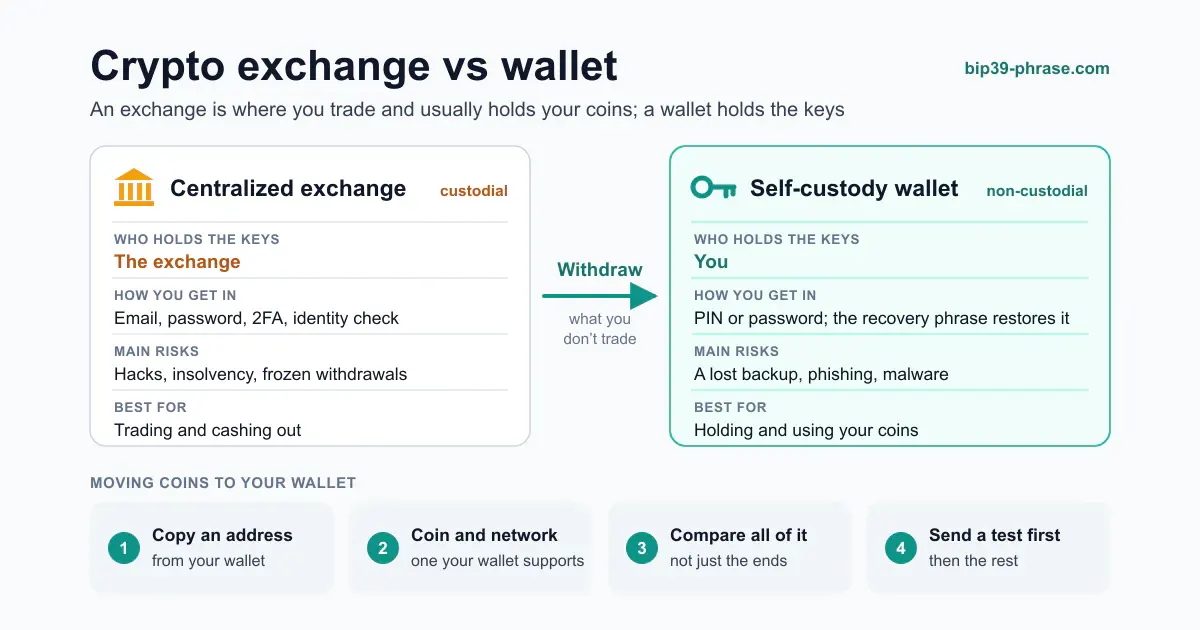
A crypto exchange is a marketplace where you buy, sell and trade coins, and a centralized exchange usually holds those coins for you in an account. A crypto wallet is the app or device that holds the private keys controlling your coins, so you can send and receive them yourself. In short, an exchange is where you trade and a wallet is where you keep. Many people use both: they buy on an exchange, then withdraw to a wallet they control.
Exchange vs Wallet at a Glance
| Feature | Centralized exchange | Self-custody wallet |
|---|---|---|
| Main job | Buy, sell and trade; convert to and from money | Hold, send and receive; connect to dApps |
| Who holds the keys | The exchange | You |
| How you get in | Email, password, 2FA and an identity check | The app’s PIN or password; the recovery phrase restores it |
| Main risks | Hacks, insolvency, frozen withdrawals | A lost backup, phishing, malware |
| Fees | Trading, deposit and withdrawal fees | Network fees, plus the price of a hardware wallet if you buy one |
| Best for | Trading and cashing out | Holding and using your coins |
What Is a Crypto Exchange?
An exchange matches buyers and sellers and keeps enough liquidity for trades to fill at once. It comes in two kinds:
- Centralized exchanges are companies. You deposit money or coins into an account, trade inside the exchange’s own books and withdraw when you are done. They verify your identity, as anti-money-laundering rules require of regulated providers (AML rules in crypto), and they hold the private keys for every customer. Traders who automate their orders connect through the exchange’s API keys.
- Decentralized exchanges (DEXs) are smart contracts. You trade straight from your own wallet, so you keep the keys, but each trade is an on-chain transaction you sign, and a malicious contract or approval can drain the tokens you expose to it. Atomic swaps apply the same idea across blockchains, and P2P trading matches buyers and sellers directly.
What Is a Crypto Wallet?
A wallet never holds coins: it holds the keys that authorize spending them, while the coins stay on the blockchain (what a crypto wallet actually stores). Wallets differ mainly in where the keys live:
- Hot wallets keep them on a phone, computer or browser that goes online. They are quick to use and suit everyday amounts.
- Cold storage, such as hardware wallets, keeps them on a device that never exposes them to the internet, which makes it the usual choice for savings (hot vs cold wallets).
- Paper wallets, a single private key printed on a sheet, are what the Bitcoin Wiki calls an obsolete and unsafe method. Spending from one means importing the key into software, and after a partial spend the rest of the balance sits at a change address in that software, not on the paper. Writing down a wallet’s recovery phrase is a different thing and remains standard practice.
The “wallet” tab inside an exchange account is not a wallet in this sense. The exchange still holds the keys, which makes it a custodial wallet.
Which Is Safer?
They fail in different ways.
- An exchange can fail you. The SEC’s investor bulletin on crypto custody warns that if a custodian is hacked, shuts down or goes bankrupt, you may lose access to your assets. FTX paused all customer withdrawals on 8 November 2022 and filed for bankruptcy on 11 November, according to the SEC’s complaint. Exchanges can also hold up a withdrawal for a compliance review or a court order.
- A wallet depends on you. No company can lose your coins or freeze your keys, but nobody can restore them for you either: a lost recovery phrase means lost funds, and a phrase typed into a phishing page means stolen ones (seed phrase scams). Hot wallets add exposure to malware, and DEX users to malicious approvals (phishing protection).
For savings, a hardware wallet with a well-stored recovery phrase removes the company risk and most of the online risk. For trading, an exchange account with strong 2FA is the practical tool; just don’t leave more there than you need.
Where Should You Keep Your Coins?
- On an exchange: only what you are about to trade or cash out. The SEC suggests checking how the exchange is regulated, whether it insures against loss or theft, whether it lends out or commingles customer assets, and what it charges to move crypto out.
- In a wallet you control: everything else. A hot wallet for spending money, cold storage for savings; how to store crypto safely turns this into a plan.
- For new networks the pattern is the same. Notcoin (NOT), for example, is bought on an exchange or a decentralized exchange and then kept in a TON wallet.
To pick the wallet itself, see the guides to hardware, software and multisig wallets.
How to Withdraw From an Exchange to Your Wallet
- Set up the wallet and back up its recovery phrase on paper or metal (how to store a seed phrase).
- Copy a receiving address from the wallet. With a hardware wallet, check it on the device’s screen.
- On the exchange, choose Withdraw, pick the coin and the network. The network must be one the wallet supports: the same token can exist on several chains, and a withdrawal on a network your wallet does not track will not show up there.
- Paste the address and compare all of it, not just the first and last characters (how Bitcoin addresses work).
- Send a small test amount first. Once it arrives, withdraw the rest. The exchange sets its own withdrawal fee, so check it before you confirm.
Best Practices for Using Both
- Keep only your trading balance on an exchange and withdraw the surplus.
- Protect the exchange account with a strong, unique password and app-based or hardware-key 2FA, and secure the email behind it.
- Back up every wallet’s recovery phrase offline and never share it: no exchange or wallet support team will ask for it.
- Use a hot wallet for daily spending and a separate cold wallet for savings.
- Review the setup once in a while: old exchange balances, unused approvals and backups you have not checked.