BIP38 Encrypted Private Keys: 6P Format and How to Decrypt
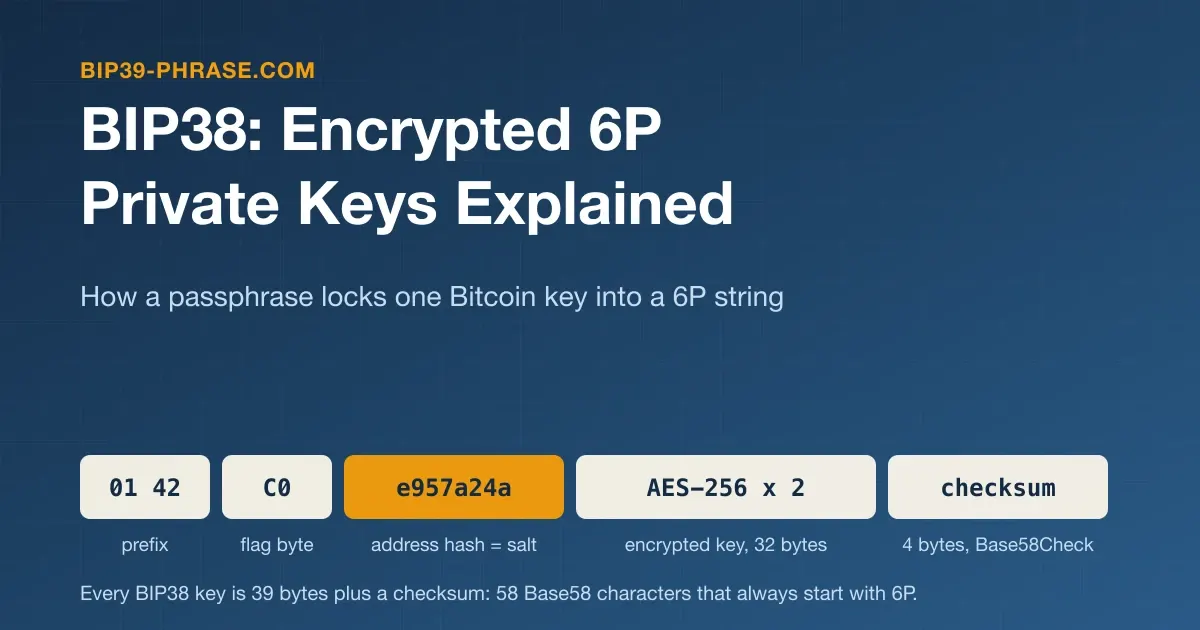
BIP38 is a standard for encrypting one Bitcoin private key with a passphrase. The result is a 58-character string that always starts with 6P and holds everything needed to rebuild the key except the passphrase, so whoever finds the paper cannot spend from it without also learning or guessing the passphrase. BIP38 was written for paper wallets and physical bitcoins, and that is where 6P keys still turn up. This guide covers how the encryption works, its two modes, the spec’s status, a decrypted test vector, wallet support and safe sweeping. It builds on the plain key format, WIF.
What a BIP38 Key Looks Like
The BIP38 specification chose the prefix on purpose: 6 marks a private key that needs something more to be usable, a neighbor of the 5 that starts an uncompressed WIF key, and P names the missing factor, a passphrase. Under the Base58Check encoding sit 39 bytes: a prefix (01 42, or 01 43 in EC-multiply mode), a flag byte, a 4-byte address hash and 32 more bytes, the encrypted key or, in EC-multiply mode, the owner’s salt (with any lot and sequence numbers) and an encrypted seed.
The third character shows the mode, ordinary or EC-multiply, and whether the public key is compressed. The spec lists the ranges for four of these prefixes; we computed the two for keys with lot and sequence numbers from the flag byte:
| Starts with | Mode | Public key | Lot and sequence numbers |
|---|---|---|---|
6PR | Ordinary | Uncompressed | — |
6PY | Ordinary | Compressed | — |
6Pf | EC-multiply | Uncompressed | No |
6Pg | EC-multiply | Uncompressed | Yes |
6Pn | EC-multiply | Compressed | No |
6Po | EC-multiply | Compressed | Yes |
The address behind a BIP38 key is always a legacy P2PKH address, the kind that starts with 1 (see Bitcoin address types). Its hash is stored unencrypted, so, as the spec notes, anyone can match a 6P string to its address with reasonable probability.
How BIP38 Encrypts a Key
The ordinary (non-EC-multiply) mode can encrypt any existing key:
addresshash = SHA256(SHA256(the key's P2PKH address as ASCII text))[0..3]
derived     = scrypt(passphrase, salt = addresshash, N = 16384, r = 8, p = 8, 64 bytes)
half1       = AES256Encrypt(privkey[0..15]  XOR derived[0..15],  aes_key = derived[32..63])
half2       = AES256Encrypt(privkey[16..31] XOR derived[16..31], aes_key = derived[32..63])
result = Base58Check(01 42 + flag + addresshash + half1 + half2)- scrypt sets the cost. Every attempt to open the key runs scrypt, which with these parameters needs 16 MiB of memory (128 × r × N bytes). The spec calls the values provisional, but Sparrow, BlueWallet and Mycelium all use them.
- No IV. Each half of the key is encrypted as a single AES block; to keep the string short, the IV-like values come from scrypt.
- Unicode is normalized. The passphrase is encoded as UTF-8 in Normalization Form C (NFC), and one official test vector checks exactly that.
- Wrong passphrases are caught. Decryption rebuilds the address and checks its hash against the stored one; a wrong passphrase passes only by a 1-in-2³² chance, about 1 in 4.3 billion.
- The output is deterministic. The salt comes from the key’s own address, so the same key, compression setting and passphrase always give the same string.
EC-Multiply Mode: Keys Made by Someone Else
The second mode lets a third party, such as a maker of physical bitcoins, create encrypted keys without learning the passphrase or the private keys. The spec calls the two sides the owner and the printer:
- The owner turns the passphrase and a random salt into a secret number with scrypt and shares only the matching elliptic curve point and the salt, as a 72-character intermediate code starting with
passphrase. - The printer multiplies that point by a factor made from 24 random bytes, which gives the public key and the address. The private key is the product of both factors, and the printer has only one.
- The printer encrypts its random bytes with AES-256, keyed by a much lighter scrypt run over the owner’s point (N = 1024, r = 1, p = 1), and returns a 6P key that only the passphrase opens.
Intermediate codes can carry a lot number (0 to 1,048,575) and a sequence number (0 to 4,095) that every resulting key repeats, a guard against mix-ups or tricks by the printer. This mode cannot encrypt a key you already have.
The printer may also return a 75-character confirmation code starting with cfrm38. As the libbitcoin developers’ analysis points out, it proves that the printer cannot spend from the address, not that you can: a dishonest printer could pair a valid code with an unrelated encrypted key. The real check is to decrypt the 6P key with your passphrase on a trusted device and compare the address. The printer also knows every address it made.
The Spec’s Status: Deployed but Discouraged
BIP38, by Mike Caldwell and Aaron Voisine (also a co-author of BIP39), was assigned its number on November 20, 2012. Its status long read Draft, with a note that it never had a public discussion because its announcement missed the mailing list. In May 2026 it moved to Deployed, which under BIP3 means it is in active use and considered final: beyond bug fixes and minor or editorial edits it should not change, because changes could hurt users of software that already supports it. That is a record of use, not an endorsement.
The preamble still reads “Unanimously Discourage for implementation”, a summary from a comment system that BIP3 has abolished. On the comment page, Luke Dashjr (2016) wrote that it was designed for single-key paper wallets, which are not a good idea in general. Eric Voskuil (2017) called the confirmation code scenario flawed but said the other scenarios appear secure, and Greg Maxwell (2017) advised against implementing BIP38, citing its missed public review and the security and usability problems of single-key paper wallets.
Decrypting an Official Test Vector in Node.js
The spec’s test vectors are public, passphrases included, so never send coins to them. This script, an ES module tested in Node.js with @noble/hashes 1.8, @noble/ciphers 2.1, @noble/curves 1.9 and @scure/base 1.2, decrypts the first vector in its uncompressed and compressed forms, then tries a wrong passphrase:
import { scrypt } from '@noble/hashes/scrypt.js';
import { sha256 } from '@noble/hashes/sha2.js';
import { ripemd160 } from '@noble/hashes/legacy.js';
import { ecb } from '@noble/ciphers/aes.js';
import { secp256k1 } from '@noble/curves/secp256k1.js';
import { createBase58check, hex } from '@scure/base';

const b58 = createBase58check(sha256);
const utf8 = (s) => new TextEncoder().encode(s);
const xor = (a, b) => a.map((v, i) => v ^ b[i]);

function bip38Decrypt(encrypted, passphrase) {
  const raw = b58.decode(encrypted); // 01 42, flag, address hash, 32 encrypted bytes
  if (raw[1] !== 0x42) throw new Error('EC-multiply keys are not handled here');
  const compressed = (raw[2] & 0x20) !== 0;
  const salt = raw.slice(3, 7);
  const dk = scrypt(utf8(passphrase.normalize('NFC')), salt, { N: 16384, r: 8, p: 8, dkLen: 64 });
  const aes = ecb(dk.slice(32), { disablePadding: true });
  const key = Uint8Array.from([
    ...xor(aes.decrypt(raw.slice(7, 23)), dk.slice(0, 16)),
    ...xor(aes.decrypt(raw.slice(23, 39)), dk.slice(16, 32)),
  ]);
  const pub = secp256k1.getPublicKey(key, compressed);
  const address = b58.encode(Uint8Array.of(0, ...ripemd160(sha256(pub))));
  if (hex.encode(sha256(sha256(utf8(address))).slice(0, 4)) !== hex.encode(salt)) return 'wrong passphrase';
  return { wif: b58.encode(Uint8Array.of(0x80, ...key, ...(compressed ? [1] : []))), address };
}

console.log(bip38Decrypt('6PRVWUbkzzsbcVac2qwfssoUJAN1Xhrg6bNk8J7Nzm5H7kxEbn2Nh2ZoGg', 'TestingOneTwoThree'));
console.log(bip38Decrypt('6PYNKZ1EAgYgmQfmNVamxyXVWHzK5s6DGhwP4J5o44cvXdoY7sRzhtpUeo', 'TestingOneTwoThree'));
console.log(bip38Decrypt('6PRVWUbkzzsbcVac2qwfssoUJAN1Xhrg6bNk8J7Nzm5H7kxEbn2Nh2ZoGg', 'testingonetwothree'));
{
wif: '5KN7MzqK5wt2TP1fQCYyHBtDrXdJuXbUzm4A9rKAteGu3Qi5CVR',
address: '1Jq6MksXQVWzrznvZzxkV6oY57oWXD9TXB'
}
{
wif: 'L44B5gGEpqEDRS9vVPz7QT35jcBG2r3CZwSwQ4fCewXAhAhqGVpP',
address: '164MQi977u9GUteHr4EPH27VkkdxmfCvGW'
}
wrong passphraseBoth WIF keys match the spec; one key gives two 6P strings because the compression flag changes the address and so the salt. We also decrypted all nine official vectors, EC-multiply and Unicode ones included, and re-encrypting the test key reproduced the published string. The private key generator shows how one random key, in hex, maps to four Bitcoin address types; treat its keys as test keys.
Where You Meet 6P Keys Today
On old paper wallets. The bitaddress.org generator, for example, offers a “BIP38 Encrypt?” option on its paper wallet tab; its last release, 3.3.0, dates from December 2016.
Wallets That Accept 6P Keys
Based on each wallet’s source code and release notes as of October 2026:
| Wallet | 6P keys | Where |
|---|---|---|
| Sparrow 2.5 (desktop) | Yes, sweep | Tools → Sweep Private Key takes a WIF or BIP38 key and asks for the passphrase |
| BlueWallet 8 (mobile) | Yes, import | Import wallet asks for the password of a 6P key and imports it as a single-key wallet |
| Mycelium 3.22 (Android) | Yes | A scanned or pasted 6P key, for example under Cold Storage spending, opens a BIP38 password prompt |
| Electrum 4.8 | No | Sweeps unencrypted keys such as WIF; decrypt first |
Sparrow has swept BIP38 keys since version 1.6.6 (2022), and version 2.5.4 (August 2026) added an address hash check. Its sweep needs a server, so the menu item is disabled offline. BlueWallet’s import code and Mycelium’s scan and paste handler decrypt both modes on the device. Electrum’s request for BIP38 import has been open since 2018.
How to Sweep an Old BIP38 Paper Wallet
Sweeping moves the whole balance, in one transaction, to a wallet backed up by its own seed phrase. Importing would leave the coins on the old key, and a later partial spend could send change where the paper does not reach (paper wallet drawbacks).
- Check the balance of the printed address in a block explorer or a watch-only wallet; this needs no secret.
- Prepare the new wallet, ideally on a hardware wallet, with its seed phrase written down.
- Decrypt offline. On a computer with networking turned off, use open-source software you have checked. One option is the bitaddress.org page: download
bitaddress.org.htmlfrom its GitHub repository, check that its SHA-256 hash matches the v3.3.0 entry in the project’s PGP-signedCHANGELOG.txt.asc, and open it from disk. On Wallet Details, enter the 6P key, click View Details, type the passphrase and click Decrypt BIP38. The page then shows two address and key pairs: Bitcoin Address with Private Key WIF (starting with 5), and Bitcoin Address Compressed with Private Key WIF Compressed (starting with K or L). Use the pair whose address matches the paper. Never use the live site or any online page. - Sweep that WIF key by typing it or scanning its QR code on the online computer, never by messenger. In Electrum, choose Wallet → Private keys → Sweep; it reads a plain WIF key as legacy P2PKH, the type BIP38 uses. In Sparrow, choose Tools → Sweep Private Key with the script type Legacy (P2PKH). Both pay to the open wallet, which can be a hardware wallet’s account.
- Retire the paper. The key has now been on an online device: never send coins to its address again, and void or destroy the paper.
Decrypting offline keeps the passphrase off networked devices, which matters if it guards other paper wallets too, as EC-multiply mode allows by design. If it guards nothing else, Sparrow, BlueWallet or Mycelium can take the 6P key and passphrase directly.
Risks of a BIP38 Paper Wallet
- A weak passphrase. Anyone who sees the 6P string can test guesses offline. Each guess costs one scrypt run, just under 0.2 seconds in our Node.js test on an Apple M4 Pro, but attackers run many guesses in parallel, so a short or common passphrase can still fall.
- A lost passphrase. There is no reset and no backdoor; see the FAQ below.
- Damaged paper. The checksum detects a misread character but cannot repair it. The spec’s own example is carrying an encrypted key while leaving a copy at home; with a strong passphrase, a spare 6P copy is far less risky to keep than a spare plain key.
- A tampered generator. Encryption cannot help if someone knew the key from the start, as with the compromised paper wallet site found in 2019.
BIP38 vs BIP39 Passphrase vs Wallet File Encryption
| BIP38 | BIP39 passphrase | Wallet file encryption | |
|---|---|---|---|
| Protects | One private key | Every key derived from one seed phrase | The keys stored in one wallet file |
| What you keep | A 6P string, usually on paper | The words plus the passphrase | The file plus its password |
| Key stretching | scrypt, N = 16384, r = 8, p = 8 | PBKDF2-HMAC-SHA512, 2048 rounds | Bitcoin Core: SHA-512 rounds tuned to about 0.1 s; Ethereum keystore: scrypt or PBKDF2 |
| Encryption | AES-256 | None: the passphrase changes the seed | Bitcoin Core: AES-256-CBC; Ethereum keystore: AES-128-CTR |
| Wrong password | Rejected by the address hash | Opens a different, empty wallet | Rejected |
| Unicode form | NFC | NFKD | — |
A BIP39 passphrase is the modern counterpart, adding something you know to a whole wallet rather than one key; see how the BIP39 passphrase works, and JSON wallets explained for keystore files.
Why Seed Phrases and Hardware Wallets Replaced BIP38
- One backup per key. A 6P string covers one key, while a seed phrase covers every key an HD wallet will ever derive (seed phrase vs private key).
- Spending exposes the key. To spend from paper, the key has to be typed into wallet software, usually on an online device; a hardware wallet signs inside the device, and its keys never leave it.
- Legacy addresses only. The format records a P2PKH address and cannot describe the SegWit or Taproot addresses that came later.
Frequently Asked Questions
What is a 6P private key?
A Bitcoin private key encrypted with BIP38. Without the passphrase it cannot be spent, but anyone who sees the string can try to guess a weak passphrase offline. Sparrow, BlueWallet and Mycelium ask for the passphrase when you enter one.
I forgot the BIP38 passphrase. Can I recover the key?
Only by finding the passphrase. If you remember most of it, the open-source BTCRecover tool can test a list of candidates with its --bip38-enc-privkey option; its documentation warns that scrypt makes this very slow. Run it offline, and never hand the 6P string to a recovery service: whoever finds the passphrase can spend the coins.
Is a BIP38 passphrase the same as a BIP39 passphrase?
No. BIP38 encrypts a single private key and rejects a wrong passphrase. A BIP39 passphrase changes the seed of a whole wallet, and a wrong one quietly opens another, empty wallet.
Can I turn a BIP38 key into a seed phrase?
No. A seed phrase generates new keys and cannot reproduce one that already exists. Sweep the coins to a wallet with its own seed phrase instead.