OpenAI API Key Format: sk-proj, sk-svcacct and sk-admin
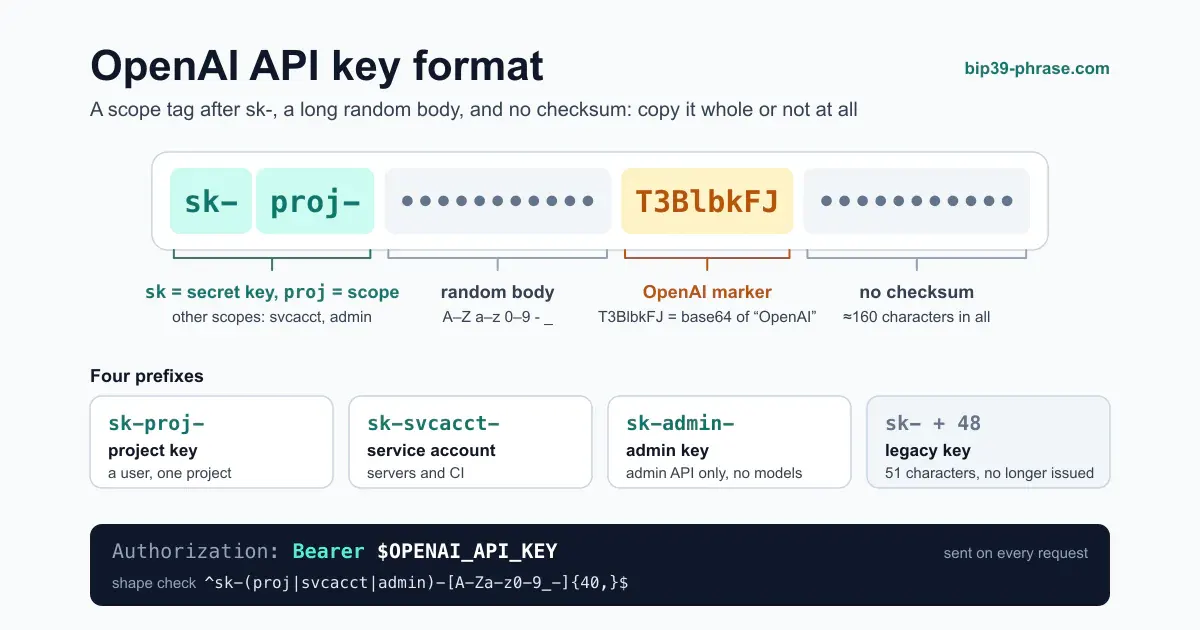
An OpenAI API key is a secret string that starts with sk- and, on current keys, a scope tag: sk-proj- for a project key, sk-svcacct- for a service account and sk-admin- for an admin key. It is sent as a bearer token in the Authorization header of every request, as OpenAI’s API reference describes, and anyone who holds it can run up your bill. In that sense it fails exactly like a wallet mnemonic: a long, high-entropy bearer credential that grants everything the moment it leaks and still gets pasted into config files as if it were an ordinary string. This guide breaks down every key type, including the legacy bare sk- key, and how to generate, validate and store one with the discipline you already apply to a seed phrase. It is the companion piece to our breakdown of the Anthropic API key format.
The Four Prefixes at a Glance
| Prefix | Key type | Belongs to | Use it for |
|---|---|---|---|
sk-proj- | Project key | A user, within one project | Development and personal scripts in that project |
sk-svcacct- | Service account key | A machine identity in a project | Production servers and CI; survives staff changes |
sk-admin- | Admin key | The organization | Organization management API only; can’t call models |
sk- + 48 characters | Legacy user key | A personal account | Nothing new: these 51-character keys are no longer issued |
If a tutorial tells you an OpenAI key “looks like sk- plus 48 characters”, the tutorial describes the legacy format. Current keys are much longer and carry a scope tag after sk-; the open-source scanner TruffleHog, for example, recognizes project keys and service account keys by those tags (it also matches a sk-service- variant for service accounts).
Admin keys deliberately can’t do model work: OpenAI’s Admin API guide states that they cannot be used for non-administration endpoints. That separation of duties means the key that can create projects and manage users never travels with your application traffic.
Anatomy of a Key
A modern project key looks like this:
sk-proj-AAAAAAAAAAAAAAAAAAAA...T3BlbkFJ...BBBBBBBBBBBBBBBBBBBBRead left to right:
sk— “secret key”, the industry convention that also opens Anthropic and Stripe secrets. It marks the string as a private credential, never a publishable identifier.proj/svcacct/admin— the scope: which kind of principal the key authenticates as.- The body — random
base64url-style characters (A–Z a–z 0–9 - _). Project keys are typically around 160 characters long in total.
One charming fossil survives inside the randomness: most OpenAI keys embed the marker T3BlbkFJ somewhere in the body, which is simply OpenAI encoded in base64. Secret scanners key on that substring (TruffleHog’s detector uses it as its search keyword), and it is the fastest way to recognize an OpenAI credential in a leaked log file. Admin keys are the exception that TruffleHog notes: they don’t match that pattern.
As with an Anthropic key, and unlike a BIP39 mnemonic, whose final word encodes a checksum, there is no checksum. Truncate the key while copying and nothing warns you; you simply get a 401 at request time, with no hint whether the key was mistyped, revoked or never real. Copy it whole, or not at all.
How to Generate One
To create a project key:
- Sign in to the OpenAI platform at
platform.openai.com. - Pick the project the key should belong to; separate projects for staging and production are a good habit.
- Open the API keys page and create a new secret key.
- Give it a descriptive name (
prod-backend,ci-tests), choose whether it belongs to you or to a service account, and restrict its permissions if the application only needs part of the API. - Set an expiration date: OpenAI’s production best practices strongly recommend one for project keys, and administrators can enforce a maximum key lifetime.
- Copy the key immediately. The full value is shown exactly once; after you close the dialog, only a masked preview remains.
That “shown once” behaviour is the single most important parallel to crypto key management: the moment of creation is the only moment you can back it up safely. Treat the copy step like writing down a 24-word phrase.
Admin keys are created on a separate admin keys page in the organization settings, so that day-to-day project work never touches them.
Validating a Key Locally
Two cheap checks before anything ships:
1. Shape check with a regex. Confirm that the string at least looks like an OpenAI key before sending it anywhere:
^sk-(proj|svcacct|admin)-[A-Za-z0-9_-]{40,}$(or ^sk-[A-Za-z0-9]{48}$ for a legacy key).
2. Live check with the cheapest authenticated call. Listing models costs nothing and confirms the key is alive:
curl https://api.openai.com/v1/models \
  -H "Authorization: Bearer $OPENAI_API_KEY"
A 200 with a JSON list means the key is valid. OpenAI’s error code guide lists what a failure means: a 401 with “Incorrect API key provided” or “Invalid Authentication” means the key or organization is wrong, a 401 with “IP not authorized” means your project’s IP allowlist blocks the request, and a 429 with the code credit_balance_exhausted (its type can still read insufficient_quota) means the key is fine but the organization has run out of prepaid credit.
Note the header: OpenAI wants Authorization: Bearer, while Anthropic’s classic examples use x-api-key. Swapping the two is one of the most common “the key is definitely correct but nothing works” mistakes when a codebase talks to both providers. If you belong to several organizations or still use a legacy user key, add the OpenAI-Organization and OpenAI-Project headers to say which one the request is billed to.
Treat the Key Like a Seed Phrase
The mental model that keeps a BIP39 mnemonic safe is the same one that keeps an API key safe: a high-value bearer secret that does its damage the moment it leaks. If you have read our breakdown of what happens when a seed phrase is compromised, the failure modes below will look familiar.
- Never commit it to source control. A hard-coded key pushed to a public repository is scraped within minutes. OpenAI API keys are among GitHub’s secret scanning partner patterns: when one appears in a public repository, GitHub alerts OpenAI, which can then revoke the key. Helpful, but by then bots may already have copied the string.
- Keep it out of client code. OpenAI’s reference warns against exposing a key in browsers or apps; load it from an environment variable or a key management service on the server. Vault, AWS Secrets Manager, Doppler or an OS keychain all beat plaintext in a config file.
- Scope keys per environment and per service. One project key for production, another for staging, a service account key for each deployed system. A leak then burns one environment, not the whole organization, the same logic as separating hot and cold wallets. The same pattern applies to exchange API keys, and to the RPC and deployer keys of a project that deploys EVM smart contracts.
- Set limits and watch the dashboard. Per-project rate and spend limits, and a hard organization spend limit, turn a leak from an unbounded bill into a capped one, and an unexpected spike is your earliest warning, exactly like an unexpected outgoing transaction from a wallet.
- Rotate on any suspicion. OpenAI’s reference says revocations take effect within a few seconds, and a replacement key breaks nothing that reads its key from the environment. Create the new key, deploy it, then revoke the old one.
OpenAI vs Anthropic Keys
| OpenAI | Anthropic | |
|---|---|---|
| Prefix | sk-proj-, sk-svcacct-, sk-admin-, legacy sk- | sk-ant-, classically sk-ant-api03- |
| Header | Authorization: Bearer | Authorization: Bearer or x-api-key |
| Machine identity | Service account keys | Service account keys |
| Admin keys | sk-admin-, administration endpoints only | sk-ant-admin01-, organization management |
More code and key-handling guides are collected in our developer guides.
OpenAI API Key Frequently Asked Questions
Q1: What does the sk-proj- prefix mean?
sk marks the string as a secret key, and proj says it is scoped to a single project inside your organization. Project keys replaced the old account-wide sk- user keys, so a leaked key exposes one project rather than everything you own.
Q2: What is the difference between sk-proj, sk-svcacct and sk-admin?
sk-proj keys belong to a human user within a project. sk-svcacct keys belong to a service account, a machine identity that survives staff changes, which suits servers and CI. sk-admin keys drive the organization-management API only and can’t call models at all. For production model traffic, a service account key is usually the right choice.
Q3: How long is an OpenAI API key, and does it have a checksum?
A modern project key is typically around 160 characters and usually contains the T3BlbkFJ marker (base64 for “OpenAI”). Legacy keys were 51 characters. Neither format has a checksum: a single mistyped character just produces a 401, so always copy the key whole.
Q4: I lost my key. Can I recover it?
No. The full value is shown only once, at creation; afterwards only a masked preview exists. Revoke the lost key on the API keys page and create a new one.
Q5: My key returns a 401 error. What should I check?
In order: confirm you copied the whole string with no stray whitespace; make sure you send it as Authorization: Bearer …, not in an x-api-key header; check that the key hasn’t been revoked, expired or blocked by an IP allowlist; verify that you are calling with the right organization and project; and if in doubt, rotate and retry with a fresh key.