What Is a Seed Phrase? How a Recovery Phrase Works
Читать по-русски: Сид-фраза (seed, мнемоническая фраза): что это и как работает
A seed phrase, also known as a recovery phrase or mnemonic phrase, is a list of 12 to 24 words that stores the random secret your crypto wallet is built from. In wallets that follow the BIP39 standard, as most do, every private key and address is derived from those words, so anyone who has them (plus the passphrase, if you set one) can recreate the wallet on another device and spend its funds. Think of it as the master key to your cryptocurrency vault: not a password for the wallet, but the wallet itself.
- Length: 12, 15, 18, 21 or 24 words, almost always from the English BIP39 list of 2,048 words.
- What it restores: every account, coin and address of the wallet, in any compatible app or hardware wallet.
- What it is not: a password. You cannot change or reset it; a new phrase means a new wallet.
- Who can use it: anyone who sees it, which is why no wallet, exchange or support agent ever asks for it.
- Where to keep it: offline, on paper or metal, in more than one secure place.
How Does a Seed Phrase Work?
BIP39 turns randomness into words, and words into keys, in five steps:
- Entropy. The wallet generates 128 to 256 bits of random data, called entropy.
- Checksum. It appends a checksum: the first bits of the entropy’s SHA-256 hash, one bit for every 32 bits of entropy.
- Words. The result is split into 11-bit groups. Each group is a number from 0 to 2047 that picks one word from the fixed BIP39 list of 2,048 words, from “abandon” (0) to “zoo” (2047).
- Seed. To use the phrase, the wallet runs it through PBKDF2-HMAC-SHA512 with 2,048 rounds, using the words as the password and “mnemonic” plus your optional passphrase as the salt. The output is a 512-bit seed.
- Keys. The seed goes into BIP32, which derives a master key and from it a whole tree of private keys. BIP44 fixes the layout of that tree (m / purpose’ / coin_type’ / account’ / change / address_index), so another compatible wallet finds the same accounts and addresses.
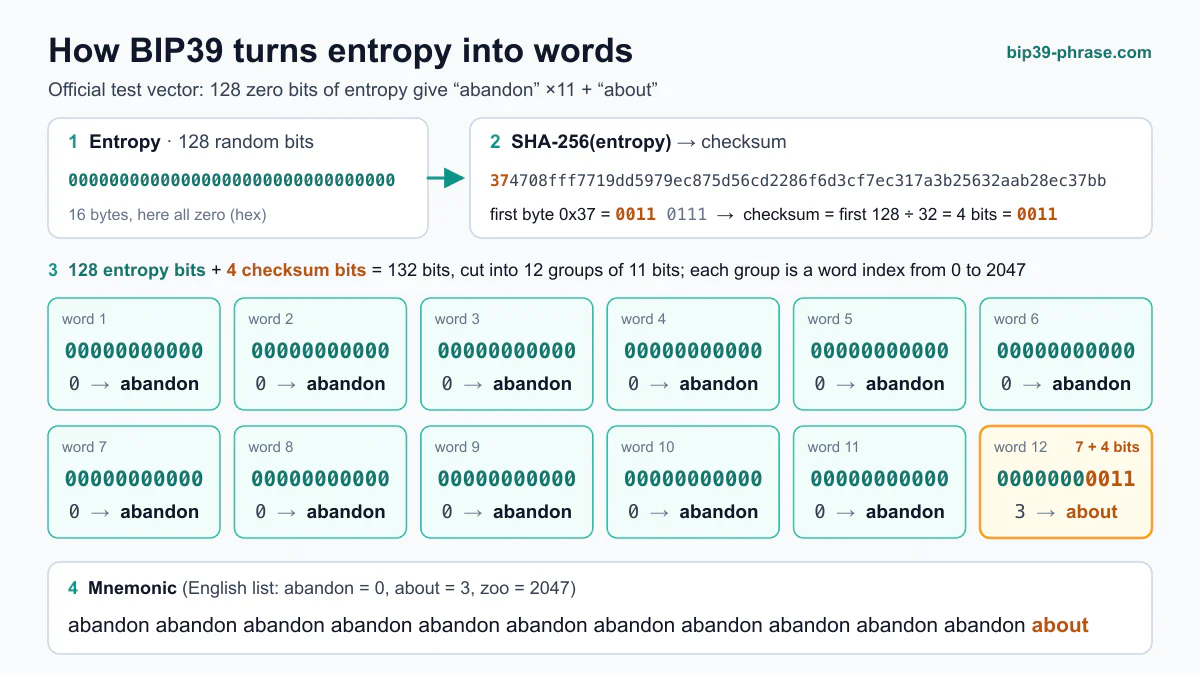
Steps 1 to 3 are easier to follow on a live example: our visualizer shows how BIP39 turns entropy into words, one 11-bit group at a time.
The number of words follows from the amount of entropy:
| Words | Entropy | Checksum |
|---|---|---|
| 12 | 128 bits | 4 bits |
| 15 | 160 bits | 5 bits |
| 18 | 192 bits | 6 bits |
| 21 | 224 bits | 7 bits |
| 24 | 256 bits | 8 bits |
Three practical consequences follow:
- The checksum catches most typos. A wallet will usually reject a mistyped phrase, and words you choose yourself usually fail the check, and are far weaker than random ones even when they pass.
- A passphrase creates a separate wallet. BIP39 turns every passphrase into a valid seed, so a mistyped passphrase opens a different, empty wallet instead of showing an error.
- Stick to the English list. BIP39 has official lists in other languages but strongly discourages them, since most wallets support only English. The seed is also computed from the words themselves, so the same entropy written in another language’s words gives a different wallet.
With 128 bits of entropy or more, guessing a seed phrase by brute force is out of reach; real losses come from weak random number generators and careless handling.
What Happens If You Lose the Phrase?
If the wallet still opens on your phone, computer or hardware device, nothing is lost yet: if the app can show the phrase again, write it down now, or move the funds to a new wallet and back up its phrase. Once that device is lost, broken or reset, the phrase is the only way to regenerate the private keys associated with your cryptocurrency addresses. Without it the coins stay on the blockchain where nobody can move them, and the developers of a non-custodial wallet keep no copy they could send you. The opposite risk is as serious: if someone else gets hold of your seed phrase, they gain full control over your funds. If you think a lost phrase or an old wallet file may still exist somewhere, where to look for lost wallet backups lists the places to search.
How Does Restoring a Wallet Work?
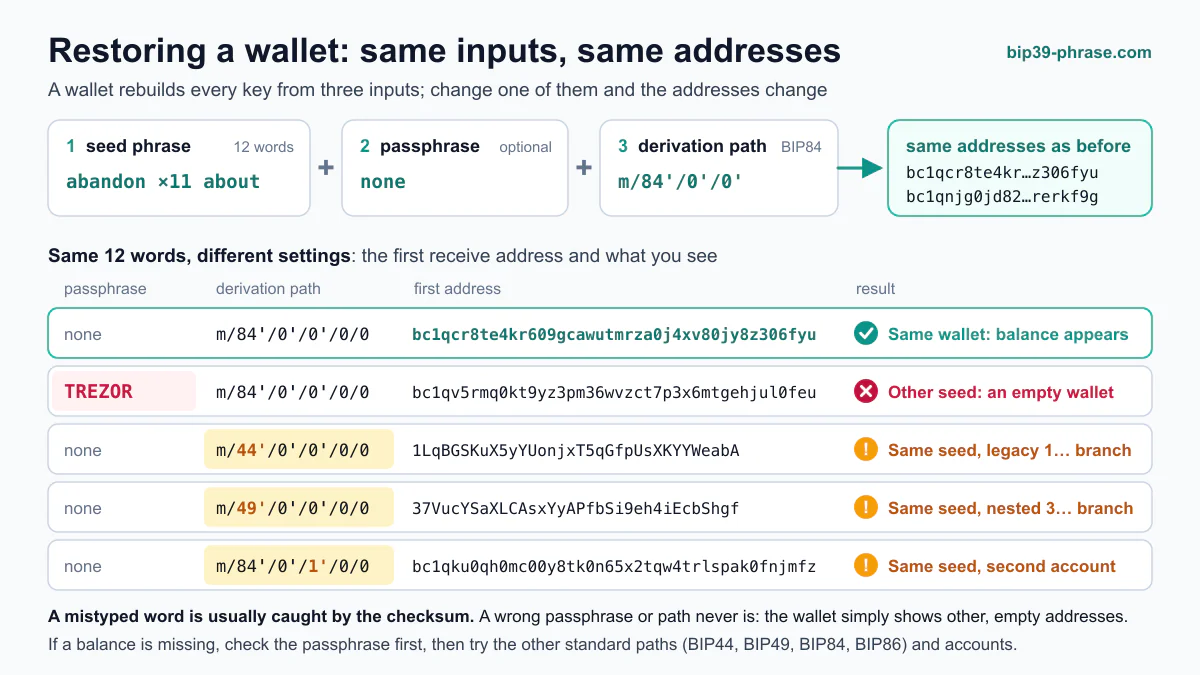
Because the phrase alone determines the keys, restoring works the same way in almost every BIP39 wallet:
- Open a wallet you trust. Install the app from the developer’s official site or app store, or start the setup of your hardware wallet, and choose to restore (or import) an existing wallet rather than create a new one.
- Enter the words in their original order. Type them in lowercase, exactly as written. The wallet checks each word against the list and verifies the checksum, which catches most typos and swapped words.
- Add your passphrase, if you used one. It must match exactly, capital letters included: a different passphrase opens a different, empty wallet.
- Check that your funds appear. The wallet rebuilds your accounts and scans their addresses; under BIP44 it stops looking after 20 unused addresses in a row. If a balance is missing, check which derivation path or address type the original wallet used, such as BIP44 (legacy), BIP49 or BIP84 (SegWit) or BIP86 (Taproot).
Type the phrase only into the wallet you are restoring, never into a website, a form or a chat with “support”: anyone who sees the words can take the funds. Some coins, such as Monero and TON, use their own phrase formats (see below), so restore those in a wallet made for that coin. If the wallet rejects your phrase, our guide on how to fix seed phrase errors explains how to find a misspelled, missing or misplaced word. For the exact steps in MetaMask, Trust Wallet, Ledger, Trezor, Electrum and other wallets, see our step-by-step guide to restoring a wallet from a seed phrase.
Where Should You Keep the Words?
Keep the phrase offline, on paper or stamped into metal, in more than one secure place, and never as a photo, screenshot or cloud note. Our guide on how to store a seed phrase compares paper, metal and hardware-wallet backups and lists the mistakes to avoid.
What Does a Seed Phrase Look Like?
Here are two official BIP39 test vectors, which show what a valid recovery phrase looks like. They are public: never use them for real funds.
-
Example 1: “ozone drill grab fiber curtain grace pudding thank cruise elder eight picnic”
-
Example 2: “legal winner thank year wave sausage worth useful legal winner thank yellow”
Words like “bitcoin” or “password” are not on the BIP39 list, so phrases built from them are not valid. More examples: mnemonic words examples.
Do All Coins Use the Same Format?
Most do. Bitcoin, Ethereum, Litecoin and most other coins use the same BIP39 words, so one phrase can hold all of them, each on its own derivation path. A few networks treat the words differently, and seed phrase formats by network covers them in detail:
-
Cardano (ADA): Wallets use 15- or 24-word phrases from the BIP39 English list, but derive keys their own way, so restore the phrase in a wallet that supports Cardano.
-
Monero (XMR): Uses 25 words from Monero’s own list of 1,626, so it is not a BIP39 phrase. See Monero’s seed phrase and private key format.
-
TON (Gram, formerly Toncoin): After a community vote the coin was renamed Gram (GRAM) on June 15, 2026, while the network, balances and addresses stayed the same (TON), so existing phrases need no change. The classic TON phrase has 24 words from the BIP39 list but derives its key in TON’s own way; TON’s documentation now recommends a 12-word BIP39 phrase for new wallets. See the TON seed phrase format. TON tokens such as Notcoin (NOT) are held by the same wallet and come back when you restore it.
How to Protect the Phrase From Theft and Loss
-
Avoid Cloud Storage: Never store your seed phrase on cloud services like Google Drive or Dropbox.
-
Regular Checks: Periodically check the physical condition of your stored seed phrase to ensure it’s not deteriorating.
-
Do Not Rely on an Encrypted File: An encrypted copy is only as safe as its password and the computer you decrypt it on, so it moves the risk rather than removing it; see how to store a seed phrase. If you still keep one, seed phrase encryption with AES, XOR and steganography compares the options and their weak points.
-
Backup Copies: Maintain multiple copies of your seed phrase stored in different secure locations to prevent loss due to unforeseen events.
Frequently Asked Questions
Can I change my seed phrase?
Not for the same wallet: the phrase is the wallet, so new words mean a new wallet. If you think your phrase may be exposed, create a new wallet, which comes with a new phrase, and send the funds to it. A new PIN or app password does not help, because the old phrase still controls the funds.
Is a seed phrase case sensitive?
The words are not: the BIP39 list is all lowercase, and most wallets convert what you type to lowercase. The optional passphrase is case sensitive, so “Secret” and “secret” open two different wallets. See whether a seed phrase is case sensitive.
Does an exchange account have a seed phrase?
No. On an exchange the company holds the keys, so you sign in with a password and recover the account through the exchange’s support. A seed phrase comes with a wallet in which you hold the keys yourself; custodial vs non-custodial wallets explains the difference.