Seed Phrase to Private Key: BIP39 Mnemonic Code Converter
Turn a BIP39 seed phrase into its entropy, seed, root key, private keys and addresses, the way wallets derive them. Paste a test phrase in any of the 10 wordlists or generate one; everything runs in your browser.
Updated
Эта страница по-русски: Конвертер сид-фразы в приватный ключ
What the mnemonic code converter shows
A mnemonic code converter takes a BIP39 phrase and shows every value a wallet derives from it, layer by layer. The name comes from Ian Coleman's open-source BIP39 tool, whose page is titled Mnemonic Code Converter. This converter is a separate implementation of the same standards, so a test phrase gives the same seed, keys and addresses on the standard paths. Looking for the difference between a seed phrase and a private key rather than a tool? Read seed phrase vs private key.
- Mnemonic. Paste a test phrase of 12 to 24 words in any of the 10 BIP39 wordlists, which the converter detects, or press Random test phrase to generate one in the length and wordlist you pick.
- Entropy details. The random number the words encode, in hex, the checksum bits at the end of the last word, and each word's index (0 to 2047) and 11 bits. You can also type entropy in hex and turn it into a phrase.
- BIP39 passphrase. Optional extra text that changes the seed and opens a different wallet; see how the BIP39 passphrase works.
- BIP39 seed and BIP32 root key. The 512-bit seed and the master extended private key (
xprv…) calculated from it. - Coin and derivation path. 205 networks, with tabs for BIP44, BIP49, BIP84, BIP86, BIP141 and custom BIP32 paths, plus presets for common wallets.
- Account keys and derived addresses. The account xprv and xpub, then a table of addresses with their public and private keys. Pick up to 1,000 rows from any start index, switch to hardened addresses, and export the table as CSV.
How a seed phrase becomes private keys
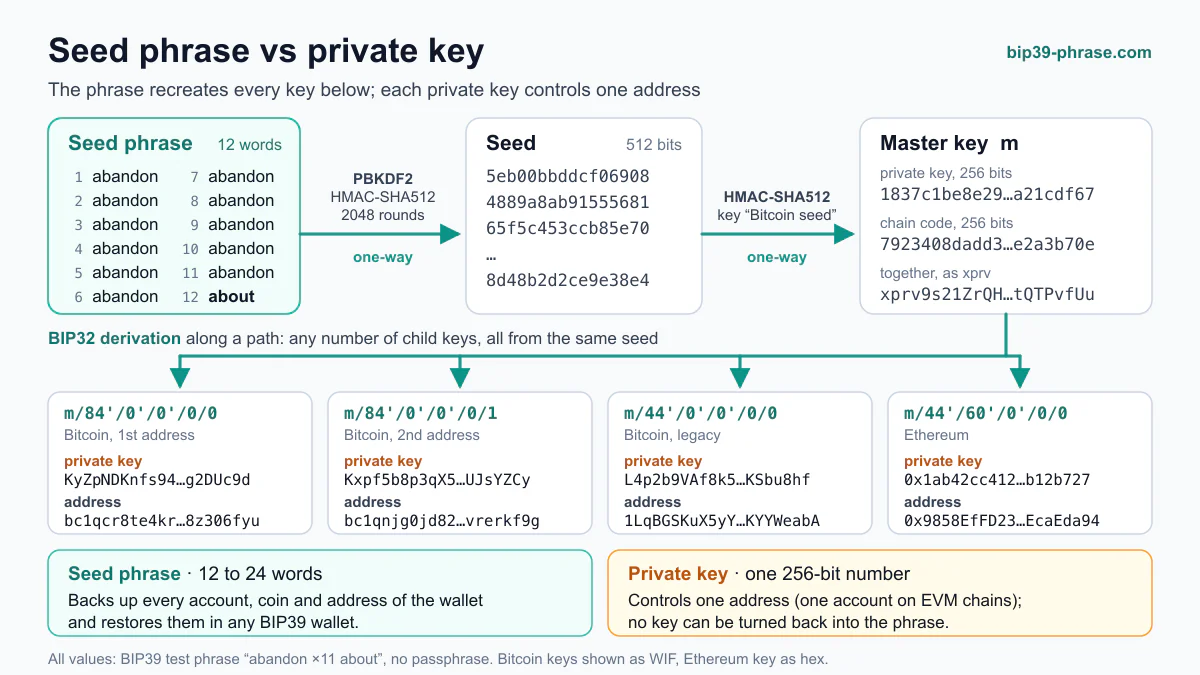
The converter follows the same standards as wallets, so the keys it shows are the ones a wallet derives from the same phrase:
- Seed. The words and the optional passphrase go through PBKDF2-HMAC-SHA512 with 2048 iterations (BIP39). The result is a 512-bit seed, shown in hex in the BIP39 Seed field.
- Master key. BIP32 turns the seed into a master private key and chain code, shown as the root key (
xprv…). - Child keys. Each step of the derivation path derives the next key. Steps marked with an apostrophe are hardened: their keys cannot be derived from a parent public key. The account key is also shown as an extended key pair; its public half is explained in our guide to xpub, ypub and zpub.
- Addresses. Each final key is encoded in the coin's format: Base58 with a version byte for legacy addresses, Bech32 for native SegWit, Keccak-256 for Ethereum and other EVM networks.
Derivation paths and address types
The tabs above the results select the standard. For the public BIP39 test phrase abandon abandon … about with an empty passphrase, the first addresses are:
| Path | Standard | Address type | First address |
|---|---|---|---|
| m/44'/0'/0'/0/0 | BIP44 | Legacy (1…) | 1LqBGSKuX5yYUonjxT5qGfpUsXKYYWeabA |
| m/49'/0'/0'/0/0 | BIP49 | Nested SegWit (3…) | 37VucYSaXLCAsxYyAPfbSi9eh4iEcbShgf |
| m/84'/0'/0'/0/0 | BIP84 | Native SegWit (bc1q…) | bc1qcr8te4kr609gcawutmrza0j4xv80jy8z306fyu |
| m/86'/0'/0'/0/0 | BIP86 | Taproot (bc1p…) | bc1p5cyxnuxmeuwuvkwfem96lqzszd02n6xdcjrs20cac6yqjjwudpxqkedrcr |
| m/44'/60'/0'/0/0 | BIP44 | Ethereum (0x…) | 0x9858EfFD232B4033E47d90003D41EC34EcaEda94 |
| m/44'/195'/0'/0/0 | BIP44 | TRON (T…) | TUEZSdKsoDHQMeZwihtdoBiN46zxhGWYdH |
Paths follow the pattern m / purpose' / coin type' / account' / change / index (see our derivation path guide for each level). Change is 0 for receiving addresses and 1 for change addresses; index counts addresses within the account. The quick presets above the coin list set the coin and the standard in one click for the most common wallets: Bitcoin native SegWit, Taproot and legacy, Ethereum, TRON, Litecoin and Dogecoin.
Why a wallet shows different addresses
- Another standard. The same phrase gives different addresses under BIP44, BIP49 and BIP84. Check which one your wallet uses and pick the same tab.
- A passphrase. Any passphrase, even a single space, produces a completely different seed and therefore a different wallet.
- Another account or coin type. Account 1 instead of 0, or coin type 60 (Ethereum) instead of 0 (Bitcoin), moves you to a different branch of the key tree.
Frequently asked questions
Which phrase lengths are supported?
Any valid BIP39 phrase of 12, 15, 18, 21 or 24 words. The checksum in the last word is verified, so a typo is reported instead of silently producing the wrong keys.
Which coins can I convert?
The list covers 205 networks with their own version bytes and address formats: Bitcoin, Litecoin, Dogecoin, Bitcoin Cash, Ethereum and other EVM chains, many smaller coins and their testnets.
What is the difference between WIF and hex private keys?
Both encode the same 32-byte key. WIF adds a network prefix, a compression flag and a checksum and is written in Base58 (on Bitcoin mainnet it starts with K, L or 5); hex is the raw key that Ethereum wallets import.
Which wordlists does it accept?
All ten official BIP39 lists: English, Japanese, Korean, Spanish, Chinese (Simplified and Traditional), French, Italian, Czech and Portuguese. Some phrases use the same words but follow other rules and do not validate here: Electrum seeds, SLIP-39 shares and 24-word TON phrases.
Can I use a mnemonic code converter offline?
Yes. This converter runs entirely in your browser, so once the page has loaded it keeps working with the network switched off. For a computer that never goes online, download the offline version: one HTML file with this converter, the generator, the checksum checker and the last word calculator. Check its SHA-256 against the value on this page, copy it to the offline computer and open it there. Another standalone option is Ian Coleman's bip39-standalone.html, signed with PGP on its GitHub releases page.
Offline version
The generator, checksum checker, last word calculator and seed phrase converter in a single HTML file: it opens in a browser with no internet connection and makes no network requests.
Download the offline version (HTML, 522 KB)
Check the file’s SHA-256 before you open it: 96396acd75801a3a271b716cd0666bf006c613e8e6f7be5e47de7330bcec2887
macOS and Linux: shasum -a 256 bip39-tools-offline.html; Windows: certutil -hashfile bip39-tools-offline.html SHA256. v1.0.0, 2026-10-19.
Guides
- Seed Phrase vs Private Key: What's the Difference?
A seed phrase backs up a whole HD wallet; a private key controls one address. See how words become keys, what each restores and which to back up.
- BIP39 Wallets: Which Wallets Support BIP39 Seed Phrases (Compared)
Which wallets support BIP39 seed phrases: 37 hardware, desktop, mobile and browser wallets compared by phrase length, passphrase, SLIP-39 and derivation path.
- Private Key Export: MetaMask, Trust Wallet, Ledger, Electrum
MetaMask and Electrum export private keys, Trust Wallet only in Developer Mode, and a Ledger never does. Steps for each wallet, plus safer ways to move funds.
- BIP39 vs BIP32 vs BIP44: How the Seed Standards Fit Together
BIP39 makes the 12–24 words and the seed, BIP32 derives a tree of keys from it, and BIP44 sets each coin's path, such as m/44'/0'/0'/0/0.
- BIP 44 – Multi-Account Hierarchy for Deterministic Wallets
BIP-44 defines the m/purpose'/coin_type'/account'/change/index path, letting a seed phrase manage accounts across coins like Bitcoin and Ethereum.
- EVM Address Format Explained: Structure & Usage
An EVM address is 0x plus 40 hex characters: the last 20 bytes of the Keccak-256 hash of a secp256k1 public key, with an EIP-55 checksum.