# BIP39 Phrase — full text of the guides
> Every English guide and Russian article on https://bip39-phrase.com, as Markdown. The index of the site is https://bip39-phrase.com/llms.txt.
# BIP 157 Client-Side Block Filtering: Compact Filters Explained
Source: https://bip39-phrase.com/bip-157-client-side-block-filtering/
Language: en · Published: 2026-01-19 · Updated: 2026-10-19
BIP 157 is the peer-to-peer protocol that lets a light Bitcoin wallet find its transactions without telling the network which addresses it owns. Full nodes compute a compact filter for every block, defined in the companion [BIP 158](https://github.com/bitcoin/bips/blob/master/bip-0158.mediawiki); the wallet downloads the filters, tests them against its own scripts on the device and fetches a full block only when a filter matches. It was designed as an alternative to the Bloom filters of BIP 37, which leaked a wallet's addresses to the nodes serving it.
## BIP 157 at a Glance
| Question | Answer |
| --- | --- |
| Full name | Client Side Block Filtering ([specification](https://github.com/bitcoin/bips/blob/master/bip-0157.mediawiki)) |
| Authors | Olaoluwa Osuntokun, Alex Akselrod and Jim Posen; number assigned May 24, 2017 |
| Status | Deployed, [Specification BIP](https://bip39-phrase.com/bitcoin-improvement-proposal/); works together with BIP 158 |
| Who builds the filters | Full nodes, once per block |
| Who checks them | The wallet, on the user's device |
| New messages | `getcfilters`/`cfilter`, `getcfheaders`/`cfheaders`, `getcfcheckpt`/`cfcheckpt` |
| Bitcoin Core | Filter index since 0.19, serving filters to peers since 0.21 |
## Why Did Light Wallets Need BIP 157?
A light wallet does not download and check every block. It follows the chain of block headers, which are only 80 bytes each, and asks full nodes for the data that concerns it. Before BIP 157, the standard way to ask was [BIP 37](https://github.com/bitcoin/bips/blob/master/bip-0037.mediawiki): the wallet sent a Bloom filter describing its addresses, and the node returned matching transactions with proofs that they were in a block. The [BIP 157 specification](https://github.com/bitcoin/bips/blob/master/bip-0157.mediawiki) lists three problems with that design:
- **Privacy.** Research cited in the spec found that most implementations gave wallets "virtually zero privacy": the filter told the node which addresses were the user's.
- **Omissions.** A malicious node could leave out transactions with little risk of being caught, a serious problem for Lightning clients that must react to on-chain events.
- **Load on honest nodes.** Serving each client's filter cost the node disk reads and CPU time, and crafted filters turned that into a denial-of-service attack.
Bitcoin Core switched BIP 37 support off by default in version 0.19, [citing those denial-of-service vectors](https://bitcoincore.org/en/releases/0.19.0.1/). BIP 157 turns the design around: the node builds one filter per block for everyone, and the wallet does the matching itself.
## How Do Compact Block Filters Work?
[BIP 158](https://github.com/bitcoin/bips/blob/master/bip-0158.mediawiki) defines the basic filter that nodes serve. For every transaction in a block it holds two kinds of items: the script each input spends (except in the coinbase transaction) and the script of each output, apart from OP_RETURN outputs. Every [Bitcoin address](https://bip39-phrase.com/what-is-a-bitcoin-address/) stands for such a script, and a wallet can list all of its own from its [extended public key](https://bip39-phrase.com/xpub-ypub-zpub/), so it can test that list against the filter.
The items are hashed and stored as a Golomb-coded set, a sorted list of hash differences compressed with Golomb-Rice coding, with the parameters P = 19 and M = 784,931. The set always matches the items it contains; any other script matches with a probability of 1 in 784,931, a false positive that costs one needless block download.
A light client using BIP 157 goes through these steps:
1. Sync the block headers and follow the chain with the most [proof of work](https://bip39-phrase.com/how-bitcoin-mining-works/).
2. Download the filter headers from several peers and compare them.
3. Download the filters for the blocks it needs and check each against its filter header.
4. Test the wallet's scripts against each filter locally.
5. For a match, download the full block, preferably from a random peer, and pick out the wallet's transactions.
## How Does a Wallet Know a Filter Is Honest?
Filters are not part of Bitcoin's consensus rules, so a block header does not commit to them. BIP 157 adds its own chain of commitments instead: each filter header is the double SHA-256 of the filter's hash joined with the previous filter header, much as each block header commits to the one before it. Nodes also answer requests for checkpoints, the filter headers at every 1,000th block, so a client can fetch ranges from several peers in parallel and check each range against the checkpoints.
If two peers send different filter headers, the client finds the first block where they disagree, downloads that block, computes the correct filter itself and bans the peer that lied. The guarantee therefore holds as long as the wallet is connected to at least one honest peer that serves filters. Committing to filters inside blocks would remove that assumption, but it would need a change to the consensus rules, which the authors chose to avoid by working purely at the peer-to-peer layer.
## BIP 157 vs BIP 37 Bloom Filters
| | BIP 37 Bloom filters | BIP 157/158 compact filters |
| --- | --- | --- |
| Who builds the filter | The wallet, from its own addresses | The full node, once per block |
| What the serving node learns | The wallet's filter, which reveals its addresses | Which blocks the wallet downloads |
| Work for the serving node | Per client, and open to crafted-filter attacks | Filters computed once and stored |
| A node hiding transactions | Hard to detect | Exposed by mismatching filter headers |
| Wallet bandwidth | Low: matching transactions with Merkle proofs | Higher: every filter, plus each matching block |
| In Bitcoin Core | Off by default since 0.19 | Optional since 0.21 |
The bandwidth row is the real trade-off. Bitcoin Optech notes that the protocol uses significantly more bandwidth in the normal case than Bloom filters or address-index servers, in exchange for more privacy against spy nodes and less risk for honest ones ([Optech topic page](https://bitcoinops.org/en/topics/compact-block-filters/)).
## Which Wallets and Nodes Use BIP 157?
- **Bitcoin Core** can index BIP 158 filters since version 0.19 and serve them to peers since 0.21, as its [list of implemented BIPs](https://github.com/bitcoin/bitcoin/blob/master/doc/bips.md) records. Serving needs both `-blockfilterindex=1` and `-peerblockfilters=1`, according to the [0.21.0 release notes](https://bitcoincore.org/en/releases/0.21.0/), and such nodes signal it with the NODE_COMPACT_FILTERS service bit that BIP 158 defines.
- **Neutrino**, a Go library from Lightning Labs, is a light client [built around compact block filters](https://github.com/lightninglabs/neutrino) for mobile Lightning wallets. The protocol itself is sometimes called Neutrino, which Optech points out is not quite correct.
- **lnd** lists neutrino as one of its three [chain back-ends](https://github.com/lightningnetwork/lnd/blob/master/sample-lnd.conf), next to bitcoind and btcd, so a Lightning node can run without a full node of its own.
- **Wasabi Wallet** checks BIP-158 filters on the user's computer and, when one matches, downloads the whole block from a random peer over Tor, as its [FAQ](https://docs.wasabiwallet.io/FAQ/FAQ-UseWasabi.html) describes.
A [hardware wallet](https://bip39-phrase.com/hardware-wallets-explained/) does not use filters itself: it only signs, and the app it connects to does the syncing, whether through filters, a server or a full node.
## What Are the Limits of BIP 157?
- **Bandwidth.** A wallet downloads a filter for every block it scans, plus whole blocks for matches and false positives.
- **Some privacy leaks.** The node that serves a block sees that the wallet wanted it. The specification recommends fetching blocks from random outbound peers, and Tor hides the wallet's IP address.
- **At least one honest peer.** Filter headers expose a lying peer only if the wallet also talks to an honest one.
- **Confirmed transactions only.** Filters describe blocks, so an incoming payment still waiting in the [mempool](https://bip39-phrase.com/bitcoin-mempool/) shows up only once a block includes it, unless the wallet watches the mempool some other way.
- **Light-client security.** As the specification puts it, light clients do not check the validity of every block in the chain with the most work and rely on miner incentives instead; a full node checks every rule itself. Our guide to the [longest chain rule](https://bip39-phrase.com/longest-chain-in-blockchain-explained-security-consensus-forks/) explains what following the most work means.
## Frequently Asked Questions
### Is BIP 157 the same as Neutrino?
No. BIP 157 and BIP 158 are the protocol and the filter format; Neutrino is one light client that implements them.
### Do compact block filters need a soft fork?
No. BIP 157 works entirely at the peer-to-peer layer, and nodes opt in. A commitment to filters in blocks would need one, which is why BIP 158 leaves OP_RETURN outputs out of the filter: a future soft fork could put the commitment in an OP_RETURN output without a circular dependency.
### How do I serve compact block filters from my node?
On Bitcoin Core 0.21 or later, add `blockfilterindex=1` and `peerblockfilters=1` to bitcoin.conf and restart. Building the index takes time and disk space; the specification lets a node prune old blocks once their filters are stored.
### Does BIP 157 work with every address type?
Yes. The basic filter covers output scripts of every type, so legacy, SegWit and Taproot addresses all match the same way.
**Explore the BIP series:** [What are Bitcoin Improvement Proposals?](https://bip39-phrase.com/bitcoin-improvement-proposal/) · [BIP-32: Hierarchical Deterministic Wallets](https://bip39-phrase.com/bip-32/) · [BIP-39: The Seed Phrase Standard](https://bip39-phrase.com/bip39-the-foundation-of-crypto-wallet-security/) · [BIP-44: Multi-Account Hierarchy](https://bip39-phrase.com/bip-44-multi-account-hierarchy-for-deterministic-wallets/) · [BIP-110 (BIP-444): Reduced Data Temporary Softfork](https://bip39-phrase.com/bip-444-reduced-data-temporary-softfork/) · [BIP39 vs BIP32 vs BIP44 compared](https://bip39-phrase.com/crypto-seed-standards-bip39-vs-bip32-vs-bip44/)
# BIP 32 Explained: Hierarchical Deterministic Wallets
Source: https://bip39-phrase.com/bip-32/
Language: en · Published: 2026-01-17 · Updated: 2026-10-19
BIP 32 is the Bitcoin standard for hierarchical deterministic (HD) wallets: it derives a whole tree of private and public keys from one seed, so a single backup restores every address a wallet has used or will use. Pieter Wuille wrote it in 2012, and nearly every wallet with a seed phrase relies on it: [BIP39](https://bip39-phrase.com/bip39-the-foundation-of-crypto-wallet-security/) turns the phrase into a seed, BIP 32 turns the seed into keys, and [BIP 44](https://bip39-phrase.com/bip-44-multi-account-hierarchy-for-deterministic-wallets/) and its successors decide which branch of the tree each coin and account uses.
## BIP 32 at a Glance
| Question | Answer |
| --- | --- |
| Full name | Hierarchical Deterministic Wallets ([specification](https://github.com/bitcoin/bips/blob/master/bip-0032.mediawiki)) |
| Author | Pieter Wuille; number assigned February 11, 2012 |
| Status | Deployed, Informational BIP |
| Input | A seed of 128 to 512 bits; a BIP39 phrase gives 512 |
| Output | A master key and a tree of child keys, with 2³¹ normal and 2³¹ hardened children under every key |
| Shareable form | Extended keys, xprv (private) and xpub (public): 78 bytes, 111 characters in Base58 |
| Built on it | Paths (BIP 43, 44, 49, 84, 86), child seeds (BIP 85) and output descriptors (BIP 380) |
## What Problem Did BIP 32 Solve?
Early Bitcoin wallets gave every address its own random private key. To avoid a new backup after every transaction, the reference client created 100 keys in advance, so a backup covered only the keys that existed when it was made: coins received on a key created later were lost with the device. Deterministic wallets fixed the backup problem by computing all keys from one seed, but the early designs produced a single chain of keys, which could only be shared all or nothing.
BIP 32 arranges the keys in a tree instead. Every branch can be handed to another system on its own, with or without the power to spend. The specification's example is a web shop: its server needs a fresh address for every order but no access to the merchant's change addresses or private keys, so it gets the public key of one branch and nothing else.
- **Before BIP 32:** 50 payments meant 50 random keys, and a backup that had to be repeated as new keys were created.
- **With BIP 32:** the same 50 addresses come from one seed, and the backup made on day one restores all of them.
## How Does BIP 32 Derive Keys From a Seed?
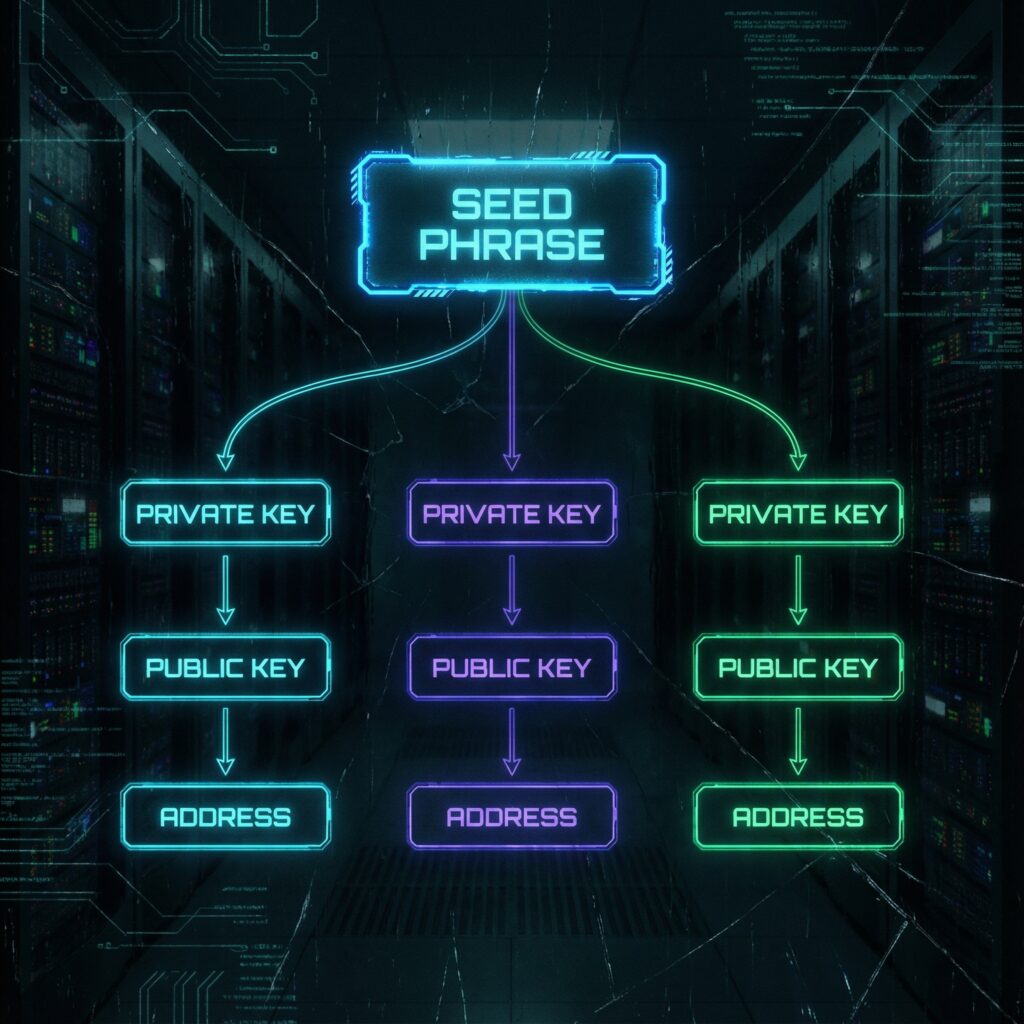
Every key in the tree comes with a 32-byte chain code, extra secret data that keeps a child from depending on the parent key alone. A key plus its chain code is an extended key. The [specification](https://github.com/bitcoin/bips/blob/master/bip-0032.mediawiki) builds the tree from two operations, both based on HMAC-SHA512:
```text
Master key
I = HMAC-SHA512(key = "Bitcoin seed", data = seed)
private key = left 32 bytes of I, chain code = right 32 bytes
Child number i (4 bytes)
normal (i < 2^31): data = parent public key || i
hardened (i ≥ 2^31): data = 0x00 || parent private key || i
I = HMAC-SHA512(key = parent chain code, data)
child private key = parent private key + left 32 bytes of I (mod n, the curve order)
child chain code = right 32 bytes of I
```
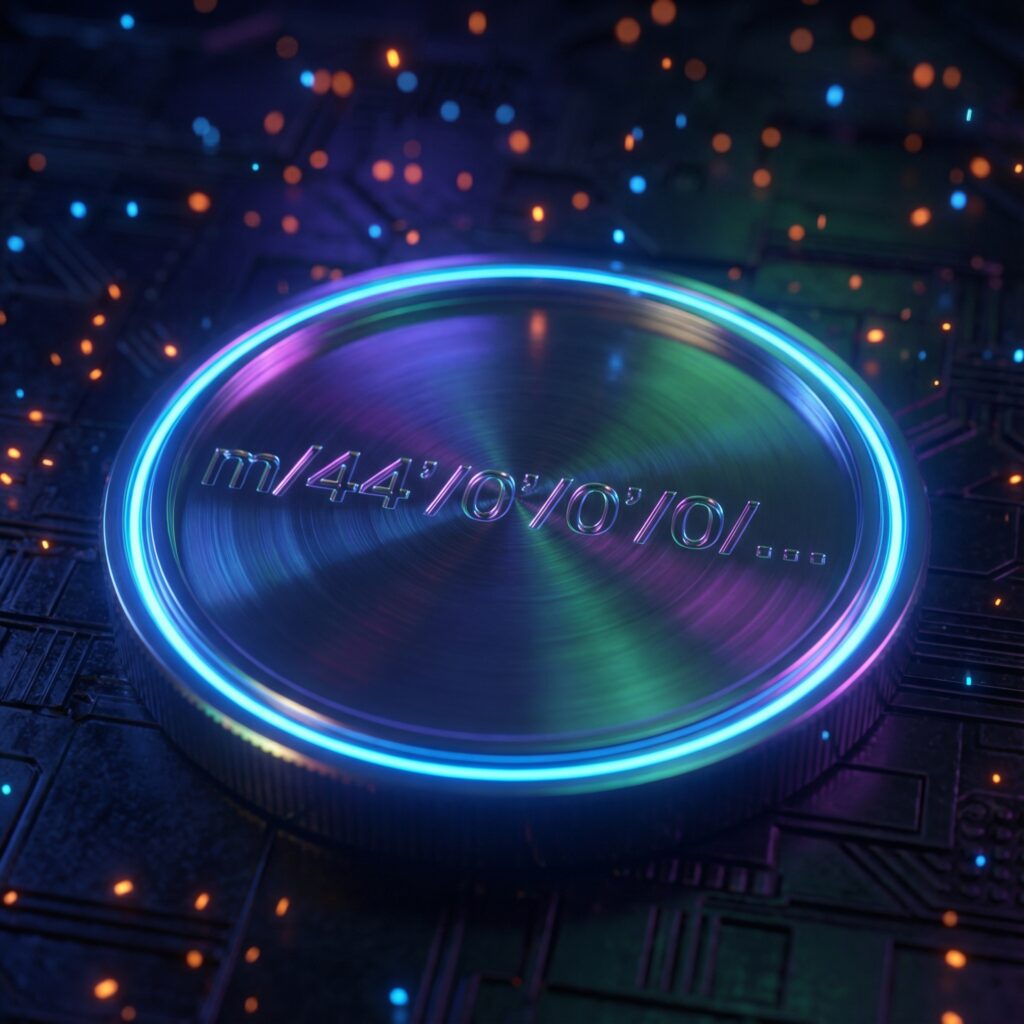
Each child is again an extended key, so the same step repeats level after level. A path such as `m/44'/0'/0'/0/0` lists the child numbers from the master key `m` down to one address key; our guide to [derivation paths](https://bip39-phrase.com/derivation-path/) explains what each number means. The steps run in one direction only: from a child extended private key and its index, BIP 32 says, finding the parent private key is no easier than a 2²⁵⁶ brute-force search.
## Hardened vs Normal Derivation: What Is the Difference?
Every extended key has 2³¹ normal children (indexes 0 to 2,147,483,647) and 2³¹ hardened ones (2,147,483,648 to 4,294,967,295). Paths write a hardened index with an apostrophe or an h, so `0'` stands for 2³¹ + 0.
| | Normal child | Hardened child |
| --- | --- | --- |
| Index | 0 to 2³¹ − 1 | 2³¹ to 2³² − 1, written `0'` or `0h` |
| Public key derivable from the parent xpub | Yes | No: it needs the parent private key |
| Typical levels | Change and address index | Purpose, coin type and account |
| A child private key leaks along with the parent xpub | The parent private key can be computed | The parent stays safe |
The second row is what makes watch-only wallets possible: anyone holding an account's extended public key can compute every normal child public key, and so every receiving address, without any private key. The last row is the catch the specification warns about: an xpub plus any private key from a normal branch below it reveals the parent's private key, and with it every key under that parent. That is why wallets harden the levels above the account: a leak inside one account cannot reach the master key or the other accounts.
We checked these properties with @scure/bip32 1.7 and the public test phrase `abandon abandon … about`. Its account xpub at `m/44'/0'/0'` produced the first address, 1LqBGSKuX5yYUonjxT5qGfpUsXKYYWeabA, without any private key, refused to derive a hardened child, and, combined with the private key of its normal child 5, gave back the account's private key.
## What Are Extended Keys (xprv and xpub)?
An extended private key is a private key with its chain code; an extended public key is the matching public key with the same chain code. BIP 32 serializes either one in 78 bytes:
| Bytes | Field |
| --- | --- |
| 4 | Version: xpub or xprv on mainnet, tpub or tprv on testnet |
| 1 | Depth: 0 for the master key, 1 for its children, and so on |
| 4 | Fingerprint of the parent key (zero for the master key) |
| 4 | Child number |
| 32 | Chain code |
| 33 | Public key, or 0x00 followed by the private key |
With a checksum and Base58 encoding, the result is a 111-character string. The specification's first test vector starts from the 16-byte seed `000102030405060708090a0b0c0d0e0f` and gives the master public key `xpub661MyMwAqRbcFtXgS5sYJABqqG9YLmC4Q1Rdap9gSE8NqtwybGhePY2gZ29ESFjqJoCu1Rupje8YtGqsefD265TMg7usUDFdp6W1EGMcet8`, which our script reproduced. A key's fingerprint, the first 4 bytes of the HASH160 of its public key, is what wallets and descriptors show as the master fingerprint: `73c5da0a` for the test phrase above.
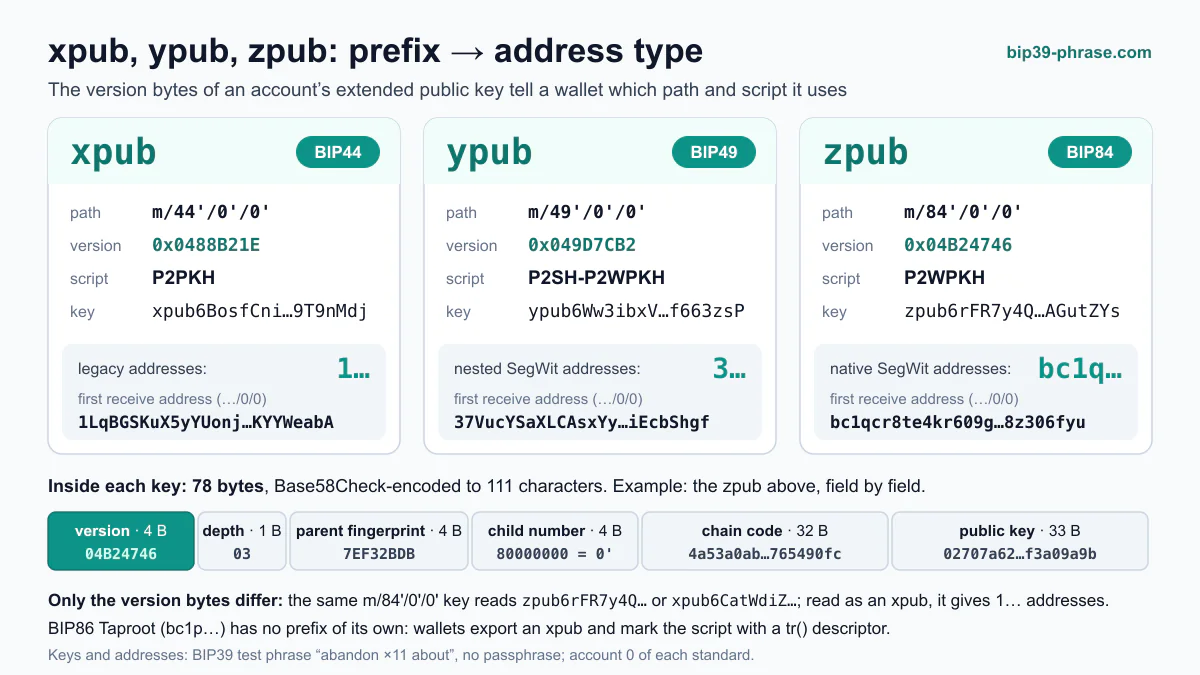
An xpub cannot spend, but it reveals every address and the whole history of its branch, so share it only with software that needs to watch. Wallets also write the same 78 bytes with other prefixes, such as zpub for native SegWit accounts; see [xpub, ypub and zpub](https://bip39-phrase.com/xpub-ypub-zpub/).
## How Do BIP39, BIP 32 and BIP 44 Fit Together?
BIP 32 does not define words or paths. It takes a seed, whatever produced it, and defines how keys are derived and written. The layers around it come from other standards:
1. **[BIP39](https://github.com/bitcoin/bips/blob/master/bip-0039.mediawiki)** turns 12 to 24 words, plus an optional [passphrase](https://bip39-phrase.com/bip39-passphrase/), into a 512-bit seed.
2. **BIP 32** turns the seed into the master key `m` and derives its children.
3. **[BIP 43](https://github.com/bitcoin/bips/blob/master/bip-0043.mediawiki)** reserves the first level for a purpose number, and [BIP 44](https://github.com/bitcoin/bips/blob/master/bip-0044.mediawiki), BIP 49, BIP 84 and BIP 86 fix the rest of the path for each address type.
BIP 32 itself suggested a simpler layout, `m/i'/0/k` for the receiving addresses and `m/i'/1/k` for the change addresses of account i; BIP 44 later added purpose and coin type levels in front. Our comparison of [BIP39 vs BIP32 vs BIP44](https://bip39-phrase.com/crypto-seed-standards-bip39-vs-bip32-vs-bip44/) shows the three layers side by side. The derivation is defined for secp256k1, the curve of Bitcoin and Ethereum; networks on ed25519, such as Solana, use the SLIP-10 variant with hardened steps only (see [seed phrase formats by network](https://bip39-phrase.com/seed-phrase-formats-by-network/)).
## What Can You Do With a BIP 32 Wallet?
The specification lists use cases that most wallets now take for granted:
- **Restore everything from one backup.** Lose the phone, install a wallet, enter the seed phrase, and every account comes back.
- **Watch without spending.** A phone app, an accountant or a payment server gets an account xpub and sees or creates addresses, but cannot move funds. The specification's audit case shares every account xpub.
- **Keep keys on a device.** A [hardware wallet](https://bip39-phrase.com/hardware-wallets-explained/) keeps the private keys and gives its companion app only xpubs, from which the app builds addresses and the transactions the device signs.
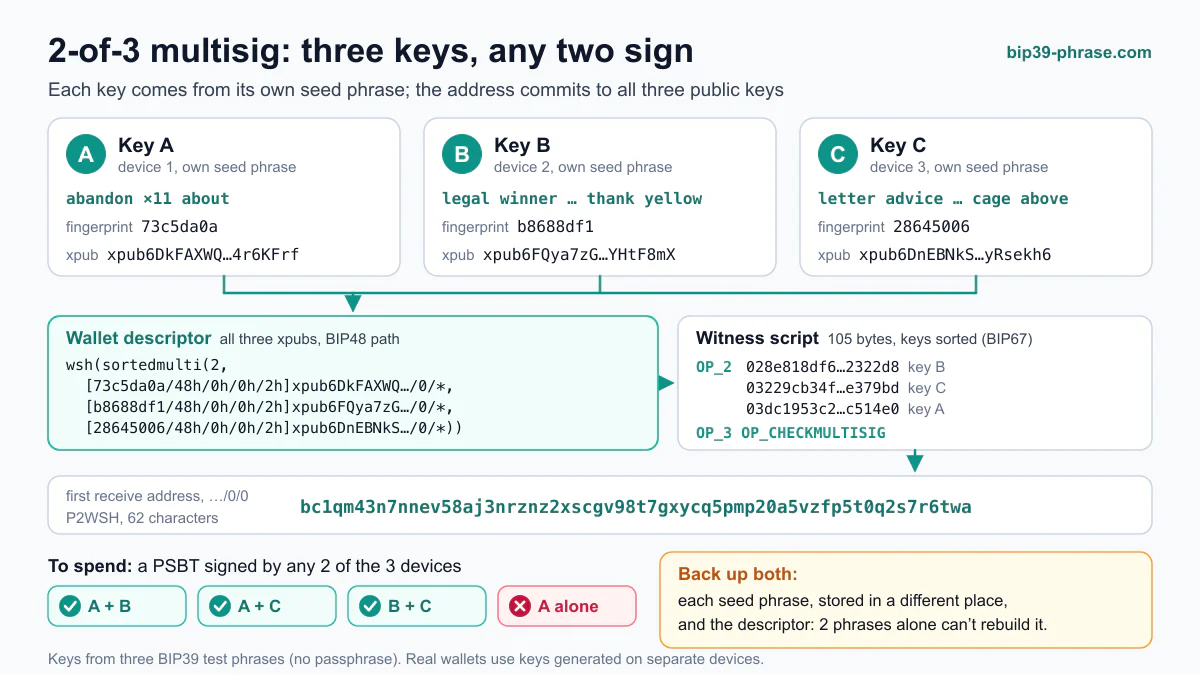
- **Coordinate multisig.** Each cosigner contributes an xpub, so a [multisig wallet](https://bip39-phrase.com/multisig-work-for-bitcoin/) can derive matching keys for every address.
- **Separate purposes.** Accounts, or whole branches for different offices, live under one master key. [BIP85](https://bip39-phrase.com/bip85/) goes further and derives separate seed phrases from one master.
A business can combine these: the master key stays offline, accounting gets read-only xpubs, a server generates invoice addresses from one of them, and spending needs the offline device, so no employee ever handles a private key.
To see the tree for yourself, paste the public test phrase into the [seed phrase to private key converter](https://bip39-phrase.com/seed-phrase-to-private-key-converter/): it shows the BIP32 root key, the account extended keys and the addresses along any path.
## Frequently Asked Questions
### Is BIP 32 the same as BIP39?
No. BIP39 turns words into a seed; BIP 32 turns a seed into keys. A wallet can use BIP 32 with a seed from another source: Electrum's own seed phrases, for example, feed BIP 32 derivation without following BIP39 (see [Electrum seed vs BIP39](https://bip39-phrase.com/electrum-seed-vs-bip39/)).
### Can someone spend my bitcoin with my xpub?
No. An xpub contains no private key, so it cannot sign. It does reveal every address and the balance of its account, and it becomes dangerous only together with a leaked private key from a normal branch below it.
### What does the apostrophe in m/44'/0'/0' mean?
It marks a hardened step: the index plus 2³¹. Hardened children can only be derived with the parent's private key.
### Do all coins use BIP 32?
Coins on the secp256k1 curve, such as Bitcoin, Ethereum, Litecoin and TRON, use BIP 32 directly, each with its own coin type in the path. Networks on ed25519, such as Solana and Stellar, use SLIP-10 instead, and a few coins have schemes of their own.
**Explore the BIP series:** [What are Bitcoin Improvement Proposals?](https://bip39-phrase.com/bitcoin-improvement-proposal/) · [BIP-39: The Seed Phrase Standard](https://bip39-phrase.com/bip39-the-foundation-of-crypto-wallet-security/) · [BIP-44: Multi-Account Hierarchy](https://bip39-phrase.com/bip-44-multi-account-hierarchy-for-deterministic-wallets/) · [BIP-110 (BIP-444): Reduced Data Temporary Softfork](https://bip39-phrase.com/bip-444-reduced-data-temporary-softfork/) · [BIP-157: Client-Side Block Filtering](https://bip39-phrase.com/bip-157-client-side-block-filtering/) · [BIP39 vs BIP32 vs BIP44 compared](https://bip39-phrase.com/crypto-seed-standards-bip39-vs-bip32-vs-bip44/)
# BIP 44 – Multi-Account Hierarchy for Deterministic Wallets
Source: https://bip39-phrase.com/bip-44-multi-account-hierarchy-for-deterministic-wallets/
Language: en · Published: 2026-01-18 · Updated: 2026-10-19
BIP 44 is the standard that fixes the layout of an HD wallet's key tree: every address sits at a path of the form `m/44'/coin_type'/account'/change/address_index`, so any compatible wallet rebuilds the same coins, accounts and addresses from the same seed phrase. Marek Palatinus and Pavol Rusnak of SatoshiLabs wrote it in 2014 on top of [BIP 32](https://bip39-phrase.com/bip-32/), which derives the keys, and [BIP 43](https://github.com/bitcoin/bips/blob/master/bip-0043.mediawiki), which reserves the first level of the path for a purpose number.
## BIP 44 at a Glance
| Question | Answer |
| --- | --- |
| Full name | Multi-Account Hierarchy for Deterministic Wallets ([specification](https://github.com/bitcoin/bips/blob/master/bip-0044.mediawiki)) |
| Authors | Marek Palatinus and Pavol Rusnak; number assigned April 24, 2014 |
| Status | Deployed, Specification BIP; requires BIP 32 and BIP 43 |
| Path | `m / purpose' / coin_type' / account' / change / address_index` |
| Network numbers | Coin types from the SLIP-44 registry: 0 for Bitcoin, 60 for Ethereum, 1 for every testnet |
| Restoring | Accounts are found in order, with a gap limit of 20 unused addresses |
| Bitcoin addresses | Legacy (P2PKH), starting with 1 |
## What Does Each Level of the Path Mean?
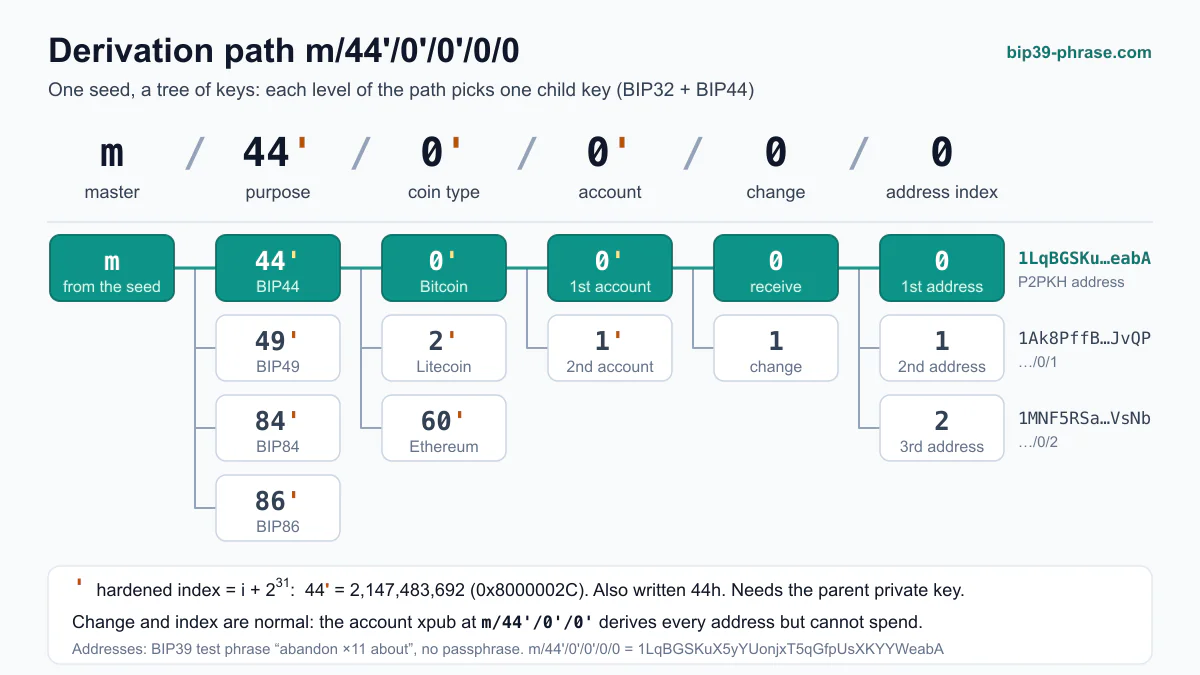
BIP 44 gives each of the five levels below the master key `m` a fixed meaning. An apostrophe marks hardened derivation:
| Level | Example | Hardened | Meaning |
| --- | --- | --- | --- |
| purpose | `44'` | Yes | Constant 44', so wallets know the subtree follows BIP 44 |
| coin_type | `0'` | Yes | A separate subtree for each network |
| account | `0'` | Yes | Independent accounts, numbered from 0 |
| change | `0` | No | 0 for receiving (external) addresses, 1 for change (internal) addresses |
| address_index | `0` | No | Addresses numbered from 0 in each chain |
Derivation path m/44'/0'/0'/0/0 as a key tree: each level picks one child key, and an apostrophe marks a hardened index (i + 2³¹). Addresses are for the test phrase “abandon ×11 about”.
The split between hardened and normal levels is deliberate. With normal derivation, an account's extended public key can compute every receiving and change address on its own, which is how watch-only wallets and payment servers work. With hardened derivation above it, a leaked key inside one account cannot expose the master key or the other accounts: as [BIP 32](https://github.com/bitcoin/bips/blob/master/bip-0032.mediawiki) warns, an xpub plus a private key from a normal branch below it reveals the parent's private key. The account level is therefore the highest one a wallet normally exports as an [xpub](https://bip39-phrase.com/xpub-ypub-zpub/).
Accounts work like separate bank accounts under one seed: one for spending, one for savings, one for donations whose addresses are public. BIP 44 asks wallets not to create a new account until the previous one has a transaction, which is what makes account discovery possible.
## Example: The First Addresses of a Bitcoin Account
For the public test phrase `abandon abandon abandon abandon abandon abandon abandon abandon abandon abandon abandon about` with no passphrase, the first BIP 44 paths give these [Bitcoin addresses](https://bip39-phrase.com/what-is-a-bitcoin-address/):
| Path | Position | Address |
| --- | --- | --- |
| `m/44'/0'/0'/0/0` | Account 0, first receiving address | 1LqBGSKuX5yYUonjxT5qGfpUsXKYYWeabA |
| `m/44'/0'/0'/0/1` | Account 0, second receiving address | 1Ak8PffB2meyfYnbXZR9EGfLfFZVpzJvQP |
| `m/44'/0'/0'/1/0` | Account 0, first change address | 1J3J6EvPrv8q6AC3VCjWV45Uf3nssNMRtH |
| `m/44'/0'/1'/0/0` | Account 1, first receiving address | 15qucUWKf95Fo58FdCBhUTSAtsm22HHE2Q |
The first address and the account xpub `xpub6BosfCnifzxcFwrSzQiqu2DBVTshkCXacvNsWGYJVVhhawA7d4R5WSWGFNbi8Aw6ZRc1brxMyWMzG3DSSSSoekkudhUd9yLb6qx39T9nMdj` are official [SLIP-132 test vectors](https://github.com/satoshilabs/slips/blob/master/slip-0132.md); we computed the other rows with @scure/bip32 1.7. The phrase is public, so never send coins to these addresses. To reproduce the table, paste the phrase into the [seed phrase to private key converter](https://bip39-phrase.com/seed-phrase-to-private-key-converter/) and keep the BIP44 tab: the **Account Extended Public Key** field shows the xpub above, **External / Internal** switches the change level, and **Account** moves to the next account.
## How Do Coin Types Work?
BIP 44 itself registers only Bitcoin (0) and Bitcoin Testnet (1) and points to [SLIP-44](https://github.com/satoshilabs/slips/blob/master/slip-0044.md), a registry SatoshiLabs maintains, for everything else. It now lists more than 1,300 named coins; to get a number, a project needs an existing wallet that implements the standard and a pull request to that file. Some common entries, with the hardened value a wallet actually uses:
| Network | Coin type | Hardened value |
| --- | --- | --- |
| Bitcoin | 0 | 0x80000000 |
| All testnets | 1 | 0x80000001 |
| Litecoin | 2 | 0x80000002 |
| Dogecoin | 3 | 0x80000003 |
| Ethereum | 60 | 0x8000003C |
| Cosmos Hub (ATOM) | 118 | 0x80000076 |
| TRON | 195 | 0x800000C3 |
| Solana | 501 | 0x800001F5 |
| Cardano | 1815 | 0x80000717 |
The coin type gives each network its own subtree, which BIP 44 introduced to avoid reusing addresses across coins. EVM chains are the usual exception: wallets such as MetaMask use Ethereum's coin type 60 for all of them, so one address works on every EVM chain. Wallets also read the rest of the path in different ways. Ethereum apps disagree about which level to count: MetaMask raises the address index (`m/44'/60'/0'/0/x`), while Ledger Wallet raises the account (`m/44'/60'/x'/0/0`), as our [derivation path guide](https://bip39-phrase.com/derivation-path/) shows. Shelley-era Cardano wallets use `m/1852'/1815'/account'/role/index` from [CIP-1852](https://github.com/cardano-foundation/CIPs/blob/master/CIP-1852/README.md) and derive keys with BIP32-Ed25519, an ed25519 variant of BIP32, while `m/44'/1815'/…` was the path of Byron-era wallets such as Yoroi. Solana and other ed25519 networks harden every level; see [seed phrase formats by network](https://bip39-phrase.com/seed-phrase-formats-by-network/).
## How Does a Wallet Find Your Accounts?
When you restore a seed phrase, the wallet has no record of which accounts and addresses you used. The [BIP 44 specification](https://github.com/bitcoin/bips/blob/master/bip-0044.mediawiki) defines how it searches:
1. Derive account 0.
2. Derive its external (receiving) chain.
3. Scan the addresses on that chain until it finds 20 unused addresses in a row, the gap limit.
4. If the account has no transactions, stop.
5. Otherwise, move on to the next account and repeat.
Discovery looks at transaction history, not balances, so an emptied account still counts as used. Only external chains are scanned, because change addresses receive coins only from the same account's own transactions. Two practical consequences follow:
- **Coins after a gap.** If someone paid to an address more than 20 places after the last used one, a wallet that stops at the gap limit will not see the payment. BIP 44 asks wallets to warn before handing out an address beyond the limit.
- **Accounts after an empty one.** A wallet that lets you create account 2 while account 1 is unused breaks the rule, and a standard wallet restoring the phrase stops searching at account 1.
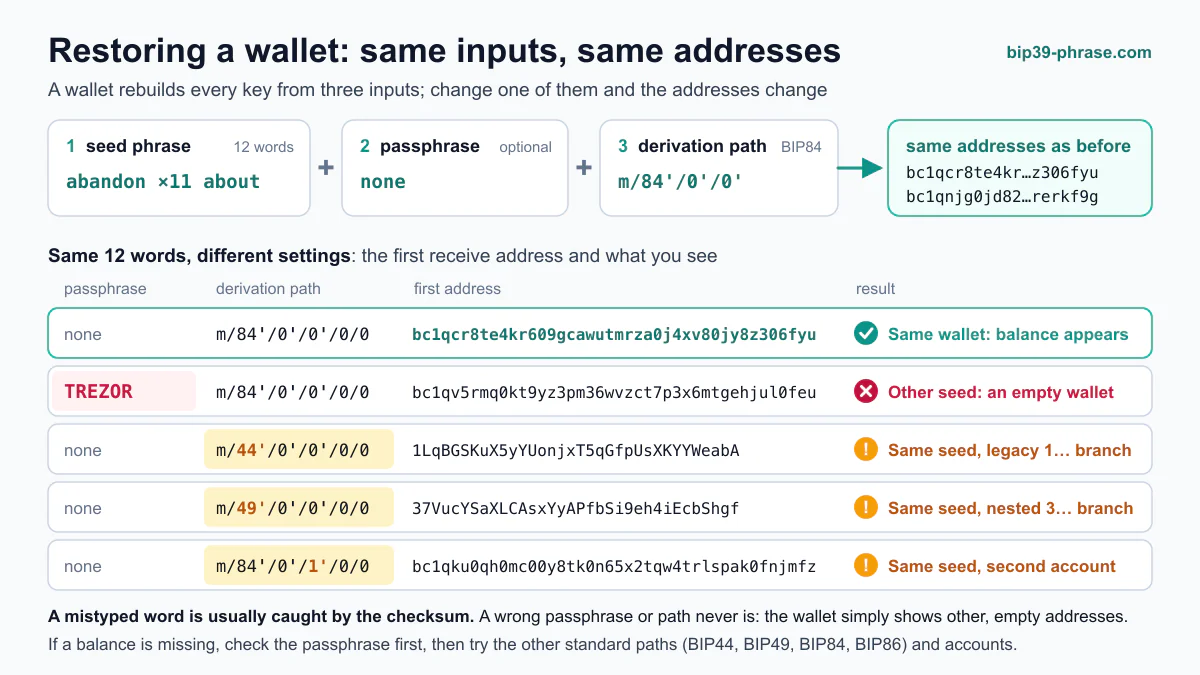
These two, along with a different address type or passphrase, are the usual reasons a restored wallet shows a zero balance; our guide to [restoring a wallet from a seed phrase](https://bip39-phrase.com/restore-wallet-from-seed-phrase/) walks through the fixes.
## BIP 44 vs BIP 49, BIP 84 and BIP 86
BIP 44 was written for legacy addresses. Later standards reuse its five-level layout with a different purpose number, one per address type:
| Standard | Path | Address type | Starts with |
| --- | --- | --- | --- |
| BIP 44 | `m/44'/0'/0'/0/0` | Legacy (P2PKH) | 1 |
| [BIP 49](https://github.com/bitcoin/bips/blob/master/bip-0049.mediawiki) | `m/49'/0'/0'/0/0` | Nested SegWit (P2WPKH in P2SH) | 3 |
| [BIP 84](https://github.com/bitcoin/bips/blob/master/bip-0084.mediawiki) | `m/84'/0'/0'/0/0` | Native SegWit (P2WPKH) | bc1q |
| [BIP 86](https://github.com/bitcoin/bips/blob/master/bip-0086.mediawiki) | `m/86'/0'/0'/0/0` | Taproot (P2TR) | bc1p |
Because the purpose differs, each standard has its own accounts: a wallet that scans only BIP 84 never finds coins on the BIP 44 addresses of the same phrase. Most other networks kept purpose 44' and differ in the coin type instead.
## Frequently Asked Questions
### What is the BIP 44 derivation path for Bitcoin?
`m/44'/0'/0'/0/0` for the first receiving address of the first account; the last number counts up for further addresses. Many current wallets default to native SegWit (BIP 84) or Taproot (BIP 86) paths instead.
### Is BIP 44 only for Bitcoin?
No. The coin type level gives every network its own branch, and Ethereum, TRON, Litecoin and many other networks use BIP 44 paths with their SLIP-44 numbers.
### What is the gap limit?
The number of unused addresses in a row after which a wallet stops scanning a chain: 20 in BIP 44. Payments to addresses beyond it are still on the blockchain, but a wallet shows them only once it scans further.
### How is a BIP 44 account different from a BIP85 child seed?
An account is another branch of the same seed and restores only with the original phrase. A [BIP85](https://bip39-phrase.com/bip85/) child is a separate seed phrase that works on its own in any wallet.
**Explore the BIP series:** [What are Bitcoin Improvement Proposals?](https://bip39-phrase.com/bitcoin-improvement-proposal/) · [BIP-32: Hierarchical Deterministic Wallets](https://bip39-phrase.com/bip-32/) · [BIP-85: Child Seeds From One Master Seed](https://bip39-phrase.com/bip85/) · [BIP-110 (BIP-444): Reduced Data Temporary Softfork](https://bip39-phrase.com/bip-444-reduced-data-temporary-softfork/) · [BIP-157: Client-Side Block Filtering](https://bip39-phrase.com/bip-157-client-side-block-filtering/) · [BIP39 vs BIP32 vs BIP44 compared](https://bip39-phrase.com/crypto-seed-standards-bip39-vs-bip32-vs-bip44/)
# BIP-444 (Now BIP 110): Reduced Data Temporary Softfork Explained
Source: https://bip39-phrase.com/bip-444-reduced-data-temporary-softfork/
Language: en · Published: 2026-01-20 · Updated: 2026-10-19
BIP-444 is the name the Reduced Data Temporary Softfork was widely known by in late 2025: a [Bitcoin Improvement Proposal](https://bip39-phrase.com/bitcoin-improvement-proposal/) to limit the data in new transactions at the consensus level for about one year. The BIP editors formally assigned it number 110, so the specification is now BIP 110. Its activation attempt failed in August 2026, and the BIP is **Closed**. Behind it is a long-running dispute among Bitcoin users over whether the blockchain should carry only financial transactions or arbitrary data as well.
## BIP-444 at a Glance
| Question | Answer |
| --- | --- |
| Official number | BIP 110, assigned on December 3, 2025; 444 was proposed but never assigned |
| Author | Dathon Ohm, with the original draft credited to Luke Dashjr |
| Type | Specification BIP for a consensus soft fork |
| What it would do | Make seven kinds of data-carrying scripts and transactions invalid while active |
| Duration | 52,416 blocks, about one year, then the rules expire |
| Status | Closed since August 2026, after a chain split with stalled mining |
## Why Is It Called Both BIP-444 and BIP 110?
Dathon Ohm opened the proposal as a [pull request to the BIPs repository](https://github.com/bitcoin/bips/pull/2017) on October 24, 2025 and announced it on the [bitcoin-dev mailing list](https://groups.google.com/g/bitcoindev/c/nOZim6FbuF8); the BIP credits Luke Dashjr (Luke-Jr) with the original draft. Within days it was being called "BIP-444". BIP editor Jon Atack [explained on the pull request](https://github.com/bitcoin/bips/pull/2017#issuecomment-3453363167) that he had proposed 444 to the other editors and noted it internally, but did not consider the number formally assigned. Under [BIP 3](https://github.com/bitcoin/bips/blob/master/bip-0003.md), which sets the rules of the BIP process, only BIP editors assign numbers, and a number counts as assigned only once an editor announces it publicly in the pull request.
That announcement came on December 3, 2025, with number 110, and the pull request was renamed "BIP 110: Reduced Data Temporary Softfork". Coverage from before December, and many headlines since, still use the old name, but both refer to the same document: the repository has no BIP 444.
## Why Was BIP-444 Proposed?
The announcement tied the timing to Bitcoin Core 30.0, which [made multiple OP_RETURN outputs standard and raised the default `datacarriersize` to 100,000 bytes](https://bitcoinops.org/en/newsletters/2025/10/17/#bitcoin-core-30-0), a change to relay policy, the rules a node applies to the unconfirmed transactions in its [mempool](https://bip39-phrase.com/bitcoin-mempool/), rather than to consensus. Core contributors saw it as fixing an incentive bug; critics read it as an endorsement of data embedding, as [Bitcoin Optech's 2025 review](https://bitcoinops.org/en/newsletters/2025/12/19/#increasing-or-removing-bitcoin-core-s-op-return-policy-limit) summarizes.
The BIP itself traces the problem to the "inscription" technique of [Bitcoin Ordinals](https://bip39-phrase.com/bitcoin-ordinals/), first exploited in 2022, saying the data-embedding trend it started burdens node operators and pulls development away from Bitcoin as money. Its rules would apply for 52,416 blocks (about one year) after activation and then expire, because permanent rules this blunt would constrain future upgrades.
## What Would the Soft Fork Restrict?
BIP 110 adds seven consensus rules that apply to blocks while it is active. The headline limits: new output scripts (scriptPubKeys) may be at most 34 bytes, except OP_RETURN outputs, which may be up to 83 bytes, restoring in consensus the long-established 83-byte policy limit. Data pushes and script-argument witness items are capped at 256 bytes, and several upgrade hooks are switched off for the duration.
Coins created before activation are exempt from all of the new rules ("UTXO grandfathering"), so existing coins cannot be frozen by the fork. The BIP does not claim to end data embedding: data can still be split into 256-byte pieces, which it argues raises the cost and signals that data storage is unsupported.
### The Seven Temporary Rules
| # | Invalid while BIP 110 is active | Note from the BIP |
| --- | --- | --- |
| 1 | New output scriptPubKeys over 34 bytes | OP_RETURN outputs may be up to 83 bytes |
| 2 | Data pushes and script-argument witness items over 256 bytes | BIP16 redeemScripts, witness scripts and Tapleaf scripts are exempt |
| 3 | Spending undefined witness or Tapleaf versions | Creating such outputs stays valid |
| 4 | Witness stacks with a Taproot annex | The annex is reserved for future upgrades |
| 5 | Taproot control blocks over 257 bytes | Spendable leaves are limited to depth 7, a 128-leaf tree |
| 6 | Tapscripts containing OP_SUCCESS opcodes, even unexecuted | These opcodes are reserved for future upgrades |
| 7 | Tapscripts that execute OP_IF or OP_NOTIF | Often used to wrap data that is skipped at execution |
## What Did Supporters Argue?
The BIP's first argument is node cost. Except for OP_RETURN outputs, unspent output scripts stay in the UTXO set, which nodes keep on fast media and cannot prune, and large scriptPubKeys can be abused to build "poison blocks" that are slow to validate. Since the scripts behind every [address type](https://bip39-phrase.com/what-is-a-bitcoin-address/) in use today fit in 34 bytes, the cap is presented as protecting decentralization without limiting real payments.
The second is the fee market. A data transaction's fee goes to one miner, while every node operator keeps storing and serving the data. In the BIP's view, data storage competes unfairly with payments, makes them more expensive and pushes users toward third-party processors that are easier to censor.
The third is content. The BIP names images as likely the most harmful use of data storage, partly because they can include content "that a large majority of node operators might object to". Early drafts and the author's comments on the pull request framed this as a legal and moral risk for node operators. Relay policy, the BIP adds, cannot fully stop miners who include such data themselves.
### Supporters and Critics: Goals and Concerns
| Group | Key Objective | Primary Concern |
| --- | --- | --- |
| Supporters | Keep block space and node resources focused on payments | Data storage raises node costs and fees and can carry objectionable content |
| Critics | Keep consensus rules narrow and avoid confiscation risk | Frozen funds in edge cases, a contentious expiry, chain-split risk and little effect on data embedding |
## What Did Critics Argue?
A central criticism was confiscation risk, which Bitcoin Optech's [summary of the early discussion](https://bitcoinops.org/en/newsletters/2025/11/07/#temporary-soft-fork-to-reduce-data) singled out. Grandfathering protects existing coins, but as [Murch pointed out](https://bitcoinops.org/en/newsletters/2026/06/26/#why-would-forbidding-op-if-in-tapscript-be-a-problem), nobody can tell which Taproot outputs rely on OP_IF (miniscript-based degrading multisig wallets are one example), so users of such setups could unknowingly lock up funds received after activation. The BIP itself concedes that some pre-signed Taproot funds could in theory be frozen or lost, and that its 128-leaf limit could hinder contracts such as BitVM.
Critics also doubted that the rules would work. Optech reported that Peter Todd encoded the text of the proposed BIP into a transaction valid under its rules. Answering a Bitcoin Stack Exchange question on why BIP 110's decentralization benefit would not outweigh its cost to transaction neutrality, Pieter Wuille [argued](https://bitcoinops.org/en/newsletters/2026/07/31/#why-does-bip110-s-decentralization-benefit-not-outweigh-its-impact-on-transaction-neutrality) that the ban would not lower node costs: the block weight limit already caps resource use, data bytes are among the cheapest to process, and blocked patterns would simply be replaced by others.
Others questioned the design. If the expiry became contested, Optech noted, letting the rules lapse would turn into a contentious hard fork. And Murch [walked through](https://bitcoinops.org/en/newsletters/2026/06/26/#does-a-softfork-always-succeed) what happens when a soft fork with mandatory signaling has only a minority of the [hash rate](https://bip39-phrase.com/hash-rate/): the signaling chain falls behind on proof of work and stalls, a split of the kind our guide to the [longest chain rule](https://bip39-phrase.com/longest-chain-in-blockchain-explained-security-consensus-forks/) describes.
## How Was It Supposed to Activate, and What Happened?
BIP 110 uses a modified BIP9 deployment with a 55% signaling threshold instead of the usual 95%, no timeout and no FAILED state. If [miners](https://bip39-phrase.com/how-bitcoin-mining-works/) did not lock it in voluntarily, enforcing nodes would reject non-signaling blocks for one retarget period, forcing lock-in on their chain. The reference implementation is a modified Bitcoin Knots branch; Bitcoin Core [does not enforce the rules](https://bitcoinops.org/en/newsletters/2026/06/26/#how-to-set-up-bitcoin-core-to-mine-a-valid-block-after-the-bip110-activation-in-august-2026).
### Deployment Parameters
| Parameter | Value in BIP 110 |
| --- | --- |
| Deployment name and signal | `reduced_data`, version bit 4 |
| Signaling start | About December 1, 2025 |
| Early lock-in threshold | 1,109 of 2,016 blocks (55%) |
| Mandatory signaling | Blocks 961,632–963,647 |
| Latest lock-in / activation | Block 963,648 / block 965,664 (about September 1, 2026) |
| Duration once active | 52,416 blocks (about one year), then the rules expire |
The BIP was merged as a Draft in February 2026 and marked Complete in June. According to BIP editor Jon Atack's [mailing-list post](https://groups.google.com/g/bitcoindev/c/b_aV3JUtUqg/m/HwFbYFJwCAAJ), the chain split on August 8, 2026, when mandatory signaling began: the BIP 110 chain started rejecting every block that did not signal bit 4, and block production on it stalled. The BIP's changelog records the move to Closed "following a chain split with stalled mining", and Optech [described the update](https://bitcoinops.org/en/newsletters/2026/08/14/#bips-2225) as following an unsuccessful activation attempt. At least one participant objected on the mailing list, arguing that BIP 110 had activated. Under [BIP 3](https://github.com/bitcoin/bips/blob/master/bip-0003.md), Closed marks a BIP as being of historical interest only, and the document stays in the repository.
BIP 110 turned an old argument about Bitcoin's purpose into concrete rules and a real activation attempt. The attempt failed, but the [BIP 110 specification](https://github.com/bitcoin/bips/blob/master/bip-0110.mediawiki), with its rationale, trade-offs and test vectors, remains a documented reference for future proposals on the same question.
**Explore the BIP series:** [What are Bitcoin Improvement Proposals?](https://bip39-phrase.com/bitcoin-improvement-proposal/) · [BIP-32: Hierarchical Deterministic Wallets](https://bip39-phrase.com/bip-32/) · [BIP-39: The Seed Phrase Standard](https://bip39-phrase.com/bip39-the-foundation-of-crypto-wallet-security/) · [BIP-44: Multi-Account Hierarchy](https://bip39-phrase.com/bip-44-multi-account-hierarchy-for-deterministic-wallets/) · [BIP-157: Client-Side Block Filtering](https://bip39-phrase.com/bip-157-client-side-block-filtering/) · [BIP39 vs BIP32 vs BIP44 compared](https://bip39-phrase.com/crypto-seed-standards-bip39-vs-bip32-vs-bip44/)
# BIP39 vs BIP32 vs BIP44: How the Seed Standards Fit Together
Source: https://bip39-phrase.com/crypto-seed-standards-bip39-vs-bip32-vs-bip44/
Language: en · Published: 2024-12-08 · Updated: 2026-10-19
BIP39, BIP32 and BIP44 are not competing standards but three layers of the same wallet. [BIP39](https://github.com/bitcoin/bips/blob/master/bip-0039.mediawiki) turns random entropy into the 12 to 24 words you back up and turns those words into a 512-bit seed; [BIP32](https://github.com/bitcoin/bips/blob/master/bip-0032.mediawiki) turns the seed into a tree of keys; [BIP44](https://github.com/bitcoin/bips/blob/master/bip-0044.mediawiki) fixes where in that tree each coin, account and address sits. Almost every modern wallet uses all three at once, so the useful question is how they fit together, not which one to pick.
## BIP39 vs BIP32 vs BIP44 at a Glance
| Aspect | BIP39 | BIP32 | BIP44 |
| --- | --- | --- | --- |
| Job | Backup: entropy → words → seed | Derivation: seed → tree of keys | Organization: a path for each coin and account |
| Input | 128 to 256 bits of entropy | A seed, usually BIP39's 512 bits | The BIP32 tree |
| Output | 12–24 words and a 512-bit seed | Master key and child keys (xprv/xpub) | Paths such as `m/44'/0'/0'/0/0` |
| Human-readable? | Yes: words from a 2,048-word list | No: long Base58 keys | Partly: numbered paths |
| Year and authors | 2013; Palatinus, Rusnak, Voisine, Bowe | 2012; Pieter Wuille | 2014; Palatinus, Rusnak |
| Our guide | [What is BIP39?](https://bip39-phrase.com/bip39-the-foundation-of-crypto-wallet-security/) | [BIP 32 explained](https://bip39-phrase.com/bip-32/) | [BIP 44 explained](https://bip39-phrase.com/bip-44-multi-account-hierarchy-for-deterministic-wallets/) |
## What Are BIP Standards?
Bitcoin Improvement Proposals are the documents in which developers specify changes and shared formats for Bitcoin; our guide to [Bitcoin Improvement Proposals](https://bip39-phrase.com/bitcoin-improvement-proposal/) explains how they are written and numbered. Wallet standards such as these three are not consensus rules, and no node checks them. They matter because wallets that follow the same ones can restore each other's backups, and many other networks, from Ethereum to TRON, reuse them with their own coin numbers.
## What Does Each Standard Do?
### BIP39: Human-Friendly Mnemonic Phrases
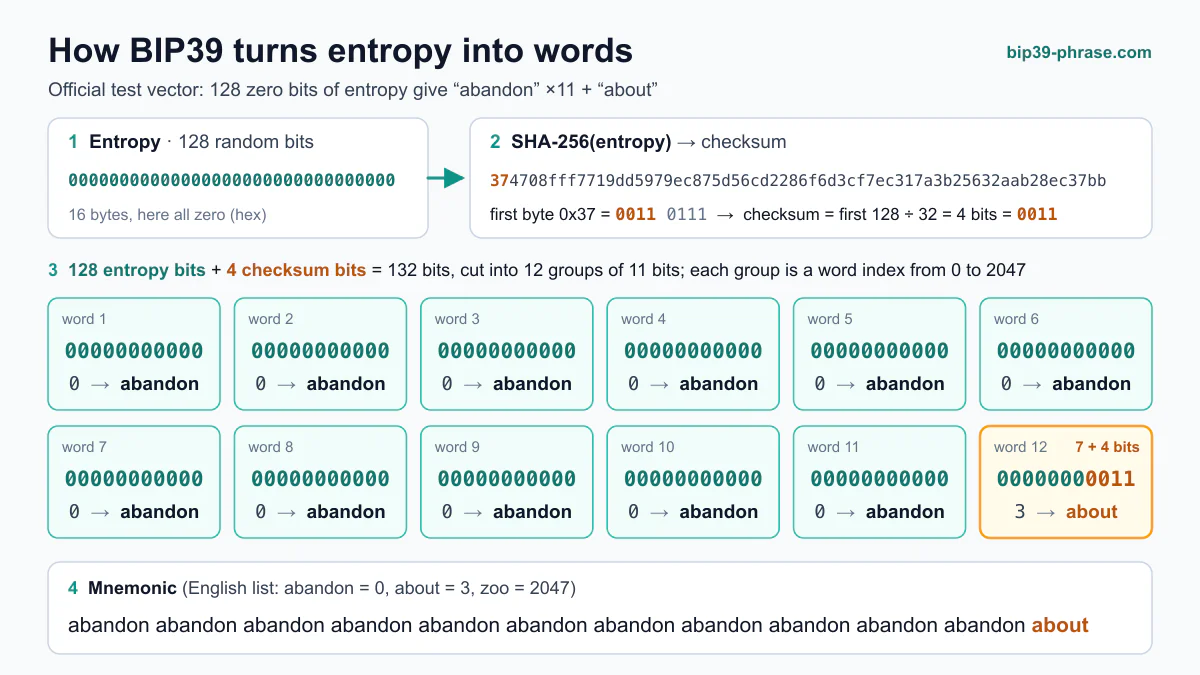
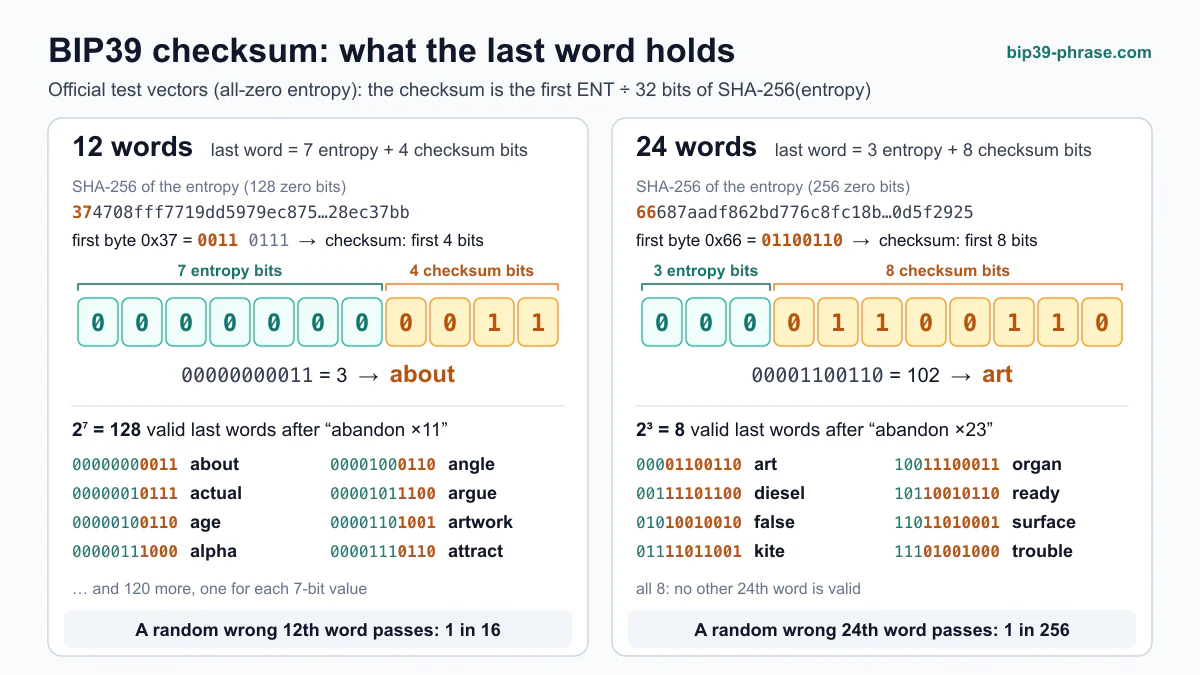
**BIP39** takes 128 to 256 bits of random entropy, adds a short SHA-256 checksum and splits the result into 11-bit groups, each pointing to one of 2,048 words. One of the official BIP39 test vectors, the entropy `9e885d952ad362caeb4efe34a8e91bd2`, becomes *“ozone drill grab fiber curtain grace pudding thank cruise elder eight picnic”*. The words, plus an optional passphrase, then go through PBKDF2 to produce the 512-bit seed. Our [step-by-step BIP39 visualizer](https://bip39-phrase.com/how-bip39-works/) shows each stage, and the [BIP39 seed phrase generator](https://bip39-phrase.com/generator-seed-phrase/) creates random phrases next to their entropy.
### BIP32: Hierarchical Deterministic Wallets
**BIP32** introduced hierarchical deterministic wallets, enabling you to create a nearly unlimited number of child keys from a single master seed. BIP32 does not define mnemonics: it takes the seed (which BIP39 produces from the words) and outputs extended keys. An extended public key (xpub) can derive the public keys of its normal children without any private key, which is how watch-only wallets work. For example, the master extended public key of BIP32 test vector 1 is `xpub661MyMwAqRbcFtXgS5sYJABqqG9YLmC4Q1Rdap9gSE8NqtwybGhePY2gZ29ESFjqJoCu1Rupje8YtGqsefD265TMg7usUDFdp6W1EGMcet8`.
### BIP44: Multi-Coin, Multi-Account Framework
**BIP44** builds upon BIP32 and the purpose field of [BIP43](https://github.com/bitcoin/bips/blob/master/bip-0043.mediawiki), providing a standardized derivation path (*m / purpose' / coin_type' / account' / change / address_index*) so that a phrase restored in another wallet finds the same accounts. BIP44 does not define mnemonics either: it fixes the path. For the test phrase “abandon abandon … about”, the first Bitcoin address at `m/44'/0'/0'/0/0` is `1LqBGSKuX5yYUonjxT5qGfpUsXKYYWeabA`; you can reproduce it with the public test phrase in our [seed phrase to private key converter](https://bip39-phrase.com/seed-phrase-to-private-key-converter/). The [derivation path guide](https://bip39-phrase.com/derivation-path/) covers BIP44's successors for SegWit and Taproot addresses.
## How the Three Standards Work Together
When you create or restore a wallet, **BIP39, BIP32 and BIP44** run in this order:
1. **BIP39** turns entropy into the words you back up, and the words, plus any [passphrase](https://bip39-phrase.com/bip39-passphrase/), into a seed.
2. **BIP32** derives a whole tree of keys from that seed.
3. **BIP44** (and its successors [BIP84](https://github.com/bitcoin/bips/blob/master/bip-0084.mediawiki) and [BIP86](https://github.com/bitcoin/bips/blob/master/bip-0086.mediawiki)) fixes where in that tree each coin, account and address lives.
So the real choices are [the length of your phrase (12 or 24 words)](https://bip39-phrase.com/12-vs-24-word-seed-phrase/), whether to add a passphrase, and the address type your wallet uses, not the standard itself. A phrase made in one BIP39 wallet restores in another, but it shows the same addresses only if the second wallet looks on the same path.
## What Each Standard Produces
Only BIP39 produces words; the other two work on what comes out of it. All values below come from official test vectors, so you can check them in any compliant wallet library (they are public: never use them for real funds).
- **BIP39:** the phrase “abandon abandon abandon abandon abandon abandon abandon abandon abandon abandon abandon about” (entropy of all zeros).
- **BIP32:** the master extended public key `xpub661MyMwAqRbcFtXgS5sYJABqqG9YLmC4Q1Rdap9gSE8NqtwybGhePY2gZ29ESFjqJoCu1Rupje8YtGqsefD265TMg7usUDFdp6W1EGMcet8` (test vector 1).
- **BIP44:** the address `1LqBGSKuX5yYUonjxT5qGfpUsXKYYWeabA` at `m/44'/0'/0'/0/0` for the BIP39 phrase above.
More valid phrases: [seed phrase examples](https://bip39-phrase.com/mnemonic-words-examples-for-crypto-security-bip39/).
## How Is the Wallet Tree Structured?
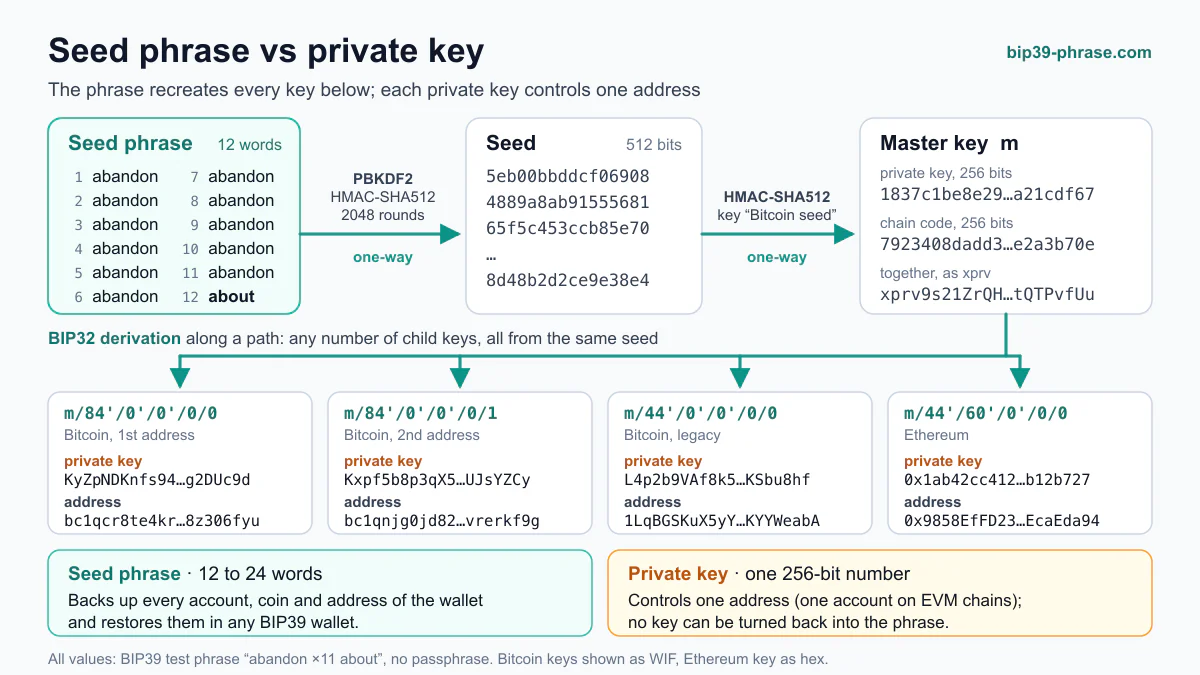
The diagram shows where each standard acts, from the phrase down to single addresses:
```text
BIP39 phrase (+ optional passphrase)
└── 512-bit seed
└── m: BIP32 master key
├── 44': BIP44 purpose
│ ├── 0': Bitcoin
│ │ ├── 0': account 0
│ │ │ ├── 0: receiving addresses /0/0, /0/1, /0/2 …
│ │ │ └── 1: change addresses /1/0, /1/1 …
│ │ └── 1': account 1
│ └── 60': Ethereum
│ └── 0': account 0 → 0 → addresses 0, 1, 2 …
└── 84': BIP84 purpose (native SegWit), same layout
```
BIP39 ends at the seed, BIP32 supplies every arrow below it, and BIP44 gives the numbers their meaning. The apostrophes mark hardened levels, which an [extended public key](https://bip39-phrase.com/xpub-ypub-zpub/) cannot derive; that is why wallets share keys at the account level and below.
## How Do You Keep the Backup Safe?
Even the best standard won’t protect you if you neglect security. Consider these guidelines:
- **Keep It Offline:** [Store your seed phrase](https://bip39-phrase.com/store-a-seed-phrase/) on paper or a metal plate, not on internet-connected devices.
- **Use Hardware Wallets:** Combine these standards with a reliable [hardware wallet](https://bip39-phrase.com/hardware-wallets-explained/) for enhanced protection.
- **Backup Thoroughly:** Make multiple backups and keep them in separate, safe locations.
- **Beware of Phishing:** Never enter your seed into suspicious websites. Always verify URLs and sources.
- **Encrypt Digital Copies:** If you must keep a digital backup, encrypt it and store it offline.
- **Note the Path:** Write the wallet name, address type and any non-default account next to your backup. The path is not secret, and it saves guesswork later.
**Pro Tip:** Test your backups by [restoring a wallet](https://bip39-phrase.com/restore-wallet-from-seed-phrase/) before adding substantial funds. This practice ensures that if something goes wrong, you discover it before risking your capital.
## Which Standard Matters When You Restore a Wallet?
All three, in turn. The words must form a valid BIP39 phrase, which the [BIP39 checksum checker](https://bip39-phrase.com/bip39-checksum-checker/) confirms; the wallet must derive keys with BIP32; and it must look on the same BIP44-style path, with the same passphrase, as the wallet that made the backup. If the phrase is accepted but the balance is zero, the path or the passphrase is the usual reason, not the words.
## Frequently Asked Questions
### Is BIP39 the same as BIP32?
No. BIP39 defines the words and how they become a seed; BIP32 defines how a seed becomes keys. A wallet can use BIP32 with a seed from another source, such as Electrum's own seed format.
### Do I need to know my BIP44 path?
Usually not: wallets fill it in. It matters when you restore a backup in a different wallet, especially for SegWit and Taproot addresses or for Ethereum accounts after the first.
### Do Ethereum and other coins use BIP39 and BIP44?
Most do: one BIP39 phrase can serve many networks, and BIP44's coin type keeps each in its own branch, `m/44'/60'/…` for Ethereum. Some networks use other schemes; see [seed phrase formats by network](https://bip39-phrase.com/seed-phrase-formats-by-network/).
**Explore the BIP series:** [What are Bitcoin Improvement Proposals?](https://bip39-phrase.com/bitcoin-improvement-proposal/) · [BIP-32: Hierarchical Deterministic Wallets](https://bip39-phrase.com/bip-32/) · [BIP-44: Multi-Account Hierarchy](https://bip39-phrase.com/bip-44-multi-account-hierarchy-for-deterministic-wallets/) · [BIP-85: Child Seeds From One Master Seed](https://bip39-phrase.com/bip85/) · [BIP-110 (BIP-444): Reduced Data Temporary Softfork](https://bip39-phrase.com/bip-444-reduced-data-temporary-softfork/) · [BIP-157: Client-Side Block Filtering](https://bip39-phrase.com/bip-157-client-side-block-filtering/)
# BIP85: Derive Many Seed Phrases From One Seed
Source: https://bip39-phrase.com/bip85/
Language: en · Published: 2026-10-16
BIP85 lets one master seed produce any number of independent child seed phrases. You choose a number, the index, and a BIP85 wallet turns your master key into a new BIP39 phrase, usually of 12 or 24 words, that any BIP39 wallet can restore. The same master and index always give the same child back, so one backup covers them all, and a child that leaks exposes neither the master nor the other children. The standard, Deterministic Entropy From BIP32 Keychains, also derives WIF keys, xprvs, hex, passwords, RSA keys, dice rolls and Nostr keys. This guide covers how the derivation works, every application and its path, the official test vector reproduced in Node, wallet support and when BIP85 is the wrong tool. New to seed phrases? Start with [what BIP39 is](https://bip39-phrase.com/bip39-the-foundation-of-crypto-wallet-security/).
## How BIP85 Works
BIP85 starts from a [BIP32](https://bip39-phrase.com/bip-32/) master key, however that key was made, from a BIP39 phrase or another scheme. Each child takes four steps:
1. **Choose a path.** It is fully hardened and starts with `m/83696968'`, followed by the application number, its parameters and the index. 83, 69, 69 and 68 are the ASCII codes of S, E, E and D, so the first level after `m` spells SEED.
2. **Derive the key.** Ordinary BIP32 hardened derivation gives the 32-byte private key `k` at that path.
3. **Hash it.** HMAC-SHA512, keyed with `bip-entropy-from-k`, turns `k` into 64 bytes of entropy.
4. **Keep what the application needs.** Each application uses as many bytes as it needs and truncates the rest: a 12-word phrase keeps the first 16 bytes, a 24-word phrase the first 32.
```text
k = private key at m/83696968'/{app}'/{parameters}'/{index}'
entropy = HMAC-SHA512(key = "bip-entropy-from-k", msg = k)
```
The [BIP85 specification](https://github.com/bitcoin/bips/blob/master/bip-0085.mediawiki) adds the HMAC step out of caution: hardened derivation already keeps a leaked child key from exposing the parent tree, and the HMAC keeps the output safe even if an implementation skipped the hardening. Both steps are one-way, so a child phrase leads back neither to `k`, nor to the master key, nor to the siblings at other indexes.
Every level of the [derivation path](https://bip39-phrase.com/derivation-path/) changes the result, including language and word count. The 12-word and 24-word children at index 0 are unrelated phrases, not a short and a long version of one.
## BIP85 Applications and Path Numbers
Version 2.1.0 of the spec, from August 2026, defines these applications. Their numbers are meant to be meaningful: 39' and 32' are BIP numbers, and 828365 spells RSA in ASCII codes.
| Application | Number | Path | Output |
|---|---|---|---|
| BIP39 | 39' | `m/83696968'/39'/{language}'/{words}'/{index}'` | 12, 15, 18, 21 or 24 words |
| HD-Seed WIF | 2' | `m/83696968'/2'/{index}'` | Compressed WIF key from the first 32 bytes |
| XPRV | 32' | `m/83696968'/32'/{index}'` | Extended private key with depth, parent fingerprint and child number set to zero |
| HEX | 128169' | `m/83696968'/128169'/{num_bytes}'/{index}'` | 16 to 64 bytes of raw entropy |
| PWD BASE64 | 707764' | `m/83696968'/707764'/{pwd_len}'/{index}'` | Password of 20 to 86 characters |
| PWD BASE85 | 707785' | `m/83696968'/707785'/{pwd_len}'/{index}'` | Password of 10 to 80 characters |
| RSA | 828365' | `m/83696968'/828365'/{key_bits}'/{key_index}'` | RSA key; GPG subkeys add `/{sub_key}'` |
| DICE | 89101' | `m/83696968'/89101'/{sides}'/{rolls}'/{index}'` | Die rolls numbered from 0, for PINs or custom alphabets |
| Nostr | 128002' | `m/83696968'/128002'/{identity}'/{account_index}'` | An `nsec` secret key |
The spec fills in the details:
- **Languages** follow the BIP39 word lists: 0' English, 1' Japanese, 2' Korean, 3' Spanish, 4' Chinese (Simplified), 5' Chinese (Traditional), 6' French, 7' Italian, 8' Czech, 9' Portuguese. The words code is the word count, from 12' (128 bits) to 24' (256 bits).
- **XPRV** takes the first 32 bytes as the chain code and the second 32 as the private key, the reverse of BIP32's order, and the spec warns about it. The output is a root-level xprv (a tprv for a testnet master), the private counterpart of an xpub; see our guide to [xpub, ypub and zpub](https://bip39-phrase.com/xpub-ypub-zpub/).
- **RSA and DICE** can need more than 64 bytes, so they use the entropy to seed BIP85-DRNG, a SHAKE256 stream. A 62-sided die gives alphanumeric passwords.
- **Nostr**, added in 2.1.0, reserves identity 0' and account 0' for future key management, so usable keys start at 1'.
BIP85 is an Informational BIP by Ethan Kosakovsky, numbered in March 2020, with Aneesh Karve as co-author since October 2024. It was marked Final that October and became Deployed in January 2026, after [BIP3](https://github.com/bitcoin/bips/blob/master/bip-0003.md), the updated BIP process, merged Final and Active into that status. A Deployed BIP is considered final, and changes beyond bug fixes, minor amendments, added test vectors and editorial edits should be avoided. Version 2.1.0 added Nostr without changing any earlier path or output.
## The BIP39 Test Vector, Reproduced in Node
The spec publishes a master key with expected outputs for every application except RSA. The key is public, so never use it for funds. This script derives the 12-word English child at index 0 with @scure/bip32 1.7, @scure/bip39 1.6 and @noble/hashes 1.8:
```js
import { HDKey } from '@scure/bip32';
import { entropyToMnemonic } from '@scure/bip39';
import { wordlist } from '@scure/bip39/wordlists/english';
import { hmac } from '@noble/hashes/hmac';
import { sha512 } from '@noble/hashes/sha2';
import { bytesToHex, utf8ToBytes } from '@noble/hashes/utils';
// Master key of the BIP85 test vectors (public: never use it for funds)
const root = HDKey.fromExtendedKey(
'xprv9s21ZrQH143K2LBWUUQRFXhucrQqBpKdRRxNVq2zBqsx8HVqFk2uYo8kmbaLLHRdqtQpUm98uKfu3vca1LqdGhUtyoFnCNkfmXRyPXLjbKb'
);
const k = root.derive("m/83696968'/39'/0'/12'/0'").privateKey;
const entropy = hmac(sha512, utf8ToBytes('bip-entropy-from-k'), k).slice(0, 16);
console.log(bytesToHex(entropy));
console.log(entropyToMnemonic(entropy, wordlist));
```
With version 2 of these libraries, the current npm release, the same functions are exported only under paths ending in `.js`, so add `.js` to the four subpath imports, as in `@noble/hashes/hmac.js`. Either way, the script prints:
```text
6250b68daf746d12a24d58b4787a714b
girl mad pet galaxy egg matter matrix prison refuse sense ordinary nose
```
Both lines match the spec. Set the words level to `18'` and keep 24 bytes, or to `24'` and keep 32, and the script returns the spec's 18- and 24-word vectors, which begin "near account window" and "puppy ocean match". We checked every other vector in the spec the same way, from the raw test cases and the DRNG to WIF, XPRV, HEX, both password formats, dice and Nostr, and all matched. One trap if you try it: the XPRV vector's DERIVED ENTROPY line shows only the second 32 bytes, the private key, not the chain code. The entropy becomes words like any BIP39 entropy, with a checksum appended; the [seed phrase generator](https://bip39-phrase.com/generator-seed-phrase/) shows random test phrases next to their entropy.
### Children of the Public Test Phrase
Started from the seed of the public BIP39 test phrase (`abandon abandon … about`) instead of the spec's key, the same derivation gives these children. They are public too, so never send funds to them:
| Parent | Path | Child phrase |
|---|---|---|
| Test phrase | `m/83696968'/39'/0'/12'/0'` | prosper short ramp prepare exchange stove life snack client enough purpose fold |
| Test phrase | `m/83696968'/39'/0'/12'/1'` | sing slogan bar group gauge sphere rescue fossil loyal vital model desert |
| Test phrase + passphrase `TREZOR` | `m/83696968'/39'/0'/12'/0'` | climb typical because giraffe beach wool fit ship common chapter hotel arm |
These are not official vectors: we computed them with the same libraries and confirmed them with an independent implementation that uses only Python's standard library. Index 1 bears no visible relation to index 0. And because a [BIP39 passphrase](https://bip39-phrase.com/bip39-passphrase/) changes the master key, the same words with `TREZOR`, the passphrase of the official BIP39 test vectors, give different children.
## Which Wallets Support BIP85
Any BIP39 wallet can restore a child, but deriving one takes a wallet that implements BIP85. These document the feature as of October 2026:
| Wallet | Where to find it | What it derives |
|---|---|---|
| [COLDCARD](https://coldcard.com/docs/bip85/) Mk4 and Q | Advanced/Tools → Derive Seed B85 (Mk4) or Derive Seeds (BIP-85) (Q) | 12, 18 or 24 words, WIF, XPRV, 32 or 64 bytes of hex, 21-character Base64 passwords |
| [BitBox02](https://support.bitbox.swiss/en_US/advanced/generate-bip-85-child-key) | BitBoxApp: Settings → Expert settings → Show BIP-85 child key | 12 or 24 words |
| [Blockstream Jade](https://help.blockstream.com/blockstream-jade/add-more-security-functionality/create-a-bip85-child-recovery-phrase) | Options → Wallet → BIP85 | 12 or 24 words |
| [Passport Core](https://docs.foundation.xyz/passport/passport-menu/settings/extensions/) | Enable Key Manager in Settings → Extensions, then tap New Key | 12 or 24 words, loadable as a temporary seed |
| [SeedSigner](https://github.com/SeedSigner/seedsigner/releases/tag/0.6.0) | Settings → Advanced → BIP-85 child seeds (off by default), then BIP-85 child seed in the seed's options | 12 or 24 English words |
| [Krux](https://selfcustody.github.io/krux/getting-started/usage/navigating-the-main-menu/) | Wallet → BIP85 | 12 or 24 words, Base64 passwords |
| [AirGap Vault](https://support.airgap.it/guides/bip85/) | Settings → the secret's details → Generate BIP85 Child secret recovery phrase | A phrase of the chosen length, with an optional passphrase |
BitBox02 added the feature in firmware 9.18.0 (April 2024), Jade in 0.1.45 (February 2023), SeedSigner in 0.6.0 (February 2023) and Krux in 24.07.0 (July 2024), so update first if the menu is missing. Two details differ between wallets:
- **Index range.** COLDCARD accepts 0 to 9999 unless you allow larger numbers in its Danger Zone menu. SeedSigner and BitBox02 accept up to 2,147,483,647 (2^31 − 1), the largest hardened index.
- **Passphrase.** COLDCARD treats the active passphrase as part of the recovery context, BitBox notes that a missing or different passphrase produces a different child, and Jade derives the child from the active wallet, passphrase included, so the same wallet must be loaded to show it again. Krux drops the parent's passphrase when it loads a child.
## Benefits and Risks
What BIP85 gives you:
- **One backup for many wallets.** The parent re-creates every child. AirGap Vault's guide says a child needs no backup of its own, and COLDCARD asks you to keep the recovery context, such as format, index and passphrase, with the parent backup.
- **Isolation.** A phone wallet, a Lightning node or a test wallet gets its own phrase. Blockstream notes that an attacker who compromises a child still cannot learn the parent phrase.
- **Compatibility.** The child works in wallets that know nothing about BIP85.
- **Regenerated secrets.** Passwords, PINs and GPG keys can be derived again instead of stored.
What it costs:
- **The master unlocks everything.** COLDCARD's guide puts it plainly: anyone who obtains the parent wallet and its derivation context can reproduce every child below it.
- **No new randomness.** A child is only as strong as its master. COLDCARD's [security status page](https://coldcard.com/security/status) describes a July 2026 incident in which a firmware bug weakened seed generation and notes that fixed firmware does not repair a seed already affected; its BIP-85 page now asks users to create the parent on fixed firmware before deriving children. Children computed from a weak master are exactly as weak. If the master was affected, Coinkite's migration guide says to move every funded child as well; the same index under a new master gives a different child ([COLDCARD](https://coldcard.com/security/migrate)).
- **Lost context.** Re-creating a child needs the application, language, word count, index and any passphrase. A forgotten index means searching through numbers.
- **Tool dependence.** Re-deriving requires a BIP85 implementation. Several exist, but a child holding real money may deserve its own written backup too.
## When to Use BIP85 and When Not
| Situation | Use BIP85? | Why |
|---|---|---|
| A phone [hot wallet](https://bip39-phrase.com/bitcoin-hot-wallet/) next to a hardware wallet | Yes | The master never touches the phone, and a leak costs only that child |
| Wallets for testing, a Lightning node or separate projects | Yes | Each gets its own phrase without another seed backup to store |
| A wallet you manage for a family member | With care | You can always spend from it, so it is never fully theirs |
| A wallet someone else should own outright | No | Whoever holds the master can re-create it at any time |
| Replacing a seed you think is compromised | No | Children of a compromised master are compromised too; create a new seed |
| Splitting a backup or planning inheritance | No | BIP85 makes more phrases, not shares; see [SLIP39 vs BIP39](https://bip39-phrase.com/slip39-vs-bip39/) and [crypto inheritance](https://bip39-phrase.com/crypto-inheritance/) |
If you use it, the master seed becomes your most valuable secret: protect it as described in [how to store a seed phrase](https://bip39-phrase.com/store-a-seed-phrase/), and note each child's index, word count and passphrase status next to its purpose.
## Frequently Asked Questions
### Is a BIP85 child seed a normal seed phrase?
Yes. It is a standard BIP39 phrase with a valid checksum, and a wallet that restores it cannot tell that it was derived.
### Can someone with a child phrase find my master seed?
No. Hardened derivation and HMAC-SHA512 cannot be reversed, so a child reveals neither the master nor the other children. The reverse does not hold: the master re-creates every child.
### Do I need to back up each child phrase?
Not strictly: the master backup and the derivation details re-create any child, which is why COLDCARD and Jade ask you to keep track of the index. A separate backup of an important child removes the dependence on a BIP85 tool.
### Does a BIP39 passphrase change BIP85 children?
Yes. The passphrase goes into the BIP39 seed and so changes the master key: the same words with and without it give different children, as the test phrase table shows.
### How is a BIP85 child different from a second account?
A second account, such as `m/44'/0'/1'` in the [BIP44](https://bip39-phrase.com/bip-44-multi-account-hierarchy-for-deterministic-wallets/) scheme, is another branch of the same seed and restores only with the original phrase. A BIP85 child is a separate seed phrase that you can load into another wallet on its own.
# Bitcoin Improvement Proposal (BIP): Process and Deployed BIP List
Source: https://bip39-phrase.com/bitcoin-improvement-proposal/
Language: en · Published: 2025-11-06 · Updated: 2026-10-19
A Bitcoin Improvement Proposal (BIP) is a design document that proposes a new feature, standard or process for Bitcoin and records the reasoning behind it. BIPs range from consensus rules, such as Taproot, to wallet formats, such as the [BIP39 seed phrase](https://bip39-phrase.com/bip39-the-foundation-of-crypto-wallet-security/). They are published in the [official BIPs repository](https://github.com/bitcoin/bips) on GitHub, where volunteer editors assign numbers and record each proposal's status.
- **Who writes them:** anyone. [BIP 3](https://github.com/bitcoin/bips/blob/master/bip-0003.md), the current process document, asks authors to test the idea on the Bitcoin Development Mailing List first.
- **Who numbers them:** only the BIP editors, once a draft has drawn real discussion.
- **Statuses:** Draft, Complete, Deployed or Closed.
- **How many:** more than 200 numbered BIPs, 78 of them Deployed as of October 2026; all 78 are listed below.
- **What a BIP is not:** a decision. No formal body governs Bitcoin development or decides whether a BIP is adopted; software projects and their users do.
## Where Do BIPs Come From?
The BIP framework, originally introduced in 2011 by developer Amir Taaki in [BIP 1](https://github.com/bitcoin/bips/blob/master/bip-0001.mediawiki) and adapted from Python's PEP process, set a common standard for submitting and reviewing new technical concepts intended to refine Bitcoin's architecture. Each proposal acts as a detailed document describing a feature, optimization, or process connected to the network. It also creates an open communication space where contributors and community members can exchange feedback and review proposed improvements transparently before their implementation.
This mechanism is essential to maintaining Bitcoin's decentralized governance model. Since the network has no central authority, protocol evolution depends entirely on community consensus. Any participant — regardless of technical background or reputation — may draft a proposal for review. Once introduced, it is discussed publicly and refined through collaboration, while volunteer editors check that it is on-topic, complete and properly formatted. The editors do not judge whether a proposal is likely to be adopted.
## What Statuses Can a BIP Have?
The rules for this process are themselves a BIP. [BIP 3](https://github.com/bitcoin/bips/blob/master/bip-0003.md), which replaced [BIP 2](https://github.com/bitcoin/bips/blob/master/bip-0002.mediawiki) from 2016, gives every proposal one of four statuses:
- **Draft.** Open for discussion and still changing.
- **Complete.** Its authors have finished the work and recommend adoption.
- **Deployed.** Settled and in active use; under BIP 3 this replaced the older Final and Active statuses.
- **Closed.** Of historical interest only: abandoned, replaced or no longer in use.
A status describes the document, not the network. A consensus change such as Taproot takes effect only after node software implements it and an activation succeeds, whatever its BIP says.
## What Types of BIPs Are There?
BIP 3 defines three types of BIPs, each fulfilling a distinct function in the network's ongoing development.
### Specification BIPs
Specification BIPs, called Standards Track before BIP 3, describe changes to the protocol or features that affect how implementations work together, such as consensus rules, the peer-to-peer protocol or wallet formats. They can be implemented and checked for compliance, and they reach Complete only once they include or point to a reference implementation and test vectors. BIP 39, the seed phrase standard, and BIP 44 are examples.
### Informational BIPs
Informational BIPs describe a design issue or give guidelines and other information to the Bitcoin community. BIP 32, the standard for HD wallets, and BIP 85 are examples.
### Process BIPs
Process BIPs describe a process around Bitcoin or propose a change to one, such as the BIP process itself.
## List of Deployed Bitcoin Improvement Proposals
As of October 2026, the official repository marks 78 BIPs as Deployed, and all of them are below, with BIP 380 to 387 sharing one entry. BIP 343 is included for context: its status is Closed. Each heading links to the BIP's full text.
### [BIP 3 – Updated BIP Process](https://github.com/bitcoin/bips/blob/master/bip-0003.md)
Replaced BIP 2 with the current process: the Draft, Complete, Deployed and Closed statuses and the Specification, Informational and Process types.
### [BIP 9 – Version bits with timeout and delay](https://github.com/bitcoin/bips/blob/master/bip-0009.mediawiki)
Introduced a mechanism to activate protocol changes via version bits with predefined timeouts.
### [BIP 11 – M-of-N Standard Transactions](https://github.com/bitcoin/bips/blob/master/bip-0011.mediawiki)
Established a standard format for multisignature transactions using multiple private keys.
### [BIP 13 – Address Format for Pay-to-Script-Hash (P2SH)](https://github.com/bitcoin/bips/blob/master/bip-0013.mediawiki)
Defined a new address type for complex transaction scripts.
### [BIP 14 – Protocol Version and User Agent](https://github.com/bitcoin/bips/blob/master/bip-0014.mediawiki)
Standardized how Bitcoin nodes communicate their protocol version.
### [BIP 16 – Pay to Script Hash (Soft Fork)](https://github.com/bitcoin/bips/blob/master/bip-0016.mediawiki)
Allowed more flexible and secure transaction types through script hashing.
### [BIP 22 – getblocktemplate – Fundamentals](https://github.com/bitcoin/bips/blob/master/bip-0022.mediawiki)
Created the foundational mining template system for block generation.
### [BIP 23 – getblocktemplate – Pooled Mining](https://github.com/bitcoin/bips/blob/master/bip-0023.mediawiki)
Extended the mining template protocol for pool operations.
### [BIP 30 – Duplicate Transactions](https://github.com/bitcoin/bips/blob/master/bip-0030.mediawiki)
Prevented duplicate transaction IDs from appearing in the blockchain.
### [BIP 31 – Pong Message](https://github.com/bitcoin/bips/blob/master/bip-0031.mediawiki)
Added a "pong" message to improve peer-to-peer communication reliability.
### [BIP 32 – Hierarchical Deterministic Wallets](https://github.com/bitcoin/bips/blob/master/bip-0032.mediawiki)
Introduced a structured method for generating wallets from a single seed; see [how BIP 32 derives a tree of keys](https://bip39-phrase.com/bip-32/).
### [BIP 34 – Block v2, Height in Coinbase](https://github.com/bitcoin/bips/blob/master/bip-0034.mediawiki)
Required miners to include block height in the coinbase transaction.
### [BIP 35 – Mempool Message](https://github.com/bitcoin/bips/blob/master/bip-0035.mediawiki)
Enabled nodes to query each other's unconfirmed transactions ([mempool](https://bip39-phrase.com/bitcoin-mempool/)).
### [BIP 37 – Connection Bloom Filtering](https://github.com/bitcoin/bips/blob/master/bip-0037.mediawiki)
Allowed lightweight clients to filter and receive relevant transactions only.
### [BIP 38 – Passphrase-Protected Private Key](https://github.com/bitcoin/bips/blob/master/bip-0038.mediawiki)
Encrypts a single private key with a passphrase into a 58-character string that starts with 6P; see [how BIP38 keys work](https://bip39-phrase.com/bip38/).
### [BIP 39 – Mnemonic Code for Generating Deterministic Keys](https://github.com/bitcoin/bips/blob/master/bip-0039.mediawiki)
Introduced mnemonic seed phrases for wallet creation and recovery; see [what BIP39 is and how wallets use it](https://bip39-phrase.com/bip39-the-foundation-of-crypto-wallet-security/).
### [BIP 42 – A Finite Monetary Supply for Bitcoin](https://github.com/bitcoin/bips/blob/master/bip-0042.mediawiki)
A tongue-in-cheek BIP dated April 1, 2014 that fixed a flaw in the subsidy code: it would have restarted the block reward after 64 halvings. The fix keeps Bitcoin's supply finite.
### [BIP 43 – Purpose Field for Deterministic Wallets](https://github.com/bitcoin/bips/blob/master/bip-0043.mediawiki)
Defined a structure to separate different wallet types by purpose.
### [BIP 44 – Multi-Account Hierarchy for Deterministic Wallets](https://github.com/bitcoin/bips/blob/master/bip-0044.mediawiki)
Specified a multi-account derivation path for HD wallets; see [the BIP 44 path, level by level](https://bip39-phrase.com/bip-44-multi-account-hierarchy-for-deterministic-wallets/).
### [BIP 47 – Reusable Payment Codes for HD Wallets](https://github.com/bitcoin/bips/blob/master/bip-0047.mediawiki)
Introduced reusable payment codes for better privacy in wallets.
### [BIP 48 – Multi-Script Hierarchy for Multi-Sig Wallets](https://github.com/bitcoin/bips/blob/master/bip-0048.mediawiki)
Defined hierarchical key derivation for [multisignature wallets](https://bip39-phrase.com/multisig-work-for-bitcoin/).
### [BIP 49 – Derivation Scheme for P2WPKH-in-P2SH](https://github.com/bitcoin/bips/blob/master/bip-0049.mediawiki)
Standardized HD derivation for nested SegWit accounts.
### [BIP 50 – March 2013 Chain Fork Post-Mortem](https://github.com/bitcoin/bips/blob/master/bip-0050.mediawiki)
Documented analysis of the 2013 Bitcoin chain split incident.
### [BIP 61 – Reject P2P Message](https://github.com/bitcoin/bips/blob/master/bip-0061.mediawiki)
Allowed peers to send rejection messages when invalid transactions are received.
### [BIP 65 – OP_CHECKLOCKTIMEVERIFY (Soft Fork)](https://github.com/bitcoin/bips/blob/master/bip-0065.mediawiki)
Enabled time-locked transactions to improve scripting flexibility.
### [BIP 66 – Strict DER Signatures](https://github.com/bitcoin/bips/blob/master/bip-0066.mediawiki)
Enforced strict DER encoding for digital signatures to enhance validation security.
### [BIP 68 – Relative Lock-Time](https://github.com/bitcoin/bips/blob/master/bip-0068.mediawiki)
Introduced transaction delays based on sequence numbers for better time control.
### [BIP 70 – Payment Protocol](https://github.com/bitcoin/bips/blob/master/bip-0070.mediawiki)
Defined a secure communication layer between wallets and payment processors.
### [BIP 71 – Payment Protocol MIME Types](https://github.com/bitcoin/bips/blob/master/bip-0071.mediawiki)
Established MIME types for consistent payment protocol data exchange.
### [BIP 72 – Bitcoin URI Extensions](https://github.com/bitcoin/bips/blob/master/bip-0072.mediawiki)
Expanded the URI format to support payment protocol integration.
### [BIP 73 – Accept Header for Payment Requests](https://github.com/bitcoin/bips/blob/master/bip-0073.mediawiki)
Improved wallet-server interaction in payment request handling.
### [BIP 75 – Out of Band Address Exchange using Payment Protocol Encryption](https://github.com/bitcoin/bips/blob/master/bip-0075.mediawiki)
Extended the BIP 70 payment protocol so that the sender can sign a payment request and the reply is encrypted end to end.
### [BIP 78 – A Simple Payjoin Proposal](https://github.com/bitcoin/bips/blob/master/bip-0078.mediawiki)
Lets the sender and the receiver build a payment together (a payjoin), which breaks the common assumption that all inputs of a transaction belong to one party.
### [BIP 84 – Derivation Scheme for P2WPKH Accounts](https://github.com/bitcoin/bips/blob/master/bip-0084.mediawiki)
Standardized native SegWit (Bech32) derivation for wallets; our guide to [derivation paths](https://bip39-phrase.com/derivation-path/) compares it with BIP 44, 49 and 86.
### [BIP 85 – Deterministic Entropy from BIP32 Keychains](https://github.com/bitcoin/bips/blob/master/bip-0085.mediawiki)
Enabled generation of [independent seeds from a single HD wallet](https://bip39-phrase.com/bip85/).
### [BIP 86 – Key Derivation for Single Key Taproot Outputs](https://github.com/bitcoin/bips/blob/master/bip-0086.mediawiki)
Defined derivation rules for Taproot addresses.
### [BIP 89 – Chain Code Delegation](https://github.com/bitcoin/bips/blob/master/bip-0089.mediawiki)
Lets a multisig participant co-sign without holding the BIP 32 chain code, so a collaborative custodian can sign without learning the wallet's other addresses or its balance.
### [BIP 90 – Buried Deployments](https://github.com/bitcoin/bips/blob/master/bip-0090.mediawiki)
Simplified activation logic for past consensus changes.
### [BIP 91 – Reduced Threshold SegWit MASF](https://github.com/bitcoin/bips/blob/master/bip-0091.mediawiki)
Lowered the activation threshold for SegWit soft fork.
### [BIP 94 – Testnet 4](https://github.com/bitcoin/bips/blob/master/bip-0094.mediawiki)
Introduced the fourth iteration of Bitcoin's public test network.
### [BIP 111 – NODE_BLOOM Service Bit](https://github.com/bitcoin/bips/blob/master/bip-0111.mediawiki)
Added a service bit indicating support for Bloom filters.
### [BIP 112 – CHECKSEQUENCEVERIFY](https://github.com/bitcoin/bips/blob/master/bip-0112.mediawiki)
Enforced relative lock-time in transaction validation.
### [BIP 113 – Median Time-Past](https://github.com/bitcoin/bips/blob/master/bip-0113.mediawiki)
Standardized block timestamp usage for time-based rules.
### [BIP 123 – BIP Classification](https://github.com/bitcoin/bips/blob/master/bip-0123.mediawiki)
Sorts BIPs into layers, such as consensus, peer services, API/RPC and applications, the values of the Layer field in BIP headers.
### [BIP 125 – Opt-in Replace-by-Fee (RBF)](https://github.com/bitcoin/bips/blob/master/bip-0125.mediawiki)
Allowed users to increase transaction fees by rebroadcasting modified transactions.
### [BIP 130 – sendheaders Message](https://github.com/bitcoin/bips/blob/master/bip-0130.mediawiki)
Improved block propagation efficiency through header announcements.
### [BIP 133 – feefilter Message](https://github.com/bitcoin/bips/blob/master/bip-0133.mediawiki)
Allowed nodes to filter transactions by fee rate.
### [BIP 137 – Signatures of Messages Using Private Keys](https://github.com/bitcoin/bips/blob/master/bip-0137.mediawiki)
Standardized the format for message signatures using Bitcoin keys.
### [BIP 141 – Segregated Witness (Consensus Layer)](https://github.com/bitcoin/bips/blob/master/bip-0141.mediawiki)
Increased block capacity and fixed transaction malleability.
### [BIP 143 – Transaction Signature Verification for SegWit](https://github.com/bitcoin/bips/blob/master/bip-0143.mediawiki)
Defined new signature hashing rules for SegWit transactions.
### [BIP 144 – Segregated Witness (Peer Services)](https://github.com/bitcoin/bips/blob/master/bip-0144.mediawiki)
Upgraded network messaging for SegWit support.
### [BIP 145 – GetBlockTemplate Updates for SegWit](https://github.com/bitcoin/bips/blob/master/bip-0145.mediawiki)
Extended mining templates for SegWit-enabled blocks.
### [BIP 147 – Dummy Stack Element Malleability](https://github.com/bitcoin/bips/blob/master/bip-0147.mediawiki)
Fixed a minor malleability issue in transaction scripts.
### [BIP 148 – Mandatory SegWit Activation](https://github.com/bitcoin/bips/blob/master/bip-0148.mediawiki)
A user-activated soft fork: from August 1, 2017, nodes enforcing it rejected blocks that did not signal for SegWit.
### [BIP 152 – Compact Block Relay](https://github.com/bitcoin/bips/blob/master/bip-0152.mediawiki)
Reduced bandwidth usage by sending compact block data between peers.
### [BIP 155 – addrv2 Message](https://github.com/bitcoin/bips/blob/master/bip-0155.mediawiki)
Introduced the addrv2 message for longer node addresses, such as Tor v3 onion and I2P addresses, which do not fit the old 128-bit format.
### [BIP 157 – Client-Side Block Filtering](https://github.com/bitcoin/bips/blob/master/bip-0157.mediawiki)
Enabled light clients to verify transactions privately; see [how client-side block filtering works](https://bip39-phrase.com/bip-157-client-side-block-filtering/).
### [BIP 158 – Compact Block Filters for Light Clients](https://github.com/bitcoin/bips/blob/master/bip-0158.mediawiki)
Defined efficient block filters for SPV wallets.
### [BIP 159 – NODE_NETWORK_LIMITED Service Bit](https://github.com/bitcoin/bips/blob/master/bip-0159.mediawiki)
Indicated limited node network capabilities.
### [BIP 173 – Bech32 Address Format](https://github.com/bitcoin/bips/blob/master/bip-0173.mediawiki)
Introduced an error-resistant, SegWit-compatible address format.
### [BIP 174 – Partially Signed Bitcoin Transactions (PSBT)](https://github.com/bitcoin/bips/blob/master/bip-0174.mediawiki)
Established a common format for unsigned or partially signed transactions.
### [BIP 324 – Version 2 P2P Encrypted Transport Protocol](https://github.com/bitcoin/bips/blob/master/bip-0324.mediawiki)
Added encryption to peer-to-peer communication.
### [BIP 327 – MuSig2 for Multi-Signatures](https://github.com/bitcoin/bips/blob/master/bip-0327.mediawiki)
Improved multisignature efficiency and privacy through MuSig2.
### [BIP 339 – WTXID-Based Transaction Relay](https://github.com/bitcoin/bips/blob/master/bip-0339.mediawiki)
Optimized transaction relay using witness transaction IDs.
### [BIP 340 – Schnorr Signatures for secp256k1](https://github.com/bitcoin/bips/blob/master/bip-0340.mediawiki)
Implemented efficient and compact signature algorithms.
### [BIP 341 – Taproot: SegWit Version 1 Spending Rules](https://github.com/bitcoin/bips/blob/master/bip-0341.mediawiki)
Introduced Taproot, enhancing privacy and flexibility.
### [BIP 342 – Validation of Taproot Scripts](https://github.com/bitcoin/bips/blob/master/bip-0342.mediawiki)
Defined how Taproot scripts are interpreted and validated.
### [BIP 343 – Mandatory Activation of Taproot](https://github.com/bitcoin/bips/blob/master/bip-0343.mediawiki)
Proposed a mandatory (LOT=true) activation of Taproot as a fallback. Taproot activated through the Speedy Trial deployment instead, and BIP 343 is now Closed.
### [BIP 350 – Bech32m Format for v1+ Witness Addresses](https://github.com/bitcoin/bips/blob/master/bip-0350.mediawiki)
Introduced an updated Bech32m address format for Taproot.
### [BIP 370 – PSBT Version 2](https://github.com/bitcoin/bips/blob/master/bip-0370.mediawiki)
Refined the PSBT structure for improved interoperability.
### [BIP 371 – Taproot Fields for PSBT](https://github.com/bitcoin/bips/blob/master/bip-0371.mediawiki)
Added Taproot-related fields to the PSBT format.
### [BIP 380–387 – Output Script Descriptors Series](https://github.com/bitcoin/bips/blob/master/bip-0380.mediawiki)
Standardized different types of script descriptors for wallet operations.
## How Does a BIP Move From Idea to Deployed?
BIP 3 describes the path a proposal takes:
1. **Ideation.** The authors check whether the idea has been discussed before and post it in a dedicated thread on the [Bitcoin Development Mailing List](https://groups.google.com/g/bitcoindev) before writing a full draft.
2. **Draft.** They open a pull request to the BIPs repository. Editors check that it is on-topic, properly formatted and specified in enough detail, and they assign a number once it has drawn real discussion; until then, it has no number.
3. **Complete.** The authors finish their work and recommend the BIP for adoption. A Specification BIP must first come with a reference implementation and test vectors.
4. **Deployed.** Anyone can request this status with evidence that the BIP is in active use, such as support in established mainnet software or a soft fork's activation criteria being met.
5. **Closed.** A BIP that is abandoned, replaced or no longer used stays in the repository for its historical interest, with the reason recorded in its changelog.
Not all BIPs carry the same impact. Some involve minor technical adjustments, while others transform Bitcoin's structure at a fundamental level. Landmark proposals like SegWit (Segregated Witness) and Taproot improved scalability, transaction throughput, and privacy, showing how BIPs drive innovation while maintaining security and decentralization.
A number can be contested, too. The soft fork first known as [BIP-444](https://bip39-phrase.com/bip-444-reduced-data-temporary-softfork/) was formally numbered BIP 110 only once an editor announced the assignment in its pull request, as BIP 3 requires.
## How Are Consensus Changes Activated?
A BIP that changes consensus rules is only a description until node software implements it and the network enforces it. Soft forks have usually been activated by miners signaling readiness in their blocks, a method [BIP 9](https://github.com/bitcoin/bips/blob/master/bip-0009.mediawiki) standardized with a threshold of 1,916 of the 2,016 blocks in a retarget period (95%). The history shows the variations:
- **SegWit (2017).** The BIP 9 deployment stayed below 95% for months. BIP 91 let miners enforce SegWit signaling with an 80% threshold, and [BIP 148](https://github.com/bitcoin/bips/blob/master/bip-0148.mediawiki), a user-activated soft fork, had its nodes reject non-signaling blocks from August 1, 2017. SegWit activated at block 481,824 later that August.
- **Taproot (2021).** A short "Speedy Trial" deployment with a 90% threshold succeeded, and [BIP 341](https://github.com/bitcoin/bips/blob/master/bip-0341.mediawiki) records the activation at block 709,632. The mandatory fallback, BIP 343, was never needed.
- **BIP 110 (2026).** The temporary soft fork to limit data in transactions used a 55% threshold and mandatory signaling. The nodes enforcing it split off onto a chain whose block production stalled in August 2026, and the proposal is now Closed.
Because the system runs on consensus, no BIP can force an upgrade: each node operator decides which rules to run, and [miners](https://bip39-phrase.com/how-bitcoin-mining-works/) whose blocks break the rules a node enforces find those blocks rejected by it.
All BIPs, including closed ones, are public in the [official repository](https://github.com/bitcoin/bips), allowing anyone to explore the development of Bitcoin and study how its architecture has evolved through collaboration and open review.
## Does Every Bitcoin Change Need a BIP?
No. BIP 3 says minor improvements and matters that concern a single project usually do not need standardization and should go to that project directly. BIPs are for ideas that interest the wider community or affect several pieces of software: consensus rules, the peer-to-peer protocol and shared formats such as seed phrases, [derivation paths](https://bip39-phrase.com/derivation-path/) and partially signed transactions. Relay policy, the rules a node applies to unconfirmed transactions, usually changes through a node project's own review; Bitcoin Core's 30.0 change to OP_RETURN limits, which set off the BIP 110 debate, is an example.
The reverse also holds: a BIP does not define what Bitcoin is. Each one is its authors' recommendation, and adoption happens when wallets, nodes and their users choose to implement it. Projects document what they support; Bitcoin Core keeps a [list of the BIPs it implements](https://github.com/bitcoin/bitcoin/blob/master/doc/bips.md), with the version that added each one.
## Frequently Asked Questions
### Who approves a BIP?
Nobody, in a formal sense. Editors check that a proposal is on-topic, complete and properly formatted, assign numbers and update statuses, but they do not decide whether it is adopted. Adoption depends on the software projects that implement a BIP and the people who run that software.
### Which BIPs matter for seed phrases and wallets?
BIP 39 turns entropy into the words you back up, [BIP 32](https://bip39-phrase.com/bip-32/) derives keys from the seed, [BIP 44](https://bip39-phrase.com/bip-44-multi-account-hierarchy-for-deterministic-wallets/), BIP 49, BIP 84 and BIP 86 fix the paths for each address type, and [BIP 85](https://bip39-phrase.com/bip85/) derives child seeds. Our comparison of [BIP39, BIP32 and BIP44](https://bip39-phrase.com/crypto-seed-standards-bip39-vs-bip32-vs-bip44/) shows how the first three fit together.
### What is the difference between a BIP and a SLIP?
SLIPs are SatoshiLabs Improvement Proposals, published by the company behind Trezor for standards outside the BIP repository, such as the SLIP-44 registry of coin types and SLIP-39 Shamir backups; see [SLIP-39 vs BIP39](https://bip39-phrase.com/slip39-vs-bip39/).
### Can a BIP be withdrawn?
It can be marked Closed, but it is not deleted: under BIP 3 it stays in the repository, with the reason for the change recorded in its changelog.
**Explore the BIP series:** [BIP-32: Hierarchical Deterministic Wallets](https://bip39-phrase.com/bip-32/) · [BIP-39: The Seed Phrase Standard](https://bip39-phrase.com/bip39-the-foundation-of-crypto-wallet-security/) · [BIP-44: Multi-Account Hierarchy](https://bip39-phrase.com/bip-44-multi-account-hierarchy-for-deterministic-wallets/) · [BIP-110 (BIP-444): Reduced Data Temporary Softfork](https://bip39-phrase.com/bip-444-reduced-data-temporary-softfork/) · [BIP-157: Client-Side Block Filtering](https://bip39-phrase.com/bip-157-client-side-block-filtering/) · [BIP39 vs BIP32 vs BIP44 compared](https://bip39-phrase.com/crypto-seed-standards-bip39-vs-bip32-vs-bip44/)
# Derivation Path Explained: What m/44'/0'/0'/0/0 Means
Source: https://bip39-phrase.com/derivation-path/
Language: en · Published: 2026-10-16
A derivation path is the address of one key in the tree of keys a wallet builds from a seed phrase. The notation `m/44'/0'/0'/0/0` lists the steps from the master key down to a single private key and its address. The phrase does not record which path was used: the same 12 or 24 words give different addresses on different paths, which is why a restored wallet sometimes shows a zero balance. This guide explains what each number means, which paths Bitcoin, Ethereum and other networks use, and how to check them with a public test phrase.
## Reading a BIP44 Derivation Path
[BIP39](https://github.com/bitcoin/bips/blob/master/bip-0039.mediawiki) turns the words into a 512-bit seed, and the seed becomes a master key, written `m`, under the rules of [BIP32 hierarchical deterministic wallets](https://bip39-phrase.com/bip-32/). Each step of the path then derives a child key from the one before it. [BIP44](https://github.com/bitcoin/bips/blob/master/bip-0044.mediawiki) assigns every position a meaning, which our [BIP44 multi-account hierarchy guide](https://bip39-phrase.com/bip-44-multi-account-hierarchy-for-deterministic-wallets/) covers in depth:
| Level | In the example | Meaning |
|---|---|---|
| `m` | `m` | Master key derived from the seed |
| `purpose'` | `44'` | Which scheme the tree follows, by BIP number ([BIP43](https://github.com/bitcoin/bips/blob/master/bip-0043.mediawiki)) |
| `coin_type'` | `0'` | Network, per the [SLIP-44](https://github.com/satoshilabs/slips/blob/master/slip-0044.md) registry: 0 is Bitcoin, 60 is Ethereum |
| `account'` | `0'` | Account number, counted from zero |
| `change` | `0` | 0 for receiving addresses, 1 for change addresses |
| `address_index` | `0` | Address number in that chain: 0, 1, 2… |
Derivation path m/44'/0'/0'/0/0 as a key tree: each level picks one child key, and an apostrophe marks a hardened index (i + 2³¹). Addresses are for the test phrase “abandon ×11 about”.
So `m/44'/0'/0'/0/0` is the first receiving address of the first Bitcoin account; `m/44'/0'/0'/0/1` is the second, `m/44'/0'/0'/1/0` the first change address and `m/44'/0'/1'/0/0` the first address of a second account.
### What the Apostrophe Means
An apostrophe marks a hardened step, which adds 2³¹ to the number, so `44'` is index 0x8000002C. Output descriptors ([BIP380](https://github.com/bitcoin/bips/blob/master/bip-0380.mediawiki)) write `84h` for `84'`.
The public keys of normal children can be computed from the parent's extended public key (xpub) alone, which lets a watch-only wallet generate addresses without private keys. But [BIP32](https://github.com/bitcoin/bips/blob/master/bip-0032.mediawiki) warns that an xpub plus any private key from a normal branch below it reveals the parent's private key. So purpose, coin type and account are hardened, keeping a leak in one account away from the master key and the other accounts, while change and index stay normal so the account xpub can still produce addresses.
## Bitcoin Derivation Paths: BIP44, BIP49, BIP84 and BIP86
In Bitcoin, the purpose number selects the address type. The table lists the first receiving address for the public test phrase `abandon abandon abandon abandon abandon abandon abandon abandon abandon abandon abandon about` with an empty passphrase. The addresses are official [SLIP-132](https://github.com/satoshilabs/slips/blob/master/slip-0132.md) and [BIP86](https://github.com/bitcoin/bips/blob/master/bip-0086.mediawiki) test vectors that anyone can reproduce, so never send coins to them.
| Standard | Path | Address type | Starts with | First address |
|---|---|---|---|---|
| BIP44 | `m/44'/0'/0'/0/0` | Legacy (P2PKH) | 1 | 1LqBGSKuX5yYUonjxT5qGfpUsXKYYWeabA |
| [BIP49](https://github.com/bitcoin/bips/blob/master/bip-0049.mediawiki) | `m/49'/0'/0'/0/0` | Nested SegWit (P2WPKH in P2SH) | 3 | 37VucYSaXLCAsxYyAPfbSi9eh4iEcbShgf |
| [BIP84](https://github.com/bitcoin/bips/blob/master/bip-0084.mediawiki) | `m/84'/0'/0'/0/0` | Native SegWit (P2WPKH) | bc1q | bc1qcr8te4kr609gcawutmrza0j4xv80jy8z306fyu |
| BIP86 | `m/86'/0'/0'/0/0` | Taproot (P2TR) | bc1p | bc1p5cyxnuxmeuwuvkwfem96lqzszd02n6xdcjrs20cac6yqjjwudpxqkedrcr |
BIP49, BIP84 and BIP86 are deliberately incompatible with BIP44: a wallet that lacks one of them will not find those accounts at all and shows an empty wallet instead.
## Ethereum Derivation Path: MetaMask vs Ledger Wallet
Ethereum's coin type is 60, and MetaMask and Ledger Wallet both put the first account at `m/44'/60'/0'/0/0`. From the second account on they differ. MetaMask keeps the branch `m/44'/60'/0'/0` and raises the last number; Ledger Wallet (called Ledger Live until 2025) raises the account number instead: `m/44'/60'/x'/0/0`. You may also meet two older schemes: Ledger's old Chrome app used a single address at `m/44'/60'/0'/0`, and MyEtherWallet and MyCrypto listed Ledger addresses at `m/44'/60'/0'/x`, the path MetaMask calls Legacy (MEW / MyCrypto) when you connect a Ledger.
| Account | MetaMask | Ledger Wallet |
|---|---|---|
| First | `m/44'/60'/0'/0/0`: 0x9858EfFD232B4033E47d90003D41EC34EcaEda94 | Same path and address |
| Second | `m/44'/60'/0'/0/1`: 0x6Fac4D18c912343BF86fa7049364Dd4E424Ab9C0 | `m/44'/60'/1'/0/0`: 0x78839F6054d7ed13918bAe0473BA31b1Ca9D7265 |
MetaMask says it supports only its default path, `m/44'/60'/0'/0`, for an imported Secret Recovery Phrase, so Ledger Wallet accounts after the first will not appear there. Each key controls the same 0x address on every EVM chain; [how EVM addresses are built](https://bip39-phrase.com/format-evm-addresses/) explains why.
## Ed25519 Networks: Every Step Is Hardened
Solana, Stellar, TON and some other networks use the ed25519 curve and [SLIP-10](https://github.com/satoshilabs/slips/blob/master/slip-0010.md) derivation, which for ed25519 allows hardened steps only: every number carries an apostrophe, and no child key can be computed from a parent public key. SLIP-10 also derives the master key with a different constant (`ed25519 seed` instead of BIP32's `Bitcoin seed`), so a familiar-looking path still gives unrelated keys.
[Solana paths vary](https://bip39-phrase.com/seed-phrase-formats-by-network/): `m/44'/501'/0'/0'` and `m/44'/501'/0'` are both in use, the `prompt:` input of the solana-keygen command-line tool defaults to the base path `m/44'/501'`, and when you import a phrase, Phantom uses `m/44'/501'/0'/0'` by default and shows accounts on its two other supported paths only if they have earlier activity. A classic 24-word TON phrase uses no path at all: TON derives its single key with its own scheme.
## Common Derivation Paths
| Network or app | Coin type | First key | Next account or address |
|---|---|---|---|
| Bitcoin, BIP84 | 0 | `m/84'/0'/0'/0/0` | `m/84'/0'/0'/0/1` |
| Ethereum, MetaMask | 60 | `m/44'/60'/0'/0/0` | `m/44'/60'/0'/0/1` |
| Ethereum, Ledger Wallet | 60 | `m/44'/60'/0'/0/0` | `m/44'/60'/1'/0/0` |
| Ethereum, Legacy (MEW / MyCrypto) | 60 | `m/44'/60'/0'/0` | `m/44'/60'/0'/1` |
| TRON, TronWeb library | 195 | `m/44'/195'/0'/0/0` | Depends on the wallet |
| Solana | 501 | `m/44'/501'/0'/0'` | `m/44'/501'/1'/0'` |
| TON, 12-word multichain phrase | 607 | `m/44'/607'/0'` | `m/44'/607'/1'` |
| Stellar (SEP-0005) | 148 | `m/44'/148'/0'` | `m/44'/148'/1'` |
Coin type 1 is reserved for the testnets of all coins. TRON uses the same secp256k1 curve as Ethereum, but its own coin type gives it its own keys, and its addresses are Base58 strings that start with T: for the test phrase, `m/44'/195'/0'/0/0` gives TUEZSdKsoDHQMeZwihtdoBiN46zxhGWYdH.
## Extended Public Keys: xpub, ypub and zpub
The xpub format from BIP32 does not say which address type an account uses, so SLIP-132 registered other prefixes for Bitcoin: ypub for BIP49 and zpub for BIP84, with tpub, upub and vpub on testnet. Taproot has none of its own; BIP86 uses a plain xpub. Only the version bytes differ, not the key: for the test phrase, our converter shows the BIP84 account key as `xpub6CatWdiZ…`, and a SLIP-132 wallet shows the same key as `zpub6rFR7y4Q…`.
BIP39 itself lists the lack of a versioning scheme among its shortcomings and says descriptor wallets now largely mitigate it: a descriptor (BIP380) such as `wpkh([fingerprint/84h/0h/0h]xpub…/0/*)` records the path and the address type together. Keep your xpub private: it reveals every address and the whole balance of the account. Our guide to [xpub, ypub and zpub](https://bip39-phrase.com/xpub-ypub-zpub/) covers the format, conversions and where wallets show the key.
## Why a Restored Wallet Shows a Zero Balance
If the wallet accepts your phrase but shows zero, it is probably looking at the wrong branch of the tree:
- **Address type.** Your old addresses are the best clue: 1 usually means BIP44, 3 BIP49, bc1q BIP84 and bc1p BIP86. Restore with the same type.
- **Account.** BIP44 wallets check accounts in order and stop at the first account without transactions, so coins in account 1 stay hidden if account 0 was never used. Ethereum apps also number accounts at different levels.
- **Network.** An Ethereum address is the same on every EVM chain, but each chain has its own balance; TRON and Solana use separate branches of the tree.
- **Gap limit.** BIP44 wallets stop scanning after 20 unused addresses in a row, so later addresses are not found automatically.
- **Passphrase.** A different passphrase gives a different seed and a whole new tree; see [how the BIP39 passphrase works](https://bip39-phrase.com/bip39-passphrase/).
The full restore procedure is in the guide to [restoring a wallet from a seed phrase](https://bip39-phrase.com/restore-wallet-from-seed-phrase/). If the wallet rejects the phrase itself, the path is not the problem: check the words first.
## How to See Derivation Paths in the Converter
The [seed phrase to private key converter](https://bip39-phrase.com/seed-phrase-to-private-key-converter/) computes keys in your browser and shows the path of every address.
1. Paste the test phrase into **BIP39 Mnemonic** and leave **BIP39 Passphrase** empty.
2. Bitcoin and the BIP44 tab are preselected. **Full path** reads `m/44'/0'/0'/0`, and the first row under **Derived Addresses** is `m/44'/0'/0'/0/0` with 1LqBGSKuX5yYUonjxT5qGfpUsXKYYWeabA.
3. Open the BIP49, BIP84 and BIP86 tabs: only the purpose changes, and the first address becomes 37Vuc… on BIP49, bc1qcr8… on BIP84 and bc1p5cyx… on BIP86.
4. Click the **Ethereum (0x…)** preset. The path becomes `m/44'/60'/0'/0`, and the second row is MetaMask's second account.
5. Type 1 into **Account**: the first row becomes `m/44'/60'/1'/0/0`, Ledger Wallet's second account. **External / Internal** switches the change level between 0 and 1.
6. On the BIP32 tab you type the path into **Custom Derivation Path**. A trailing normal number is replaced by the row number, so `m/44'/60'/0'/0` lists the Legacy (MEW / MyCrypto) addresses.
Other quick presets include TRON (it reproduces the T… address above), Litecoin and Dogecoin. The converter does not handle ed25519 networks; the paths of Solana, Aptos and Sui, and the one Ledger uses for Polkadot, are on the [private key generator](https://bip39-phrase.com/private-key-generator/) page. Polkadot.js and Subkey use no BIP44 path: by default they derive an sr25519 key from the phrase alone.
## Frequently Asked Questions
### What is the derivation path for Ethereum?
MetaMask and Ledger Wallet both use `m/44'/60'/0'/0/0` for the first account. For the second, MetaMask uses `m/44'/60'/0'/0/1` and Ledger Wallet `m/44'/60'/1'/0/0`.
### Where can I find my wallet's derivation path?
Check the wallet's documentation or settings: Ledger Wallet shows it under **Edit account** > **Advanced** as freshAddressPath. Otherwise, let an old address guide you: its prefix points to the Bitcoin standard, and for Ethereum try the MetaMask, Ledger Wallet and Legacy paths.
### Can I lose funds by choosing the wrong path?
No. A path changes nothing on the blockchain: the wallet just shows other, empty addresses, and the balance returns once you switch back. The real risk is receiving payments on a non-standard path and then forgetting which one.
### Should I write down my derivation path?
It is not secret and gives no access to funds, so you can note it beside your backup with the wallet name, address type and account numbers. With default settings it is optional; with custom ones it saves time when you restore.
### How is a derivation path different from a passphrase?
A path picks a branch inside one tree of keys; a passphrase changes the seed itself and produces a different tree. The path can stay public, but a passphrase needs the same protection as the seed phrase.
# SLIP-39 vs BIP39: Shamir Backup and 20-Word Shares Explained
Source: https://bip39-phrase.com/slip39-vs-bip39/
Language: en · Published: 2026-10-16
SLIP-39 is SatoshiLabs' standard for Shamir backup: instead of one recovery phrase, it can split a wallet's master secret into several word lists, called shares, so that a set number of them, any 2 of 3 for example, restores the wallet while fewer reveal nothing. BIP39 writes the secret as one phrase of 12 to 24 words. The formats use different word lists, checksums and seed derivation, so a SLIP-39 backup restores only in wallets that support it and can never become a BIP39 phrase for the same wallet. This guide compares the two, explains what the words of a share mean, walks through a 2-of-3 example, lists the wallets that restore SLIP-39 and helps you choose. For the older standard, start with [what BIP39 is](https://bip39-phrase.com/bip39-the-foundation-of-crypto-wallet-security/).
## SLIP-39 vs BIP39 at a Glance
Pavol Rusnak and Marek Palatinus of SatoshiLabs co-authored both [BIP39](https://github.com/bitcoin/bips/blob/master/bip-0039.mediawiki), assigned in 2013, and [SLIP-39](https://github.com/satoshilabs/slips/blob/master/slip-0039.md), created in 2017 and now marked Final. SLIP-39 was meant to replace BIP39, and the two are largely incompatible.
| Feature | BIP39 | SLIP-39 |
|---|---|---|
| Word list | 2,048 words, 10 official languages | 1,024 words, English only |
| Bits per word | 11 | 10 |
| Length | 12, 15, 18, 21 or 24 words | 20 words (128-bit secret) or 33 words (256-bit) per share, the two lengths the spec requires every wallet to support |
| Checksum | 4 to 8 bits inside the last word | The last 3 words (RS1024) |
| Splitting | None: one phrase | Up to 16 groups of up to 16 shares, each with a threshold |
| Wallet seed | PBKDF2-HMAC-SHA512 of the words, 2,048 iterations: 64 bytes | The master secret itself: 16 or 32 bytes |
| Passphrase | Any Unicode text | Printable ASCII only |
| Wallet support | Most wallets | Trezor and a short list of others |
SLIP-39 2-of-3: any two of the three 20-word shares restore the master secret, while one share alone reveals nothing; the last three words of each share are an RS1024 checksum.
A random wrong word passes the BIP39 checksum about 1 time in 16 in a 12-word phrase (1 in 256 with 24 words), while SLIP-39's three checksum words catch any error in up to three words and miss larger errors less than once in a billion. SLIP-39 words are 4 to 8 letters long, with unique 4-letter prefixes, and 553 of them also appear on the BIP39 English list, so at a glance a share looks like a BIP39 phrase. The word count gives it away, and so does academic, the third word of every single-group share, which is not a BIP39 word.
## How SLIP-39 Works
### Shares, Thresholds and Groups
Shamir's Secret Sharing stores the secret as one value of a random polynomial and hands out other values as shares: any T of them recover the secret, and fewer reveal nothing. Our [cold sharding guide](https://bip39-phrase.com/cold-sharding-method-private-key-storage-strategy/) covers the general idea; SLIP-39 fixes the details, down to the GF(256) arithmetic, so that shares made by one wallet restore in another. Every backup has two levels:
- **Member shares.** A T-of-N scheme, such as 2-of-3, inside a group. A basic T-of-N backup uses a single group, as the spec recommends.
- **Groups.** An optional group threshold on top. In the spec's example, any 2 of 4 groups restore the wallet: the owner holds two single-share groups, while friends form a 3-of-5 group and relatives a 2-of-6 group.
The simplest case, a single share, is a 1-of-1 scheme in one group and is used like a single recovery phrase.
### What the Words in a Share Mean
A share is a string of bits cut into 10-bit words. In a 20-word share:
| Words | Content |
|---|---|
| 1–2 | Random 15-bit identifier, extendable-backup flag, iteration exponent |
| 3–4 | Group index, group threshold, group count, member index, member threshold |
| 5–17 | The share value: 128 bits plus 2 padding bits |
| 18–20 | RS1024 checksum |
In a 33-word share, words 5 to 30 hold 256 bits plus 4 padding bits. Three checks work by eye:
- **Words 1 and 2 match on every share of one backup.** Shares that start differently cannot be combined.
- **Word 3 also matches within a group.**
- **A single-share backup always has academic academic as words 3 and 4**: every group and member field in them is zero, and academic is word 0 of the list. Trezor points to the same marker.
### Passphrase and Encryption
Before splitting, SLIP-39 encrypts the master secret with your passphrase, or an empty one, in a four-round Feistel network built on PBKDF2-HMAC-SHA256. The iteration exponent e sets the work at 10,000 × 2^e iterations; [Trezor's firmware](https://github.com/trezor/trezor-firmware/blob/main/core/src/trezor/crypto/slip39.py) uses e = 1, so 20,000. As with a [BIP39 passphrase](https://bip39-phrase.com/bip39-passphrase/), nothing checks it: every passphrase decrypts to a valid-looking secret, so a typo opens an empty wallet without an error. Only printable ASCII characters (codes 32 to 126) are allowed.
### Extendable Backups
A May 2024 revision of the spec added the extendable-backup flag. When it is set, the identifier no longer salts the encryption, so the same master secret and passphrase can be split again into a new set with a new identifier. Trezor has used this since June 2024: from a single-share backup you can later make a multi-share backup of the same wallet, without moving funds. The old backup stays valid and can still restore the wallet on its own, so if you retire it, destroy it only after checking the new one. Shares from two sets never combine. Extendable shares compute their checksum with the string shamir_extendable instead of shamir, so software that predates the revision rejects them.
## A 2-of-3 Example
Say any two of three places should be able to restore your wallet: a home safe, a bank deposit box and a relative's house.
1. **Create.** The [hardware wallet](https://bip39-phrase.com/hardware-wallets-explained/) generates a random 128-bit secret and splits it 2-of-3 in one group. You write each of the three 20-word shares on its own card.
2. **Recognize.** All three cards start with the same two words. Word 3 is academic on each, because there is one group; word 4 differs, carrying the card's member number and the threshold of 2.
3. **Distribute.** One card goes to each place. A burglar who finds the home card can neither restore the wallet nor learn the secret from it.
4. **Lose one.** If the house burns down, the other two cards restore the wallet, entered in any order: the device checks each checksum, rebuilds the encrypted secret, verifies a digest stored in the shares and decrypts it with your passphrase. Then make a fresh set. If a card was stolen rather than destroyed, moving the funds to a new wallet is the safer fix: a new set does not revoke old cards.
5. **Restore elsewhere.** Without the hardware wallet, any wallet with SLIP-39 support does the same; see [how to restore a wallet](https://bip39-phrase.com/restore-wallet-from-seed-phrase/).
The [official test vectors](https://github.com/trezor/python-shamir-mnemonic/blob/master/vectors.json) listed in the spec show the pattern. Vector 4, a public 2-of-3 set with the passphrase TREZOR, publishes shares 1 and 3:
```text
share 1: shadow pistol academic acid actress prayer class unknown …
share 3: shadow pistol academic always adequate wildlife fancy gross …
```
Here acid encodes member 1 with a threshold of 2, and always encodes member 3; the unpublished share 2 would begin shadow pistol academic agency. Together the two shares give the 16-byte master secret `b43ceb7e57a0ea8766221624d01b0864`. These shares are public, so never use them for real funds.
## Why a SLIP-39 Backup Cannot Become a BIP39 Phrase
The standards turn words into a wallet in opposite ways. In BIP39 the words are the input: the sentence and the passphrase go through PBKDF2-HMAC-SHA512 with 2,048 iterations, and the 64-byte output is the BIP32 seed. In SLIP-39 the master secret is the seed: the spec requires wallets to use it directly as the BIP32 master seed, 16 bytes behind 20-word shares and 32 bytes behind 33-word shares. The spec spells out what follows:
- **SLIP-39 to BIP39 is impossible.** A BIP39 phrase always yields a 64-byte seed through a one-way function, so no phrase can be worked out from a seed, and none yields the 16- or 32-byte seed behind 20- or 33-word shares.
- **BIP39 to SLIP-39 means 59-word shares.** The 512-bit BIP39 seed can be split, but each share then has 59 words and only one passphrase wallet carries over. The authors, and Trezor, advise moving the funds to a new SLIP-39 wallet instead.
Splitting a phrase's entropy rather than its seed fails too: a SLIP-39 wallet uses those bytes as the seed itself and opens a different wallet. Here it is with the public test phrase; never send funds to either address.
```text
abandon abandon … about (public BIP39 test phrase)
entropy 00000000000000000000000000000000 (16 bytes)
BIP39 seed 5eb00bbddcf069084889a8ab91555681… (64 bytes)
m/84'/0'/0'/0/0 bc1qcr8te4kr609gcawutmrza0j4xv80jy8z306fyu
the same 16 bytes as a SLIP-39 master secret, empty passphrase
m/84'/0'/0'/0/0 bc1qsqs4ja3sm84vhtc7k3palld0nwga7tf47azjsq
```
After the seed, both kinds of wallet derive keys the same way, with BIP32 along the usual [derivation paths](https://bip39-phrase.com/derivation-path/).
## Which Wallets Restore SLIP-39
Each entry was checked against the project's own guides, release notes or source code in October 2026. Use current versions: older releases reject the extendable shares Trezor has made since mid-2024.
| Wallet | Type | SLIP-39 support |
|---|---|---|
| Trezor Safe 3, Safe 5, Safe 7, Model T | Hardware | [Creates and restores](https://trezor.io/learn/security-privacy/personal-security-standards/understanding-trezor-wallet-backups-12-20-or-24-words) single-share and multi-share backups |
| Electrum | Desktop | Restores with the SLIP39 seed type since 4.1.5, extendable shares since 4.5.5 ([release notes](https://github.com/spesmilo/electrum/blob/master/RELEASE-NOTES)); not in the Android app |
| Sparrow | Desktop | Restores through Mnemonic Shares (SLIP39) since [2.0.0](https://github.com/sparrowwallet/sparrow/releases/tag/2.0.0) |
| BlueWallet | Mobile | Imports shares pasted one per line ([source code](https://github.com/BlueWallet/BlueWallet/blob/master/class/wallets/slip39-wallets.ts)) |
| Wasabi | Desktop | Creates and restores multi-share backups since [2.6.0](https://github.com/WalletWasabi/WalletWasabi/releases/tag/v2.6.0) |
| Rabby | Browser extension, EVM | Imports SLIP 39 shares, with or without a password ([source code](https://github.com/RabbyHub/Rabby/blob/develop/src/ui/component/WordsMatrix/MnemonicsInputs.tsx)) |
| Keystone 3 Pro | Hardware | Creates shares and imports [20- or 33-word shares](https://guide.keyst.one/docs/shamir-backup) |
| OneKey Pro | Hardware | Creates and restores 20-word shares since [version 4.15.0](https://help.onekey.so/en/articles/12501797-slip39-wallet-creation-and-recovery-steps) |
A BIP39-only wallet cannot restore a share: 20 and 33 are not BIP39 lengths, and nearly half of the SLIP-39 words are not on its list. Trezor, Electrum, Sparrow and Rabby also accept a SLIP-39 passphrase.
### Trezor Defaults by Model
The format a Trezor gave you depends on the model and on when it was set up, according to [Trezor's guide to its backups](https://trezor.io/learn/security-privacy/personal-security-standards/understanding-trezor-wallet-backups-12-20-or-24-words):
| Model | Default backup | SLIP-39 |
|---|---|---|
| Model One | BIP39, 24 words | Not supported |
| Model T | BIP39, 12 words | Optional |
| Safe 3, set up before June 2024 | BIP39, 12 words | Optional |
| Safe 3, set up from June 2024 | SLIP-39 single-share, 20 words | Default |
| Safe 5, Safe 7 | SLIP-39 single-share, 20 words | Default |
Trezor Suite offers other formats in a Backup format menu during setup, and its device settings can later add new single-share or multi-share backups to a SLIP-39 wallet. A wallet with a BIP39 backup, or with a SLIP-39 one from before June 2024, needs a new wallet and a transfer instead.
## SLIP-39 vs Hand-Split Words vs Multisig
Cutting a BIP39 phrase into pieces is not a safe substitute: every piece holds real words. In one hand-made 2-of-3 layout, each of three sheets holds 8 of the 12 words, so a thief with one sheet faces about 2^40, roughly 1.1 trillion, candidate phrases instead of 2^128 (see [how hard guessing a phrase is](https://bip39-phrase.com/can-you-guess-a-seed-phrase-probability-and-real-risks/)). With 24 words, a sheet of 16 words leaves 2^80. SLIP-39 shares below the threshold reveal nothing, as Trezor's FAQ also points out.
[Multisig](https://bip39-phrase.com/multisig-work-for-bitcoin/) splits something else: the power to spend, not the backup.
| Aspect | Words split by hand | SLIP-39 multi-share | Multisig, e.g. 2-of-3 |
|---|---|---|---|
| One stolen part | Narrows the search | Reveals nothing | Cannot spend alone |
| One device can spend | Yes | Yes | No |
| Extra things to back up | Nothing | Nothing | The wallet descriptor: threshold and every cosigner's public key |
| Restores in | Any BIP39 wallet | SLIP-39 wallets | Multisig-capable wallets |
SLIP-39 protects the backup; multisig also protects spending. They combine, too: a SLIP-39 backup can secure one multisig key, as Trezor notes.
## When to Choose Which
- **BIP39** for the widest wallet support, when one phrase in one safe place is enough; add a passphrase in case someone finds the words. A working BIP39 wallet needs no migration unless you want shares.
- **SLIP-39 single-share** if your Trezor creates it by default. It backs up like one phrase, has the stronger checksum and can be re-split into shares later without moving funds, but fewer wallets restore it.
- **SLIP-39 multi-share** if no single place should be able to lose or leak the wallet, or for [inheritance](https://bip39-phrase.com/crypto-inheritance/), where heirs together hold enough shares. Record the threshold and which wallet made the shares.
- **Multisig** for large holdings where no single device should be able to spend, if you can manage several devices and their backups.
- **Never** split a BIP39 phrase by hand.
Store each share like a seed phrase: offline, on paper or [metal](https://bip39-phrase.com/metal-seed-phrase-backup/), never photographed or typed into a website; see [how to store a seed phrase](https://bip39-phrase.com/store-a-seed-phrase/).
## Frequently Asked Questions
### Can I restore a Trezor 20-word backup in a BIP39 wallet?
No. A 20-word SLIP-39 share is not a BIP39 phrase and cannot be converted into one. Restore it on a Trezor or in another wallet from the table above.
### Is a 20-word share more secure than a 12-word phrase?
It holds the same 128 bits of secret. The extra words carry the identifier, the share settings and a stronger checksum. A 33-word share holds 256 bits, like a 24-word phrase; see [12 vs 24 words](https://bip39-phrase.com/12-vs-24-word-seed-phrase/) for what the extra bits buy.
### What if I lose more shares than the threshold allows?
The backup can no longer restore the wallet. If the device still works, move the funds to a new wallet with a new backup right away.
### Does each share need its own passphrase?
No. The passphrase applies to the secret the shares rebuild, not to any single share, so one passphrase covers the whole set; a wrong one opens a different, empty wallet.
# What Is BIP39? The Standard Behind Seed Phrases
Source: https://bip39-phrase.com/bip39-the-foundation-of-crypto-wallet-security/
Language: en · Published: 2025-03-30 · Updated: 2026-10-19
BIP39 (Bitcoin Improvement Proposal 39) is the standard that defines seed phrases: it turns a wallet's random secret into 12 to 24 words from a fixed list of 2,048 and turns those words back into the seed from which every key in the wallet is derived. Marek Palatinus, Pavol Rusnak, Aaron Voisine and Sean Bowe wrote it in 2013, and most software and hardware wallets now use it for their backups.
## BIP39 at a Glance
| Question | Answer |
| --- | --- |
| Full name | Mnemonic code for generating deterministic keys ([specification](https://github.com/bitcoin/bips/blob/master/bip-0039.mediawiki)) |
| Authors and date | Marek Palatinus, Pavol Rusnak, Aaron Voisine and Sean Bowe; number assigned September 10, 2013 |
| Status | Deployed, Specification BIP |
| Phrase lengths | 12, 15, 18, 21 or 24 words: 128 to 256 bits of entropy plus a 4- to 8-bit checksum |
| Word lists | 2,048 words in each of 10 [official languages](https://github.com/bitcoin/bips/blob/master/bip-0039/bip-0039-wordlists.md); most wallets support only English |
| Seed | 512 bits from PBKDF2-HMAC-SHA512 with 2,048 iterations, with an optional passphrase |
| What comes next | BIP32 derives the keys from the seed; BIP44 and its successors choose the paths |
## Why Does BIP39 Matter?
Before BIP39, most wallets were backed up as files of raw keys, and the few word-based schemes, such as Electrum's, worked only in their own wallet. The specification's stated goal is to carry computer-generated randomness in a form people can write on paper or read out over the telephone. The phrase ultimately generates the private keys that control access to cryptocurrency funds on the blockchain, functioning essentially as the master password to your digital wealth.
A 12-word phrase holds 128 bits of [entropy](https://bip39-phrase.com/can-you-guess-a-seed-phrase-probability-and-real-risks/) and a 24-word phrase 256 bits, both far beyond the reach of any brute-force search with today's computers. The weak points are elsewhere: how the words were generated and how they are stored.
Because the format is standardized, a phrase created in one BIP39 wallet can be restored in another, so your backup is not tied to a single vendor. That portability is a large part of how BIP39 balances security with accessibility.
## Inside BIP39: Entropy, Checksum and Words
The BIP39 process involves several key steps that transform random data into a recoverable seed for generating crypto wallet keys:
- **Entropy generation:** The process begins with creating random data (entropy) — typically 128 to 256 bits depending on the desired mnemonic length.
From entropy to words: the first 4 bits of SHA-256(entropy) are the checksum (0011), and the 132 bits, cut into 11-bit groups, pick the words “abandon” ×11 + “about”.
- **Checksum creation:** A checksum is generated from this entropy using SHA-256 hashing, which helps verify the mnemonic's integrity later.
- **Word mapping:** The combined entropy and checksum bits are split into groups of 11 bits, with each group corresponding to a specific word from the BIP39 wordlist.
- **Mnemonic formation:** These mapped words form the mnemonic phrase that users write down and store.
- **Seed derivation:** When recovery is needed, the mnemonic phrase is processed through PBKDF2 (with HMAC-SHA512) to generate a 512-bit seed, which can optionally include a passphrase for added security.
This guide focuses on what BIP39 is and why it matters, so the list above is only an outline. Our interactive walkthrough shows [how BIP39 works step by step](https://bip39-phrase.com/how-bip39-works/), from the random entropy and its SHA-256 checksum to the word each 11-bit group points to.
The conversion between binary data and human-readable words is what makes BIP39 particularly practical. As the [official BIP39 specification](https://github.com/bitcoin/bips/blob/master/bip-0039.mediawiki) describes, the wordlist is carefully constructed to minimize the possibility of mistakes: it is enough to type the first four letters to identify a word unambiguously, and near-identical pairs such as "build" and "built" were left out. The first feature is particularly important for [hardware wallet](https://bip39-phrase.com/hardware-wallets-explained/) implementations where typing can be cumbersome.
## How Does BIP39 Work With Other Standards?
BIP39 doesn't exist in isolation — it's part of a suite of BIPs that together define how modern cryptocurrency wallets function. BIP39 ends at the seed; the other standards take it from there:
- **BIP32:** Defines [hierarchical deterministic wallets](https://bip39-phrase.com/bip-32/), allowing every key and address to be derived from that single seed.
- **BIP44:** Establishes the [account hierarchy](https://bip39-phrase.com/bip-44-multi-account-hierarchy-for-deterministic-wallets/) for wallet structures, enabling support for multiple cryptocurrencies from a single seed; BIP49, BIP84 and BIP86 do the same for newer Bitcoin address types.
- **BIP85:** A standard, Deployed since January 2026, for the [deterministic derivation of multiple BIP39 mnemonic seeds](https://bip39-phrase.com/bip85/) from a master seed.
Together, these standards let a single backup restore every account and address derived from the same seed, which is what makes this integrated approach both robust and practical. Our comparison of [BIP39, BIP32 and BIP44](https://bip39-phrase.com/crypto-seed-standards-bip39-vs-bip32-vs-bip44/) shows how the layers fit.
### Which Wallets Use BIP39?
Ledger, MetaMask, Trust Wallet, Exodus, Coinbase Wallet and Phantom use BIP39 recovery phrases. Trezor's Model One and Model T create BIP39 phrases by default, while the Safe 5, the Safe 7 and Safe 3 devices set up since June 2024 default to SLIP-39 shares instead, according to [Trezor's guide to its backups](https://trezor.io/learn/security-privacy/personal-security-standards/understanding-trezor-wallet-backups-12-20-or-24-words). Electrum creates its own seed format by default but can import BIP39 phrases (see [Electrum seed vs BIP39](https://bip39-phrase.com/electrum-seed-vs-bip39/)).
This wide adoption means you can usually move between wallet providers without losing access to your funds. The new wallet has to accept the same phrase length and passphrase and look on the same [derivation path](https://bip39-phrase.com/derivation-path/); otherwise it opens an empty-looking wallet even though the words are right.
## How Safe Is a BIP39 Phrase?
While BIP39 provides robust cryptographic security, its implementation in real-world scenarios introduces human factors that must be carefully managed:
### Physical Storage Solutions
Handwritten paper records remain popular, but specialized metal backup solutions offer better protection against fire, water and corrosion. Products like Cryptosteel, Billfodl, or CryptoTag are made for long-term seed phrase storage; our [metal backup guide](https://bip39-phrase.com/metal-seed-phrase-backup/) compares how such plates hold up in tests.
### Passphrase Implementation
Adding a BIP39 passphrase (sometimes called a "25th word") substantially increases security by creating a second factor that must be provided alongside the mnemonic: even if someone obtains your mnemonic phrase, they cannot access your funds without the passphrase. It also provides what the [BIP39 specification](https://github.com/bitcoin/bips/blob/master/bip-0039.mediawiki) calls "plausible deniability": every passphrase generates a valid wallet, but only the correct one opens yours. You can keep a small decoy balance under one passphrase and reveal that one under duress, while your main funds stay behind another. The flip side is that a forgotten passphrase cannot be reset, so back it up as carefully as the words; our guide to the [BIP39 passphrase](https://bip39-phrase.com/bip39-passphrase/) covers the details.
### Inheritance Planning
Creating secure processes for [seed phrase inheritance](https://bip39-phrase.com/crypto-inheritance/) presents unique challenges. Multi-signature setups, timelock contracts, and dead man's switch mechanisms provide technical solutions, while legal frameworks like the Uniform Fiduciary Access to Digital Assets Act offer regulatory approaches.
### Critical Security Warnings
- **Never store seed phrases digitally** (screenshots, cloud documents, email, or password managers)
- **Never enter your seed phrase on websites** — legitimate wallet providers will never ask for this information
- **Never share your mnemonic phrase** with anyone, including support personnel
- **Verify recipient addresses** multiple times before confirming transactions
## What Are BIP39's Limitations?
The specification itself lists the known shortcomings of the format:
- **The seed depends on the word list.** The words, not the entropy behind them, go into the seed, so the same entropy written with the Spanish list gives a different wallet. A phrase cannot be translated into another language.
- **The conversion is one-way.** Any BIP39 phrase gives a BIP32 seed, but an arbitrary BIP32 seed cannot be written as a BIP39 phrase.
- **The checksum is short.** It misses 1 random error in 256 with 24 words (8 checksum bits) and about 1 in 16 with 12 words (4 bits), and it cannot say which word is wrong. The [BIP39 checksum checker](https://bip39-phrase.com/bip39-checksum-checker/) tests a phrase, and our guide to [fixing seed phrase errors](https://bip39-phrase.com/how-to-fix-seed-phrase-errors/) covers finding the mistake.
- **No version.** A phrase does not record which address type or path it was used with; descriptors (BIP380) now carry that information alongside the seed.
Its authors later proposed [SLIP-39](https://bip39-phrase.com/slip39-vs-bip39/) as the intended successor that addresses these points. One more limit is by design: the specification says BIP39 is a way to transport computer-generated randomness, not to turn sentences people make up ("brainwallets") into a wallet seed. When researchers scanned the Bitcoin blockchain for such brain wallets, they found 884 in use between 2011 and 2015, and all but 21 had been drained, usually within 24 hours and often within minutes ([Vasek et al., Financial Cryptography 2016](https://discovery.ucl.ac.uk/id/eprint/10154816/1/vasekfc16.pdf)).
## What Builds on BIP39?
The standard itself is settled, but several schemes build on it or around it:
### Shamir Secret Sharing
[SLIP-39](https://github.com/satoshilabs/slips/blob/master/slip-0039.md), a separate standard from SatoshiLabs, uses Shamir's Secret Sharing to split a wallet's master secret into multiple shares, requiring a predefined threshold of shares to reconstruct it. It does not extend BIP39: it has its own 1,024-word list, and its shares [cannot be converted into a BIP39 phrase](https://bip39-phrase.com/slip39-vs-bip39/), so moving to SLIP-39 normally means creating a new wallet and transferring your funds to it. This approach removes the single point of failure of one written phrase.
### Social Recovery Systems
Smart contract-based wallets are increasingly implementing [social recovery](https://vitalik.eth.limo/general/2021/01/11/recovery.html) mechanisms, in which a majority of trusted contacts ("guardians") can approve switching the wallet to a new signing key. This lets them collectively help [recover wallet](https://bip39-phrase.com/recovery-seed-phrase-guide/) access without individually having complete control; the mechanism lives in the wallet's smart contract, not in a BIP39 phrase.
### One Phrase, Many Networks
The same BIP39 seed can hold coins on many networks, because each network gets its own branch of the key tree through a coin type number, and networks on the ed25519 curve use their own derivation, SLIP-10. A few, such as Monero, use seed formats of their own; our overview of [seed phrase formats by network](https://bip39-phrase.com/seed-phrase-formats-by-network/) lists the exceptions.
## Frequently Asked Questions
### Can I create my own BIP39 mnemonic phrase?
While technically possible, self-created mnemonics often lack sufficient randomness. Cryptographically secure random number generators used by wallet software provide significantly stronger security than human-generated phrases, which tend to have unconscious patterns. Let the wallet generate the words instead; our guide to [creating a seed phrase safely](https://bip39-phrase.com/create-a-seed-phrase/) walks through the process.
### If I lose my wallet device, can I recover my crypto with just the seed phrase?
Yes, this is exactly what BIP39 was designed for. Your seed phrase can be used with any compatible wallet software or hardware to restore access to your funds, regardless of the original device used. If you added a passphrase, you need it too, and the new wallet must use the same derivation path; see [how to restore a wallet from a seed phrase](https://bip39-phrase.com/restore-wallet-from-seed-phrase/).
### Does changing wallet software affect my seed phrase?
No. The phrase stays the same, and so do the keys derived from it, because the keys, not the app, control your coins on the blockchain. You can use the same BIP39 mnemonic across different wallet applications as long as they support the BIP39 standard and the same derivation path.
### What happens if I lose part of my seed phrase?
Partial recovery may be possible depending on how many words are missing. One missing word leaves at most 2,048 candidates, and only some of them pass the checksum, so recovery tools can test them all quickly. Every further missing word multiplies the work by 2,048, so recovery becomes impractical after a few words, and knowing the missing positions helps a great deal. A longer phrase does not change this much: the 8-bit checksum of a 24-word phrase filters out more wrong candidates than the 4-bit checksum of a 12-word one, but each missing word still adds 2,048 possibilities.
### Is BIP39 only for Bitcoin?
No. Despite its name, BIP39 phrases back up wallets for Ethereum, Solana, TRON and many other networks, each deriving its own keys from the same seed.
# Bitcoin Ordinals Explained: Inscriptions, Rare Sats and Runes
Source: https://bip39-phrase.com/bitcoin-ordinals/
Language: en · Published: 2025-08-24 · Updated: 2026-10-16
Ordinals are a numbering scheme for satoshis, the smallest unit of bitcoin (one hundred-millionth of a coin). Ordinal theory gives each sat a serial number and tracks it from transaction to transaction, and inscriptions build on that by attaching content, such as an image or a text file, to an individual sat. None of this needs a separate token, another blockchain or a change to Bitcoin ([ord documentation](https://docs.ordinals.com/overview.html)): it is a way of reading ordinary Bitcoin transactions, implemented in the open-source `ord` software. Inscription number 0 was made in block 767,430 on December 14, 2022, and ord lifted its restrictions on mainnet wallet use in version 0.4.0 in January 2023.
## How Sats Get Their Numbers
Sats are numbered in the order they are [mined](https://bip39-phrase.com/how-bitcoin-mining-works/). The first sat of the genesis block is sat 0, and the count runs through every block subsidy to sat 2,099,999,997,689,999, which the [ord handbook](https://docs.ordinals.com/overview.html) lists as the last satoshi that will ever be mined. That makes 2,099,999,997,690,000 sats in all: slightly under 21 million BTC, because the subsidy is rounded down at each halving.
When a transaction spends outputs, sats move from inputs to outputs first in, first out: the first sats of the first input fill the first output, and so on, and any sats left over go to the miner as part of the fee. Anyone with a copy of the blockchain can therefore follow a particular sat through every transaction since it was mined.
The same sat can be written in several notations. The ord documentation uses this example, which we checked describes one and the same sat:
| Notation | Value | Meaning |
|---|---|---|
| Integer | `2099994106992659` | The serial number |
| Decimal | `3891094.16797` | Block height, then the sat's offset in that block |
| Degree | `3°111094′214″16797‴` | Cycle, block in the halving epoch, block in the difficulty period, offset |
| Percentile | `99.99971949060254%` | Position in the total supply |
| Name | `satoshi` | The number encoded with the letters a to z |
## Rare Sats
Ordinal theory ties rarity to the moments when Bitcoin's schedule turns over: a new block, a difficulty adjustment every 2,016 blocks, a halving every 210,000 blocks, and a cycle of six halvings, after which a halving and a difficulty adjustment fall on the same block again.
| Rarity | Which sats | How many will ever exist |
|---|---|---|
| Common | Every sat that is not the first of its block | 2,099,999,990,760,000 |
| Uncommon | The first sat of each block | 6,926,535 |
| Rare | The first sat of each difficulty adjustment period | 3,432 |
| Epic | The first sat of each halving epoch | 27 |
| Legendary | The first sat of each cycle | 5 |
| Mythic | The first sat of the genesis block | 1 |
Rarity is a convention among collectors, not something the Bitcoin protocol recognizes: to the network, every sat is worth exactly one sat.
## How Inscriptions Work
An inscription is a file with a content type, such as `image/png` or `text/plain`, stored in a Bitcoin transaction and assigned to a sat. According to the [inscription specification](https://docs.ordinals.com/inscriptions.html), the content sits in the script of a Taproot script-path spend, inside an "envelope" (`OP_FALSE OP_IF … OP_ENDIF`) that never executes, so it doesn't change what the script does. The envelope holds the marker `ord`, the content type and the body as data pushes of up to 520 bytes each, so larger files are split across many pushes.
Because a Taproot script can only be revealed by spending an existing Taproot output, inscribing takes two transactions:
1. **Commit:** a transaction creates a Taproot output that commits to the script containing the content.
2. **Reveal:** a second transaction spends that output, publishing the content in its witness and inscribing it on the first sat of that input.
The inscription ID is the reveal transaction's ID followed by `i` and an index, for example `…i0` for the first inscription in that transaction.
## What an Inscription Costs
Inscription content goes into the witness, where each byte counts as one weight unit instead of four, so data there costs about a quarter of what it would elsewhere in a transaction. The [ord wallet guide](https://docs.ordinals.com/guides/wallet.html) gives a rule of thumb: divide the content size by four and multiply by the fee rate. A 100,000-byte image at 10 sat/vB therefore pays about 250,000 sats in fees, plus the commit transaction. Bitcoin Core does not relay transactions over 400,000 weight units, so the guide suggests keeping content under about 390,000 bytes. The fee rate itself depends on demand in the [mempool](https://bip39-phrase.com/bitcoin-mempool/), where inscriptions compete with ordinary payments for block space. ord also places each new inscription in an output of 10,000 sats by default, which stays with the inscription when it is sent on.
## Ordinals vs NFTs on Ethereum
| | Ordinal inscriptions | Typical Ethereum NFTs |
|---|---|---|
| Where the content lives | In the Bitcoin transaction itself | Often off-chain, on IPFS or a web server, linked from the token |
| Can it change after creation? | No | Depends on the contract; some can be changed by their owner |
| What tracks ownership | Indexers such as ord, following sats through transactions | The token's [smart contract](https://bip39-phrase.com/smart-contract-evm-what-it-is-and-how-it-works/) |
The ord FAQ stresses the first two rows: inscription content is always on-chain and can't be modified. The third cuts the other way: Bitcoin nodes know nothing about inscriptions, so ownership is an interpretation that every ord-compatible indexer must compute the same way.
## Tokens on Top: BRC-20 and Runes
Fungible tokens came later. BRC-20 is an experimental convention that writes token deploy, mint and transfer operations as JSON text inscriptions, with balances calculated by separate indexers. [Runes](https://docs.ordinals.com/runes.html), described in the ord documentation, stores its messages, called runestones, in OP_RETURN outputs instead of inscriptions; ord recognizes runes from block 840,000, the April 2024 halving.
## Keeping Inscriptions Safe
- **Use a wallet with sat control.** The ord guide warns that the Bitcoin Core wallet cannot create inscriptions and does not perform sat control. A wallet that doesn't track sats can spend an inscribed sat in an ordinary payment or as part of a fee, and the inscription then goes with it.
- **Receive on a Taproot address.** The ord wallet uses Taproot (bc1p…) addresses; [Bitcoin address types](https://bip39-phrase.com/what-is-a-bitcoin-address/) explains how they differ from older formats.
- **Don't sweep small outputs blindly.** Inscriptions often sit in small outputs that look like leftover change, and consolidation tools that clean up [dust and tiny UTXOs](https://bip39-phrase.com/dust-transaction/) can spend an inscribed sat as an ordinary input.
- **Treat "free mint" links with suspicion.** A fake mint or marketplace page can ask you to sign a transaction that sends your bitcoin or inscriptions to the attacker, so check what you sign.
## The Block Space Debate
Inscriptions are contentious. The ord FAQ argues that they add fee demand that will help pay for Bitcoin's security as the block subsidy shrinks. Critics see them as data that every full node has to download and verify, and the dispute has fed proposals such as [BIP 110, the Reduced Data Temporary Softfork](https://bip39-phrase.com/bip-444-reduced-data-temporary-softfork/), which would have temporarily limited data in transactions.
## Frequently Asked Questions
### Are Bitcoin Ordinals NFTs?
They play a similar role, as unique items that can be owned, sent and traded, but they work differently: there is no token contract, the content is stored in the Bitcoin transaction, and ownership is worked out by following sats through the blockchain.
### Did Ordinals require a Bitcoin fork?
No. They use what SegWit (2017) and Taproot (November 2021) already allowed: data in the witness of a Taproot script-path spend. Nodes that don't run ord validate inscription transactions like any others.
### Can I lose an inscription by sending bitcoin?
Yes, if your wallet doesn't know the inscription is there. The inscribed sat can leave in a normal payment or end up in the fee, and it can't be recovered unless the recipient sends it back. Keep inscriptions in an ordinals-aware wallet.
# Bitcoin Pizza Day: The 10,000 BTC Pizza Story (May 22, 2010)
Source: https://bip39-phrase.com/bitcoin-for-pizza-story/
Language: en · Published: 2026-01-16 · Updated: 2026-10-19
Bitcoin Pizza Day is 22 May, the anniversary of the first known purchase of a physical good with bitcoin. On 22 May 2010, Florida programmer Laszlo Hanyecz paid 10,000 BTC to Jeremy Sturdivant, a forum member known as jercos, who had two pizzas delivered to Hanyecz's home. At the time the coins were worth about $41.
## Bitcoin Pizza Day at a Glance
| Parameter | Detail |
| --- | --- |
| Transaction date | 22 May 2010, block 57,043 |
| Buyer / payer | Laszlo Hanyecz, early BTC user |
| Recipient | Jeremy Sturdivant (jercos), BTC hobbyist |
| BTC transferred | 10,000 BTC |
| Goods delivered | Two large take-out pizzas |
| Approximate value in 2010 | About $41 for the 10,000 BTC; about $25 for the two pizzas |
| BTC price then | About $0.004 per coin |
| Value in October 2026 | About $810 million, at roughly $81,000 per BTC |
The 2010 figures come from the original [Bitcointalk thread](https://bitcointalk.org/index.php?topic=137.0): on 18 May 2010 a forum member noted that the 10,000 BTC could be sold on bitcoinmarket.com for about $41, and Hanyecz later put the cost of the two pizzas at about $25, or $30 with a tip. The October 2026 figure uses the bitcoin price shown by [mempool.space](https://mempool.space/) on 18 October 2026.
## How Did the First Bitcoin Purchase Happen?
Before the pizza deal, Bitcoin existed only as software and cryptographic proof. The network came online in January 2009 as a ledger kept by volunteers ([the history of Bitcoin](https://bip39-phrase.com/history-of-bitcoin/) covers those first years), and its creator, [Satoshi Nakamoto](https://bip39-phrase.com/who-is-satoshi-nakamoto-the-mystery-of-bitcoins-creator/), was still active on the forum. Coins were mined on home computers, sent between test wallets and used to try out the protocol. Transactions confirmed and balances moved, but nobody had yet used the currency to obtain anything you could touch or eat.
Hanyecz set out to change that. Instead of sending coins back and forth inside the community, he wanted to see whether bitcoin could pay for something ordinary and universally understood: dinner. On the Bitcointalk forum he offered 10,000 bitcoins to anyone who would arrange a pizza delivery to his home.
Sturdivant took up the offer. He ordered two pizzas with his own money and had them delivered to Hanyecz, who then sent 10,000 BTC to Sturdivant's wallet. On 22 May 2010 Hanyecz reported on the forum that he had successfully traded 10,000 bitcoins for pizza, completing what is now considered the first documented purchase of a physical good with bitcoin.
The meal was modest, but the step mattered: for the first time, bitcoins left their closed circle and paid for a real product, with two people trading voluntarily and without any intermediary. Neither of them saw it as momentous at the time. Hanyecz later described it as a fun way to try something new.

## Can You See the Transaction on the Blockchain?
The payment is still there for anyone to inspect. [Transaction a1075db5…d48d](https://mempool.space/tx/a1075db55d416d3ca199f55b6084e2115b9345e16c5cf302fc80e9d5fbf5d48d) was confirmed in block 57,043 on 22 May 2010. It combines 131 inputs worth 10,000.99 BTC into a single output of exactly 10,000 BTC and leaves 0.99 BTC as the fee. Bitcoin spends whole outputs instead of adjusting account balances ([how Bitcoin works](https://bip39-phrase.com/how-does-bitcoin-works/) explains the model), so Hanyecz's wallet had to gather 131 smaller outputs to reach the amount. The receiving address starts with 1, the legacy format that was the only address type in use at the time ([Bitcoin address types](https://bip39-phrase.com/what-is-a-bitcoin-address/)).
## How Did Bitcoin Pizza Day Start?
As the price of bitcoin rose, the story took on symbolic weight, and the community began marking 22 May as Bitcoin Pizza Day. The [Bitcoin Wiki](https://en.bitcoin.it/wiki/Laszlo_Hanyecz) records the name and notes that pizza sellers offer discounts to bitcoin users for the occasion. Exchanges, meetups and crypto media mark the date every year with posts, promotions and pizza.
For newcomers, the day is a memorable entry point into Bitcoin's origins. For long-time users, it is a reminder that meaningful innovation often grows from small experiments.
## What Happened to the 10,000 BTC?
Sturdivant later spent the coins on travel. Both men have said the trade was never about future value but about testing whether the system worked. With hindsight, though, the pizzas became the most famous meal in crypto: the same 10,000 BTC would have been worth about $810 million in October 2026. How bitcoin went from fractions of a cent to tens of thousands of dollars is the subject of [what makes Bitcoin's price go up](https://bip39-phrase.com/bitcoins-price-go-up/).
## Why Does the Pizza Purchase Still Matter?
The purchase proved that Bitcoin could work as a means of payment without banks or other intermediaries, and that realization encouraged merchants and users to try it in everyday trade. It also shows how perceptions shift over time: early contributors saw Bitcoin as a technical hobby, while later observers recognized its global financial potential.
- Bitcoin paid for ordinary, real-world goods
- Value moved directly between two individuals without intermediaries
- Early participants shaped the outcome before BTC had a recognized value
- Practical use validated the system more effectively than theory
The pizza exchange has since become a reference point in documentaries, lectures and discussions worldwide. Its significance lies not in the number of coins spent but in what it demonstrated: a decentralized network could support real economic activity, and a small experiment could start long-term change.
# How Bitcoin Mining Works: Proof of Work and Hardware
Source: https://bip39-phrase.com/how-bitcoin-mining-works/
Language: en · Published: 2024-12-12 · Updated: 2026-10-19
Bitcoin mining is the process that adds new blocks to the blockchain and issues new bitcoins. Miners collect waiting transactions into a candidate block and hash its header over and over until the result falls below a target set by the network, a search that takes the whole network about ten minutes on average. The first miner to succeed broadcasts the block and collects the block subsidy, 3.125 BTC since the April 2024 halving, plus the fees of the transactions it included.
## Bitcoin Mining at a Glance
| Parameter | Value |
|---|---|
| Target time per block | 10 minutes on average |
| Difficulty adjustment | Every 2,016 blocks (about two weeks), by at most a factor of four |
| Block subsidy | 3.125 BTC since block 840,000 (April 2024), halving every 210,000 blocks |
| Next halving | Block 1,050,000, expected in 2028 |
| Hash function | SHA-256, applied twice to the 80-byte block header |
| Network hash rate | About 1,000 EH/s in October 2026 |
The subsidy and difficulty rules are part of Bitcoin's consensus code, in Bitcoin Core's [validation.cpp](https://github.com/bitcoin/bitcoin/blob/master/src/validation.cpp) and [pow.cpp](https://github.com/bitcoin/bitcoin/blob/master/src/pow.cpp); the hash rate figure is [mempool.space's estimate](https://mempool.space/mining).
## Why Does Bitcoin Need Mining?
Mining solves two problems at once. It decides who adds the next block to the shared ledger without anyone being in charge, and it makes rewriting history expensive: changing a confirmed block means redoing its proof of work and that of every block after it, faster than the rest of the network can extend the chain ([Bitcoin white paper](https://bitcoin.org/bitcoin.pdf), section 4). It is also the only way new coins are issued, which the white paper compares to gold miners spending resources to add gold to circulation. When two versions of the chain compete, nodes follow the one with the [most accumulated proof of work](https://bip39-phrase.com/longest-chain-in-blockchain-explained-security-consensus-forks/).
Without mining, Bitcoin would need a central operator to order transactions and stop double spending. Instead, miners spread around the world compete for each block, which makes the network hard to censor or manipulate.
## How Is a New Block Found, Step by Step?
1. **Pick transactions.** A miner takes transactions from its [mempool](https://bip39-phrase.com/bitcoin-mempool/), usually the highest fee rates first, until the block reaches the limit of 4 million weight units.
2. **Add the coinbase transaction.** The first transaction in the block pays the subsidy plus all the fees to the miner. Its coins can't be spent until another 100 blocks have been mined ([Bitcoin developer guide](https://developer.bitcoin.org/devguide/block_chain.html)).
3. **Build the header.** The 80-byte header holds the previous block's hash, a Merkle root that summarizes the transactions, a timestamp, the current target and a 32-bit nonce.
4. **Hash and repeat.** The miner hashes the header with double SHA-256 and checks whether the result is below the target. If not, it changes the nonce, or other fields once the nonce runs out, and tries again, trillions of times per second on a single machine.
5. **Broadcast.** When a hash falls below the target, the miner sends the block to its peers. Every node checks it, adds it to its copy of the chain if it is valid, and miners start on the next block on top of it.
Each block references the previous one, so altering an old transaction would change that block's hash and break every link after it. That chain of hashes, backed by the work behind it, is what makes the ledger tamper-resistant.
## How Does the Difficulty Adjustment Work?
Every 2,016 blocks, nodes compare how long those blocks took with the two weeks they should have taken and move the target by the same ratio, never by more than a factor of four in one step ([Bitcoin developer guide](https://developer.bitcoin.org/devguide/block_chain.html)). More machines make blocks arrive early and raise the difficulty; machines switching off do the opposite. The result is a steady rhythm of about one block every ten minutes, whatever the [network hash rate](https://bip39-phrase.com/hash-rate/), which stood at around 1,000 EH/s in October 2026.
## How Do Miners Get Paid?
The subsidy started at 50 BTC per block and halves every 210,000 blocks, roughly every four years, as the `GetBlockSubsidy` function in Bitcoin Core's validation.cpp sets out:
| Blocks | Subsidy per block | Halving date |
|---|---|---|
| 0 – 209,999 | 50 BTC | Launch, January 2009 |
| 210,000 – 419,999 | 25 BTC | 28 November 2012 |
| 420,000 – 629,999 | 12.5 BTC | 9 July 2016 |
| 630,000 – 839,999 | 6.25 BTC | 11 May 2020 |
| 840,000 – 1,049,999 | 3.125 BTC | 20 April 2024 |
| 1,050,000 – 1,259,999 | 1.5625 BTC | Expected in 2028 |
Fees make up the rest, and today they are small next to the subsidy: over the 1,008 blocks to 18 October 2026, fees were about 0.55% of everything miners earned ([mempool.space](https://mempool.space/mining)). As the subsidy keeps halving, fees will have to carry more of the cost of securing the network. The white paper anticipated this, saying the incentive can eventually move entirely to transaction fees once all the coins are issued.
## From CPUs to ASICs: What Hardware Is Used?
### Four Generations of Hardware
The first blocks were mined on ordinary computer processors. Graphics cards took over around 2010 and 2011 because they compute many hashes in parallel, FPGAs followed, and from 2013 ASICs, Application-Specific Integrated Circuits that do nothing but SHA-256, made every earlier option obsolete. A modern ASIC miner produces hundreds of terahashes per second, and its key figure is efficiency in joules per terahash (J/TH): the lower it is, the less electricity each unit of work costs.
### Modern Mining Farms
Professional operations run large farms with thousands of ASICs. Location, cooling and regular hardware upgrades decide who stays competitive in these cost-driven environments.

## What Does a Mining Setup Need?
### Choosing the Right Hardware
Choosing an ASIC means balancing hash rate, efficiency and price. Top models cost more but use less electricity per terahash, which matters more as difficulty climbs and as each halving cuts revenue.
### Electricity and Infrastructure
Electricity is usually the largest running cost, so miners look for cheap, stable power, often from hydroelectric, geothermal or otherwise stranded energy. Cooling, a reliable internet connection and routine maintenance keep the machines running.
### Mining Pools
A single machine competing alone would wait decades on average to find a block, so most miners join pools. A pool combines its members' hash rate, finds blocks more often and pays each member according to the shares of work they submitted ([Bitcoin developer guide](https://developer.bitcoin.org/devguide/mining.html)). Choose a reputable pool with clear fees and prompt payouts, and send the payouts to a wallet whose keys you control.
## Is Bitcoin Mining Profitable?
[Mining profitability](https://bip39-phrase.com/bitcoin-mining-still-profitable/) depends on the bitcoin price, the difficulty, the price of electricity and the efficiency of the hardware. Rising prices lift miners' revenue, while rising difficulty or power costs narrow their margins. Each halving cuts the subsidy in half overnight, so miners plan for those dates and upgrade hardware to stay above break-even.
## How Much Energy Does It Use?
A lot, by design: proof of work turns electricity into security. Critics consider the consumption excessive, while supporters argue that the neutrality and security it buys justify it and that miners increasingly use surplus or renewable power. The [Cambridge Bitcoin Electricity Consumption Index](https://ccaf.io/cbnsi/cbeci) publishes a running estimate of the network's power demand for anyone who wants the numbers.
## How Does Proof of Work Secure the Network?
Mining validates every transaction that enters a block, prevents double spends and makes old blocks expensive to change. To rewrite recent history, an attacker would need more hash rate than the rest of the network combined, and even then could not spend other people's coins or break the rules, because every full node checks each block. Because miners operate in many countries, there is no single point of failure, although pools concentrate a large share of hash rate, which is worth watching.
## What Will Change Next?
- **More efficient ASICs:** better chip designs keep lowering the energy needed per terahash.
- **Geographic shifts:** regulation and power prices move miners between countries.
- **Cheaper and cleaner power:** waste heat recovery, stranded energy and renewables lower costs.
- **Fees after halvings:** each halving makes fees a larger share of income, so demand for block space, including from layer-two systems such as the Lightning Network that settle on-chain, matters more over time.
Mining will keep changing as hardware improves and the subsidy shrinks, but its job stays the same: ordering transactions and making the ledger costly to rewrite. For how mining fits together with keys, transactions and nodes, see [how Bitcoin works](https://bip39-phrase.com/how-does-bitcoin-works/).
# How Does Bitcoin Work? Keys, Transactions, Mining and Nodes
Source: https://bip39-phrase.com/how-does-bitcoin-works/
Language: en · Published: 2026-01-12 · Updated: 2026-10-19
Bitcoin works as a shared public ledger, the blockchain, that thousands of independent computers keep in sync with no bank or company in charge. Owners sign payments with private keys, miners collect waiting payments into blocks by doing proof of work, and every full node checks each block against the same rules before accepting it. Satoshi Nakamoto described the design in the 2008 [Bitcoin white paper](https://bitcoin.org/bitcoin.pdf), and the network has been running since January 2009.
## Bitcoin at a Glance
| Part | What it does |
|---|---|
| Private keys and addresses | A private key signs payments; the address calculated from it receives them |
| Transactions | Spend earlier outputs and create new ones, leaving a fee for the miner |
| Mempool | Holds valid transactions that are not yet in a block |
| Mining | Miners compete to add the next block, about every ten minutes |
| Blocks | Each block includes the hash of the previous one, which links them into a chain |
| Nodes | Check every transaction and block and reject anything that breaks the rules |
## What Is Bitcoin?
Bitcoin is the name of both a currency and the network that records who owns it. One bitcoin (BTC) divides into 100 million units called satoshis. There is no issuer: new coins enter circulation only as the block subsidy paid to miners, which started at 50 BTC per block and halves every 210,000 blocks, as the `GetBlockSubsidy` function in [Bitcoin Core's source code](https://github.com/bitcoin/bitcoin/blob/master/src/validation.cpp) sets out. That schedule caps the supply just under 21 million coins, and it passed 20 million with block 940,000, mined in March 2026.
## How Do Keys Prove Ownership?
The network has no accounts or names. Coins sit in transaction outputs, and each output is locked to a condition, usually a valid signature from the key behind a particular address. A private key is a secret 256-bit number; the public key and the address are calculated from it, never the other way round, so you can share an address freely while the key stays secret. [Bitcoin address types](https://bip39-phrase.com/what-is-a-bitcoin-address/) explains the formats you will see. Whoever can produce the signature can spend the coins, which is why the white paper defines an electronic coin as a chain of digital signatures.
A wallet stores keys, not coins. Modern wallets derive all their keys from one [seed phrase](https://bip39-phrase.com/recovery-seed-phrase-guide/) of 12 or 24 words, so the phrase is the backup that restores every address; [seed phrase vs private key](https://bip39-phrase.com/seed-phrase-vs-private-key/) compares the two. Anyone who learns the phrase can take the funds, and no legitimate wallet, exchange or support agent will ever ask for it.
## What Happens When You Send a Payment?
Bitcoin does not store balances. A transaction spends earlier outputs, called UTXOs (unspent transaction outputs), as its inputs and creates new outputs in their place, as the [Bitcoin developer guide](https://developer.bitcoin.org/devguide/transactions.html) describes. Suppose your wallet holds a single 0.5 BTC output and you pay someone 0.2 BTC:
- **Input:** the 0.5 BTC output, unlocked with your signature
- **Output 1:** 0.2 BTC to the recipient's address
- **Output 2:** 0.2999 BTC back to an address in your own wallet, called change
- **Fee:** the 0.0001 BTC that no output claims, which goes to the miner
The fee depends on the transaction's size in virtual bytes, not on the amount, so sending 10 BTC can cost the same as sending 0.01 BTC. Your wallet passes the signed transaction to a few nodes, they check it and pass it on, and within seconds it is waiting in the [mempool](https://bip39-phrase.com/bitcoin-mempool/) of nodes around the world until a miner picks it up.
## How Does a Transaction Get Into a Block?
Miners build candidate blocks from their mempools, usually taking the transactions that pay the highest fee per virtual byte first, because a block can hold at most 4 million weight units of data ([BIP 141](https://github.com/bitcoin/bips/blob/master/bip-0141.mediawiki)). Each block header contains the hash of the previous block's header, a fingerprint of the block's transactions, a timestamp, the difficulty target and a number called the nonce.
Proof of work is a guessing game. A miner hashes the header twice with SHA-256, checks whether the result falls below the target, changes the nonce and tries again. The whole network made about 10²¹ such guesses per second in October 2026, a [hash rate](https://bip39-phrase.com/hash-rate/) of around 1,000 EH/s by [mempool.space's estimate](https://mempool.space/mining). Even so, it finds a block only every ten minutes on average, because every 2,016 blocks the target is recalculated to keep that pace ([Bitcoin developer guide](https://developer.bitcoin.org/devguide/block_chain.html)). The winning miner broadcasts the block and collects the subsidy, 3.125 BTC since the April 2024 halving, plus the fees of every transaction in it. [How Bitcoin mining works](https://bip39-phrase.com/how-bitcoin-mining-works/) covers the hardware and the economics.
## What Do Nodes Do?
A full node downloads every block and checks every rule itself: valid signatures, no coin spent twice, blocks within the weight limit, no more new coins than the schedule allows and enough proof of work. A block that breaks a rule is rejected however much work went into it, so miners cannot change the rules on their own. Nodes also relay valid transactions and blocks to their peers.
When two miners find a block at almost the same moment, nodes briefly see two versions of the chain. They follow the [valid chain with the most accumulated proof of work](https://bip39-phrase.com/longest-chain-in-blockchain-explained-security-consensus-forks/), and the tie breaks when the next block extends one of the branches. Lightweight wallets on phones do not check everything themselves: they rely on block headers plus servers or compact filters such as [BIP 157 client-side block filtering](https://bip39-phrase.com/bip-157-client-side-block-filtering/).
## When Is a Payment Final?
A transaction has one confirmation once it is in a block, and each block mined on top of that one adds another. Every extra block makes reversing the payment harder: by the white paper's calculation, an attacker with 10% of the network's hash rate has about a 0.024% chance of catching up from six blocks behind. The [Bitcoin developer guide](https://developer.bitcoin.org/devguide/payment_processing.html) suggests waiting for six confirmations, about an hour, before treating a high-value payment as settled, while small payments are often accepted after one.
## Who Controls Bitcoin's Rules?
No single person or company. The rules live in the node software each operator chooses to run. Changes are proposed in public as [Bitcoin Improvement Proposals](https://bip39-phrase.com/bitcoin-improvement-proposal/) and take effect only when enough of the network runs software that enforces them, the way SegWit was adopted in 2017 and Taproot in 2021. Bitcoin's creator, [Satoshi Nakamoto](https://bip39-phrase.com/who-is-satoshi-nakamoto-the-mystery-of-bitcoins-creator/), stopped taking part in 2011, and the network has carried on without them.
## Frequently Asked Questions
### Is Bitcoin anonymous?
No, it is pseudonymous. Every transaction is public and permanent, but addresses carry no names. The white paper recommends a new key pair for each transaction so that payments are harder to link to one owner, which is why most wallets offer a fresh receiving address for every payment.
### Can lost bitcoin be recovered?
Only with the private key or the seed phrase behind it. No help desk can reset access, so the backup is everything; [how to restore a wallet from a seed phrase](https://bip39-phrase.com/restore-wallet-from-seed-phrase/) walks through the process.
### How long does a Bitcoin transaction take?
A block is found every ten minutes on average, so a transaction that pays a competitive fee rate usually gets its first confirmation in the next block or two. When the mempool is busy, a low fee rate can keep it waiting for hours or longer.
# Is Bitcoin Mining Still Profitable? Costs and Break-Even Math
Source: https://bip39-phrase.com/bitcoin-mining-still-profitable/
Language: en · Published: 2025-10-12 · Updated: 2026-10-19
Bitcoin mining is still profitable for operators who pay little for electricity and run efficient machines, and mostly unprofitable at household power prices. With mid-October 2026 numbers, each terahash per second of mining power earned about 3.6 US cents a day, so a machine using 15 joules per terahash broke even at roughly 10 cents per kilowatt-hour. That is close to the average US industrial rate of 9.77 cents and about half the residential rate of 18.31 cents, the July 2026 averages published by the [U.S. Energy Information Administration](https://www.eia.gov/electricity/monthly/epm_table_grapher.php?t=epmt_5_6_a).
- **Revenue:** the block subsidy of 3.125 BTC plus fees, shared among miners in proportion to their hash rate
- **Main cost:** electricity, set by the machine's efficiency in J/TH and your price per kWh
- **Moving parts:** the network hash rate, the bitcoin price and fees change every day
- **Next shock:** the 2028 halving cuts the subsidy to 1.5625 BTC per block
## How Do Bitcoin Miners Earn Money?
Miners compete to find the next block, and the winner collects the block subsidy plus the fees of every transaction in it ([how Bitcoin mining works](https://bip39-phrase.com/how-bitcoin-mining-works/) explains the process). The subsidy halves every 210,000 blocks, about every four years, and fell from 6.25 to 3.125 BTC in April 2024. Fees depend on demand for block space in the [mempool](https://bip39-phrase.com/bitcoin-mempool/) and were small in late 2026: over the 1,008 blocks to 18 October, they made up about 0.55% of miner revenue ([mempool.space](https://mempool.space/mining)).
A miner's expected share of those rewards equals its share of the [network hash rate](https://bip39-phrase.com/hash-rate/). When more machines join, everyone's share shrinks, and every 2,016 blocks the difficulty adjusts to keep blocks about ten minutes apart, so a bigger network does not mean more bitcoin to go around. Over time, the subsidy keeps shrinking and fees have to make up a larger part of miners' income.
## How Do You Calculate Profit and Break-Even?
Revenue per terahash per day, often called hashprice, follows from public numbers: the difficulty, the reward per block and the bitcoin price.
```text
BTC per TH/s per day = reward per block × 86,400 × 10^12 / (difficulty × 2^32)
daily revenue = your TH/s × BTC per TH/s per day × BTC price
daily power cost = power draw in kW × 24 × price per kWh
daily profit = daily revenue − daily power cost − pool fee
```
Here is the calculation for an example machine of 200 TH/s at 15 J/TH, which draws 3.0 kW, with the network figures of 18 October 2026:
| Input | Value | Source |
|---|---|---|
| Difficulty | 1.406 × 10¹⁴ | [mempool.space](https://mempool.space/mining) |
| Average reward per block | 3.142 BTC (3.125 subsidy + 0.017 fees) | mempool.space, last 1,008 blocks |
| Bitcoin price | About $80,850 | mempool.space |
| Revenue per TH/s per day | 45 satoshis, about $0.036 | Calculated |
| Revenue of the example machine | About $7.27 a day | Calculated |
| Power at 9.77 ¢/kWh (US industrial average) | 72 kWh × $0.0977 = $7.03 a day | EIA |
| Power at 18.31 ¢/kWh (US residential average) | 72 kWh × $0.1831 = $13.18 a day | EIA |
At the industrial rate the machine roughly breaks even before pool fees and the cost of the hardware itself. At the residential rate it loses about $6 a day. Its break-even electricity price is about 10 cents per kWh, and an older machine at 25 J/TH would need power below about 6 cents. Every input moves daily, so rerun the numbers with current data and your own electricity bill; online mining calculators do the same sum, as long as they use the current difficulty and include pool fees.
## What Makes Margins Rise or Fall?
- **Network hash rate and difficulty.** As more hardware joins worldwide, each machine earns a smaller share of the rewards.
- **Hardware efficiency.** Machines differ widely in joules per terahash, and electricity is most miners' largest running cost, so efficiency decides who survives when margins shrink.
- **The bitcoin price.** Revenue is paid in bitcoin, so a falling price cuts income in dollars while the power bill stays the same. A rising price does the opposite, which is why mining margins swing with the market; [what makes Bitcoin's price go up](https://bip39-phrase.com/bitcoins-price-go-up/) covers the drivers.
- **Fees.** Busy periods in the mempool raise fee income; quiet periods leave miners living on the subsidy.
- **Halvings.** Each one cuts the subsidy in half overnight, which can turn a profitable machine into a loss-maker on the day it happens.
- **Hardware cost.** The purchase price of the machine has to be earned back before it wears out or becomes obsolete.
## Is Pool Mining Worth It?
For almost everyone, yes. A 200 TH/s machine mining alone against a network of about 1,000 EH/s would find a block about once a century on average, so its income would be all or nothing. A pool combines many members' hash rate, finds blocks often and pays each member according to the shares of work they submitted ([Bitcoin developer guide](https://developer.bitcoin.org/devguide/mining.html)).
Pool payouts are smaller but frequent, which makes income predictable. Pools charge a fee for this, which reduces income slightly; for most participants, the steady payouts are worth it.
## Is Cloud Mining a Good Idea?
Some people rent mining capacity from a provider instead of running their own machines. That avoids buying hardware and finding cheap power, but it adds risks you cannot easily check: contracts may hide fees, performance guarantees are often vague, and you often have no way to verify that the machines even exist. US regulators have warned that fraudsters claim to invest customers' money in "mining" farms while promising high guaranteed returns, for example 20 to 50%, with little or no risk ([CFTC and SEC investor alert](https://www.cftc.gov/PressRoom/PressReleases/7917-19)). Treat any guaranteed return as a red flag.
## How Do Regulation and Energy Policy Matter?
Success doesn't depend only on hardware and prices. Regulations and energy policy decide where mining is possible at all: some regions restrict industrial power use or mining itself, while others court miners with cheap or surplus energy.
The energy use of mining is also part of the public debate. The [Cambridge Bitcoin Electricity Consumption Index](https://ccaf.io/cbnsi/cbeci) tracks an estimate of the network's power demand, and in response to the criticism, some miners are moving to cleaner power, stranded energy or waste heat reuse. These trends may shape where and how mining happens in the coming years.
## Is It Worth Starting Now?
Start with the arithmetic above, using your real electricity price and a machine you can actually buy. Projections are estimates, not guarantees: the difficulty, the bitcoin price and fees will all change during the life of the machine, and the next halving will cut the subsidy in half around 2028. Keep your payouts in a wallet whose keys you hold, such as one of the [hardware wallets](https://bip39-phrase.com/hardware-wallets-explained/), rather than leaving them with a pool or an exchange.
For people with access to cheap electricity and efficient hardware, mining can still generate positive returns. For most others, especially at household power prices, the numbers do not work. Today, mining resembles a long-term business with thin margins more than an easy way to earn cryptocurrency, and success depends on preparation and on adapting to change.
# Longest Chain in Blockchain: Security, Consensus and Forks
Source: https://bip39-phrase.com/longest-chain-in-blockchain-explained-security-consensus-forks/
Language: en · Published: 2024-12-13 · Updated: 2026-10-19
The "longest chain" is the valid chain with the most accumulated proof of work, not simply the one with the most blocks, and it represents the transaction history the network accepts. It is a key element of distributed ledgers such as [Bitcoin](https://bip39-phrase.com/how-does-bitcoin-works/), where a consistent sequence of data is maintained by the network participants.
This principle protects the integrity of the blockchain and prevents the same coins from being spent twice. The network relies on it so that, after any brief disagreement, every node ends up treating one chain as the true one.
- **The rule:** nodes follow the valid chain with the most accumulated proof of work, not the one with the most blocks.
- **Forks:** when two blocks compete, the tie breaks as soon as one branch gets the next block.
- **Reorganizations:** blocks on the losing branch become stale, and any of their transactions the winning branch lacks go back to the mempool.
- **Security:** rewriting confirmed history takes more hash rate than the rest of the network combined.

## How Is the Longest Chain Formed?
The longest chain is created through consensus, the process that lets the network's nodes agree on a single version of the ledger. Bitcoin uses a [Proof-of-Work mechanism](https://bip39-phrase.com/how-bitcoin-mining-works/), in which miners repeatedly hash candidate blocks until one meets the network's difficulty target, then add it to the chain. The [Bitcoin white paper](https://bitcoin.org/bitcoin.pdf) states the rule plainly: nodes always consider the longest chain to be the correct one and keep working on extending it.
Sometimes the chain branches, because two miners find a block at almost the same time. In that case each node works on the block it received first but keeps the other branch, until a new block extends one of them. The extended branch now has more work, every node switches to it, and the block on the other branch becomes stale.
## Why Does "Longest" Mean the Most Work?
The "longest" chain is the one with the most work. A chain's work is equal to the expected number of hashes it would take for someone to replicate a chain of the same number of blocks and the exact same difficulty steps ([Bitcoin Stack Exchange](https://bitcoin.stackexchange.com/questions/29742/strongest-vs-longest-chain-and-orphaned-blocks)). Bitcoin 0.1 simply counted blocks, which is why the white paper says "longest"; total work replaced the block count soon after, because counting blocks would have let an attacker win with a long chain of easy blocks.
Each block adds work equal to the number of hashes expected to find it, roughly the difficulty multiplied by 2³². At the difficulty set in October 2026, about 1.4 × 10¹⁴ ([mempool.space](https://mempool.space/mining)), that is around 2⁷⁹, or 6 × 10²³ hashes per block, the output of the network's [hash rate](https://bip39-phrase.com/hash-rate/) over about ten minutes. Blocks with less difficulty add less work. However, two blocks in the same difficulty period always add the same amount of work to the chain. A block with a lower hash is not considered better than one with a higher hash.
## Which Blockchains Use the Longest Chain Rule?
Bitcoin is the classic example: each time a miner adds a block, the chain grows, and miners are rewarded for building on the chain with the most work. Ethereum also used proof of work until September 2022; since the Merge it runs on proof of stake, where validators follow a different fork-choice rule (LMD-GHOST with Casper FFG finality) instead of the most-work chain.
## How Often Do Chain Conflicts Occur?
Chain reorganizations are rare, and their likelihood depends on how fast blocks are found and how quickly they spread through the network. On Bitcoin, a one-block conflict usually ends with the next block, about ten minutes later. The [Bitcoin developer guide](https://developer.bitcoin.org/devguide/block_chain.html) puts the rule this way: normal peers always follow the most difficult chain to recreate and throw away stale blocks from shorter forks.
## What Were the Deepest Reorganizations in Bitcoin's History?
The two deepest reorganizations in Bitcoin's history were caused by software bugs, not by ordinary mining races:
- **August 2010, the value overflow bug.** Block 74,638 contained a transaction that created more than 184 billion bitcoins. A fixed client, a soft fork that made such transactions invalid, was released within five hours, and the corrected chain overtook the bad one at block 74,691, discarding about 50 blocks ([Bitcoin Wiki](https://en.bitcoin.it/wiki/Value_overflow_incident)).
- **March 2013, the 0.8 database fork.** A block with an unusually large number of inputs was accepted by Bitcoin 0.8 nodes but rejected by some older ones, and the chain split. The 0.8 branch had around 60% of the hash rate, so the split would not resolve on its own: two large pools, BTCGuild and Slush, downgraded to version 0.7 so that the other branch could overtake it, and 0.8 nodes then reorganized onto it. The post-mortem in [BIP 50](https://github.com/bitcoin/bips/blob/master/bip-0050.mediawiki) records at least one large double spend during the split, made by someone testing whether it was possible.
## What Are Forks?
A fork occurs when a blockchain splits into two separate paths. This can happen by accident, when two miners find a block at almost the same time, or because nodes disagree about the rules.
Rule changes come in two kinds. A soft fork tightens the rules, so nodes that have not upgraded still accept the new blocks. A hard fork loosens or changes them, so nodes that have not upgraded reject the new blocks, and the chain splits permanently if part of the network keeps the old rules. Changes to Bitcoin's rules are proposed as [Bitcoin Improvement Proposals](https://bip39-phrase.com/bitcoin-improvement-proposal/). A soft fork that only part of the network enforces can still split the chain, as the failed [BIP 110 activation](https://bip39-phrase.com/bip-444-reduced-data-temporary-softfork/) showed in August 2026.
## Why Do Forks Occur?
Forks primarily occur for two reasons: network latency and software updates. Latency means blocks reach different nodes at different times, so two of them can briefly be accepted in different parts of the network. Software updates cause forks when nodes run versions that disagree about which blocks are valid.
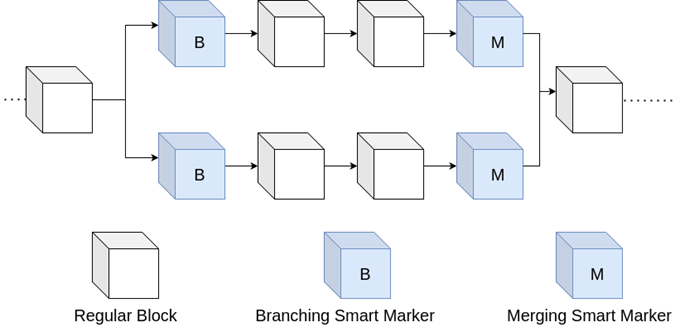
## What Happens to Transactions from Obsolete Blocks?
When a block becomes stale in a chain reorganization, its data no longer counts as confirmed. Its transactions are not lost, though: they can return to the [mempool](https://bip39-phrase.com/bitcoin-mempool/) and wait to be included in a new block, unless the winning chain already contains them or a conflicting transaction ([Bitcoin developer guide](https://developer.bitcoin.org/devguide/p2p_network.html)).
## What Are the Risks of Chain Reorganizations?
Chain reorganizations are usually limited to a single block, but they carry risks:
- Loss of confidence in transaction confirmations, which is why high-value payments wait for several blocks.
- The possibility of attacks such as the 51% attack, in which an attacker controls more than half of the network's hash rate and can outpace the honest chain.
- Long reorganizations can disrupt services, especially on smaller networks with less hash rate.
## Why Does the Longest Chain Rule Matter?
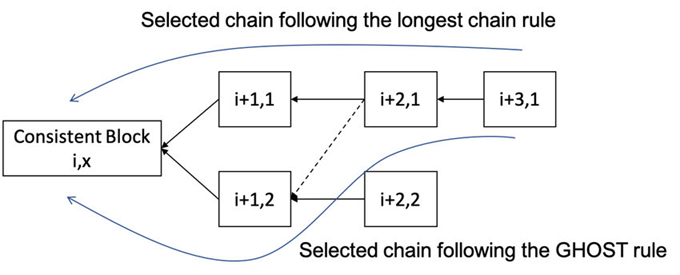
[Comparison between the chain selection rules of the longest chain and GHOST](https://www.researchgate.net/figure/Comparison-between-the-chain-selection-rules-of-the-longest-chain-and-GHOST-Block-i-k_fig9_352683511)
The longest chain principle plays a critical role in the security and resilience of the blockchain. Through it, the network achieves:
- Consistency of data in a decentralized network.
- Resistance to manipulation, since rewriting history means redoing the work.
- Effective prevention of double-spending.
The white paper shows how quickly that protection grows: the probability that an attacker with a minority of the hash rate catches up drops exponentially with every block added after a transaction. This principle not only builds trust in blockchains but also provides a foundation for their further development.
# The History of Bitcoin: A Timeline of Key Events Since 2008
Source: https://bip39-phrase.com/history-of-bitcoin/
Language: en · Published: 2025-10-28 · Updated: 2026-10-19
Bitcoin's history begins on 31 October 2008, when Satoshi Nakamoto sent the Bitcoin white paper to a cryptography mailing list, and the network itself started on 3 January 2009 with the genesis block. Since then Bitcoin has grown from an experiment run by a handful of volunteers into a global network, through exchange collapses, chain splits over upgrades and, in 2024, the approval of spot bitcoin exchange-traded products in the United States.
## Bitcoin History at a Glance
| Date | Event |
|---|---|
| 31 October 2008 | Satoshi Nakamoto [announces the white paper](https://www.metzdowd.com/pipermail/cryptography/2008-October/014810.html) on the Cryptography Mailing List |
| 3 January 2009 | The [genesis block](https://mempool.space/block/000000000019d6689c085ae165831e934ff763ae46a2a6c172b3f1b60a8ce26f) is mined |
| 12 January 2009 | Block 170 records the first transaction between two people: 10 BTC from Satoshi to Hal Finney |
| 22 May 2010 | Bitcoin Pizza Day: 10,000 BTC buys two pizzas |
| 15 August 2010 | A bug lets block 74,638 create 184 billion BTC; a fixed release, a soft fork, removes them within a day |
| 12 December 2010 | Satoshi's last forum post; the last known emails follow in April 2011 |
| 28 November 2012 | First halving: the block subsidy falls from 50 to 25 BTC |
| February 2014 | Mt. Gox, once the largest bitcoin exchange, halts withdrawals and files for bankruptcy protection |
| 9 July 2016 | Second halving: 12.5 BTC |
| 1 August 2017 | Bitcoin Cash splits off in the dispute over block size |
| 24 August 2017 | SegWit activates at block 481,824 |
| 11 May 2020 | Third halving: 6.25 BTC |
| 14 November 2021 | Taproot activates at block 709,632 |
| 10 January 2024 | The US SEC approves spot bitcoin exchange-traded products |
| 20 April 2024 | Fourth halving: 3.125 BTC |
| 9 March 2026 | Block 940,000 completes the first 20 million coins of the 21 million schedule |
## Where Did Bitcoin Come From?
In 2008, an anonymous individual, or possibly a group, using the name [Satoshi Nakamoto](https://bip39-phrase.com/who-is-satoshi-nakamoto-the-mystery-of-bitcoins-creator/) published *[Bitcoin: A Peer-to-Peer Electronic Cash System](https://bitcoin.org/bitcoin.pdf)*, a nine-page proposal for a currency that would work without governments or banks, relying instead on a decentralized network. It built on earlier ideas that it cites, such as Adam Back's Hashcash and Wei Dai's b-money. A few months later, in January 2009, the first block, known as the genesis block, was mined, launching the world's first working cryptocurrency.
The proposal introduced a distributed ledger that records and secures every transaction across the network ([how Bitcoin works](https://bip39-phrase.com/how-does-bitcoin-works/) explains the mechanics). It removed the need for intermediaries and offered a transparent, tamper-resistant record of all activity. Bitcoin's foundational ideas have since influenced thousands of blockchain projects around the world.
## How Has Mining Changed?
Rather than being created or printed, bitcoins enter circulation through [mining](https://bip39-phrase.com/how-bitcoin-mining-works/). Miners use computing power to find blocks that meet the network's proof-of-work target, and the winner of each round receives newly issued coins plus fees, which rewards them for maintaining and protecting the network. The amount issued per block halves every 210,000 blocks, which is why the halvings in the timeline above arrive roughly every four years.
Mining has moved from home computers to industrial-scale farms full of specialized hardware, and the network's combined computing power, its [hash rate](https://bip39-phrase.com/hash-rate/), reached around 1,000 EH/s in 2026. The growing scale and competition have raised questions about energy use and sustainability, prompting some developers to explore more energy-efficient alternatives for other networks.
## How Did the Early Ecosystem Grow?
In 2010, a well-known early transaction involved [buying two pizzas for 10,000 bitcoins](https://bip39-phrase.com/bitcoin-for-pizza-story/), the currency's first exchange for a physical good. The same year saw the launch of early trading platforms such as BitcoinMarket.com, which made it easier to swap coins for traditional currencies.
Shortly after, exchanges such as Mt. Gox gained dominance, though not without problems. In February 2014 Mt. Gox stopped withdrawals and applied for civil rehabilitation in Tokyo, and it entered bankruptcy that April after losing a large share of its customers' bitcoin; the [court-appointed trustee](https://www.mtgox.com/) did not begin repaying creditors in bitcoin until July 2024. The collapse became one of the most dramatic events in crypto history and showed both the enthusiasm and the fragility of Bitcoin's early infrastructure.
By 2011, developers had begun creating alternative currencies such as Litecoin, using Bitcoin's open-source code as a foundation. These coins introduced variations in speed, supply and algorithm design, expanding the ecosystem and encouraging experimentation.
## How Did It Reach the Mainstream?
Bitcoin's price history has been full of dramatic highs and lows. As word spread, more people were drawn to its promise of financial independence and high returns. Forums, blogs and news outlets amplified its exposure, turning it from a tech novelty into a global phenomenon.
What signaled Bitcoin's maturing status was the growing interest from large financial institutions. Hedge funds, corporate treasuries and fintech companies began adding Bitcoin to their strategies. On 10 January 2024 the US Securities and Exchange Commission [approved the listing and trading of spot bitcoin exchange-traded products](https://www.sec.gov/newsroom/speeches-statements/gensler-statement-spot-bitcoin-011023), giving ordinary brokerage customers a regulated way to hold bitcoin exposure, while stressing that the decision was no endorsement of bitcoin itself.
More than a speculative asset, Bitcoin gained recognition as a tool for cross-border payments and digital savings, particularly in regions with limited access to stable banking. Its decentralized design appealed to people who distrust traditional finance, its price growth attracted investors and its global reach made it useful across borders.
## What Setbacks and Splits Came Along the Way?
Bitcoin's journey hasn't been smooth. In its early years, it was linked to unauthorized transactions and online black markets, which prompted stronger legal oversight in many jurisdictions and raised public concerns about its use.
Volatility also remains a major issue. Prices can swing by thousands of dollars in days, which makes bitcoin unsuitable for many as a stable medium of exchange. Users must also take responsibility for the security of their own funds, as the system offers no central recovery mechanism.
Upgrades to the protocol have sparked fierce debate. They are proposed as [Bitcoin Improvement Proposals](https://bip39-phrase.com/bitcoin-improvement-proposal/), and disagreements have occasionally led to [chain forks](https://bip39-phrase.com/longest-chain-in-blockchain-explained-security-consensus-forks/) that produced new cryptocurrencies: the dispute over block size ended in August 2017 with Bitcoin Cash splitting off, weeks before SegWit ([BIP 141](https://github.com/bitcoin/bips/blob/master/bip-0141.mediawiki)) activated on Bitcoin. Taproot followed in November 2021 with broad support ([BIP 341](https://github.com/bitcoin/bips/blob/master/bip-0341.mediawiki)), and its new script rules later enabled [Ordinals inscriptions](https://bip39-phrase.com/bitcoin-ordinals/), which reopened the debate over what block space is for.
## How Has It Changed Finance?
Despite its challenges, Bitcoin has changed how people think about financial systems. It lets individuals hold and transfer value without relying on intermediaries, and in countries with unstable banking systems or high inflation it offers a possible alternative to the local currency.
More broadly, Bitcoin opened the way for a new financial sector built on decentralized technology. Whether it is used as a means of exchange, a store of value or a speculative asset, its influence now reaches well beyond the small group of cryptographers who first ran it, and its future, like its past, is likely to bring both breakthroughs and setbacks.
# What Is a Dust Transaction in Crypto? Bitcoin UTXO Basics
Source: https://bip39-phrase.com/dust-transaction/
Language: en · Published: 2025-09-12 · Updated: 2026-10-19
A dust transaction is one that creates or spends an output so small that the fee to spend it would be larger than the output itself is worth. Bitcoin Core treats such outputs as dust: at its default settings, anything below 546 satoshis sent to a legacy address or 294 satoshis sent to a native SegWit address. Dust ends up in wallets as leftover change, as tiny payments from faucets and services, or on purpose, in dusting attacks that try to link a person's addresses.
## Dust Limits at a Glance
| Output type | Address starts with | Dust limit at 3 sat/vB |
|---|---|---|
| Legacy (P2PKH) | 1 | 546 satoshis |
| Native SegWit (P2WPKH) | bc1q | 294 satoshis |
| Taproot (P2TR) | bc1p | 330 satoshis |
The first two limits are spelled out in Bitcoin Core's [policy code](https://github.com/bitcoin/bitcoin/blob/master/src/policy/policy.cpp), and the same formula gives 330 satoshis for a Taproot output. [Bitcoin address types](https://bip39-phrase.com/what-is-a-bitcoin-address/) explains the formats.
## How Small Is Too Small to Spend?
In Bitcoin, value sits in unspent transaction outputs (UTXOs), and every output you spend later has to be added to a transaction as an input, which takes space and therefore fees. Bitcoin Core counts an output as dust when spending it would cost more than it is worth at its dust relay fee rate of 3 sat/vB. The cost covers the output itself plus the input needed to spend it, so the limit depends on the output type: a legacy output of 34 bytes needs an input of at least 148 bytes to spend, 182 bytes in all, which at 3 sat/vB comes to 546 satoshis.
Outputs above the dust limit can still be uneconomical. Bitcoin Optech defines [uneconomical outputs](https://bitcoinops.org/en/topics/uneconomical-outputs/) as outputs worth less than the fees it will cost to spend them, which depends on fee rates at the time. A native SegWit input takes about 68 vbytes, so at 15 sat/vB spending it costs about 1,000 satoshis: a 1,000-satoshi output is not dust by policy, but it is worth nothing in a busy [mempool](https://bip39-phrase.com/bitcoin-mempool/).
## Where Do Tiny Outputs Come From?
### Change Left Over From Payments
When the coins a wallet spends don't match the payment exactly, the remainder comes back to the sender as change. Sometimes that change is so small that it is barely worth spending.
### Many Small Payments
Receiving lots of low-value payments over time, from faucets, rewards or micropayments, builds up a pile of small UTXOs. Each one adds an input, and a fee, when you eventually spend it.
### Dusting Attacks
An attacker sends tiny amounts, usually just above the dust limit so that the transactions relay, to addresses that have already appeared on the blockchain. If a wallet later spends that dust together with its other coins, the transaction shows that the addresses belong to the same owner, a privacy leak that Bitcoin Optech describes in its [topic on output linking](https://bitcoinops.org/en/topics/output-linking/). The defense is simple: don't spend unexpected dust. Freeze it in your wallet's coin control, or leave it alone.
## Why Do Small Outputs Cost More Than They Are Worth?
Despite the tiny amounts involved, dust outputs cause real problems:
### Extra Load on the Blockchain
Every UTXO stays in the set of unspent outputs that each full node keeps until someone spends it. Dust that is never spent bloats that set forever, which is why nodes refuse to relay transactions that create it.
### Higher Transaction Costs
Fees in Bitcoin depend on the size of the transaction in virtual bytes, not on the value transferred. A transaction with many small inputs is larger and therefore more expensive to confirm.
### Slower Wallet Performance
Wallets that hold hundreds of tiny outputs can slow down when building transactions, and the clutter complicates fee estimation and coin selection.
## How Do You Clean Up Small UTXOs?
### Leave Dust Out of Payments
Spending a single dust output on its own costs more in fees than the output is worth. Many wallets skip such outputs when they pick coins automatically, and Bitcoin Core nodes won't relay a transaction that would create new dust.
### Consolidate When Fees Are Low
When the mempool is quiet and fee rates drop, you can combine several small outputs into one larger UTXO, which cuts the cost of future payments. Consolidation is the opposite of [batching payments](https://bip39-phrase.com/bitcoin-batching/): many inputs become one output instead of one transaction paying many people. Keep in mind that it links the consolidated addresses on the blockchain, so never consolidate dust that arrived from strangers.
### Use Coin Control
Desktop wallets such as Bitcoin Core, [Electrum](https://bip39-phrase.com/electrum-a-secure-and-lightweight-bitcoin-wallet/) and Sparrow let you see individual UTXOs, choose which ones a transaction spends and freeze the ones you want to keep out of it.
### Check for Inscriptions First
Small outputs can carry [Bitcoin Ordinals inscriptions](https://bip39-phrase.com/bitcoin-ordinals/). A wallet that doesn't track individual sats treats an inscribed output like any other coin, so a cleanup can spend the inscription as part of a fee or a consolidation.
## Is Dust Part of Bitcoin's Consensus Rules?
No. Dust is governed by node policy and [mempool](https://bip39-phrase.com/bitcoin-mempool/) behavior, not by Bitcoin's consensus rules: a block containing dust outputs is still valid. Bitcoin Core refuses to relay or mine new transactions that create dust, and node operators can change the threshold with the `-dustrelayfee` setting. The limit depends on the output type and on that configured fee rate, not on current network fees.
Since [Bitcoin Core 29.0](https://bitcoincore.org/en/releases/29.0/), there is one narrow exception called ephemeral dust: a zero-fee transaction may carry a single dust output, as long as that output is spent in the same package by a child transaction.
Dust involves tiny amounts of bitcoin, but it touches privacy, fees and the size of every node's database. Knowing where it comes from and when to leave it alone keeps a wallet clean, cheap to use and harder to trace.
# What Is Bitcoin Batching? Benefits and Drawbacks
Source: https://bip39-phrase.com/bitcoin-batching/
Language: en · Published: 2025-11-10 · Updated: 2026-10-19
Bitcoin batching means paying several recipients in one transaction instead of sending each of them a separate one. The payments share the transaction's fixed overhead, its inputs and a single change output, so each payment takes less block space and costs a smaller fee. In [Bitcoin Optech's analysis](https://bitcoinops.org/en/payment-batching/), a transaction that pays five recipients saves a bit over 60% of the block space per payment, and the saving approaches a bit over 75% as batches grow.
## Batching at a Glance
| | Five separate payments | One transaction paying five recipients |
|---|---|---|
| Transactions | 5 | 1 |
| Block space per payment | About 140 vbytes | About 53 vbytes |
| Change outputs | 5 | 1 |
| Fee per payment at the same fee rate | Full fee | A bit under 40% of it |
The sizes come from Optech's example, in which every input and output is native SegWit (P2WPKH).
## How Do Several Payments Fit in One Transaction?
Bitcoin tracks coins as unspent transaction outputs (UTXOs), and one transaction can spend several of them and create many new outputs. A batched payment uses that directly: the wallet selects enough inputs to cover every payment plus the fee, adds one output for each recipient and one change output back to itself, and signs each input once. Bitcoin Core's `sendmany` command works this way, paying any number of addresses while creating only one transaction ([RPC reference](https://developer.bitcoin.org/reference/rpc/sendmany.html)).
Each recipient sees an ordinary payment to their [Bitcoin address](https://bip39-phrase.com/what-is-a-bitcoin-address/), so batching needs no cooperation or special software on their side. Miners treat the batch like any other transaction and rank it by its fee rate ([how Bitcoin mining works](https://bip39-phrase.com/how-bitcoin-mining-works/)).
## How Much Can You Save on Fees?
Every transaction carries some data no matter how many people it pays: the version and lock time, the input and output counts, the inputs themselves and usually a change output. A batch pays for that once. In Optech's example, a single payment takes 140 vbytes, while a batch to five recipients uses about 53 vbytes per recipient. The more recipients, the closer the saving gets to its ceiling of a bit over 75%. Savings are smaller for services that need roughly one input for every payment they send, peaking at about 30% in that case.
The savings matter most when fees are high. When the [mempool](https://bip39-phrase.com/bitcoin-mempool/) is congested and fee rates climb, a 60% smaller footprint per payment means a 60% smaller fee bill, and fewer transactions also mean less data for every node to relay, check and store.
### Main Advantages
- **Lower fees:** sharing one transaction among many payments cuts the block space, and so the fee, per payment, by up to a bit over 75% in the best case
- **Less load on the network:** fewer and smaller transactions to relay, validate and store
- **More payments per block:** the same block space carries more transfers
- **Tidier wallets:** fewer change outputs mean fewer small UTXOs to manage later
## What Are the Drawbacks?
- **Privacy:** everyone paid in the same transaction can see the other outputs and reasonably assume one sender paid them all, a concern Optech's guide also raises.
- **Delays:** a service has to collect payments before sending them, so a withdrawal may wait minutes or hours instead of leaving at once, and recipients see nothing until the batch goes out.
- **Shared fate:** all the payments confirm together or not at all. If the batch pays too low a fee, every recipient waits, and fee bumping gets harder because recipients who spend their unconfirmed outputs can push the transaction group toward relay limits.
- **No individual changes:** once the batch is broadcast, a single payment can't be edited or cancelled on its own; changing one means replacing the whole transaction.
## Batching vs Consolidation: What Is the Difference?
The two are opposite moves. Batching combines many payments, and so many outputs, into one transaction. Consolidation combines many of your own small inputs into a single output, usually when fee rates are low, so that later payments need fewer inputs. Wallets that collect lots of small payments use consolidation to keep future fees down; [dust outputs](https://bip39-phrase.com/dust-transaction/), which cost more to spend than they are worth, are the exception and are usually best left alone. Busy services often do both: they consolidate when block space is cheap and batch outgoing payments when it is expensive.
## Who Uses It, and Can Individuals Batch Too?
Batching pays off for anyone who sends many payments at once. Optech names exchanges processing customer withdrawals as the main users and mining pools paying their members as a natural fit. Individuals can batch too: some wallets accept several recipients on one send screen, so a [hot wallet](https://bip39-phrase.com/bitcoin-hot-wallet/) with that feature can save fees when you pay several people on the same day.
Batching does not change Bitcoin's rules or its block size; it simply uses block space more efficiently, which keeps fees lower for the people batching and leaves more room in each block for everyone else.
# What Is Hash Rate? Bitcoin Mining Power, Units and Difficulty
Source: https://bip39-phrase.com/hash-rate/
Language: en · Published: 2025-09-19 · Updated: 2026-10-19
Hash rate is the number of hash calculations per second that miners perform while searching for a valid block. On Bitcoin, each calculation is a double SHA-256 hash of a block header, and the network's combined hash rate, about 1,000 exahashes per second (10²¹ hashes every second) in October 2026 according to [mempool.space](https://mempool.space/mining), measures how much computing power stands behind the blockchain.
- **Unit:** hashes per second (H/s). Bitcoin's network total is counted in EH/s, 10¹⁸ H/s.
- **Estimated, not reported:** nobody announces their hash rate; it is worked out from the difficulty and how fast blocks arrive.
- **Tied to difficulty:** every 2,016 blocks the target adjusts so that blocks keep coming about every ten minutes, whatever the hash rate.
- **Security:** rewriting confirmed blocks takes more hash rate than the rest of the network combined.
- **Mining income:** a miner's expected share of block rewards equals its share of the network hash rate.
## What Does Hash Rate Measure?
A miner looks for a block header whose hash, read as a number, falls below the network's target. Hash outputs cannot be predicted, so the only method is trial and error: change a field called the nonce, hash the header again and check the result. The [Bitcoin white paper](https://bitcoin.org/bitcoin.pdf) describes proof of work as exactly this kind of scan, expensive to perform but checked with a single hash. Each attempt is one hash, and hash rate counts attempts per second.
Two different numbers go by the same name. A mining machine's hash rate is its speed, printed on its spec sheet in terahashes per second. The network hash rate is the sum of every machine working on Bitcoin. Neither says anything about how many transactions Bitcoin can process: the block weight limit and the ten-minute target set that, and more hash rate only makes each block harder to find.
## From H/s to ZH/s: Which Units Are Used?
| Unit | Hashes per second | Where you meet it |
|---|---|---|
| H/s (hash) | 1 | The base unit |
| kH/s (kilohash) | 10³ | — |
| MH/s (megahash) | 10⁶ | CPUs and graphics cards in Bitcoin's first years |
| GH/s (gigahash) | 10⁹ | Early ASIC miners around 2013 |
| TH/s (terahash) | 10¹² | A single modern ASIC miner |
| PH/s (petahash) | 10¹⁵ | A mining farm |
| EH/s (exahash) | 10¹⁸ | Large pools and the network as a whole |
| ZH/s (zettahash) | 10²¹ | The whole network, around 1 ZH/s (1,000 EH/s) in October 2026 |
Each step is a thousand times the one before it, so 1 EH/s equals a million TH/s.
## How Is the Network Total Estimated?
Miners do not report their hash rate, but the blockchain gives it away. The difficulty, D, sets how many hashes a block takes on average: about D × 2³². At one block per 600 seconds, that implies a network hash rate of D × 2³² / 600 hashes per second, the formula the [Bitcoin Wiki](https://en.bitcoin.it/wiki/Difficulty) gives. After the adjustment at block 971,712 on 16 October 2026 the difficulty was about 1.406 × 10¹⁴, which works out to roughly 1.0 × 10²¹ hashes per second, or 1,000 EH/s.
Estimates also use how fast recent blocks arrived. Bitcoin Core's `getnetworkhashps` command averages over the last 120 blocks by default, or over the blocks since the last difficulty change if you pass -1 ([RPC reference](https://developer.bitcoin.org/reference/rpc/getnetworkhashps.html)). Because blocks are found at random, short windows swing a lot: mempool.space's daily estimates ranged from about 940 to 1,080 EH/s between 14 and 18 October 2026. Charts based on three-day or seven-day averages are smoother, and two sites can disagree by several percent without either being wrong.
## Why Does Mining Difficulty Change Every Two Weeks?
Every 2,016 blocks, about two weeks, each node compares how long those blocks took with the two weeks they should have taken and moves the target in proportion, by at most a factor of four in either direction ([Bitcoin developer guide](https://developer.bitcoin.org/devguide/block_chain.html)). If hash rate grew, blocks arrived early and the difficulty rises; if miners switched off, blocks slowed down and the difficulty falls. The 2,016 blocks before height 971,712 took about 13 days instead of 14, so the difficulty rose by 5.9%.
Between adjustments the lag shows. A quickly growing hash rate makes blocks come faster than every ten minutes, and a sudden drop makes them slower until the next retarget: in the week to 18 October 2026, miners found 1,074 blocks instead of the 1,008 a seven-day week should produce ([mempool.space](https://mempool.space/mining)). This feedback loop keeps Bitcoin's issuance on schedule no matter how much hardware joins or leaves. [How Bitcoin mining works](https://bip39-phrase.com/how-bitcoin-mining-works/) covers the rest of the process, from building a block to the hardware.
## Why Does Hash Rate Matter for Security?
To reverse a confirmed payment, an attacker has to build an alternative chain with more accumulated work than the honest one, because nodes follow the [chain with the most proof of work](https://bip39-phrase.com/longest-chain-in-blockchain-explained-security-consensus-forks/). Doing that reliably takes more hash rate than the rest of the network, the so-called 51% attack. With less, the odds collapse quickly: the white paper calculates that an attacker with 10% of the hash rate catches up from six blocks behind with a probability of about 0.024%, and that against an attacker with 30%, a recipient needs to wait for 24 confirmations to push the chance below 0.1%.
A high hash rate makes such an attack expensive, because the attacker would need machines and electricity on the scale of the whole network. Even a successful attacker could only reverse or reorder recent transactions, such as their own payments. They could not spend coins without the private keys, create coins beyond the subsidy or change the rules, because nodes reject invalid blocks however much work they carry.
The total hides how concentrated hash rate is. Most of it is pointed at a few pools: in the week to 18 October 2026, Foundry USA and AntPool together found 46% of all blocks ([mempool.space](https://mempool.space/mining)). Pools coordinate miners rather than own all the machines, and miners can switch pools, but concentration is worth watching alongside the headline number.
## How Much Can One Miner Expect to Earn?
A miner's expected share of block rewards equals its share of the network hash rate. One machine at 200 TH/s against a network of 1,020 EH/s has a 1 in 5.1 million chance of finding any given block. At 144 blocks a day, mining alone it would expect one block every 97 years or so, which is why miners join pools that pay out in proportion to the work each member submits ([Bitcoin developer guide](https://developer.bitcoin.org/devguide/mining.html)).
The same ratio drives income. Revenue per unit of hash rate, often called hashprice, falls when the network grows faster than the bitcoin price or the fees users pay to get out of the [mempool](https://bip39-phrase.com/bitcoin-mempool/): at the October 2026 difficulty and the average reward of the preceding 1,008 blocks, one TH/s earned about 45 satoshis a day. Whether that covers the electricity bill is the subject of [is Bitcoin mining still profitable](https://bip39-phrase.com/bitcoin-mining-still-profitable/).
## Where Can You Check the Current Hash Rate?
- **mempool.space mining dashboard:** hash rate and difficulty charts, the estimated next adjustment and each pool's share of recent blocks.
- **Your own node:** `getnetworkhashps` for the estimate and `getmininginfo` for the current difficulty.
- **Compare like with like:** a one-day figure and a seven-day average often differ by 5 to 10%, so check which window a chart uses before reading a record or a crash into it.
```bash
bitcoin-cli getnetworkhashps # hashes per second over the last 120 blocks
bitcoin-cli getnetworkhashps -1 # since the last difficulty adjustment
bitcoin-cli getmininginfo # includes the current difficulty
```
Hash rate is one of several public numbers that describe the network. For how it fits with the mempool, blocks and nodes, see [how Bitcoin works](https://bip39-phrase.com/how-does-bitcoin-works/).
# What Is the Bitcoin Mempool and How Does It Work?
Source: https://bip39-phrase.com/bitcoin-mempool/
Language: en · Published: 2025-08-10 · Updated: 2026-10-19
The Bitcoin mempool, short for memory pool, is the set of valid transactions a node has received but not yet seen confirmed in a block. Every full node keeps its own, so there is no single global queue: [miners](https://bip39-phrase.com/how-bitcoin-mining-works/) build blocks from their mempool, usually taking the highest fee rates first, and a transaction leaves it when it is confirmed, replaced by a version that pays more, or dropped.
## Mempool Limits at a Glance
The defaults below are Bitcoin Core's, the software most nodes run. Operators can change every one of them, which is one reason mempools differ.
| Setting | Default | What it controls |
|---|---|---|
| `-maxmempool` | 300 MB | Memory the mempool may use before the lowest fee rates are evicted |
| `-mempoolexpiry` | 336 hours (two weeks) | How long an unconfirmed transaction is kept |
| `-minrelaytxfee` | 0.1 sat/vB | Lowest fee rate the node accepts and relays |
| `-dustrelayfee` | 3 sat/vB | Fee rate used to decide which outputs count as dust |
| Replace-by-fee | Full RBF | Any unconfirmed transaction can be replaced by one that pays more |
| `-persistmempool` | On | The mempool is saved to `mempool.dat` at shutdown and reloaded at startup |
The size and expiry limits are set in [mempool_options.h](https://github.com/bitcoin/bitcoin/blob/master/src/kernel/mempool_options.h) and the fee rates in [policy.h](https://github.com/bitcoin/bitcoin/blob/master/src/policy/policy.h). The minimum relay fee rate fell from 1 to 0.1 sat/vB in [Bitcoin Core 29.1](https://bitcoincore.org/en/releases/29.1/) (September 2025), and full RBF became the default in [Bitcoin Core 28.0](https://bitcoincore.org/en/releases/28.0/).
## How Does a Transaction Get Into the Mempool?
A wallet builds and signs a transaction, spending earlier outputs as [how Bitcoin works](https://bip39-phrase.com/how-does-bitcoin-works/) describes, and sends it to one or more nodes. Each node checks it before accepting it: the signatures must be valid, the coins it spends must exist and not be spent already, and it must pass the node's relay policy, which sets a minimum fee rate, a maximum size of 400,000 weight units and a ban on creating [dust outputs](https://bip39-phrase.com/dust-transaction/) too small to be worth spending. A transaction that passes goes into the node's mempool and is announced to its peers, which run the same checks, so it usually reaches nodes across the network within seconds.
Mempools still differ from node to node. A transaction may not have reached a node yet, a node may run a smaller mempool or a stricter policy, or it may have evicted low-fee transactions that others still keep. That is why two block explorers can show different numbers for "the" mempool.
## How Do Fees Decide What Confirms First?
Block space is limited: a block may hold at most 4 million weight units, about 1 million virtual bytes ([BIP 141](https://github.com/bitcoin/bips/blob/master/bip-0141.mediawiki)). Miners want the most fees from that space, so they rank transactions by fee rate, in satoshis per virtual byte (sat/vB), not by the total fee or the amount sent. A simple payment with one input and two outputs takes about 140 vbytes ([Bitcoin Optech](https://bitcoinops.org/en/payment-batching/)), so at 5 sat/vB it pays 700 satoshis whether it moves 0.001 BTC or 100 BTC.
Unconfirmed parents and children are judged together. Bitcoin Core's block template ranks a transaction with its unconfirmed ancestors by their combined fee rate, which is what lets a high-fee child pull a low-fee parent into a block ([Bitcoin Optech](https://bitcoinops.org/en/topics/cpfp/)). Block explorers use the same logic to draw projected blocks: slices of the mempool sorted by fee rate, each about one block's worth, with the fee rate needed to make the next one.
Services that send many payments can shrink their share of the queue by [batching payments](https://bip39-phrase.com/bitcoin-batching/) into one transaction, which takes far less block space per payment.
## What Happens When the Network Is Congested?
When demand for block space outruns supply, whether from payments or from data such as [Ordinals inscriptions](https://bip39-phrase.com/bitcoin-ordinals/), the backlog grows. Once a node's mempool reaches its memory limit, the node evicts the transactions with the lowest fee rates and raises its own minimum fee rate, so new transactions below that level are turned away; mempool.space shows this level as the purging fee rate. Separately, a transaction that waits two weeks without confirming expires from Bitcoin Core's mempool.
A big mempool does not always mean high fees. On 18 October 2026, [mempool.space](https://mempool.space/) counted about 38,000 unconfirmed transactions, roughly 30 million vbytes or 30 blocks' worth. Yet 3 sat/vB was enough for the next block, because 95% of that backlog paid only 0.1 to 0.2 sat/vB, just above the minimum relay fee rate. What decides your wait is how much is queued above your fee rate, not the total size.
## Why Is My Transaction Stuck, and How Can I Speed It Up?
A transaction stays unconfirmed when its fee rate is below what miners can earn from other transactions. Nothing is lost while it waits: the transaction will either confirm or drop out of mempools, and your wallet keeps control of the coins. There are three ways forward.
- **Replace-by-fee (RBF).** Broadcast a new version that spends at least one of the same inputs and pays a higher fee ([Bitcoin Optech](https://bitcoinops.org/en/topics/replace-by-fee/)). Under Bitcoin Core's [replacement rules](https://github.com/bitcoin/bitcoin/blob/master/doc/policy/mempool-replacements.md), the new version must pay more in total than what it replaces, plus enough to cover its own size at the incremental relay fee rate. Wallets call this "bump fee", "speed up" or "increase fee". Transactions once had to opt in to replacement by signalling, as [BIP 125](https://github.com/bitcoin/bips/blob/master/bip-0125.mediawiki) describes; since Bitcoin Core 28.0, nodes accept replacements by default without the signal, although some wallets still offer the button only for transactions that signalled.
- **Child pays for parent (CPFP).** Spend an output of the stuck transaction, either your change or, if you are the recipient, the payment itself, in a new transaction with a high fee. Miners evaluate the two together, so the child pulls the parent into a block.
- **Wait.** If it is not urgent, let it sit: fee rates rise and fall with demand, and the transaction confirms once the queue above it clears.
A transaction that expires or is evicted is not cancelled. Until its coins are spent in a confirmed transaction, the original can still be rebroadcast by anyone and mined. If you need certainty, replace it with RBF, for example with a version that sends the coins back to your own address.
## How Can You See What Is in the Mempool?
Block explorers show the mempool of their own nodes. [mempool.space](https://mempool.space/) is a popular open-source example: it shows projected blocks with their fee ranges, fee estimates in sat/vB and, when mempools fill up, the purging fee rate. Paste a transaction ID into its search box to see the transaction's fee rate and how far it is from the next block. Its fee estimates are guides, not promises.
With your own Bitcoin Core node you can query the mempool directly:
```bash
bitcoin-cli getmempoolinfo # transaction count, total vsize, memory use, minimum fee
bitcoin-cli getrawmempool # IDs of every transaction in the mempool
bitcoin-cli getmempoolentry # fee, size and ancestors of one transaction
```
In the `getmempoolinfo` output, `size` is the number of transactions, `bytes` their total virtual size, `usage` the memory they take and `mempoolminfee` the lowest fee rate the node currently accepts ([RPC reference](https://bitcoincore.org/en/doc/29.0.0/rpc/blockchain/getmempoolinfo/)).
## Mempool vs Blockchain: What Is the Difference?
| | Mempool | Blockchain |
|---|---|---|
| Contents | Valid transactions waiting for a block | Confirmed transactions in blocks |
| Copies | Each node keeps its own, and they differ | The same chain on every node that follows it |
| Lifetime | Temporary: transactions confirm, expire or get replaced | Permanent |
| Rules | Node policy, which operators can change | Consensus rules every node enforces |
The two meet during a chain reorganization. When a block becomes stale because another branch overtook it, its transactions can go back into the mempool to wait for a new block, unless the winning chain already contains them or a conflicting spend ([Bitcoin developer guide](https://developer.bitcoin.org/devguide/p2p_network.html)). The [longest chain rule](https://bip39-phrase.com/longest-chain-in-blockchain-explained-security-consensus-forks/) explains why such reorganizations happen.
## Frequently Asked Questions
### Is there one mempool for the whole Bitcoin network?
No. Each node keeps its own mempool, and the contents differ with timing, settings and policy. An explorer shows the view of its own nodes.
### Can a transaction disappear from the mempool?
Yes. It can expire after two weeks, be evicted when mempools fill up, or be replaced by a version with a higher fee. Disappearing is not the same as being cancelled: until the coins are spent in a confirmed transaction, the original can still be rebroadcast and mined.
### What fee rate should I pay?
Look at how much is queued above a fee rate rather than at the size of the mempool. If the lowest fee rate in the next projected block is 3 sat/vB, paying a little more should get you into it unless a rush of new transactions arrives. If you are in no hurry, a lower fee rate with the option to bump it later is cheaper.
# Who Is Satoshi Nakamoto? The Mystery of Bitcoin's Creator
Source: https://bip39-phrase.com/who-is-satoshi-nakamoto-the-mystery-of-bitcoins-creator/
Language: en · Published: 2024-11-01 · Updated: 2026-10-19
Satoshi Nakamoto is the pseudonym of the person or group who created Bitcoin: Satoshi published the Bitcoin white paper in October 2008, mined the first block in January 2009 and stopped communicating in 2011. Nobody has proven who Satoshi is. Everyone named so far has denied it or failed to prove it, and in 2024 the High Court in London ruled that Craig Wright, the most persistent claimant, is not Satoshi.
- **Known work:** the Bitcoin white paper, the genesis block and the first versions of the Bitcoin software
- **Last public post:** 12 December 2010, on the Bitcointalk forum
- **Coins:** an estimated 1.1 million BTC mined in 2009 and 2010, almost none of it ever spent
- **Identity:** unknown; the only convincing proof would be a signature made with Satoshi's early keys
## What Did Satoshi Create?
On 31 October 2008, Satoshi sent the white paper, *[Bitcoin: A Peer-to-Peer Electronic Cash System](https://bitcoin.org/bitcoin.pdf)*, to the [Cryptography Mailing List](https://www.metzdowd.com/pipermail/cryptography/2008-October/014810.html), introducing "a new electronic cash system that's fully peer-to-peer, with no trusted third party". The nine-page paper describes a [decentralized digital currency](https://bip39-phrase.com/how-does-bitcoin-works/) in which a chain of proof of work, rather than a bank, stops anyone from spending the same coins twice. It builds on earlier ideas that it cites, such as Adam Back's Hashcash and Wei Dai's b-money.
In January 2009 Satoshi mined the genesis block and released Bitcoin v0.1. For the next two years Satoshi kept writing code, answered questions on the forum and exchanged emails with early developers such as Hal Finney, Gavin Andresen and Mike Hearn. Those conversations show deep knowledge of cryptography and C++ and a strong commitment to a currency that no central party controls.
## When Did Satoshi Disappear?
| Date | Event |
| --- | --- |
| 31 October 2008 | The Bitcoin white paper is posted to the Cryptography Mailing List |
| 3 January 2009 | Satoshi mines the genesis block, embedding the Times headline "Chancellor on brink of second bailout for banks" |
| 9 January 2009 | Bitcoin v0.1 is released |
| 12 January 2009 | Satoshi sends Hal Finney 10 BTC in block 170, the first bitcoin transaction between two people |
| 12 December 2010 | Satoshi's last public post on the Bitcointalk forum |
| April 2011 | In the last known email, to developer Mike Hearn, Satoshi says they have "moved on to other things" |
Satoshi's [last forum post](https://bitcointalk.org/index.php?topic=2228.0), on 12 December 2010, announced version 0.3.19 with new protections against denial-of-service attacks. Bitcoin was still small then: the [first pizza bought with bitcoin](https://bip39-phrase.com/bitcoin-for-pizza-story/) had changed hands less than seven months earlier. Private emails continued for a few more months, by which time Satoshi had handed control of the code repository to Gavin Andresen. Nothing has been heard from Satoshi since.
## Why Did Bitcoin's Creator Stay Anonymous?
Satoshi never explained the choice, so every answer is a guess. The practical reasons are easy to see: whoever launched a currency outside the banking system could attract legal pressure, and whoever holds a famous fortune risks being targeted. Anonymity also suits the design. With no known founder there is nobody to arrest, sue or lobby, and nobody whose word overrides the rules that everyone else runs.
## Main Identity Theories: Who Has Been Named?
Many people have been named as Satoshi. None of the claims has been proven, and the people below have either denied them or been shown to be wrong:
- **Hal Finney**: a cypherpunk who ran Bitcoin from its first day and received the first transaction. He denied being Satoshi and died in 2014.
- **Nick Szabo**: designed "bit gold", a precursor to Bitcoin. He has repeatedly denied being Satoshi.
- **Adam Back**: invented Hashcash, the proof-of-work scheme cited in the white paper. He denies being Satoshi.
- **Dorian Nakamoto**: named by Newsweek in 2014. He denied any involvement.
- **Craig Wright**: claimed to be Satoshi from 2016. In March 2024 the High Court of England and Wales ruled that he is not Satoshi, and its [written judgment](https://caselaw.nationalarchives.gov.uk/ewhc/ch/2024/1198) of 20 May 2024 declared that he did not write the white paper or the first versions of the Bitcoin software.
- **Peter Todd**: named by the 2024 HBO documentary *Money Electric*. He denies it.
The only convincing proof would be cryptographic: a message signed with a key from one of the early blocks, or coins moved from them. No such proof has ever appeared.
## How Many Bitcoins Does Satoshi Hold?
Satoshi never published a list of addresses, so every figure is an estimate from blockchain analysis. In 2013, researcher Sergio Demian Lerner [found a pattern in the coinbase data of early blocks](https://bitslog.com/2013/04/17/the-well-deserved-fortune-of-satoshi-nakamoto/) that points to one dominant early miner, widely assumed to be Satoshi, and put its holdings at around 1 million BTC. His [2019 follow-up on the "Patoshi pattern"](https://bitslog.com/2019/04/16/the-return-of-the-deniers-and-the-revenge-of-patoshi/) counts about 22,000 blocks [mined](https://bip39-phrase.com/how-bitcoin-mining-works/) by that miner in 2009 and 2010, roughly 1.1 million BTC at 50 BTC per block, and cites a lower estimate of about 700,000 BTC from BitMEX Research.
By Lerner's count, 99.9% of those blocks are still unspent. The coins sit in thousands of separate outputs, so any movement would show on the blockchain at once. The 50 BTC reward of the genesis block can never be spent at all: the original code never added it to the set of spendable outputs.
## Does the Creator Still Control Bitcoin?
No. Owning coins gives no control over the network. The consensus rules are enforced by every full node that validates blocks, and changes are proposed in public as [Bitcoin Improvement Proposals](https://bip39-phrase.com/bitcoin-improvement-proposal/) that node operators, miners and users have to adopt, so today no single person, Satoshi included, can change the rules. If Satoshi's coins ever moved, the effect would be on the market, through fear of a large sale, not on the protocol.
## What Clues Do the Writings Give?
The white paper and the forum posts show fluency in cryptography, distributed systems, economics and programming, which is why some believe Satoshi was a small team rather than one person. The genesis block quotes a front-page headline from The Times, a London newspaper, about a second bank bailout, and many read it as a comment on the financial crisis that Bitcoin was meant to answer. Beyond that the writing gives few clues, and no attempt to match it to a known author has produced proof.
## What Would Happen If Satoshi Returned?
If Satoshi proved their identity, the immediate effect would be attention: on the person, on the fortune and on any views they voiced about Bitcoin's direction. Those views would carry weight in debates but no special power, since upgrades would still need node operators to adopt them. Whether Satoshi will ever come forward is unknown. After 15 years of silence, many assume the keys are lost or the person is no longer alive, but nothing confirms either.
## What Legacy Did Bitcoin's Creator Leave?
Bitcoin itself: the first decentralized digital currency to work at scale, still running more than a decade after its creator left. The white paper's ideas, a chain of proof of work and incentives for the people who secure it, inspired thousands of other blockchain projects; Harvard Business Review's [look at blockchain in business](https://hbr.org/2017/01/the-truth-about-blockchain) shows how far beyond currency the idea has spread. The smallest unit of bitcoin, one hundred-millionth of a coin, is called a satoshi in Satoshi's honour, and [Bitcoin Ordinals](https://bip39-phrase.com/bitcoin-ordinals/) even give each one a serial number.
## Frequently Asked Questions
### Is "Satoshi Nakamoto" a pseudonym?
Almost certainly. The name appeared with the white paper in 2008 and has never been tied to an identified person, and the Japanese-sounding name says nothing reliable about the creator's nationality.
### Did Satoshi Nakamoto act alone?
Nobody knows. The range of skills in the white paper and the code leads some to suspect a team, while others point to the single, consistent voice of the posts and emails.
### How could someone prove they are Satoshi?
By signing a message with a [private key](https://bip39-phrase.com/private-key-btc/) from one of the early blocks attributed to Satoshi, or by moving coins from them. Documents, stories and claims of authorship prove nothing, as the Craig Wright case showed.
### Where can I read Satoshi's original writings?
The white paper is on bitcoin.org, the announcement is in the archive of the Cryptography Mailing List, and Satoshi's forum posts remain on Bitcointalk. Our [history of Bitcoin](https://bip39-phrase.com/history-of-bitcoin/) follows what happened after Satoshi left.
# Anthropic API Key Format (sk-ant-api03): Anatomy & Security
Source: https://bip39-phrase.com/anthropic-api-key-format/
Language: en · Published: 2026-06-09 · Updated: 2026-10-19
An Anthropic API key is a secret string that starts with `sk-ant-` (in its classic form `sk-ant-api03-`) and authenticates your requests to the Claude API. You create it in the Claude Console, where the full value is shown only once, and send it with every request, either as a bearer token in the `Authorization` header or in the older `x-api-key` header, according to Anthropic's [API overview](https://platform.claude.com/docs/en/api/overview). Whoever holds the string can spend your credits, so it deserves the same care as a crypto private key: a long, high-entropy bearer secret that is mishandled mostly because people treat it as an ordinary configuration value. This guide breaks down the format, the other Anthropic credential types, and how to create, check, store and rotate a key.
## Anthropic API Key at a Glance
| Item | Details |
|---|---|
| **Prefix** | `sk-ant-`, classically `sk-ant-api03-`; Admin API keys use `sk-ant-admin01-` |
| **Length** | About 108 characters for an `api03` key |
| **Where to create it** | Claude Console, API keys page (`platform.claude.com/settings/keys`) |
| **How to send it** | `Authorization: Bearer `, or the legacy `x-api-key: ` header |
| **Shown** | Once, at creation; afterwards only a masked hint |
| **Expiration** | Chosen at creation: a preset from 3 hours to 30 days, a custom duration or never |
| **If it leaks** | Disable or delete it in the Console; keys found in public GitHub repositories are deactivated automatically |
## Anatomy of a Key
A classic Anthropic production key begins with the prefix `sk-ant-api03-`, followed by a long random body:
```text
sk-ant-api03-AAAAAAAAAAAAAAAAAAAA...BBBBBBBBBBBBBBBBBBBB
```
Read left to right, the prefix is self-describing:
- **`sk`** — "secret key", an industry convention that also opens OpenAI and Stripe secrets. It signals that the string is a private credential, not a publishable identifier.
- **`ant`** — the issuer, Anthropic. This namespacing lets secret-scanning tools tell an Anthropic key apart from an OpenAI or Stripe key at a glance.
- **`api03`** — the key format. Admin API keys carry `admin01` in the same place, which is how scanners tell the two apart.
- **The body** — random characters from the `A–Z a–z 0–9 - _` alphabet. The open-source secret scanner TruffleHog [matches an `api03` key](https://github.com/trufflesecurity/trufflehog/blob/main/pkg/detectors/anthropic/anthropic.go) as 93 such characters followed by `AA`, which makes the whole token 108 characters long.
One detail matters for anyone coming from the crypto world: **there is no checksum**. A BIP39 mnemonic encodes a checksum in its final word, so a typo is usually caught the moment you try to import it. An Anthropic key has no such safety net: change one character and you simply get a `401 authentication_error`, with no hint about whether the key was mistyped, revoked or expired. Copy it whole, or not at all.
## Which Anthropic Credentials Exist?
Not every Anthropic credential is a regular API key. Anthropic's [authentication guide](https://platform.claude.com/docs/en/manage-claude/authentication) and [Admin API key guide](https://platform.claude.com/docs/en/manage-claude/admin-api-keys) describe these:
| Credential | Typical prefix | Created in | Used for |
|---|---|---|---|
| **Personal API key** | `sk-ant-` | Console, API keys page | Your own development; acts as you and stops working if you leave the organization |
| **Service account key** | `sk-ant-` | Console, linked to a service account | CI pipelines, production services and agents |
| **Workspace key** (legacy) | `sk-ant-api03-` | Console, inside a workspace | Older integrations; belongs to the workspace, not a person |
| **Admin API key** | `sk-ant-admin01-` | Console, Admin keys page (admins only) | Organization management, usage and cost reports |
| **Claude Code OAuth token** | `sk-ant-oat01-` | `claude setup-token` | Claude Code billed to a Pro, Max, Team or Enterprise subscription |
Personal and service account keys are identity-backed: when the person or service account is removed from the organization, the key stops working, so it can't outlive its owner. For a server, a bot or a CI pipeline, use a service account key. The long-lived token that `claude setup-token` prints is different: according to the [Claude Code documentation](https://code.claude.com/docs/en/authentication), it lasts one year, authenticates against your Claude subscription and can only make model requests. Mixing up a subscription token and an API key is a common reason an integration "works on my machine" but fails in production.
The same split between an identifier and a secret shows up across the industry: our overview of [API keys on major cryptocurrency exchanges](https://bip39-phrase.com/api-keys-popular-exchanges/) shows the pattern in a different domain.
## How to Generate One
Anthropic's [key guide](https://platform.claude.com/docs/en/get-api-key) lists the steps:
1. Sign in to the **Claude Console** at `platform.claude.com`.
2. Open the **API keys** page (`platform.claude.com/settings/keys`).
3. Click **Create key**, give it a descriptive name (e.g. `prod-backend` or `ci-tests`), choose an expiration and set **Linked account** to yourself for a personal key or to a service account. You can also scope the key to one workspace.
4. Copy the key **immediately**. Like a freshly generated seed phrase, the full value is shown exactly once; after you close the dialog, only a masked preview remains.
That "shown once" behaviour is the most important parallel to crypto key management: **the moment of creation is the only moment you can back it up safely.** Treat the copy step with the same seriousness you would give to writing down a 24-word phrase.
## Validating a Key Locally
Before shipping, you can sanity-check a key in two cheap ways.
**1. Shape check with a regex.** Confirm that the string at least looks like a classic key before sending it anywhere:
```text
^sk-ant-api03-[A-Za-z0-9_-]{93}AA$
```
Newer key types may use a different tag after `sk-ant-`, so treat a failed match as a reason to look closer, not as proof the key is invalid.
**2. Live check with a free request.** Listing the available models with the [Models API](https://platform.claude.com/docs/en/api/models/list) uses no tokens and confirms the key is accepted:
```bash
curl https://api.anthropic.com/v1/models \
-H "Authorization: Bearer $ANTHROPIC_API_KEY" \
-H "anthropic-version: 2023-06-01"
```
A `200` with a list of models means the key works. Per Anthropic's [error reference](https://platform.claude.com/docs/en/api/errors), a `401 authentication_error` means the key is malformed, revoked or expired, and a `402 billing_error` points to a payment problem rather than the key. A key that works in several workspaces also needs an `anthropic-workspace-id` header on each request, or the API answers with a `400`.
## Treat the Key Like a Seed Phrase
This is where our usual subject matter pays off. The mental model that keeps a BIP39 mnemonic safe is the same one that keeps an API key safe: a high-value bearer secret that does damage the moment it leaks. If you have read our breakdown of [what happens when a seed phrase is compromised](https://bip39-phrase.com/bip39-seed-phrase-compromise/), the failure modes below will look familiar.
- **Never commit it to source control.** The most common key leak is a `.env` file or a hard-coded string pushed to a public repository. Anthropic's [key safety article](https://support.claude.com/en/articles/9767949-api-key-best-practices-keeping-your-keys-safe-and-secure) explains that GitHub scans public repositories for Claude API keys, notifies Anthropic when it finds one, and Anthropic deactivates the key and emails the owner. That limits the damage, but bots may have copied the key first. The crypto-world equivalent is a screenshot of your seed phrase in a cloud photo library.
- **Use environment variables or a secrets manager**, never inline literals. Vault, AWS Secrets Manager, Doppler or an OS keychain all beat plaintext in a config file. The same goes for the RPC keys and deployer private keys in a blockchain project, such as the ones used to [deploy EVM smart contracts](https://bip39-phrase.com/smart-contract-evm-what-it-is-and-how-it-works/).
- **Scope and isolate keys per environment.** One key for production, a separate one for staging, another for each developer. A leak then hits one environment, not your whole account, the same logic as keeping separate wallets for spending and savings.
- **Set spend limits and expirations, and monitor usage.** The Console lets you cap spend and watch per-key consumption, and an expiration date limits how long a leaked key stays useful. An unexpected spike is your earliest leak signal, just as an unexpected outgoing transaction is for a wallet.
- **Rotate on any suspicion.** In the Console, **Disable** is reversible and **Delete** is permanent. Revoking and reissuing an API key takes seconds, far easier than the irreversible "move all funds to a new wallet" routine a compromised seed phrase forces. Use that ease: when in doubt, rotate.
## Anthropic vs OpenAI API Keys
If your code talks to both providers, the differences below cause most "the key is definitely right but nothing works" bugs:
| | Anthropic | OpenAI |
|---|---|---|
| **Prefix** | `sk-ant-` (classic `sk-ant-api03-`) | `sk-proj-`, `sk-svcacct-`, `sk-admin-`, legacy `sk-` |
| **Header** | `Authorization: Bearer` or `x-api-key` | `Authorization: Bearer` |
| **Extra required header** | `anthropic-version` | None |
| **Free live check** | `GET /v1/models` | `GET /v1/models` |
The full breakdown of the other side is in our guide to the [OpenAI API key format](https://bip39-phrase.com/openai-api-key-format/), and more developer material is collected in our [developer guides](https://bip39-phrase.com/topics/developers/).
## Anthropic API Key Frequently Asked Questions
### Q1: What does the `sk-ant-api03` prefix mean?
It is a self-describing namespace: `sk` marks the string as a secret key, `ant` identifies Anthropic as the issuer, and `api03` marks the classic API key format. Admin keys use `sk-ant-admin01-` instead, and newer key types may carry a different tag after `sk-ant-`.
### Q2: What is the difference between an API key and an `sk-ant-oat01` token?
An API key is created in the Claude Console and billed to your organization's API usage. An `oat01` token is an OAuth token, such as the one `claude setup-token` generates for Claude Code; it draws on a Claude subscription and can only make model requests. For servers, bots and CI pipelines, use an API key, ideally one linked to a service account.
### Q3: How long is an Anthropic API key, and does it have a checksum?
A classic `api03` key is 108 characters: the 13-character `sk-ant-api03-` prefix plus 95 random characters. Unlike a BIP39 mnemonic, it has **no checksum**: a single mistyped character produces a `401` error with no hint, so always copy the key whole.
### Q4: I lost my key. Can I recover it?
No. Like a seed phrase, the full value is shown only once, at creation, and even the Admin API returns only a partial hint. Create a new key and delete the old one in the Console.
### Q5: My key returns a 401 error. What should I check?
In order: confirm you copied the whole string with no leading or trailing whitespace; check in the Console that the key hasn't been disabled, deleted or reached its expiration date; make sure you send it as `Authorization: Bearer` or `x-api-key`, not in the URL or body; and if both `ANTHROPIC_API_KEY` and `ANTHROPIC_AUTH_TOKEN` are set, unset one, since conflicting credentials can also be rejected. If in doubt, create a fresh key and try it.
# API Keys of Major Cryptocurrency Exchanges: Examples & Uses
Source: https://bip39-phrase.com/api-keys-popular-exchanges/
Language: en · Published: 2025-02-05 · Updated: 2026-10-19
An exchange API key is a set of credentials, usually a public key that identifies your account plus a secret that signs each request, that lets a program trade, read balances or pull market data on your exchange account without your password. Each exchange issues its own format and signs requests its own way, and each lets you limit what a key may do. Below: what the credentials look like on Binance, Coinbase, Kraken, Bitfinex and HTX, how bots use them, and how to keep them from becoming a back door into your account.
## Exchange API Keys at a Glance
Exchange API credentials are not interchangeable: each exchange issues its own set of values and signs requests differently. The examples below are the placeholder values the exchanges publish in their own documentation, so they are safe to show; never publish real keys.
| Exchange | Credentials | How requests are signed |
| --- | --- | --- |
| Binance | API key + secret key (HMAC), or API key + your own Ed25519 or RSA key pair | HMAC-SHA256, Ed25519 or RSA |
| Coinbase (CDP) | Key name or key ID + private key (ECDSA or Ed25519) | A JWT signed with ES256 or EdDSA, valid for 2 minutes |
| Kraken | API key + private key | HMAC-SHA512 |
| Bitfinex | API key + API secret | HMAC-SHA384 |
| HTX (Huobi) | Access key + secret key | HMAC-SHA256 |
## What Is an API Key?
An API key is a unique identifier used to authenticate requests from a user or an application to the services an exchange provides. Exchanges use them so that third-party applications can access your account without your login credentials, and only within the permissions you grant. On most exchanges the key comes as a pair: the public part travels with every request, while the secret never leaves your machine and is used only to compute a signature.
### Why Are API Keys Important?
API keys are essential for:
- **Automated trading:** Bots need API keys to place buy or sell orders on your behalf.
- **Portfolio management:** External tools track portfolio performance through your exchange's API.
- **Market data:** APIs provide real-time prices, trading volumes and order book data.
## Examples of API Keys for Major Cryptocurrency Exchanges
### 1. Binance
Binance offers three key types. For an HMAC key, Binance generates both values: an API key, sent in the `X-MBX-APIKEY` header, and a secret key used to sign each request with HMAC-SHA256. The keys in Binance's [request security documentation](https://developers.binance.com/en/docs/products/spot/rest-api#request-security) are 64 letters and digits long:
```text
API Key: vmPUZE6mv9SD5VNHk4HlWFsOr6aKE2zvsw0MuIgwCIPy6utIco14y7Ju91duEh8A
Secret Key: NhqPtmdSJYdKjVHjA7PZj4Mge3R5YNiP1e3UZjInClVN65XAbvqqM6A7H5fATj0j
```
Binance's [API key FAQ](https://developers.binance.com/en/docs/products/spot/faqs/api_key_types) marks HMAC keys as deprecated and recommends Ed25519 keys. With Ed25519 or RSA you share only your public key with Binance and keep the private key, which signs your requests, on your own computer.
**Binance API keys** let applications check balances, place and cancel orders and read market data, within the permissions you grant. Trading is off by default: a new key cannot trade until you enable it in API Management.
### 2. Coinbase
Coinbase Developer Platform (CDP) keys do not sign requests directly. The private key signs a short-lived JSON Web Token (JWT), valid for 2 minutes, which is sent as a Bearer token. Coinbase's [JWT authentication guide](https://docs.cdp.coinbase.com/get-started/authentication/jwt-authentication) calls ECDSA a legacy algorithm and recommends Ed25519 keys, whose secret is base64 text encoding 64 bytes: a 32-byte seed followed by the public key. The Coinbase App APIs still [require ECDSA (ES256) keys](https://docs.cdp.coinbase.com/coinbase-app/authentication-authorization/api-key-authentication), which consist of a key name and a PEM private key:
```text
Key name: organizations/{org_id}/apiKeys/{key_id}
Private key: -----BEGIN EC PRIVATE KEY-----
...
-----END EC PRIVATE KEY-----
```
Coinbase Exchange (formerly Coinbase Pro) still uses a different scheme: an API key, a base64 secret and a passphrase you choose, sent in the `CB-ACCESS-KEY`, `CB-ACCESS-SIGN`, `CB-ACCESS-TIMESTAMP` and `CB-ACCESS-PASSPHRASE` headers, with HMAC-SHA256 signatures ([Coinbase Exchange authentication](https://docs.cdp.coinbase.com/exchange/rest-api/authentication)). Coinbase stores only a salted hash of the passphrase, so it can't be recovered if you forget it.
### 3. Kraken
Kraken issues an API key, sent in the `API-Key` header, and a private key that is never transmitted. According to Kraken's [REST authentication guide](https://docs.kraken.com/exchange/guides/rest/authentication), each request is signed with HMAC-SHA512 over the URI path and a SHA-256 hash of the nonce and POST data, using the base64-decoded private key; the nonce must increase with every request. This is the private key from that guide, 88 base64 characters encoding 64 bytes:
```text
Private Key: kQH5HW/8p1uGOVjbgWA7FunAmGO8lsSUXNsu3eow76sz84Q18fWxnyRzBHCd3pd5nE9qa99HAZtuZuj6F1huXg==
```
**Kraken's API** covers spot trading, funding and margin, and keys can be limited to specific actions.
### 4. Bitfinex
Bitfinex API v2 uses an API key and an API secret. Its documentation shows no example values, only how a signed request is built: three headers carry the key, an ever-increasing nonce and the signature, computed with HMAC-SHA384 over the URL path, the nonce and the JSON body ([Bitfinex authenticated request example](https://docs.bitfinex.com/recipes/restpython-authenticated-request-example)). In Python that takes nothing beyond the standard `hmac` and `hashlib` modules, the same ones our [BIP39 seed phrase script in Python](https://bip39-phrase.com/seed-phrase-generation-using-python/) relies on.
```text
bfx-apikey:
bfx-nonce:
bfx-signature: hex(HMAC-SHA384(API secret, "/api/v2/" + nonce + JSON body))
```
**Bitfinex's API** provides real-time data streams, account management and trading.
### 5. HTX (formerly Huobi)
HTX, the exchange formerly known as Huobi, issues an access key, used in each request, and a secret key, shown only once when it is created. Requests are signed with HMAC-SHA256 and the signature is base64-encoded. The [HTX API documentation](https://huobiapi.github.io/docs/spot/v1/en/) shows keys masked like this:
```text
AccessKeyId=e2xxxxxx-99xxxxxx-84xxxxxx-7xxxx
```
The same documentation strongly suggests binding each key to an IP address and notes that a key without an IP binding expires after 90 days. HTX's API gives access to trading, market data and wallet functions.
## How API Keys Are Used in Trading
API keys let users automate trading, portfolio management and market analysis. They are particularly useful for:
- **Bot trading:** Trading bots need keys to execute trades based on predefined strategies without human intervention.
- **Data retrieval:** APIs pull real-time data for analysis, such as prices, volumes and market trends.
- **Controlled access:** A key carries only the permissions you assign, so a portfolio tracker can read balances without being able to trade.
While a bot trades, your funds stay on the exchange, which holds the keys to them; [crypto exchange vs wallet](https://bip39-phrase.com/crypto-exchange-wallet-difference/) explains what that means if the exchange fails.
## Security Tips for Using API Keys
- **Never enable withdrawals unless you must.** A key that can only trade or read can't send your coins to someone else's address. Most bots and trackers need no withdrawal permission at all.
- **Grant the minimum permissions.** Restrict keys to read-only if you don't need trading. Binance, for example, creates keys that cannot trade until you enable it.
- **Bind keys to IP addresses.** Allow requests only from your server's IP addresses. HTX goes further and expires keys that have no IP binding after 90 days.
- **Keep the secret secret.** Never share your keys. Store them in a password manager, a secrets manager or an encrypted file, never in code or a public repository. The same rules apply to other API secrets, such as [OpenAI API keys](https://bip39-phrase.com/openai-api-key-format/) and [Anthropic API keys](https://bip39-phrase.com/anthropic-api-key-format/).
- **Prefer asymmetric keys where offered.** With Ed25519 or RSA keys on Binance, you keep the private key and share only the public one, so a leak on the exchange's side can't expose your signing key.
- **Be wary of anyone asking for keys.** "Copy-trading" services, bot sellers and fake support agents who ask for a key with withdrawal rights are running a scam, the API-key cousin of [wallet phishing](https://bip39-phrase.com/protect-crypto-wallet-from-phishing/).
- **Rotate and review.** Delete keys you no longer use, rotate active ones regularly, and check the exchange's API activity log for requests you don't recognize.
For more information on API keys, check the official documentation on your exchange's website, linked in each section above. More code and key-handling guides are collected in our [developer guides](https://bip39-phrase.com/topics/developers/).
## Frequently Asked Questions
### Can someone steal my crypto with my API key?
Only if the key has withdrawal permission, or if it can trade and the attacker uses it to move your funds through manipulated trades. A read-only key exposes your balances and history but can't move coins. That is why withdrawal rights should stay off and keys should be tied to your IP addresses.
### What is the difference between an API key and an API secret?
The API key identifies you and travels with every request, much like a username. The secret, or private key, never travels: it signs each request so the exchange can verify it came from you. Treat both as sensitive, though: Binance's documentation warns never to share either one.
### Do I need an API key to use an exchange?
No. API keys are for programs. You need one only if you connect a bot, a portfolio tracker, tax software or your own code to your account.
# Generate a BIP39 Seed Phrase in Python: Code and Test Vectors
Source: https://bip39-phrase.com/seed-phrase-generation-using-python/
Language: en · Published: 2025-02-28 · Updated: 2026-10-16
To generate a BIP39 seed phrase in Python, draw 128 to 256 random bits from the `secrets` module, append the first bits of their SHA-256 hash as a checksum, split the result into 11-bit numbers and look each one up in the official 2,048-word list. This guide builds a complete BIP39 implementation in Python using only the standard library: it generates a mnemonic from secure randomness, validates the checksum of an existing phrase, derives the 512-bit seed and turns that seed into a BIP32 master key. The code below passes all 24 English test vectors published for [BIP39](https://github.com/bitcoin/bips/blob/master/bip-0039.mediawiki), and the last section shows how to run that check yourself. Use it to learn and to test; a phrase that will hold real funds belongs in a hardware wallet or well-established wallet software.
- **Randomness:** `secrets.token_bytes(32)` gives 256 bits, which become 24 words; `secrets.token_bytes(16)` gives 12.
- **Checksum:** the first ENT/32 bits of the entropy's SHA-256 hash, 4 to 8 bits depending on length.
- **Words:** each 11-bit group is an index from 0 to 2047 into `english.txt`, whose SHA-256 the script verifies.
- **Seed:** PBKDF2-HMAC-SHA512 with 2,048 iterations and the salt `"mnemonic"` plus an optional passphrase.
- **Proof:** the official test vectors, run at the end, must all pass.
## How BIP39 Turns Randomness into Words
BIP39 starts with entropy, a random number of 128 to 256 bits, in multiples of 32. It appends a checksum made of the first ENT/32 bits of the entropy's SHA-256 hash, splits the result into 11-bit groups and uses each group as an index into a list of 2,048 words. A separate step turns the words into a seed: PBKDF2 with HMAC-SHA512, 2,048 iterations, the phrase as the password and `"mnemonic"` plus an optional passphrase as the salt, both normalized to Unicode NFKD.
| Entropy (bits) | Checksum (bits) | Total bits | Words |
|---|---|---|---|
| 128 | 4 | 132 | 12 |
| 160 | 5 | 165 | 15 |
| 192 | 6 | 198 | 18 |
| 224 | 7 | 231 | 21 |
| 256 | 8 | 264 | 24 |
A worked example: for 128 zero bits, the SHA-256 hash of the entropy begins with the byte 0x37 (binary 0011 0111), so the 4-bit checksum is 0011. The first eleven 11-bit groups are all zeros, index 0 in the list, `abandon`. The twelfth is seven zero bits followed by 0011, which is 3, the word `about`. That is why the best-known test phrase is `abandon` eleven times followed by `about`.
The checksum makes most mistyped phrases invalid, while all the [security comes from the entropy](https://bip39-phrase.com/can-you-guess-a-seed-phrase-probability-and-real-risks/): 128 bits for 12 words, 256 bits for 24. To watch these steps on a live example, bit by bit, open our [BIP39 visualizer](https://bip39-phrase.com/how-bip39-works/).
## Before You Start
You need Python 3.9 or newer; check with `python3 --version`, and get an installer from [python.org](https://www.python.org/downloads/) if needed. Then download the official English wordlist, `english.txt`, from the [bitcoin/bips repository](https://github.com/bitcoin/bips/blob/master/bip-0039/english.txt) as a raw file and confirm that it hasn't been altered:
```bash
curl -O https://raw.githubusercontent.com/bitcoin/bips/master/bip-0039/english.txt
shasum -a 256 english.txt # macOS; use sha256sum on Linux
# 2f5eed53a4727b4bf8880d8f3f199efc90e58503646d9ff8eff3a2ed3b24dbda english.txt
```
A modified list would produce phrases no other wallet can restore, so the script checks this hash as well.
## The Code
Save this as `bip39_demo.py` next to `english.txt`:
```python
import hashlib
import hmac
import secrets
import unicodedata
from pathlib import Path
# SHA-256 of bip-0039/english.txt in the bitcoin/bips repository
WORDLIST_SHA256 = "2f5eed53a4727b4bf8880d8f3f199efc90e58503646d9ff8eff3a2ed3b24dbda"
def load_wordlist(path: str = "english.txt") -> list[str]:
data = Path(path).read_bytes()
if hashlib.sha256(data).hexdigest() != WORDLIST_SHA256:
raise ValueError("english.txt is not the official BIP39 English wordlist")
words = data.decode("utf-8").split()
assert len(words) == 2048
return words
def entropy_to_mnemonic(entropy: bytes, wordlist: list[str]) -> str:
if len(entropy) not in (16, 20, 24, 28, 32):
raise ValueError("entropy must be 128, 160, 192, 224 or 256 bits")
ent_bits = len(entropy) * 8
cs_bits = ent_bits // 32 # 4 to 8 checksum bits
checksum = hashlib.sha256(entropy).digest()[0] >> (8 - cs_bits)
value = (int.from_bytes(entropy, "big") << cs_bits) | checksum
n_words = (ent_bits + cs_bits) // 11
indexes = [(value >> (11 * i)) & 0x7FF for i in reversed(range(n_words))]
return " ".join(wordlist[i] for i in indexes)
def generate_mnemonic(wordlist: list[str], strength: int = 256) -> str:
return entropy_to_mnemonic(secrets.token_bytes(strength // 8), wordlist)
def mnemonic_to_entropy(mnemonic: str, wordlist: list[str]) -> bytes:
words = unicodedata.normalize("NFKD", mnemonic).split()
if len(words) not in (12, 15, 18, 21, 24):
raise ValueError("a BIP39 mnemonic has 12, 15, 18, 21 or 24 words")
index = {word: i for i, word in enumerate(wordlist)}
value = 0
for word in words:
if word not in index:
raise ValueError(f"not in the BIP39 wordlist: {word!r}")
value = (value << 11) | index[word]
cs_bits = len(words) * 11 // 33
entropy = (value >> cs_bits).to_bytes(len(words) * 4 // 3, "big")
expected = hashlib.sha256(entropy).digest()[0] >> (8 - cs_bits)
if value & ((1 << cs_bits) - 1) != expected:
raise ValueError("checksum mismatch: a word is wrong or out of order")
return entropy
def mnemonic_to_seed(mnemonic: str, passphrase: str = "") -> bytes:
words = " ".join(unicodedata.normalize("NFKD", mnemonic).split())
salt = "mnemonic" + unicodedata.normalize("NFKD", passphrase)
return hashlib.pbkdf2_hmac("sha512", words.encode("utf-8"),
salt.encode("utf-8"), 2048)
B58 = "123456789ABCDEFGHJKLMNPQRSTUVWXYZabcdefghijkmnopqrstuvwxyz"
def seed_to_xprv(seed: bytes) -> str:
"""BIP32 master private key, serialized for Bitcoin mainnet."""
digest = hmac.new(b"Bitcoin seed", seed, hashlib.sha512).digest()
key, chain_code = digest[:32], digest[32:]
payload = (bytes.fromhex("0488ADE4") + bytes(9) # version, depth, parent, index
+ chain_code + b"\x00" + key)
payload += hashlib.sha256(hashlib.sha256(payload).digest()).digest()[:4]
n, out = int.from_bytes(payload, "big"), ""
while n:
n, r = divmod(n, 58)
out = B58[r] + out
return out
if __name__ == "__main__":
wordlist = load_wordlist()
mnemonic = generate_mnemonic(wordlist) # 24 words
mnemonic_to_entropy(mnemonic, wordlist) # raises ValueError if anything is off
seed = mnemonic_to_seed(mnemonic, passphrase="")
print(mnemonic)
print("seed:", seed.hex())
```
What each function does:
- **`entropy_to_mnemonic`** computes the checksum, appends it to the entropy and reads the bits back 11 at a time as word indexes.
- **`generate_mnemonic`** draws the entropy from `secrets.token_bytes`, which uses the operating system's secure random generator. Python's documentation warns that the `random` module must not be used for security purposes.
- **`mnemonic_to_entropy`** reverses the process and raises an error for an unknown word, a wrong word count or a failed checksum, the same test our [BIP39 checksum checker](https://bip39-phrase.com/bip39-checksum-checker/) runs in the browser. About 1 in 16 random 12-word sequences, and 1 in 256 random 24-word ones, still passes by chance, so a valid checksum doesn't prove that the words are the ones you wrote down.
- **`mnemonic_to_seed`** applies PBKDF2 exactly as BIP39 specifies. Any passphrase gives a valid but different seed, which is how a [BIP39 passphrase](https://bip39-phrase.com/bip39-passphrase/) creates a separate wallet.
- **`seed_to_xprv`** is the first step of [BIP32](https://bip39-phrase.com/bip-32/): HMAC-SHA512 keyed with `"Bitcoin seed"`, serialized as an `xprv` string. Every account and address key is derived from it.
## Check It Against the Official Test Vectors
The BIP39 test vectors live in `vectors.json` in the [python-mnemonic repository](https://github.com/trezor/python-mnemonic/blob/master/vectors.json); every entry uses the passphrase `TREZOR`. Three of the English entries:
| Entropy | Mnemonic |
|---|---|
| `00000000000000000000000000000000` | `abandon` × 11, then `about` |
| `7f7f7f7f7f7f7f7f7f7f7f7f7f7f7f7f` | `legal winner thank year wave sausage worth useful legal winner thank yellow` |
| `ffffffffffffffffffffffffffffffff` | `zoo` × 11, then `wrong` |
Download the raw file next to the script (`curl -O https://raw.githubusercontent.com/trezor/python-mnemonic/master/vectors.json`) and run:
```python
import json
import bip39_demo as b
wordlist = b.load_wordlist("english.txt")
with open("vectors.json") as f:
vectors = json.load(f)["english"]
for entropy_hex, mnemonic, seed_hex, xprv in vectors:
entropy = bytes.fromhex(entropy_hex)
assert b.entropy_to_mnemonic(entropy, wordlist) == mnemonic
assert b.mnemonic_to_entropy(mnemonic, wordlist) == entropy
seed = b.mnemonic_to_seed(mnemonic, passphrase="TREZOR")
assert seed.hex() == seed_hex
assert b.seed_to_xprv(seed) == xprv
print(f"all {len(vectors)} English test vectors pass")
```
On Python 3.14 it prints `all 24 English test vectors pass`. For the first vector, the seed begins `c55257c360c07c72`.
## Using the Reference Library Instead
BIP39 names [python-mnemonic](https://github.com/trezor/python-mnemonic) as its reference implementation, and it supports all the official wordlists. After `pip install mnemonic` (we tested version 0.21):
```python
from mnemonic import Mnemonic
mnemo = Mnemonic("english")
words = mnemo.generate(strength=256) # 24 words
assert mnemo.check(words) # wordlist and checksum
seed = mnemo.to_seed(words, passphrase="") # 64-byte seed
xprv = Mnemonic.to_hd_master_key(seed) # BIP32 master key
```
It agrees with the code above on every English test vector.
## Security Rules for Real Use
- **Generate offline.** Run the script on a computer that is not connected to the network, and don't fund a phrase that has been printed on an everyday machine.
- **Keep phrases out of logs, notebooks and the clipboard.** Jupyter saves cell output in the notebook file, and terminal scrollback or log files can keep what you print.
- **Never pick the words yourself.** Human choices have far less entropy than `secrets` ([why you should never create your own seed phrase](https://bip39-phrase.com/why-you-should-never-create-your-own-seed-phrase/)).
- **Store the result on paper or metal**, as described in [how to store a seed phrase](https://bip39-phrase.com/store-a-seed-phrase/).
## Frequently Asked Questions
### Why use `secrets` instead of `random`?
`random` is a deterministic generator designed for modelling and simulation, and Python's documentation says it should not be used for security. `secrets` draws from the operating system's cryptographically secure source.
### Will a phrase from this script work in my wallet?
Yes, if the wallet supports BIP39: the words and the seed follow the standard exactly. Which addresses you see then depends on the wallet's [derivation path](https://bip39-phrase.com/derivation-path/) and on whether you add a passphrase.
### Can I use the other BIP39 languages?
The algorithm is the same, but you need the matching wordlist from the bitcoin/bips repository, and the wordlist notes require Japanese phrases to be shown with ideographic spaces (U+3000) between words. The `mnemonic` library handles these details for all official lists. More code and reference material for developers is collected in our [developer guides](https://bip39-phrase.com/topics/developers/).
# OpenAI API Key Format: sk-proj, sk-svcacct and sk-admin
Source: https://bip39-phrase.com/openai-api-key-format/
Language: en · Published: 2026-07-31 · Updated: 2026-10-19
An OpenAI API key is a secret string that starts with `sk-` and, on current keys, a scope tag: `sk-proj-` for a project key, `sk-svcacct-` for a service account and `sk-admin-` for an admin key. It is sent as a bearer token in the `Authorization` header of every request, as OpenAI's [API reference](https://developers.openai.com/api/reference/overview) describes, and anyone who holds it can run up your bill. In that sense it fails exactly like a wallet mnemonic: a long, high-entropy bearer credential that grants everything the moment it leaks and still gets pasted into config files as if it were an ordinary string. This guide breaks down every key type, including the legacy bare `sk-` key, and how to generate, validate and store one with the discipline you already apply to a seed phrase. It is the companion piece to our breakdown of the [Anthropic API key format](https://bip39-phrase.com/anthropic-api-key-format/).
## The Four Prefixes at a Glance
| Prefix | Key type | Belongs to | Use it for |
|---|---|---|---|
| `sk-proj-` | Project key | A user, within one project | Development and personal scripts in that project |
| `sk-svcacct-` | Service account key | A machine identity in a project | Production servers and CI; survives staff changes |
| `sk-admin-` | Admin key | The organization | Organization management API only; can't call models |
| `sk-` + 48 characters | Legacy user key | A personal account | Nothing new: these 51-character keys are no longer issued |
If a tutorial tells you an OpenAI key "looks like `sk-` plus 48 characters", the tutorial describes the legacy format. Current keys are much longer and carry a scope tag after `sk-`; the open-source scanner TruffleHog, for example, [recognizes](https://github.com/trufflesecurity/trufflehog/blob/main/pkg/detectors/openai/openai.go) project keys and service account keys by those tags (it also matches a `sk-service-` variant for service accounts).
Admin keys deliberately can't do model work: OpenAI's [Admin API guide](https://developers.openai.com/api/docs/guides/admin-apis) states that they cannot be used for non-administration endpoints. That separation of duties means the key that can create projects and manage users never travels with your application traffic.
## Anatomy of a Key
A modern project key looks like this:
```text
sk-proj-AAAAAAAAAAAAAAAAAAAA...T3BlbkFJ...BBBBBBBBBBBBBBBBBBBB
```
Read left to right:
- **`sk`** — "secret key", the industry convention that also opens Anthropic and Stripe secrets. It marks the string as a private credential, never a publishable identifier.
- **`proj` / `svcacct` / `admin`** — the scope: which kind of principal the key authenticates as.
- **The body** — random `base64url`-style characters (`A–Z a–z 0–9 - _`). Project keys are typically around 160 characters long in total.
One charming fossil survives inside the randomness: most OpenAI keys embed the marker **`T3BlbkFJ`** somewhere in the body, which is simply `OpenAI` encoded in base64. Secret scanners key on that substring (TruffleHog's detector uses it as its search keyword), and it is the fastest way to recognize an OpenAI credential in a leaked log file. Admin keys are the exception that TruffleHog notes: they don't match that pattern.
As with an Anthropic key, and unlike a BIP39 mnemonic, whose final word encodes a checksum, **there is no checksum**. Truncate the key while copying and nothing warns you; you simply get a `401` at request time, with no hint whether the key was mistyped, revoked or never real. Copy it whole, or not at all.
## How to Generate One
To create a project key:
1. Sign in to the OpenAI platform at `platform.openai.com`.
2. Pick the **project** the key should belong to; separate projects for staging and production are a good habit.
3. Open the **API keys** page and create a new secret key.
4. Give it a descriptive name (`prod-backend`, `ci-tests`), choose whether it belongs to you or to a **service account**, and restrict its permissions if the application only needs part of the API.
5. Set an expiration date: OpenAI's [production best practices](https://developers.openai.com/api/docs/guides/production-best-practices) strongly recommend one for project keys, and administrators can enforce a maximum key lifetime.
6. Copy the key **immediately**. The full value is shown exactly once; after you close the dialog, only a masked preview remains.
That "shown once" behaviour is the single most important parallel to crypto key management: **the moment of creation is the only moment you can back it up safely.** Treat the copy step like writing down a 24-word phrase.
Admin keys are created on a separate admin keys page in the organization settings, so that day-to-day project work never touches them.
## Validating a Key Locally
Two cheap checks before anything ships:
**1. Shape check with a regex.** Confirm that the string at least looks like an OpenAI key before sending it anywhere:
```text
^sk-(proj|svcacct|admin)-[A-Za-z0-9_-]{40,}$
```
(or `^sk-[A-Za-z0-9]{48}$` for a legacy key).
**2. Live check with the cheapest authenticated call.** Listing models costs nothing and confirms the key is alive:
```bash
curl https://api.openai.com/v1/models \
-H "Authorization: Bearer $OPENAI_API_KEY"
```
A `200` with a JSON list means the key is valid. OpenAI's [error code guide](https://developers.openai.com/api/docs/guides/error-codes) lists what a failure means: a `401` with "Incorrect API key provided" or "Invalid Authentication" means the key or organization is wrong, a `401` with "IP not authorized" means your project's IP allowlist blocks the request, and a `429` with the code `credit_balance_exhausted` (its type can still read `insufficient_quota`) means the key is fine but the organization has run out of prepaid credit.
Note the header: OpenAI wants `Authorization: Bearer`, while Anthropic's classic examples use `x-api-key`. Swapping the two is one of the most common "the key is definitely correct but nothing works" mistakes when a codebase talks to both providers. If you belong to several organizations or still use a legacy user key, add the `OpenAI-Organization` and `OpenAI-Project` headers to say which one the request is billed to.
## Treat the Key Like a Seed Phrase
The mental model that keeps a BIP39 mnemonic safe is the same one that keeps an API key safe: a high-value bearer secret that does its damage the moment it leaks. If you have read our breakdown of [what happens when a seed phrase is compromised](https://bip39-phrase.com/bip39-seed-phrase-compromise/), the failure modes below will look familiar.
- **Never commit it to source control.** A hard-coded key pushed to a public repository is scraped within minutes. OpenAI API keys are among GitHub's [secret scanning partner patterns](https://docs.github.com/en/code-security/reference/secret-security/supported-secret-scanning-patterns): when one appears in a public repository, GitHub alerts OpenAI, which can then [revoke the key](https://docs.github.com/en/code-security/concepts/secret-security/secret-scanning-for-partners). Helpful, but by then bots may already have copied the string.
- **Keep it out of client code.** OpenAI's reference warns against exposing a key in browsers or apps; load it from an environment variable or a key management service on the server. Vault, AWS Secrets Manager, Doppler or an OS keychain all beat plaintext in a config file.
- **Scope keys per environment and per service.** One project key for production, another for staging, a service account key for each deployed system. A leak then burns one environment, not the whole organization, the same logic as separating hot and cold wallets. The [same pattern applies to exchange API keys](https://bip39-phrase.com/api-keys-popular-exchanges/), and to the RPC and deployer keys of a project that [deploys EVM smart contracts](https://bip39-phrase.com/smart-contract-evm-what-it-is-and-how-it-works/).
- **Set limits and watch the dashboard.** Per-project rate and spend limits, and a hard organization spend limit, turn a leak from an unbounded bill into a capped one, and an unexpected spike is your earliest warning, exactly like an unexpected outgoing transaction from a wallet.
- **Rotate on any suspicion.** OpenAI's reference says revocations take effect within a few seconds, and a replacement key breaks nothing that reads its key from the environment. Create the new key, deploy it, then revoke the old one.
## OpenAI vs Anthropic Keys
| | OpenAI | Anthropic |
|---|---|---|
| **Prefix** | `sk-proj-`, `sk-svcacct-`, `sk-admin-`, legacy `sk-` | `sk-ant-`, classically `sk-ant-api03-` |
| **Header** | `Authorization: Bearer` | `Authorization: Bearer` or `x-api-key` |
| **Machine identity** | Service account keys | Service account keys |
| **Admin keys** | `sk-admin-`, administration endpoints only | `sk-ant-admin01-`, organization management |
More code and key-handling guides are collected in our [developer guides](https://bip39-phrase.com/topics/developers/).
## OpenAI API Key Frequently Asked Questions
### Q1: What does the `sk-proj-` prefix mean?
`sk` marks the string as a secret key, and `proj` says it is scoped to a single project inside your organization. Project keys replaced the old account-wide `sk-` user keys, so a leaked key exposes one project rather than everything you own.
### Q2: What is the difference between `sk-proj`, `sk-svcacct` and `sk-admin`?
`sk-proj` keys belong to a human user within a project. `sk-svcacct` keys belong to a service account, a machine identity that survives staff changes, which suits servers and CI. `sk-admin` keys drive the organization-management API only and can't call models at all. For production model traffic, a service account key is usually the right choice.
### Q3: How long is an OpenAI API key, and does it have a checksum?
A modern project key is typically around 160 characters and usually contains the `T3BlbkFJ` marker (base64 for "OpenAI"). Legacy keys were 51 characters. Neither format has a checksum: a single mistyped character just produces a `401`, so always copy the key whole.
### Q4: I lost my key. Can I recover it?
No. The full value is shown only once, at creation; afterwards only a masked preview exists. Revoke the lost key on the API keys page and create a new one.
### Q5: My key returns a 401 error. What should I check?
In order: confirm you copied the whole string with no stray whitespace; make sure you send it as `Authorization: Bearer …`, not in an `x-api-key` header; check that the key hasn't been revoked, expired or blocked by an IP allowlist; verify that you are calling with the right organization and project; and if in doubt, rotate and retry with a fresh key.
# Smart Contract EVM: What It Is and How It Works
Source: https://bip39-phrase.com/smart-contract-evm-what-it-is-and-how-it-works/
Language: en · Published: 2025-03-13 · Updated: 2026-10-19
The Ethereum Virtual Machine (EVM) is the sandboxed runtime that every Ethereum node uses to execute smart contracts: programs stored on the blockchain that run exactly as written whenever a transaction calls them. Ethereum's [EVM documentation](https://ethereum.org/developers/docs/evm/) describes it as "a decentralized virtual environment that executes code consistently and securely across all Ethereum nodes." Developers write contracts in a language such as Solidity, compile them to EVM bytecode and pay for every computation step in gas. Many other networks run the same EVM, so contracts, tools and even addresses carry over between them.
## The EVM at a Glance
| Item | Details |
|---|---|
| **What it is** | The runtime that executes smart contract bytecode on every Ethereum node |
| **Design** | A stack machine whose stack holds up to 1,024 items of 256 bits each |
| **Languages** | Solidity (dominant) and Vyper, compiled to EVM bytecode |
| **Fees** | Gas: every operation has a cost; under EIP-1559 the base fee is burned and the tip goes to the block producer |
| **Determinism** | The same state and the same transaction give the same result on every node |
| **Main risk** | Bugs in code that can't easily be changed after deployment, such as the 2016 DAO exploit |
| **Where it runs** | Ethereum and EVM-compatible networks such as BNB Smart Chain, Polygon, Avalanche and Ethereum's layer 2 rollups |
## What Is a Smart Contract?
Blockchain **smart contracts** are self-executing programs that run on decentralized networks, automatically enforcing agreements without intermediaries. They were first proposed in the 1990s by Nick Szabo and popularized by Ethereum as a core feature of its blockchain. A smart contract executes its code once predefined conditions are met, enabling trustless transactions. A classic analogy is a vending machine: if you insert the correct amount and select an item, the machine dispenses it with no need for a shopkeeper or middleman. Because they run on a blockchain, the results are transparent, traceable and irreversible.
> "A smart contract is a computerized transaction protocol that executes the terms of a contract." – Nick Szabo, [Smart Contracts](https://www.fon.hum.uva.nl/rob/Courses/InformationInSpeech/CDROM/Literature/LOTwinterschool2006/szabo.best.vwh.net/smart.contracts.html) (1994)
Ethereum was the first blockchain platform to implement this concept at scale, allowing developers to write their own smart contracts and deploy them on a live blockchain. These contracts have unlocked a world of *decentralized applications (dApps)*, from finance to gaming, all powered by code instead of centralized entities. What makes this possible under the hood is the **Ethereum Virtual Machine**, the engine that runs Ethereum's smart contracts on every node in the network and ensures each contract executes exactly as coded.
## How Does the Ethereum Virtual Machine (EVM) Work?
The **EVM (Ethereum Virtual Machine)** is the runtime environment for smart contracts in Ethereum. You can think of it as a global, decentralized computer that exists across all Ethereum nodes: every node (a computer running Ethereum software) includes an instance of the EVM, and they all run the same instructions to keep the network in sync. Technically it is a stack machine: instructions push and pop values on a stack that holds up to 1,024 items, each a 256-bit word, a size that matches the 256-bit hashes and keys Ethereum works with.
When a smart contract is deployed, it is compiled from high-level code (like Solidity) into low-level *bytecode*, a series of opcodes (operations) that the EVM can execute. The bytecode is stored on the blockchain at the contract's address. When someone later interacts with the contract, for example by calling one of its functions in a transaction, nodes execute that bytecode in their EVM. The EVM is a *sandboxed*, isolated environment: the code runs without direct access to the node's file system or network, which keeps execution deterministic and secure across the network.
The EVM executes smart contract code in a **deterministic** manner. Given the same starting state and the same transaction input, every node's EVM produces the same output, and this is crucial for **consensus**: all nodes must agree on the outcome of contract executions. In practice, the validator that proposes a block executes its transactions and commits to the resulting state, and every other node re-executes the same transactions to check that result, for example that 5 tokens moved from Alice to Bob. A node that arrives at a different state rejects the block and falls out of step with the rest of the network, which is why any non-determinism in the EVM would break consensus.
To maintain fairness and prevent abuse, Ethereum uses a mechanism called **gas**. Every operation the EVM can execute (adding numbers, storing data, sending coins and so on) has an associated gas cost. When users send a transaction that invokes a smart contract, they set a gas limit and pay a fee in ether for the computation. If execution exceeds the gas limit, it is halted and its changes are reverted, although the fee for the gas already used is still paid; this keeps infinite loops and extremely resource-intensive tasks from clogging the network. Under [EIP-1559](https://eips.ethereum.org/EIPS/eip-1559), the fee has two parts: a base fee that the protocol burns, and a priority fee, or tip, that the block producer keeps. Since Ethereum's switch to proof of stake in 2022, that producer is a validator rather than a miner.
In summary, the EVM works as a **global interpreter** for Ethereum smart contracts: it takes the contract bytecode plus any input from transactions, executes the code step by step (charging gas for each step) and produces an outcome that updates the blockchain's state once the network agrees on it.
## What Are the Key Features of Smart Contracts on the EVM?
Smart contracts running on the EVM have a few fundamental characteristics that make them powerful and unique compared to traditional software:
- **Immutability:** Once a smart contract is deployed to Ethereum, its code typically cannot be changed or tampered with. The contract resides on the blockchain, and any attempt to alter it would be rejected by the network. This *immutability* ensures that the contract runs as originally programmed: even its creator cannot directly modify it after deployment. (There are patterns for upgradeable contracts, but they must be built in from the start.) Immutability is a double-edged sword: it keeps the contract's behavior predictable, but if the code has a bug, it can't easily be fixed.
- **Security and trustlessness:** Smart contracts enable *trustless* interactions. Because the code executes automatically and the blockchain verifies outcomes, participants don't need to trust a third party or each other; they trust the code. For example, if two parties set up a contract for payment on delivery, the funds are released only when the coded conditions are met, and neither party can change the terms afterwards. Ethereum's decentralization adds to this: the contract is run and verified by thousands of independent nodes, so there is no single server that an attacker could take over or switch off, and outcomes are extremely difficult to falsify or censor. (This "security" assumes the contract code itself is well written; the risks section below covers what happens when it isn't.)
- **Decentralization:** Smart contracts inherit the decentralization of the blockchain. The EVM runs on every full node across the globe, so no central authority controls the execution of contracts, and the network keeps running them even when some nodes go offline. No one can override or block a valid contract call. Decentralization also brings transparency: all transactions and contract states are visible on the public ledger, so anyone can audit a contract's activity. The result is a system that is hard to censor and has no central point that could shut it down.
## How Are Smart Contracts Written in Solidity?
How do developers create these smart contracts for the EVM? The most popular language for writing Ethereum smart contracts is **Solidity**, a high-level, contract-oriented programming language with a syntax similar to JavaScript or C++, designed specifically for Ethereum and the EVM. Developers write the smart contract's logic in Solidity, then use a compiler to translate that code into EVM bytecode.
Let's look at a simple example of a Solidity smart contract to see the structure:
```solidity
// SPDX-License-Identifier: GPL-3.0
pragma solidity ^0.8.0;
contract SimpleStorage {
uint256 storedData;
function set(uint256 x) public {
storedData = x;
}
function get() public view returns (uint256) {
return storedData;
}
}
```
In this basic Solidity contract, called `SimpleStorage`, we define a single variable `storedData` and two functions. The `set` function takes an unsigned integer `x` and stores it in the state variable `storedData`. The `get` function is marked `view`, which means it doesn't change the state; it simply returns the current value of `storedData`. This contract allows anyone to store a number (by calling `set`) and retrieve that number later (by calling `get`).
A few things to note in this Solidity code:
- The first line `// SPDX-License-Identifier: GPL-3.0` is a license identifier comment (not required for functionality, but good practice).
- The `pragma solidity ^0.8.0;` line specifies the Solidity compiler version the code is intended for (here, any 0.8.x version). This helps ensure the code isn't compiled with an incompatible compiler.
- `uint256 storedData;` declares a state variable of type 256-bit unsigned integer. State variables are stored on the blockchain and persist between function calls.
- The `set` function is `public`, meaning anyone (or any other contract) can call it. It writes to the blockchain state by updating `storedData`. (Writing to state costs gas.)
- The `get` function is also public, but marked `view` and returns a `uint256`. `view` means it does not modify state, so calling `get` doesn't cost gas if called externally (e.g., via a call from a web3 interface, since it doesn't create a transaction).
This simple contract demonstrates the basics of a Solidity smart contract: you have state (stored variables) and functions that can modify or read that state. In a real scenario, you would compile this Solidity code (using the Solidity compiler or an IDE like Remix), which produces the EVM bytecode, as in the [Solidity documentation's introduction](https://docs.soliditylang.org/en/latest/introduction-to-smart-contracts.html). You would then deploy that bytecode to the Ethereum network, which is itself a transaction that costs gas. Once deployed, the contract gets its own [Ethereum address](https://bip39-phrase.com/format-evm-addresses/). Users can interact with the contract by sending transactions to its address, calling the `set` or `get` functions.
Solidity has many more features (like events for logging, modifiers and inheritance between contracts), but the example above is enough to illustrate the core idea of writing a smart contract. There are other languages as well (such as Vyper, which has a Python-like syntax), but Solidity remains the dominant language for EVM development. When writing Solidity smart contracts, developers must follow best practices to ensure the code behaves as expected and is secure, because once the contract is deployed, it's immutable. Next, let's look at what people are doing with EVM smart contracts.
## What Are EVM Smart Contracts Used For?
Ethereum's smart contracts (and by extension, the EVM) have enabled an explosion of innovation in blockchain applications. Here are a few prominent use cases and examples:
- **Decentralized Finance (DeFi):** DeFi is one of the most impactful use cases of EVM smart contracts. These are financial applications built on blockchain that operate without traditional banks or intermediaries. For example, [Uniswap](https://uniswap.org) is a decentralized exchange running on smart contracts: it lets users swap tokens automatically via liquidity pool algorithms. [Aave](https://aave.com) and Compound are lending protocols where smart contracts let users lend and borrow cryptocurrencies without a bank, using collateral and algorithmic interest rates. Stablecoins like DAI are managed by smart contracts that maintain their peg to the dollar through collateralized debt positions. Contracts with a hash lock and a time lock also make [atomic swaps](https://bip39-phrase.com/atomic-swap/) between blockchains possible. By removing middlemen, DeFi platforms can operate 24/7 with potentially lower fees and more transparency.
- **NFTs and Digital Collectibles:** Non-Fungible Tokens (NFTs) are unique digital assets (often art, collectibles or in-game items) represented by smart contracts. Ethereum's ERC-721 and ERC-1155 standards define how NFTs are implemented. A famous example is [CryptoKitties](https://www.cryptokitties.co/), one of the first NFT games, where each kitty is a unique token governed by a smart contract. Marketplaces like [OpenSea](https://opensea.io/) let users buy and sell NFTs (art, music, virtual real estate and more) through smart contract transactions. NFTs have let artists and creators monetize digital works: the ownership and transfer of an NFT are enforced by the smart contract, which ensures the token is one of a kind and cannot be duplicated.
- **Decentralized Autonomous Organizations (DAOs):** DAOs are organizations governed by smart contracts and community voting rather than centralized leadership. The rules and governance procedures of a DAO are encoded in smart contracts, often using token-based voting. For instance, [MakerDAO](https://makerdao.com/en/), the project behind the DAI stablecoin (its website now presents it as Sky), is governed by token holders who propose and vote on changes through smart contracts. Another example is [The LAO](https://www.thelao.io/), a venture investment DAO where members pool funds and vote on investments through smart contract mechanisms. DAOs can manage treasuries worth millions of dollars with complete transparency, as all votes and fund movements are executed by the contract code. While the concept is still evolving, it represents a new way of organizing people and resources with minimal centralized control.
- **Gaming and Virtual Worlds:** Smart contracts also power blockchain-based games and virtual ecosystems. In these games, in-game assets can be NFTs owned by players, and game rules or marketplaces may be governed by smart contracts. A well-known example is [Decentraland](https://decentraland.org/), a virtual world where land and items are NFTs and the economy runs on Ethereum smart contracts. Players own their digital land and collectibles and can trade them freely outside the game, while smart contracts enforce scarcity and the rules of the game economy.
- **Supply Chain and Identity:** Beyond finance and gaming, EVM smart contracts are being explored for supply chain tracking, digital identity and more. For instance, a supply chain smart contract can automatically release payments when goods arrive (using IoT devices and oracles to feed data), or log the provenance of products on an immutable ledger. Identity platforms might use smart contracts to give users control over their credentials, so that only the individual can grant access to their personal data.
These examples barely scratch the surface. Because smart contracts are general-purpose programs that run on a distributed network, new use cases keep emerging as the technology matures. With that power come real risks, covered next.
## What Are the Risks and Security Considerations?
While smart contracts enable powerful new applications, they also introduce significant risks if not implemented carefully. Smart contracts are only as good as their code, and code can have bugs or unintended logic flaws. Here are some important security considerations and risks for EVM smart contracts:
- **Vulnerabilities in Contract Code:** A small bug in a smart contract can lead to catastrophic consequences, because once the contract is deployed, its code is law. If there's a flaw, attackers might exploit it to steal funds or disrupt the contract. One infamous example is [The DAO hack](https://www.gemini.com/cryptopedia/the-dao-hack-makerdao) in 2016: a Decentralized Autonomous Organization's smart contract had a vulnerability (a *reentrancy* bug) that allowed an attacker to withdraw funds repeatedly. About $60 million worth of ether was drained from The DAO before it was stopped. The incident was so severe that it prompted a hard fork of Ethereum, which split the network into Ethereum and Ethereum Classic. Other known vulnerabilities include integer overflow and underflow (an issue until Solidity 0.8.0 made [arithmetic revert on overflow and underflow](https://docs.soliditylang.org/en/latest/080-breaking-changes.html) by default), mishandled default function logic, and mistakes in access control (e.g., giving ownership to the wrong address). Developers need to be extremely careful and follow security best practices.
- **No Upgradeability (By Default):** As noted, smart contracts are immutable by default. If a bug is discovered after deployment, there's no simple way to patch it, and funds locked in the contract could be stuck or at risk. Some projects build upgradeable contracts (using proxy patterns or admin keys that can switch logic), but these add complexity and can undermine decentralization if not done carefully. In most cases, if a critical bug is found, the only recourse is to deploy a new, corrected contract and migrate users and funds to it, a process that can be difficult and damage user trust. This is why thorough testing and auditing before deployment are essential.
- **Security Audits and Best Practices:** Given the high stakes, most serious smart contract projects undergo *security audits* by third-party firms, whose auditors review the code for vulnerabilities and logic errors. Using established libraries and templates (such as the OpenZeppelin library for ERC-20 and ERC-721 token contracts) can reduce risk because they are battle-tested. Developers are encouraged to follow practices like the Checks-Effects-Interactions pattern (to avoid reentrancy issues), use static analyzers such as Slither to detect common bugs, and run extensive tests. Bug bounty programs also reward independent researchers for reporting issues responsibly. Smart contract security is an ongoing process that starts at development and continues through deployment and use.
- **Leaked Keys in the Toolchain:** Contracts are deployed and administered with ordinary private keys, and development setups often keep those keys next to RPC provider keys and, increasingly, AI assistant keys in the same `.env` file. A leaked deployer or admin key hands an attacker every privileged function the contract has. Every secret in that file deserves the same handling as [exchange API keys](https://bip39-phrase.com/api-keys-popular-exchanges/), [OpenAI API keys](https://bip39-phrase.com/openai-api-key-format/) and [Anthropic API keys](https://bip39-phrase.com/anthropic-api-key-format/): out of source control, scoped narrowly and rotated on any suspicion.
- **Malicious Contracts and Approvals:** Users face a different contract risk. Phishing sites ask people to sign token approvals or transactions that let a drainer contract move tokens out of their wallet, so read what you sign and revoke approvals you no longer need ([how to protect a wallet from phishing](https://bip39-phrase.com/protect-crypto-wallet-from-phishing/)).
- **Financial and Operational Risks:** Even if a smart contract's code is secure, there are other risks. Smart contracts can manage large amounts of money (think DeFi protocols with hundreds of millions in liquidity), and any flaw attracts attackers because of the high reward. There's also the risk of user error: sending funds to the wrong contract address or calling the wrong function can result in loss, and there's usually no recourse (no "customer support" on a decentralized blockchain to undo mistakes). Performance and scalability matter too: complex contracts can consume a lot of gas, making them expensive to run, or hit block gas limits. If a dApp becomes wildly popular (e.g., CryptoKitties in 2017), it can congest the network and drive up fees for everyone.
In summary, while EVM smart contracts bring powerful features, they must be approached with caution: vulnerabilities in smart contracts lead to lost trust and stolen funds. Developers need to code carefully and test thoroughly, and users should prefer audited projects and understand that blockchain transactions are generally final. The Ethereum community has learned from past incidents (like The DAO) and continues to improve security tools and practices to make the smart contract ecosystem safer.
## Which Blockchains Are EVM-Compatible?
The EVM not only powers Ethereum but has become a standard of sorts: many other blockchains, such as BNB Smart Chain (formerly Binance Smart Chain), Polygon and Avalanche, have adopted EVM compatibility, allowing them to run Solidity smart contracts and share Ethereum's development ecosystem. Developers can deploy similar contracts across multiple platforms, and users benefit from a growing interoperable ecosystem of dApps. These networks also share Ethereum's address format and key derivation, so in wallets such as MetaMask one seed phrase gives the same address on all of them ([seed phrase formats by network](https://bip39-phrase.com/seed-phrase-formats-by-network/) and [what a derivation path is](https://bip39-phrase.com/derivation-path/) explain why), and an encrypted [JSON keystore file](https://bip39-phrase.com/json-wallets-explained/) works with any of them.
Ethereum keeps evolving: it switched to proof of stake in September 2022 (the Merge) and now scales mainly through layer 2 rollups, which the March 2024 Dencun upgrade (EIP-4844) made cheaper, but the EVM remains a cornerstone of the network. Future improvements may refine how the EVM works or introduce new virtual machine designs (researchers have proposed replacements more than once), but the core idea of a deterministic, sandboxed execution environment is likely to persist.
Understanding the EVM and how smart contracts work is key to participating in the next generation of the web, often called *Web3*. Whether you are a developer writing the next dApp or a user interacting with a DeFi platform, it helps to know what the Ethereum Virtual Machine is doing behind the scenes. More code-level material, from generating a BIP39 phrase in Python to handling API keys, is collected in our [developer guides](https://bip39-phrase.com/topics/developers/).
*External References:*
- [Ethereum.org – Ethereum Virtual Machine (Documentation)](https://ethereum.org/developers/docs/evm/)
- [CoinDesk – How Does Ethereum Work? (Overview of EVM and Ethereum)](https://www.coindesk.com/learn/how-does-ethereum-work)
- [Solidity Documentation – Introduction to Smart Contracts (Simple Storage Example)](https://docs.soliditylang.org/en/latest/introduction-to-smart-contracts.html)
- [Investopedia – What Are Smart Contracts? (Definition and Examples)](https://www.investopedia.com/terms/s/smart-contracts.asp)
- [Vibranium Audits – Reentrancy Attacks (The DAO Hack Explained)](https://www.vibraniumaudits.com/post/reentrancy-attacks-in-smart-contracts-understanding-and-fixing-the-vulnerability)
- [Hedera – Guide to Smart Contract Security (Common vulnerabilities and practices)](https://hedera.com/learning/smart-contract-security/)
# BIP38 Encrypted Private Keys: 6P Format and How to Decrypt
Source: https://bip39-phrase.com/bip38/
Language: en · Published: 2026-10-16
BIP38 is a standard for encrypting one Bitcoin private key with a passphrase. The result is a 58-character string that always starts with 6P and holds everything needed to rebuild the key except the passphrase, so whoever finds the paper cannot spend from it without also learning or guessing the passphrase. BIP38 was written for paper wallets and physical bitcoins, and that is where 6P keys still turn up. This guide covers how the encryption works, its two modes, the spec's status, a decrypted test vector, wallet support and safe sweeping. It builds on the plain key format, [WIF](https://bip39-phrase.com/private-key-btc/).
## What a BIP38 Key Looks Like
The [BIP38 specification](https://github.com/bitcoin/bips/blob/master/bip-0038.mediawiki) chose the prefix on purpose: 6 marks a private key that needs something more to be usable, a neighbor of the 5 that starts an uncompressed WIF key, and P names the missing factor, a passphrase. Under the Base58Check encoding sit 39 bytes: a prefix (`01 42`, or `01 43` in EC-multiply mode), a flag byte, a 4-byte address hash and 32 more bytes, the encrypted key or, in EC-multiply mode, the owner's salt (with any lot and sequence numbers) and an encrypted seed.
The third character shows the mode, ordinary or EC-multiply, and whether the public key is compressed. The spec lists the ranges for four of these prefixes; we computed the two for keys with lot and sequence numbers from the flag byte:
| Starts with | Mode | Public key | Lot and sequence numbers |
|---|---|---|---|
| `6PR` | Ordinary | Uncompressed | — |
| `6PY` | Ordinary | Compressed | — |
| `6Pf` | EC-multiply | Uncompressed | No |
| `6Pg` | EC-multiply | Uncompressed | Yes |
| `6Pn` | EC-multiply | Compressed | No |
| `6Po` | EC-multiply | Compressed | Yes |
The address behind a BIP38 key is always a legacy P2PKH address, the kind that starts with 1 (see [Bitcoin address types](https://bip39-phrase.com/what-is-a-bitcoin-address/)). Its hash is stored unencrypted, so, as the spec notes, anyone can match a 6P string to its address with reasonable probability.
## How BIP38 Encrypts a Key
The ordinary (non-EC-multiply) mode can encrypt any existing key:
```text
addresshash = SHA256(SHA256(the key's P2PKH address as ASCII text))[0..3]
derived = scrypt(passphrase, salt = addresshash, N = 16384, r = 8, p = 8, 64 bytes)
half1 = AES256Encrypt(privkey[0..15] XOR derived[0..15], aes_key = derived[32..63])
half2 = AES256Encrypt(privkey[16..31] XOR derived[16..31], aes_key = derived[32..63])
result = Base58Check(01 42 + flag + addresshash + half1 + half2)
```
- **scrypt sets the cost.** Every attempt to open the key runs scrypt, which with these parameters needs 16 MiB of memory (128 × r × N bytes). The spec calls the values provisional, but Sparrow, BlueWallet and Mycelium all use them.
- **No IV.** Each half of the key is encrypted as a single AES block; to keep the string short, the IV-like values come from scrypt.
- **Unicode is normalized.** The passphrase is encoded as UTF-8 in Normalization Form C (NFC), and one official test vector checks exactly that.
- **Wrong passphrases are caught.** Decryption rebuilds the address and checks its hash against the stored one; a wrong passphrase passes only by a 1-in-2³² chance, about 1 in 4.3 billion.
- **The output is deterministic.** The salt comes from the key's own address, so the same key, compression setting and passphrase always give the same string.
## EC-Multiply Mode: Keys Made by Someone Else
The second mode lets a third party, such as a maker of physical bitcoins, create encrypted keys without learning the passphrase or the private keys. The spec calls the two sides the owner and the printer:
1. **The owner** turns the passphrase and a random salt into a secret number with scrypt and shares only the matching elliptic curve point and the salt, as a 72-character intermediate code starting with `passphrase`.
2. **The printer** multiplies that point by a factor made from 24 random bytes, which gives the public key and the address. The private key is the product of both factors, and the printer has only one.
3. **The printer** encrypts its random bytes with AES-256, keyed by a much lighter scrypt run over the owner's point (N = 1024, r = 1, p = 1), and returns a 6P key that only the passphrase opens.
Intermediate codes can carry a lot number (0 to 1,048,575) and a sequence number (0 to 4,095) that every resulting key repeats, a guard against mix-ups or tricks by the printer. This mode cannot encrypt a key you already have.
The printer may also return a 75-character confirmation code starting with `cfrm38`. As the [libbitcoin developers' analysis](https://github.com/libbitcoin/libbitcoin-system/wiki/BIP38-Security-Unraveled) points out, it proves that the printer cannot spend from the address, not that you can: a dishonest printer could pair a valid code with an unrelated encrypted key. The real check is to decrypt the 6P key with your passphrase on a trusted device and compare the address. The printer also knows every address it made.
## The Spec's Status: Deployed but Discouraged
BIP38, by Mike Caldwell and Aaron Voisine (also a co-author of BIP39), was assigned its number on November 20, 2012. Its status long read Draft, with a note that it never had a public discussion because its announcement missed the mailing list. In May 2026 it moved to Deployed, which under [BIP3](https://github.com/bitcoin/bips/blob/master/bip-0003.md) means it is in active use and considered final: beyond bug fixes and minor or editorial edits it should not change, because changes could hurt users of software that already supports it. That is a record of use, not an endorsement.
The preamble still reads "Unanimously Discourage for implementation", a summary from a comment system that BIP3 has abolished. On the [comment page](https://github.com/bitcoin/bips/wiki/Comments:BIP-0038), Luke Dashjr (2016) wrote that it was designed for single-key paper wallets, which are not a good idea in general. Eric Voskuil (2017) called the confirmation code scenario flawed but said the other scenarios appear secure, and Greg Maxwell (2017) advised against implementing BIP38, citing its missed public review and the security and usability problems of single-key paper wallets.
## Decrypting an Official Test Vector in Node.js
The spec's test vectors are public, passphrases included, so never send coins to them. This script, an ES module tested in Node.js with @noble/hashes 1.8, @noble/ciphers 2.1, @noble/curves 1.9 and @scure/base 1.2, decrypts the first vector in its uncompressed and compressed forms, then tries a wrong passphrase:
```js
import { scrypt } from '@noble/hashes/scrypt.js';
import { sha256 } from '@noble/hashes/sha2.js';
import { ripemd160 } from '@noble/hashes/legacy.js';
import { ecb } from '@noble/ciphers/aes.js';
import { secp256k1 } from '@noble/curves/secp256k1.js';
import { createBase58check, hex } from '@scure/base';
const b58 = createBase58check(sha256);
const utf8 = (s) => new TextEncoder().encode(s);
const xor = (a, b) => a.map((v, i) => v ^ b[i]);
function bip38Decrypt(encrypted, passphrase) {
const raw = b58.decode(encrypted); // 01 42, flag, address hash, 32 encrypted bytes
if (raw[1] !== 0x42) throw new Error('EC-multiply keys are not handled here');
const compressed = (raw[2] & 0x20) !== 0;
const salt = raw.slice(3, 7);
const dk = scrypt(utf8(passphrase.normalize('NFC')), salt, { N: 16384, r: 8, p: 8, dkLen: 64 });
const aes = ecb(dk.slice(32), { disablePadding: true });
const key = Uint8Array.from([
...xor(aes.decrypt(raw.slice(7, 23)), dk.slice(0, 16)),
...xor(aes.decrypt(raw.slice(23, 39)), dk.slice(16, 32)),
]);
const pub = secp256k1.getPublicKey(key, compressed);
const address = b58.encode(Uint8Array.of(0, ...ripemd160(sha256(pub))));
if (hex.encode(sha256(sha256(utf8(address))).slice(0, 4)) !== hex.encode(salt)) return 'wrong passphrase';
return { wif: b58.encode(Uint8Array.of(0x80, ...key, ...(compressed ? [1] : []))), address };
}
console.log(bip38Decrypt('6PRVWUbkzzsbcVac2qwfssoUJAN1Xhrg6bNk8J7Nzm5H7kxEbn2Nh2ZoGg', 'TestingOneTwoThree'));
console.log(bip38Decrypt('6PYNKZ1EAgYgmQfmNVamxyXVWHzK5s6DGhwP4J5o44cvXdoY7sRzhtpUeo', 'TestingOneTwoThree'));
console.log(bip38Decrypt('6PRVWUbkzzsbcVac2qwfssoUJAN1Xhrg6bNk8J7Nzm5H7kxEbn2Nh2ZoGg', 'testingonetwothree'));
```
```text
{
wif: '5KN7MzqK5wt2TP1fQCYyHBtDrXdJuXbUzm4A9rKAteGu3Qi5CVR',
address: '1Jq6MksXQVWzrznvZzxkV6oY57oWXD9TXB'
}
{
wif: 'L44B5gGEpqEDRS9vVPz7QT35jcBG2r3CZwSwQ4fCewXAhAhqGVpP',
address: '164MQi977u9GUteHr4EPH27VkkdxmfCvGW'
}
wrong passphrase
```
Both WIF keys match the spec; one key gives two 6P strings because the compression flag changes the address and so the salt. We also decrypted all nine official vectors, EC-multiply and Unicode ones included, and re-encrypting the test key reproduced the published string. The [private key generator](https://bip39-phrase.com/private-key-generator/) shows how one random key, in hex, maps to four Bitcoin address types; treat its keys as test keys.
## Where You Meet 6P Keys Today
On old paper wallets. The [bitaddress.org](https://github.com/pointbiz/bitaddress.org) generator, for example, offers a "BIP38 Encrypt?" option on its paper wallet tab; its last release, 3.3.0, dates from December 2016.
### Wallets That Accept 6P Keys
Based on each wallet's source code and release notes as of October 2026:
| Wallet | 6P keys | Where |
|---|---|---|
| Sparrow 2.5 (desktop) | Yes, sweep | **Tools → Sweep Private Key** takes a WIF or BIP38 key and asks for the passphrase |
| BlueWallet 8 (mobile) | Yes, import | **Import wallet** asks for the password of a 6P key and imports it as a single-key wallet |
| Mycelium 3.22 (Android) | Yes | A scanned or pasted 6P key, for example under Cold Storage spending, opens a BIP38 password prompt |
| Electrum 4.8 | No | Sweeps unencrypted keys such as WIF; decrypt first |
Sparrow has swept BIP38 keys since version 1.6.6 (2022), and [version 2.5.4](https://github.com/sparrowwallet/sparrow/releases/tag/2.5.4) (August 2026) added an address hash check. Its sweep needs a server, so the menu item is disabled offline. BlueWallet's [import code](https://github.com/BlueWallet/BlueWallet/blob/master/class/wallet-import.ts) and Mycelium's [scan and paste handler](https://github.com/mycelium-com/wallet-android/blob/master/mbw/src/main/java/com/mycelium/wallet/activity/StringHandlerActivity.java) decrypt both modes on the device. Electrum's [request for BIP38 import](https://github.com/spesmilo/electrum/issues/3786) has been open since 2018.
## How to Sweep an Old BIP38 Paper Wallet
Sweeping moves the whole balance, in one transaction, to a wallet backed up by its own seed phrase. Importing would leave the coins on the old key, and a later partial spend could send change where the paper does not reach ([paper wallet drawbacks](https://bip39-phrase.com/difference-hot-wallet-and-cold-wallet/)).
1. **Check the balance** of the printed address in a block explorer or a watch-only wallet; this needs no secret.
2. **Prepare the new wallet**, ideally on a hardware wallet, with its seed phrase written down.
3. **Decrypt offline.** On a computer with networking turned off, use open-source software you have checked. One option is the bitaddress.org page: download `bitaddress.org.html` from its GitHub repository, check that its SHA-256 hash matches the v3.3.0 entry in the project's PGP-signed `CHANGELOG.txt.asc`, and open it from disk. On **Wallet Details**, enter the 6P key, click **View Details**, type the passphrase and click **Decrypt BIP38**. The page then shows two address and key pairs: **Bitcoin Address** with **Private Key WIF** (starting with 5), and **Bitcoin Address Compressed** with **Private Key WIF Compressed** (starting with K or L). Use the pair whose address matches the paper. Never use the live site or any online page.
4. **Sweep that WIF key** by typing it or scanning its QR code on the online computer, never by messenger. In Electrum, choose **Wallet → Private keys → Sweep**; it reads a plain WIF key as legacy P2PKH, the type BIP38 uses. In Sparrow, choose **Tools → Sweep Private Key** with the script type Legacy (P2PKH). Both pay to the open wallet, which can be a hardware wallet's account.
5. **Retire the paper.** The key has now been on an online device: never send coins to its address again, and void or destroy the paper.
Decrypting offline keeps the passphrase off networked devices, which matters if it guards other paper wallets too, as EC-multiply mode allows by design. If it guards nothing else, Sparrow, BlueWallet or Mycelium can take the 6P key and passphrase directly.
## Risks of a BIP38 Paper Wallet
- **A weak passphrase.** Anyone who sees the 6P string can test guesses offline. Each guess costs one scrypt run, just under 0.2 seconds in our Node.js test on an Apple M4 Pro, but attackers run many guesses in parallel, so a short or common passphrase can still fall.
- **A lost passphrase.** There is no reset and no backdoor; see the FAQ below.
- **Damaged paper.** The checksum detects a misread character but cannot repair it. The spec's own example is carrying an encrypted key while leaving a copy at home; with a strong passphrase, a spare 6P copy is far less risky to keep than a spare plain key.
- **A tampered generator.** Encryption cannot help if someone knew the key from the start, as with the [compromised paper wallet site](https://bip39-phrase.com/qr-code-private-key-security-risks/) found in 2019.
## BIP38 vs BIP39 Passphrase vs Wallet File Encryption
| | BIP38 | BIP39 passphrase | Wallet file encryption |
|---|---|---|---|
| Protects | One private key | Every key derived from one seed phrase | The keys stored in one wallet file |
| What you keep | A 6P string, usually on paper | The words plus the passphrase | The file plus its password |
| Key stretching | scrypt, N = 16384, r = 8, p = 8 | PBKDF2-HMAC-SHA512, 2048 rounds | Bitcoin Core: SHA-512 rounds tuned to about 0.1 s; Ethereum keystore: scrypt or PBKDF2 |
| Encryption | AES-256 | None: the passphrase changes the seed | Bitcoin Core: AES-256-CBC; Ethereum keystore: AES-128-CTR |
| Wrong password | Rejected by the address hash | Opens a different, empty wallet | Rejected |
| Unicode form | NFC | NFKD | — |
A BIP39 passphrase is the modern counterpart, adding something you know to a whole wallet rather than one key; see [how the BIP39 passphrase works](https://bip39-phrase.com/bip39-passphrase/), and [JSON wallets explained](https://bip39-phrase.com/json-wallets-explained/) for keystore files.
## Why Seed Phrases and Hardware Wallets Replaced BIP38
- **One backup per key.** A 6P string covers one key, while a seed phrase covers every key an HD wallet will ever derive ([seed phrase vs private key](https://bip39-phrase.com/seed-phrase-vs-private-key/)).
- **Spending exposes the key.** To spend from paper, the key has to be typed into wallet software, usually on an online device; a [hardware wallet](https://bip39-phrase.com/hardware-wallets-explained/) signs inside the device, and its keys never leave it.
- **Legacy addresses only.** The format records a P2PKH address and cannot describe the SegWit or Taproot addresses that came later.
## Frequently Asked Questions
### What is a 6P private key?
A Bitcoin private key encrypted with BIP38. Without the passphrase it cannot be spent, but anyone who sees the string can try to guess a weak passphrase offline. Sparrow, BlueWallet and Mycelium ask for the passphrase when you enter one.
### I forgot the BIP38 passphrase. Can I recover the key?
Only by finding the passphrase. If you remember most of it, the open-source BTCRecover tool can test a list of candidates with its `--bip38-enc-privkey` option; its [documentation](https://btcrecover.readthedocs.io/en/latest/Usage_Examples/basic_password_recoveries/) warns that scrypt makes this very slow. Run it offline, and never hand the 6P string to a recovery service: whoever finds the passphrase can spend the coins.
### Is a BIP38 passphrase the same as a BIP39 passphrase?
No. BIP38 encrypts a single private key and rejects a wrong passphrase. A BIP39 passphrase changes the seed of a whole wallet, and a wrong one quietly opens another, empty wallet.
### Can I turn a BIP38 key into a seed phrase?
No. A seed phrase generates new keys and cannot reproduce one that already exists. Sweep the coins to a wallet with its own seed phrase instead.
# Bitcoin Private Key Format: WIF, Base58 and Hex Explained
Source: https://bip39-phrase.com/private-key-btc/
Language: en · Published: 2024-05-26 · Updated: 2026-10-16
A Bitcoin private key is a 256-bit number. The string most wallets show for it is that number in Wallet Import Format (WIF): a version byte, the key, an optional compression flag and a 4-byte checksum, all written in Base58. This guide takes one key through every step of the encoding, shows how to read a WIF string at a glance, and explains what its checksum can and cannot protect you from. Every key below comes from a published test vector and is public knowledge: never send coins to the addresses they control.
## What a Private Key Is
A private key is any number from 1 to n − 1, where n is the order of secp256k1, the elliptic curve Bitcoin uses:
```text
n = FFFFFFFF FFFFFFFF FFFFFFFF FFFFFFFE BAAEDCE6 AF48A03B BFD25E8C D0364141
```
As raw hexadecimal, a key is 64 characters (32 bytes). The public key and the address are calculated from it, never the other way round. In a modern wallet you rarely meet a key on its own: an HD wallet derives every key from the seed phrase through [BIP32](https://bip39-phrase.com/bip-32/), and the guide to [exporting a private key](https://bip39-phrase.com/convert-seed-phrase-to-private-key-guide/) shows which wallets let you see one. When they do, they usually show it in WIF.
## The Base58 Alphabet
Base58 uses 58 characters: all digits and Latin letters except 0 (zero), O (capital o), I (capital i) and l (lowercase L).
| Group | Characters | Count |
|---|---|---|
| Digits | `123456789` | 9 |
| Uppercase | `ABCDEFGHJKLMNPQRSTUVWXYZ` | 24 |
| Lowercase | `abcdefghijkmnopqrstuvwxyz` | 25 |
Bitcoin Core's [base58.h](https://github.com/bitcoin/bitcoin/blob/master/src/base58.h) explains the choice: the excluded characters look alike in many fonts, and a string without punctuation is easier to accept as input, survives email line-wrapping and is selected whole by a double-click. Each leading zero byte is written as `1`, which is why legacy addresses, whose version byte is 0x00, start with 1.
## How WIF Encoding Works, Step by Step
The example key is the master private key of BIP32 test vector 1 (seed `000102…0f`), read from the `xprv9s21ZrQH143K3QTDL4…` string published in [BIP32](https://github.com/bitcoin/bips/blob/master/bip-0032.mediawiki):
1. **Start with the 32-byte key:** `e8f32e723decf4051aefac8e2c93c9c5b214313817cdb01a1494b917c8436b35`.
2. **Add the version byte** `0x80` in front for mainnet (`0xef` for testnet).
3. **Add the compression flag** `0x01` at the end if the key is used with a compressed public key, the default in current wallets.
4. **Compute the checksum:** hash the bytes with SHA-256 twice and keep the first 4 bytes.
5. **Append the checksum** and encode the whole byte string in Base58. This combination of version byte, double-SHA-256 checksum and Base58 is called Base58Check.
| | Compressed | Uncompressed |
|---|---|---|
| Payload | `80` + key + `01` (34 bytes) | `80` + key (33 bytes) |
| Checksum | `f387029f` | `2bf720ff` |
| WIF | `L52XzL2cMkHxqxBXRyEpnPQZGUs3uKiL3R11XbAdHigRzDozKZeW` | `5KasyVKwgbH5VmDomdJdevZXRMMrbWcePkW17vxeg8daJWoeqHQ` |
| Length | 52 characters | 51 characters |
The same steps in Python, using only the standard library, plus a decoder that reverses them:
```python
import hashlib
B58 = "123456789ABCDEFGHJKLMNPQRSTUVWXYZabcdefghijkmnopqrstuvwxyz"
def to_wif(key_hex: str, compressed: bool = True, testnet: bool = False) -> str:
payload = (b"\xef" if testnet else b"\x80") + bytes.fromhex(key_hex)
if compressed:
payload += b"\x01"
payload += hashlib.sha256(hashlib.sha256(payload).digest()).digest()[:4]
n, out = int.from_bytes(payload, "big"), ""
while n:
n, r = divmod(n, 58)
out = B58[r] + out
return out # the payload starts with 0x80 or 0xef, so no leading "1" is needed
def from_wif(wif: str) -> tuple[str, bool]:
n = 0
for ch in wif:
n = n * 58 + B58.index(ch)
raw = n.to_bytes(38 if len(wif) == 52 else 37, "big")
payload, checksum = raw[:-4], raw[-4:]
if hashlib.sha256(hashlib.sha256(payload).digest()).digest()[:4] != checksum:
raise ValueError("checksum mismatch: the key was mistyped")
return payload[1:33].hex(), len(payload) == 34 # (hex key, compressed?)
key = "e8f32e723decf4051aefac8e2c93c9c5b214313817cdb01a1494b917c8436b35"
print(to_wif(key)) # L52XzL2cMkHxqxBXRyEpnPQZGUs3uKiL3R11XbAdHigRzDozKZeW
print(to_wif(key, compressed=False)) # 5KasyVKwgbH5VmDomdJdevZXRMMrbWcePkW17vxeg8daJWoeqHQ
```
## Reading a WIF String at a Glance
Because the version byte and the length are fixed, the first character and the length tell you the network and the compression flag:
| Starts with | Length | Network | Public key |
|---|---|---|---|
| `5` | 51 | Mainnet | Uncompressed |
| `K` or `L` | 52 | Mainnet | Compressed |
| `9` | 51 | Testnet | Uncompressed |
| `c` | 52 | Testnet | Compressed |
A 64-character hex string is the same key without any of this framing. A 111-character string starting with `xprv` is not a single key but a BIP32 extended private key, which derives a whole branch of keys and also uses Base58 with a checksum.
## Compressed or Uncompressed: Why the Flag Matters
The flag does not shrink the private key. It tells the wallet which public key to calculate: the 65-byte uncompressed form or the 33-byte compressed form. The two forms hash to different legacy addresses, so a key imported with the wrong flag shows a different, usually empty, address. SegWit needs the compressed form: under [BIP143](https://github.com/bitcoin/bips/blob/master/bip-0143.mediawiki), transactions that use uncompressed keys in version 0 witness programs are not relayed or mined by default.
WIF does not record the address type either: one compressed key controls a legacy (1…), a nested SegWit (3…) and a native SegWit (bc1q…) address, each with its own balance ([address types explained](https://bip39-phrase.com/what-is-a-bitcoin-address/)). Electrum therefore writes a script type such as `p2wpkh:` in front of the keys it exports. Bitcoin Core 30.0 removed the old `importprivkey` and `dumpprivkey` RPCs ([release notes](https://bitcoincore.org/en/releases/30.0/)); a descriptor wallet takes the key inside a [descriptor](https://github.com/bitcoin/bitcoin/blob/master/doc/descriptors.md) that names the type, such as `wpkh()`, imported with `importdescriptors` and the checksum that `getdescriptorinfo` returns.
## What the Checksum Catches, and What It Doesn't
The checksum is 32 bits, so a randomly corrupted key passes it only about once in 4.3 billion tries (1 in 2^32). Change one character of `L52Xz…KZeW` and `from_wif` raises an error instead of returning a different key. That protects you from importing a mistyped key, but the checksum only says that something is wrong, not where. It also [does nothing for secrecy](https://bip39-phrase.com/bip38/): a WIF string is the key itself, and anyone who sees it, photographs it or receives it in a chat can spend the coins it controls.
## A Test Vector from a Seed Phrase
To follow the chain from words to address, take the public BIP39 test phrase (`abandon` eleven times, then `about`) and the path m/84'/0'/0'/0/0. [BIP84](https://github.com/bitcoin/bips/blob/master/bip-0084.mediawiki) publishes the result, and we reproduced it from the phrase:
| Field | Value |
|---|---|
| Private key (WIF) | `KyZpNDKnfs94vbrwhJneDi77V6jF64PWPF8x5cdJb8ifgg2DUc9d` |
| Private key (hex) | `4604b4b710fe91f584fff084e1a9159fe4f8408fff380596a604948474ce4fa3` |
| Public key | `0330d54fd0dd420a6e5f8d3624f5f3482cae350f79d5f0753bf5beef9c2d91af3c` |
| Address | `bc1qcr8te4kr609gcawutmrza0j4xv80jy8z306fyu` |
The WIF starts with K, so it is a compressed mainnet key, as a native SegWit address requires.
## Base58 vs Base64 vs Bech32
| | Base58 with checksum | Base64 | Bech32 / Bech32m |
|---|---|---|---|
| Alphabet | 58 characters, no 0, O, I, l | 64 characters including `+` and `/`, `=` as padding | 32 characters, lowercase, no 1, b, i, o |
| Checksum | 4 bytes of double SHA-256 | None | BCH code that always detects up to 4 mistyped characters |
| Used in Bitcoin for | WIF keys, legacy and P2SH addresses, xprv and xpub | PSBT files exchanged as text ([BIP174](https://github.com/bitcoin/bips/blob/master/bip-0174.mediawiki)) | Native SegWit (bc1q…) and Taproot (bc1p…) addresses |
Bech32 ([BIP173](https://github.com/bitcoin/bips/blob/master/bip-0173.mediawiki)) replaced Base58 for SegWit addresses: its single-case alphabet is easier to read aloud and type, and its checksum guarantees that small typos are caught.
## Handling WIF Keys Safely
- **Treat a WIF like cash.** It cannot be changed or revoked, so if it may have been seen, move the funds to a new wallet. Never paste it into a website, chat or "support" form.
- **Sweep instead of importing** when a wallet offers it, so the coins end up under the receiving wallet's own backup.
- **Generate keys locally.** Our [private key generator](https://bip39-phrase.com/private-key-generator/) creates them in your browser.
## Frequently Asked Questions
### Is a WIF private key the same as a seed phrase?
No. A WIF string is one key and controls only the addresses calculated from it. [A seed phrase recreates every key in an HD wallet](https://bip39-phrase.com/seed-phrase-vs-private-key/). You cannot get the seed phrase back from a WIF key.
### How do I convert a WIF key to hex?
Decode the Base58 string, check the 4-byte checksum, then drop the version byte, the checksum and the `01` flag if present. The remaining 32 bytes are the hex key; `from_wif` above does exactly that. Do it offline.
### Why does my imported key show an empty balance?
Usually the wallet calculated a different address from the one that holds the coins: the compression flag differs, or the wallet assumed another address type. Look up the funded address in a block explorer and import the key with the matching type, such as Electrum's `p2wpkh:` prefix or a `pkh()`, `sh(wpkh())` or `wpkh()` descriptor in Bitcoin Core.
# Ethereum Keystore File (JSON Wallet): Structure and Security
Source: https://bip39-phrase.com/json-wallets-explained/
Language: en · Published: 2025-01-26 · Updated: 2026-10-19
An Ethereum keystore file, also called a JSON wallet or a UTC file, is a small JSON document that holds one private key encrypted with a password. Its format is the Web3 Secret Storage definition, version 3: a key derivation function, scrypt or PBKDF2, stretches the password, AES-128-CTR encrypts the key, and a Keccak-256 checksum tells a wrong password from a right one. Whoever copies the file still needs the password, but a weak password can be guessed offline, and a forgotten one cannot be reset.
## Keystore Files at a Glance
| | Ethereum keystore file |
|---|---|
| Standard | [Web3 Secret Storage](https://ethereum.org/en/developers/docs/data-structures-and-encoding/web3-secret-storage/), version 3 |
| Holds | One private key, so one account, usually with its address in plain text |
| Password stretching | scrypt (Geth's default) or PBKDF2-HMAC-SHA256 |
| Encryption | AES-128-CTR |
| Wrong password | Rejected by the Keccak-256 MAC before anything is decrypted |
| File name in Geth | `UTC----` |
| Opens in | Geth, MyEtherWallet, the MetaMask browser extension, libraries such as eth-account |
| Backs up | One account only, unlike a seed phrase, which backs up every account of a wallet |
## What Is Inside a Keystore File?
Below is a real, working example. It encrypts the public test private key `7a28b5ba57c53603b0b07b56bba752f7784bf506fa95edc395f5cf6c7514fe9d` from the Web3 Secret Storage specification with the password `testpassword`, using scrypt with Geth's standard parameters. Never put funds on a test key.
```json
{
"address": "008aeeda4d805471df9b2a5b0f38a0c3bcba786b",
"crypto": {
"cipher": "aes-128-ctr",
"cipherparams": {
"iv": "b7d483dbb5ed84542dfa20b08ef05745"
},
"ciphertext": "614f2c44298a81a6ec31bb5127a2076c012d2431f3e911117b4940f6d8f1de40",
"kdf": "scrypt",
"kdfparams": {
"dklen": 32,
"n": 262144,
"p": 1,
"r": 8,
"salt": "c906d7cdfb8cf20e81e919670e83542ca57950de83a1f364b8dc6cae3153f580"
},
"mac": "d0dee0c7c7bbe2c2b0959c315aa8dccc2de300be3e3cb7e1c5ddc66d397cbe9b"
},
"id": "4d2424cf-56e4-44a5-9005-b129b2aec863",
"version": 3
}
```
| Field | What it holds | Size for a 32-byte key |
| --- | --- | --- |
| `version` | Format version | always `3` |
| `id` | A random UUID that identifies the file | 16 bytes |
| `address` | The account address, unencrypted (optional) | 20 bytes (40 hex characters) |
| `crypto.ciphertext` | The private key, encrypted with AES-128-CTR | 32 bytes (64 hex characters) |
| `crypto.cipherparams.iv` | Random initialization vector for AES | 16 bytes (32 hex characters) |
| `crypto.kdf`, `kdfparams` | How the password becomes a key: scrypt or PBKDF2, with a random salt | salt: 32 bytes by convention |
| `crypto.mac` | Keccak-256 checksum that tells a wrong password from a right one | 32 bytes (64 hex characters) |
The ciphertext has the same length as the private key, which is why it is 64 hex characters and not more. The address is stored in lowercase without `0x`; wallets display the same address with its mixed-case [EIP-55 checksum](https://bip39-phrase.com/format-evm-addresses/).
## How Does the Password Decrypt the Key?
Decryption works in three steps:
1. The password and salt go through the key derivation function (here scrypt with N = 262,144, r = 8, p = 1), which produces a 32-byte derived key.
2. The wallet computes Keccak-256 of the second half of the derived key followed by the ciphertext. If the result differs from `mac`, the password is wrong and nothing is decrypted.
3. The first half of the derived key and the `iv` decrypt the ciphertext with AES-128-CTR, which returns the 32-byte private key.
Step 1 is deliberately expensive. Geth's source code describes its standard scrypt settings as needing 256 MB of memory and about a second of CPU time on a modern processor ([passphrase.go](https://github.com/ethereum/go-ethereum/blob/master/accounts/keystore/passphrase.go)); in our test, a pure-JavaScript scrypt took about 0.4 seconds per attempt on an Apple M4 Pro. Every password guess pays that cost, which slows an attacker down but does not save a short or common password. Geth's `--lightkdf` option writes much cheaper settings, N = 4,096 and p = 6, which make guessing far faster.
## Scrypt or PBKDF2: Which KDF Does a File Use?
The `crypto.kdf` field says. Geth writes scrypt, while the specification names PBKDF2-HMAC-SHA256 as the function every implementation must support. This is the specification's PBKDF2 test vector; the password `testpassword` decrypts it to the same test key:
```json
{
"crypto": {
"cipher": "aes-128-ctr",
"cipherparams": {
"iv": "6087dab2f9fdbbfaddc31a909735c1e6"
},
"ciphertext": "5318b4d5bcd28de64ee5559e671353e16f075ecae9f99c7a79a38af5f869aa46",
"kdf": "pbkdf2",
"kdfparams": {
"c": 262144,
"dklen": 32,
"prf": "hmac-sha256",
"salt": "ae3cd4e7013836a3df6bd7241b12db061dbe2c6785853cce422d148a624ce0bd"
},
"mac": "517ead924a9d0dc3124507e3393d175ce3ff7c1e96529c6c555ce9e51205e9b2"
},
"id": "3198bc9c-6672-5ab3-d995-4942343ae5b6",
"version": 3
}
```
The cost here is the iteration count `c`: 262,144 rounds of HMAC-SHA256. Unlike scrypt, PBKDF2 needs almost no memory, so it is cheaper to attack with graphics cards; we checked that both example files decrypt to the published key.
## Which Wallets Create or Open Keystore Files?
The format is the same everywhere; only the file name and the KDF settings differ:
- **Geth** keeps every account as a keystore file in the `keystore` folder of its data directory. Its [account management guide](https://geth.ethereum.org/docs/fundamentals/account-management) gives the naming format `UTC----` and says it is safe to copy individual key files between Ethereum nodes.
- **MyEtherWallet** can create a keystore file as one of its software wallet options and can open one to access a wallet.
- **MetaMask** imports a keystore file only in the browser extension: open the account selector, choose **Add wallet**, then **Import an account**, set **Select Type** to **JSON File**, choose the file and enter the password that protects the file, not your MetaMask password ([MetaMask: use an existing wallet](https://support.metamask.io/start/use-an-existing-wallet/)). The mobile app cannot. MetaMask also notes that imported accounts do not come back when you restore from your Secret Recovery Phrase, so keep the file and its password, or move the funds to an account derived from your phrase. MetaMask does not keep its own accounts in this format: its backup is the Secret Recovery Phrase, and it exports a single account as a raw private key; see [how to export a private key from MetaMask and other wallets](https://bip39-phrase.com/convert-seed-phrase-to-private-key-guide/).
### Validator Keystores Are a Different Format
Keystores from Ethereum staking follow [EIP-2335](https://eips.ethereum.org/EIPS/eip-2335), which stores the BLS12-381 keys that validators sign with. The structure looks similar, but the version is 4, the checksum uses SHA-256 instead of Keccak, the file adds fields such as `pubkey` and `path`, and the password is normalized to NFKD with control characters removed. These files belong in validator software, not in a wallet like MetaMask.
## Code Example: Encrypting and Decrypting in Python
The [eth-account](https://github.com/ethereum/eth-account) library reads and writes keystore files:
```python
from eth_account import Account
private_key = "0x7a28b5ba57c53603b0b07b56bba752f7784bf506fa95edc395f5cf6c7514fe9d" # public test key
keystore = Account.encrypt(private_key, "testpassword") # scrypt by default
restored = Account.decrypt(keystore, "testpassword")
print(keystore["crypto"]["kdf"]) # scrypt
print(restored.hex()) # 7a28b5ba57c5...fe9d
print(Account.from_key(restored).address) # 0x008AeEda4D805471dF9b2A5B0f38A0C3bCBA786b
```
Every call to `encrypt` picks a new salt and IV, so the same key and password give a different file each time, and all of them decrypt to the same key. `Account.decrypt` is also how you get the raw private key out of a keystore file offline.
## How Secure Is a Keystore File?
- **The password is the whole defense.** Anyone who copies the file can test passwords offline for as long as they like. A long, random passphrase, such as several unrelated words, puts that out of practical reach; a short or reused one does not.
- **There is no reset.** Geth's guide warns that a lost password cannot be retrieved and the account stays locked forever. Keep the password somewhere safe and separate from the file.
- **File plus password equals the key.** Together they control the account on every EVM network at once, so treat them like a private key: never upload the file to a website, and remember that nobody legitimate, including wallet support, asks for your keystore file and its password ([how phishing works](https://bip39-phrase.com/protect-crypto-wallet-from-phishing/)).
- **One key, one account.** A keystore backs up a single account, while a seed phrase recreates every account a wallet derives from it; the difference is explained in [seed phrase vs private key](https://bip39-phrase.com/seed-phrase-vs-private-key/). If an account was derived from your phrase, the phrase recreates its key at any time, so the keystore is only a convenience; the [seed phrase to private key converter](https://bip39-phrase.com/seed-phrase-to-private-key-converter/) shows that derivation on Ethereum's standard path.
- **Old copies keep the old password.** Changing the password writes a new file, but any earlier copy still opens with the old one. Delete or destroy copies you no longer trust.
Bitcoin has a similar format for a single key: [BIP38](https://bip39-phrase.com/bip38/) encrypts one private key with a passphrase into a string starting with 6P.
## Frequently Asked Questions
### Can I open a keystore file without the password?
No. The private key is encrypted with a key derived from the password, and no wallet or service can reset it. The only way back is to find the password, for example by testing variations you might have used.
### Is a UTC file the same as a keystore file?
Yes. Geth names keystore files `UTC----`, so wallets and guides call the same thing a UTC file, a JSON file or a keystore file.
### Does a keystore file contain my seed phrase?
No. A version 3 keystore holds a single private key and no seed phrase, so it restores one account, not a whole wallet.
### How do I change the password of a keystore file?
Decrypt it with the old password and encrypt the key again with the new one. Geth does this with `geth account update `, which its [command help](https://github.com/ethereum/go-ethereum/blob/master/cmd/geth/accountcmd.go) describes as the way to change an account's password; in Python, pass the result of `Account.decrypt` to `Account.encrypt`.
# EVM Address Format Explained: Structure & Usage
Source: https://bip39-phrase.com/format-evm-addresses/
Language: en · Published: 2024-04-30 · Updated: 2026-10-15
An EVM address is the public identifier of an account on Ethereum and on every network that runs the Ethereum Virtual Machine: BNB Smart Chain, Polygon, Arbitrum, Optimism, Avalanche C-Chain and others. It is always `0x` followed by 40 hexadecimal characters, for example `0x9858EfFD232B4033E47d90003D41EC34EcaEda94`. Those 40 characters encode 20 bytes, and every one of them is derived from a private key in a fixed, one-way sequence.
## From private key to address
An ordinary account (an externally owned account, EOA) is created in four steps:
1. **Private key.** 32 random bytes, written as 64 hexadecimal characters. Mathematically it is a number between 1 and n − 1, where n is the order of the secp256k1 elliptic curve. This is the only secret in the chain.
2. **Public key.** The private key is multiplied by the curve's generator point G. The result is a point with two 32-byte coordinates, x and y: 64 bytes, or 65 bytes when written with the `04` prefix that marks an uncompressed key.
3. **Hash.** The 64 bytes of the public key (without the `04` prefix) are hashed with Keccak-256.
4. **Address.** The last 20 bytes of the 32-byte hash, prefixed with `0x`, are the address.
Each step is easy to compute forward and infeasible to reverse: the address does not reveal the public key, and the public key does not reveal the private key. Our [private key generator](https://bip39-phrase.com/private-key-generator/) runs these steps in your browser and shows a new random key together with its checksummed Ethereum address.
### Worked example
The private key `0x0000…0001` (the number 1) is a well-known test value. Never use it: anyone can sign with it.
| Step | Value |
| --- | --- |
| Private key | `0000000000000000000000000000000000000000000000000000000000000001` |
| Public key (uncompressed) | `0479be667ef9dcbbac55a06295ce870b07029bfcdb2dce28d959f2815b16f81798483ada7726a3c4655da4fbfc0e1108a8fd17b448a68554199c47d08ffb10d4b8` |
| Keccak-256 of x‖y | `c0a6c424ac7157ae408398df7e5f4552091a69125d5dfcb7b8c2659029395bdf` |
| Address (last 20 bytes, EIP-55) | `0x7E5F4552091A69125d5DfCb7b8C2659029395Bdf` |
## The EIP-55 checksum
Hexadecimal is case-insensitive, so `0x7e5f…` and `0x7E5F…` point to the same account. [EIP-55](https://eips.ethereum.org/EIPS/eip-55) uses the letter case to carry a checksum: the lowercase address is hashed with Keccak-256, and each letter is capitalized when the matching hex digit of that hash is 8 or higher.
Wallets reject a mixed-case address whose capitalization does not match, which catches most typos. An all-lowercase address has no checksum at all, so a mistyped character in it goes undetected. Copy addresses in their mixed-case form whenever possible.
## Private key, public key and address compared
| | Private key | Public key | Address |
| --- | --- | --- | --- |
| Size | 32 bytes | 64 bytes (65 with `04`), or 33 bytes compressed | 20 bytes |
| Written as | 64 hex characters | 128 hex characters; 66 when compressed (starts with `02` or `03`) | `0x` + 40 hex characters |
| Secret | Yes | No | No |
| Used for | Signing transactions | Verifying signatures | Receiving funds, identifying the account |
A 66-character hex string starting with `02` or `03` is a compressed public key, not a private key. Ethereum rarely displays public keys at all: a transaction has no sender field, so nodes recover the sender's public key from the signature and hash it to get the address.
## One address on every EVM chain
The address does not contain a network identifier. Instead, each signed transaction includes a chain ID ([EIP-155](https://eips.ethereum.org/EIPS/eip-155)), so a signature made for one network cannot be replayed on another. For an ordinary account, the same private key controls the same address on Ethereum, Polygon, BNB Smart Chain and every other EVM network. Tokens sent to your address on a network you did not expect are still under your key; you only have to add that network to your wallet.
Smart-contract wallets are different. A multisig deployed on one chain does not automatically exist at the same address on another, so funds sent there may be unreachable.
## Contract addresses
[Smart contracts](https://bip39-phrase.com/smart-contract-evm-what-it-is-and-how-it-works/) have addresses in the same format but no private key. A contract created with `CREATE` gets an address computed from the deployer's address and nonce; one created with `CREATE2` gets an address computed from the deployer's address, a salt and the hash of the contract's creation code. Nobody can sign transactions for a contract address: only the contract's code decides what it does.
## Addresses from a seed phrase
Wallets such as MetaMask [do not store a single private key](https://bip39-phrase.com/seed-phrase-vs-private-key/). They derive keys from a BIP39 seed phrase along the [BIP44](https://bip39-phrase.com/bip-44-multi-account-hierarchy-for-deterministic-wallets/) path `m/44'/60'/0'/0/i`, where `60` is Ethereum's coin type and `i` numbers the accounts. For the public test phrase `abandon abandon abandon abandon abandon abandon abandon abandon abandon abandon abandon about`, account 0 has the private key `1ab42cc412b618bdea3a599e3c9bae199ebf030895b039e9db1e30dafb12b727` and the address `0x9858EfFD232B4033E47d90003D41EC34EcaEda94`. You can reproduce this in the [seed phrase to private key converter](https://bip39-phrase.com/seed-phrase-to-private-key-converter/) or read how the derivation works in [BIP39 vs BIP32 vs BIP44](https://bip39-phrase.com/crypto-seed-standards-bip39-vs-bip32-vs-bip44/).
## Keeping the private key safe
Anyone who has the private key, or the seed phrase it was derived from, controls the address on every EVM network at once. Never paste either into a website, a chat or a cloud document, and treat the example values on this page as public: they are test keys that anyone can use. If a single key has to be kept as a file, the standard format is an [encrypted JSON keystore](https://bip39-phrase.com/json-wallets-explained/), not plain text.
# Private Key Export: MetaMask, Trust Wallet, Ledger, Electrum
Source: https://bip39-phrase.com/convert-seed-phrase-to-private-key-guide/
Language: en · Published: 2024-06-29 · Updated: 2026-10-16
Exporting a private key copies the secret behind an account out of your wallet, and whoever holds that secret can move the funds. That is why wallets put the option behind passwords and warnings, why Trust Wallet hides it in a developer setting, and why a Ledger never hands its keys out at all. This guide gives the steps each vendor documents for MetaMask, Trust Wallet and Electrum, explains what Ledger offers instead, and shows how keys are derived from a seed phrase when a wallet has no export option. The steps were checked against each vendor's own documentation in October 2026; menus can change between app versions.
## At a Glance
| Wallet | Exports private keys? | Where | What you get |
|---|---|---|---|
| MetaMask (extension and mobile) | Yes | Three-dot menu next to the account | The key of one account |
| Trust Wallet (iOS and Android app) | Yes, once Developer Mode is on | Developer Mode settings > **Export Private Keys** | The key for the network you pick |
| Ledger | No, the keys never leave the device | Not available | Only the 24-word recovery phrase recreates the keys |
| Electrum (desktop, software wallets) | Yes | **Wallet** > **Private keys** > **Export** | The keys of every address in the wallet |
## What a Private Key Controls
A private key is a secret number that allows cryptocurrency to be spent. Each address has its own private key, and the public key and address are calculated from it. In an HD wallet, all of these private keys are derived from a single master key, which in turn comes from the seed phrase.
The seed phrase is the 12- to 24-word backup that recreates every key in the wallet; the guide to the [recovery seed phrase](https://bip39-phrase.com/recovery-seed-phrase-guide/) explains what it is and how to store it. The difference matters for exports: [a private key exposes one account](https://bip39-phrase.com/seed-phrase-vs-private-key/) (on Bitcoin, one address), while the phrase exposes all of them.
Keys come in two common formats. Bitcoin wallets show them in WIF, a Base58 string that starts with K, L or 5 on mainnet ([WIF and Base58 explained](https://bip39-phrase.com/private-key-btc/)); Ethereum and other EVM wallets use the raw key, 64 hexadecimal characters.
## Do You Need to Export a Key at All?
Usually not. To move funds to another wallet, send them from the old wallet to an address in the new one: an ordinary transaction moves the coins, and no secret ever leaves the old wallet. Ledger's academy gives this advice for moving from a hot wallet to a Ledger: open fresh accounts on the device and send each asset over, paying the network fees, instead of importing the hot wallet's seed phrase ([Can I recover my hot wallet on a Ledger?](https://www.ledger.com/academy/can-i-recover-my-hot-wallet-on-a-ledger)). Trust Wallet makes a similar point: its default backup is a 12-word recovery phrase, so that private keys don't have to be exposed.
Exporting makes sense when a service or wallet accepts only a private key, or when you want to move one account rather than a whole wallet. MetaMask, for example, imports a single account from a private key, while a Secret Recovery Phrase imports the whole wallet with its accounts.
## MetaMask: Export an Account's Private Key
Steps from MetaMask's help article [How to export a private key](https://support.metamask.io/configure/accounts/how-to-export-an-accounts-private-key/).
**Extension**
1. Click the account selector at the top of the screen.
2. Click the three dots next to the account and select **Account details**.
3. Click **Private key** and confirm with your MetaMask password.
4. Click and hold **Hold to reveal Private Key**. The key appears and can be copied.
5. Click **Done** to close the screen.
**Mobile**
1. Open the account selector at the top of the wallet view and tap the three dots next to the account.
2. Tap **Private keys** and enter your MetaMask password.
3. Tap the icon next to the network you need to copy that key.
MetaMask shows the key in clear text, so make sure nobody can see your screen or capture a screenshot, and remember that MetaMask support never asks for a private key. The key covers that one account only. If you import it into another MetaMask wallet, it becomes an imported account: MetaMask notes that imported accounts are not derived from that wallet's Secret Recovery Phrase and do not come back when you restore from it, so the key needs its own backup ([importing an existing wallet](https://support.metamask.io/start/use-an-existing-wallet/)).
## Trust Wallet: Export the Key for One Network
Trust Wallet puts key export behind Developer Mode, which exists only in the iOS and Android apps, not in the browser extension. Steps from its help article [How to Export your Private Keys](https://support.trustwallet.com/en/articles/717168-how-to-export-your-private-keys):
1. Make sure the wallet is set up in the Trust Wallet app on your phone.
2. Open `link.trustwallet.com/developer` in the phone's web browser.
- On iOS the app opens on the Home page: tap the wallet name, then the settings icon, then **Developer**.
- On Android the app opens the Developer Mode settings page directly.
3. Authenticate with your PIN or biometrics.
4. Tap **Export Private Keys**, authenticate again and acknowledge the warning.
5. Tap the network you need the key for. On iOS the key is shown as a QR code; on Android it is copied to the clipboard.
The export works network by network: you pick a network and get that network's key. Developer Mode switches itself off after a sensitive action like this one, so turn it on again before the next export. Trust Wallet also warns that a private key cannot be changed or revoked: once it leaks, the wallet stays compromised. A key shown as a QR code is just as sensitive as the text ([QR code private key risks](https://bip39-phrase.com/qr-code-private-key-security-risks/)). In the other direction, Trust Wallet's [private key import](https://support.trustwallet.com/en/articles/717152-how-to-import-a-wallet-via-private-key-on-trust-wallet) works in the mobile app only and creates a single-network wallet.
## Ledger: The Keys Never Leave the Device
A Ledger has nothing to export. Ledger says its devices are built so that private keys never leave the device and stay isolated from internet-connected threats ([Why your Ledger device is secure](https://support.ledger.com/article/Why-Your-Ledger-Device-Is-Secure)); the device signs transactions itself after you confirm them on its screen (see [how hardware wallets work](https://bip39-phrase.com/hardware-wallets-explained/)). Ledger's own help for moving accounts to another wallet, [Export your accounts](https://support.ledger.com/article/4404388633489-zd), therefore works through the 24-word recovery phrase:
- **Restore the phrase in another wallet.** Accounts created on a Ledger can be recovered in any hardware or software wallet that supports the same standards: BIP32, BIP39 and BIP44.
- **Generate the private keys (advanced).** Ledger describes deriving the keys from the phrase with a BIP39 tool downloaded for offline use, adding the passphrase if you set one on the device. Ledger does not endorse any particular tool.
Both routes come with Ledger's warning: once the 24 words are typed on any device other than your Ledger, the phrase is exposed and should be considered compromised, and the device's protection no longer applies. Ledger also says software wallets should only be used for recovery as a last resort, and it tells you never to enter the phrase into the Ledger Wallet app, any other software, a website or a computer. To move funds off a Ledger, send them with an ordinary transaction that you check and confirm on the device's screen.
## Electrum: Export Keys from a Software Wallet
Electrum's website says you can export your private keys and use them in other Bitcoin clients ([more about Electrum](https://bip39-phrase.com/electrum-a-secure-and-lightweight-bitcoin-wallet/)). In the desktop app (version 4.8):
1. Open the wallet and choose **Wallet** > **Private keys** > **Export**.
2. Enter the wallet password if asked. Electrum lists every address in the wallet with its key and warns that exposing even one key can compromise the whole wallet.
3. To save the list, choose CSV or JSON and a file name, then click **Export**.
For a single address, show the Addresses tab with **View** > **Addresses**, right-click the address and choose **Private key**. From the command line, with the wallet loaded in the Electrum daemon, the documentation gives this command for the keys of every address that holds coins ([Command Line](https://electrum.readthedocs.io/en/latest/cmdline.html#export-private-keys-and-sweep-coins)):
```bash
electrum listaddresses --funded | electrum getprivatekeys -
```
Electrum writes the script type in front of each key, for example `p2wpkh:` followed by the WIF string.
The wallet type matters:
- **Hardware wallets.** If the Electrum wallet uses a Ledger, Trezor or another signing device, the Export item is disabled: the keys are on the device.
- **Watching-only wallets.** A wallet created from a master public key or a list of addresses holds no private keys, so Export is disabled as well.
- **Multisig wallets.** Electrum exports this wallet's keys but warns that they do not back up a multisig wallet.
Electrum's own seed phrases are not BIP39: Electrum generates its seeds with its own [seed version system](https://electrum.readthedocs.io/en/latest/seedphrase.html), so a BIP39 tool cannot recreate the keys of an Electrum-generated phrase. When keys travel the other way, into Electrum, the [FAQ](https://electrum.readthedocs.io/en/latest/faq.html) explains that a wallet with a seed cannot import private keys; you sweep them instead with **Wallet** > **Private keys** > **Sweep**, which sends the coins they control to an address of your wallet. Sweeping is the safer habit in any wallet that offers it, because the coins end up under the receiving wallet's own backup.
## From a Seed Phrase: Derive the Keys Offline
When a wallet has no export option, or all you have is the recovery phrase, the keys can be recreated from the phrase itself. BIP39 turns the words and the optional passphrase into a 512-bit seed, [BIP32](https://bip39-phrase.com/bip-32/) derives a master key from that seed, and the derivation path selects the key for each address. Our [seed phrase to private key converter](https://bip39-phrase.com/seed-phrase-to-private-key-converter/) runs these steps in your browser and shows each key in WIF or hex; with the public BIP39 test phrase (`abandon abandon … about`), its BIP84 results match the test vectors published in [BIP84](https://github.com/bitcoin/bips/blob/master/bip-0084.mediawiki).
To use it offline, load the page, disconnect from the network, enter the phrase and close the tab before you reconnect.
A seed phrase backs up every key in the wallet; each private key controls one address (one account on EVM chains), and no key can be turned back into the phrase (values for the test phrase “abandon ×11 about”).
### Derivation Paths: Which Key Belongs to Which Address
A key only helps if it matches the address that holds the funds, and the derivation path decides that. A path follows the pattern m / purpose' / coin type' / account' / change / index. `m/44'/0'/0'/0/0` is the first receiving address of the first account and `m/44'/0'/0'/0/1` is the second; the change field is 0 for receiving addresses and 1 for change addresses. For Bitcoin, the purpose follows the address type:
- `44'`: legacy addresses (1…), [BIP44](https://bip39-phrase.com/bip-44-multi-account-hierarchy-for-deterministic-wallets/)
- `49'`: nested SegWit addresses (3…), BIP49
- `84'`: native SegWit addresses (bc1q…), BIP84
- `86'`: Taproot addresses (bc1p…), BIP86
The coin type selects the network, so one phrase gives Bitcoin keys under `0'` and Ethereum keys under `60'`. For Ethereum accounts, MetaMask's help pages say it supports only the default BIP-44 path `m/44'/60'/0'/0` when you import a Secret Recovery Phrase; the first key under that path is `m/44'/60'/0'/0/0`. A BIP39 passphrase, if you set one, changes every key. How the three standards fit together is covered in [BIP39 vs BIP32 vs BIP44](https://bip39-phrase.com/crypto-seed-standards-bip39-vs-bip32-vs-bip44/).
## Safety Rules for Exported Keys
- **An exported key is full control.** Anyone who has it can sign transactions and move the funds it controls. A key cannot be changed or revoked, so if it may have been seen, move the funds to a new wallet.
- **Never paste a key or a phrase into a website, chat, email or "support" form.** MetaMask says its support never asks for a private key, Trust Wallet tells you not to share one even with its support, and Ledger says it will never ask for your 24 words. Electrum's export screen specifically warns against third-party "redeem private key" services. More in [how to protect a wallet from phishing](https://bip39-phrase.com/protect-crypto-wallet-from-phishing/).
- **Prefer a normal transaction.** To move funds, send them to an address in the new wallet instead of exporting keys. If a key has to come along, sweep it rather than import it.
- **Mind the screen and the clipboard.** MetaMask warns about screenshots and clipboard hacks, and Trust Wallet's Android export copies the key to the clipboard. Paste it straight where it is needed and don't leave it in clipboard history, notes or cloud storage.
- **Keep any copy offline.** If you have to keep an exported key, write it down on paper and store it securely; never keep it in screenshots, cloud notes, email or chat apps.
# Seed Phrase vs Private Key: What's the Difference?
Source: https://bip39-phrase.com/seed-phrase-vs-private-key/
Language: en · Published: 2026-10-16
A seed phrase and a private key can both spend your crypto, but at different levels. A seed phrase, or recovery phrase, is 12 to 24 words from which an HD wallet calculates all of its private keys: every account, coin and address, including ones it has not used yet. A private key is one 256-bit number that controls a single address, or one account on Ethereum and other EVM networks. The phrase can always recreate a key derived from it; no key can give back the phrase. This guide compares the two, traces a public test phrase down to its first Bitcoin address, and covers what each restores, when a key is all you have, the risk of exporting keys and which one to back up. New to the topic? Start with [what a seed phrase is and how it works](https://bip39-phrase.com/recovery-seed-phrase-guide/).
## Seed Phrase vs Private Key at a Glance
| | Seed phrase | Private key |
|---|---|---|
| **What it is** | Words that encode the random entropy an HD wallet is built from | One secret number that signs for one address or account |
| **What it controls** | Every account, coin and address derived from it, including future ones | Only the address or account calculated from that key |
| **Format** | Words from a 2048-word [BIP39](https://github.com/bitcoin/bips/blob/master/bip-0039.mediawiki) list, almost always English | Bitcoin: WIF, a Base58 string; Ethereum: [64 hex characters](https://ethereum.org/developers/docs/accounts/); sometimes an encrypted file |
| **Length** | 12, 15, 18, 21 or 24 words: 128 to 256 bits of entropy plus a checksum | 256 bits: 64 hex characters, or a 52-character WIF starting with K or L (51 characters starting with 5 if uncompressed) |
| **How wallets use it** | Shown at setup to write down; entered again only to restore | Derived from the seed to sign transactions; shown only through an export option |
| **What to back up** | The phrase, plus the passphrase if you set one | Only keys that do not come from your phrase, such as imported accounts and paper wallets |
The phrase is the root of a tree and the keys are its leaves: every leaf can be recomputed from the root, but no leaf leads back to the phrase. How a WIF string is built is covered in [Bitcoin WIF and Base58](https://bip39-phrase.com/private-key-btc/).
A seed phrase backs up every key in the wallet; each private key controls one address (one account on EVM chains), and no key can be turned back into the phrase (values for the test phrase “abandon ×11 about”).
## How a Seed Phrase Becomes Private Keys
The values below come from the public BIP39 test phrase with no passphrase, the same input BIP84 uses for its test vectors, so never send funds to its addresses.
1. **Words to entropy.** Each word carries 11 bits, so 12 words hold 128 bits of entropy plus a 4-bit checksum. The test phrase encodes all-zero entropy, and the checksum bits make its last word "about".
2. **Words to seed.** PBKDF2-HMAC-SHA512 with 2048 iterations turns the words into a 64-byte seed, with "mnemonic" plus the optional [passphrase](https://bip39-phrase.com/bip39-passphrase/) as the salt.
3. **Seed to master key.** [BIP32](https://github.com/bitcoin/bips/blob/master/bip-0032.mediawiki) computes HMAC-SHA512 of the seed under the key "Bitcoin seed": the left half becomes the master private key, the right half the chain code. Together they form the master extended private key, or xprv.
4. **Master key to one key.** A [derivation path](https://bip39-phrase.com/derivation-path/) selects a key in the tree; `m/84'/0'/0'/0/0` is the first receiving address of the first native SegWit account.
5. **Key to address.** The public key is calculated from the private key, and the address from a hash of the public key.
```text
Phrase abandon abandon abandon abandon abandon abandon
abandon abandon abandon abandon abandon about
Entropy 00000000000000000000000000000000
Seed 5eb00bbddcf069084889a8ab9155568165f5c453ccb85e70811aaed6f6da5fc1
9a5ac40b389cd370d086206dec8aa6c43daea6690f20ad3d8d48b2d2ce9e38e4
Master xprv xprv9s21ZrQH143K3GJpoapnV8SFfukcVBSfeCficPSGfubmSFDxo1kuHnLisriDvSnRRuL2Qrg5ggqHKNVpxR86QEC8w35uxmGoggxtQTPvfUu
Path m/84'/0'/0'/0/0
Private key 4604b4b710fe91f584fff084e1a9159fe4f8408fff380596a604948474ce4fa3
WIF KyZpNDKnfs94vbrwhJneDi77V6jF64PWPF8x5cdJb8ifgg2DUc9d
Public key 0330d54fd0dd420a6e5f8d3624f5f3482cae350f79d5f0753bf5beef9c2d91af3c
Address bc1qcr8te4kr609gcawutmrza0j4xv80jy8z306fyu
```
We computed these values with the @scure/bip39, @scure/bip32 and @scure/btc-signer libraries. The WIF key, public key and address match the test vectors in [BIP84](https://github.com/bitcoin/bips/blob/master/bip-0084.mediawiki), which lists the same master key as a zprv. The [seed phrase to private key converter](https://bip39-phrase.com/seed-phrase-to-private-key-converter/) repeats the steps from seed to address for any test phrase.
### One Phrase, Many Keys
Change any number in the path and you get a different key. [BIP44](https://github.com/bitcoin/bips/blob/master/bip-0044.mediawiki) notes that one master seed can serve an unlimited number of coins, each in its own branch. The test phrase gives, among many others:
| Path | What it is | Address |
|---|---|---|
| `m/84'/0'/0'/0/0` | Bitcoin, native SegWit, first receiving address | bc1qcr8te4kr609gcawutmrza0j4xv80jy8z306fyu |
| `m/84'/0'/0'/0/1` | Bitcoin, native SegWit, second receiving address | bc1qnjg0jd8228aq7egyzacy8cys3knf9xvrerkf9g |
| `m/44'/0'/0'/0/0` | Bitcoin, legacy, first receiving address | 1LqBGSKuX5yYUonjxT5qGfpUsXKYYWeabA |
| `m/44'/60'/0'/0/0` | Ethereum, first account | 0x9858EfFD232B4033E47d90003D41EC34EcaEda94 |
The phrase recreates all four keys; each key on its own restores only its row.
### Where Extended Keys Fit
Extended keys sit in between. The master xprv derives the same BIP32 tree as the seed, and an account xprv derives every key of one account, so guard either one like the phrase. The public half, an xpub, lists addresses but cannot spend ([xpub, ypub and zpub](https://bip39-phrase.com/xpub-ypub-zpub/)).
## What Each One Can Restore
### The Seed Phrase: The Whole Wallet
Entered into a compatible wallet, the phrase rebuilds every key, and the wallet can find the accounts and addresses you used on [every network it supports](https://bip39-phrase.com/seed-phrase-formats-by-network/). MetaMask draws the line plainly: a Secret Recovery Phrase imports an entire wallet with all its accounts, a private key imports one account ([MetaMask](https://support.metamask.io/start/use-an-existing-wallet/)).
Two conditions apply. The passphrase, if you set one, must match exactly, and the new wallet must scan the same derivation paths as the old one; otherwise the right phrase shows an empty wallet.
### A Private Key: One Address or Account
A private key restores exactly what it controls. On Ethereum, the address is the last 20 bytes of the Keccak-256 hash of the public key ([ethereum.org](https://ethereum.org/developers/docs/accounts/)), so one key means one address, the same on every EVM network. In Bitcoin, the legacy, nested SegWit and native SegWit addresses built from one key are different addresses with separate balances, and a WIF string does not record which one you used.
### Imported Accounts Are Not in the Phrase
A phrase recreates only the keys derived from it; anything added from outside stays outside its backup. MetaMask says imported accounts are not derived from your Secret Recovery Phrase and do not appear automatically when you restore with it ([import guide](https://support.metamask.io/start/use-an-existing-wallet/)), and that the only way back to an account imported from a private key is to import that key again ([troubleshooting](https://support.metamask.io/configure/accounts/my-secret-recovery-phrase-private-key-restored-the-wrong-accounts/)). Wallets created with Google, Apple or Telegram login are the exception: they sync imported wallets to that login.
Electrum will not import private keys into a wallet that has a seed. A wallet built from imported keys has none, and its FAQ warns that such a wallet must be backed up because it cannot be recovered from a seed ([Electrum FAQ](https://electrum.readthedocs.io/en/latest/faq.html#can-i-import-private-keys-from-other-bitcoin-clients)).
## When All You Have Is a Private Key
Some keys sit outside your seed phrase:
- **Paper wallets.** A private key and its address printed on paper. Some hold a [BIP38](https://bip39-phrase.com/bip38/) key instead: a 58-character string starting with 6P that also needs its password.
- **Keystore JSON files.** Ethereum's [Web3 Secret Storage](https://ethereum.org/developers/docs/data-structures-and-encoding/web3-secret-storage/) format, version 3, keeps a private key encrypted under a password, usually with AES-128-CTR, so you need both the file and the password ([JSON wallets explained](https://bip39-phrase.com/json-wallets-explained/)).
- **Exported and imported keys.** A key copied from one wallet into another, for example with MetaMask's **Import an account** option, becomes a standalone account that the new wallet's phrase does not cover.
The cleanest fix is to move such funds under your phrase. On an EVM network, send them to an account derived from your phrase, keeping some of the network's coin for the fee. In Bitcoin, sweep the key: Electrum's **Wallet → Private keys → Sweep** sends its coins to an address generated from your wallet's seed, and the key itself does not join the wallet ([Electrum FAQ](https://electrum.readthedocs.io/en/latest/faq.html#can-i-sweep-private-keys-from-other-bitcoin-clients)). Electrum treats a plain WIF key as the key of a legacy (1…) address, so for a SegWit address put the script type in front of the key, `p2wpkh:` for bc1q… or `p2wpkh-p2sh:` for 3…, as the help button in the sweep dialog shows. After that, one backup covers everything.
## A Seed Phrase Cannot Be Recovered From a Private Key
No tool can turn a private key back into its words, because the chain from words to keys has steps that run only one way:
- **Words to seed.** BIP39 notes that the seed is generated by hashing the phrase, so the conversion runs only from words to seed.
- **Parent to child.** BIP32 states that even a child extended private key and its index do not reveal the parent private key faster than a 2^256 brute force of HMAC-SHA512.
- **Hardened levels.** The purpose, coin type and account levels of a BIP44 path are hardened, so even the weakness described in the next section stops at the account.
Be wary of tools that "convert" a private key into 24 words. A 32-byte key can be written as BIP39 entropy, but a wallet hashes those words into a new seed and derives different keys: with the test key above, none of the first 50 receiving and 50 change keys in the first account of each of the four standard Bitcoin paths (BIP44, BIP49, BIP84 and BIP86) matched it. If a key is all you have, back it up as a key or move the funds to a wallet with a fresh phrase.
## The Risk of Exporting Single Keys
An exported key cannot be changed or revoked, and it can expose more than its own address. BIP32 warns that a parent extended public key plus any non-hardened private key below it is equivalent to the parent extended private key. Account xpubs are often shared with watch-only wallets and payment servers, so if yours has leaked and an exported address key leaks too, the whole account is exposed.
With the test phrase it takes a few lines of code: the account xpub at `m/84'/0'/0'` plus the WIF key of `…/0/0` gives back the account xprv, which derives every receiving and change key:
```text
xprv9ybY78BftS5UGANki6oSifuQEjkpyAC8ZmBvBNTshQnCBcxnefjHS7buPMkkqhcRzmoGZ5bokx7GuyDAiktd5HemohAU4wV1ZPMDRmLpBMm
```
Hardened derivation contains the damage: BIP32 says a leak of private keys at the account level or below never risks the master key or other accounts. Mind what counts as an account, though. MetaMask derives every Ethereum account it creates from a phrase as a numbered, non-hardened child of one branch, `m/44'/60'/0'/0` ([MetaMask](https://support.metamask.io/configure/wallet/importing-a-seed-phrase-from-another-wallet-software-derivation-path/), [keyring code](https://github.com/MetaMask/accounts/blob/7e77d53100e583e637a0db23485ce01e11c9809a/packages/keyring-eth-hd/src/hd-keyring.ts)), so one exported account key plus that branch's extended public key would expose all of them.
The export is a risk in itself: the key passes through your screen and clipboard, and MetaMask warns of clipboard hacks. Once pasted elsewhere, it is a copy your phrase backup does not track. To move funds, an ordinary transaction is usually better, since no secret leaves the wallet; if a key must come out, the [private key export guide](https://bip39-phrase.com/convert-seed-phrase-to-private-key-guide/) covers each wallet's steps.
## Which One to Back Up
Back up the seed phrase. BIP32 names the problem it solved: wallets of random keys needed frequent new backups, and a deterministic wallet does not. A phrase covers every key the wallet will ever derive, including change addresses on BIP32's internal chain.
- **Keep the phrase offline,** on paper or [metal](https://bip39-phrase.com/metal-seed-phrase-backup/), never in a photo or cloud note; see [how to store a seed phrase](https://bip39-phrase.com/store-a-seed-phrase/).
- **Store the passphrase separately, if you set one.** Without it, the same words open a different, empty wallet.
- **Cover what the phrase does not.** Imported accounts, paper wallets and keystore files need their own backups, with passwords, until you move their funds under the phrase.
- **Note which wallet created the phrase.** It decides the derivation path a restore needs.
## Frequently Asked Questions
### Is a recovery phrase the same as a private key?
No. The recovery phrase is the master backup from which a wallet calculates all of its private keys. A private key is one of those keys and controls one address or account.
### Can I get my seed phrase from a private key?
No. The words are hashed into the seed, a one-way step that no key can reverse. If a wallet app still holds the phrase, use its [reveal option](https://bip39-phrase.com/view-seed-phrase/) and write the words down; otherwise move the funds to a new wallet with a new phrase.
### Can I import a private key into a wallet that has a seed phrase?
It depends on the wallet. MetaMask adds the key as an imported account that the phrase will not restore; Electrum hides its import option in a seed wallet, so you sweep the key instead. Either way, back up the key separately or move its funds under your phrase.
### Do I need to back up private keys if I have the seed phrase?
Not the keys derived from it: the phrase recreates them as long as the passphrase and derivation path match, and every extra copy is one more thing that can leak. Imported keys and keystore files need their own backups.
# What Is a Bitcoin Address and How Does It Work?
Source: https://bip39-phrase.com/what-is-a-bitcoin-address/
Language: en · Published: 2026-01-15 · Updated: 2026-10-19
A Bitcoin address is a short string, such as `bc1q…` or `1…`, that tells the sender's wallet how to lock the coins it sends: to the hash of a public key, to the hash of a script or, for Taproot, to a public key itself. The address holds no coins and is not an account. The blockchain records outputs locked to the script the address stands for, and only whoever has the matching private key, or meets the script's conditions, can spend them. Wallets calculate addresses from keys in one direction only, so you can share an address freely while the key stays secret.
## Address Types at a Glance
| Starts with | Type | Locks coins to | Encoding | Length | Since |
|---|---|---|---|---|---|
| `1` | Legacy, P2PKH | Hash of one public key | Base58Check | Up to 34 characters | 2009 |
| `3` | P2SH: multisig or nested SegWit | Hash of a script | Base58Check | 34 characters | 2012 |
| `bc1q` | Native SegWit, P2WPKH | Hash of one public key | Bech32 | 42 characters | 2017 |
| `bc1q` | Native SegWit, P2WSH | Hash of a script | Bech32 | 62 characters | 2017 |
| `bc1p` | Taproot, P2TR | A tweaked public key | Bech32m | 62 characters | 2021 |
On testnet the same types start with `m` or `n`, `2`, `tb1q` and `tb1p`.
## What Does an Address Encode?
The Bitcoin protocol keeps no accounts or balances. It records unspent transaction outputs (UTXOs), and each output carries a locking script, which the [Bitcoin developer guide](https://developer.bitcoin.org/devguide/transactions.html) calls the pubkey script. For the original address type, pay to public key hash (P2PKH), the script is `OP_DUP OP_HASH160 OP_EQUALVERIFY OP_CHECKSIG`: it pays whoever later shows a public key with that hash and a valid signature made with the matching private key. As the guide notes, the pubkey hash is almost always handed over encoded as a Bitcoin address. An address, then, is a compact, typo-checked way of writing the locking script the sender's wallet should use.
What a wallet shows as your balance is the sum of the outputs locked to its addresses. A payment spends whole outputs and creates new ones, usually including change to a fresh address of your own; outputs too small to be worth spending are covered in [dust transactions](https://bip39-phrase.com/dust-transaction/).
## What Do 1, 3, bc1q and bc1p Mean?
- **1: legacy (P2PKH).** The original format: a 20-byte hash of one public key, written in Base58Check. Every wallet can pay to it, but spending from it costs the most in fees.
- **3: pay to script hash (P2SH).** Defined in [BIP 13](https://github.com/bitcoin/bips/blob/master/bip-0013.mediawiki), whose version byte 5 makes every such address start with 3. It holds the hash of a script, so the address alone does not reveal whether it belongs to a [multisig wallet such as a 2-of-3](https://bip39-phrase.com/multisig-work-for-bitcoin/) or to a single key wrapped as nested SegWit (P2SH-P2WPKH), the form wallets used while software caught up with SegWit.
- **bc1q: native SegWit.** [BIP 141](https://github.com/bitcoin/bips/blob/master/bip-0141.mediawiki) defines version 0 witness programs: 20 bytes for the hash of one key (P2WPKH, 42-character addresses) and 32 bytes for the hash of a script (P2WSH, 62 characters). [BIP 173](https://github.com/bitcoin/bips/blob/master/bip-0173.mediawiki) writes them in Bech32 after the prefix `bc`.
- **bc1p: Taproot.** [BIP 341](https://github.com/bitcoin/bips/blob/master/bip-0341.mediawiki) defines a Taproot output as a SegWit version 1 output with a 32-byte witness program: a public key that can also commit to alternative scripts, which stay hidden unless one is used. The addresses are written in Bech32m ([BIP 350](https://github.com/bitcoin/bips/blob/master/bip-0350.mediawiki)), and Taproot script paths are also where [Bitcoin Ordinals](https://bip39-phrase.com/bitcoin-ordinals/) inscriptions keep their data.
Two output types have no address. Pay to public key (P2PK), used in Bitcoin's earliest blocks, locks coins to a full public key and has no address format of its own. An OP_RETURN output carries data and can never be spent, so any coins assigned to it are destroyed.
BIP 173 gives `bc1qw508d6qejxtdg4y5r3zarvary0c5xw7kv8f3t4` (P2WPKH) and `bc1qrp33g0q5c5txsp9arysrx4k6zdkfs4nce4xj0gdcccefvpysxf3qccfmv3` (P2WSH) as examples, and BIP 350's test vectors include the Taproot address `bc1p0xlxvlhemja6c4dqv22uapctqupfhlxm9h8z3k2e72q4k9hcz7vqzk5jj0`. Treat them as format samples, not as places to send coins.
## How Is an Address Made From a Private Key?
Every step runs one way: a private key gives an address, but an address never gives back the key. For a single-key address:
1. **Private key to public key.** The wallet multiplies the 256-bit private key by the generator point of the secp256k1 curve and writes the result as a 33-byte compressed public key ([Bitcoin private key formats](https://bip39-phrase.com/private-key-btc/)).
2. **Public key to hash.** It hashes the public key with SHA-256 and then RIPEMD-160, which gives the 20-byte HASH160.
3. **Hash to address.** For a legacy address it puts the version byte `0x00` in front, appends the first 4 bytes of a double SHA-256 of the result as a checksum and encodes it all in Base58, the steps listed under [Address Conversion](https://developer.bitcoin.org/reference/transactions.html#address-conversion) in the developer reference. For native SegWit it writes the same 20 bytes as a version 0 witness program in Bech32. Taproot skips the hash: the public key is tweaked with a hash of itself, Q = P + int(hashTapTweak(bytes(P)))G in BIP 341's notation, and the 32-byte x-coordinate of Q goes into a Bech32m address.
One key can therefore stand behind several addresses, each with its own balance. Here is the public key of the first [BIP84](https://github.com/bitcoin/bips/blob/master/bip-0084.mediawiki) test vector, which comes from the public test phrase (`abandon` eleven times, then `about`), so never send coins to these addresses:
| Step or address type | Value |
|---|---|
| Public key | `0330d54fd0dd420a6e5f8d3624f5f3482cae350f79d5f0753bf5beef9c2d91af3c` |
| HASH160 | `c0cebcd6c3d3ca8c75dc5ec62ebe55330ef910e2` |
| Legacy (P2PKH) | `1JaUQDVNRdhfNsVncGkXedaPSM5Gc54Hso` |
| Nested SegWit (P2SH-P2WPKH) | `3GtVZYzsKF6Feikdjd4bDyPdAiyeHANY9b` |
| Native SegWit (P2WPKH) | `bc1qcr8te4kr609gcawutmrza0j4xv80jy8z306fyu` |
| Taproot (P2TR, key path only) | `bc1p8knh0enfv47gmpuf66528zd4jtkgjq4sv5w5l2gqwgk8exu2ynns9g8c9m` |
The native SegWit address is the one BIP84 publishes; we computed the other three with the @scure/btc-signer library. Our [private key generator](https://bip39-phrase.com/private-key-generator/) shows these four address types for a random key. An HD wallet, though, gives each type its own keys: the [derivation path](https://bip39-phrase.com/derivation-path/) differs (`m/44'` for legacy, `m/49'` for nested SegWit, `m/84'` for native SegWit and `m/86'` for Taproot under [BIP 86](https://github.com/bitcoin/bips/blob/master/bip-0086.mediawiki)), so a standard wallet does not produce all four addresses above from one key.
## How Does the Checksum Catch Typos?
Every address format carries a checksum, so a wallet refuses a mistyped address instead of sending coins to it:
- **Base58Check (1 and 3).** The 4-byte double SHA-256 checksum lets a random typo through about once in 4.3 billion tries (1 in 2^32). The Base58 alphabet also leaves out 0, O, I and l, which look alike in many fonts.
- **Bech32 (bc1q).** BIP 173's BCH code guarantees detection of any error affecting up to four characters and misses larger errors with a chance below one in a billion. Its 32-character alphabet leaves out 1, b, i and o, decoders must reject mixed case, and QR codes should use the uppercase form.
- **Bech32m (bc1p).** BIP 350 describes a weakness of Bech32: when an address ends in `p`, inserting or deleting `q` characters right before it does not break the checksum. Bech32m changes one constant to fix this and is used for witness versions 1 to 16, Taproot included; version 0 addresses keep Bech32.
A checksum proves only that the string is well formed. A valid address that belongs to someone else passes every check, which is what clipboard malware and look-alike addresses rely on. Compare the whole address before you send, on a hardware wallet's screen if you use one ([address poisoning and other phishing tricks](https://bip39-phrase.com/protect-crypto-wallet-from-phishing/)).
## Which Address Type Should You Use?
For a new single-key wallet, native SegWit (bc1q) or Taproot (bc1p), because of fees. Fees are paid per virtual byte, and BIP 141 defines weight as base size × 3 + total size, so the witness data that holds SegWit and Taproot signatures counts a quarter as much as the rest of the transaction. We calculated typical sizes for spends with one signature from the field sizes listed in Bitcoin Optech's [transaction size calculator](https://bitcoinops.org/en/tools/calc-size/), adding for nested SegWit the 23-byte script that wraps its witness program:
| Address type | Spending one coin (input) | Receiving one coin (output) |
|---|---|---|
| Legacy (1…) | 148 vbytes | 34 vbytes |
| Nested SegWit (3…) | 91 vbytes | 32 vbytes |
| Native SegWit (bc1q…) | 68 vbytes | 31 vbytes |
| Taproot (bc1p…, key path) | 57.5 vbytes | 43 vbytes |
At the same fee rate, spending a coin held on a legacy address costs more than twice as much as spending one on a bc1q address. Taproot inputs are the smallest, but its outputs are 12 bytes larger, so for simple single-key payments the two SegWit types end up close; Taproot's bigger gains are privacy and cheaper complex spending conditions. Bitcoin Core's dust rule rests on the same sizes: in its [policy code](https://github.com/bitcoin/bitcoin/blob/master/src/policy/policy.cpp), an output is dust below 546 satoshis for a legacy address and 294 satoshis for a native SegWit one at the default dust fee rate of 3 sat/vB, and transactions that create dust are generally not relayed.
The type a wallet keeps its own coins on does not limit whom it can pay; what matters is whether it understands the recipient's format. Support for paying bc1p addresses arrived years after bc1q, so if a service rejects your Taproot address, give it a native SegWit one.
## Why Do Wallets Show a New Address Each Time?
For privacy. Anyone who has paid you, or who links an address to you, can follow every payment to it on the public blockchain. The developer guide's section on [avoiding key reuse](https://developer.bitcoin.org/devguide/transactions.html#avoiding-key-reuse) asks applications to avoid public key reuse and to use new addresses for payments and change. Spending from a legacy or native SegWit address also reveals the full public key behind it, because the spender has to show it for the hash check.
Fresh addresses cost nothing in an HD wallet: under [BIP32](https://bip39-phrase.com/bip-32/) one seed phrase derives billions of keys, and an account's extended public key lets a watch-only wallet or a payment server create new receiving addresses without any private key ([xpub, ypub and zpub](https://bip39-phrase.com/xpub-ypub-zpub/)). Old addresses stay valid; the wallet just stops offering them. If a restored wallet shows an empty balance, the usual cause is a different address type or derivation path, which our guide to [restoring a wallet from a seed phrase](https://bip39-phrase.com/restore-wallet-from-seed-phrase/) walks through.
## Frequently Asked Questions
### Is a Bitcoin address the same as a public key?
No. Legacy and native SegWit addresses contain a hash of the public key, and P2SH and P2WSH addresses the hash of a script; the key itself appears on the blockchain only when the coins are spent. Taproot is the exception: a bc1p address contains a tweaked public key.
### Are Bitcoin addresses case sensitive?
Base58 addresses, starting with 1 or 3, are: changing the case of one letter gives a different string, which the checksum almost certainly rejects. Bech32 and Bech32m addresses are not, but they must be written entirely in lowercase or entirely in uppercase.
### Can I send bitcoin from one address type to another?
Yes. The sender's wallet turns the recipient's address into a locking script, so a wallet holding coins on legacy addresses can pay a bc1q address and the other way round, as long as it understands the recipient's format.
### Does a Bitcoin address expire?
No. Coins sent to an address stay spendable with its key for as long as the key exists. Exchanges and payment services may rotate the deposit addresses they show you, so copy the current one each time rather than reusing an old one.
# xpub, ypub and zpub: Extended Public Keys Explained
Source: https://bip39-phrase.com/xpub-ypub-zpub/
Language: en · Published: 2026-10-16
An extended public key, or xpub, is one string from which a wallet can calculate every receiving and change address of an account, without being able to spend from any of them. Its first four letters hint at the address type: a ypub or a zpub is the same key as an xpub with different version bytes, added so that a wallet would know whether to make [addresses that start with 3 or with bc1q](https://bip39-phrase.com/what-is-a-bitcoin-address/). This guide explains what is inside an extended key, which prefix belongs to which address type, how to convert between them, where wallets show yours and why it should stay private. The keys come from your seed phrase through a [derivation path](https://bip39-phrase.com/derivation-path/).
## What an Extended Public Key Does
In a [BIP32](https://bip39-phrase.com/bip-32/) wallet, every key in the tree comes with a 32-byte chain code. A public key plus its chain code is an extended public key, and it is enough to derive that key's non-hardened children: the account key at `m/84'/0'/0'` produces the receiving addresses at `…/0/0`, `…/0/1` and so on, and the change addresses at `…/1/i`. That is why one xpub can stand for a whole account.
- **It cannot spend.** An extended public key holds no private key, so it cannot sign transactions.
- **It cannot climb the tree.** The levels above the account are hardened, and a hardened child cannot be derived from a public key. Your account xpub reveals nothing about your other accounts or coins.
- **It sees everything in its account.** Every past and future address of that account, every balance and the whole history.
So an xpub is what you give to software that only needs to watch: a watch-only wallet on your phone, a payment server that creates a fresh address for each invoice, or the coordinator of a [multisig wallet](https://bip39-phrase.com/multisig-work-for-bitcoin/) that needs every cosigner's public key.
## xpub, ypub and zpub at a Glance
BIP32 defined one mainnet version for public keys, which encodes as xpub, and one for private keys, xprv (tpub and tprv on testnet). It said nothing about address types, so a wallet given an xpub had to guess. [SLIP-132](https://github.com/satoshilabs/slips/blob/master/slip-0132.md) registered more version bytes so that the prefix would tell:
| Prefix | Version bytes | Address type | Standard | Addresses start with |
|---|---|---|---|---|
| xpub | `0488b21e` | Legacy (P2PKH) or P2SH | BIP44 | 1 or 3 |
| ypub | `049d7cb2` | Nested SegWit (P2WPKH in P2SH) | BIP49 | 3 |
| zpub | `04b24746` | Native SegWit (P2WPKH) | BIP84 | bc1q |
| Ypub | `0295b43f` | Multisig, nested SegWit (P2WSH in P2SH) | — | 3 |
| Zpub | `02aa7ed3` | Multisig, native SegWit (P2WSH) | — | bc1q |
On testnet the same pattern gives tpub, upub and vpub (Upub and Vpub for multisig), and other coins registered their own, such as Ltub and Mtub for Litecoin. Each public prefix has a private twin: xprv, yprv and zprv. Those are full private keys for the account and deserve the same protection as the seed phrase. Taproot accounts (BIP86) have no prefix of their own and use a plain xpub.
## What Is Inside an xpub
BIP32 serializes an extended key as 78 bytes and encodes them in Base58Check, which adds a 4-byte checksum, so the string always has 111 characters. Here are the fields of the native SegWit account key of the public test phrase (`abandon abandon … about`):
| Field | Bytes | In the example |
|---|---|---|
| Version | 4 | `04b24746` (zpub) or `0488b21e` (xpub) |
| Depth | 1 | `03`: three steps below the master key, `m/84'/0'/0'` |
| Parent fingerprint | 4 | `7ef32bdb`: identifies the parent key, `m/84'/0'` |
| Child number | 4 | `80000000`: account 0, hardened |
| Chain code | 32 | `4a53a0ab21b9dc95…` |
| Public key | 33 | `02707a62fdacc26e…`, a compressed secp256k1 key |
xpub, ypub and zpub differ only in their version bytes, which tell a wallet the path and address type: P2PKH 1…, P2SH-P2WPKH 3…, P2WPKH bc1q… (keys of the test phrase “abandon ×11 about”).
Only the first four bytes differ between the xpub and the zpub of an account. Because they come first, though, the whole Base58 string changes, and the two look like unrelated keys.
## Test Vectors: Four Standards, One Phrase
These are the account keys of the BIP39 test phrase, whose master key fingerprint is `73c5da0a`. The phrase is public, so never send funds to it. Each key derives, on its own, the first receiving address of its standard, the same addresses as in our [derivation path guide](https://bip39-phrase.com/derivation-path/):
| Standard | Account path | Prefix used | First address, `…/0/0` |
|---|---|---|---|
| BIP44 | `m/44'/0'/0'` | xpub | 1LqBGSKuX5yYUonjxT5qGfpUsXKYYWeabA |
| BIP49 | `m/49'/0'/0'` | ypub | 37VucYSaXLCAsxYyAPfbSi9eh4iEcbShgf |
| BIP84 | `m/84'/0'/0'` | zpub | bc1qcr8te4kr609gcawutmrza0j4xv80jy8z306fyu |
| BIP86 | `m/86'/0'/0'` | xpub | bc1p5cyxnuxmeuwuvkwfem96lqzszd02n6xdcjrs20cac6yqjjwudpxqkedrcr |
```text
BIP44 xpub6BosfCnifzxcFwrSzQiqu2DBVTshkCXacvNsWGYJVVhhawA7d4R5WSWGFNbi8Aw6ZRc1brxMyWMzG3DSSSSoekkudhUd9yLb6qx39T9nMdj
BIP49 ypub6Ww3ibxVfGzLrAH1PNcjyAWenMTbbAosGNB6VvmSEgytSER9azLDWCxoJwW7Ke7icmizBMXrzBx9979FfaHxHcrArf3zbeJJJUZPf663zsP
= xpub6C6nQwHaWbSrzs5tZ1q7m5R9cPK9eYpNMFesiXsYrgc1P8bvLLAet9JfHjYXKjToD8cBRswJXXbbFpXgwsswVPAZzKMa1jUp2kVkGVUaJa7
BIP84 zpub6rFR7y4Q2AijBEqTUquhVz398htDFrtymD9xYYfG1m4wAcvPhXNfE3EfH1r1ADqtfSdVCToUG868RvUUkgDKf31mGDtKsAYz2oz2AGutZYs
= xpub6CatWdiZiodmUeTDp8LT5or8nmbKNcuyvz7WyksVFkKB4RHwCD3XyuvPEbvqAQY3rAPshWcMLoP2fMFMKHPJ4ZeZXYVUhLv1VMrjPC7PW6V
BIP86 xpub6BgBgsespWvERF3LHQu6CnqdvfEvtMcQjYrcRzx53QJjSxarj2afYWcLteoGVky7D3UKDP9QyrLprQ3VCECoY49yfdDEHGCtMMj92pReUsQ
```
The BIP84 and BIP86 keys are the official test vectors of those BIPs, and SLIP-132 lists the same xpub, ypub and zpub in its own test vectors; we derived all of them again with the @scure/bip32 library. The [seed phrase to private key converter](https://bip39-phrase.com/seed-phrase-to-private-key-converter/) shows the account extended keys of any test phrase, always with the xpub prefix.
## Taproot and Descriptors: No New Prefixes
SLIP-132 has no prefix for Taproot: BIP86 accounts use a plain xpub, as the table above shows. Instead of adding prefixes, wallets moved to output script descriptors, which write the address type, the key origin and the key in one line:
```text
wpkh([73c5da0a/84h/0h/0h]xpub6CatWdiZiodmUeTDp8LT5or8nmbKNcuyvz7WyksVFkKB4RHwCD3XyuvPEbvqAQY3rAPshWcMLoP2fMFMKHPJ4ZeZXYVUhLv1VMrjPC7PW6V/0/*)
tr([73c5da0a/86h/0h/0h]xpub6BgBgsespWvERF3LHQu6CnqdvfEvtMcQjYrcRzx53QJjSxarj2afYWcLteoGVky7D3UKDP9QyrLprQ3VCECoY49yfdDEHGCtMMj92pReUsQ/0/*)
```
Descriptors are defined in BIP380 to BIP386: `pkh()` and `sh()` in BIP381, `wpkh()` in BIP382 and `tr()` in BIP386. Bitcoin Core has supported them since version 0.17. BIP380 calls extra version bytes a layer violation, because key derivation should stay separate from the script type, and its key expressions accept only BIP32's own xpub and xprv encodings. Bitcoin Core therefore rejects a ypub or zpub in a descriptor: convert it to an xpub first. BTCPay Server follows the same idea with its own notation. A plain xpub means native SegWit, `xpub…-[p2sh]` nested SegWit and `xpub…-[legacy]` legacy addresses, and a ypub or zpub you enter is converted to an xpub when the wallet is set up.
## Converting a zpub to an xpub
Since only the version bytes differ, converting is a matter of decoding the Base58Check string, swapping the first four bytes and encoding it again; the key and the addresses stay the same. Electrum does it from the command line or its console: `electrum -o convert_xkey p2wpkh` re-encodes a key as a zpub, `p2wpkh-p2sh` as a ypub and `standard` as an xpub (in the Console tab, `convert_xkey('zpub…', 'standard')`). Sparrow shows both forms of a SegWit key and has a button to switch between them. Convert only public keys, and never paste an xprv, yprv or zprv into a website.
A plain xpub does not carry its address type with it. If you import the xpub of a native SegWit account, tell the wallet: choose Native Segwit in Sparrow, use a `wpkh()` descriptor in Bitcoin Core, or convert the key to a zpub for Electrum, which reads the type from the prefix. Otherwise the wallet derives legacy addresses that hold nothing.
## Where Wallets Show Your xpub
Each wallet below was checked against its latest release in October 2026:
| Wallet | Where to find it | What it shows |
|---|---|---|
| Electrum 4.8 | Wallet → Information → Master Public Key | xpub, ypub or zpub by script type; Ypub or Zpub for multisig |
| Sparrow 2.5 | Settings → Keystores → the keystore's xpub field | xpub, with a switch to show a SegWit key as ypub or zpub |
| BlueWallet 8 | Wallet → **…** → Show Wallet XPUB | zpub (BIP84), ypub (BIP49), xpub (legacy); Taproot as a `tr()` descriptor |
| Trezor Suite | Account → Details → Public key (XPUB) → Show public key | A descriptor with zpub, ypub or xpub; Taproot as `tr()` with an xpub |
| Ledger Wallet | Account → settings icon (Edit account) → Advanced | Always xpub, with a note naming its address type |
| Bitcoin Core | `listdescriptors` in the console (Window → Node window) | Plain xpubs inside descriptors |
A few details matter when you move a key between them:
- **Electrum** takes the address type from the prefix when you create a watch-only wallet from a master public key: an xpub gives legacy addresses, a ypub nested SegWit and a zpub native SegWit. It has no Taproot wallets.
- **Sparrow** keeps the address type in the wallet's Script Type setting and accepts xpub, ypub and zpub for a watch-only wallet; if the prefix and the setting disagree, it warns about a script type mismatch.
- **BlueWallet**, given a plain xpub to watch, tries it as legacy, nested and native SegWit and offers each version that has history.
- **Trezor Suite** asks you to confirm on the device before it shows the key. Its mobile app can also watch an xpub you scan or paste.
- **Ledger Wallet** reminds you to choose the same address type when you import its xpub into another wallet, because the prefix will not say.
- **Bitcoin Core** makes a watch-only wallet with `importdescriptors` in a wallet with private keys disabled; the descriptor sets the address type.
## Importing an xpub as a Watch-Only Wallet
A watch-only wallet built from your xpub shows balances and creates receiving addresses while the private keys stay on your hardware wallet or offline computer. To spend, you build the transaction in the watch-only wallet and sign it with the device that holds the keys, usually as a PSBT. Three settings decide whether the balance appears:
1. **The address type.** In Electrum the prefix decides it; in Sparrow and Bitcoin Core the script type setting or the descriptor does. Taproot accounts always arrive as a plain xpub or a `tr()` descriptor.
2. **The account.** An xpub covers one account only. Funds in a second account need that account's xpub.
3. **The gap limit.** Wallets stop scanning after a run of unused addresses, usually 20, so addresses far ahead of the last used one can stay hidden.
## Keep Your xpub Private
An xpub cannot move funds, but it takes away your privacy: whoever has it can list every address of the account, past and future, see every balance and payment, and follow you as you receive coins. Give it only to software you control or trust, such as your own payment server or watch-only wallet.
There is also a security catch. BIP32 warns that knowing a parent extended public key plus any non-hardened private key that descends from it is equivalent to knowing the parent extended private key. If your account xpub has leaked and you export the private key of a single address, for example to import it into another app, an attacker who gets that key can compute the private keys of the entire account. Keep both secret, and prefer moving funds with ordinary transactions over exporting keys.
## Frequently Asked Questions
### Can someone steal my bitcoin with my xpub?
Not with the xpub alone: it holds no private key. It reveals every address and balance of the account, and together with any one private key from the same account it gives away all of them, so keep it private.
### Why does one wallet show an xpub and another a zpub for the same account?
Wallets that follow SLIP-132 put the address type into the prefix: Electrum and BlueWallet show a zpub for a native SegWit account. Ledger Wallet, Bitcoin Core and, by default, Sparrow show a plain xpub and store the address type separately. Both are the same key, as the test vectors above show.
### Is there a prefix for Taproot?
No. SLIP-132 registered none, and BIP86 accounts use a plain xpub. A `tr()` descriptor records that the key is meant for Taproot.
### What is the difference between an xpub and an xprv?
The xprv is the private half: it contains the private key and can derive every private key of the account, so it can spend. The xpub can only derive public keys and addresses.
### Does a 12-word and a 24-word phrase give a different xpub?
Yes, because they are different seeds. So does the same phrase with a [BIP39 passphrase](https://bip39-phrase.com/bip39-passphrase/): each passphrase leads to a different master key and a different set of xpubs.
# Anti-Money Laundering (AML) in Crypto: Compliance Explained
Source: https://bip39-phrase.com/anti-money-laundering-crypto/
Language: en · Published: 2025-03-30 · Updated: 2026-10-19
Anti-money laundering (AML) in crypto is the set of laws and controls that make exchanges, custodial wallets and other virtual asset service providers (VASPs) verify their customers, monitor transactions, report suspicious activity and pass sender and recipient details along with transfers. The rules come from national law and, in the EU, from EU regulations, built on standards set by the Financial Action Task Force (FATF), which extended them to virtual assets in 2018 and 2019. Individual users meet AML mostly at the points where crypto touches a regulated service: identity checks when opening an account, questions about where funds came from, and checks on withdrawals to a private wallet.
## Crypto AML at a Glance
| Requirement | What it means | Who must comply |
|---|---|---|
| **Know your customer (KYC)** | Verify identity and assess risk before and during the relationship | Exchanges, brokers, custodial wallets |
| **Transaction monitoring** | Screen transfers for structuring, high-risk jurisdictions and addresses linked to crime | VASPs |
| **Suspicious activity reports** | Report suspicious transactions to the national financial intelligence unit, such as FinCEN in the U.S. | VASPs |
| **Travel Rule** | Send originator and beneficiary details along with transfers between providers | VASPs; in the EU, for transfers of any amount since 30 December 2024 |
| **Self-hosted wallets** | The wallet software itself is not regulated; the provider on the other side of a transfer collects the data | No one for the wallet itself; users meet the rules at deposits and withdrawals |
## What Is Anti-Money Laundering (AML)?
Anti-money laundering refers to the laws, regulations and procedures designed to prevent criminals from disguising illegally obtained funds as legitimate income. AML frameworks compel financial institutions and certain businesses to monitor customer transactions and report suspicious activities to the authorities.
The core objective of AML measures is to detect and deter criminal activities including tax evasion, public corruption, market manipulation, trade in illegal goods and the financing of terrorism. According to the [United Nations Office on Drugs and Crime](https://www.unodc.org/unodc/en/money-laundering/overview.html), the estimated amount of money laundered globally in one year is 2-5% of global GDP, roughly $800 billion to $2 trillion.
## How Did AML Rules Reach Crypto?
The integration of AML practices into the cryptocurrency ecosystem has evolved significantly since Bitcoin's launch in 2009. At first, the decentralized and pseudonymous nature of blockchain technology created a regulatory blind spot. As digital assets gained mainstream adoption, regulators extended existing financial rules to cover the new asset class.
Key milestones in the evolution of crypto AML regulations include:
- **2013:** FinCEN (the U.S. Financial Crimes Enforcement Network) [issued guidance](https://www.fincen.gov/resources/statutes-regulations/guidance/application-fincens-regulations-persons-administering) on March 18, 2013, stating that an administrator or exchanger of virtual currency is a money transmitter under its rules
- **2015:** New York introduced the BitLicense regulatory framework
- **2018:** The FATF updated Recommendation 15 to extend its AML/CFT requirements to virtual assets and virtual asset service providers
- **2019:** The FATF Travel Rule was introduced for virtual asset service providers
- **2021:** The Infrastructure Investment and Jobs Act introduced expanded reporting requirements for digital assets in the U.S.
- **2023-2024:** More countries passed Travel Rule laws and tightened KYC/AML requirements for crypto exchanges
- **2024:** The EU's Transfer of Funds Regulation began to apply on 30 December 2024, bringing the Travel Rule to every crypto transfer handled by a provider in the EU
## What Does AML Compliance Involve?
Compliance in the cryptocurrency sphere consists of several interlocking components that work together to detect and prevent illicit financial activity.
### Know Your Customer (KYC)
KYC procedures form the foundation of effective AML implementation. They involve verifying the identity of customers and assessing the risks they may pose. For cryptocurrency platforms, KYC typically includes:
- Collection of personal information (name, address, date of birth)
- Verification of identity through government-issued IDs
- Address verification through utility bills or bank statements
- In some cases, source of funds verification for large transactions
KYC is also one of the practical differences between an exchange account and a wallet you control yourself; [crypto exchange vs wallet](https://bip39-phrase.com/crypto-exchange-wallet-difference/) explains the rest.
### Transaction Monitoring
Cryptocurrency businesses use analytics tools to monitor the transactions on their platforms. These systems flag potentially suspicious activity based on parameters such as:
- Unusually large transactions
- Frequent small transfers that could indicate "structuring"
- Transactions with high-risk jurisdictions
- Unusual patterns of activity within an account
- Transactions with addresses linked to known illicit activities
Because every transaction on a public blockchain stays visible, analytics firms can follow funds from [one address](https://bip39-phrase.com/what-is-a-bitcoin-address/) to the next long after a transfer.
### Suspicious Activity Reporting (SAR)
When suspicious activity is detected, cryptocurrency businesses must file reports with the appropriate authorities, which helps law enforcement investigate financial crime. According to [Chainalysis' 2024 Crypto Crime Report](https://www.chainalysis.com/blog/2024-crypto-money-laundering/), illicit addresses sent $22.2 billion worth of cryptocurrency to services in 2023, down from $31.5 billion in 2022, and centralized exchanges remained the primary destination for those funds.
### Risk-Based Approach
Modern AML frameworks emphasize a risk-based approach, where the intensity of due diligence matches the level of risk associated with particular customers or transactions. High-risk scenarios that trigger enhanced due diligence include:
- Transactions involving politically exposed persons (PEPs)
- Business relationships with entities in countries identified as having weak AML controls
- Unusual transaction patterns or volumes
- Transactions involving privacy coins or mixing services
## Why Does AML Matter for Individual Crypto Users?
Even if you're not running a cryptocurrency business, AML requirements affect you. Your transactions may be monitored, your access to services may depend on completing KYC, and coins with a suspicious history can lead to frozen accounts or lengthy questions. In the worst cases, innocent users whose transactions look suspicious face significant inconvenience or even legal scrutiny.
## What Is the FATF Travel Rule?
One of the most significant developments in cryptocurrency AML regulation is the Financial Action Task Force's "Travel Rule." Introduced in 2019, it requires virtual asset service providers to share customer information when transferring funds between institutions. Similar to requirements that have long existed in banking, the Travel Rule says the following information must "travel" with the transaction:
- Name of the originator
- Account number or wallet address of the originator
- Physical address, national identity number, or date and place of birth of the originator
- Name of the beneficiary
- Account number or wallet address of the beneficiary
The implementation of the Travel Rule has posed significant technological and operational challenges for cryptocurrency businesses and spurred a range of compliance solutions. These aim to share the required information securely without exposing more user data than necessary.
The FATF tracks how countries put the rule into practice. In its [July 2026 targeted update](https://www.fatf-gafi.org/en/publications/Fatfrecommendations/targeted-updated-virtualassets-vasps-2026.html), 91 of the 109 jurisdictions that answered its survey (83%) had passed Travel Rule legislation, up from 73% a year earlier, but experience in supervising and enforcing the rule was still limited.
### How the EU Applies the Travel Rule
The EU wrote the rule into [Regulation (EU) 2023/1113](https://eur-lex.europa.eu/eli/reg/2023/1113/oj/eng), which has applied since 30 December 2024. A crypto-asset service provider must send the originator's name, distributed ledger address and account number, and their address, official document number and customer number or date and place of birth, plus the beneficiary's name and distributed ledger address. Unlike bank transfers, crypto transfers get no small-amount exemption: the regulation applies the same requirements regardless of the amount. For a transfer of more than €1,000 to or from a self-hosted address, the provider must also assess whether that address is owned or controlled by its own customer, which is why some exchanges ask you to prove that a withdrawal address is yours.
## What Makes Crypto Hard to Monitor?
### DeFi and Regulatory Coverage
Decentralized finance (DeFi) platforms present unique regulatory challenges. Unlike centralized exchanges, many DeFi protocols operate without a central controlling entity, which raises the question of who is responsible for AML controls. Tools such as [atomic swaps](https://bip39-phrase.com/atomic-swap/) let two people trade coins across blockchains with no intermediary at all. Regulators worldwide are working out how to extend AML requirements to these systems without stifling innovation.
### Privacy Coins and Anonymizing Technologies
Privacy-focused cryptocurrencies like [Monero](https://bip39-phrase.com/seed-phrase-and-private-key-format-of-monero-guide/), Zcash and Dash, as well as mixing services and tumblers, present significant challenges for AML compliance. These technologies are designed to obscure transaction details, making it difficult to trace the flow of funds. As a result, many regulated exchanges have delisted privacy coins or restricted their use.
### Cross-Border Nature of Transactions
The global nature of cryptocurrency transactions creates jurisdictional complexities. Countries take different approaches to cryptocurrency regulation, which creates opportunities for regulatory arbitrage. Efforts to harmonize international standards, such as those led by the FATF, aim to close these gaps, but significant disparities remain.
> "Implementation progress remains incomplete, uneven and inconsistent. This creates opportunities for regulatory arbitrage..."
>
> — Arthur Yuen, Hong Kong Monetary Authority, on the Financial Stability Board's [October 2025 peer review](https://www.fsb.org/2025/10/fsb-finds-significant-gaps-and-inconsistencies-in-implementation-of-crypto-and-stablecoin-recommendations/) of its crypto framework
## Best Practices for Individual Users
Even individual cryptocurrency users should be aware of AML considerations to protect themselves and keep their transactions running smoothly. Here are some best practices:
### Keep Detailed Records
Keep records of your cryptocurrency transactions, including dates, amounts, counterparties and purposes. This documentation is invaluable if you ever need to show that your activities are legitimate.
### Choose Compliant Platforms
Use exchanges, [peer-to-peer marketplaces](https://bip39-phrase.com/p2p-crypto-trading/) and wallet services that implement proper AML measures. While this may require providing more personal information, it reduces your risk of unwittingly using platforms that facilitate illicit activity.
### Be Cautious with Privacy Tools
Using privacy coins, mixers or tumblers may trigger additional scrutiny. Privacy tools aren't inherently illegal everywhere, but their use can complicate your dealings with regulated entities.
### Stay Informed About Regulations
Monitor regulatory developments in your jurisdiction. Compliance requirements can change quickly, and staying informed helps you adapt.
## What Is Changing in Crypto Compliance?
The landscape of cryptocurrency AML regulation keeps evolving. Several trends are shaping compliance:
### Integration of Blockchain Analytics
Blockchain analytics tools are becoming more sophisticated, tracking funds across multiple blockchains and through conversion attempts. They help identify patterns associated with money laundering and other financial crimes, even when perpetrators try to hide their activity.
### Regulatory Focus on DeFi
Regulators are turning their attention to decentralized finance platforms. While the approach varies by jurisdiction, there is a growing consensus that DeFi protocols should not remain outside the regulatory perimeter. This is likely to drive "decentralized compliance" solutions that preserve the core attributes of DeFi while addressing AML concerns.
### Global Harmonization Efforts
International bodies like the FATF continue to work toward greater global consistency in cryptocurrency regulation. As more countries implement the FATF's recommendations, AML standards should become more uniform, reducing opportunities for regulatory arbitrage.
### Privacy-Preserving Compliance Technologies
Emerging technologies like zero-knowledge proofs could satisfy regulatory requirements while preserving user privacy, for example by proving that a user passed a check without exposing all of their personal data.
## How Do the Rules Affect Self-Custody Users?
For users of self-custody solutions, including those who secure their assets with seed phrases and [hardware wallets](https://bip39-phrase.com/hardware-wallets-explained/), AML brings both challenges and opportunities. When you hold your own private keys, you gain independence but also take on more responsibility for compliance. The trade-off between the two models is covered in [custodial vs non-custodial wallets](https://bip39-phrase.com/custodial-vs-non-custodial-wallet/).
Key considerations for self-custody users include:
- **On/off ramp interactions:** When you move assets between self-custody wallets and centralized exchanges or fiat gateways, you'll encounter AML procedures. Clear records make these transitions smoother.
- **Address whitelisting:** Some platforms require you to pre-register withdrawal addresses, which adds security but also friction.
- **Transaction history transparency:** Blockchain analytics can trace the history of assets held in self-custody. Coins with a questionable history may face restrictions when you move them to regulated platforms.
- **Travel Rule implications:** As the Travel Rule spreads, transfers between self-custody wallets and regulated services face more checks, such as proving that a withdrawal address belongs to you.
AML rules are part of what lets regulated institutions treat crypto as a legitimate asset class, even though they sit uneasily with the original vision of a frictionless, private financial system. For individual users, choosing compliant platforms, keeping good records and following regulatory changes is usually enough to avoid trouble. More on trading and regulation is in our [crypto markets guides](https://bip39-phrase.com/topics/markets/).
## Frequently Asked Questions
### Do I need to pass KYC to use a self-custody wallet?
No. Wallet software that only stores your keys doesn't verify anyone. KYC applies when you use a service that holds or exchanges crypto for you, such as an exchange or a broker, including when you send coins from your own wallet to it.
### Why did my exchange ask where my crypto came from?
Source-of-funds questions are part of the risk-based approach: large deposits, unusual patterns or coins that analytics link to risky services trigger enhanced due diligence. Answering with records of where you bought the coins is usually enough.
### Does the Travel Rule apply to withdrawals to my own wallet?
The provider still records who is sending and receiving, usually from your own account details. In the EU, for withdrawals of more than €1,000 to a self-hosted address, the provider must also assess whether the address belongs to you.
# Key Macroeconomic Indicators and Their Impact on Crypto
Source: https://bip39-phrase.com/key-macroeconomic-indicators-cryptocurrency/
Language: en · Published: 2025-02-23 · Updated: 2026-10-19
The macroeconomic indicators that move crypto prices most are inflation, central-bank interest rates and the data that shape expectations for both, such as jobs reports and GDP growth. Cryptocurrencies were first hailed for their independence from traditional finance, but their growing adoption has made them sensitive to the global economy: news that makes lower interest rates more likely tends to lift bitcoin, and news that points to higher rates tends to weigh on it. This guide explains what each indicator measures, who publishes it and how crypto markets usually react.
## Macroeconomic Indicators at a Glance
| Indicator | What it measures | Published by (U.S.) | How often | Usual crypto reaction |
|---|---|---|---|---|
| **CPI inflation** | Change in the prices urban consumers pay | Bureau of Labor Statistics | Monthly | Hotter than expected: rate cuts look less likely, crypto often falls |
| **Interest rate decision** | The Federal Reserve's target for short-term rates | Federal Open Market Committee | Eight scheduled meetings a year | Cuts or signals of cuts tend to lift risk assets, crypto included |
| **Jobs report** | Payroll employment, hours and earnings | Bureau of Labor Statistics | Monthly | Read through rates: a very strong report can mean higher rates for longer |
| **GDP** | The value of final goods and services produced | Bureau of Economic Analysis | Quarterly | Strong growth supports risk appetite; a slump encourages caution |
| **Geopolitical news** | Wars, elections, trade disputes, sanctions | — | Any time | Sharp swings, often a first move out of risky assets |
U.S. data matters most because the dollar and the Federal Reserve set financial conditions far beyond the United States, but the same logic applies to the European Central Bank and other major central banks.
## Why Does Crypto React to Macro Data at All?
Most of the effect runs through liquidity and risk appetite. When money is cheap, investors take more risk, and crypto sits at the speculative end of the spectrum; when money gets expensive, it is among the first things sold. In 2020–2021 bitcoin began to move much more closely with stocks: an [IMF study](https://www.imf.org/en/Blogs/Articles/2022/01/11/crypto-prices-move-more-in-sync-with-stocks-posing-new-risks) found the correlation between bitcoin and the S&P 500 rose from 0.01 in 2017–2019 to 0.36 in 2020–2021. So the market reacts less to the data itself than to what the data means for the next interest-rate decision.
## How Does Inflation Affect Crypto?
Inflation measures how much the general level of prices for goods and services is rising; in the U.S. the headline gauge is the [Consumer Price Index](https://www.bls.gov/cpi/), which tracks the average change in prices paid by urban consumers. Central banks manage inflation through **monetary policy**, mainly interest rates and the money supply. When a central bank sets lower interest rates, borrowing becomes cheaper, which can stimulate economic activity but may also add inflationary pressure. Higher interest rates can tame inflation but often slow economic growth.
> "Inflation is like toothpaste. Once it's out, you can hardly get it back in again." – Karl Otto Pöhl, former President of the Bundesbank, in a [1980 interview](https://www.bundesbank.de/resource/blob/666662/cebdc3a25107a0d45060fdb36270abb4/472B63F073F071307366337C94F8C870/quotes-by-karl-otto-poehl-data.pdf)
For the cryptocurrency market, inflation can be a double-edged sword:
- **Inflation hedge narrative:** Many see bitcoin and other digital assets as a hedge against inflation, since they have a limited supply or built-in issuance cuts such as bitcoin's halving. That scarcity is one of the factors that [push bitcoin's price up](https://bip39-phrase.com/bitcoins-price-go-up/) when demand grows.
- **Risk-on vs. risk-off behavior:** When inflation rises quickly, investors may reduce their exposure to speculative assets, including crypto, because they expect central banks to raise rates, unless they believe those assets can outperform traditional hedges like gold or real estate.
In practice the second effect has often been stronger in the short run: a monthly inflation figure above expectations tends to hit crypto prices on the day it is released.
## Why Do Interest Rates and Bond Yields Move Bitcoin?
Interest rates and bond yields shape the flow of capital globally. *Lower rates* push investors toward higher-risk assets, as bond yields become less attractive. *Higher rates* draw capital into more stable investments like government bonds, which then pay a meaningful return with little risk.
In the U.S., rates are set by the Federal Open Market Committee, which holds eight regularly scheduled meetings a year ([FOMC calendar](https://www.federalreserve.gov/monetarypolicy/fomccalendars.htm)); the March, June, September and December meetings also publish economic projections. Cryptocurrencies sit on the more speculative end of the risk spectrum, so when central banks signal rate increases, three things tend to happen:
- **Reduced liquidity:** Tighter monetary conditions reduce the money available for crypto investments, and trading volumes fall.
- **Shifts in investor preference:** Investors rotate out of crypto into assets with more predictable returns, including bonds that now pay higher yields.
- **Volatility spikes:** Rate decisions can trigger rapid price swings, especially around announcements and press conferences of the Federal Reserve, the ECB and other major central banks.
## What Does GDP Growth Mean for Crypto?
Gross domestic product measures the value of the final goods and services an economy produces; the U.S. figures come from the [Bureau of Economic Analysis](https://www.bea.gov/data/gdp/gross-domestic-product) every quarter. Strong GDP numbers typically signal robust consumer spending and business investment, while weak data can point to a slowdown or recession.
In the cryptocurrency market, GDP growth works directly and indirectly:
- **Consumer confidence:** A rising GDP can boost confidence and encourage more people to explore alternative investments, including crypto.
- **Regulatory outlook:** Healthy growth often comes with forward-looking policy, which may include crypto-friendly regulation. In times of low or negative growth, regulators can become more cautious.
- **Risk appetite:** During expansions, investors are more willing to diversify into emerging assets, which supports demand for cryptocurrencies.
## Why Do Jobs Reports Matter to Crypto Traders?
Employment reports such as the U.S. nonfarm payrolls figure, from the Bureau of Labor Statistics' [Current Employment Statistics](https://www.bls.gov/ces/) survey of employers, shape market sentiment every month. A strong labor market usually indicates a growing economy, which can be bullish for risk assets. Weak employment figures can signal economic trouble that discourages speculative investment.
For crypto traders the report is an indirect signal, read mainly through interest rates. When job numbers beat expectations, investors may feel confident enough to venture into cryptocurrencies, but a very strong report can also mean the central bank keeps rates high for longer. A disappointing report can trigger a flight to safety that takes capital away from higher-risk markets, or, if it makes rate cuts more likely, lift them. Which reading wins depends on what the market was already expecting.
## How Do Trade Balances and Currency Moves Affect Crypto?
A nation's trade balance, exports minus imports, reflects its competitiveness and its economic ties with other countries. Large changes affect currency valuations and investor confidence, and in the cryptocurrency market they work indirectly:
- **Capital flows:** Countries running large deficits can see pressure on their currency, which makes alternative stores of value, including crypto, more appealing.
- **Regulatory climate:** Nations with growing deficits may tighten rules on cross-border transactions, which can slow crypto adoption.
- **Exchange-rate volatility:** Swings in fiat currency values drive interest in stablecoins and other cryptocurrencies as a hedge. In countries with weak currencies or capital controls, much of that demand runs through [peer-to-peer crypto trading](https://bip39-phrase.com/p2p-crypto-trading/) rather than exchanges.
## How Do Geopolitical Events and Regulation Move Crypto?
Beyond economic data, geopolitical events such as trade wars, elections or conflicts can trigger sharp market reactions. Investors respond by adjusting their portfolios, either seeking safer assets or opportunistically entering riskier markets like crypto.
Keep an eye on:
- **News releases:** Major policy changes or international disputes can spark large swings in both traditional and crypto markets.
- **Regulatory shifts:** Countries that clarify or restrict cryptocurrency use can quickly change trading volumes and prices, especially on exchanges that rely heavily on those regions. Compliance rules such as [anti-money-laundering requirements](https://bip39-phrase.com/anti-money-laundering-crypto/) also decide which services operate where.
- **Investor psychology:** Fear and uncertainty often lead to hasty sell-offs, while optimism can fuel bull runs.
## How Can You Track These Indicators?
- **Use an economic calendar.** Release dates are published in advance: the Federal Reserve posts its meeting dates a year or more ahead, and statistical agencies list their schedules. U.S. inflation figures, for example, come out at 8:30 a.m. Eastern according to the [BLS release calendar](https://www.bls.gov/schedule/news_release/cpi.htm), and crypto prices often move in the minutes after.
- **Compare with expectations.** Markets react to the surprise, the gap between the actual figure and the consensus forecast, not to the number alone.
- **Diversify:** Even within crypto, diversification can soften the impact of sudden policy shifts. [Bitcoin dominance](https://bip39-phrase.com/bitcoin-dominance/), bitcoin's share of the total crypto market, shows whether money is moving into BTC or into altcoins.
- **Manage risk.** Stop-loss orders, smaller positions around major releases and regular rebalancing limit the damage of a surprise.
Macroeconomic data won't tell you where crypto prices will be next year, but it explains a large share of the day-to-day swings, and it helps separate a move driven by the whole market from one specific to a coin. More context on what moves crypto markets is collected in our [markets guides](https://bip39-phrase.com/topics/markets/).
# Notcoin (NOT): How It Was Claimed and How to Trade It
Source: https://bip39-phrase.com/claim-and-trade-notcoin/
Language: en · Published: 2024-06-03 · Updated: 2026-10-16
Notcoin (NOT) is a token on the TON (The Open Network) blockchain. It started in January 2024 as a free tap-to-earn game in Telegram, and the NOT token began trading on exchanges such as Binance and Bybit on May 16, 2024. Players received NOT for their in-game coins at launch; today you buy it on an exchange or swap for it on a TON DEX and keep it in a TON wallet. Below: how the launch claim worked, how to hold and trade NOT now, and how to avoid fake tokens and "claim" pages. Exchange listings and fees change over time, and nothing here is investment advice.
## Notcoin (NOT) at a Glance
| Fact | Value |
|---|---|
| Ticker and network | NOT, a jetton on TON |
| Decimals | 9 |
| Supply at launch | 102,719,221,714 NOT, all of it circulating when listed |
| Allocation | 78% miners (players), 9% ecosystem fund, 5% community incentives, 5% development, 3% Binance Launchpool |
| Jetton master address | `EQAvlWFDxGF2lXm67y4yzC17wYKD9A0guwPkMs1gOsM__NOT` |
Supply and allocation are from [Binance Research](https://www.binance.com/en/research/projects/notcoin); the master address is the one listed by [CoinGecko](https://www.coingecko.com/en/coins/notcoin), and the TON explorer service tonapi.io marks it as verified.
## How Does NOT Work as a TON Jetton?
NOT is a jetton, TON's token standard: a master contract defines the token, and holders' balances sit in separate jetton wallet contracts linked to their addresses ([TON docs](https://docs.ton.org/contracts/standard/tokens/jettons/how-it-works)). Wallet apps handle this automatically. Like other TON tokens, NOT benefits from the network's fast transactions and low fees, and it sits in the same wallets as the network's native coin. Those wallets back up with either a classic 24-word TON phrase or a newer 12-word BIP39 phrase ([how TON seed phrases differ from BIP39](https://bip39-phrase.com/seed-phrase-format-for-ton-wallets/)).
## How Notcoin Was Claimed, and How to Get It Today
The game, built by Open Builders, drew about 35 million players, according to [Decrypt](https://decrypt.co/resources/what-is-notcoin-telegram-based-game-airdrop). In-game mining ended on April 1, 2024, and players holding more than 10 million in-game coins could convert them into NFT vouchers, which could be traded before the launch and redeemed for NOT afterwards.
Players of the Notcoin game collected in-game coins and received NOT when the token launched in May 2024, withdrawing it from the game to an exchange or a TON wallet. That launch-time claim is not how people get NOT today: you buy it on an exchange or swap for it on a TON DEX, and keep it in a TON wallet:
- Install a TON-compatible wallet such as [Keeper (formerly Tonkeeper)](https://keeperwallet.com), [My Wallet (formerly MyTonWallet)](https://mywallet.io) or [Tonhub](https://tonhub.com).
- Create a new wallet and write down its seed phrase on paper, never in a screenshot or cloud note ([how to store a seed phrase](https://bip39-phrase.com/store-a-seed-phrase/)), or import an existing wallet using your seed phrase.
- Buy NOT on an exchange and withdraw it to your wallet's TON address, or swap GRAM, the network's native coin (formerly Toncoin), for NOT on a DEX such as STON.fi (see below). Keep a small amount of GRAM in the wallet to cover transaction fees.
- Confirm the transaction and wait for the network to process it. This usually takes a few minutes at most.
A note on names: on June 15, 2026, after a community vote, TON's native coin, Toncoin (TON), was renamed Gram, with the ticker GRAM ([TON](https://t.me/gram/2385)). The network is still The Open Network, and balances and addresses did not change, so nothing has to be migrated; the vote announcement on TON's official channel calls any site, bot or link asking you to "claim GRAM" or "migrate TON" a scam ([TON](https://t.me/gram/2384)). Exchanges such as Binance and OKX now list the coin as GRAM.
## Is There Anything Left to Claim?
Treat any site, ad or Telegram bot that offers to "claim", "check eligibility for" or "unlock" NOT as phishing. Such pages ask you to connect your wallet and sign a transaction that sends your tokens away, or to type in your seed phrase. A real token claim never needs your seed phrase, and no airdrop is worth signing something you haven't read ([how to protect a wallet from phishing](https://bip39-phrase.com/protect-crypto-wallet-from-phishing/); fake airdrops are among the most common [seed phrase scams](https://bip39-phrase.com/seed-phrase-scams/)).
## Trading Notcoin on Exchanges
Major exchanges that listed NOT at launch include the ones below. Check that the exchange still supports NOT in your country before you deposit:
- [Bybit](https://www.bybit.com)
- [Binance](https://www.binance.com)
- [OKX](https://www.okx.com)
In October 2026, the public market data of all three still listed NOT/USDT as trading. To trade Notcoin on these exchanges, follow these steps:
- Register for an account on your chosen exchange and complete any required verification processes.
- Deposit Notcoin into your exchange wallet. You can do this by navigating to the "Deposit" section, selecting Notcoin (NOT), and copying the deposit address. Then, use your TON wallet to send Notcoin to this address.
- When you copy the address, make sure the deposit network is TON. If the exchange also shows a memo or comment, include it exactly, and send a small test amount before a large one.
- Once the deposit is confirmed, go to the trading section of the exchange and place an order to buy or sell Notcoin. A market order fills at once at the best available price; a limit order waits for the price you set.
While coins sit on an exchange, the exchange holds the keys. Withdraw what you don't trade to your own wallet ([exchange vs wallet](https://bip39-phrase.com/crypto-exchange-wallet-difference/)). Other ways to trade without an exchange, from P2P marketplaces to atomic swaps, are covered in our [crypto markets guides](https://bip39-phrase.com/topics/markets/).
## Using DEX Wallets for Notcoin
Decentralized exchanges (DEXs) offer another way to trade Notcoin without relying on centralized platforms. One notable DEX on the TON blockchain is [STON.fi](https://ston.fi); [DeDust](https://dedust.io) is another.
To trade on STON.fi, follow these steps:
- Visit the [STON.fi](https://ston.fi) website and connect your TON wallet. Connecting a wallet never requires your seed phrase.
- Ensure you have Notcoin (NOT) in your wallet and some GRAM to cover transaction fees.
- Navigate to the swap section and select the tokens you wish to trade. Check that the NOT you select has the master address above, and look at the price impact and slippage limit before you continue.
- Confirm the transaction in your wallet and wait for it to be processed on the blockchain.
A DEX lets you keep control of your private keys and needs no account, but it isn't automatically cheaper. STON.fi's [fee page](https://docs.ston.fi/developer-section/dex/fees) gives a default trading fee of 0.3% per swap (0.2% to liquidity providers and 0.1% to the protocol), set per pool between 0% and 1%, and the network fee comes on top. Large swaps in a thin pool also move the price against you, and a confirmed swap can't be undone.
## How to Check That Your NOT Is Real
Anyone can create a jetton named Notcoin with the ticker NOT, so the name and logo prove nothing. Open the token's details in your wallet or a TON block explorer and compare its master address with `EQAvlWFDxGF2lXm67y4yzC17wYKD9A0guwPkMs1gOsM__NOT`. A token with a different master address is not Notcoin, whatever it is called.
## Frequently Asked Questions
### Can I still claim Notcoin from the game?
The in-game claim belonged to the token launch in May 2024. Today NOT is bought on an exchange or swapped for on a DEX. Treat any "claim" page or bot as phishing, and never enter your seed phrase.
### Which network should I use to deposit NOT on an exchange?
TON, because NOT is a jetton on The Open Network. Include the memo or comment if the exchange gives you one, and send a small test first.
### Why do I need GRAM to send NOT?
Network fees on TON, including those of a jetton transfer, are paid in the native coin, GRAM (formerly Toncoin). The wallet attaches a little GRAM to the transfer, and the amount not used for fees is returned. Some wallets offer "gasless" transfers through a relay for selected tokens, but keeping a small GRAM balance is the reliable option.
# What Is an Atomic Swap? How Cross-Chain HTLC Swaps Work
Source: https://bip39-phrase.com/atomic-swap/
Language: en · Published: 2025-11-09 · Updated: 2026-10-19
An atomic swap is a trade of two cryptocurrencies on different blockchains, settled directly between the two parties' wallets, in which either both transfers happen or neither does. No exchange or custodian holds the coins in between: each side locks its coins in a contract on its own chain that pays the other party only if they reveal a secret before a deadline, and lets the owner take the coins back after it. Tier Nolan described the scheme on the Bitcointalk forum in May 2013 ([Alt chains and atomic transfers](https://bitcointalk.org/index.php?topic=193281.0)). Below: a swap step by step, the hashed timelock contracts behind it, which coins support it, and its costs and risks.
## Atomic Swaps at a Glance
| Topic | Summary |
|---|---|
| **What it is** | A direct, all-or-nothing trade of coins that live on two different blockchains |
| **Mechanism** | Hashed timelock contracts (HTLCs): a hash lock and a time lock on each chain |
| **Requirements** | Both chains must support the same hash function and time locks, natively or through smart contracts |
| **Custody** | Each party keeps its own keys; no third party can take the coins |
| **Costs** | Network fees on both chains, usually two transactions per side; no exchange fees |
| **Main drawbacks** | Slow, few easy wallets, both sides must stay online, the initiator gets a free option |
## How Does an Atomic Swap Work, Step by Step?
Say Alice has bitcoin, Bob has litecoin, and they have agreed on amounts. Alice starts the swap:
| Step | Alice (has BTC) | Bob (has LTC) |
|---|---|---|
| 1 | Picks a random secret and sends Bob only its SHA-256 hash | Waits |
| 2 | Locks her BTC in a contract: Bob can claim it with the secret; after 48 hours Alice can take it back | Checks Alice's contract on the Bitcoin blockchain |
| 3 | Checks Bob's contract on the Litecoin blockchain | Locks his LTC under the same hash: Alice can claim it with the secret; after 24 hours Bob can take it back |
| 4 | Claims the LTC, which publishes the secret on the Litecoin blockchain | Watches the Litecoin blockchain |
| 5 | Done | Copies the secret from Alice's claim and claims the BTC |
The trade is atomic because the only way for Alice to collect Bob's coins is to reveal the secret that also unlocks hers for Bob. If Bob never locks his litecoin, Alice waits out her 48 hours and takes her bitcoin back. If Alice never claims, both time locks expire and each side recovers its own coins.
The deadlines are not symmetric for a reason. Alice's lock must run longer than Bob's: if both expired together, Alice could claim Bob's coins at the last moment and refund her own before Bob had time to use the secret. With 48 against 24 hours, Bob still has at least a day after Alice reveals it. Refunds are not automatic, either: after a time lock expires, the owner has to broadcast a refund transaction, so swap software must keep running or be reopened in time.
## What Is a Hashed Timelock Contract (HTLC)?
An HTLC is a script with two ways to spend the locked coins. The hash lock pays the recipient if they present the preimage of a given hash, that is, the secret; the time lock pays the original owner back once a set time or number of blocks has passed. [BIP-199](https://github.com/bitcoin/bips/blob/master/bip-0199.mediawiki), by Sean Bowe and Daira Hopwood, specifies the Bitcoin version:
```text
OP_IF
[HASHOP] OP_EQUALVERIFY OP_DUP OP_HASH160
OP_ELSE
[TIMEOUTOP] OP_DROP OP_DUP OP_HASH160
OP_ENDIF
OP_EQUALVERIFY
OP_CHECKSIG
```
`[HASHOP]` is OP_SHA256 or OP_HASH160, and `[TIMEOUTOP]` is OP_CHECKSEQUENCEVERIFY or OP_CHECKLOCKTIMEVERIFY. The BIP spells out the same tension as the deadlines above: the party funding the contract wants a short timeout so that its money isn't tied up for long, while the party who will reveal the secret wants a long one, so that its claim confirms before the refund becomes possible. On Ethereum and other EVM networks, the same two conditions are written as a [smart contract](https://bip39-phrase.com/smart-contract-evm-what-it-is-and-how-it-works/) instead of a script.
## Which Coins Support Atomic Swaps?
Both blockchains need a scripting system that can check a hash preimage and enforce a time lock, and both contracts must use the same hash function. Bitcoin, Litecoin, Bitcoin Cash and Decred meet these conditions, and so does any EVM chain through a contract. An early public demonstration was a swap between Decred and Litecoin on September 19, 2017, made with Decred's open-source swap tools ([Decred blog](https://blog.decred.org/2017/09/20/On-Chain-Atomic-Swaps/)). Coins without such scripts need other cryptographic constructions, which is why swaps involving them remain rare.
## What Do You Gain Over an Exchange Trade?
- **No custodian.** The coins never sit in an exchange's wallet, so the trade doesn't depend on an exchange's security or solvency ([exchange vs wallet](https://bip39-phrase.com/crypto-exchange-wallet-difference/) explains that risk).
- **Low transaction costs.** There are no exchange trading or withdrawal fees, only the network fees on each chain: each side usually pays for one transaction that locks its coins and one that claims the other side's coins, or takes a refund if the swap fails.
- **Rules enforced by the network.** The scripts are checked by every node, so neither party can change the terms once the coins are locked.
- **Transparency.** Each step is recorded on-chain and can be verified by both parties.
- **Cross-chain trading.** Coins move between independent blockchains without wrapped tokens or a bridge operator.
## What Are the Risks and Limitations?
- **The free option problem.** Once Bob has locked his coins, Alice can wait and complete the swap only if the price has moved in her favor. Runchao Han, Haoyu Lin and Jiangshan Yu showed that an atomic swap is equivalent to an American call option without the premium, and estimated that missing premium at 2–3% of the asset value for cryptocurrencies ([On the optionality and fairness of Atomic Swaps](https://eprint.iacr.org/2019/896), AFT '19).
- **Time and confirmations.** Each lock needs enough confirmations before the other side can safely act, because a chain reorganization can undo a recent transaction ([how the longest-chain rule settles forks](https://bip39-phrase.com/longest-chain-in-blockchain-explained-security-consensus-forks/)). A fee spike can delay a claim or refund near its deadline, so swap software must pay enough to get through a busy [mempool](https://bip39-phrase.com/bitcoin-mempool/).
- **Staying online.** Each party must claim or refund in time; a wallet that is offline when it matters can lose the race.
- **Finding a counterparty.** A swap needs someone holding the other coin who agrees on the price, which is why swap protocols add order books or market makers on top.
- **Privacy.** The same hash appears in both contracts, so anyone who watches both chains can link the two halves of the trade.
- **Software bugs.** Contract or wallet mistakes can lock funds or expose them, so use well-tested software and try small amounts first.
## Atomic Swap vs Exchange vs P2P Marketplace
| | Atomic swap | Centralized exchange | P2P marketplace |
|---|---|---|---|
| **Who holds the coins during the trade** | Nobody: they are locked in contracts | The exchange | The platform's escrow |
| **Main risk** | Timing and software errors | Exchange hacks, insolvency or frozen accounts | Payment fraud and disputes |
| **Speed** | Confirmations on two blockchains | Instant matching | As fast as the fiat payment |
| **Fiat currency** | No, crypto for crypto only | Yes | Yes |
| **Identity checks** | None in the protocol itself | Usually required | Usually required on regulated platforms |
That sets atomic swaps apart from [P2P trading platforms](https://bip39-phrase.com/p2p-crypto-trading/), where the platform holds the seller's coins in escrow until the buyer's payment arrives. The protocol performs no identity checks, but the exchanges and services where traders buy and sell the coins still apply [anti-money-laundering rules](https://bip39-phrase.com/anti-money-laundering-crypto/).
## Where Are HTLC Swaps Used Today?
The largest use of the idea is not on exchanges at all but inside the Lightning Network: BIP-199 notes that Lightning uses HTLC scripts to perform atomic swaps between payment channels, so a payment can hop through several nodes and either arrive in full or not at all. Swaps between Lightning and on-chain bitcoin, known as submarine swaps, rely on the same hash lock ([Bitcoin Optech](https://bitcoinops.org/en/topics/submarine-swaps/)). Cross-chain swaps between different coins exist as well, mostly through specialized wallets and swap protocols, and remain a niche next to centralized exchanges. More trading topics are collected in our [crypto markets guides](https://bip39-phrase.com/topics/markets/).
## Frequently Asked Questions
### Are atomic swaps safe?
The protocol removes the need to trust the other party with your coins: if they don't follow through, you can take your coins back after the time lock expires. The remaining risks are practical ones, such as software bugs, missing a deadline or fees that delay a claim.
### What happens if the other side never locks their coins?
Nothing is lost except time and network fees. The initiator waits until their own time lock expires and broadcasts a refund transaction.
### Is an atomic swap the same as a cross-chain bridge?
No. A bridge usually locks coins on one chain and issues a wrapped token on another, with a contract or operator holding the originals. An atomic swap exchanges native coins between two owners and leaves nothing locked once it completes.
# What Is Bitcoin Dominance? How It's Calculated and Used
Source: https://bip39-phrase.com/bitcoin-dominance/
Language: en · Published: 2025-08-17 · Updated: 2026-10-19
**Bitcoin dominance** is bitcoin's market capitalization as a percentage of the total market capitalization of all cryptocurrencies. If bitcoin is worth $1.2 trillion and the whole crypto market $2 trillion, dominance is 60%. Traders watch it to see whether money is flowing into bitcoin or into other coins, called altcoins, and because it is a ratio, it can rise on a day when bitcoin's price falls. Below: the formula, why CoinGecko, CoinMarketCap and TradingView publish different figures, how to read a rise or a fall, and what the number leaves out.
## Bitcoin Dominance at a Glance
| Topic | Summary |
|---|---|
| **Formula** | Bitcoin market cap ÷ total crypto market cap × 100 |
| **Market cap** | Price × circulating supply, for bitcoin and for every coin in the total |
| **Where to see it** | CoinGecko, CoinMarketCap, TradingView (ticker `BTC.D`) |
| **Rising** | Bitcoin is gaining share: money moves into BTC, or leaves other coins faster |
| **Falling** | Other coins, stablecoins included, are gaining share |
| **Main caveat** | Each tracker counts a different set of coins, so their figures don't match |
## How Is Bitcoin Dominance Calculated?
```text
bitcoin dominance (%) = bitcoin market cap / total crypto market cap × 100
market cap = price × circulating supply
```
CoinGecko's [methodology page](https://www.coingecko.com/en/methodology) defines a coin's market cap as its price times its circulating supply, and its global market cap as the sum of the market caps of all the projects it tracks. Dominance is the first number divided by the second.
A worked example with round numbers shows why the ratio needs care. Say bitcoin's market cap is $1.2 trillion and the rest of the market adds $0.8 trillion: dominance is 1.2 / 2.0 = 60%. If altcoins then gain $0.4 trillion while bitcoin stands still, dominance drops to 1.2 / 2.4 = 50%. Bitcoin's price didn't move, yet the indicator fell ten points. The reverse happens too: when everything falls but altcoins fall harder, dominance rises in a falling market.
## Why Do CoinGecko, CoinMarketCap and TradingView Show Different Numbers?
The numerator is roughly the same everywhere; the denominator is not.
- **CoinGecko** divides by the sum of every project it tracks.
- **TradingView's `BTC.D`** divides by the combined market cap of the top 125 coins, according to its [symbol page](https://www.tradingview.com/symbols/BTC.D/).
- **CoinMarketCap** counts tokens and stablecoins as well as coins in its total, as its [dominance chart FAQ](https://coinmarketcap.com/charts/bitcoin-dominance/) explains.
On top of that, trackers estimate circulating supply differently for many tokens, and thousands of small, thinly traded tokens carry market caps that are easy to inflate. The gap shows up in history as well: [CoinGecko](https://www.coingecko.com/en/charts/bitcoin-dominance) puts bitcoin's all-time low at around 38% at the start of 2018, while [Decrypt](https://decrypt.co/7912/bitcoin-dominance-up-100-since-its-all-time-low) reported a low of 33% on January 8, 2018. Compare levels only within one source, and pay more attention to the direction than to the exact figure.
## What Does Rising or Falling Dominance Mean?
Read dominance together with bitcoin's price. The four combinations below are tendencies traders talk about, not rules:
| Bitcoin price | Dominance | Common reading |
|---|---|---|
| Up | Up | Bitcoin leads the rally and altcoins lag |
| Up | Down | Altcoins rise faster than bitcoin, the pattern called altcoin season |
| Down | Up | Money leaves altcoins faster than bitcoin: caution within crypto |
| Down | Down | A broad sell-off, often with money parked in stablecoins |
A rising share is usually read as a preference for the largest and most liquid asset, since smaller coins tend to lose more in a sell-off. A falling share in a rising market usually means traders are reaching for higher returns in riskier coins. Remember that dominance is relative: a surge in altcoin capitalization lowers bitcoin's share even if bitcoin's own market cap is unchanged.
## What Is Altcoin Season?
Altcoin season is a period when most altcoins outperform bitcoin and dominance falls. There is no official definition. Blockchaincenter's [Altcoin Season Index](https://www.blockchaincenter.net/altcoin-season-index/), for example, declares one when 75% of the top 50 coins, leaving out stablecoins and asset-backed tokens, performed better than bitcoin over the last 90 days. The best-known example is the ICO boom of 2017, when money poured into newly issued tokens and pushed bitcoin's share to its record low at the start of 2018.
## How Do Stablecoins Affect the Reading?
Stablecoins such as USDT and USDC are part of the total market cap on CoinMarketCap and CoinGecko, so they move dominance even though nobody buys them to bet on price. When traders sell coins for stablecoins in a downturn, the stablecoins' share grows and bitcoin's share can fall without any money going into altcoins. To separate the two effects, some traders also watch stablecoin dominance: TradingView's `USDT.D`, for example, is Tether's market cap divided by the total crypto market cap ([symbol page](https://www.tradingview.com/symbols/USDT.D/)).
## How Do Traders Use the Dominance Chart?
- **Splitting money between bitcoin and altcoins.** Rising dominance is a reason many traders keep most of a crypto allocation in bitcoin; a sustained fall is when they start looking at altcoins.
- **Confirming a trend.** A breakout in dominance alongside [rising BTC prices](https://bip39-phrase.com/bitcoins-price-go-up/) is often read as a bitcoin-led cycle. Traders pair the chart with trendlines, volume and support and resistance levels, or with the ETH/BTC price ratio, which shows the same shift for the second-largest coin.
- **Adding outside context.** Dominance only compares crypto with crypto. [Interest rates, inflation and other macro data](https://bip39-phrase.com/key-macroeconomic-indicators-cryptocurrency/) explain moves that start outside the market.
Bitcoin is also the sector's benchmark: its moves often set the tone for the whole market, which is why many coins are quoted and judged against BTC as well as against the dollar. More context on the forces behind these moves is collected in our [crypto markets guides](https://bip39-phrase.com/topics/markets/).
## What the Number Doesn't Tell You
- **Market cap is not money invested.** Price × supply values every coin at its last traded price. A token with a few thin markets can add billions to the total without that much money ever going into it.
- **New tokens dilute it mechanically.** Every newly listed token with a large supply raises the denominator, even if nobody sold bitcoin to buy it.
- **Lost coins still count.** Bitcoin's market cap includes coins whose keys are gone for good, because nothing on the blockchain marks a coin as lost.
- **It says nothing about the network.** Security, fees and usage are measured separately; [hash rate](https://bip39-phrase.com/hash-rate/) is the usual gauge of how much computing power protects bitcoin.
## How Has Dominance Changed Over Time?
For bitcoin's first years there was little to compare it with. According to [CoinGecko](https://www.coingecko.com/en/charts/bitcoin-dominance), dominance was above 80% in the early market and still above 90% when Ethereum launched in July 2015. The 2017 ICO boom then brought it down to the record low of early 2018, somewhere between 33% and 38% depending on the tracker. For how bitcoin got there in the first place, see [the history of bitcoin](https://bip39-phrase.com/history-of-bitcoin/).
## Frequently Asked Questions
### Is rising bitcoin dominance bullish?
For bitcoin relative to altcoins, usually yes; for the market as a whole, not necessarily. Dominance also rises when the whole market falls and altcoins fall harder.
### Does bitcoin dominance include stablecoins?
On CoinMarketCap and CoinGecko, yes: stablecoins are part of the total market cap. That is why a rush into stablecoins can lower bitcoin dominance even when nobody is buying altcoins.
### Why does bitcoin dominance differ between websites?
They divide by different totals. TradingView's `BTC.D` uses the top 125 coins, CoinGecko all the projects it tracks, and supply estimates for smaller tokens vary from one tracker to the next.
### What is a normal bitcoin dominance level?
There isn't one. The figure has ranged from above 90% to the 30s, and each tracker's level differs, so compare a reading only with the same source's history.
# What Is P2P Crypto Trading? How It Works and How to Stay Safe
Source: https://bip39-phrase.com/p2p-crypto-trading/
Language: en · Published: 2025-11-08 · Updated: 2026-10-19
Peer-to-peer (P2P) crypto trading is buying or selling cryptocurrency directly with another person, at a price and payment method the two of you agree on. On most P2P marketplaces the platform matches buyers and sellers and holds the seller's coins in escrow, while the money itself moves directly between the traders by bank transfer, mobile payment or even cash. That makes P2P trading useful where exchanges and card payments are hard to reach, and it is also why most P2P fraud targets the payment step rather than the crypto.
## P2P Crypto Trading at a Glance
| Topic | Summary |
|---|---|
| **How a trade works** | The seller's crypto goes into escrow, the buyer pays the seller directly, the seller confirms the payment and the coins are released |
| **Who holds the coins** | The platform's escrow on centralized marketplaces; a multisig address shared by the traders on decentralized ones such as Bisq |
| **Costs** | Platform fees, often charged only to the advertiser, plus the gap between the offer price and the exchange rate |
| **Main risks** | Fake payment proof, chargebacks, payments from third parties and scammers moving the chat off the platform |
| **Rules** | Regulated platforms verify identity and follow anti-money-laundering rules |
## How Does a P2P Trade Work, Step by Step?
1. **Choose an offer.** Each ad lists a price, minimum and maximum amounts and the accepted payment methods. Check the trader's completion rate and reviews before you start.
2. **The coins go into escrow.** When the order opens, the seller's crypto is locked for that order, so the seller can't spend it elsewhere while the buyer pays.
3. **The buyer pays.** Payment goes from the buyer's own account straight to the seller, using the method in the ad, and the buyer marks the order as paid.
4. **The seller checks and releases.** The seller confirms in their own bank or wallet app, not from a screenshot, that the money has arrived, and only then releases the crypto to the buyer.
5. **Disputes go to the platform.** If something goes wrong, either side can appeal, and the platform's support decides based on the evidence in the order chat.
This procedure keeps the trade fair as long as both sides stay inside it: the escrow protects the buyer, and the seller's own check of the payment protects the seller.
## What Does P2P Trading Cost?
- **Platform fees.** Marketplaces typically charge a small fee per completed order. Binance's blog, for example, has described its P2P marketplace as charging [takers no trading fee](https://www.binance.com/en/square/post/172495) and advertisers a fee that depends on the local fiat market.
- **The spread.** P2P offers are priced by the traders, often above or below the exchange rate. For a buyer, this gap is usually the largest cost of the trade.
- **Payment fees.** Bank transfers and payment apps can charge their own fees.
- **Network fees.** Moving the coins to your own wallet afterwards costs a normal withdrawal or network fee.
One drawback is lower liquidity than on centralized markets: because each trade depends on finding a matching offer, it can take longer to complete a deal, especially for large amounts or rare payment methods.
## Is P2P Crypto Trading Safe? The Common Scams
P2P platforms protect the crypto side of a trade well; the weak point is the fiat payment, which the platform can't see. Binance's official blog lists the [scams P2P traders run into](https://www.binance.com/en/square/post/610733) most often:
- **Fake proof of payment.** A buyer sends an edited receipt and pushes the seller to release quickly. Only money that has actually arrived in your account counts.
- **Chargebacks.** The buyer reverses a bank or card payment after receiving the crypto, and the seller loses both. Avoid payment methods that allow easy reversals.
- **Third-party payments.** Money arrives from an account in another name. Accept payments only from the account holder you are trading with.
- **The triangle scam.** A fraudulent seller gets a genuine buyer to send proof of payment outside the order chat, then has an accomplice open a matching order and post that proof as their own. The crypto goes to the accomplice, and the real buyer gets neither the coins nor a refund. Never share payment proof outside the platform's chat.
- **Fake support.** Messages that move the conversation off the platform, or "support agents" who ask for passwords, 2FA codes or a seed phrase, are phishing. No genuine support staff will ask for them ([how to protect a wallet from phishing](https://bip39-phrase.com/protect-crypto-wallet-from-phishing/)).
Data encryption, two-step authentication and public reputation scores help, but they don't replace the basic rule: release crypto only after you have confirmed the payment yourself.
## Centralized vs Decentralized P2P Platforms
Most P2P volume runs through marketplaces attached to large exchanges. There the platform holds the coins in escrow, verifies users and settles disputes, so you depend on it the same way you depend on an exchange.
Decentralized P2P software takes the platform out of custody. On [Bisq](https://bisq.wiki/Security_deposit), both traders lock a security deposit together with the trade amount in a 2-of-2 multisig address; the deposits return automatically when the trade completes, and a trader who breaks the protocol, for example by not paying, loses part or all of their deposit. Makers set the deposit between 15% and 50% of the trade amount. Some newer platforms put the escrow logic in a [smart contract](https://bip39-phrase.com/smart-contract-evm-what-it-is-and-how-it-works/) instead. The trade-off is usability: decentralized platforms are slower, have fewer offers and leave more of the dispute work to the traders.
## P2P Trading vs Exchanges vs Atomic Swaps
| | P2P marketplace | Centralized exchange | Atomic swap |
|---|---|---|---|
| **Fiat payment** | Direct between the traders | Deposited with the exchange | None: crypto for crypto |
| **Who holds the coins** | The escrow, during the trade | The exchange, until you withdraw | Nobody: contracts lock them |
| **Price** | Set by the traders' offers | The exchange's order book | Agreed between the two parties |
| **Speed** | Minutes to hours, depending on the payment | Instant matching | Confirmations on two blockchains |
Crypto-for-crypto trades can skip the platform altogether: [atomic swaps](https://bip39-phrase.com/atomic-swap/) exchange coins across two blockchains with no escrow agent at all. For the custody side of exchanges, see [crypto exchange vs wallet](https://bip39-phrase.com/crypto-exchange-wallet-difference/).
## Who Uses P2P Trading and Why?
P2P trading gives people a route into crypto where banks and exchanges don't serve them well. Because traders choose their own payment methods, from direct transfers and e-wallets to regional payment systems, it is particularly useful in countries with limited banking access, weak currencies or restrictions on card payments to exchanges. It also lets traders set their own prices and limits, and it works across borders and currencies.
What it does not offer on regulated platforms is anonymity: the same identity checks apply as on the exchange the marketplace belongs to.
## Is P2P Crypto Trading Legal?
In most countries where crypto trading itself is legal, P2P trading is too, but the rules vary and change. Regulated marketplaces require identity verification (KYC) and follow [anti-money-laundering (AML) rules](https://bip39-phrase.com/anti-money-laundering-crypto/), and in many jurisdictions selling crypto through P2P is taxed the same way as selling it anywhere else. Check your local requirements before trading regularly, and keep records of each trade.
## After the Trade: Move the Coins to Your Own Wallet
Coins bought on a centralized P2P marketplace land in your account on that platform, which still holds the keys. Withdraw what you don't plan to trade to a wallet you control, and store its recovery phrase offline ([custodial vs non-custodial wallets](https://bip39-phrase.com/custodial-vs-non-custodial-wallet/) compares the two, and [how to store a seed phrase](https://bip39-phrase.com/store-a-seed-phrase/) covers the backup). More on trading and regulation is in our [crypto markets guides](https://bip39-phrase.com/topics/markets/).
## Frequently Asked Questions
### Is P2P trading cheaper than an exchange?
Not always. Platform fees are often low or zero for the person taking an offer, but the offer price can sit well above or below the exchange rate. Compare the final amount you receive, not just the fee.
### Can a buyer reverse a payment after I release the crypto?
With some payment methods, yes: card payments and some payment apps allow chargebacks. That is why experienced sellers accept only methods that are hard to reverse and only from accounts in the buyer's own name.
### Do I need to verify my identity for P2P trading?
On regulated marketplaces, yes: they apply the same KYC checks as the exchange they belong to. Decentralized P2P software such as Bisq doesn't verify users itself, but the banks and payment services used for the fiat side still apply their own rules.
# What Makes Bitcoin's Price Go Up? Supply, Demand and Macro
Source: https://bip39-phrase.com/bitcoins-price-go-up/
Language: en · Published: 2025-08-30 · Updated: 2026-10-19
Bitcoin's price goes up when more people want to buy it than want to sell at the current price. Its supply can't respond: the number of new coins is fixed by the protocol and falls by half about every four years, so a rise in demand shows up almost entirely in the price. Demand itself comes from several directions, from funds and exchange-traded products to interest rates, regulation and plain market sentiment, and the same forces in reverse explain the falls. This guide groups the drivers into supply, demand, macro, regulation and sentiment.
## What Moves Bitcoin's Price at a Glance
| Driver | Pushes the price up when… | Pushes it down when… |
|---|---|---|
| **Supply** | New issuance shrinks after a halving while demand holds | Miners or large holders sell into a weak market |
| **Institutional demand** | Funds, companies and exchange-traded products buy and hold | Those products see outflows |
| **Macro conditions** | Interest rates fall and money is easy to borrow | Rates rise and investors cut risk |
| **Regulation** | Rules become clearer and access gets easier | Governments restrict exchanges or trading |
| **Sentiment and leverage** | News and momentum pull in new buyers | Bad news triggers forced selling of leveraged positions |
## How Does Bitcoin's Fixed Supply Affect Its Price?
Bitcoin's issuance follows a schedule written into the protocol. Miners receive a block reward that halves every 210,000 blocks, roughly every four years, so the total supply approaches but never exceeds 21 million coins (20,999,999.9769 BTC, according to the [Bitcoin Wiki's supply page](https://en.bitcoin.it/wiki/Controlled_supply)). The latest halving, at block 840,000 in April 2024, cut the reward to 3.125 BTC per block.
That fixed cap contrasts with demand that can grow without limit. When the desire to buy outpaces the coins offered for sale, the price is the only thing that can adjust. Scarcity tightens further as long-term holders keep coins off the market, and coins whose keys are lost will never be sold at all.
Halvings matter because miners sell part of their new coins to pay for electricity and hardware; halving the reward halves that steady flow of supply ([how bitcoin mining works](https://bip39-phrase.com/how-bitcoin-mining-works/) and [whether mining still pays](https://bip39-phrase.com/bitcoin-mining-still-profitable/) cover the miners' side). Past halvings were followed by bull markets, but with only four halvings so far and each one known years in advance, that pattern is not proof that the halving caused the rallies.
## Where Does New Demand Come From?
### Institutional Adoption
When financial institutions allocate money to bitcoin or launch bitcoin products, demand rises and tends to stick, because these buyers usually hold. A turning point came on January 10, 2024, when the U.S. Securities and Exchange Commission [approved the listing and trading of spot bitcoin exchange-traded products](https://www.sec.gov/newsroom/speeches-statements/gensler-statement-spot-bitcoin-011023), which let ordinary brokerage accounts buy exposure to bitcoin. Such moves also attract media coverage and retail investors, which adds further buying pressure.
### Integration Into the Financial System
Bitcoin's growing presence in payment processors, investment portfolios and corporate treasury reserves signals broader adoption and creates recurring demand. Each new channel lowers the effort needed to buy, and lower friction brings in buyers who would never open a crypto exchange account.
### Network Effects and Adoption
As more users, businesses and developers use the Bitcoin network, its utility and perceived importance grow, and this widespread adoption creates long-term upward pressure on the price. The first known purchase of goods with bitcoin, [two pizzas for 10,000 BTC in May 2010](https://bip39-phrase.com/bitcoin-for-pizza-story/), shows how far adoption, and the price, have come since.
## How Do Interest Rates and Inflation Move Bitcoin?
Bitcoin trades on global money conditions more than its early supporters expected. When central banks cut interest rates and liquidity is plentiful, investors take more risk and bitcoin tends to rise; when rates go up, borrowing gets expensive and speculative assets are sold first. An [IMF analysis](https://www.imf.org/en/Blogs/Articles/2022/01/11/crypto-prices-move-more-in-sync-with-stocks-posing-new-risks) found that the correlation between bitcoin and the S&P 500 rose from 0.01 in 2017–2019 to 0.36 in 2020–2021, a sign that bitcoin had started to trade like other risk assets rather than as a hedge against them.
Rising inflation, currency devaluation and geopolitical uncertainty push some investors toward bitcoin as a store of value, a hedge against traditional financial risks. Inflation reports, interest rate decisions and other [macroeconomic indicators](https://bip39-phrase.com/key-macroeconomic-indicators-cryptocurrency/) can therefore move crypto prices in either direction, depending on what the market expects central banks to do next.
## Does Regulation Push the Price Up or Down?
Favorable regulatory announcements can boost investor confidence. When governments or financial regulators clarify legal frameworks or approve regulated products, markets often react positively, because large investors that need legal certainty can finally buy. Crackdowns work the other way: bans on exchanges, stricter licensing or enforcement actions cut access and push the price down. Rules that come with access, such as the know-your-customer checks explained in our guide to [anti-money-laundering rules in crypto](https://bip39-phrase.com/anti-money-laundering-crypto/), add friction but also make bitcoin acceptable to regulated institutions.
Technology plays a quieter role. Upgrades to the Bitcoin network, better scalability and integration into financial infrastructure make bitcoin more useful, and as its usability improves, so does its perceived value. These changes rarely move the price on the day they happen.
## How Do Sentiment, Media and Leverage Amplify the Moves?
- **Market sentiment.** Positive news, social media and influential personalities can set off a surge in buying, and momentum traders follow upward trends in anticipation of further gains.
- **Media coverage.** Rising prices bring headlines, headlines bring new investors, and new investors bring more buying.
- **Speculation and volume.** Speculative activity amplifies price movements. When trading volume rises on major exchanges, it often accompanies bullish sentiment and can push the price higher.
- **Leverage.** Futures and other derivatives let traders bet with borrowed money. When the price moves against them, exchanges close their positions automatically, and those forced trades can turn a small move into a large one in either direction.
Bitcoin's market capitalization is small next to global stock and bond markets, so inflows of capital have an outsized effect on its price. Within the crypto market, bitcoin's share of total capitalization, known as [bitcoin dominance](https://bip39-phrase.com/bitcoin-dominance/), shows whether money is flowing into BTC or into altcoins.
## Why Does Bitcoin's Price Fall?
The same drivers run in reverse. Interest rate rises and tighter liquidity, outflows from bitcoin funds, exchange failures and hacks, regulatory crackdowns and the liquidation of leveraged positions have all been behind sharp drops. Unlike a company's shares, bitcoin has no earnings or cash flows to anchor its value: the price reflects what buyers believe about its role as a store of value and an alternative financial system. That belief can strengthen through education, innovation and mainstream integration, and it can weaken just as quickly, which is why the price stays volatile. More on these forces is collected in our [crypto markets guides](https://bip39-phrase.com/topics/markets/), and the long view is in [the history of bitcoin](https://bip39-phrase.com/history-of-bitcoin/).
## Frequently Asked Questions
### Does the halving always push the price up?
No. A halving reduces new supply, and past halvings were followed by rising prices, but the event is known years in advance and demand can fall at the same time. Four halvings are too few to call it a rule.
### Why does bitcoin react to interest rate decisions?
Higher rates make safe assets such as bonds pay more and make borrowing to invest more expensive, so investors move money out of speculative assets. Since bitcoin began trading more like a risk asset, rate news moves it much as it moves stocks.
### Who sets the price of bitcoin?
No one. The price is the last price at which buyers and sellers traded on exchanges, and arbitrage keeps the prices on different exchanges close to each other.
### Can bitcoin's supply be increased?
Not without changing the software that every full node runs. The limit is a consensus rule: nodes reject blocks that pay miners more than the schedule allows, so raising it would need almost the whole network to agree, which is why the supply is considered fixed.
# Bitcoin Core Seed Phrase: Why There Is None and How to Back Up
Source: https://bip39-phrase.com/bitcoin-core-seed-phrase-backup-guide/
Language: en · Published: 2025-01-24 · Updated: 2026-10-19
Bitcoin Core has no seed phrase. It does not implement BIP39, so it never shows you 12 or 24 recovery words: a Bitcoin Core wallet keeps its HD seed and private keys inside its wallet file, [`wallet.dat`](https://bip39-phrase.com/how-to-view-and-recover-bitcoin-wallet-dat-content/), and the backup is a copy of that file. The term "Bitcoin Core seed phrase" comes from other wallets, where a BIP39 phrase, also called a recovery phrase or mnemonic phrase, is the backup. If you want a phrase, use a BIP39 wallet; if you use Bitcoin Core, back up the file.
## Wallet File vs Seed Phrase at a Glance
| | Bitcoin Core | BIP39 wallet |
| --- | --- | --- |
| **The backup** | A copy of the wallet file | 12 to 24 words on paper or metal |
| **How you make it** | **File → Backup Wallet…** or `backupwallet` | Write the words down when the wallet is created |
| **When to make a new one** | After encrypting the wallet or changing its passphrase, and regularly to keep labels | Only when you create a new wallet |
| **What protects it** | The wallet passphrase, which encrypts the private keys only | Where you keep it, plus an optional passphrase |
| **Where it restores** | Bitcoin Core: **File → Restore Wallet…** | Most other wallets and hardware wallets |
## Does Bitcoin Core Use BIP39?
No. BIP39 is not on the list of BIPs that Bitcoin Core [implements](https://github.com/bitcoin/bitcoin/blob/master/doc/bips.md). Bitcoin Core does use [BIP32](https://bip39-phrase.com/bip-32/) hierarchical deterministic (HD) wallets, since version 0.13.0, and its descriptor wallets, the default for new wallets since version 23.0, derive addresses along the same BIP44, BIP49, BIP84 and BIP86 [derivation paths](https://bip39-phrase.com/derivation-path/) as other wallets. What differs is the starting point: a BIP39 wallet derives its seed from words, while Bitcoin Core generates a random seed and stores it in the wallet file. There are no words behind it, so there is nothing to write down.
That has trade-offs. A BIP39 phrase is portable: the same words [restore the wallet](https://bip39-phrase.com/restore-wallet-from-seed-phrase/) in most other apps and hardware wallets, and one list of words backs up every key the wallet will ever derive. A Bitcoin Core backup is made for Bitcoin Core, but it also keeps your labels and transaction history. A BIP39 phrase looks like the official test vector `legal winner thank year wave sausage worth useful legal winner thank yellow`, which is public, so never use it for funds; more in [mnemonic words examples](https://bip39-phrase.com/mnemonic-words-examples-for-crypto-security-bip39/).
If you'd rather have a phrase, create the wallet in a BIP39 wallet or [hardware wallet](https://bip39-phrase.com/hardware-wallets-explained/). Our [seed phrase generator](https://bip39-phrase.com/generator-seed-phrase/) creates a BIP39 phrase in your browser, and [how BIP39 works](https://bip39-phrase.com/how-bip39-works/) shows where its words come from.
## How to Back Up a Bitcoin Core Wallet
The steps follow Bitcoin Core's guide to [managing wallets](https://github.com/bitcoin/bitcoin/blob/master/doc/managing-wallets.md):
1. **Make the backup with Bitcoin Core running.** Choose **File → Backup Wallet…** or run `backupwallet` with a destination. The documentation says one of these must be used so that the file is in a safe state when it is copied:
```bash
bitcoin-cli -rpcwallet="wallet-01" backupwallet /media/usb/wallet-01-backup.dat
```
2. **Keep copies on offline media**, in more than one place.
3. **Make a new backup right after you encrypt the wallet or change its passphrase.** Encryption flushes the keypool and generates a new HD seed, so coins received afterwards cannot be recovered from older backups.
4. **Repeat it regularly.** One backup of an HD wallet covers its future keys, but the documentation still recommends a backup every week, or after many new transactions, to keep labels. Wallets created before version 0.13 are not HD and must be backed up every 100 keys used.
5. **Test a backup now and then** by restoring it under a new wallet name.
Encrypting the wallet, under **Settings → Encrypt Wallet…** or with `encryptwallet`, protects a stolen copy of the file, but only the private keys are encrypted: transactions and other wallet data stay readable. Bitcoin Core also says there is no way to recover a lost passphrase, and the coins are lost with it, so back the passphrase up separately, the same way you would a seed phrase.
## How to Restore the Backup
Choose **File → Restore Wallet…** and pick the backup file, or run `restorewallet` with a new wallet name and the file's path, then let the node sync and check the balance; `getwalletinfo` shows whether the wallet is fully restored.
```bash
bitcoin-cli restorewallet "restored-wallet" /media/usb/wallet-01-backup.dat
```
A backup of an old legacy wallet (Berkeley DB, the default before version 23.0) can't be loaded this way in Bitcoin Core 30.0 and later: it has to be migrated to the descriptor format first, as our guide to [recovering a wallet.dat](https://bip39-phrase.com/how-to-view-and-recover-bitcoin-wallet-dat-content/) explains.
## Can You Import a 12- or 24-Word Phrase?
Not directly: Bitcoin Core cannot turn words into a seed. There are two ways around it:
- **Use a BIP39 wallet with your own node.** Sparrow, for example, restores BIP39 phrases and can [connect to your Bitcoin Core node](https://sparrowwallet.com/docs/connect-node.html), so the phrase stays in Sparrow while your node checks the transactions.
- **Import descriptors.** A descriptor wallet accepts an extended private key inside an [output descriptor](https://github.com/bitcoin/bitcoin/blob/master/doc/descriptors.md), such as `wpkh(xprv…/84h/0h/0h/0/*)` for native SegWit receiving addresses, plus a matching `/1/*` descriptor for change. You need the phrase's BIP32 root key (xprv), which a BIP39 tool computes from the words; our [seed phrase to private key converter](https://bip39-phrase.com/seed-phrase-to-private-key-converter/) shows how it is derived. Then create a blank wallet with private keys enabled, get each descriptor's checksum with `getdescriptorinfo` and add both with `importdescriptors`, marked active, with a timestamp from before the wallet's first transaction so that Bitcoin Core rescans far enough.
The second route is for advanced users: a wrong path or script type gives a wallet that shows no coins. [xpub, ypub and zpub](https://bip39-phrase.com/xpub-ypub-zpub/) explains how extended keys and descriptors fit together.
## Can the Wallet Show Its Seed as Words?
No, because there are no words to show. `listdescriptors true` prints the wallet's private descriptors, which contain its master private key as an xprv string. Another descriptor wallet can import them, but they are long strings, not words, and easy to miscopy by hand. If you want a backup you can write on paper, move the coins with an ordinary transaction to a BIP39 wallet and back up its phrase ([how to store a seed phrase](https://bip39-phrase.com/store-a-seed-phrase/)).
## Common Mistakes to Avoid
- **Copying `wallet.dat` while Bitcoin Core is running.** Use **Backup Wallet** or `backupwallet`, which make a consistent copy.
- **Keeping one copy, or keeping it on the same disk.** A failed drive then takes the wallet and its backup together.
- **Losing the wallet passphrase.** Without it, the encrypted wallet and its encrypted backups stay locked for good.
- **Forgetting the backup after encrypting.** Encryption starts a new HD seed, so make a new backup right away.
- **Sharing the file or a private descriptor.** Anyone with an unencrypted copy can spend the coins, and no wallet developer or support agent will ever ask for your backup or a seed phrase.
# Crypto Inheritance: How to Pass On Your Seed Phrase
Source: https://bip39-phrase.com/crypto-inheritance/
Language: en · Published: 2026-10-16
Crypto inheritance means arranging things so that the people you choose can reach your coins after you die or can no longer act, while nobody can reach them before. For self-custodied crypto it comes down to one fact: whoever holds the seed phrase, plus the passphrase if you set one, controls the funds, and there is no bank or password reset to fall back on. A working inheritance plan, for bitcoin or any other coin, keeps the backup and the instructions apart and gets both to the right people at the right time. This guide covers what heirs need, five ways to pass on access, why the phrase stays out of your will, a letter of instruction checklist and testing. New to recovery phrases? Start with [how a seed phrase works](https://bip39-phrase.com/recovery-seed-phrase-guide/).
**Not legal or tax advice.** Inheritance law differs between countries and states, so ask an estate lawyer how to make your plan valid where you live.
## Why Self-Custodied Crypto Is Lost Without a Plan
The developer of a non-custodial wallet does not hold your phrase and cannot restore it. If nobody finds your backup or understands it, the coins stay on the blockchain, unspendable. And the words alone are often not enough:
- **A passphrase opens a different wallet.** BIP39 makes every passphrase produce a valid wallet, so an heir who does not know about yours restores a different wallet, usually an empty one, and sees no error ([how the passphrase works](https://bip39-phrase.com/bip39-passphrase/)).
- **Wallet settings matter.** The same words give different addresses on different [derivation paths](https://bip39-phrase.com/derivation-path/), and not every phrase is BIP39: Electrum, for one, does not generate BIP39 seeds ([Electrum seed vs BIP39](https://bip39-phrase.com/electrum-seed-vs-bip39/)).
- **Multisig and time-locked wallets** also need their configuration.
The opposite failure is as real: a backup many people can reach can be stolen or spent early. Every method below balances the two.
## What Your Heirs Will Need
Whatever the method, heirs need:
1. **To know the crypto exists.** Coins nobody knows about usually go unclaimed.
2. **The backup.** A BIP39 phrase, SLIP-39 shares or multisig seeds, on paper or [metal](https://bip39-phrase.com/metal-seed-phrase-backup/).
3. **The passphrase, if any.** Stored apart from the words, but findable.
4. **The wallet details.** App or device, address type, derivation path, accounts and networks.
5. **Instructions and a helper.** Plain steps, and someone technical to ask.
Wallet details cannot spend anything, so they can be written down. For the public BIP39 test phrase (`abandon` eleven times, then `about`; never send funds to it):
```text
Backup type: BIP39, 12 words, no passphrase
Script type: Native SegWit (P2WPKH), BIP84
Account path: m/84'/0'/0'
Master fingerprint: 73c5da0a
First address: bc1qcr8te4kr609gcawutmrza0j4xv80jy8z306fyu
```
That address is the official BIP84 test vector. An heir who restores the wallet and sees the same first address knows the words, passphrase and path are right. Anyone who reads the address can also look up its history, so keep the document private.
## Five Ways to Pass On Access
### Sealed Letter Plus Separate Storage
The backup stays in secure storage (see [how to store a seed phrase](https://bip39-phrase.com/store-a-seed-phrase/)), and a letter of instruction with no secrets in it tells your heirs where it is and what to do. The letter can sit with your estate documents or your lawyer; the backup goes where your executor can reach it.
It is cheap, and any compatible wallet can restore the backup. The weakness: whoever finds it, before or after your death, can take everything. A passphrase kept elsewhere adds a second factor, as long as the letter says it exists.
### SLIP-39 Shares
[SLIP-39](https://github.com/satoshilabs/slips/blob/master/slip-0039.md) uses Shamir's secret sharing to split a wallet's master secret into shares, any threshold number of which restores it. Fewer shares than the threshold reveal nothing about the secret, so in a 2-of-3 set one lost or stolen share does no harm. The spec allows up to 16 shares per group and 16 groups, so friends and family can hold separate groups. Each share is written in words from a separate 1,024-word list: 20 of them for a 128-bit secret, 33 for a 256-bit one.
Trezor calls this Multi-share Backup and supports it on the Safe 7, Safe 5, Safe 3 and Model T. A 20-word single-share backup made since June 2024 can be upgraded in Trezor Suite under Settings → Device → Create Multi-share Backup, but the original backup [stays valid](https://trezor.io/guides/backups-recovery/advanced-wallets/upgrading-to-multi-share-backup) and still needs protecting. A 12- or 24-word wallet, or a 20-word one from before June 2024, cannot be upgraded: you create a new wallet and move the funds. [SLIP-39 vs BIP39](https://bip39-phrase.com/slip39-vs-bip39/) compares the formats.
SLIP-39 2-of-3: any two of the three 20-word shares restore the master secret, while one share alone reveals nothing; the last three words of each share are an RS1024 checksum.
Heirs need enough shares and a wallet that restores SLIP-39, and shareholders who reach the threshold can restore it without you, so pick people unlikely to collude.
### Multisig With a Trusted Person or Heir
In a [multisig wallet](https://bip39-phrase.com/multisig-work-for-bitcoin/), a set number of its keys must sign each spend. One inheritance layout is 2-of-3: you keep two keys in different places and an heir or trusted person holds the third. You can spend alone, the heir cannot, and after your death the heir adds one of your keys, found through the letter.
The catch is the configuration. The script behind a multisig address lists every cosigner's public key ([BIP 383](https://github.com/bitcoin/bips/blob/master/bip-0383.mediawiki)), so two seeds alone cannot find the coins: the wallet also needs the third public key, usually saved as an output descriptor or a configuration file. Keep a copy with every key. It cannot spend, but it reveals balances and history.
2-of-3 multisig: any two of the three keys can sign, one cannot. Back up every seed phrase and the descriptor, because the address commits to all three public keys.
### Time-Locked Recovery Path
Bitcoin scripts can add a second spending path that opens only after a delay. In Liana, an open-source wallet, your primary key spends at any time, and a recovery key, such as an heir's, only after a period of inactivity you choose. The timelock is relative: the clock starts when each coin is received, and [each coin must be spent at least once per timelock period](https://github.com/wizardsardine/liana/blob/master/doc/USAGE.md) to keep the recovery path closed; when that path is close to opening, Liana v15's home screen offers a **Reset timelock** button that does it with a transaction to yourself. [BIP 68](https://github.com/bitcoin/bips/blob/master/bip-0068.mediawiki) caps a block-based relative timelock at 65,535 blocks, about 15 months. After the delay, the heir restores the wallet from its descriptor, opens the **Recovery** menu and sends the coins to another wallet, signing with the recovery key.
In Nunchuk's on-chain [design](https://nunchuk.io/blog/autonomous-inheritance), the wallet is 2-of-4 with Nunchuk's Platform Key until the timelock and 1-of-3 without it afterward; the beneficiary needs the inheritance key and the wallet configuration, and postponing the timelock takes a guided migration.
The heir cannot spend early, but if you forget to refresh, the recovery path opens while you are alive, and each refresh costs a fee.
### Inheritance Services
Inheritance services follow a few patterns, going by their own documentation:
- **A key holder with a claim process.** In [Casa](https://docs.casa.io/wealth-security-protocol/chosen-features/inheritance), your recipient holds an encrypted copy of your mobile key that cannot sign until an inheritance request unlocks. A request starts a six-month verification period in which Casa tries to reach you and you can cancel; after it, the recipient signs with that key and requests a signature from the Casa Recovery Key. In a vault that needs three signatures, you also share a hardware wallet and its seed phrase with the recipient, and Private Clients with Enhanced Verification skip the wait in exchange for identity checks.
- **A beneficiary feature in the wallet.** In [Bitkey](https://support.bitkey.world/hc/en-us/articles/32939502001300-Can-a-beneficiary-initiate-an-inheritance-claim-before-I-die), a beneficiary can start a claim at any time, followed by a mandatory six-month waiting period with alerts to the owner, who can cancel it.
- **A date set off-chain.** Nunchuk's [off-chain option](https://nunchuk.io/inheritance) lets a beneficiary claim only from a date you choose, which you can change without moving funds or paying network fees; Nunchuk holds one key of your multisig, which needs several keys to spend.
They can spare heirs much of the technical work, but they tie the plan to a company: check the fees, and ask what happens if the provider shuts down.
## Comparing the Approaches
| Approach | Security | Complexity | What heirs must do |
|---|---|---|---|
| Letter plus storage | One backup controls everything; a passphrase adds a factor | Low | Find the backup, restore in a compatible wallet, add the passphrase |
| SLIP-39 shares | Fewer shares than the threshold reveal nothing; enough holders together can restore | Medium | Collect the threshold of shares, restore in a SLIP-39 wallet |
| Multisig, 2-of-3 | No single key can spend; descriptor needed | High | Gather two keys and the descriptor, restore in a multisig wallet |
| Time-locked recovery | Heir's key works only after the timelock; coins need refreshing | Medium to high | Wait out the timelock, load the descriptor, sign the recovery spend |
| Inheritance service | A waiting period or timelock blocks early claims; depends on the company | Low to medium | File a claim, wait (six months at Bitkey, and at Casa by default), then sign or transfer |
## Why the Seed Phrase Does Not Belong in Your Will
A will passes through many hands: lawyers, executors, family, sometimes a court. It can also become public: in England and Wales, the government's probate guidance says the will is kept by the probate registry and [becomes a public record](https://www.gov.uk/applying-for-probate/after-youve-applied); once probate is issued, [copies can be ordered online](https://www.gov.uk/search-will-probate). Rules elsewhere differ. Wills are also updated rarely, while wallets change often.
Keep the words in secure storage and only instructions in documents. Your lawyer can advise how the will should mention your digital assets and the letter.
## Letter of Instruction Checklist
Write for a non-technical reader, date it, and keep every secret out: no words, passphrase or PINs. Include:
- **Inventory.** Each wallet, its coins and networks, and roughly how much it holds.
- **Backup type.** BIP39 and the word count, an Electrum seed, SLIP-39 shares and their threshold, or the multisig quorum.
- **Locations.** Where every backup, share, key and device is, not what it says.
- **Passphrase.** Whether one exists and where its separate backup is.
- **Wallet details.** App or device and version, script type, derivation path, accounts.
- **A check value.** The first receiving address or the master fingerprint.
- **Multisig and timelock details.** Who holds which key, where the descriptor copies are, when a recovery path opens.
- **Custodial accounts.** Exchanges and the email each account uses, never passwords; the executor or other legal representative claims them through each exchange.
- **Steps.** Install the wallet from its official site, restore on a clean device, check the first address, then move the funds to a new wallet the heir controls.
- **People.** The executor, a technical helper and your lawyer.
- **Warnings.** Never type the phrase into a website; no support agent, lawyer or recovery service needs it.
## Testing the Plan
Test without exposing the real backup:
1. **Rehearse.** Have your heir follow the letter to restore a practice wallet, or the public test phrase, in the same app; the [restore guide](https://bip39-phrase.com/restore-wallet-from-seed-phrase/) has steps for popular wallets.
2. **Check the real backup yourself.** Use the hardware wallet's own check, such as [Check backup](https://trezor.io/guides/backups-recovery/general-standards/check-backup-on-trezor-safe-5) under Device settings → Wallet backup in Trezor Suite, or Ledger's [Recovery Check](https://github.com/LedgerHQ/app-recovery-check) app. Each compares the words you enter with the backup the device holds.
3. **Restore the configuration.** For multisig or Liana, confirm that a fresh install plus the descriptor shows your addresses.
4. **Walk the route.** Make sure the heir can reach every location named.
## Keeping the Plan Current
Review the plan yearly and after any change: a new wallet, device, address type or passphrase, new heirs, a move, or a wallet app that is discontinued. Record the standards (BIP39, BIP84, the path), not just app names, put timelock refreshes in your calendar, and destroy old letters.
## Common Mistakes
- **The phrase in the will**, a cloud note or an email to a relative.
- **A passphrase only you know**, or one stored next to the words: the first locks heirs out, the second removes its protection.
- **No wallet details.** Right words, wrong app or path: a zero balance. See [finding lost wallet backups](https://bip39-phrase.com/recover-lost-bitcoin-find-wallet-backups/).
- **Multisig keys without the descriptor.**
- **Cutting a phrase in half between two people.** Each half gives away part of the secret: whoever holds six words of a 12-word phrase faces about 2⁶² possibilities instead of 2¹²⁸, and losing either half loses the wallet.
- **Forgetting to refresh** time-locked coins, or not telling heirs they must wait.
- **Backup and letter in one envelope.**
- **Trusting anyone who offers to unlock the inheritance** for a fee or a share; see [common seed phrase scams](https://bip39-phrase.com/seed-phrase-scams/).
## Frequently Asked Questions
### Can I put my seed phrase in my will?
It is safer not to. Many people handle a will, and in England and Wales a will that goes through probate becomes a public record. Keep the words in secure storage and let a letter of instruction say where to look.
### What happens to crypto if nobody has the seed phrase?
Coins in a self-custodied wallet stay on the blockchain, but nobody can move them. Coins on an exchange are different: the exchange holds the keys, so the estate's legal representative files a claim with it. [Kraken](https://support.kraken.com/articles/deceased-client-account-claims), for example, asks for a death certificate, proof of appointment such as probate, photo ID and a signed letter.
### Do my heirs need my hardware wallet and its PIN?
No. The PIN only unlocks that one device. With the backup, plus any passphrase, heirs can restore the wallet on a new device or in a compatible app. Multisig and time-locked wallets also need their descriptor.
### Is SLIP-39 or multisig better for inheritance?
They solve different problems. SLIP-39 splits the backup of a single-signature wallet, which controls the coins once enough shares are combined. Multisig needs several signatures for every spend: stronger against theft, harder for heirs.
# How to Restore a Wallet From a Seed Phrase: Step by Step
Source: https://bip39-phrase.com/restore-wallet-from-seed-phrase/
Language: en · Published: 2026-10-16
A seed phrase, also called a recovery phrase (MetaMask says Secret Recovery Phrase), is not a password for an app: it is the wallet itself. Every private key and address is calculated from its words, so you can restore the wallet in any compatible app or hardware device, even if the old phone is lost or broken. Enter the same words in the same order and the wallet finds your funds on the blockchain again. This guide covers the general steps for BIP39 wallets, the exact steps in popular wallets, what to check if the balance shows zero, and which phrases follow other rules. New to the topic? Start with [what a seed phrase is and how it works](https://bip39-phrase.com/recovery-seed-phrase-guide/).
## Before You Restore
The words are almost certainly English: of the ten official BIP39 lists, wallets nearly always use the English one, with 2048 words. If a handwritten word is hard to read, compare it with the [BIP39 word list](https://bip39-phrase.com/): in the English list the first four letters identify every word.
- **Number of words.** A BIP39 phrase has 12, 15, 18, 21 or 24 words. With 20, 25 or 33 words you have a different format: see the phrases that are not BIP39, below.
- **Passphrase.** If you added a passphrase, the so-called 25th word, when the wallet was created, you need it again: without it, the same words open a different, empty wallet.
- **Origin.** Note which app or device created the wallet. It decides the phrase format and the derivation path.
- **Device.** Restore on your own phone or computer, one without suspicious software.
Restoring needs the same three inputs: the 12 words, the passphrase (if any) and the derivation path. Another passphrase opens a different, empty wallet; another path shows other addresses of the same seed.
## How to Restore a Wallet From a Seed Phrase: Six Steps
1. **Install the wallet from an official source.** Get the app or browser extension through the developer's website or the official app store, and check the publisher's name: fake wallet apps turn up in stores too. A hardware wallet should be new or reset.
2. **Choose to restore.** Look for an option such as "Import", "Restore" or "I already have a wallet", not "Create a new wallet". If the app asks how many words your phrase has, pick that number.
3. **Enter the words in order.** Use lowercase, exactly as written. The wallet checks each word against the list and verifies the checksum, so it usually rejects a typo or two swapped words.
4. **Add the passphrase, if you set one.** It must match exactly, capital letters and spaces included; see [how the BIP39 passphrase works](https://bip39-phrase.com/bip39-passphrase/).
5. **Set a new PIN or password.** It protects the wallet on this device only and has nothing to do with the seed phrase.
6. **Check the addresses and the balance.** Make sure the wallet shows familiar addresses and the balance you expect, and compare them with old records, such as the withdrawal history on an exchange. Syncing can take a few minutes.
### Hardware and Software Wallets
In a phone or desktop wallet, you type the phrase on that device's keyboard. On most hardware wallets you enter the words on the device itself, so they never pass through the computer, and you set the PIN there too. The official companion app then finds the accounts; for some coins you add them by hand.
Keep two things in mind. Restoring does not move a wallet, it adds one more way in: an old phone or device with the same phrase still controls the funds. And a hardware wallet does not make a phrase safe if that phrase was kept on a phone or typed into a computer before. For large amounts, create a new phrase on the device and move the funds to it.
## Restore Steps for Popular Wallets
Menu names change between app versions. The steps below follow each developer's own help pages and apps as of October 2026, linked in every section, and the table shows what each wallet accepts.
| Wallet | Type | Accepts | BIP39 passphrase |
|---|---|---|---|
| MetaMask | Extension, mobile | 12 to 24 words, English only | No |
| Trust Wallet | Mobile, extension | 12 or 24 words | Not documented |
| Phantom | Extension, mobile | 12 or 24 words | Not documented |
| Coinbase Wallet | Mobile, web, extension | 12 words | Not documented |
| Exodus | Desktop, mobile | 12 words | Not documented |
| Ledger | Hardware | 12, 18 or 24 words | Yes, set on the device |
| Trezor | Hardware | BIP39 12 or 24 words, SLIP-39 shares | Yes |
| Electrum | Desktop, Android | Electrum seeds, BIP39, SLIP-39 (desktop) | Yes |
| BlueWallet | Mobile | BIP39 | Yes |
| Sparrow | Desktop | BIP39 12 to 24 words, SLIP-39 shares | Yes |
If your wallet had a passphrase, restore it in a wallet that takes one: MetaMask has no passphrase field, and Trust Wallet, Phantom, Coinbase Wallet and Exodus do not document one, so they can only open the wallet that has no passphrase.
### MetaMask
Steps from MetaMask's guide to [restoring a wallet from the Secret Recovery Phrase](https://support.metamask.io/configure/wallet/how-to-restore-your-metamask-wallet-from-secret-recovery-phrase/), the same in the browser extension and the mobile app:
1. **On a fresh install, choose I have an existing wallet**, then **Import using Secret Recovery Phrase**. If the first button is not there, the second one is on the welcome screen itself. The Google, Apple and Telegram buttons are for wallets created with social login.
2. **Enter the words**, one per box, in lowercase and without spaces.
3. **Set a new password.** It unlocks MetaMask on this device only and cannot recover the wallet.
4. **Add what is missing.** MetaMask adds accounts in order and stops at the first one it finds unused, so add later accounts by hand from the account menu, then re-add custom networks and tokens ([missing accounts](https://support.metamask.io/configure/accounts/how-to-add-missing-accounts-after-restoring-with-secret-recovery-phrase/)).
MetaMask accepts English phrases only and has no field for a BIP39 passphrase. For Ethereum and other EVM networks it uses one path, m/44'/60'/0'/0, so Ledger Wallet accounts after the first do not appear ([importing from other wallets](https://support.metamask.io/configure/wallet/importing-a-seed-phrase-from-another-wallet-software-derivation-path/)). Since October 2025 each account also holds a Solana address, and since December 2025 a Bitcoin address ([Bitcoin on MetaMask](https://metamask.io/news/bitcoin-on-metamask-btc-wallet)), the latter Native SegWit only. With Backup and sync turned on, the default, account names and contacts come back, but accounts added with a private key or a JSON file and hardware wallet accounts do not: they need backups of their own. To add a second phrase to a MetaMask that already has a wallet, open the account selector and choose **Add wallet** → **Import a wallet**.
### Trust Wallet
Steps from Trust Wallet's guide to [restoring with a recovery phrase](https://support.trustwallet.com/en/articles/719110-how-to-restore-your-trust-wallet-using-your-recovery-phrase), in the mobile app:
1. **Choose I already have a wallet**, then **Secret Phrase**.
2. **Confirm the safety checklist** and choose **Multi-coin wallet**.
3. **Name the wallet, enter the words** and tap **Restore wallet**.
4. **Set a new passcode.** It controls access to the app only.
Trust Wallet documents 12- and 24-word phrases. It restores every supported coin, but some tokens may have to be turned on again: balances below 0.01 are hidden by default, and custom tokens are added back by contract address ([tokens missing after recovery](https://support.trustwallet.com/en/articles/825410-why-don-t-tokens-or-balances-appear-in-trust-wallet-after-recovery-or-reinstalling)). Wallets imported with a private key do not come back with the phrase. Trust Wallet's open-source [wallet core](https://github.com/trustwallet/wallet-core) derives Solana at m/44'/501'/0', while Phantom defaults to m/44'/501'/0'/0', so one phrase can show different Solana addresses in the two apps.
### Phantom
To restore a phrase as the main wallet, Phantom has to be on its welcome screen: if you are signed in, make sure the wallet already there is backed up, then reset or reinstall the app. To add a phrase next to an existing wallet instead, choose **Add Account** → **Import Recovery Phrase** from the profile menu. Steps from Phantom's guide to [importing a wallet](https://help.phantom.com/articles/sign-in-to-or-import-your-phantom-wallet-15079894392851):
1. **Extension:** choose **I Already Have a Wallet** → **Import Recovery Phrase**. **Mobile:** choose **More Options** → **Import Recovery Phrase**.
2. **Enter the 12 or 24 words** and confirm with **Import Wallet** (extension) or **Import** (mobile).
3. **In the extension, create a password.**
Phantom restores the accounts with on-chain activity, oldest first; add empty ones by hand. It scans several [derivation paths](https://help.phantom.com/articles/supported-derivation-paths-in-phantom-12988493966227): for Solana m/44'/501'/n'/0' by default, plus m/44'/501'/n' and the deprecated m/501'/n'/0/0 when those show activity; for EVM networks m/44'/60'/0'/0/n; for Bitcoin m/84'/0'/0'/0/n and m/86'/0'/0'/0/n. Other phrases or private keys you imported into Phantom do not come back with the main wallet. Phantom ended Sui support on September 24, 2026: Sui assets no longer show there, but they are still on the Sui chain and open in a Sui wallet with the same phrase.
### Coinbase Wallet
Coinbase Wallet is Coinbase's self-custody app. It was called the Base app from 2025 until it took back the Coinbase Wallet name in 2026, and some help pages still use the Base name. An account on the Coinbase exchange has no seed phrase. Steps from Coinbase's help on [recovering access to the wallet](https://help.coinbase.com/en/contact-us/support-faq/coinbase-wallet/how-to-recover-access-to-coinbase-wallet) and [managing wallets](https://help.coinbase.com/en/wallet/getting-started/manage-wallets):
1. **On a fresh install, tap More options → Import Recovery Phrase.** In an app that already has a wallet, tap your avatar → **Add Wallet** → **Import Wallet** → **Import Recovery Phrase**.
2. **Confirm the safety statements, enter the 12 words** in order and tap **Import**.
3. **Turn on Solana and Bitcoin** with **Enable Now**, if you hold them.
Coinbase documents 12-word phrases only. The app imports every wallet linked to the phrase, up to 10. Some networks are no longer shown, among them Dogecoin, Litecoin, Bitcoin Cash, XRP, Stellar and any custom network: the funds stay at the same addresses, and Coinbase suggests importing the phrase into a wallet that supports them ([unsupported assets](https://help.coinbase.com/en/wallet/other-topics/move-unsupported-assets)). A cloud backup in iCloud or Google Drive is an encrypted copy of the phrase, locked with a password you chose: if the password is lost, so is that backup, which is why the written phrase still matters. Smart wallets are recovered with a passkey, not a phrase.
### Exodus
Exodus calls its phrase the 12-word secret key, and its phrases always have 12 words. Steps from Exodus's guide to [restoring from the secret key](https://www.exodus.com/support/en/articles/8598623-how-do-i-restore-from-my-12-word-secret-key):
1. **Mobile:** tap the profile icon → **Settings** → **Restore account** → **Secret Key (Advanced)** and follow the prompts. **Desktop, new install:** choose **Import Wallet**.
2. **Enter the 12 words** in lowercase (on mobile, four at a time) and confirm the restore.
3. **On the desktop, set a password.** Then let balances and history resync, turn on assets that are off by default and add custom tokens back.
Restoring overwrites the wallet currently in Exodus, so back that one up first; the desktop app keeps an overwritten wallet's data for 90 days. A 12-word phrase from another wallet shows its funds in Exodus only where the derivation paths match, and it documents no import for 24-word phrases apart from Hedera accounts, so a 24-word Ledger phrase needs a different wallet. For Bitcoin it uses m/84'/0'/0'/0/0 (SegWit), m/44'/0'/0'/0/0 (Legacy) and m/86'/0'/0'/0/0 (Taproot), and for Ethereum and other EVM networks m/44'/60'/0'/0/0 ([derivation paths in Exodus](https://www.exodus.com/support/en/articles/8598933-derivation-paths-in-exodus)). The Exodus Web3 Wallet browser extension reached the end of support on October 1, 2026.
### Ledger
A Ledger takes the words on the device itself: Ledger tells you never to type the phrase into a computer, a phone, a website or its own app. Steps from Ledger's guide to [restoring from a Secret Recovery Phrase](https://support.ledger.com/article/4404382560913-zd):
1. **Reset the device if it is already set up.** A Ledger holds one phrase at a time: reset it in Settings, which needs the PIN.
2. **Start the setup.** On the Stax, Flex and Nano Gen5, name the device and choose a PIN of 4 to 8 digits, then tap **Recover access to your existing assets** and **Use my Secret Recovery Phrase**. On the Nano S Plus and Nano X, choose **Restore from recovery phrase** first, then the PIN.
3. **Choose 24, 18 or 12 words and enter them.** On a touchscreen you type the first letters and tap the suggested word; on a Nano you pick letters and words with the two buttons.
4. **Add your accounts again.** In the Ledger Wallet app, called Ledger Live until October 2025, open **Accounts**, choose **Add Account** and pick each coin: the app scans for the accounts that belong to the phrase.
Ledger devices create only 24-word phrases. The 12- and 18-word options exist for phrases from other wallets, which Ledger does not recommend, and it warns against loading a phrase that may already be exposed, and against loading a MetaMask phrase onto a Ledger at all. If you used a passphrase, set it again in the device settings after the restore. To check a written phrase without resetting anything, install the **Recovery Check** app from My Ledger in Ledger Wallet. Three wrong PINs in a row reset a Ledger, so the paper backup is what you rely on.
### Trezor
A Trezor that already holds a wallet has to be wiped before it can load a different backup; Trezor Suite, the desktop, web and mobile app, guides you through the rest. Steps from Trezor's recovery guides for the [Safe 5](https://trezor.io/guides/backups-recovery/general-standards/recover-wallet-on-trezor-safe-5) and the [Model One](https://trezor.io/guides/backups-recovery/general-standards/recover-wallet-on-model-one):
1. **Connect the Trezor and choose to recover a wallet** in Suite, then start the recovery and confirm on the device.
2. **Choose the number of words.**
3. **Enter the words.** The Safe 3, Safe 5, Safe 7 and Model T take them on the device itself. The Model One has no keyboard: you type the words in Suite in the shuffled order the device asks for, and Suite may also ask for words that are not in your backup. Its advanced method has you enter letters through a blind grid whose layout only the device screen shows.
4. **Set a PIN.** Suite then looks for accounts with a balance or history on the networks you have turned on; more networks can be turned on in Suite's settings.
A Trezor restores BIP39 phrases and SLIP-39 backups. The Safe 5, Safe 7 and the Safe 3 since June 2024 create a 20-word SLIP-39 backup by default, which only a SLIP-39 wallet can restore. A 24-word phrase from another wallet can be loaded, but [Trezor recommends](https://trezor.io/guides/trezor-devices/trezor-fundamentals/moving-to-trezor-from-another-wallet) creating a new wallet and sending the funds to it instead. For a passphrase, turn on **Use Passphrase wallets** under Settings → Device, then open a passphrase wallet from the wallet list; Trezor offers to take the passphrase on the device so it never touches the computer. To test a backup without wiping anything, use **Check backup** under Settings → Device: the device compares the words with its stored backup and changes nothing.
### Electrum
Electrum restores its own seeds, BIP39 phrases and, on the desktop, SLIP-39 shares. Its default seed type is Electrum, so it accepts a BIP39 phrase only after you switch the type. Steps for Electrum 4.8 on the desktop, from its [seed documentation](https://electrum.readthedocs.io/en/latest/seedphrase.html) and the wizard in its [source code](https://github.com/spesmilo/electrum):
1. **Open the wizard.** It starts on first launch, after the terms of use, or from File → New/Restore. Name the wallet file, then choose **Standard wallet** and **I already have a seed**.
2. **Click Options and set the seed type**: Electrum, **BIP39 seed** or **SLIP39 seed**. Tick **Extend this seed with custom words** if the wallet had a passphrase.
3. **Enter the words.** For a BIP39 phrase, Electrum warns about a failed checksum but still lets you continue, so a typo here restores an empty wallet.
4. **Choose the script type and derivation path** (BIP39 and SLIP-39 only). **Detect Existing Accounts** scans the known paths online; otherwise pick legacy (p2pkh), p2sh-segwit or native segwit (p2wpkh), the default, and edit the path if you need to.
5. **Set a wallet password.** It encrypts the wallet file and is not the seed extension.
There is no Taproot script type in this step, so a BIP86 wallet from BlueWallet or Sparrow does not restore in Electrum. Electrum scans 20 receiving addresses by default; to look further, run `wallet.change_gap_limit(50)` in the Console tab, which you can turn on in the View menu. The Android app follows the same steps, but its seed types are Electrum and BIP39 only.
### BlueWallet
BlueWallet, a mobile Bitcoin wallet, finds the address type for you. Steps from its guide to [importing a wallet](https://bluewallet.io/docs/import-wallet/):
1. **Tap + → Add Wallet → Import wallet**, then paste or type the words.
2. **If the wallet had a passphrase,** open the **⋯** menu and turn on **Passphrase**; turn on **Search accounts** there too if you used more than the first account.
3. **Tap Import** and choose the wallet BlueWallet discovered.
By default, BlueWallet checks the first account on the BIP44, BIP49, BIP84 and BIP86 (Taproot) paths, and it treats a path as used only if its first receiving address has history. If your wallet still does not appear, tap **Use custom derivation path** on the discovery screen ([custom derivation](https://bluewallet.io/docs/import-custom-derivation/)).
### Sparrow
Sparrow, a desktop Bitcoin wallet, asks for the script type before the words. Steps for Sparrow 2.5, the current version:
1. **Choose File → New Wallet**, name it and click **Create Wallet**.
2. **Set the Script Type** to match the wallet you are restoring: Legacy (P2PKH), Nested Segwit (P2SH-P2WPKH), Native Segwit (P2WPKH), the default, or Taproot (P2TR).
3. **Click New or Imported Software Wallet → Mnemonic Words (BIP39)**, choose the number of words and type them until Sparrow shows **Valid checksum**. Tick **Use passphrase?** if the wallet had one.
4. **Click Create Keystore → Import Keystore**, then **Apply**, and choose whether to set a password.
Not sure of the script type? **File → Import Wallet** with the mnemonic option can discover it while online. Sparrow refuses Electrum seeds, telling you to import the Electrum wallet file instead, and restores SLIP-39 backups through **Mnemonic Shares (SLIP39)**. The gap limit, 20 by default, is under Settings → **Advanced** ([Sparrow FAQ](https://sparrowwallet.com/docs/faq.html)).
## The Phrase Is Accepted but the Balance Is Zero
If the words are right, the funds are most likely still there: the wallet has opened a different branch of the same key tree, or it is looking at the wrong network. Look up an old address in a block explorer. If it still holds a balance, the problem is in the wallet's settings. Check these in order.
### Derivation Path and Address Type
The same words give different addresses on different derivation paths. Bitcoin has four standards: BIP44 (addresses that start with 1), BIP49 (3), BIP84 (bc1q) and BIP86 (Taproot, bc1p), and a wallet that does not support yours will not find those coins. Restore with the address type you see in your old records. [Derivation paths explained](https://bip39-phrase.com/derivation-path/) shows how the paths work, and the [seed phrase to private key converter](https://bip39-phrase.com/seed-phrase-to-private-key-converter/) shows how one test phrase gives different addresses.
### Account Number
Under BIP44, a wallet checks accounts in order and stops at the first account without transactions. Ethereum apps also number accounts differently: the second account in MetaMask and the second account in Ledger Wallet sit on different paths. If the funds were not in the first account, add the next ones by hand.
### Passphrase
Any passphrase, even one with a typo or an extra space, opens its own valid but empty wallet, and you see no error. Try every variant you might have used, and try no passphrase at all.
### Network and Tokens
On Ethereum and compatible networks, such as BNB Smart Chain, Polygon and Arbitrum, your address is the same, but each network has its own balance, and the wallet shows only the networks it has turned on. Some tokens have to be added by hand. USDT on TRON sits on a separate address that starts with T, and the wallet shows it only if it supports TRON. Apps also drop networks: Coinbase Wallet no longer shows Dogecoin or Litecoin, and Phantom no longer shows Sui. The coins are still on their chains, and a wallet that supports the network shows them with the same phrase.
### The 20-Address Gap Limit
BIP44 tells wallets to stop scanning after 20 unused addresses in a row, the gap limit. If you created many receiving addresses and only some of them were paid, part of the funds can lie beyond that limit. Some wallets, such as Electrum, let you raise it.
## Phrases That Are Not BIP39
[Not every phrase made of English words is a BIP39 phrase](https://bip39-phrase.com/seed-phrase-formats-by-network/). These formats restore only in wallets that support them:
| Format | Words | How to recognize it | Where to restore |
|---|---|---|---|
| Electrum | Usually 12 | Created in Electrum; words from the same English list, but no BIP39 checksum | Electrum, as an Electrum seed |
| SLIP-39 (Shamir) | 20 or 33 | Its own list of 1024 words; all shares of one backup start with the same two words | Trezor, or a wallet with SLIP-39 support such as Electrum |
| TON | 24 | Words from the BIP39 list, but its own check and its own key derivation | A TON wallet |
| Monero | 25 (sometimes 13 or 16) | The classic phrase uses its own list of 1626 words | A Monero wallet |
Since version 2.0, Electrum creates phrases in [its own versioned format](https://bip39-phrase.com/electrum-seed-vs-bip39/) rather than BIP39, and BIP39 wallets usually reject them. Newer Trezor models create [20-word SLIP-39 backups](https://bip39-phrase.com/slip39-vs-bip39/) by default (see Trezor above), which an ordinary BIP39 wallet cannot restore. A BIP39 wallet rejects a classic 24-word TON phrase or opens an empty wallet from it; for new wallets, TON's documentation recommends a 12-word BIP39 phrase. See the guides to the [TON seed phrase format](https://bip39-phrase.com/seed-phrase-format-for-ton-wallets/) and the [Monero seed phrase](https://bip39-phrase.com/seed-phrase-and-private-key-format-of-monero-guide/) for those coins.
## After You Restore
1. **Check every account and network you used**: Bitcoin addresses of each type, Ethereum accounts, tokens.
2. **Decide whether the phrase is compromised.** If you ever typed it into a website, sent it to "support", kept a photo of it in the cloud, or someone else saw it, assume strangers know it. A new PIN does not help. Create a new wallet with a new phrase, preferably on a hardware device, and move everything to it, starting with a small test amount. To move tokens off the old address you need the network's own coin (ETH, BNB, TRX) for the fee.
3. **Refresh your backup.** Paper or metal, offline, in a safe place: see [how to store a seed phrase](https://bip39-phrase.com/store-a-seed-phrase/).
## Safety Rules
- Enter the phrase only into the wallet app itself or into a hardware wallet. No website, bot or form for a "balance check", "wallet sync" or "airdrop claim" needs your words.
- Wallet and exchange support never asks for your seed phrase. [Anyone who does is a scammer](https://bip39-phrase.com/seed-phrase-scams/).
- Do not photograph the phrase or send it by messenger or email.
- The [converter](https://bip39-phrase.com/seed-phrase-to-private-key-converter/) on this site shows how words become keys and addresses.
## Frequently Asked Questions
### Can I restore a wallet without the seed phrase?
Only if another backup survives, such as a wallet file with its password, or the private keys. The developers of non-custodial wallets do not store your phrase and cannot recover it. If the wallet is still open on an old device and [the app can show the phrase](https://bip39-phrase.com/view-seed-phrase/), write it down now. If your funds were on an exchange, you never had a seed phrase: the exchange restores access to the account. Our guide on [where to look for lost wallet backups](https://bip39-phrase.com/recover-lost-bitcoin-find-wallet-backups/) lists the places to search.
### The wallet says the phrase is invalid. What now?
First make sure it is a BIP39 phrase at all (see the table above). If it is, look for a typo, a similar word or two swapped words: our guide on [how to fix seed phrase errors](https://bip39-phrase.com/how-to-fix-seed-phrase-errors/) walks through each case.
### Can I restore a wallet from one app in another?
Yes, if both support BIP39 and the networks you need. The derivation path may differ: choose the same address type in the new app or add the accounts you need, and if it cannot do that, use a wallet that supports the right path.
### Does restoring on a new device remove the wallet from the old one?
No. The old phone or device keeps full access with the same phrase. To cut it off, reset or wipe that device, and if you think someone else may have the phrase, move the funds to a wallet with a new one.
### How can I check that my phrase is written down correctly?
While the new wallet is still empty, delete it from the app and restore it from your written copy: if it shows the same first address, the words are right. Hardware wallets can check a backup without wiping anything: Trezor has **Check backup** in Trezor Suite, and Ledger has the Recovery Check app. You can rehearse the whole process with a test phrase from the [seed phrase generator](https://bip39-phrase.com/generator-seed-phrase/), as long as you never send funds to it.
# How to View & Recover Bitcoin Wallet.dat Content
Source: https://bip39-phrase.com/how-to-view-and-recover-bitcoin-wallet-dat-content/
Language: en · Published: 2025-04-23 · Updated: 2026-10-16
`wallet.dat` is the file in which Bitcoin Core keeps a wallet's keys and transactions. To see what one holds and get the coins out of it, load a copy in a current Bitcoin Core: a descriptor wallet opens directly, while an old legacy wallet, the default before version 23.0, has to be migrated first. Bitcoin Core 30.0 removed the legacy format and with it the `dumpprivkey` command that older tutorials rely on. Everything below was checked against Bitcoin Core 31.1, the current release in October 2026, and applies to old files from a forgotten laptop or backup drive too.
- **Where it is:** in a `wallets` folder inside Bitcoin Core's data directory; the table below gives the path for each system.
- **How to view it:** on a copy, with **File > Open Wallet** for a descriptor wallet, or after migration for a legacy one.
- **An old legacy file:** migrate it with the latest release, never with 30.0 or 30.1.
- **A forgotten password:** it cannot be reset or recovered; BTCRecover can only test your guesses.
- **The private keys:** there is no `dumpprivkey` since 30.0; export the descriptors or, usually better, move the coins to a new wallet.
## What Is a wallet.dat File?
`wallet.dat` is the database file of a Bitcoin Core wallet. According to the [Bitcoin Wiki](https://en.bitcoin.it/wiki/Wallet), it holds your private and public keys, scripts (which correspond to addresses), key metadata such as labels, and your transactions; HD wallets also store the seed the keys are derived from. Two formats share the name:
| | Legacy wallet | Descriptor wallet |
|---|---|---|
| Database | Berkeley DB (BDB) | SQLite |
| Default for new wallets | Before Bitcoin Core 23.0 | Since 23.0 (introduced in 0.21.0) |
| In Bitcoin Core 30.0 and later | Can't be created or loaded, only migrated | The normal wallet format |
Most files found on old disks are legacy wallets. Their coins are still recoverable, but current Bitcoin Core has to migrate them first.
If the file and every backup are lost, Bitcoin Core's [wallet documentation](https://github.com/bitcoin/bitcoin/blob/master/doc/managing-wallets.md) says the bitcoins become permanently inaccessible.
**Warning:** `wallet.dat` is not encrypted by default. Anyone who gets a copy of an unencrypted file can steal your bitcoins, so treat every copy with extreme caution.
## How to Locate Your wallet.dat File
Current Bitcoin Core keeps wallets in a `wallets` folder inside its data directory. A named wallet is a subfolder with its own `wallet.dat`; an unnamed default wallet sits directly in `wallets`. The default wallet directories:
| Operating system | Default wallet directory |
|---|---|
| Windows | `C:\Users\\AppData\Local\Bitcoin\wallets` |
| macOS | `/Users//Library/Application Support/Bitcoin/wallets` |
| Linux | `/home//.bitcoin/wallets` |
Older installs differ:
- **Windows before 28.0** used `C:\Users\\AppData\Roaming\Bitcoin`, and current versions keep using that folder if it exists.
- **Before 0.16.0**, wallet files sat at the top level of the data directory, for example `~/.bitcoin/wallet.dat`. Upgraded nodes keep that layout.
- **Since 0.15.0** a node can hold several wallets, and the `-datadir` and `-walletdir` options can move them anywhere.
In the GUI, **Window > Information** shows the data directory (Datadir), and **File > Open Wallet** lists the wallets Bitcoin Core finds; `bitcoin-cli listwalletdir` does the same. For other places to search, see our guide to [finding old wallet backups](https://bip39-phrase.com/recover-lost-bitcoin-find-wallet-backups/).
## Creating Proper Backups Before Proceeding
**Essential Step:** Before you view, migrate or [recover your wallet](https://bip39-phrase.com/recovery-seed-phrase-guide/), make several copies and work only on a copy. Migration rewrites the file it works on.
- **If Bitcoin Core is running**, use **File > Backup Wallet…** or `backupwallet`. The documentation says one of these must be used so the file is in a safe state when it's copied:
```bash
bitcoin-cli -rpcwallet="wallet-01" backupwallet /home/node01/Backups/backup-01.dat
```
- **To copy by hand**, shut Bitcoin Core down completely and copy the whole wallet folder, including a `wallet.dat-journal` file (descriptor wallets) or a `database/` folder (old BDB wallets). The documentation says to keep both as safe as `wallet.dat` itself.
- **Store copies in several places** on different media and, as [Bitcoin.org's security guide](https://bitcoin.org/en/secure-your-wallet) advises, encrypt any backup that is stored online.
- **Verify each copy** by comparing checksums, and keep one untouched original offline:
```bash
sha256sum wallet.dat # Linux
shasum -a 256 wallet.dat # macOS
certutil -hashfile wallet.dat SHA256 # Windows
```
## Methods to View wallet.dat Contents
### Check Which Kind of wallet.dat You Have
Put a copy in its own folder inside the wallets directory, for example `wallets/old-2013/wallet.dat` (the folder name becomes the wallet name). Since Bitcoin Core 30.0, **File > Open Wallet** shows a legacy file greyed out and marked "(needs migration)", and `bitcoin-cli listwalletdir` warns that it "will need to be migrated with migratewallet before it can be loaded". Without a running node, the `bitcoin-wallet` tool prints the format and encryption status of a descriptor wallet and refuses a legacy one with a pointer to the migration tool:
```bash
bitcoin-wallet -wallet=old-2013 info
```
### Using Bitcoin Core
A descriptor wallet opens normally through **File > Open Wallet**. Once your node has fully synced, the **Overview**, **Transactions** and **Receive** tabs show balances and history, and **Window > Receiving addresses** lists your addresses.
For details, open **Window > Console**, select the wallet there and type the commands below without `bitcoin-cli`. Or run `bitcoind` and use `bitcoin-cli` (`bitcoin-qt` only accepts `bitcoin-cli` commands when started with `-server`):
```bash
bitcoin-cli -rpcwallet="old-2013" getwalletinfo
bitcoin-cli -rpcwallet="old-2013" getbalances
bitcoin-cli -rpcwallet="old-2013" listtransactions "*" 100
bitcoin-cli -rpcwallet="old-2013" listreceivedbyaddress 0 true
bitcoin-cli -rpcwallet="old-2013" listdescriptors
```
`getwalletinfo` should report `"format": "sqlite"` and `"descriptors": true`. `listdescriptors` (since Bitcoin Core 22.0) shows the descriptors the wallet derives its addresses from, each with the [extended key](https://bip39-phrase.com/xpub-ypub-zpub/) and path it starts from. `listdescriptors true` adds the private keys; an encrypted wallet has to be unlocked first:
```bash
bitcoin-cli -rpcwallet="old-2013" walletpassphrase "passphrase" 120
bitcoin-cli -rpcwallet="old-2013" listdescriptors true
bitcoin-cli -rpcwallet="old-2013" walletlock
```
**Security Note:** Private descriptors give full control over the funds. Never display them on a computer that might be compromised or while sharing your screen.
Bitcoin Core 30.0 removed the legacy-only commands `dumpprivkey`, `dumpwallet`, `importprivkey`, `importwallet`, `importaddress`, `importpubkey`, `importmulti`, `addmultisigaddress`, `newkeypool`, `sethdseed` and `upgradewallet`. Current releases answer them with "Method not found".
### Viewing an Old Legacy wallet.dat
Since 30.0, Bitcoin Core can't open a legacy file at all, not even read-only. Migrate a copy as described in the next section, then use the commands above.
Old guides suggest PyWallet (its README still lists Python 2.x as a requirement) or wallet-key-tool (last updated in 2017). Both are third-party, read only Berkeley DB files and export keys in readable form; with migration built into Bitcoin Core, you don't need them. Never upload a wallet file, key export or descriptor to a website or "online importer": whoever receives it can take the coins.
## Recovering an Old Legacy wallet.dat with Current Bitcoin Core
The [Bitcoin Core 30.0 release notes](https://bitcoincore.org/en/releases/30.0/) say legacy wallets "can no longer be created or loaded. They can be migrated to the new descriptor wallet format." Migration uses the `migratewallet` command (added in 24.0.1) or the **Migrate Wallet** menu (since 26.0) and moves your addresses and private keys into a descriptor wallet with the same name.
### Before You Migrate
- **Use a current release:** 31.1 at the time of writing, never 30.0 or 30.1. Bitcoin Core [warned in January 2026](https://bitcoincore.org/en/2026/01/05/wallet-migration-bug/) that a failed migration in those two versions could delete all files in the wallet directory; 30.2 shipped the fix.
- **Migrate a copy in its own folder** such as `wallets/old-2013/`, never your only file or a file inside an old data directory. Migration deletes the legacy file it works on and writes the new SQLite wallet in its place, after saving a backup with the extension `.legacy.bak`.
- **Use a synced node without pruning.** An old wallet has to catch up from the last block it saw. If a pruned node no longer has that block, migration stops with "last wallet synchronisation goes beyond pruned data" and the file stays a legacy wallet.
### Migrating in the GUI
In Bitcoin Core 31.x, choose **File > Migrate Wallet > Restore and Migrate Wallet File…**, select your copy and name the wallet; the confirmation dialog says the original file will not be modified. A copy that is already in the wallets directory is listed directly under **File > Migrate Wallet** (since 28.0). Bitcoin Core asks for the passphrase if the wallet is encrypted and names any extra wallets it creates.
### Migrating with bitcoin-cli
```bash
bitcoin-cli listwalletdir
bitcoin-cli -rpcclienttimeout=0 migratewallet "old-2013"
```
For an encrypted wallet, pass the passphrase as the second argument:
```bash
bitcoin-cli -rpcclienttimeout=0 migratewallet "old-2013" "your passphrase"
```
To keep the passphrase out of your shell history, add `-stdin` instead and type the passphrase on its own line (end the input with Ctrl-D on macOS and Linux). The command's help warns that migration can take a long time and recommends a longer client timeout; `-rpcclienttimeout=0` switches it off. The result lists the new wallet names and `backup_path`, where the backup of the original file was saved.
### What Happens to Passphrases and Watch-Only Addresses
- **Encrypted wallets:** without the right passphrase, migration stops with "Error: Wallet decryption failed, the wallet passphrase was not provided or was incorrect." The migrated wallet stays encrypted with the same passphrase.
- **Watch-only parts:** a descriptor wallet can't mix private keys and watch-only scripts, so migration may add `old-2013_watchonly` (watched addresses) and `old-2013_solvables` (scripts the wallet knows but doesn't watch). A legacy wallet without any private keys becomes only `old-2013_watchonly`, with private keys disabled.
- **New addresses:** an HD wallet keeps its BIP 32 seed but derives new addresses along the standard BIP 44, 49, 84 and 86 [derivation paths](https://bip39-phrase.com/derivation-path/).
- **Best effort:** the documentation warns that unusual setups may leave some scripts out, so keep your original copy and the `.legacy.bak` file.
Then check `getbalances` and back up every new wallet right away; the documentation says migration requires a new backup.
## Recovering Encrypted wallet.dat Passwords
Bitcoin Core's documentation is clear: "There is no way to recover a passphrase." You can only test guesses based on what you remember, and since 30.0 an encrypted legacy wallet can't be migrated without its passphrase. Encryption only covers the private keys, so transactions and other wallet data stay readable.
### Using BTCRecover for Password Recovery
[BTCRecover](https://github.com/3rdIteration/btcrecover) is an open-source password recovery tool that supports Bitcoin Core wallets. Install it as its documentation describes, copy (never move) your `wallet.dat` into its folder, describe what you remember about the password in a tokens file and run:
```bash
python btcrecover.py --wallet wallet.dat --tokenlist tokens.txt
```
For a plain list of candidate passwords, use `--passwordlist passwords.txt` instead of `--tokenlist`. Depending on how much you remember and on your hardware, recovery takes minutes or never finishes.
### Using Advanced Recovery Services
If you hire help, never send your `wallet.dat`. BTCRecover's extract script for Bitcoin Core outputs only the encrypted master key, which its documentation says contains no addresses or private keys. A helper can run the search on that output with BTCRecover's `--data-extract` option:
```bash
python3 extract-bitcoincore-mkey.py wallet.dat
```
Even so, research any service's reputation extensively and consider legal agreements that penalize theft of funds.
## How to Extract Private Keys from wallet.dat
Since Bitcoin Core 30.0 there is no `dumpprivkey` or `dumpwallet`, so you can't print one key per address, in [WIF format](https://bip39-phrase.com/private-key-btc/), anymore.
### Using Bitcoin Core Command Line
`listdescriptors true` (shown above) exports the private descriptors, which contain the keys. Another Bitcoin Core wallet can import them with `importdescriptors`, which then rescans the blockchain.
### Moving the Funds Instead of Exporting Keys
Usually it's safer to leave the keys where they are and send the coins to a fresh wallet that you back up before it receives anything:
```bash
bitcoin-cli createwallet "new-wallet"
bitcoin-cli -rpcwallet="new-wallet" backupwallet /home/node01/Backups/new-wallet.dat
bitcoin-cli -rpcwallet="new-wallet" getnewaddress
bitcoin-cli -rpcwallet="old-2013" walletpassphrase "passphrase" 120
bitcoin-cli -rpcwallet="old-2013" sendall '[""]'
```
`sendall` (since 24.0.1, still marked experimental) spends all confirmed coins and unconfirmed change in the wallet to the given address. In the GUI, use the **Send** tab with **Use available balance**.
**Critical Security Warning:** Private keys and private descriptors represent total control over your funds. Never share them, store them in plaintext, or enter them on websites.
## Common Issues and Troubleshooting
### Corrupted Wallet File
Symptoms: Bitcoin Core refuses to open or migrate the file, or reports errors while reading it.
Solutions:
- **Restore another copy** (always the best option). A descriptor wallet backup is restored with **File > Restore Wallet…** or:
```bash
bitcoin-cli restorewallet "restored-wallet" /home/node01/Backups/backup-01.dat
```
- **"LSNs are not reset, this database is not completely flushed"** means a legacy file wasn't closed cleanly, for example because it was copied while Bitcoin Core was running. As the message says, reopen and close it with a version that has BDB support (Bitcoin Core 29.x or older), on a copy, then migrate that copy with the current release.
- **There is no repair tool anymore.** `-salvagewallet` was removed in 0.21.0 in favour of an experimental `salvage` command in the `bitcoin-wallet` tool, and since 30.0 the tool only offers `create`, `createfromdump`, `dump` and `info`. The current documentation describes no way to repair a damaged wallet file, so rely on several independent copies. If the file comes from a failing disk, image the disk and work on the image.
### Wallet Version Incompatibility
Symptoms: "The wallet appears to be a Legacy wallet, please use the wallet migration tool (migratewallet RPC or the GUI option)."
Solutions: migrate the file as described above. The `-upgradewallet` option (removed in 0.21.0) and the `upgradewallet` command (removed in 30.0) no longer exist, and releases older than 0.21.0 can't open descriptor wallets at all.
### Missing or Incomplete Transaction History
Symptoms: Your balance is wrong, or transaction history appears incomplete.
Solutions:
- Allow Bitcoin Core to fully synchronize with the network
- The `-rescan` startup option was removed in 23.0; use `rescanblockchain`, which is much faster if the node runs with `-blockfilterindex=1` (an index of the same compact block filters that [BIP 157](https://bip39-phrase.com/bip-157-client-side-block-filtering/) light clients download):
```bash
bitcoin-cli -rpcwallet="old-2013" rescanblockchain
```
- A pruned node can't rescan blocks it has deleted and reports "Prune: last wallet synchronisation goes beyond pruned data". Switching pruning off means downloading the entire blockchain again, which takes many hours.
## Security Considerations and Best Practices
### Working in a Secure Environment
- **Download Bitcoin Core only from [bitcoincore.org](https://bitcoincore.org/en/download/)** and verify the release
- **Use a trusted, malware-free computer**, ideally offline, whenever keys or descriptors are on screen
- **Never upload** wallet files, key exports or descriptors to websites, online "checkers" or chats
### After Recovery
- **Transfer funds to a new wallet** if there's any chance the original keys were compromised
- **Securely delete temporary files** that contain keys, such as exported descriptors or screenshots
- **Back up the migrated or new wallet** and update your backup strategy
- **Want a seed phrase backup instead?** Move the coins with a normal transaction from Bitcoin Core to a [wallet that gives you a phrase](https://bip39-phrase.com/what-type-of-wallet-manage-seed-phrase-private-key-yourself/), rather than typing keys into another app
- **Keep old wallet.dat files**, properly secured, in case they hold forgotten funds
## Frequently Asked Questions
### Can I open wallet.dat with a text editor?
No. It's a binary database (Berkeley DB for legacy wallets, SQLite for descriptor wallets) and appears as gibberish in a text editor; saving it from one can corrupt it. Use Bitcoin Core on a copy.
### Can current Bitcoin Core still open my old wallet.dat?
Not directly. Since 30.0, legacy files can only be migrated. Use the latest release (at least 30.2) and migrate a copy as described above.
### How do I recover a wallet.dat from a formatted or crashed hard drive?
Data recovery software like TestDisk, PhotoRec, or R-Studio can help recover deleted wallet.dat files. Stop using the drive immediately so the data isn't overwritten; physically damaged drives may need a professional service. A file rescued from a crashed system may not have been closed cleanly; see the "LSNs are not reset" fix above.
### Is it safe to store wallet.dat in cloud storage?
An unencrypted wallet.dat in cloud storage is extremely risky, and even Bitcoin Core's encryption leaves addresses and transactions readable. A copy that leaks can also be attacked offline, so the password is the only barrier left ([testing your own wallet](https://bip39-phrase.com/hack-own-crypto-wallet/)). If you must, encrypt the wallet within Bitcoin Core, then add another layer with VeraCrypt or 7-Zip and a strong, unique password before uploading.
### How often should I back up my wallet.dat file?
Wallets created since Bitcoin Core 0.13 are HD wallets, so one backup can recover the coins at any time. The documentation still recommends weekly backups, or backups after many new transactions, to keep labels and other metadata. Non-HD wallets created before 0.13 must be backed up every 100 keys used. Always make a new backup after encrypting, changing the passphrase or migrating.
### What's the difference between wallet.dat and wallet seed phrases?
A seed phrase (usually 12 or 24 words) is a human-readable encoding of the random data from which an HD wallet's master key is derived. Bitcoin Core doesn't use one: BIP39 isn't on its list of implemented BIPs. Its HD seed lives inside `wallet.dat`, so the file, or a backup made with `backupwallet`, is your backup. Our [Bitcoin Core seed phrase guide](https://bip39-phrase.com/bitcoin-core-seed-phrase-backup-guide/) explains the difference.
### Do old wallet.dat guides still work?
Partly. Descriptor wallets open directly, but legacy files must be migrated first, with the latest release, on a copy, on a synced node that isn't pruned. The `dumpprivkey` and `-salvagewallet` instructions in older guides no longer apply, and uploading a wallet to a website was never safe.
# Invalid Seed Phrase? How to Find and Fix a Wrong Word (BIP39)
Source: https://bip39-phrase.com/how-to-fix-seed-phrase-errors/
Language: en · Published: 2025-04-23 · Updated: 2026-10-19
A wallet calls a seed phrase invalid when one of the words is not on the BIP39 word list or when the words fail the checksum that BIP39 builds into the last word. The backup itself is usually fine and the mistake is small: a misspelled or misread word, a skipped word or two words in the wrong order. You can find it by checking every word against the list, testing the few words that pass the checksum in the doubtful position, and keeping only the candidate that produces an address you recognize. A phrase in another format, such as an Electrum seed or a 20-word Trezor backup, is rejected by any wallet that expects a BIP39 phrase, however correct its words are.
## Invalid Seed Phrase: Causes at a Glance
| What you see | Likely cause | What to do |
| --- | --- | --- |
| The wallet flags one word | A misspelling, a plural or a word that is not on the list | Look it up in the [BIP39 word list](https://bip39-phrase.com/); the [checksum checker](https://bip39-phrase.com/bip39-checksum-checker/) suggests the closest valid words |
| "Invalid checksum" though every word is on the list | A valid but wrong word, such as peace for piece, or two swapped words | Test the doubtful position: about 1 word in 16 passes the checksum there |
| A word is missing | Skipped when writing or typing | For the last word, the [last word calculator](https://bip39-phrase.com/bip39-last-word-calculator/) lists the valid endings; otherwise try each position |
| The phrase is accepted but the balance is zero | A wrong word that passed the checksum, a passphrase or another derivation path | Compare the first address with your records; see [what to check after a restore](https://bip39-phrase.com/restore-wallet-from-seed-phrase/) |
| 20, 25 or 33 words, or an Electrum seed | Not a BIP39 phrase | Restore it in a wallet that supports that format |
MetaMask's help page for its "Invalid Seed Phrase" error starts with the same two checks: every word against the BIP39 English list, then the original order, with one space between words and all in lowercase ([MetaMask Support](https://support.metamask.io/configure/troubleshooting/how-to-fix-invalid-seed-phrase-error-invalid-secret-recovery-phrase/)).
## Why Does a Wallet Reject a Seed Phrase?
A BIP39 [seed phrase](https://bip39-phrase.com/recovery-seed-phrase-guide/), typically 12 or 24 words, encodes random data called [entropy](https://bip39-phrase.com/can-you-guess-a-seed-phrase-probability-and-real-risks/), and part of its last word is a checksum calculated from that data. When you enter the phrase, the wallet runs two tests: every word must be on the list of 2,048 words, and the checksum must match. A typo usually fails the first test; a wrong word that happens to be on the list fails the second.
### How the Checksum Is Built
According to the [official BIP39 specification](https://github.com/bitcoin/bips/blob/master/bip-0039.mediawiki), a seed phrase can be 12, 15, 18, 21 or 24 words long. For a 12-word phrase:
1. The wallet generates 128 bits of entropy.
2. It hashes the entropy with SHA-256 and takes the first 4 bits of the hash as the checksum: one bit for every 32 bits of entropy.
3. It appends those 4 bits to the entropy, which gives 132 bits.
4. It splits the 132 bits into twelve groups of 11 bits.
5. Each group is a number from 0 to 2047 that picks one word from the list.
A 24-word phrase works the same way with 256 bits of entropy and an 8-bit checksum. The checksum always ends up in the last word: 4 of its 11 bits in a 12-word phrase, 8 in a 24-word one. Our [BIP39 visualizer](https://bip39-phrase.com/how-bip39-works/) shows the checksum bits landing in the last word, one 11-bit group at a time.
### Why One Wrong Word Usually Shows Up
A 4-bit checksum matches by chance once in 16 times. So if one word of a 12-word phrase is wrong, the wallet notices it about 15 times out of 16; with 24 words and 8 checksum bits, it misses about 1 error in 256. For the same reason, not every combination of valid words makes a valid phrase.
The BIP39 specification itself lists the short checksum as a shortcoming: it gives only modest odds of catching random errors and cannot help you correct them.
### What If a Wrong Word Passes the Checksum?
Then the wallet accepts the phrase and opens a different, valid wallet, usually an empty one, and your funds seem to be missing. A valid checksum does not prove that the phrase is yours, so check that the first address the wallet shows matches your records, such as an old receiving address or the withdrawal history on an exchange. For background on how mnemonics, seeds and derived addresses fit together, see the wallets chapter of *Mastering Bitcoin* by Andreas Antonopoulos and David Harding, [free to read on GitHub](https://github.com/bitcoinbook/bitcoinbook/blob/develop/ch05_wallets.adoc).
## How to Find a Wrong Word
Two common cases have a shortcut. A misspelled word that is not on the BIP39 list is the easiest error to find: the
[BIP39 checksum checker](https://bip39-phrase.com/bip39-checksum-checker/) highlights it and suggests the closest valid words. If only the
last word is missing, the [last word calculator](https://bip39-phrase.com/bip39-last-word-calculator/) cuts the 2,048 possibilities down
to the words that complete the phrase with a valid checksum, 128 for a 12-word phrase and 8 for a 24-word one.
Only one of them restores your wallet, so check each candidate against an address you know.
### Check Every Word Against the List
Go through the backup word by word and look each one up in the [BIP39 English word list](https://bip39-phrase.com/). The list was built so that the first four letters identify every word, which means a word with a smudged or illegible ending can still be pinned down. Most errors fall into a few patterns:
| Error | Examples | Does the word check catch it? |
| --- | --- | --- |
| Sound-alike words, both on the list | peace / piece, pair / pear, right / write | No: only the checksum can |
| Look-alike handwriting, both on the list | coach / couch, daring / during, wine / wire | No: only the checksum can |
| Similar spelling, both on the list | thunder / wonder | No: only the checksum can |
| A word that is not on the list | apples (the list has apple), flour (the list has flower) | Yes: the wallet flags the word |
| Two words swapped | Word 5 and word 6 in each other's place | No, every word is valid; the checksum catches most swaps |
### Try Each Word in the Doubtful Position
If you know which word is wrong, try every word of the list in its place:
1. Note the position of the doubtful word.
2. Put each of the 2,048 words in that position in turn.
3. Keep the candidates that pass the checksum.
4. Restore each survivor and keep the one that shows an address you recognize.
About 1 word in 16 survives step 3. In the official test vector `ozone drill grab fiber curtain grace pudding thank cruise elder eight picnic`, for example, 125 of the 2,048 words pass the checksum in the fourth position, and only one of them, fiber, is right. Swapped words behave the same way: of the 66 ways to swap two words in that phrase, 2 still pass the checksum, and none of the 11 swaps of neighboring words does. By hand this takes hours; the tools below do it in seconds.
### Use a Recovery Tool
- **[Seed Savior](https://github.com/ZenGo-X/mnemonic-recovery)** is a browser-based tool from ZenGo, built on Ian Coleman's BIP39 tool. Type "?" for a missing word and it lists every option; for a wrong word it suggests the closest match. A standalone HTML version works offline.
- **[FinderOuter](https://github.com/Coding-Enthusiast/FinderOuter)** is an open-source bitcoin recovery tool that finds missing words in BIP39 and Electrum seed phrases. It checks candidates against a key or address you already know, so you need one derived address and its exact derivation path.
- **[BTCRecover](https://github.com/3rdIteration/btcrecover)** is an open-source wallet password and seed recovery tool. Its seed recovery script takes a phrase with one or more mistakes in it and searches for the right one.
BTCRecover's [seed recovery quick start](https://github.com/3rdIteration/btcrecover/blob/master/docs/Seedrecover_Quick_Start_Guide.md) comes down to these steps:
1. **Download BTCRecover** from its official repository and install Python and the packages it needs.
2. **Run `seedrecover.py`** and choose your wallet type.
3. **Give it something to check against:** the wallet's master public key (xpub), or a few addresses from the first account, preferably early ones, plus how many addresses to generate for each guess.
4. **Enter your best guess** of the seed phrase.
5. **Verify the result.** Restore the phrase it finds in your wallet and check that the expected addresses and funds appear.
## What If You Don't Know Which Word Is Wrong?
### Unknown Position
If you suspect an error but don't know which word is wrong, a tool has to try every position, which multiplies the work by the length of the phrase. For a 12-word phrase with one wrong word somewhere, that is 12 × 2,048 = 24,576 candidates; for a 24-word phrase, 49,152.
### Several Wrong Words
When more than one word might be wrong, the numbers grow fast:
- For two unknown words in a 12-word phrase: 2,048² ≈ 4.2 million combinations if you know which two positions are wrong, or about 277 million (66 possible position pairs × 2,048²) if you don't
- For three unknown words: 2,048³ ≈ 8.6 billion combinations with known positions, or about 1.9 trillion (220 possible position triples × 2,048³) with unknown positions
A 12-word phrase has only a 4-bit checksum, so about 1 in 16 random candidates still passes it. The checksum thins out these numbers, but the survivors still have to be checked against something you know:
- Addresses the wallet should derive from the seed
- Part of your transaction history
- The wallet app and the derivation path it used
### Confirming the Right Candidate
When several candidate phrases pass the checksum, find the right one by:
- Generating the first few addresses for each candidate
- Checking in a block explorer which addresses have a transaction history
- Verifying that the balance matches your expectations
Different wallets may use different [derivation paths](https://bip39-phrase.com/derivation-path/) for the same seed phrase, so knowing which wallet software you originally used can decide the search. If the wallet accepts the phrase but shows a zero balance, our guide to [restoring a wallet from a seed phrase](https://bip39-phrase.com/restore-wallet-from-seed-phrase/) lists what to check.
## Is It a BIP39 Phrase at All?
Some backups look like BIP39 phrases but follow other rules, and a wallet that expects BIP39 rejects them however carefully you check the words. [Seed phrase formats by network](https://bip39-phrase.com/seed-phrase-formats-by-network/) covers the exceptions; the common ones are:
- **Electrum seeds.** Electrum does not generate BIP39 seeds: its phrases use the same 2,048-word list but carry a version number instead of the BIP39 checksum ([Electrum documentation](https://electrum.readthedocs.io/en/latest/seedphrase.html)). Restore them in Electrum as an Electrum seed; see [Electrum seed vs BIP39](https://bip39-phrase.com/electrum-seed-vs-bip39/).
- **SLIP-39 shares.** 20 or 33 words from a separate list of 1,024 words, created by default on newer Trezor models ([SLIP-39 vs BIP39](https://bip39-phrase.com/slip39-vs-bip39/)).
- **TON and Monero.** A classic TON phrase has 24 words from the BIP39 list but its own check; a Monero phrase has 25 words from Monero's own list.
- **Another language.** A phrase from one of the other BIP39 word lists is valid, but many wallets, MetaMask among them, accept English phrases only.
## How to Avoid Seed Phrase Errors
### Write the Phrase Down Carefully and Test It
- **Write clearly and number the words.** Spell each word exactly as in the list; if your handwriting is hard to read, the first four letters printed clearly are enough to identify a word.
- **Use metal for the long term.** Specialized metal plates protect the words against fire, water and time.
- **Keep more than one copy.** Store redundant copies in different secure locations.
- **Test the backup before you fund the wallet.** Restore a wallet from what you wrote down, or use your hardware wallet's backup check; our guide to [testing your wallet backup](https://bip39-phrase.com/hack-own-crypto-wallet/) walks through it.
### Back Up a Passphrase Separately
Many wallets support an additional passphrase, sometimes called the "25th word", that combines with your seed phrase. It protects against theft of the written words and allows plausible deniability wallets.
The passphrase has no checksum, though. As the [BIP39 specification](https://github.com/bitcoin/bips/blob/master/bip-0039.mediawiki)
notes, every passphrase generates a valid seed, so a typo in it raises no error: it simply opens a different,
empty wallet.
Jameson Lopp [compares](https://blog.lopp.net/how-to-back-up-a-seed-phrase/) a passphrase-protected wallet to a
2-of-2 multisig: lose either the words or the passphrase and the funds are out of reach, and he has seen people
locked out of their funds after forgetting or losing the passphrase. Back up the passphrase as carefully as the
seed phrase, but not in the same place.
### Check Your Backup Regularly
- Set reminders to check your backups, for example before every firmware update
- Test recovery on a spare device without connecting it to the internet
- Verify that the expected wallet addresses are generated
## For Developers: Where the Checksum Check Happens
Once a phrase passes the checksum, the wallet turns it into the seed:
1. It normalizes the phrase with Unicode NFKD normalization.
2. It builds the salt: the string "mnemonic" followed by the optional passphrase.
3. It runs PBKDF2 with HMAC-SHA512 and 2,048 iterations.
4. The resulting 512-bit value is the seed from which the HD wallet derives every key.
The last word carries the checksum: 7 + 4 bits and 128 valid last words for 12 words, 3 + 8 bits and only 8 valid last words for 24 words (official all-zero test vectors).
Wallets check the checksum before this step, and recovery tools do the same: one SHA-256 hash is far cheaper than 2,048 rounds of HMAC-SHA512, so most wrong candidates are discarded before the expensive part. For both stages in working code, see [a BIP39 implementation in Python](https://bip39-phrase.com/seed-phrase-generation-using-python/).
## Frequently Asked Questions
### Can a seed phrase be invalid if every word is right?
Yes. The words may be in the wrong order, the app may expect a different number of words, or the phrase may not be BIP39 at all, like an Electrum seed or SLIP-39 shares. Some apps are also strict about capital letters and extra spaces; MetaMask, for one, asks for lowercase words with one space between them.
### Can I recover a seed phrase with two wrong words?
Usually, if you know at least one address of the wallet. With the two positions known, there are about 4.2 million combinations, of which about 262,000 pass the checksum, and a recovery tool can test those against your address on an ordinary computer. If you don't know the positions, the search is 66 times larger.
### Can wallet support fix my seed phrase?
No. The developers of a non-custodial wallet never see your phrase and cannot correct it. Anyone who offers to fix it if you send them the words, including people posing as support in chats and on social media, is trying to take the funds: see [common seed phrase scams](https://bip39-phrase.com/seed-phrase-scams/).
# Recover Lost Bitcoin: Find Wallet Backups and Seed Phrases
Source: https://bip39-phrase.com/recover-lost-bitcoin-find-wallet-backups/
Language: en · Published: 2025-01-24 · Updated: 2026-10-19
Lost bitcoin can be recovered only if a backup of its keys still exists: a seed phrase, a wallet file with its password, or a private key. The coins never leave the blockchain; what goes missing is the means to sign for them, so recovering them is a search for one of those backups. For a self-custody wallet nobody else holds a copy, and Bitcoin Core's documentation puts it plainly: if the wallet and all its backups are lost, the bitcoins become permanently inaccessible ([managing wallets](https://github.com/bitcoin/bitcoin/blob/master/doc/managing-wallets.md)). Coins you bought on an exchange and never withdrew are a different case: the exchange holds the keys, and you get them back by recovering the account through its support.
## What You Found and Where to Restore It
| What you find | What it is | Where to restore it |
| --- | --- | --- |
| 12 to 24 words | Usually a BIP39 seed phrase | Any compatible wallet: see [how to restore a wallet from a seed phrase](https://bip39-phrase.com/restore-wallet-from-seed-phrase/) |
| 12 words from Electrum | An Electrum seed | Electrum, as an Electrum seed ([Electrum seed vs BIP39](https://bip39-phrase.com/electrum-seed-vs-bip39/)) |
| 20 or 33 words | SLIP-39 shares, usually from a Trezor | A Trezor or another wallet with SLIP-39 support ([SLIP-39 vs BIP39](https://bip39-phrase.com/slip39-vs-bip39/)) |
| A `wallet.dat` file | A Bitcoin Core wallet | A current Bitcoin Core, on a copy: [view and recover wallet.dat](https://bip39-phrase.com/how-to-view-and-recover-bitcoin-wallet-dat-content/) |
| A file named `default_wallet` or similar | An Electrum wallet file | Electrum, with the file's password if it has one |
| A string starting with 5, K or L | A private key in WIF | A wallet that can import or sweep private keys ([WIF explained](https://bip39-phrase.com/private-key-btc/)) |
| A string starting with 6P | A BIP38-encrypted private key | A wallet with BIP38 support, plus its password ([BIP38 explained](https://bip39-phrase.com/bip38/)) |
## Where Do Bitcoin Wallets Keep Their Files?
Start with the computers you used for crypto, then every old laptop, external drive and USB stick. The common wallet files and their default places:
| Wallet | What to look for | Default location |
| --- | --- | --- |
| Bitcoin Core | `wallet.dat`, usually inside a `wallets` subfolder | Windows: `%LOCALAPPDATA%\Bitcoin` (`%APPDATA%\Bitcoin` before version 28.0); macOS: `~/Library/Application Support/Bitcoin`; Linux: `~/.bitcoin` |
| Electrum | Wallet files such as `default_wallet`, named after each wallet | `wallets` folder in `%APPDATA%\Electrum` (Windows) or `~/.electrum` (macOS and Linux) |
| Geth and other Ethereum wallets | [Keystore files](https://bip39-phrase.com/json-wallets-explained/): encrypted JSON files, in Geth named `UTC----` | Geth's `keystore` folder, or wherever you saved the file |
| Exodus | No backup file: the 12-word secret phrase is the backup | Wherever you wrote the phrase down (Exodus says its desktop data folder is not a backup) |
Bitcoin Core's [file documentation](https://github.com/bitcoin/bitcoin/blob/master/doc/files.md) lists these data directories and notes that a node without a `wallets` subfolder, as in older installs, keeps its wallets directly in the data directory. The [Bitcoin Core 28.0 release notes](https://bitcoincore.org/en/releases/28.0/) explain the Windows change: new installs use `AppData\Local\Bitcoin`, while a node that already has `AppData\Roaming\Bitcoin` keeps using it. Electrum's [FAQ](https://electrum.readthedocs.io/en/latest/faq.html) lists its folders for each system. Backups made with Bitcoin Core's **Backup Wallet** command carry whatever name you gave them, usually ending in `.dat`.
These folders are hidden by default. On Windows, type the path into File Explorer's address bar; on a Mac, use **Go → Go to Folder** (Shift-Cmd-G) in Finder; on Linux, show hidden files with Ctrl+H. To search a whole disk by file name, run the first command in a macOS or Linux terminal, or the second in Windows PowerShell:
```bash
find / \( -iname "wallet.dat" -o -iname "default_wallet" -o -iname "UTC--*" \) 2>/dev/null
```
```powershell
Get-ChildItem -Path C:\ -Recurse -Force -ErrorAction SilentlyContinue -Include wallet.dat, default_wallet, UTC--* | Select-Object FullName
```
Copy any file you find to a separate drive before you open it, and work on the copy: current software may rewrite an old file, and Bitcoin Core 30.0 and later can only migrate an old wallet file, which replaces it, not open it as it is.
## Where Else Could the Seed Phrase Be?
Most seed phrases were written on paper when the wallet was set up. Look in:
- **Paper records.** Notebooks, the recovery sheet or card that came in a hardware wallet's box, safes, deposit boxes and folders of important documents.
- **Old phones and computers.** If a wallet app still opens on an old device, it may [show the phrase again](https://bip39-phrase.com/view-seed-phrase/); write it down and check it before you rely on it.
- **Digital copies.** Notes apps, email drafts and sent messages, cloud drives, password managers and photo libraries, where a screenshot can hide among thousands of pictures.
- **Encrypted files.** If you once [encrypted your seed phrase or hid it in an image](https://bip39-phrase.com/seed-phrase-encrypting-with-aes-xor-and-steganography/), look for those files and for any notes on how you did it; a password manager may hold the password.
If a copy turns up in a cloud account, an email or a photo library, treat the phrase as exposed: restore the wallet and move the funds to a new wallet with a new phrase.
## What If You Found Only Part of the Backup?
- **A phrase with a doubtful, wrong or missing word.** Compare each word with the [BIP39 word list](https://bip39-phrase.com/), where the first four letters identify every word. The checksum narrows down the rest: [how to fix seed phrase errors](https://bip39-phrase.com/how-to-fix-seed-phrase-errors/) shows how to find the word, and the [last word calculator](https://bip39-phrase.com/bip39-last-word-calculator/) lists the possible final words.
- **A phrase that restores an empty wallet.** The wallet may be looking on another [derivation path](https://bip39-phrase.com/derivation-path/), or the original wallet had a passphrase; the [zero-balance checks](https://bip39-phrase.com/restore-wallet-from-seed-phrase/) in our restore guide go through each cause.
- **A wallet file without its password.** Bitcoin Core's documentation says there is no way to recover a passphrase, so all you can do is test guesses based on what you remember, which BTCRecover automates; our wallet.dat guide covers [password recovery](https://bip39-phrase.com/how-to-view-and-recover-bitcoin-wallet-dat-content/) step by step.
## What If You Can't Find Any Backup?
Keep looking before you give up: old devices, external drives and USB sticks, cloud storage and old messages are where forgotten backups turn up. A deleted wallet file may still be on a disk, so stop using that drive and try data recovery software. If the coins were on an exchange, its account recovery can restore access without any backup of your own.
Without a seed phrase, a wallet file or a private key, though, nobody can restore a self-custody wallet: not the wallet's developers and not a "recovery service". Be wary of anyone who offers to recover lost bitcoin for an upfront fee or asks for your phrase or wallet file. The FBI has warned about companies that falsely claim they can recover cryptocurrency lost to scams: they charge a fee up front, then go silent or ask for more ([FBI IC3](https://www.ic3.gov/PSA/2023/PSA230811)).
## How to Keep This From Happening Again
- Write the phrase on paper or metal and keep two copies in different places ([how to store a seed phrase](https://bip39-phrase.com/store-a-seed-phrase/)).
- Test the backup by restoring it before you fund the wallet ([test your wallet backup](https://bip39-phrase.com/hack-own-crypto-wallet/)).
- Note which wallet created it, the address type and whether a passphrase exists, but keep the passphrase itself away from the words.
- Tell someone you trust where the backup is, or leave written instructions: see [crypto inheritance](https://bip39-phrase.com/crypto-inheritance/).
# Test Your Wallet Backup: A Self-Audit of Your Seed Phrase
Source: https://bip39-phrase.com/hack-own-crypto-wallet/
Language: en · Published: 2025-05-29 · Updated: 2026-10-16
Testing your wallet backup means proving, before you need it, that the seed phrase you wrote down restores your wallet, that no stray copies of it exist and that a thief or an heir would find exactly what you expect. The cheapest time to find a weakness in your wallet setup is before anyone else does, so treat it as cracking your own wallet: a structured self-audit that checks the backup, looks for copies where they shouldn't be, measures how much a partial leak would give away and shows what a thief would get from your devices. Everything below applies only to wallets you own. Trying any of it on someone else's wallet is an attempt to take their money, whatever the tool.
## The Six Tests at a Glance
| Threat | The question | The test |
|---|---|---|
| Lost or damaged backup | Can I restore from what I wrote down? | Run the device's backup check |
| Partial leak | What could someone do with part of my phrase? | Count the guesses it leaves |
| Digital copies | Is my phrase in photos, cloud storage or notes? | Search your own files |
| Stolen device | What does a thief get from my phone or hardware wallet? | Review PINs, encryption and passwords |
| Phishing | Would I notice a fake request? | Rehearse the checks before you need them |
| Your absence | Could someone I trust restore it? | Write and review recovery instructions |
## Does Your Backup Actually Restore?
Hardware wallets can [check a backup without exposing it](https://bip39-phrase.com/view-seed-phrase/). On a Trezor Safe 5, for example, **Check backup** in Trezor Suite has you enter the words on the device, which compares them with the backup it holds; Trezor recommends running it before you wipe the device and before every firmware update ([Trezor guide](https://trezor.io/guides/backups-recovery/general-standards/check-backup-on-trezor-safe-5)). Ledger's Recovery Check app does the same on Ledger devices: you type the phrase on the device and it reports whether it matches ([app source](https://github.com/LedgerHQ/app-recovery-check)). A software wallet has no such check. While it is still empty, delete it from the app and [restore it from the paper](https://bip39-phrase.com/restore-wallet-from-seed-phrase/): if the same first address appears, the words are right.
If you use a [BIP39 passphrase](https://bip39-phrase.com/bip39-passphrase/), test it separately. BIP39 is designed so that [every passphrase produces a valid wallet](https://github.com/bitcoin/bips/blob/master/bip-0039.mediawiki), which means a typo doesn't cause an error: it opens a different, empty wallet. Open the passphrase wallet and confirm that it shows the first receiving address you expect.
Then look at the paper itself. Every word should be legible, numbered and spelled as in the BIP39 list, where the first four letters identify each word. If a word is doubtful, [how to fix seed phrase errors](https://bip39-phrase.com/how-to-fix-seed-phrase-errors/) explains how the checksum narrows it down.
## What Would a Partial Leak Give Away?
A complete 12-word phrase from a proper random generator carries 128 bits of entropy, far beyond any guessing ([why a seed phrase can't be guessed](https://bip39-phrase.com/can-you-guess-a-seed-phrase-probability-and-real-risks/)). Part of a phrase is a different matter. Recovery software tries every candidate against an address you know, and the checksum discards most of them without any further work:
| What the attacker has | Candidates | Passing the checksum |
|---|---|---|
| 11 of 12 words, missing position known | 2,048 | about 128 |
| 23 of 24 words, missing position known | 2,048 | about 8 |
| 10 of 12 words, missing positions known | 4,194,304 | about 262,000 |
| All 12 words, order unknown | 479,001,600 | about 30 million |
| All 24 words, order unknown | about 6.2 × 10^23 | far too many to try |
Each candidate that passes still needs 2,048 rounds of PBKDF2-HMAC-SHA512 to become a seed. In our test, one core of a current laptop did that in about half a millisecond, so even 30 million candidates is a matter of hours. Open-source tools such as [BTCRecover](https://github.com/3rdIteration/btcrecover) exist precisely to recover your own phrase when words are missing or mistyped. The lesson: scrambling the order of 12 words, or storing most of a phrase in one place, protects far less than it seems.
## Is Your Phrase in Photos, Cloud Storage or Notes?
Malware looks for phrases where people leave them. Kaspersky found apps in Google Play and the App Store carrying SparkCat, which read photo galleries with text recognition to find wallet recovery phrases, and advised against keeping such screenshots ([Securelist](https://securelist.com/sparkcat-stealer-in-app-store-and-google-play/115385/)). Microsoft reports that the Lumma infostealer searches computers for wallet files, browser extensions and local keys ([Microsoft Security](https://www.microsoft.com/en-us/security/blog/2025/05/21/lumma-stealer-breaking-down-the-delivery-techniques-and-capabilities-of-a-prolific-infostealer/)).
Check the places they would: your photo library and screenshots, cloud drives and photo sync, notes apps, email drafts, chat "saved messages", password managers, and old phones and computers. If a copy was ever synced or shared, deleting it doesn't undo the exposure: create a new wallet with a new phrase and move the funds.
## What Would a Thief Get From Your Devices?
- **Hardware wallet.** A PIN guards the device, and repeated wrong guesses erase it: three attempts on a Ledger, 16 on most Trezor models and 10 on the Trezor Safe 7 ([Ledger](https://www.ledger.com/academy/topics/ledgersolutions/ledger-pin-code-what-you-need-to-know), [Trezor](https://trezor.io/guides/trezor-devices/trezor-fundamentals/pin-protection-on-trezor-devices)). That makes the written backup the real target, so it should never be stored with the device ([where to keep a seed phrase](https://bip39-phrase.com/store-a-seed-phrase/)).
- **Phone and computer.** Check the screen lock, full-disk encryption and the wallet app's own PIN, and that the wallet locks itself after a short time.
- **Encrypted wallet files.** A copied wallet file can be attacked offline at full speed. Password-cracking tools such as hashcat list [ready-made modes](https://hashcat.net/wiki/doku.php?id=example_hashes) for Bitcoin Core's wallet.dat, Electrum, MetaMask and Ethereum keystore files, so the password is the only barrier. Rather than testing a weak password, replace it with a long random one, such as six random words from a diceware list (about 77 bits).
## Would You Spot a Phishing Request?
You don't need a phishing simulator. Check that you reach your wallet and exchange through bookmarks, that your hardware wallet's screen shows the same receiving address as your computer, and that old token approvals have been revoked. Then settle the rule in advance: [nobody gets the phrase, whoever asks](https://bip39-phrase.com/seed-phrase-scams/) and however urgent it sounds. The guide to [protecting a wallet from phishing](https://bip39-phrase.com/protect-crypto-wallet-from-phishing/) covers the common tricks.
## Could Someone You Trust Restore It Without You?
Ask whether a person you trust could restore the wallet without you. Would they find the backup, know which wallet app and which coins it holds, and know that a passphrase exists and where it is kept? [Write those instructions down](https://bip39-phrase.com/crypto-inheritance/) and store them apart from the phrase, without the secret itself. A backup that only you can interpret is lost on the day you can't.
## Rules for a Safe Self-Audit
- Never type a real phrase into a chat, including with support staff or an AI assistant.
- Try any tool with the public BIP39 test phrase first, and run it offline.
- Download recovery tools only from their official repository, since a lookalike copy can carry malware.
- Write down what you found and what you changed, without recording any secret.
## Frequently Asked Questions
### Is it legal to test my own wallet like this?
Testing your own backup, devices and passwords is ordinary security practice. Using the same tools against a wallet that isn't yours, including a phrase you found or bought, is an attempt to access someone else's funds.
### Can someone brute-force my 12-word seed phrase?
Not if the words came from a proper random generator: 128 bits of entropy is out of reach. The real risks are partial leaks, phrases chosen by people instead of generators, and weak passwords on wallet files.
### How often should I repeat the audit?
Run the backup check before firmware updates and before wiping a device, as Trezor recommends, and repeat the whole audit whenever something changes: a new phone, a new storage place or a new passphrase.
# What Is a Seed Phrase? How a Recovery Phrase Works
Source: https://bip39-phrase.com/recovery-seed-phrase-guide/
Language: en · Published: 2024-07-06 · Updated: 2026-10-19
A seed phrase, also known as a recovery phrase or mnemonic phrase, is a list of 12 to 24 words that stores the random secret your crypto wallet is built from. In wallets that follow the [BIP39 standard](https://github.com/bitcoin/bips/blob/master/bip-0039.mediawiki), as most do, every private key and address is derived from those words, so anyone who has them (plus the passphrase, if you set one) can recreate the wallet on another device and spend its funds. Think of it as the master key to your cryptocurrency vault: not a password for the wallet, but the wallet itself.
- **Length:** 12, 15, 18, 21 or 24 words, almost always from the English BIP39 list of 2,048 words.
- **What it restores:** every account, coin and address of the wallet, in any compatible app or hardware wallet.
- **What it is not:** a password. You cannot change or reset it; a new phrase means a new wallet.
- **Who can use it:** anyone who sees it, which is why no wallet, exchange or support agent ever asks for it.
- **Where to keep it:** offline, on paper or metal, in more than one secure place.
## How Does a Seed Phrase Work?
BIP39 turns randomness into words, and words into keys, in five steps:
1. **Entropy.** The wallet generates 128 to 256 bits of random data, called entropy.
2. **Checksum.** It appends a checksum: the first bits of the entropy's SHA-256 hash, one bit for every 32 bits of entropy.
3. **Words.** The result is split into 11-bit groups. Each group is a number from 0 to 2047 that picks one word from the fixed [BIP39 list of 2,048 words](https://bip39-phrase.com/), from "abandon" (0) to "zoo" (2047).
4. **Seed.** To use the phrase, the wallet runs it through PBKDF2-HMAC-SHA512 with 2,048 rounds, using the words as the password and "mnemonic" plus your optional passphrase as the salt. The output is a 512-bit seed.
5. **Keys.** The seed goes into [BIP32](https://bip39-phrase.com/bip-32/), which derives a master key and from it a whole tree of private keys. [BIP44](https://bip39-phrase.com/bip-44-multi-account-hierarchy-for-deterministic-wallets/) fixes the layout of that tree (m / purpose' / coin_type' / account' / change / address_index), so another compatible wallet finds the same accounts and addresses.
From entropy to words: the first 4 bits of SHA-256(entropy) are the checksum (0011), and the 132 bits, cut into 11-bit groups, pick the words “abandon” ×11 + “about”.
Steps 1 to 3 are easier to follow on a live example: our visualizer shows [how BIP39 turns entropy into words](https://bip39-phrase.com/how-bip39-works/), one 11-bit group at a time.
The number of words follows from the amount of entropy:
| Words | Entropy | Checksum |
| --- | --- | --- |
| 12 | 128 bits | 4 bits |
| 15 | 160 bits | 5 bits |
| 18 | 192 bits | 6 bits |
| 21 | 224 bits | 7 bits |
| 24 | 256 bits | 8 bits |
Three practical consequences follow:
- **The checksum catches most typos.** A wallet will usually reject a mistyped phrase, and [words you choose yourself](https://bip39-phrase.com/why-you-should-never-create-your-own-seed-phrase/) usually fail the check, and are far weaker than random ones even when they pass.
- **A passphrase creates a separate wallet.** BIP39 turns every [passphrase](https://bip39-phrase.com/bip39-passphrase/) into a valid seed, so a mistyped passphrase opens a different, empty wallet instead of showing an error.
- **Stick to the English list.** BIP39 has official lists in other languages but strongly discourages them, since most wallets support only English. The seed is also computed from the words themselves, so the same entropy written in another language's words gives a different wallet.
With 128 bits of entropy or more, [guessing a seed phrase](https://bip39-phrase.com/can-you-guess-a-seed-phrase-probability-and-real-risks/) by brute force is out of reach; real losses come from weak random number generators and careless handling.
## What Happens If You Lose the Phrase?
If the wallet still opens on your phone, computer or hardware device, nothing is lost yet: if the app can [show the phrase again](https://bip39-phrase.com/view-seed-phrase/), write it down now, or move the funds to a new wallet and back up its phrase. Once that device is lost, broken or reset, the phrase is the only way to [regenerate the private keys](https://bip39-phrase.com/seed-phrase-vs-private-key/) associated with your cryptocurrency addresses. Without it the coins stay on the blockchain where nobody can move them, and the developers of a non-custodial wallet keep no copy they could send you. The opposite risk is as serious: if someone else gets hold of your seed phrase, they gain full control over your funds. If you think a lost phrase or an old wallet file may still exist somewhere, [where to look for lost wallet backups](https://bip39-phrase.com/recover-lost-bitcoin-find-wallet-backups/) lists the places to search.
## How Does Restoring a Wallet Work?
Restoring needs the same three inputs: the 12 words, the passphrase (if any) and the derivation path. Another passphrase opens a different, empty wallet; another path shows other addresses of the same seed.
Because the phrase alone determines the keys, restoring works the same way in almost every BIP39 wallet:
1. **Open a wallet you trust.** Install the app from the developer's official site or app store, or start the setup of your [hardware wallet](https://bip39-phrase.com/hardware-wallets-explained/), and choose to restore (or import) an existing wallet rather than create a new one.
2. **Enter the words in their original order.** Type them in lowercase, exactly as written. The wallet checks each word against the list and verifies the checksum, which catches most typos and swapped words.
3. **Add your passphrase, if you used one.** It must match exactly, [capital letters included](https://bip39-phrase.com/is-seed-phrase-case-sensitivity-really-important/): a different passphrase opens a different, empty wallet.
4. **Check that your funds appear.** The wallet rebuilds your accounts and scans their addresses; under [BIP44](https://github.com/bitcoin/bips/blob/master/bip-0044.mediawiki) it stops looking after 20 unused addresses in a row. If a balance is missing, check which [derivation path](https://bip39-phrase.com/derivation-path/) or address type the original wallet used, such as BIP44 (legacy), BIP49 or BIP84 (SegWit) or BIP86 (Taproot).
Type the phrase only into the wallet you are restoring, never into a website, a form or a chat with "support": anyone who sees the words can take the funds. Some coins, such as Monero and TON, use their own phrase formats (see below), so restore those in a wallet made for that coin. If the wallet rejects your phrase, our guide on [how to fix seed phrase errors](https://bip39-phrase.com/how-to-fix-seed-phrase-errors/) explains how to find a misspelled, missing or misplaced word. For the exact steps in MetaMask, Trust Wallet, Ledger, Trezor, Electrum and other wallets, see our [step-by-step guide to restoring a wallet from a seed phrase](https://bip39-phrase.com/restore-wallet-from-seed-phrase/).
## Where Should You Keep the Words?
Keep the phrase offline, on paper or [stamped into metal](https://bip39-phrase.com/metal-seed-phrase-backup/), in more than one secure place, and never as a photo, screenshot or cloud note. Our guide on [how to store a seed phrase](https://bip39-phrase.com/store-a-seed-phrase/) compares paper, metal and hardware-wallet backups and lists the mistakes to avoid.
## What Does a Seed Phrase Look Like?
Here are two official [BIP39 test vectors](https://github.com/trezor/python-mnemonic/blob/master/vectors.json), which show what a valid recovery phrase looks like. They are public: never use them for real funds.
- **Example 1:** "ozone drill grab fiber curtain grace pudding thank cruise elder eight picnic"
- **Example 2:** "legal winner thank year wave sausage worth useful legal winner thank yellow"
Words like "bitcoin" or "password" are not on the BIP39 list, so phrases built from them are not valid. More examples: [mnemonic words examples](https://bip39-phrase.com/mnemonic-words-examples-for-crypto-security-bip39/).
## Do All Coins Use the Same Format?
Most do. Bitcoin, Ethereum, Litecoin and most other coins use the same BIP39 words, so one phrase can hold all of them, each on its own derivation path. A few networks treat the words differently, and [seed phrase formats by network](https://bip39-phrase.com/seed-phrase-formats-by-network/) covers them in detail:
- **Cardano (ADA):** Wallets use 15- or 24-word phrases from the BIP39 English list, but derive keys their own way, so restore the phrase in a wallet that supports Cardano.
- **Monero (XMR):** Uses 25 words from Monero's own list of 1,626, so it is not a BIP39 phrase. See [Monero's seed phrase and private key format](https://bip39-phrase.com/seed-phrase-and-private-key-format-of-monero-guide/).
- **TON (Gram, formerly Toncoin):** After a community vote the coin was renamed Gram (GRAM) on June 15, 2026, while the network, balances and addresses stayed the same ([TON](https://t.me/gram/2385)), so existing phrases need no change. The classic TON phrase has 24 words from the BIP39 list but derives its key in TON's own way; TON's documentation now recommends a 12-word BIP39 phrase for new wallets. See [the TON seed phrase format](https://bip39-phrase.com/seed-phrase-format-for-ton-wallets/). TON tokens such as [Notcoin (NOT)](https://bip39-phrase.com/claim-and-trade-notcoin/) are held by the same wallet and come back when you restore it.
## How to Protect the Phrase From Theft and Loss
- **Avoid Cloud Storage:** Never store your seed phrase on cloud services like Google Drive or Dropbox.
- **Regular Checks:** Periodically check the physical condition of your stored seed phrase to ensure it's not deteriorating.
- **Do Not Rely on an Encrypted File:** An encrypted copy is only as safe as its password and the computer you decrypt it on, so it moves the risk rather than removing it; see [how to store a seed phrase](https://bip39-phrase.com/store-a-seed-phrase/). If you still keep one, [seed phrase encryption with AES, XOR and steganography](https://bip39-phrase.com/seed-phrase-encrypting-with-aes-xor-and-steganography/) compares the options and their weak points.
- **Backup Copies:** Maintain multiple copies of your seed phrase stored in different secure locations to prevent loss due to unforeseen events.
## Frequently Asked Questions
### Can I change my seed phrase?
Not for the same wallet: the phrase is the wallet, so new words mean a new wallet. If you think your phrase may be exposed, create a new wallet, which comes with a new phrase, and send the funds to it. A new PIN or app password does not help, because the old phrase still controls the funds.
### Is a seed phrase case sensitive?
The words are not: the BIP39 list is all lowercase, and most wallets convert what you type to lowercase. The optional passphrase is case sensitive, so "Secret" and "secret" open two different wallets. See [whether a seed phrase is case sensitive](https://bip39-phrase.com/is-seed-phrase-case-sensitivity-really-important/).
### Does an exchange account have a seed phrase?
No. On an exchange the company holds the keys, so you sign in with a password and recover the account through the exchange's support. A seed phrase comes with a wallet in which you hold the keys yourself; [custodial vs non-custodial wallets](https://bip39-phrase.com/custodial-vs-non-custodial-wallet/) explains the difference.
# Cold Sharding: Splitting a Private Key Into Offline Shamir Shares
Source: https://bip39-phrase.com/cold-sharding-method-private-key-storage-strategy/
Language: en · Published: 2025-05-30 · Updated: 2026-10-19
Cold sharding is a way to back up a private key or wallet seed by splitting it into several shares with Shamir's secret sharing and keeping each share offline in a different place. A set number of shares, for example any 3 of 5, rebuilds the secret, while fewer reveal nothing about it: a thief who finds one share learns nothing, and a fire that destroys one location loses nothing. The trade-off is that the secret has to be put back together on one device before it can sign, which is the main difference from a [multisig wallet](https://bip39-phrase.com/multisig-work-for-bitcoin/). It builds on [cold storage](https://bip39-phrase.com/difference-hot-wallet-and-cold-wallet/): the shares are created on an offline device and never touch an online one.
## Cold Sharding at a Glance
| | Cold sharding (Shamir shares) | Single seed phrase | Multisig |
| --- | --- | --- | --- |
| What you store | N shares, any T of which rebuild one secret | One recovery phrase | N keys, each with its own phrase, plus the wallet configuration |
| One backup stolen | Reveals nothing while below the threshold | Gives full access | One key cannot spend |
| One backup lost | No loss while T shares remain | No loss while the device still works | No loss while enough keys remain |
| Where signing happens | One device, after the shares are combined | One device | Each device signs on its own; no key is ever assembled |
| On chain | An ordinary single-key wallet | An ordinary single-key wallet | A multisig script, with higher fees |
| Standard | SLIP-39 | BIP39 | P2WSH or Taproot scripts, descriptors |
## How Does Cold Sharding Work?
The method comes from Adi Shamir's 1979 paper [How to Share a Secret](https://doi.org/10.1145/359168.359176), which shows how to divide data into n pieces so that any k of them rebuild it, while even complete knowledge of k − 1 pieces reveals absolutely no information. The secret becomes one point of a random polynomial of degree k − 1 and each share is another point on it; k points fix the polynomial, and fewer leave every possible secret equally likely. No amount of computing power changes that, because the missing information is simply not in the shares.
For wallets, SatoshiLabs standardized the scheme as [SLIP-39](https://github.com/satoshilabs/slips/blob/master/slip-0039.md), which splits a wallet's master secret into word lists called shares and states that knowing fewer than the required number does not leak information about the secret. [Trezor's description of Shamir backup](https://trezor.io/learn/advanced/standards-proposals/what-is-shamir-backup) gives the usual example: in a 2-of-3 scheme you create three shares of 20 or 33 words, any two restore the wallet, and a single lost or stolen share leaves it safe. SLIP-39 can also nest thresholds in groups, for example two of your own shares, or three of five friends together with two of six family members. [SLIP-39 vs BIP39](https://bip39-phrase.com/slip39-vs-bip39/) explains the share format word by word.
"Cold" refers to where this happens: the shares are generated on a hardware wallet or an offline computer, written on paper or metal, and never typed into a phone or a connected computer.
## How Do You Create and Store the Shares?
1. **Pick the threshold.** For one person, 2-of-3 tolerates one lost share, or one share that falls into the wrong hands. For a family or a company, 3-of-5 or a group scheme spreads trust further.
2. **Generate the shares on a device that supports SLIP-39**, such as a Trezor, instead of on a general-purpose computer. The device creates the secret and shows the words on its own screen ([hardware wallets explained](https://bip39-phrase.com/hardware-wallets-explained/)).
3. **Write each share down by hand**, on paper or stamped metal ([metal seed phrase backups](https://bip39-phrase.com/metal-seed-phrase-backup/)), and label it with its number but not with the locations of the others.
4. **Spread the shares out:** a home safe, a bank deposit box, a trusted relative. Keeping a threshold's worth of shares in one place turns the scheme back into a single backup.
5. **Test recovery before funding the wallet.** Use the device's backup check, or restore on a second device, while the balance is still small ([how to check a Trezor backup](https://bip39-phrase.com/view-seed-phrase/)).
6. **Write down the scheme itself**: how many shares exist, how many are needed and who holds them, so that your heirs can use it ([crypto inheritance](https://bip39-phrase.com/crypto-inheritance/)).
## What Are the Risks of Cold Sharding?
- **The reconstruction moment.** To sign, the shares are combined back into the full secret on one device. If that device is compromised, the scheme fails at once. Combining shares inside a hardware wallet, which is how Trezor's recovery works, keeps the assembled secret off computers that run other software.
- **Homemade splits are not secret sharing.** Cutting a 24-word phrase into pieces that each show some of the words gives every finder part of the phrase and makes the rest easier to guess ([how guessable a seed phrase is](https://bip39-phrase.com/can-you-guess-a-seed-phrase-probability-and-real-risks/)). Use a real Shamir implementation.
- **Format lock-in.** SLIP-39 shares restore only in wallets that support SLIP-39, and an existing BIP39 phrase cannot be turned into shares of the same wallet. SLIP-39 exists partly because non-standard tools carry the risk of being unable to recover the secret once the tooling changes.
- **Wrong or damaged shares.** Plain Shamir sharing cannot tell a wrong share from a right one. SLIP-39 adds a checksum to every share and a digest that confirms the recovered secret, which is another reason to prefer it over custom scripts.
- **Collusion and coordination.** Any T shareholders together can take the funds, and if too many shares are lost or nobody knows the scheme, the funds are gone. Pick holders who would not collude, and keep the list current.
## Cold Sharding vs Multisig: Which Should You Use?
Sharding protects the backup; multisig protects the spending. A sharded wallet is an ordinary single-key wallet, so it costs no more in fees and works anywhere SLIP-39 does, but its secret exists in one place whenever you sign. In a multisig wallet each key signs on its own device and is never assembled, at the cost of more devices, a configuration file to back up and larger transactions. The two can be combined, for example by backing up each multisig key as Shamir shares, though every layer adds work.
A third approach is threshold signatures: any k of n key holders produce one ordinary signature that verifies under a single public key, so the spend looks like a single-key payment. In schemes such as FROST the full key is never assembled, though support in consumer wallets is still new; [Bitcoin Optech's topic page](https://bitcoinops.org/en/topics/threshold-signature/) tracks the work.
**Our rule of thumb:** the extra hardware, locations and testing begin to pay off once losing the funds would change your life, which for many people means somewhere around $100,000. Below that, one well-stored seed phrase, perhaps with a [BIP39 passphrase](https://bip39-phrase.com/bip39-passphrase/), is usually enough ([how to store a seed phrase](https://bip39-phrase.com/store-a-seed-phrase/)). [Sparrow Wallet's best-practices guide](https://sparrowwallet.com/docs/best-practices.html) draws a similar line, suggesting single-signature storage up to about US$100,000 and multisig cold storage beyond it. The attacks each scheme defends against are covered in the [threats and defenses guides](https://bip39-phrase.com/topics/security/).
## Frequently Asked Questions
### Is cold sharding the same as a Shamir backup?
In practice, yes. Shamir backup is the common name for SLIP-39 shares, which Trezor now calls Multi-share Backup; cold sharding adds the rule that the shares are created and kept offline, in separate places.
### Can I shard my existing seed phrase?
Not into the same wallet with SLIP-39. Create a new wallet with a Shamir backup, check the shares, then send your funds to it.
### How many shares should I make?
Enough that losing one or two still leaves the threshold, and few enough that you can keep track of them all. For one person, 2-of-3 is a sensible default; 3-of-5 suits groups and larger amounts.
# How to Protect Your Crypto Wallet from Phishing
Source: https://bip39-phrase.com/protect-crypto-wallet-from-phishing/
Language: en · Published: 2025-01-25 · Updated: 2026-10-16
Phishing is the most direct way to lose crypto, because it doesn't need to break any cryptography. It tricks you into doing one of three things: revealing your seed phrase or a private key, signing a transaction or approval that hands your tokens to someone else, or sending funds to an address the attacker controls. A blockchain has no chargeback, so a confirmed transaction stays confirmed. This guide shows how each kind of attack works and the habit that stops it.
## The Main Phishing Attacks at a Glance
| Attack | What it wants from you | What stops it |
|---|---|---|
| Fake wallet website, app or browser extension | Your seed phrase | Official links and bookmarks only |
| Fake support by email, DM or phone | Your seed phrase or a "verification" | Knowing that no real support asks for it |
| Fake mint, airdrop or "claim" page | A token approval or signature | Reading every request before you sign |
| Address poisoning | A payment to a lookalike address | Checking the whole address |
| Account phishing | Your exchange password and 2FA code | Passkeys or hardware security keys |
## Reach Wallets and Exchanges Only Through Addresses You Trust
Most attacks start with a link in a search ad, an email or a chat message. Type the address of your wallet or exchange yourself once, bookmark it and use the bookmark. Install wallet apps and extensions only through the links on the vendor's own website: official stores are not a guarantee, and a fake Ledger Live app was listed in the Microsoft Store for weeks in 2023 ([ESET](https://blog.eset.ie/2023/11/08/fake-ledger-live-app-in-microsoft-store-steals-768000-in-crypto/)).
The padlock and "https" only mean that the connection is encrypted. Phishing sites get certificates too, which is why the FBI's IC3 [warned](https://www.ic3.gov/PSA/2019/PSA190610) against trusting a site for its lock icon. Check the spelling of the domain instead: lookalikes swap or add letters, or use another ending such as .app or .io.
## Your Seed Phrase Goes Nowhere but Your Wallet
A seed phrase is not a password you log in with. It is the wallet: whoever types it into any app gets every account it controls. No real service needs it from you. MetaMask's support page says plainly that anyone who asks for your Secret Recovery Phrase is trying to scam you, and that its support has no phone number and never offers help by DM ([MetaMask support channels](https://support.metamask.io/stay-safe/safety-in-web3/what-are-metamasks-official-support-channels/)). Trezor's August 2026 [security notice](https://trezor.io/blog/news/coldcard-vulnerability-trezor-devices-are-not-affected) says Trezor will never contact you for your wallet backup and that it should never be typed into a website, form, app or message.
Typical pretexts are a "security alert", a "wallet sync" or a firmware problem, usually with a deadline; [nine common seed phrase scams](https://bip39-phrase.com/seed-phrase-scams/) shows how each one is staged. On a hardware wallet the phrase is entered only on the device itself, when you restore it, and the written copy stays offline ([how to store a seed phrase](https://bip39-phrase.com/store-a-seed-phrase/)).
## Read What You Sign
Many attacks never ask for the phrase. A fake mint, airdrop or "claim" page asks you to approve a token instead. A token approval is permission for a contract to move a specific token from your wallet ([MetaMask: what is a token approval?](https://support.metamask.io/stay-safe/safety-in-web3/what-is-a-token-approval/)), and an unlimited approval to a malicious contract lets it take that token whenever it likes; for NFTs, `setApprovalForAll` does the same for a whole collection.
Signatures can do the same without any transaction. Tokens that support [ERC-2612](https://eips.ethereum.org/EIPS/eip-2612) accept a "permit": a signed message that changes your allowance, which the attacker submits on-chain later. Because signing costs no gas, it feels harmless. Before you confirm anything:
- Check which site is asking, for which token and amount, and refuse requests you don't understand.
- Lower the spending cap to what the transaction needs instead of accepting "unlimited".
- Review old approvals from time to time and revoke the ones you don't use, for example with the [Etherscan token approval checker](https://etherscan.io/tokenapprovalchecker) or MetaMask Portfolio. Revoking is an on-chain transaction and costs a fee.
## Check Every Address Before You Send
In address poisoning, the attacker creates an address with the same first and last characters as one you use and sends you a transaction of negligible value from it, hoping you will later copy their address from your history ([MetaMask: address poisoning](https://support.metamask.io/stay-safe/protect-yourself/wallet-and-hardware/address-poisoning-scams/)). These transfers often look like [dust transactions](https://bip39-phrase.com/dust-transaction/). Clipboard malware does the same job on your computer by swapping an address you copy for its own.
The defense is the same for both: don't copy addresses from transaction history, save the ones you use often in your wallet's address book, and compare the whole address, including the middle characters, before you confirm ([how an EVM address is built](https://bip39-phrase.com/format-evm-addresses/)). For a large amount, send a small test payment first.
## Use a Hardware Wallet, and Know Its Limits
[Hardware wallets](https://bip39-phrase.com/hardware-wallets-explained/) such as Ledger or Trezor keep private keys on the device and sign transactions there, so malware or a fake website cannot copy keys that never leave the device. A hardware wallet cannot help if a phishing page tricks you into typing your seed phrase or approving a malicious transaction, so check the address and amount on the device's own screen before you confirm, and be wary of any request the device cannot show in readable form.
## Lock Down Exchange and Email Accounts
Two-factor authentication protects accounts: an exchange, an email inbox or a custodial wallet. It does nothing for a self-custody wallet, where the seed phrase alone is enough to move the funds (see [custodial vs non-custodial wallets](https://bip39-phrase.com/custodial-vs-non-custodial-wallet/)). A [CISA fact sheet](https://www.cisa.gov/sites/default/files/publications/fact-sheet-implementing-phishing-resistant-mfa-508c.pdf) calls FIDO/WebAuthn methods, such as passkeys and hardware security keys, phishing-resistant; codes from authenticator apps can be phished by a fake login page that relays them in real time, and SMS codes are also exposed to SIM swapping. Use a passkey or security key where the exchange offers one, an authenticator app otherwise, and avoid SMS. Protect your email account the same way, since it can reset your exchange password.
## If You Already Clicked
- **You typed your seed phrase somewhere.** Treat the wallet as compromised. Create a new wallet with a new phrase on a device you trust and move everything to it at once; Trezor's guide to [moving crypto to a wallet with a new backup](https://trezor.io/guides/backups-recovery/general-standards/move-crypto-to-a-wallet-with-a-new-wallet-backup) shows the steps for its devices. [Is my seed phrase compromised?](https://bip39-phrase.com/bip39-seed-phrase-compromise/) covers the warning signs and the false alarms.
- **You signed an approval.** Revoke it immediately and move the remaining tokens to a fresh address.
- **You entered exchange credentials.** Change the password on the official site, sign out other sessions, reset 2FA and contact the exchange through its website.
- **Report the site** to the company it imitates and, in the US, to the [IC3](https://www.ic3.gov/). Ignore offers to recover your funds for a fee: the FTC warns that [recovery scams](https://consumer.ftc.gov/articles/refund-and-recovery-scams) target people who have already lost money.
## Frequently Asked Questions
### Can a hardware wallet be phished?
Its keys can't be copied, but you can still be tricked into typing the seed phrase into a fake app or approving a malicious transaction. It protects you only if you read its screen before you confirm.
### Does 2FA protect my MetaMask or other self-custody wallet?
No. 2FA protects accounts that a company runs, such as an exchange or email. Anyone who has the seed phrase or private keys of a self-custody wallet can move its funds without any second factor.
### Can I get my crypto back after a phishing attack?
Usually not. Confirmed transactions can't be reversed, and only the recipient can send the funds back. If the coins reached an exchange, report the theft quickly to that exchange and to the police, and never pay a "recovery service" up front.
# Is My Seed Phrase Compromised? Signs and What to Do Next
Source: https://bip39-phrase.com/bip39-seed-phrase-compromise/
Language: en · Published: 2025-05-21 · Updated: 2026-10-19
Your seed phrase is compromised if anyone other than you could have seen or copied it: you entered it on a phishing page or in a fake app, read it out to "support", a photo or cloud copy of it exists, it came pre-filled with a device, or it was generated by software later found to be flawed. The clearest sign is a transaction you did not make, but by then the funds are usually gone, because automated "sweepers" often move coins within minutes. So act on exposure, not on proof. Trezor's [guide to moving crypto to a new wallet backup](https://trezor.io/guides/backups-recovery/general-standards/move-crypto-to-a-wallet-with-a-new-wallet-backup) puts it the same way: if you suspect your backup has been compromised, assume it has and move your funds.
## Warning Signs at a Glance
| Sign | What it means | What to do |
| --- | --- | --- |
| A transaction you did not send | Someone else holds the keys | Move whatever is left at once |
| A token approval you did not sign | A contract can take that token | Revoke it, then move the tokens |
| You entered the words on a page or app reached from a link, ad or message, or gave them to "support" | Treat them as stolen | New wallet, move everything |
| A photo, screenshot, cloud note or email copy exists | Anyone with access to that account or device has the phrase | New wallet, move everything |
| The phrase came printed with the device, or someone gave it to you | Whoever wrote it kept a copy | Never fund it; if you did, move out |
| The software that created it has a published flaw | Attackers can recompute the phrase | Follow the advisory and move out |
| Your written backup was moved, photographed or lost | Someone may have copied it | New wallet, move everything |
## How Do Seed Phrases Leak?
Attackers rarely break the cryptography. They get the words from you, from a copy of them, or from the way the phrase was made.
- **You entered the words somewhere.** Fake support agents, fake wallet apps and "validate your wallet" pages exist to collect phrases; [seed phrase scams](https://bip39-phrase.com/seed-phrase-scams/) describes the common ones and [phishing protection](https://bip39-phrase.com/protect-crypto-wallet-from-phishing/) covers approval tricks that don't need the phrase at all.
- **A digital copy leaked.** Electrum's [malware documentation](https://electrum.readthedocs.io/en/latest/malware.html) is blunt: taking a photo of your seed, and above all uploading it to cloud storage, is asking for trouble. Anyone who gets into that account, phone or computer gets the phrase.
- **Malware on the wallet's device.** The same page describes malicious clones of wallet apps that upload the seed words or send out all the coins, and malware that reads the wallet file or memory. A hot wallet's keys are only as safe as the device ([how hot wallets work](https://bip39-phrase.com/bitcoin-hot-wallet/)).
- **Someone had the backup or the device in hand.** A flatmate who finds the paper is enough. Hardware can be attacked too: in January 2020, [Kraken Security Labs showed](https://blog.kraken.com/product/security/kraken-identifies-critical-flaw-in-trezor-hardware-wallets) that voltage glitching could extract the encrypted seed from a Trezor One or Model T with about 15 minutes of physical access, and recommended a BIP39 passphrase, which is not stored on the device.
- **The phrase was weak from the start.** In the [Milk Sad case](https://milksad.info/disclosure.html) (CVE-2023-39910), the `bx seed` command of Libbitcoin Explorer 3.x drew its entropy from a generator with only 32 bits of seed, so attackers could recompute the phrases; the researchers estimate that more than $900,000 was taken in the 2023 thefts. Their write-up ties it to a near-identical flaw in Trust Wallet's browser extension (CVE-2023-31290), disclosed in April 2023. Words you pick yourself are weak in the same way ([why you should never create your own seed phrase](https://bip39-phrase.com/why-you-should-never-create-your-own-seed-phrase/)).
## How to Check Your Wallet and Its History
1. **Look at the history of every account.** Open each address or account in your wallet or a block explorer and look for outgoing transactions you don't recognize, especially one that moves everything to an unknown address.
2. **Check every network the phrase controls.** One phrase can hold Bitcoin, Ethereum and other coins at once, each under its own [derivation path](https://bip39-phrase.com/derivation-path/). A thief may empty one network first and come back for the rest.
3. **Review token approvals** on Ethereum and other EVM chains, and revoke any you don't remember signing ([how to review and revoke approvals](https://bip39-phrase.com/protect-crypto-wallet-from-phishing/)).
4. **Check where the app came from.** If you installed the wallet from a search ad or a link in a message, assume the phrase you entered into it is exposed.
5. **List everywhere the phrase has been.** Every place you wrote, typed, photographed or read it out counts, including old phones and laptops.
A thief who restores your phrase leaves no trace on the blockchain until they spend, and some wait: in a counterfeit hardware wallet case covered in [seed phrase scams](https://bip39-phrase.com/seed-phrase-scams/), the thieves waited about a month before moving the funds. A clean history proves nothing if one of the exposure signs applies.
## False Alarms: Signs That Don't Mean Your Phrase Is Compromised
- **A zero balance after restoring in another app.** Usually the new wallet is looking at a different address type, derivation path or passphrase, not at stolen funds. A block explorer shows whether the coins actually moved; [restoring a wallet from a seed phrase](https://bip39-phrase.com/restore-wallet-from-seed-phrase/) explains how to find them.
- **Tiny payments or unknown tokens arriving.** Unsolicited [dust transactions](https://bip39-phrase.com/dust-transaction/) and airdropped tokens are used to track addresses, poison your history with lookalike addresses or lure you to a scam site. They need no access to your wallet; just don't interact with them.
- **"Invalid seed phrase" when restoring.** That points to a wrong or misspelled word, not to theft ([how to fix an invalid seed phrase](https://bip39-phrase.com/how-to-fix-seed-phrase-errors/)).
- **An email or text saying your wallet is compromised.** Self-custody wallet makers cannot see your phrase, so they cannot know whether it leaked. The message is most likely the phishing attempt.
## What to Do If Your Seed Phrase Is Compromised
1. **Create a new wallet with a new phrase on a device you trust**, ideally a hardware wallet bought from the manufacturer. Accounts added under the old phrase share its exposed seed, so they don't count.
2. **Move the funds now, the most valuable first**, on every network the old phrase controls, after checking the receiving address on the new wallet's screen. Speed matters: in a study of Bitcoin "brain wallets", keys anyone could guess, all but 21 of 884 wallets were drained, usually within 24 hours and often within minutes ([Vasek et al., Financial Cryptography 2016](https://discovery.ucl.ac.uk/id/eprint/10154816/1/vasekfc16.pdf)).
3. **Mind the fee coin.** Tokens need the network's own coin for fees, and a sweeper watching the address may grab any coin you send to cover them; [seed phrase scams](https://bip39-phrase.com/seed-phrase-scams/) explains how to order the transfers.
4. **Revoke approvals** the old addresses gave to contracts you no longer trust.
5. **Move passphrase wallets too.** If your [BIP39 passphrase](https://bip39-phrase.com/bip39-passphrase/) was not exposed, those funds now rest on it alone.
6. **Clean up the device and the copies.** Remove unknown apps and extensions, scan for malware, and delete photos, notes and backups of the old phrase from devices and cloud accounts.
7. **Report the theft** to the police, in the US to the [IC3](https://www.ic3.gov/), and to any exchange the coins reached. Telling the exchanges matters: in [A Fistful of Bitcoins](https://smeiklej.com/files/imc13.pdf) (IMC 2013), researchers who followed funds from notable thefts concluded that because so much money passes through a few large services, exchanges above all, an agency with subpoena power is well placed to identify who is paying whom. Ignore anyone who offers to recover the funds for a fee.
## How to Keep the New Phrase Safe
- Let your wallet or hardware device generate the phrase, and never use words that came on a card in the box or that someone else gave you.
- Write it on paper or metal, with no photos, screenshots or cloud copies, and keep it away from the device ([how to store a seed phrase](https://bip39-phrase.com/store-a-seed-phrase/)).
- Never give it to anyone. No support team, exchange or wallet maker needs it, and a page that asks for it to "verify" or "sync" your wallet is a scam.
- For large amounts, add a passphrase or spread the keys across a [multisig wallet](https://bip39-phrase.com/multisig-work-for-bitcoin/), so that one exposed backup is no longer enough to take the funds.
- Test your own setup the way an attacker would: [cracking your own wallet](https://bip39-phrase.com/hack-own-crypto-wallet/) walks through a safe self-audit, and the [seed phrase security guides](https://bip39-phrase.com/topics/security/) cover the other common attacks.
## Frequently Asked Questions
### Will I be notified if someone restores my seed phrase?
No. Restoring a wallet only reads the blockchain and leaves no record. You see nothing until the thief sends a transaction.
### Does changing the wallet password help?
No. The password protects only the copy of the keys on your device. Anyone with the phrase can restore the wallet elsewhere and choose their own password.
### Can I keep using a phrase that might be exposed?
No. A seed phrase cannot be changed; it is the wallet. The only fix is a new wallet with a new phrase and moving everything to it.
# Private Key QR Code Risks: Why Online Generators Are Unsafe
Source: https://bip39-phrase.com/qr-code-private-key-security-risks/
Language: en · Published: 2025-05-30 · Updated: 2026-10-19
An online QR code generator is an unsafe place for a private key or a seed phrase. Whatever you type goes to a website whose code, servers and third-party scripts you cannot inspect, and the finished QR code is the key itself, readable by any camera that sees it. Public data, such as a receiving address or a payment request, is fine to encode anywhere. Secret data should become a QR code only on a device that already holds it and never goes online.
## What Is Safe to Put in a QR Code?
| What the QR code holds | Make it in an online generator? | Why |
| --- | --- | --- |
| A receiving address or payment request | Yes | It is public by design; [BIP321](https://github.com/bitcoin/bips/blob/master/bip-0321.mediawiki) defines the bitcoin: URI that payment QR codes carry |
| An extended public key (xpub) | No | It cannot spend, but it reveals every address, balance and transaction of the account ([xpub, ypub and zpub](https://bip39-phrase.com/xpub-ypub-zpub/)) |
| A private key, for example in [WIF format](https://bip39-phrase.com/private-key-btc/) | No | Whoever sees, stores or photographs the code can spend the funds |
| A seed phrase | No | It restores every key of the wallet |
| A transaction for an offline signer (PSBT) | Only between your own wallet apps | It holds no keys, but it shows amounts and addresses |
## Why Are Online QR Generators Risky for Private Keys?
Turning a key into a QR code takes a few lines of code, but on a website those lines run alongside everything else the site loads:
- **Server-side generation.** Many generators build the image on their server, so the key crosses the internet and can be logged or stored, even if only briefly.
- **"Processed in your browser" claims you cannot check.** A page can say it never sends anything, and you have no practical way to confirm that the code it serves today matches what it promises, or what it served yesterday. The case below shows how far the two can drift apart.
- **Third-party scripts.** Analytics, ads, fonts and libraries loaded from other servers run in the same page and can read what you type, as can browser extensions with page access.
- **Copies on your own device.** The key passes through the clipboard, and the generated image can stay in the browser cache, the downloads folder or a printer's job history. SeedSigner's [SeedQR specification](https://github.com/SeedSigner/seedsigner/blob/dev/docs/seed_qr/README.md) treats a seed QR as secret data that should never be stored on any digital medium, and notes that even printers add risk.
- **HTTPS is not a safeguard here.** It encrypts the connection, so nobody in between can read the key, but it says nothing about what the site does once the key arrives.
| Weak point | Who can exploit it | Can you rule it out as a visitor? |
| --- | --- | --- |
| Server-side logging | The site's operator, or anyone who breaches it | No |
| Code that differs from the published source | The operator, or an attacker who changed the site | No |
| Third-party scripts | The script's provider, or whoever compromised it | Partly, by blocking scripts |
| Browser cache and downloads | Malware or anyone with access to the device | Partly, by clearing them |
| Clipboard | Clipboard malware | No, once the device is infected |
## Real Cases: Weak Keys and Clipboard Malware
These risks are not just theoretical. In May 2019, MyCrypto researcher Harry Denley found that WalletGenerator.net, an open-source online paper wallet generator, was no longer serving the code published on GitHub. Asked for 1,000 keys, the GitHub version produced 1,000 unique keys, while the live site produced only 120 unique keys per session, so different visitors could receive the same private keys. MyCrypto advised anyone who had generated keys on the site after August 17, 2018 to move their funds ([CoinDesk report](https://www.coindesk.com/markets/2019/05/27/researcher-discovers-serious-vulnerability-in-paper-crypto-wallet-site)).
Clipboard hijacking is the other well-documented threat. Malware known as a "clipper" watches the clipboard and quietly replaces its contents with data the attacker controls. In February 2019, ESET [found the first clipper on Google Play](https://www.welivesecurity.com/2019/02/08/first-clipper-malware-google-play/): it impersonated the MetaMask wallet, tried to steal credentials and private keys, and swapped copied Bitcoin and Ethereum addresses for the attacker's own. Anyone who copies a private key to paste it into an online generator sends it through that same clipboard, so an infected device can expose the key before the website even sees it.
## What If the Key Leaks Later?
A key that went through a generator, or a QR code that was printed, photographed or synced, stays dangerous for as long as the funds sit behind it:
- **Old data resurfaces.** A breach, a log file or a backup can expose keys months or years after they were entered.
- **Scanning is automated.** A leaked key can be checked against Bitcoin, Ethereum and other networks in seconds, so even a key that looks unimportant gets tried.
- **Thieves can wait.** An attacker who holds a key can let the balance grow before taking it; in one counterfeit hardware wallet case described in [seed phrase scams](https://bip39-phrase.com/seed-phrase-scams/), the thieves waited about a month.
- **A photo is a copy.** A picture of a QR code is as good as the key. Wallets such as MetaMask and BlueWallet can display the recovery phrase as a QR code, so keep that screen out of photos and screen recordings ([how to view a seed phrase safely](https://bip39-phrase.com/view-seed-phrase/)).
If a key or phrase has already been through an online generator, treat it as exposed and move the funds to a new wallet; [is my seed phrase compromised?](https://bip39-phrase.com/bip39-seed-phrase-compromise/) walks through the steps, and the [key and seed phrase security guides](https://bip39-phrase.com/topics/security/) cover the other ways keys leak.
## Safer Ways to Create a QR Code of a Key
The basic rule of key management applies: the [Bitcoin Wiki](https://en.bitcoin.it/wiki/Seed_phrase) says a seed phrase must not be typed into any website, and a raw private key deserves the same treatment.
- **Keep the key in the wallet that created it.** [Hardware wallets](https://bip39-phrase.com/hardware-wallets-explained/) never let the keys leave the device, so there is no raw key to paste anywhere in the first place. Software wallets that show a backup QR code, such as BlueWallet, draw it inside the app rather than through a website.
- **Use QR codes for transactions, not keys.** Air-gapped signers exchange unsigned and signed transactions with the online wallet as QR codes, usually in the PSBT format of [BIP174](https://github.com/bitcoin/bips/blob/master/bip-0174.mediawiki); the keys never leave the signer ([hot vs cold wallets](https://bip39-phrase.com/difference-hot-wallet-and-cold-wallet/)).
- **For a seed backup, use SeedQR on the signing device.** SeedSigner encodes a BIP39 phrase as a QR code compact enough to copy by hand onto paper or metal. Its specification warns never to photograph a SeedQR.
- **Encrypt a key before printing it.** A [BIP38-encrypted key](https://bip39-phrase.com/bip38/) starts with 6P and is useless without its passphrase, so a printed QR code of it is far less dangerous than one of a raw key. Paper wallets in general, a single key printed on a sheet, are what the [Bitcoin Wiki](https://en.bitcoin.it/wiki/Paper_wallet) calls an obsolete and unsafe method; a written seed phrase is the standard backup today ([how to store a seed phrase](https://bip39-phrase.com/store-a-seed-phrase/)).
- **If you must generate one yourself**, use open-source software on a computer that stays offline, and wipe the image, the clipboard and any print job afterwards.
## Frequently Asked Questions
### Is a QR code of my seed phrase safer than the written words?
No. It is the same secret in another form, and a camera can copy it faster than a person can read the words. Store it like the phrase itself, offline and out of sight.
### Is it safe to scan a QR code to pay someone?
An address QR code holds public data, but a scammer can swap it, for example by sticking their own code over a real one. Check the address and amount your wallet shows before you confirm; BIP321 tells wallets never to act on a payment link without your approval.
### I already made a QR code of my key online. What now?
Treat the key as exposed. Create a new wallet, move the funds to it, and stop using the old key or phrase.
# Seed Phrase Scams: How Thieves Get Your Recovery Words
Source: https://bip39-phrase.com/seed-phrase-scams/
Language: en · Published: 2026-10-16
A seed phrase scam is any trick that puts your recovery words in someone else's hands: you type them into a fake app or form, read them out to fake "support", or start using a phrase that a thief already knows. Whoever holds the words controls the wallet, and a blockchain transfer cannot be reversed. This guide covers nine such scams, each with how it works, a documented case or official warning and the signs that give it away, then a red-flag checklist and what to do if you have already entered your words. New to the topic? Start with [what a seed phrase is and how it works](https://bip39-phrase.com/recovery-seed-phrase-guide/).
Two rules stop most of them: never give your phrase to anyone, and never use a phrase that someone else made or saw.
## The Scams at a Glance
| Scam | What it wants |
|---|---|
| Fake support in replies and DMs | Your phrase |
| Fake wallet app or extension | Your phrase |
| "Validate" or "sync" site | Your phrase |
| Airdrop or claim page | Your phrase or a signature |
| Phishing after a data leak | Your phrase |
| Pre-filled card or tampered device | Your deposits |
| Honeypot wallet | Your fee coin |
| Fake recovery service | Fees and personal data |
| Online seed generator | Your deposits |
## How Each Scam Works
### Fake Support on Discord, Telegram and X
You ask for help in a Discord server, a Telegram group or on X, and "support" replies or sends a direct message. The account borrows a real company's name and logo, then asks for your phrase to "sync" or "restore" the wallet, or links to a form that does. The FBI's Internet Crime Complaint Center (IC3) has warned that fake exchange support or security staff cold-contact crypto owners by call, text or email, tell them their wallet has a security problem and talk them into handing over access or moving their funds ([IC3, March 2022](https://www.ic3.gov/PSA/2022/PSA220316)). Ledger's list of [ongoing phishing campaigns](https://www.ledger.com/phishing-campaigns-status) describes fake support and staff accounts that answer people's posts and pull them into direct messages.
**How to spot it:** the contact starts with them, and the fix needs your words. Ledger says it never sends direct messages on social media, and even a reply that looks like real support can be a lure: in June 2025, Trezor said attackers had abused its contact form to send scam emails that appeared to be legitimate Trezor support replies.
### Fake Wallet Apps and Browser Extensions
A clone of a popular wallet turns up in an app store, an extension store or a sponsored search result, then asks you to "import" your phrase or shows an error that only the phrase can fix. Ledger's phishing page describes fake Ledger Wallet apps and websites whose buttons, such as "Verify Now" and "Secure My Account Now", lead to a page that asks for the 24 words. In May 2025, Mozilla said it had uncovered hundreds of scam crypto wallet extensions in its add-ons store over the previous few years.
**How to spot it:** install a wallet only through the link on its developer's website. Ledger tells you never to type the phrase into Ledger Wallet or any other software: on a Ledger, the words go into the device itself.
### "Validate, Sync or Rectify" Wallet Sites
A link in a message, an email or a search ad leads to a page saying your wallet must be validated, synchronized, rectified or upgraded, often by a deadline, and offering to fix it once you enter your phrase. MetaMask says that any platform or person asking you to complete KYC, click a link or button (usually in an email), or "verify" or "upgrade" your account in order to use your MetaMask wallet is running a scam ([MetaMask Support](https://support.metamask.io/stay-safe/safety-in-web3/will-metamask-ever-ask-me-to-verify-my-account/)).
**How to spot it:** a self-custody wallet has no account to verify and nothing to synchronize with a website. Typing your real words into a "seed validator" or balance checker carries the same risk, whoever runs it.
### Airdrop and Claim Pages
Free tokens or NFTs land in your wallet, or a post announces an airdrop, with a link to a "claim" page that asks you to sign a transaction or simply asks for the phrase. In June 2025 the FBI warned that criminals were sending NFT airdrops to Hedera wallet users with a link in the memo field, and that connecting on the linked site often required security details, seed phrases included ([IC3, June 2025](https://www.ic3.gov/PSA/2025/PSA250603)).
**How to spot it:** a genuine airdrop never needs your phrase. Ignore tokens you did not expect, and read [how approval and signature phishing works](https://bip39-phrase.com/protect-crypto-wallet-from-phishing/) before you sign anything on a claim page.
### Phishing After Customer-Data Leaks
A leaked customer list tells scammers who owns a wallet and lets them address you by name. In July 2020, Ledger disclosed that an attacker had reached its e-commerce and marketing database through a third party's API key. On December 20, 2020, the full databases appeared on a forum: about 272,000 customer records with names, postal addresses and phone numbers, plus more than a million email addresses ([Ledger](https://www.ledger.com/blog/update-efforts-to-protect-your-data-and-prosecute-the-scammers)).
Ledger's phishing page, as [archived in June 2021](https://web.archive.org/web/20210620170711/https://www.ledger.com/phishing-campaigns-status), lists the campaigns of the following months: emails asking customers to "update" their 24 words, and parcels holding a fake letter and a tampered Ledger whose instructions led to a fake Ledger Live app that asked for the words. In April 2025, Ledger confirmed on X that a paper letter asking its recipient to "upgrade" was a scam; it did not say where the sender got the address. Its current phishing page shows more letters that lead through a QR code or a website to a request for the 24 words.
**How to spot it:** your name, address and order history prove nothing after a leak. Ledger and Trezor both tell you to treat any message in their name that arrives by text, WhatsApp, Telegram, phone call or postal letter as phishing.
### Pre-Filled Recovery Cards and Tampered Hardware Wallets
A new hardware wallet generates its phrase during setup and shows it on its own screen; whoever wrote words on a card in advance kept a copy. The archived Ledger page records a buyer whose Nano S, bought on Amazon, had been initialized by a malicious seller and came with the recovery sheet already filled in.
A tampered device needs no card. In a May 2023 case study, Kaspersky described a counterfeit Trezor Model T bought through a classifieds site: its firmware swapped the random phrase for one of 20 phrases stored in advance, and the thieves waited about a month after the first deposit before moving the funds ([Kaspersky](https://www.kaspersky.com/blog/fake-trezor-hardware-crypto-wallet/48155/)). Coinbase, warning of phishing emails in March 2025, put the rule simply: never enter a recovery phrase given to you by someone else.
Genuine devices can be tampered with too. In October 2026 Ledger said a criminal group had bought genuine Ledger devices, fitted hidden components designed to capture the recovery phrase during setup, put them back into distribution through resellers in Southeast Asia and then drained the wallets; Ledger says there was no flaw in its chip, operating system or servers ([Ledger](https://www.ledger.com/blog-response-hardware-implant-attack)). Its Genuine Check confirms that the secure element is real, but Ledger notes the check cannot detect such implants while the original chip is intact ([Ledger](https://www.ledger.com/academy/topics/ledgersolutions/best-practices-to-securely-buy-ledger-signer)).
**How to spot it:** buy from the manufacturer or an authorized reseller, reject any device that arrives already set up or with words written down, and run the maker's authenticity check where one exists, in the maker's official app rather than one supplied by the seller. See [how hardware wallets work](https://bip39-phrase.com/hardware-wallets-explained/).
### "Leaked Seed Phrase" Honeypot Wallets
A stranger posts a seed phrase in a comment or a chat, often as a beginner asking how to move their USDT. The wallet holds real tokens but little or none of the coin that pays network fees. As MetaMask describes the trap, a sweeper script moves out the coin you send for the fee at once, so the tokens never leave ([MetaMask Support](https://support.metamask.io/stay-safe/protect-yourself/social-engineering/honeypot-scams/)). In a TRON version spread through YouTube comments, which Kaspersky described in December 2024, the wallet was multisignature, so the phrase could not move the USDT at all.
**How to spot it:** a funded phrase posted in public, with a story attached, is bait rather than luck. Never send coins to such a wallet: every phrase published online, the examples on this site included, belongs to everyone who has seen it.
### Fake Recovery Services
After a loss, "recovery experts" and law firms reach you through ads, social media and messaging apps, promise to recover the funds and ask for fees up front. In August 2025, the FBI described fake law firms that claim government ties, cite regulators that do not exist, know the dates and amounts of the victim's earlier transfers and want payment in cryptocurrency or gift cards. It notes that the US government does not charge for law enforcement services ([IC3, August 2025](https://www.ic3.gov/PSA/2025/PSA250813)).
**How to spot it:** the offer is unsolicited, the fee comes first and the result is promised. A helper who asks for the phrase of a drained wallet gets the thief's access to anything you send there later.
### Online Seed Generators That Keep Copies
A website that generates a phrase for you can save it and wait for a deposit. In January 2019, Europol announced the arrest in Oxford of a suspect in the theft of about €10 million in IOTA from more than 85 victims since January 2018. The case centered on iotaseed.io, a generator of IOTA's 81-character seeds that, according to Europol, stored the seeds it created in the background ([Europol](https://www.europol.europa.eu/media-press/newsroom/news/cryptocurrency-iota-international-police-cooperation-arrests-suspect-behind-10-million-eur-theft)).
**How to spot it:** you cannot audit what a web page does with the words it shows you, so let a hardware wallet or your wallet app create the phrase. Inventing the words yourself is no safer: see [why you should never create your own seed phrase](https://bip39-phrase.com/why-you-should-never-create-your-own-seed-phrase/).
## Red-Flag Checklist
- **Someone asks for your words**, whoever they claim to be.
- **Someone gives you words**, on a card, in an email or in a comment.
- **The contact starts with them**: a DM, a reply, a call, a text or a letter.
- **A deadline or a threat**, such as "mandatory" or "deactivated".
- **Account chores for a self-custody wallet** sent by message or link: validation, sync, KYC, an "upgrade" or a claim. Real firmware and app updates show up in the official app.
- **Free money with a catch**: an unexpected airdrop or a stranger's funded wallet.
- **A promise to recover stolen funds**, above all for a fee up front.
- **A QR code in unsolicited mail**, even with your real name on it.
- **A download link from anywhere but the developer's website.**
## If You Already Entered Your Phrase
Assume a thief has the phrase, even if nothing has moved yet: in the counterfeit Trezor case, the thieves waited about a month.
1. **Create a new wallet with a new phrase on a device you trust**, ideally a hardware wallet bought from the manufacturer or an authorized reseller; accounts added under the old phrase share its exposed seed. Write the new words on paper or metal ([how to store a seed phrase](https://bip39-phrase.com/store-a-seed-phrase/)).
2. **Move the most valuable assets first**, on every network and account the old phrase controls, after checking the receiving address on the new wallet's screen.
3. **Keep the fee coin for last.** Fees are paid in the network's own coin, such as ETH on Ethereum or TRX on TRON, so move tokens while the old address still holds some, then send the rest of the coin. If it holds none, topping it up is risky: a sweeper script watching an exposed address can take the coin as soon as it arrives. MetaMask's support site describes an Ethereum workaround, a Flashbots bundle in which a second account sends the ETH for gas and the tokens move out in the same bundle; it calls for significant technical know-how, and a stranger who offers to do it for you may be running another scam.
4. **Move passphrase wallets too.** If your [BIP39 passphrase](https://bip39-phrase.com/bip39-passphrase/) was not exposed, those funds now rest on it alone.
5. **Clean the device** where you typed the words: remove unknown apps and extensions and run a malware scan.
6. **Report it.** In the US, file a complaint at ic3.gov; elsewhere, contact the police or your national fraud center. Keep letters, screenshots and transaction IDs, and ignore offers to get the money back. [How to tell whether a seed phrase is compromised](https://bip39-phrase.com/bip39-seed-phrase-compromise/) covers the signs to watch for next.
## Frequently Asked Questions
### Will a wallet company ever ask for my seed phrase?
No. Ledger, Trezor, MetaMask and Trust Wallet all state that they never ask for it, and no exchange or support team needs it. You type it only to [restore a wallet](https://bip39-phrase.com/restore-wallet-from-seed-phrase/) yourself.
### Is it safe to test my phrase on a "seed checker" website?
Not with a real phrase. A site that receives your words can keep them, and even a page that checks them inside your browser shares it with extensions and other scripts. Use your hardware wallet's own check, such as Check backup in Trezor Suite or Ledger's Recovery Check app.
### Someone posted a seed phrase with money in it. Can I move the funds?
No. Treat it as bait: the coin you send for fees gets taken, or the phrase cannot move the tokens at all.
### Can stolen crypto be recovered?
Rarely. Confirmed transactions cannot be reversed. Report the theft quickly to the police, to IC3 in the US and to any exchange the coins reached, and treat anyone who promises recovery for an up-front fee as the next scam.
### Does a hardware wallet protect me from these scams?
Partly. It keeps the keys off your computer, but it cannot stop you from typing the words into a fake app, and a tampered or pre-filled device defeats it from the start.
# 12 vs 24 Word Seed Phrase: Which Is More Secure?
Source: https://bip39-phrase.com/12-vs-24-word-seed-phrase/
Language: en · Published: 2026-10-16
A 24-word seed phrase holds 256 bits of entropy and a 12-word phrase holds 128, so on paper 24 words are stronger. In practice both are far beyond brute force, and the keys a Bitcoin wallet derives from either one sit on the secp256k1 curve, which offers about 128-bit security whatever the phrase length. For a randomly generated phrase that stays secret, 12 words are enough; 24 words earn their place when part of a backup might be exposed, for example seen in a photo or copied without its order. This guide compares the bits, counts the candidates left when words are missing, lists wallet defaults and recommends a length for each use. For the standard itself, start with [what BIP39 is and how it works](https://bip39-phrase.com/bip39-the-foundation-of-crypto-wallet-security/).
## 12 vs 24 Words at a Glance
Each BIP39 word stands for an 11-bit number, its position from 0 to 2047 in the word list. The [BIP39 specification](https://github.com/bitcoin/bips/blob/master/bip-0039.mediawiki) allows 128 to 256 bits of entropy in steps of 32 bits and appends a checksum: the first ENT/32 bits of the entropy's SHA-256 hash, where ENT is the entropy length. That gives five lengths:
| Words | Entropy bits | Checksum bits | Total bits | Valid last words |
|---|---|---|---|---|
| 12 | 128 | 4 | 132 | 128 |
| 15 | 160 | 5 | 165 | 64 |
| 18 | 192 | 6 | 198 | 32 |
| 21 | 224 | 7 | 231 | 16 |
| 24 | 256 | 8 | 264 | 8 |
In our visualizer you can pick any of the five lengths and [see where the checksum bits end up](https://bip39-phrase.com/how-bip39-works/). The last word carries the leftover entropy bits plus the whole checksum. In a 12-word phrase it holds 7 bits of entropy and 4 of checksum, so once the first 11 words are fixed, exactly 2⁷ = 128 of the 2,048 words can end the phrase. In a 24-word phrase it holds 3 bits of entropy and 8 of checksum, which leaves 8. After 23 × "abandon", the start of a public BIP39 test vector, the eight valid endings are:
```text
art diesel false kite organ ready surface trouble
```
The [last word calculator](https://bip39-phrase.com/bip39-last-word-calculator/) lists the valid endings for any test prefix. Two more details matter here:
- **The checksum adds no secrecy.** It is computed from the entropy, so there are 2¹²⁸ valid 12-word phrases, not 2,048¹² = 2¹³².
- **Both lengths give a seed of the same size.** BIP39 stretches the words with PBKDF2, 2,048 rounds of HMAC-SHA512, into a 64-byte seed. The length only decides how many different seeds are possible.
## Is a 24-Word Seed Phrase More Secure?
Mathematically, yes: 2²⁵⁶ possible phrases against 2¹²⁸. In practice the difference rarely matters, for two reasons.
### Both Lengths Are Beyond Brute Force
12 vs 24 words: 128 or 256 bits of entropy plus a 4- or 8-bit checksum; 2¹²⁸ ≈ 3.4 × 10³⁸ vs 2²⁵⁶ ≈ 1.16 × 10⁷⁷ possible phrases, and a random wrong word passes the checksum 1 time in 16 vs 1 in 256.
2¹²⁸ is about 3.4 × 10³⁸ and 2²⁵⁶ about 1.16 × 10⁷⁷. No attacker can try a meaningful share of either number; our guide on [whether a seed phrase can be guessed](https://bip39-phrase.com/can-you-guess-a-seed-phrase-probability-and-real-risks/) works through the math and the real-world risks. Trezor's comparison of backup lengths rates 12 words at 128-bit security, equivalent to the strength of a Bitcoin private key, and calls the 256 bits of 24 words "vastly more than needed" ([Trezor](https://trezor.io/learn/security-privacy/personal-security-standards/understanding-trezor-wallet-backups-12-20-or-24-words)).
### The Curve Caps Practical Security Near 128 Bits
The seed is only one way into a wallet. Bitcoin addresses are controlled by private keys on secp256k1, and SEC 2, the standard that defines this curve, rates it at 128 bits of strength: solving the discrete logarithm problem on a curve of its size is believed to take about 2¹²⁸ operations ([SEC 2](https://www.secg.org/sec2-v2.pdf), Table 1). An attacker who sees one of your public keys can attack that key directly, and the curve, not the seed, decides how hard that is.
So a 24-word phrase makes the seed far harder to guess than any single key, but it cannot lift a key above the curve's roughly 128 bits. A 12-word phrase already matches that level.
## Where 24 Words Still Help
Length starts to matter once an attacker, or you, already knows part of the phrase. The work then depends on how many words are still unknown.
### Candidates Left When Words Are Unknown
Each unknown word multiplies the search by 2,048, and the checksum then rejects most combinations: 15 of every 16 for 12 words, 255 of every 256 for 24 words. Here is what remains when you know which positions are missing:
| Unknown words | 12 words | 15 words | 18 words | 21 words | 24 words |
|---|---|---|---|---|---|
| 1 | 128 | 64 | 32 | 16 | 8 |
| 2 | 262,144 | 131,072 | 65,536 | 32,768 | 16,384 |
| 3 | 536,870,912 | 268,435,456 | 134,217,728 | 67,108,864 | 33,554,432 |
| 4 | 1,099,511,627,776 | 549,755,813,888 | 274,877,906,944 | 137,438,953,472 | 68,719,476,736 |
The counts are exact when the last word is among the unknown ones and averages otherwise: with word 5 of the 12-word test phrase blanked out, 131 words pass the checksum; in the 24-word test vector, 10 do. The checksum test costs a single SHA-256 hash, so only the survivors need the slow PBKDF2 step.
For the same number of missing words, a 24-word phrase leaves fewer candidates, because its checksum is twice as long. If you lose one or two words of your own backup, either length leaves a search that recovery software can finish; see [how to fix seed phrase errors](https://bip39-phrase.com/how-to-fix-seed-phrase-errors/).
### What Counts Is How Many Words Stay Hidden
The advantage of 24 words shows when someone sees a fixed part of your backup: a photo of one column, a glimpse of a sheet, one half of a split. The part still hidden is then much longer:
| What the attacker learned | 12-word phrase | 24-word phrase |
|---|---|---|
| 8 words | 4 unknown: about 1.1 × 10¹² candidates (2⁴⁰) | 16 unknown: about 3.7 × 10⁵⁰ (2¹⁶⁸) |
| Half the words | 6 unknown: about 4.6 × 10¹⁸ (2⁶²) | 12 unknown: about 2.1 × 10³⁷ (2¹²⁴) |
| Every word, but not the order | 12! = 479,001,600 orders (about 2²⁹) | 24! ≈ 6.2 × 10²³ orders (about 2⁷⁹) |
About a trillion candidates is a large but finite job, 2⁸⁸ times less work than guessing a whole 12-word phrase; 2¹⁶⁸ is out of reach. In the last row, the checksum trims the 12-word case to about 30 million orders worth testing. Trezor gives a related reason for the Model One's 24-word default: its recovery relies on entering words on a computer, and 24 words add safety to that process ([Trezor](https://trezor.io/learn/security-privacy/personal-security-standards/understanding-trezor-wallet-backups-12-20-or-24-words)).
The same math explains why splitting a phrase by words is weak. Each piece narrows the search, and Trezor warns that keeping the first and last 12 words in different places does not protect the way real secret sharing does. For a backup in pieces, use [SLIP-39 shares](https://bip39-phrase.com/slip39-vs-bip39/) or multisig rather than cutting the words apart.
## The Trade-Offs of 24 Words
- **Twice the writing and checking.** Every paper copy, [metal plate](https://bip39-phrase.com/metal-seed-phrase-backup/) and backup check takes twice as long, and each extra word is one more chance to miscopy.
- **A tighter typo filter in return.** A random one-word mistake still passes the checksum about 1 time in 16 with 12 words (4 checksum bits) but only about 1 time in 256 with 24 words (8 bits). A simulation of 200,000 random one-word mistakes per length agreed: about 6 percent got through with 12 words and about 0.4 percent with 24.
- **Slower entry on hardware wallets.** Devices that take the words on their own screen or buttons need twice as many entries.
- **Fewer places to restore it.** Not every wallet accepts 24 words: Exodus says its secret keys are always 12 words. Phantom creates 12 words but can import a 24-word BIP39 phrase.
## Default Lengths in Popular Wallets
Each entry below comes from the vendor's own help pages or documentation as of October 2026:
| Wallet | Default length | Other options and notes |
|---|---|---|
| [Ledger](https://support.ledger.com/article/4404382560913-zd) (all devices) | 24 words, the only length it generates | Restores 12- and 18-word phrases from other wallets, which Ledger does not recommend |
| [Trezor](https://trezor.io/learn/security-privacy/personal-security-standards/understanding-trezor-wallet-backups-12-20-or-24-words) Model One | 24 words (BIP39) | 12 words |
| Trezor Model T | 12 words (BIP39) | 24 words; SLIP-39 shares |
| Trezor Safe 3 | 12 words until June 2024, then a 20-word single-share SLIP-39 backup | BIP39 12 or 24 words; SLIP-39 multi-share |
| Trezor Safe 5, Safe 7 | 20-word single-share SLIP-39 backup | BIP39 12 or 24 words; SLIP-39 multi-share |
| [MetaMask](https://support.metamask.io/start/user-guide-secret-recovery-phrase-password-and-private-keys/) | 12 words | — |
| [Trust Wallet](https://support.trustwallet.com/en/articles/719110-how-to-restore-your-trust-wallet-using-your-recovery-phrase) | 12 words | — |
| [Exodus](https://www.exodus.com/support/en/articles/8598627-everything-you-need-to-know-about-your-12-word-secret-key) | 12 words | Always 12 |
| [Coinbase Wallet](https://help.coinbase.com/en/contact-us/support-faq/coinbase-wallet/how-to-recover-access-to-coinbase-wallet) | 12 words | Accounts can use email, social or passkey sign-in instead of a recovery phrase |
| [Phantom](https://help.phantom.com/articles/create-a-new-phantom-wallet-with-a-secret-recovery-phrase-45135465489555) | 12 words | Imports 24-word BIP39 phrases |
| [Electrum](https://electrum.readthedocs.io/en/latest/seedphrase.html) | 12-word Electrum seed | Its own format, 132 bits; Electrum does not generate BIP39 phrases |
When you create a wallet on a Trezor, Trezor Suite's setup lets you pick another format from the Backup format dropdown. A 20-word SLIP-39 share still holds a 128-bit secret: the extra words carry share data and a stronger checksum.
## You Cannot Turn 12 Words Into 24
BIP39 feeds the words themselves into PBKDF2 as the password, so any change to them, twelve extra words included, produces an unrelated seed. The two public test phrases show it. Both start from entropy made only of zero bits, yet their first native SegWit addresses, at the BIP84 path `m/84'/0'/0'/0/0` with no passphrase, have nothing in common:
```text
12 words abandon ×11 about → bc1qcr8te4kr609gcawutmrza0j4xv80jy8z306fyu
24 words abandon ×23 art → bc1qzmtrqsfuaf6l6kkcsseumq26ukaphfj9skkug6
```
Both phrases are published test vectors, so never send funds to them. To change length, create a new wallet with a freshly generated phrase and send your funds to it. Wallet makers say the same: Phantom notes that a recovery phrase is generated once and cannot be changed, and Trezor says a BIP39 backup cannot be converted to SLIP-39, only replaced by a new wallet.
## A Passphrase Is the Other Option
If your worry is someone finding the written words, more words do not help: a thief with the whole sheet has the whole phrase. A [BIP39 passphrase](https://bip39-phrase.com/bip39-passphrase/) does help. BIP39 mixes it into the seed, every passphrase opens a valid but different wallet, and only the right one opens yours. The trade-offs:
- **It is a second secret to back up.** Lose it, and the words alone open only the wallet without a passphrase.
- **Your future wallet must support it.** Check that any app or device you might restore in has a passphrase option.
- **Adding one later creates a new wallet.** Like changing the length, it means moving your funds.
## Which Length Should You Choose?
Match the length to how your backup could fail, not to how secure the number sounds:
- **Everyday software wallet:** keep the 12 words the app creates. The realistic risks are phishing, malware and careless storage, and length helps with none of them.
- **Hardware wallet:** use the device's default, such as 24 words on a Ledger or the 20-word backup on a new Trezor Safe.
- **A backup that might be partly seen, or recovery through a computer, as on the Trezor Model One:** prefer 24 words. They tolerate a glimpse or a lost order far better. No length helps if you type the phrase into a wallet app on an infected computer, which sees every word in order.
- **Large or long-term holdings:** 24 words add margin at the cost of more writing. Against someone finding the written words, a passphrase helps more; for a backup kept in pieces, use SLIP-39 shares or multisig. See [how to store a seed phrase](https://bip39-phrase.com/store-a-seed-phrase/) and, for heirs, [crypto inheritance planning](https://bip39-phrase.com/crypto-inheritance/).
- **You already have 12 words:** keep them. Switching means a new wallet and on-chain transfers, and buys little.
Whatever the length, the phrase must come from a proper random generator on a device you trust. The [seed phrase generator](https://bip39-phrase.com/generator-seed-phrase/) on this site creates phrases of every length.
## Frequently Asked Questions
### Is a 24-word seed phrase twice as secure as a 12-word one?
No. It is 2¹²⁸ times harder to guess, not twice. But guessing a 12-word phrase is already out of reach, and the secp256k1 keys behind Bitcoin addresses offer about 128-bit security, so against brute force both lengths are equally safe in practice.
### Why does Ledger use 24 words while MetaMask uses 12?
Each vendor sets its own default. Both are standard BIP39 lengths, so either phrase can be restored in another BIP39 wallet that accepts its length, though the derivation paths may differ.
### Are 15-, 18- and 21-word phrases valid?
Yes. BIP39 defines all five lengths, from 128 to 256 bits of entropy. They are less common, and not every wallet accepts all of them: Ledger's recovery offers only 12, 18 or 24 words.
### How can I check that a phrase has a valid checksum?
Your wallet checks it when you restore. To see how the check works, try the [checksum checker](https://bip39-phrase.com/bip39-checksum-checker/) with a public test phrase.
# BIP39 Passphrase: How the 25th Word Creates a Hidden Wallet
Source: https://bip39-phrase.com/bip39-passphrase/
Language: en · Published: 2026-10-16
A BIP39 passphrase is an optional secret you add to your seed phrase. It is often called the "25th word": the longest BIP39 phrases have 24 words, and the passphrase acts as one more that only you chose. Yet it is not a word from the list but any string, from one word to a whole sentence. Trezor and Ledger call it a passphrase, Electrum a seed extension. The same words with another passphrase open a separate wallet, often called a hidden wallet, which is both the feature's strength and its main risk. New to seed phrases? Start with [what a seed phrase is and how it works](https://bip39-phrase.com/recovery-seed-phrase-guide/).
## How the Passphrase Changes the Seed
Under the [BIP39 specification](https://github.com/bitcoin/bips/blob/master/bip-0039.mediawiki), the words become a 512-bit seed through PBKDF2, with the passphrase in the salt:
```
seed = PBKDF2-HMAC-SHA512(
password = mnemonic words (UTF-8, NFKD),
salt = "mnemonic" + passphrase (UTF-8, NFKD),
iterations = 2048,
length = 64 bytes
)
```
The passphrase is part of the PBKDF2 salt, so the same 12 words with no passphrase, “TREZOR” or “trezor” open three different wallets (official BIP39 test vector; first address m/84'/0'/0'/0/0).
Without a passphrase, the salt is just "mnemonic". The seed becomes a BIP32 master key, from which every key and address is derived along a [derivation path](https://bip39-phrase.com/derivation-path/), so a different passphrase changes the whole wallet, not one address. The passphrase is never part of the words: a [BIP39 seed phrase generator](https://bip39-phrase.com/generator-seed-phrase/) creates only the words, and you set a passphrase in the wallet.
BIP39's official test vectors use the passphrase "TREZOR". The public test phrase `abandon abandon … about` (eleven times "abandon", then "about") produces these seeds:
| Passphrase | Seed starts with |
| --- | --- |
| No passphrase | `5eb00bbd…` |
| `TREZOR` | `c55257c3…` (the official test vector) |
| `trezor` | `f5057546…` |
| `TREZOR` plus a trailing space | `9d970e64…` |
To reproduce these seeds, paste the test phrase into the [seed phrase to private key converter](https://bip39-phrase.com/seed-phrase-to-private-key-converter/) with the passphrase TREZOR, then change one letter: the seed, the root key and every address change.
## Every Passphrase Opens a Wallet
The words carry a checksum, so wallets reject most mistyped phrases, and a [BIP39 checksum checker](https://bip39-phrase.com/bip39-checksum-checker/) shows whether a set of words fits together. The passphrase has none: BIP39 is designed so that every passphrase generates a valid seed, and therefore a working wallet. A typo raises no error; it quietly opens a different wallet, most likely an empty one. Trezor warns that its Suite app [cannot tell a wrong passphrase](https://trezor.io/guides/trezor-suite/using-a-passphrase-wallet-in-trezor-suite) from a right one whose wallet is empty.
### Decoy Wallets and Plausible Deniability
The same property provides what BIP39 calls plausible deniability. You keep a small amount in the wallet without a passphrase, or under a second one, and the main funds under the real passphrase. If you are forced to open your wallet, you open the decoy; as the authors of [SLIP-39](https://github.com/satoshilabs/slips/blob/master/slip-0039.md) note, a coercer cannot prove it is not the real one. Don't overrate the trick: attackers know about passphrases too, and Ledger calls this protection limited.
## Case, Spaces and Unicode
Wallets usually convert the words to lowercase, but the passphrase is used character for character (see [seed phrase case sensitivity](https://bip39-phrase.com/is-seed-phrase-case-sensitivity-really-important/)). The only change the standard makes is Unicode normalization (NFKD), which unifies different encodings of the same visible character but keeps the case, the number of spaces and the alphabet as typed:
| Difference when typing | Same seed? |
| --- | --- |
| `TREZOR` vs `trezor` | No |
| A space at the start or end | No |
| Two spaces instead of one | No |
| `café` vs `cafe` | No |
| Cyrillic "Е" in place of Latin "E" | No |
| "é" typed as one character or as "e" plus an accent mark | Yes |
| A non-breaking space instead of a normal one | Yes |
Trezor reminds you that a space counts as a character, and spacing has caused trouble before: a 2018 bug report showed that Electrum [collapsed repeated spaces](https://github.com/spesmilo/electrum/issues/4566) in BIP39 passphrases and dropped leading and trailing ones, so it derived different addresses from other wallets. Electrum fixed it and now warns about such spaces, because old versions open a different wallet with them.
The safest choice is printable ASCII: Latin letters, digits and common symbols. Trezor Suite supports the standard ASCII set, and SLIP-39 allows only printable ASCII (codes 32 to 126) in passphrases. Other alphabets add look-alikes: Cyrillic "а", "е" and "о" look like Latin letters but are different characters.
## How Trezor, Ledger and Electrum Handle It
**Trezor.** The feature is [off by default](https://trezor.io/guides/backups-recovery/advanced-wallets/what-is-a-passphrase). The device does not store the passphrase, so you enter it each time you open that wallet, on the device or in Trezor Suite. The Safe 7, Safe 5, Safe 3 and Model T take up to 128 characters; the Model One takes 50, and only through Suite. Trezor advises typing it on the device whenever you can, since anything typed on a compromised computer or phone can be captured. A passphrase cannot be changed, removed or recovered.
**Ledger.** A passphrase can have up to 100 characters, is case-sensitive and is set on the device. A temporary passphrase stays active until the device turns off; with one attached to a secondary PIN, unlocking the device with that PIN opens the passphrase accounts. [Ledger warns](https://www.ledger.com/academy/passphrase-an-advanced-security-feature) never to enter a passphrase on a computer or smartphone, and it does not store or back up passphrases. Even with a secondary PIN, keep a written copy: three wrong PIN attempts reset the device, and the hidden accounts then come back only with the recovery phrase and the passphrase.
**Electrum.** The Options button on the seed screen opens a dialog with the "Extend this seed with custom words" checkbox. For a BIP39 phrase, this seed extension is a standard BIP39 passphrase. Electrum's own seeds, the only kind it creates, use the salt "electrum" instead of "mnemonic" and first lowercase the extension, strip its accents and collapse its spaces. Electrum reminds you to back up the extension along with the seed.
## How to Back Up a Passphrase
1. **Write it down exactly**: every capital, space and symbol, in clear block letters.
2. **Store it apart from the words.** No single place should hold both, yet you and your heirs must be able to find each. Lose either and the funds are gone.
3. **Keep it offline.** The rules in [how to store a seed phrase](https://bip39-phrase.com/store-a-seed-phrase/) apply to it too.
4. **Test it before funding the wallet.** Reopen the wallet from your written copy, not from memory, and confirm you land in the same wallet. Note its first receiving address to recognize it later.
5. **Check your restore path.** Not every wallet app accepts a BIP39 passphrase.
## When It Helps and When It Adds Risk
A passphrase helps when:
- someone finds or photographs your written words: without the passphrase, they reach an empty or decoy wallet;
- the words are kept where others could see them, such as a bank deposit box or a relative's home;
- the seed itself turns out to be weak: for COLDCARD seeds weakened by the firmware bug disclosed in July 2026, Coinkite's advisory says the reduced entropy alone is not enough to reach a wallet protected by a strong, unique passphrase, but still tells passphrase users to move to a new seed as soon as practical ([Coinkite](https://blog.coinkite.com/coldcard-mk3-seed-generation-warning/));
- you want a decoy wallet in case you are coerced.
It adds risk when:
- it exists only in your memory: nobody can recover a forgotten passphrase;
- your heirs don't know about it;
- it is weak: a name or birth date does little against someone who has the words, since each guess costs only 2,048 PBKDF2 iterations (Trezor advises real randomness);
- you type it on an infected computer.
Ledger calls the passphrase an advanced feature, and Trezor ships it switched off. If you can't keep two secrets safe and [explain both to your heirs](https://bip39-phrase.com/crypto-inheritance/), a well-stored seed phrase without a passphrase is safer.
## Passphrase vs PIN vs App Password
| | BIP39 passphrase | Device PIN | Wallet app password |
| --- | --- | --- | --- |
| Used to derive the keys | Yes | No | No |
| Needed to restore on a new device | Yes | No, you set a new one | No, you set a new one |
| What it protects | The wallet itself, even if the words are found | Access to one device | Data in one app on one device |
| If you forget it | The funds behind it are lost | Reset and restore from the words | Reinstall and restore from the words |
A PIN and an app password lock one device; Electrum even warns that the seed extension is not your encryption password. The passphrase is part of the wallet: without it, the words open a different wallet on any device.
## Frequently Asked Questions
### Why is the passphrase called the 25th word?
The longest BIP39 phrases have 24 words, and the passphrase works like one more that you choose; Ledger notes it is commonly called the 25th word. Unlike the words, it has no checksum, and only the wallet limits its length.
### Can a forgotten passphrase be recovered?
No. A passphrase is not stored on a Trezor or in Trezor Suite, and Ledger does not store or back up passphrases, so no support team can look one up. You can only try the variations you remember in your own wallet: capitals, spaces, symbols, typos. Any website or "recovery service" that asks for your words is a way to lose the rest.
### Can I add a passphrase to an existing wallet?
Yes, but it does not move your funds: as Ledger points out, it opens a separate set of accounts with new addresses, which start empty. The old wallet stays reachable with the words alone, so move the funds with an ordinary transaction. If your words may have been exposed, move to a new seed phrase instead: the passphrase would be your only protection.
### Does a passphrase work with a 12-word seed phrase?
Yes. BIP39 applies the passphrase when it turns any valid phrase, from 12 to 24 words, into a seed, so it works the same way whatever the length.
# Can You Guess a Seed Phrase? Probability and Real Risks
Source: https://bip39-phrase.com/can-you-guess-a-seed-phrase-probability-and-real-risks/
Language: en · Published: 2025-04-22 · Updated: 2026-10-19
No: nobody can guess a seed phrase that was generated properly. A 12-word BIP39 phrase is one of 2¹²⁸, about
3.4 × 10³⁸, possible phrases, and a 24-word phrase one of 2²⁵⁶. Even at a trillion guesses per second, finding
a random 12-word phrase would take on average about 400 million times the age of the universe. Seed phrases
are lost to weak random number generators, words people chose themselves and phrases handed to scammers, not
to guessing. This article works through the mathematics and then the real-world attacks that do succeed.
A BIP39 seed phrase is 12 to 24 words from a fixed list of 2,048 that encode a random number of 128 to 256
bits, so guessing the phrase means guessing that number. For how the words then become your private keys, see
[what a seed phrase is and how it works](https://bip39-phrase.com/recovery-seed-phrase-guide/).
## Guessing Odds at a Glance
| Situation | Can it be guessed? | Why |
| --- | --- | --- |
| Random 12-word phrase, nothing known | No | 2¹²⁸ ≈ 3.4 × 10³⁸ possible phrases |
| Random 24-word phrase, nothing known | No | 2²⁵⁶ ≈ 1.16 × 10⁷⁷ possible phrases |
| One or two words missing from a known 12-word phrase | Yes, with recovery software | About 128 to 262,144 candidates pass the checksum |
| Phrase from a flawed generator | Sometimes | [Milk Sad](https://milksad.info/disclosure.html) seeds had at most about 4.29 billion possibilities |
| Words chosen by a person, or a brain wallet | Often | Attackers try word lists, quotes and patterns first |
## The Mathematics of Entropy: How 2²⁵⁶ Defines Security
To understand the security of seed phrases, we must grasp the concept of entropy – a measure of randomness or
unpredictability. In cryptography, higher entropy corresponds to greater security.
12 vs 24 words: 128 or 256 bits of entropy plus a 4- or 8-bit checksum; 2¹²⁸ ≈ 3.4 × 10³⁸ vs 2²⁵⁶ ≈ 1.16 × 10⁷⁷ possible phrases, and a random wrong word passes the checksum 1 time in 16 vs 1 in 256.
A 24-word seed phrase derived from BIP39 provides 256 bits of entropy. This means there are 2²⁵⁶ possible
combinations – a number so vast it defies intuitive understanding. Let's put this in perspective:
| Entropy Bits | Number of Combinations | Physical Analogy |
| --- | --- | --- |
| 128 bits (12 words) | 2¹²⁸ ≈ 3.4 × 10³⁸ | Over 300 trillion times the estimated 10²²–10²⁴ stars in the universe |
| 256 bits (24 words) | 2²⁵⁶ ≈ 1.16 × 10⁷⁷ | Close to, but below, the estimated 10⁷⁸–10⁸² atoms in the observable universe |
Quantum computers don't change this picture much. The [National Institute of Standards and Technology (NIST)](https://csrc.nist.gov/projects/post-quantum-cryptography/faqs)
notes that Grover's algorithm speeds up brute-force key search at best quadratically, and probably by less in
practice. NIST considers it quite likely that Grover-style attacks give no real advantage against even 128-bit
keys in an attack that has to finish within years or decades, which suggests that guessing a properly generated
seed stays out of reach too. The real quantum risk lies elsewhere: NIST's
key-management guidance, [SP 800-57 Part 1](https://csrc.nist.gov/pubs/sp/800/57/pt1/r5/final), warns that
large-scale quantum computers are expected to break today's public-key algorithms, including the elliptic-curve
signature schemes of the kind crypto wallets use.
Even if 2 billion computers could each check 1 trillion seed phrase combinations per second, exhausting all
possibilities of a 256-bit seed would take more than 10³⁸ times the age of the universe.
Cryptographers call this computational security: guessing is not ruled out in principle, but the number of
possibilities is so large that no realistic amount of computing power could search a meaningful share of it.
## Do the Wordlist and Word Count Matter?
The wordlist does not. BIP39 has a single fixed English list of [2,048 words](https://bip39-phrase.com/), so there is no "best" or
"more secure" list to pick. Each word stands for an 11-bit number, its position in the list counted from zero,
and that number, not the word itself, is what the phrase encodes:
| Position | Word | 11-bit value |
| --- | --- | --- |
| 1 | abandon | 00000000000 |
| 100 | arrest | 00001100011 |
| 500 | dinosaur | 00111110011 |
| 2048 | zoo | 11111111111 |
Short words are therefore exactly as strong as long ones. The list was designed for reliable writing rather
than secrecy: the first four letters identify every word, and it never contains both words of a look-alike
pair such as "build" and "built". BIP39 also publishes official lists in other languages, but it strongly
discourages using them because most wallets support only English.
[The word count does matter](https://bip39-phrase.com/12-vs-24-word-seed-phrase/), because it sets the amount of entropy: 12 words carry 128 bits, 24 words carry
256 bits, and the 15-, 18- and 21-word lengths fall in between. The last word also holds a checksum of 4 to 8
bits, but that adds no secrecy: it is computed from the entropy, so there are 2¹²⁸ valid 12-word phrases,
not 2,048¹². Our BIP39 visualizer lets you [watch the checksum being computed](https://bip39-phrase.com/how-bip39-works/) and appended to
the entropy. As the table above shows, even 128 bits puts brute force out of reach; 24 words add a safety
margin rather than fix a weakness.
## Guessing Probability: Can Your Seed Phrase Be Compromised?
In theory, someone could guess your exact seed phrase on their first try. However, the probability is so
infinitesimally small that it can be considered effectively impossible. For a 24-word phrase, the chance of
a correct random guess is 1 in 2²⁵⁶, or approximately 1 in 10⁷⁷.
```js
// Visualization: Guessing 1 million seed phrases per second
const seedsPerSecond = 1_000_000;
const totalSeeds24Word = BigInt(2) ** BigInt(256);
// Time to guess all combinations in years
const secondsToGuessAll = totalSeeds24Word / BigInt(seedsPerSecond);
const yearsToGuessAll = secondsToGuessAll / BigInt(60 * 60 * 24 * 365);
console.log(yearsToGuessAll.toString().length); // 64 digits: about 3.7 × 10⁶³ years
```
To contextualize this further, even if a powerful adversary could check one trillion seed phrases per second
(far beyond current capabilities), finding a specific 24-word phrase would take on average about 10⁴⁷ times
the age of the universe, and a 12-word phrase about 400 million times.
**Important:** These calculations assume properly generated random seed phrases. If your
phrase wasn't generated using a cryptographically secure random number generator, the actual security
could be significantly lower.
While the mathematical protection is robust, most successful attacks on cryptocurrency wallets don't involve
brute-forcing seed phrases. Instead, they exploit human error, poor security practices, and vulnerabilities
in the handling of seed phrases. It pays to [test your own wallet the way an attacker would](https://bip39-phrase.com/hack-own-crypto-wallet/)
before someone else does.
## Examples of "Weak" Seed Phrases and Why They're Vulnerable
Despite the theoretical strength of seed phrases, several scenarios can dramatically reduce their effective
security. Here are examples of compromised seed phrase security:
### 1. Patterns and Sequences
Some wallet implementations have had flaws that generated predictable patterns, and some people build
phrases from patterns themselves. A phrase that follows a recognizable sequence, such as one word or a group
of words repeated over and over, did not come from random bits. A single repeated word is normal, though:
random phrases often contain one, as the official 24-word test vector does with "private" and "delay".
```text
// Example of a weak pattern (DO NOT USE)
"abandon abandon abandon abandon abandon abandon abandon abandon abandon abandon abandon about"
// Or sequences with internal patterns
"word1 word2 word3 word1 word2 word3 word1 word2 word3 word1 word2 word3"
```
Such patterns reduce the effective entropy from 128 or 256 bits to a handful of guesses. The first example is
the public all-zero BIP39 test vector, so anyone can open its wallet.
### 2. Predictable Sources of Randomness
If a wallet uses weak entropy sources for generation, the resulting seed phrases could be vulnerable.
Flawed random number generators have a long history in cryptocurrency: in 2023, the wallet-recovery firm
Unciphered disclosed [Randstorm](https://www.randstorm.com/), a weakness in the randomness used by BitcoinJS-based
browser wallets that potentially affects millions of wallets created between 2011 and 2015.
In 2017, the [ROCA vulnerability](https://crocs.fi.muni.cz/public/papers/rsa_ccs17) (CVE-2017-15361) in Infineon's RSA key generation library
made keys created on its smart cards, security tokens and TPMs, including Estonian ID cards, factorable: a 2048-bit
key could be broken with at most about 100 CPU-years of computation, tens of thousands of dollars of cloud time,
instead of being out of reach. Similar flaws in seed phrase generation would be catastrophic for wallet security.
### 3. Self-Created or Modified Phrases
Some users attempt to create "memorable" seed phrases by selecting words themselves or modifying randomly
generated ones. This drastically reduces entropy and creates vulnerability.
| Type of Phrase | Security Characteristics | Vulnerability Level |
| --- | --- | --- |
| Properly generated random phrase | Full 128- to 256-bit entropy | Extremely secure |
| Words chosen by user | Limited to human randomness, far below the nominal entropy | Highly vulnerable |
| Modified random phrase (changing 2-3 words) | Significantly reduced entropy | Moderately vulnerable |
| Phrase with meaningful sentence structure | Minimal entropy (follows linguistic patterns) | Extremely vulnerable |
### 4. Brain Wallets and Passphrases
A particularly dangerous practice is the creation of "brain wallets" – where users derive private keys from
memorable phrases or quotations rather than proper random generation. These are extraordinarily vulnerable
to dictionary attacks.
In 2015, security researcher Ryan Castellucci reported in his [DEF CON 23 talk](https://rya.nc/files/cracking_cryptocurrency_brainwallets.pdf)
that money sent to brain wallets whose passphrases appeared on common word lists, in song lyrics or on Wikiquote
was swiped within seconds by thieves using precomputed lookup tables.
## Real-World Attack Vectors: Beyond Pure Mathematics
While the mathematical security of properly generated seed phrases is overwhelming, real-world attacks target
much more vulnerable aspects of the cryptocurrency storage ecosystem.
### Social Engineering and Physical Security
The most common successful attacks involve no advanced mathematics but rather exploit human psychology
and behavior:
- **Phishing attacks:** Fraudulent websites or applications that trick users into
entering their seed phrases
- **Fake recovery services:** Scammers posing as wallet recovery specialists who request
seed phrases
- **Physical theft or observation:** Seed phrases written on paper or stored insecurely
- **Malicious support personnel:** Fake customer service representatives requesting
recovery information
None of these attacks needs to break the cryptography: [each one gets the phrase from its owner instead](https://bip39-phrase.com/seed-phrase-scams/).
### Software Vulnerabilities and Faulty Generation
Several technical vulnerabilities can compromise seed phrase security:
[Hardware wallets](https://bip39-phrase.com/hardware-wallets-explained/) are not immune. In July 2026, Coinkite disclosed in a
[technical write-up](https://blog.coinkite.com/entropy-technical-backgrounder/) that since a March 2021 firmware
change, its COLDCARD devices had been generating seeds with a general-purpose software pseudo-random generator
instead of their hardware random number generator, and that attackers had regenerated affected seeds offline and
stolen funds. Coinkite's preliminary estimate put the effective search space at about 40 bits for the older Mk2
and Mk3 and about 72 bits for the Mk4, Mk5 and Q, instead of the expected 128. Coinkite says seeds that mixed in
at least 50 private dice rolls are not at risk from the bug alone, and that a strong, unique BIP39 passphrase
reduces the immediate exposure but does not repair an affected seed.
- **Compromised wallet software:** Malicious or flawed wallet applications that
deliberately or accidentally generate predictable seed phrases
- **Screenshot and clipboard malware:** Software that monitors for patterns resembling
seed phrases in clipboard contents or screen captures; [clipper malware](https://bip39-phrase.com/qr-code-private-key-security-risks/)
also swaps copied addresses for the attacker's own
- **Flawed RNG implementations:** Cryptocurrency wallets that use insufficient entropy
sources when generating seed phrases
- **Side-channel attacks:** Advanced techniques that extract information about private
keys from physical signals like power consumption or electromagnetic emissions
Even if the theoretical security of a seed phrase is 256 bits, implementation flaws can reduce this to an
attackable level. A well-documented software case is Libbitcoin Explorer's `bx seed` command (versions 3.0.0 to
3.6.0): asked for 256 bits of entropy, it used a Mersenne Twister generator seeded with only 32 bits, so there
were at most about 4.29 billion possible seeds, a space the researchers who disclosed the flaw say an average
gaming PC can search in a few days. Attackers did exactly that, sweeping around 29.65 BTC from affected wallets
on 12 July 2023 ([Milk Sad disclosure, CVE-2023-39910](https://milksad.info/disclosure.html)).
## Best Practices for Securing Your Seed Phrase
Given the challenges outlined above, here are evidence-based practices for maximizing seed phrase security:
### Essential Security Measures
- Use only trusted, open-source wallet implementations with robust security audits
- Treat any website, app, chat or "support" agent that asks for your seed phrase as a phishing attempt
- [Store recovery phrases](https://bip39-phrase.com/store-a-seed-phrase/) using durable, physical mediums (metal storage preferred)
- Before sending funds to a new wallet, check that your written copy matches the words the wallet showed you
- Consider distributing partial backups across multiple secure locations with Shamir's Secret Sharing, the method behind [cold sharding](https://bip39-phrase.com/cold-sharding-method-private-key-storage-strategy/)
- Add a [passphrase](https://bip39-phrase.com/bip39-passphrase/) (sometimes called a "25th word") to create additional security beyond the seed
phrase
The addition of a custom passphrase (implemented in BIP39 as an optional security layer) can provide
significant additional protection even if your seed phrase is compromised. This effectively adds your own
entropy to the mathematically generated entropy of the seed phrase.
Modern best practices increasingly recommend using [multisignature wallets](https://bip39-phrase.com/multisig-work-for-bitcoin/) or Shamir's Secret Sharing schemes
that distribute security across multiple points, removing single points of failure. Put your effort into proper
generation, safe storage and resisting social engineering: that is where seed phrases are actually lost.
# Electrum Seed vs BIP39: Why Other Wallets Reject It
Source: https://bip39-phrase.com/electrum-seed-vs-bip39/
Language: en · Published: 2026-10-16
An Electrum seed is not a BIP39 phrase, even though new ones use words from the same 2048-word English list. Since version 2.0, Electrum checks a phrase with a hash-based version number instead of the BIP39 checksum and derives keys with a different salt and its own paths. Since 4.1.3, it also discards new seeds that happen to pass the BIP39 checksum. Wallets that check that checksum reject the phrase, and an older Electrum seed that slips through opens an empty wallet. This guide covers the format, a worked example, how to recognize each type, where it restores and how to move funds. For the standard itself, see [what BIP39 is](https://bip39-phrase.com/bip39-the-foundation-of-crypto-wallet-security/).
## How an Electrum Seed Differs From BIP39
Electrum documents its format as the [Seed Version System](https://electrum.readthedocs.io/en/latest/seedphrase.html). The phrase is normalized (lowercased, with accents and extra spaces removed) and hashed with HMAC-SHA512, keyed with the string `Seed version`. The hex result must start with a registered prefix, which names the wallet type and doubles as the integrity check. Keys then come from PBKDF2-HMAC-SHA512 with 2048 rounds and the salt `electrum` plus the optional seed extension, as Electrum's [mnemonic.py](https://github.com/spesmilo/electrum/blob/master/electrum/mnemonic.py) shows.
[BIP39](https://github.com/bitcoin/bips/blob/master/bip-0039.mediawiki) appends a checksum taken from the SHA-256 hash of the entropy instead, 4 bits for 12 words (the [BIP39 checksum checker](https://bip39-phrase.com/bip39-checksum-checker/) shows it with test phrases), and uses the salt `mnemonic` plus the passphrase. Electrum's documentation objects that this checksum ties a phrase to a fixed word list and that a BIP39 phrase records no version, so future software has to guess how its keys were derived. Electrum's hash works on the text itself, so it needs no word list. BIP39's own text now lists the missing version among its shortcomings and says descriptor wallets largely mitigate it.
| | Electrum seed (2.0 and later) | BIP39 phrase |
|---|---|---|
| Length | 12 words since Electrum 2.7; usually 13 in 2.0 to 2.6 (2FA: 24 or 25) | 12, 15, 18, 21 or 24 words |
| Integrity check | 8- or 12-bit hash prefix, which also names the wallet type | Checksum, 4 bits for 12 words |
| PBKDF2 salt | `electrum` + seed extension | `mnemonic` + passphrase |
| Address paths | `m/0/i` (standard), `m/0'/0/i` (segwit) | BIP44-style, such as `m/84'/0'/0'/0/i` |
### Why New Electrum Seeds Fail the BIP39 Checksum
With a 4-bit checksum, about 1 in 16 random 12-word phrases pass BIP39's check, and Electrum's developers gave the same odds for their own seeds in [pull request #6001](https://github.com/spesmilo/electrum/pull/6001). Since version 4.1.3 (June 2021), Electrum's seed generator skips every candidate with a valid BIP39 checksum, according to its [release notes](https://github.com/spesmilo/electrum/blob/master/RELEASE-NOTES), so every new Electrum seed fails that check. Twelve-word seeds from Electrum 2.7 to 4.1.2 pass it about 1 time in 16, and a BIP39 app then opens an empty wallet without any error. The 13-word seeds of Electrum 2.0 to 2.6 never pass, because BIP39 has no 13-word length.
## Electrum Seed Versions
Electrum's [version.py](https://github.com/spesmilo/electrum/blob/master/electrum/version.py) defines four prefixes. The first hex digit sets the prefix length: `0` means two digits, `1` means three.
| Prefix | Seed type | Wallet | Addresses start with | Since |
|---|---|---|---|---|
| `01` | Standard | P2PKH (P2SH in multisig) | 1 (3 in multisig) | Electrum 2.0 |
| `100` | Segwit | Native SegWit P2WPKH (P2WSH in multisig) | bc1q | 3.0; default for new wallets since 3.3.0 |
| `101` | 2FA | TrustedCoin 2-of-3 multisig, P2SH | 3 | 2.0 |
| `102` | 2FA segwit | TrustedCoin 2-of-3 multisig, P2WSH | bc1q, 62 characters | 3.3.0 |
| none | Old | Electrum 1.x wallet | 1 | Before 2.0 |
Electrum 2.7 changed how 2FA keys are derived but kept the prefix, so Electrum tells older and newer 2FA seeds apart by length: 12 words since 2.7, more before it. Since 4.1.0 (March 2021), the wizard no longer asks for a seed type and creates segwit wallets.
### Old Seeds From Electrum 1.x
Electrum 1.x seeds encode 128 bits in 12 words from Electrum's own list of 1,626 words, taken from a frequency list of words in contemporary poetry, with no checksum or version. Electrum recognizes an old seed when all 12 or 24 words are on that list. By our count, 861 of them are also BIP39 words, but words such as `powerful`, `nobody` and `look` are not in the [BIP39 word list](https://bip39-phrase.com/) and give an old seed away. Old seeds take no seed extension, and their addresses start with 1.
## Worked Example: Electrum's Public Test Seeds
Electrum's test suite, [test_wallet_vertical.py](https://github.com/spesmilo/electrum/blob/master/tests/test_wallet_vertical.py), restores wallets from published example seeds and checks their addresses. Here is its segwit seed run through the formula. These phrases are public test data: never send funds to them.
```text
phrase bitter grass shiver impose acquire brush forget axis eager alone wine silver
HMAC-SHA512 key "Seed version" 100400bacf13fe2e… -> prefix 100: segwit
BIP39 checksum invalid
PBKDF2 salt "electrum", 2048 rounds 8ff3b1fa35d0bace…
m/0' account key zpub6nsHdRuY92FsMKdbn9BfjBCG6X8pyhCibNP6uDvpnw2cyrVhecvHRMa3Ne8kdJZxjxgwnpbHLkcR4bfnhHy6auHPJyDTQ3kianeuVLdkCYQ
m/0'/0/0 first receiving address bc1q3g5tmkmlvxryhh843v4dz026avatc0zzr6h3af
m/0'/1/0 first change address bc1qdy94n2q5qcp0kg7v9yzwe6wvfkhnvyzje7nx2p
```
The zpub and both addresses match Electrum's test; we derived them again with the @noble/hashes, @scure/bip32 and @scure/btc-signer libraries. The version check in Node.js:
```js
const { createHmac } = require('node:crypto');
const phrase = 'bitter grass shiver impose acquire brush forget axis eager alone wine silver';
console.log(createHmac('sha512', 'Seed version').update(phrase).digest('hex').slice(0, 3)); // 100
```
Other test phrases from the same file:
| Public test phrase | Hash starts with | Electrum reads it as |
|---|---|---|
| `cycle rocket west magnet parrot shuffle foot correct salt library feed song` | `01d374d9…` | Standard; first address 1NNkttn1YvVGdqBW4PR6zvc3Zx3H5owKRf |
| `kiss live scene rude gate step hip quarter bunker oxygen motor glove` | `101a8791…` | 2FA |
| `universe topic remind silver february ranch shine worth innocent cattle enhance wise` | `1027a92a…` | 2FA segwit |
| `powerful random nobody notice nothing important anyway look away hidden message over` | `55dd1334…` | Old, by its word list; first address 1FJEEB8ihPMbzs2SkLmr37dHyRFzakqUmo |
| `abandon abandon … about` | `9b99f787…` | Not an Electrum seed; the file uses it as a BIP39 test phrase |
Under BIP39 rules, the segwit test seed gives an unrelated wallet. If you choose **BIP39 seed** in Electrum's options and type it, Electrum shows **BIP39 checksum failed** but lets you continue, and on the default path `m/84'/0'/0'` the first address is `bc1qdlgh4gp7rsty5vt49alv9can6jalz37z0sy7t3`.
## How to Recognize Each Type
- **Ask Electrum.** In the restore wizard, with the seed type left on Electrum, a label under the words shows **Seed Type:** segwit, standard, old, 2fa or 2fa_segwit. No label and a grayed-out **Next** button mean the words are not a valid Electrum seed or contain a typo. In an open wallet, **Wallet → Information** shows the type next to **Seed available**.
- **Count the words.** BIP39 has no 13-word phrases, while Electrum 2.0 to 2.6 drew 136 random bits for each standard seed, so about 15 in 16 of those seeds have 13 words. A 13-word Bitcoin backup therefore points to an Electrum seed from that era.
- **Check the words.** A correctly spelled word missing from the BIP39 list, such as `nobody`, points to an old Electrum 1.x seed.
- **Remember where it was made.** A phrase from Electrum, or from Cake Wallet's Electrum seed type, is an Electrum seed even if it passes BIP39's checksum, as 12-word Electrum seeds made before 4.1.3 do about 1 time in 16. Cake Wallet's Electrum seeds have 24 words, the same length as a long BIP39 phrase.
## Where Each Seed Restores
Checked against each project's documentation or code in October 2026:
| Wallet | Electrum seeds | BIP39 | Notes |
|---|---|---|---|
| Electrum 4.8.2, desktop | All types | Yes, via Options | Also [SLIP-39](https://bip39-phrase.com/slip39-vs-bip39/) shares |
| Electrum, Android | Yes | Yes | **Seed Type**: Electrum or BIP39 |
| [BlueWallet](https://github.com/BlueWallet/BlueWallet/blob/master/class/wallet-import.ts) | Standard and segwit | Yes | Import only, detected automatically |
| [Cake Wallet](https://docs.cakewallet.com/cryptos/bitcoin/) | Segwit only | Yes, the default | Also creates them, with 24 words, under Advanced Settings; path `m/0'` |
| [SeedSigner](https://github.com/SeedSigner/seedsigner/blob/main/docs/electrum.md) | Segwit only | Yes | Off by default: Settings → Advanced |
| [Sparrow](https://github.com/sparrowwallet/sparrow/blob/master/src/main/java/com/sparrowwallet/sparrow/control/MnemonicKeystoreImportPane.java) | No | Yes | Segwit and 2FA seeds: **Unsupported Electrum seed**; standard ones: **Invalid checksum** |
BlueWallet asks for the seed extension if you turn on **Import with a passphrase** in the ⋯ menu of its import screen. Cake Wallet's [restore code](https://github.com/cake-tech/cake_wallet/blob/main/cw_bitcoin/lib/bitcoin_wallet_service.dart) accepts an Electrum seed only if it has the segwit prefix. SeedSigner keeps Electrum seeds on Electrum's own paths and disables SeedQR backups and BIP-85 for them. Sparrow's tooltip suggests importing the Electrum wallet file instead.
## How to Restore an Electrum Seed in Electrum
Steps for Electrum 4.8.2, the current version, on the desktop:
1. **Start the wizard.** It opens on first launch; otherwise choose **File → New/Restore**, name the wallet file and click **Next**.
2. **Choose the wallet type.** **Standard wallet** takes old, standard and segwit seeds; **Wallet with two-factor authentication** takes 2FA seeds. If you pick the wrong one, Electrum names the seed type it found and suggests the other wallet type.
3. **Choose I already have a seed** and type the words, leaving the seed type on Electrum. Check that the label shows the type you expect.
4. **Add the seed extension, if you set one.** Click **Options**, tick **Extend this seed with custom words** and type the extension on the next screen.
5. **For a 2FA seed, choose Keep or Disable.** Disable stores two of the three master private keys in the wallet, so you can spend without TrustedCoin's server.
6. **Set a password.** It encrypts the wallet file and is not part of the seed.
Electrum skips the derivation path screen for its own seeds, because the prefix says which paths to use. On Android, choose Electrum under **Seed Type**. For installation and other features, see our [Electrum wallet overview](https://bip39-phrase.com/electrum-a-secure-and-lightweight-bitcoin-wallet/).
## How to Restore a BIP39 Phrase in Electrum
The same wizard imports BIP39 phrases from other wallets: choose **Standard wallet** and **I already have a seed**, click **Options**, select **BIP39 seed** and tick the extension box if the wallet had a passphrase. Unlike its own seeds, a BIP39 phrase then needs a script type and derivation path: **Detect Existing Accounts** scans for used accounts, or you pick legacy (p2pkh) at `m/44'/0'/0'`, p2sh-segwit (p2wpkh-p2sh) at `m/49'/0'/0'` or native segwit (p2wpkh) at `m/84'/0'/0'`, the default. The step-by-step version for Electrum and other wallets is in [how to restore a wallet from a seed phrase](https://bip39-phrase.com/restore-wallet-from-seed-phrase/), and the paths are explained in [derivation paths](https://bip39-phrase.com/derivation-path/). What changes compared with an Electrum seed:
- **A typo does not stop you.** Electrum shows **BIP39 checksum failed**, or **Unknown BIP39 wordlist** for a word that is not on the list, but still lets you continue into a different, empty wallet, so check every word.
- **No Taproot.** The script types end at native segwit, so a BIP86 wallet does not restore.
- **No promise of future support.** Electrum warns that it imports BIP39 phrases so that you can reach funds from other wallets but does not generate them, because they do not meet its safety standard. It adds that their missing version number compromises compatibility with future software and that "We do not guarantee that BIP39 imports will always be supported in Electrum."
- **No recoverable Lightning channels.** These exist only in wallets with an Electrum seed, so a BIP39 wallet needs a fresh wallet-file backup after each new channel.
## Seed Extension vs BIP39 Passphrase
Both are optional extra words that open a different wallet when they change, and Electrum uses one checkbox for both, but they are treated differently:
| | Electrum seed extension | [BIP39 passphrase](https://bip39-phrase.com/bip39-passphrase/) |
|---|---|---|
| Salt | `electrum` + extension | `mnemonic` + passphrase |
| Normalization | Lowercased; accents and repeated spaces removed | Unicode NFKD only |
| `Satoshi` and `satoshi` | Same wallet | Different wallets |
| Available for | Electrum seeds except old ones and pre-2.7 2FA seeds | Every BIP39 phrase |
A forgotten capital letter therefore does not lock you out of an Electrum-seed wallet, but it does in any BIP39 wallet, Electrum's BIP39 mode included. Neither is the wallet password, which only encrypts the file on your computer.
## Moving From an Electrum Seed to a BIP39 Wallet
There is no conversion. Both formats feed the words themselves into PBKDF2 with different salts, then follow different paths: the same 12 words lead to `bc1q3g5t…` in Electrum and to `bc1qdlgh…` under BIP39 rules. Working backwards is not possible either, since the BIP39 text itself notes that its conversion is one-way and an existing BIP32 seed cannot be expressed as a BIP39 sentence. Moving means sending the coins:
1. **Open the Electrum wallet** in Electrum, restoring it if needed, and let it sync.
2. **Create the new wallet** in the app or device you are moving to, and write down and check its new BIP39 phrase.
3. **Send a small test amount** to the new wallet and wait for it to arrive.
4. **Send the rest.** In the **Send** tab, paste the address and click **Max**. Close any Lightning channels first, so those funds are back on-chain.
5. **Keep the old seed** until the Electrum wallet is empty and nobody will pay to its old addresses.
To open the same wallet in Sparrow instead, import the Electrum wallet file with **File → Import Wallet**. Sparrow's [Electrum importer](https://github.com/sparrowwallet/sparrow/blob/master/src/main/java/com/sparrowwallet/sparrow/io/Electrum.java) reads wallet files made from standard and segwit seeds but rejects 2FA wallets, and the backup is still the Electrum seed.
## Frequently Asked Questions
### Can I convert an Electrum seed into a BIP39 phrase?
No. With different salts and paths, no BIP39 phrase opens the same wallet. Create a new BIP39 wallet and send the funds to it.
### Why does my wallet say my Electrum seed is invalid?
It checks the BIP39 checksum, which every Electrum seed made since version 4.1.3 fails on purpose and most older ones fail by chance; a 13-word seed also has a length BIP39 does not allow. Restore the phrase in Electrum or another wallet from the table above. If Electrum rejects it too, look for a typo or swapped words with our guide on [how to fix seed phrase errors](https://bip39-phrase.com/how-to-fix-seed-phrase-errors/).
### Is an Electrum seed less secure than a BIP39 phrase?
Not in practice. Electrum's documentation counts 132 bits of entropy for a 12-word seed, against 128 bits plus a 4-bit checksum for 12 BIP39 words, but it also notes that the version prefix weakens key stretching: an attacker can discard most wrong guesses after one quick hash, without running PBKDF2. Either format is far beyond brute force; the real difference is compatibility, since fewer wallets restore Electrum seeds.
# How to Create a Seed Phrase: Step-by-Step Guide and Examples
Source: https://bip39-phrase.com/create-a-seed-phrase/
Language: en · Published: 2024-10-21 · Updated: 2026-10-19
To create a seed phrase, set up a new wallet and choose to create, not import, a wallet: the wallet draws 128 to 256 random bits, adds a checksum and shows the result as 12 to 24 words from the BIP39 list. Write the words down in order, confirm them when the wallet asks, and check that your copy restores the wallet before you send it real money. A seed phrase, also called a recovery phrase or mnemonic phrase, encodes the secret your wallet derives all of its private keys from, so anyone who holds it controls your funds; if you are new to the idea, start with [what a seed phrase is and how it works](https://bip39-phrase.com/recovery-seed-phrase-guide/).
## Creating a Seed Phrase at a Glance
| Step | What to do | Why it matters |
|---|---|---|
| 1. Choose the wallet | A hardware wallet for savings, a well-known app for small amounts | The same type of wallet will restore the phrase later |
| 2. Create a new wallet | Pick "Create", not "Import" or "Restore" | The words must come from the wallet's random generator |
| 3. Write the words down | On paper, numbered, in the order shown | The order is part of the phrase |
| 4. Confirm the words | Read them from your copy, not from memory | Catches copying mistakes early |
| 5. Test the backup | Run the device's backup check or a test restore | Proves the copy works before it holds funds |
| 6. Store the copies | Two offline copies in separate places | One copy is a single point of failure |
## What Happens When a Wallet Creates a Seed Phrase?
A seed phrase is a way of writing down the random number your wallet is built from. Under the [BIP39 specification](https://github.com/bitcoin/bips/blob/master/bip-0039.mediawiki), the wallet:
1. **Draws the entropy**: 128 to 256 random bits from a secure random number generator.
2. **Adds a checksum**: the first bits of the entropy's SHA-256 hash, 4 bits for 128 bits of entropy and 8 for 256.
3. **Cuts the result into 11-bit groups** and turns each group into a word from the 2,048-word list, so the last word depends on all the others.
You can [see each step bit by bit](https://bip39-phrase.com/how-bip39-works/) in our entropy-to-words visualizer. The words then become a 512-bit seed through PBKDF2, together with an optional [passphrase](https://bip39-phrase.com/bip39-passphrase/), and the wallet derives its private keys, public keys and addresses from that seed. That is why the phrase works as a master password for the whole wallet: it restores every account and address, on any compatible device, without passwords or recovery questions.
## Which Wallet Should Create Your Phrase?
Any reputable wallet generates the phrase for you during setup. The main choices:
- **Hardware wallets** such as [Ledger](https://www.ledger.com/) and [Trezor](https://trezor.io/) create the phrase on the device and keep the keys there; see [hardware wallets explained](https://bip39-phrase.com/hardware-wallets-explained/). Ledger devices generate 24 words. Trezor's Safe 3 (since June 2024), Safe 5 and Safe 7 create a 20-word SLIP-39 backup by default, a different standard from BIP39, and offer 12- or 24-word BIP39 phrases as an option ([Trezor](https://trezor.io/learn/security-privacy/personal-security-standards/understanding-trezor-wallet-backups-12-20-or-24-words)).
- **Software wallets** such as [MetaMask](https://metamask.io) and [Trust Wallet](https://trustwallet.com/) create a 12-word phrase. MetaMask generates its Secret Recovery Phrase when you first set up the app and warns that it cannot recover your wallet for you ([MetaMask](https://support.metamask.io/start/user-guide-secret-recovery-phrase-password-and-private-keys/)).
- **Electrum** creates its own 12-word seed format, which BIP39 wallets cannot restore; see [Electrum seed vs BIP39](https://bip39-phrase.com/electrum-seed-vs-bip39/).
Our 12 vs 24 words guide compares the [default lengths of popular wallets](https://bip39-phrase.com/12-vs-24-word-seed-phrase/). You can also generate a BIP39 phrase with a standalone tool, such as our [seed phrase generator](https://bip39-phrase.com/generator-seed-phrase/), and import it into any BIP39 wallet.
## How to Write Down and Confirm the Words
- **Start the setup.** When you set the wallet up for the first time, choose to create a new wallet. It generates a random 12- to 24-word phrase and shows it on screen.
- **Write each word down** in the order shown, numbered, on paper or a metal plate. Check every word letter by letter: restoring the wallet later requires these exact words in this exact order.
- **Confirm the words** when the wallet asks for some of them, reading from your copy rather than from memory, so that a copying mistake shows up now.
- **Don't photograph the screen** or copy the words into a notes app, an email or a cloud drive.
Here is what a 12-word phrase looks like written down (an official BIP39 test vector: public, so never use it for real funds):
```text
1. ozone 2. drill 3. grab 4. fiber
5. curtain 6. grace 7. pudding 8. thank
9. cruise 10. elder 11. eight 12. picnic
```
Then test the backup while the wallet is still empty: run the device's backup check if it has one, or reset the wallet, restore it from your written copy and compare the first receiving address with the one you noted. [How to restore a wallet from a seed phrase](https://bip39-phrase.com/restore-wallet-from-seed-phrase/) walks through the restore in each popular wallet.
## What Does a Valid Seed Phrase Look Like?
Here are two more official BIP39 test vectors. Every word is on the BIP39 list and the last word carries the checksum, so wallets accept them. They are public: never send funds to a wallet created from them.
```text
Example 1 (12 words):
legal winner thank year wave sausage worth useful legal winner thank yellow
```
```text
Example 2 (24 words):
hamster diagram private dutch cause delay private meat slide toddler razor book
happy fancy gospel tennis maple dilemma loan word shrug inflict delay length
```
More examples with their entropy are collected in [seed phrase examples](https://bip39-phrase.com/mnemonic-words-examples-for-crypto-security-bip39/).
## How Should You Store the New Phrase?
Keep your seed phrase offline: write it on paper or [stamp it into metal](https://bip39-phrase.com/metal-seed-phrase-backup/), keep copies in separate safe places, and never photograph it or save it on a phone, computer, email or cloud drive. Our guide on [how to store a seed phrase](https://bip39-phrase.com/store-a-seed-phrase/) compares paper, metal and other backup methods in detail.
## Mistakes to Avoid
- **Choosing the words yourself.** A phrase you pick, or a generated one you edit, is far easier to guess than one the wallet created; see [why you should never create your own seed phrase](https://bip39-phrase.com/why-you-should-never-create-your-own-seed-phrase/).
- **Using a phrase that came with the device.** A hardware wallet that arrives with words already printed or written in the box was prepared by someone who kept a copy, one of the common [seed phrase scams](https://bip39-phrase.com/seed-phrase-scams/).
- **Storing it digitally.** Photos, notes, email and cloud drives sync to every device and server tied to the account.
- **Sharing it.** Nobody legitimate, wallet support included, ever needs your phrase; only the people in your recovery plan should know where it is kept.
- **Keeping a single copy.** If that copy is lost or destroyed, so are your funds.
- **Skipping the recovery test.** A backup you have never restored from is unproven.
## Frequently Asked Questions
### Can I change my seed phrase?
No. A seed phrase cannot be changed once it has been generated. If you suspect it has been compromised, create a new wallet with a new phrase and transfer your funds to it.
### Can I use the same seed phrase in several wallets?
Yes, if they all support BIP39: the same phrase restores the same keys, although wallets may scan different derivation paths. For separate purposes it is safer to use [different seed phrases](https://bip39-phrase.com/bip85/), which BIP85 can derive from one master seed.
### What happens if I lose my seed phrase?
As long as the wallet still works, nothing is lost yet: write down a new backup or move the funds to a new wallet. If the device or app fails too, you won't be able to restore the wallet and its funds, which is why you keep at least two copies in secure places.
### Is a 12-word seed phrase less secure than a 24-word one?
On paper, yes: 128 bits of entropy against 256. In practice [both lengths are beyond brute force](https://bip39-phrase.com/12-vs-24-word-seed-phrase/), and the keys of a Bitcoin wallet offer about 128-bit security either way; 24 words help mainly when part of a backup could be seen.
### Can hackers guess my seed phrase?
Not if a proper random generator created it: a 12-word phrase is one of 2¹²⁸ possibilities. Phrases have been cracked when a wallet's random number generator was flawed or when people chose the words themselves; see [whether a seed phrase can be guessed](https://bip39-phrase.com/can-you-guess-a-seed-phrase-probability-and-real-risks/).
### Should I laminate my paper backup?
Lamination protects paper from water and wear, but not from fire. Keep the sheet in a secure place such as a fire-resistant safe, or use a metal backup for long-term storage.
**Try it yourself:** generate a 12–24 word phrase with our free [BIP39 seed phrase generator](https://bip39-phrase.com/generator-seed-phrase/) — everything runs in your browser.
# How to Encrypt a Seed Phrase: AES, XOR and Steganography
Source: https://bip39-phrase.com/seed-phrase-encrypting-with-aes-xor-and-steganography/
Language: en · Published: 2025-04-22 · Updated: 2026-10-19
You can encrypt a seed phrase with AES under a key derived from a strong password, split it into parts with XOR, or hide it inside an ordinary file with steganography. None of these makes the secret disappear: each moves the risk to a password, a key or a method that you have to back up as carefully as the phrase itself. For most people, a [BIP39 passphrase](https://bip39-phrase.com/bip39-passphrase/), [SLIP-39 shares](https://bip39-phrase.com/slip39-vs-bip39/) or a [multisig wallet](https://bip39-phrase.com/multisig-work-for-bitcoin/) does the same job with wallet support and less room for error. This guide shows how each method works, with Python examples run on public test phrases, and when an encrypted copy makes sense next to a [paper or metal backup](https://bip39-phrase.com/store-a-seed-phrase/).
## Encryption Methods at a Glance
| Method | Protects against | What you must also keep | Main risk |
| --- | --- | --- | --- |
| AES with a password | Someone who finds the file or the printout | The password and the encryption parameters | A weak or forgotten password |
| XOR split (Seed XOR) | Someone who finds one of the parts | Every part, since all are needed | Losing any single part |
| Steganography | Someone who doesn't know where to look | The carrier file and the method | No secrecy once the carrier is found |
| BIP39 passphrase | Someone who finds the words | The passphrase | Forgetting it; a typo opens another wallet |
| SLIP-39 shares | Loss or theft of fewer shares than the threshold | Enough shares to reach the threshold | Fewer wallets support it |
## Why Encrypt a Seed Phrase at All?
Your seed phrase is a human-readable form of the master key that controls your cryptocurrency. Unlike traditional banking systems, which offer account recovery and fraud protection, a blockchain determines ownership solely by control of the private keys.
According to [Chainalysis](https://www.chainalysis.com/blog/crypto-hacking-stolen-funds-2026/) (December 2025), more than $3.4 billion was stolen from January to early December 2025, and compromises of personal wallets reached 158,000 incidents with at least 80,000 victims, who lost $713 million.
The immutable nature of blockchain means that once assets are transferred, they cannot be reclaimed without the new
owner's consent.
A plain backup on paper or [metal](https://bip39-phrase.com/metal-seed-phrase-backup/) is readable by anyone who finds it. Encryption is one way to make a found copy useless, alongside the built-in options compared at the end of this guide.
## What Encryption Does and Doesn't Protect
Encryption transforms readable data (plaintext) into an encoded format (ciphertext) that can only be read after decryption with the right key. Applied to a seed phrase, it protects the stored copy: a thief who finds the ciphertext learns nothing without the key. It does not protect the phrase while you decrypt and use it, since malware on that computer sees everything, and it adds a key that you can lose. The three methods in this guide work differently:
- **AES (Advanced Encryption Standard)**: a symmetric cipher whose key comes from your password
- **XOR**: a bitwise operation that, with a random key as long as the secret, splits it into parts that are useless alone
- **Steganography**: hiding the data inside an ordinary file, so that nobody knows there is a secret to look for
## How to Encrypt a Seed Phrase With AES
AES is the standard symmetric cipher, adopted by governments and security professionals worldwide. [NIST](https://csrc.nist.gov/projects/cryptographic-standards-and-guidelines/archived-crypto-projects/aes-development) selected the Rijndael algorithm for it in October 2000, after a public competition, and published the standard, FIPS 197, in November 2001. AES supports 128-, 192- and 256-bit keys and continues to withstand scrutiny from the cryptographic community, so when you encrypt a seed phrase, the cipher is rarely the weak point: the password is.
### Step by Step
- **Choose a strong password**: long, random and stored apart from the ciphertext.
- **Generate a random salt**, so the same password never produces the same key twice.
- **Derive the key with a slow function.** OWASP's [password storage guidance](https://cheatsheetseries.owasp.org/cheatsheets/Password_Storage_Cheat_Sheet.html) recommends 600,000 iterations for PBKDF2-HMAC-SHA256, or a memory-hard function such as scrypt or Argon2id.
- **Encrypt in an authenticated mode.** GCM (Galois/Counter Mode) provides both confidentiality and integrity, so a damaged or altered ciphertext fails to decrypt instead of returning wrong words.
- **Store the ciphertext with the salt, nonce, tag and parameters.** You need all of them to decrypt.
```python
# Python example using PyCryptodome (simplified)
from Crypto.Cipher import AES
from Crypto.Hash import SHA256
from Crypto.Protocol.KDF import PBKDF2
from Crypto.Random import get_random_bytes
import base64
# User's secret password
password = "your_strong_password_here"
# Seed phrase to encrypt (the public BIP39 test phrase)
seed_phrase = "abandon abandon abandon abandon abandon abandon abandon abandon abandon abandon abandon about"
# Generate a salt and derive a 256-bit key
salt = get_random_bytes(16)
key = PBKDF2(password, salt, dkLen=32, count=600_000, hmac_hash_module=SHA256)
# Encrypt
cipher = AES.new(key, AES.MODE_GCM)
nonce = cipher.nonce
ciphertext, tag = cipher.encrypt_and_digest(seed_phrase.encode())
# Encode for storage
encoded_salt = base64.b64encode(salt).decode()
encoded_nonce = base64.b64encode(nonce).decode()
encoded_ciphertext = base64.b64encode(ciphertext).decode()
encoded_tag = base64.b64encode(tag).decode()
# Store these values securely
print(f"Salt: {encoded_salt}")
print(f"Nonce: {encoded_nonce}")
print(f"Ciphertext: {encoded_ciphertext}")
print(f"Tag: {encoded_tag}")
```
### Tools That Do It for You
Several well-vetted tools can apply AES encryption to a seed phrase:
| Tool | Platform | Key Features | Security Considerations |
| --- | --- | --- | --- |
| OpenSSL | Cross-platform (CLI) | Industry standard, highly configurable | Command line complexity, requires technical knowledge |
| VeraCrypt | Windows, macOS, Linux | Creates encrypted containers, plausible deniability | Ensure clean shutdown to prevent memory attacks |
| KeePassXC | Cross-platform | Password manager with secure notes | Master password becomes a single point of failure |
| GnuPG | Cross-platform | Industry standard for file encryption | Key management complexity |
When using AES, the security of your encrypted seed phrase is only as strong as your encryption password.
A 256-bit AES encryption with a weak password might be easier to break than a 128-bit encryption with a
strong passphrase.
Wallet standards apply the same recipe to single keys. [BIP38](https://bip39-phrase.com/bip38/) encrypts a Bitcoin private key with scrypt and AES-256 into a string that starts with 6P ([BIP38 specification](https://github.com/bitcoin/bips/blob/master/bip-0038.mediawiki)), and Ethereum's [keystore files](https://bip39-phrase.com/json-wallets-explained/) hold a key encrypted with AES-128-CTR under a key derived with scrypt or PBKDF2 ([Web3 Secret Storage](https://ethereum.org/en/developers/docs/data-structures-and-encoding/web3-secret-storage/)).
## How Does XOR Splitting Work?
The XOR (exclusive OR) operation combines each bit of the secret with a bit of a key: equal bits give 0, different bits give 1. Applying the same key twice returns the original, (A ⊕ B) ⊕ B = A, so one function both encrypts and decrypts. With a truly random key as long as the secret, used only once, the result is a one-time pad: the ciphertext alone reveals nothing.
That condition is easy to break. A short password repeated over the text of a phrase is weak, because the plaintext is predictable: lowercase words from a public list, separated by spaces. Anyone who knows a few of those characters can work out the matching part of the key. The example below shows the operation itself; for a real backup, XOR the entropy rather than the text, as Seed XOR does.
```python
# Python example of XOR on text (illustration only: a repeated key is weak)
def xor_bytes(message, key):
# Repeat the key to the length of the message
extended_key = (key * (len(message) // len(key) + 1))[:len(message)]
return bytes(m ^ k for m, k in zip(message, extended_key))
seed_phrase = "abandon abandon abandon abandon abandon abandon abandon abandon abandon abandon abandon about".encode()
key = "YourSecretKey12345".encode()
encrypted = xor_bytes(seed_phrase, key)
print(f"Encrypted: {encrypted.hex()}")
decrypted = xor_bytes(encrypted, key) # the same function decrypts
print(f"Decrypted: {decrypted.decode()}")
```
### Seed XOR: Splitting the Entropy Into Valid Phrases
Seed XOR, created by Coinkite for its COLDCARD devices and documented at [seedxor.com](https://seedxor.com/), applies XOR to the entropy a phrase encodes instead of its text. You XOR your phrase's entropy with the entropy of one or more random phrases, and every part is again a normal BIP39 phrase of 12 or 24 words. All parts are needed to rebuild the original, each part on its own works as a small decoy wallet, and the arithmetic can even be done on paper with a worksheet.
Three official BIP39 test vectors show the idea, because `7f` XOR `80` gives `ff` in every byte:
```text
part 1 legal winner thank year wave sausage worth useful legal winner thank yellow 7f7f…7f
part 2 letter advice cage absurd amount doctor acoustic avoid letter advice cage above 8080…80
XOR zoo zoo zoo zoo zoo zoo zoo zoo zoo zoo zoo wrong ffff…ff
```
In real use, one part must come from a secure random generator; these patterned vectors only make the arithmetic visible, and all three phrases are public. In Python, with the reference implementation of BIP39:
```python
# Seed XOR with python-mnemonic: combine two parts into the original phrase
from mnemonic import Mnemonic
m = Mnemonic("english")
part_1 = m.to_entropy("legal winner thank year wave sausage worth useful legal winner thank yellow")
part_2 = m.to_entropy("letter advice cage absurd amount doctor acoustic avoid letter advice cage above")
combined = bytes(a ^ b for a, b in zip(part_1, part_2))
print(m.to_mnemonic(combined)) # zoo zoo zoo zoo zoo zoo zoo zoo zoo zoo zoo wrong
```
To split a phrase instead, draw a random part with `os.urandom(16)` (32 bytes for 24 words), turn it into words with `to_mnemonic`, and XOR it with your phrase's entropy to get the other part. The [BIP39 visualizer](https://bip39-phrase.com/how-bip39-works/) shows how entropy maps to words.
### Advantages and Limitations
XOR splitting offers several benefits:
- **Simplicity**: easy to understand and to perform with minimal tools, even on paper
- **Perfect secrecy**: with a truly random part of equal length, used once, a single part reveals nothing about the original
- **No special software**: each Seed XOR part restores in any BIP39 wallet
However, it also has important limitations:
- **Every part is required**: lose one and the original is gone, unlike SLIP-39, where any threshold of shares is enough
- **No integrity check**: a miscopied part silently yields a different, valid phrase
- **Pattern vulnerability**: a reused or predictable key leaks the secret
## Can You Hide a Seed Phrase With Steganography?
While encryption makes your seed phrase unreadable, steganography hides the fact that a secret exists at all. It conceals the data inside ordinary-looking carriers such as text, images, audio or video files. Its advantage is that it attracts no attention; its weakness is that once someone suspects the carrier and the method, the data is easy to extract, so encrypt the phrase before you hide it. For images, Subhedar and Mankar's [survey of image steganography](https://doi.org/10.1016/j.cosrev.2014.09.001) (Computer Science Review, 2014) reviews the main techniques. Methods that change the least significant bits of pixels do not survive lossy recompression, for example when a messaging app converts the picture to JPEG, so keep the original file.
### Text-Based Steganography
Text-based steganography methods are particularly relevant for seed phrases, as they allow you to hide your
mnemonic within seemingly innocent text content. These techniques include:
- **Linguistic steganography** — Encoding information within the structure of natural
language
- **Format-based methods** — Using spacing, formatting, or invisible characters
- **Acrostic techniques** — Where the first letters of words or lines spell out the hidden
message
- **Semantic methods** — Embedding information within the meaning of text
A practical approach for seed phrase protection is to create a meaningful text where specific words or
patterns encode your seed phrase words. This could be a story, poem, or recipe where predetermined positions
contain the actual seed words or clues to them.
```python
# Example of a simple acrostic approach in Python
def create_acrostic(seed_words, template_text):
"""Create a text where the first letter of each word reveals the seed phrase."""
seed_indices = [0] * len(seed_words)
result_text = []
# Find words in template text that start with the same letter as each seed word
words = template_text.split()
seed_index = 0
for i, word in enumerate(words):
if seed_index < len(seed_words) and word[0].lower() == seed_words[seed_index][0]:
seed_indices[seed_index] = i # position of the word carrying the next letter
result_text.append(word.upper())
seed_index += 1
else:
result_text.append(word)
if seed_index < len(seed_words):
raise ValueError("The template text is too short for this seed phrase")
# One letter is only a clue: BIP39 words are unique by their first four letters
return " ".join(result_text), seed_indices
```
## Should You Combine Several Layers?
Combining methods creates defense in depth only if each layer has its own, separately stored secret. A layered approach might look like:
- **First layer: AES encryption** with a strong password
- **Second layer: XOR** of the ciphertext with a separate random key of the same length, stored elsewhere
- **Third layer: steganography** to hide the result in an ordinary file
- **Fourth layer: physical security** for the carrier and the keys, possibly across multiple locations
Every layer is also one more secret to lose. An XOR layer with a short repeating key adds little on top of AES; with a random key of full length kept in a different place, it turns the backup into a 2-of-2 split.
```python
# Conceptual Python example of a multi-layered approach
import os
from cryptography.hazmat.primitives.ciphers import Cipher, algorithms, modes
from cryptography.hazmat.primitives import hashes
from cryptography.hazmat.primitives.kdf.pbkdf2 import PBKDF2HMAC
# Original seed phrase (the public BIP39 test phrase)
seed_phrase = "abandon abandon abandon abandon abandon abandon abandon abandon abandon abandon abandon about"
# Layer 1: AES encryption
password = "strong_password_for_aes_layer"
salt = os.urandom(16)
kdf = PBKDF2HMAC(
algorithm=hashes.SHA256(),
length=32,
salt=salt,
iterations=600_000,
)
key = kdf.derive(password.encode()) # 32 raw bytes = an AES-256 key
# Perform AES-GCM encryption (simplified)
iv = os.urandom(12)
cipher = Cipher(algorithms.AES(key), modes.GCM(iv))
encryptor = cipher.encryptor()
aes_ciphertext = encryptor.update(seed_phrase.encode()) + encryptor.finalize()
tag = encryptor.tag # needed for decryption, detects tampering
# Layer 2: XOR with a random key of the same length, stored separately
xor_key = os.urandom(len(aes_ciphertext))
xor_result = bytes(c ^ k for c, k in zip(aes_ciphertext, xor_key))
# Layer 3: Steganography (conceptual)
def embed_in_image(data, image_path, output_path):
"""Conceptual function to embed data in an image using LSB steganography"""
# A real implementation would modify pixel values
print(f"Embedded {len(data)} bytes in {image_path}, saved to {output_path}")
return output_path
# Complete the multilayer protection
output_file = embed_in_image(xor_result, "innocent_looking_image.png", "protected_image.png")
print(f"Seed phrase protected with multiple layers and stored in: {output_file}")
print("Store separately: AES password, salt, IV, GCM tag, XOR key and the steganography method")
```
When implementing multilayered security, keep a recovery path for each layer and document your method securely: the more complex the scheme, the greater the risk of locking yourself out of your own assets.
## What Can Go Wrong With an Encrypted Backup?
While encryption adds valuable protection to your seed phrase, it also introduces new risks that must be
carefully managed.
### Security vs. Recoverability Trade-off
Every layer of protection adds complexity to the recovery process. This fundamental trade-off means that as
security increases, the risk of permanently losing access due to forgotten passwords, lost keys, or
procedural errors also increases.
Research by [Chainalysis](https://web.archive.org/web/20230529013515/https://blog.chainalysis.com/reports/money-supply/) estimated in 2018 that between 2.3 and 3.7 million bitcoin,
or roughly 13-22% of the coins then in circulation, were likely lost forever due to lost private keys,
representing billions in inaccessible assets.
### Key Considerations
- **Inheritance planning** — Consider how authorized parties could access your assets in case of emergency or death; see [crypto inheritance](https://bip39-phrase.com/crypto-inheritance/)
- **Memory dependency** — Avoid systems that rely solely on memorized information
- **Technological obsolescence** — Ensure your encryption methods and tools will remain
accessible in the future
- **Testability** — Regularly verify that your recovery process works as expected
| Risk Factor | Description | Mitigation Strategy |
| --- | --- | --- |
| Password loss | Forgetting encryption passwords or keys | Create secure password hints, consider secure sharing mechanisms |
| Process complexity | Too many steps leading to procedural errors | Document processes clearly, test recovery periodically |
| Single points of failure | Critical components with no redundancy | Create backup systems and redundant storage |
| Software dependency | Reliance on specific software that may become unavailable | Prefer open standards and widely adopted tools |
## Passphrase, SLIP-39 or Your Own Encryption: Which to Use?
Wallet standards already offer encryption-like protection that the wallet itself understands:
- **A BIP39 passphrase** is mixed into the seed calculation, so the words alone open a different wallet. The [BIP39 specification](https://github.com/bitcoin/bips/blob/master/bip-0039.mediawiki) notes that every passphrase generates a valid seed, which gives plausible deniability but also means that a typo opens an empty wallet.
- **SLIP-39** splits the secret into shares with a threshold, such as any 2 of 3, and can also encrypt the master secret with a passphrase: its [specification](https://github.com/satoshilabs/slips/blob/master/slip-0039.md) uses a four-round Feistel network with PBKDF2 as the round function, and every passphrase again produces a valid seed.
- **Multisig** removes the single secret altogether: several seed phrases, stored apart, are needed to spend.
Home-made encryption makes the most sense as an extra copy on top of such a setup, for example an AES-encrypted file in a second location. For your main backup, a method that any compatible wallet can restore is safer than one that depends on your own scripts.
### For Beginners
- **Start simple** — One strong method, such as AES with a password kept apart from the ciphertext
- **Test thoroughly** — Practice the entire encryption and decryption process with a test phrase and small amounts first
- **Document clearly** — Create simple, clear recovery instructions and store them securely
- **Use established tools** — Avoid creating custom systems until you're experienced
### For Advanced Users
- **Implement defense in depth** — Combine methods, each with an independent key stored separately
- **Create geographic redundancy** — Store encrypted backups in multiple physical locations
- **Consider [key sharding](https://bip39-phrase.com/cold-sharding-method-private-key-storage-strategy/)** — Split encryption keys using Shamir's Secret Sharing
- **Establish inheritance protocols** — Create secure mechanisms for authorized access in
emergencies
The 3-2-1 rule of general data backup applies to encrypted seed phrases too: keep at least three copies, on two different types of media, with one copy stored off-site.
### Universal Recommendations
- **Never store unencrypted seed phrases digitally** — Not even temporarily
- **Use air-gapped devices** — Perform encryption on devices without network connectivity
- **Test recovery periodically** — Verify that your process works at least annually
- **Keep physical security** — Encryption doesn't eliminate the need for physical protection
- **Balance security and usability** — The most secure system is worthless if too complex to
use
# How to Generate a BIP39 Seed Phrase with Dice, Step by Step
Source: https://bip39-phrase.com/seed-phrase-with-dice/
Language: en · Published: 2026-10-19
To generate a BIP39 seed phrase with dice, roll a fair six-sided die at least 50 times for a 12-word phrase or 99 times for a 24-word phrase, turn the rolls into bits, and finish with a last word that carries the checksum. Each roll adds log₂ 6 ≈ 2.585 bits of entropy, so 50 rolls cover the 128 bits behind 12 words. A signing device such as Coldcard, SeedSigner or Krux can turn the rolls into words for you; without one, you can build each word by hand from 11 even-or-odd rolls and pick the last one with the [BIP39 last word calculator](https://bip39-phrase.com/bip39-last-word-calculator/). Either way, the randomness comes from the die, not from a chip you have to trust or from your own taste in words.
## Dice Rolls at a Glance
| | 12 words | 24 words |
| --- | --- | --- |
| Entropy needed | 128 bits | 256 bits |
| Six-sided die, rolls hashed by a device | 50 rolls | 99 rolls |
| Twenty-sided die (Krux) | 30 rolls | 60 rolls |
| By hand, one bit per roll or coin flip | 121 for the first 11 words, 7 for the last | 253 for the first 23 words, 3 for the last |
| Checksum bits in the last word | 4 | 8 |
| Valid last words to choose from | 128 | 8 |
## Why Roll Dice Instead of Trusting the Wallet's Generator?
A wallet makes a seed phrase from its random number generator, and you cannot see whether that generator works. Usually it does, but the failures are documented:
- **Coldcard, 2021 to 2026.** In July 2026 Coinkite [disclosed](https://blog.coinkite.com/entropy-technical-backgrounder/) that since a March 2021 firmware change, its Coldcard devices had drawn seeds from MicroPython's general-purpose software generator instead of their hardware random number generator. It put the effective search space at about 40 bits for the Mk2 and Mk3 and about 72 bits for the Mk4, Mk5 and Q, instead of 128, and attackers regenerated the weak keys offline and stole funds. Coinkite does not consider seeds created with at least 50 fair, independent, private dice rolls at risk from the flaw alone.
- **Libbitcoin Explorer, 2023.** The `bx seed` command in versions 3.0.0 to 3.6.0 seeded a Mersenne Twister generator with 32 bits of clock time, so there were at most about 4.29 billion possible seeds, and attackers swept around 29.65 BTC on 12 July 2023 ([Milk Sad disclosure](https://milksad.info/disclosure.html)).
Dice take the device's generator out of the picture. The price is time and new ways to make mistakes, covered below. For most people a reputable wallet's generator is still the practical choice: even for the replacement seeds after its flaw, Coinkite calls dice optional and the fixed firmware's own seed sufficient. Why a properly generated phrase is beyond brute force is worked out in [can you guess a seed phrase](https://bip39-phrase.com/can-you-guess-a-seed-phrase-probability-and-real-risks/).
## How Many Dice Rolls Do You Need?
A fair die has six equally likely faces, so a roll carries log₂ 6 ≈ 2.585 bits. Divide the entropy of the phrase by that and round up:
| Phrase length | Entropy | Six-sided die rolls | Bits in those rolls |
| --- | --- | --- | --- |
| 12 words | 128 bits | 50 | 129.2 |
| 15 words | 160 bits | 62 | 160.3 |
| 18 words | 192 bits | 75 | 193.9 |
| 21 words | 224 bits | 87 | 224.9 |
| 24 words | 256 bits | 99 (or 100) | 255.9 (or 258.5) |
Forty-nine rolls give only 126.7 bits, so 50 is the minimum for 12 words. For 24 words the exact answer is 99.03: 99 rolls fall a tenth of a bit short of 256, which makes no practical difference, and [Coldcard](https://coldcard.com/docs/verifying-dice-roll-math/), SeedSigner and Krux all ask for 99. Coldcard and Krux accept extra rolls, so a 100th is a free margin.
Coins and other dice work too. A coin flip carries exactly 1 bit, so 12 words need 128 flips. A twenty-sided die carries log₂ 20 ≈ 4.32 bits, and [Krux](https://selfcustody.github.io/krux/getting-started/usage/generating-a-mnemonic/) asks for 30 rolls for 12 words and 60 for 24.
Extra rolls never hurt; too few always do, and the hashing method below hides the shortfall. Twenty rolls turn into a random-looking 256-bit value, but an attacker only has to try 6²⁰ roll sequences, about 52 bits.
## Method 1: Let a Signing Device Hash the Rolls
The quickest way is a hardware signing device that accepts dice rolls:
- **Coldcard:** New Seed Words > Advanced > 12 Word Dice Roll or 24 Word Dice Roll. The device warns that no hardware-generated randomness will be mixed in.
- **SeedSigner:** Tools > New seed (the option with the dice icon), then 12 words (50 rolls) or 24 words (99 rolls).
- **Krux:** a six-sided (D6) or twenty-sided (D20) mode, with a progress bar for the minimum number of rolls and an entropy estimate.
You enter each roll as it lands. All three then compute SHA-256 over the rolls, written out as text exactly as entered, and use the hash as entropy: all 256 bits for 24 words, the first 128 bits for 12. The formula is public ([Coldcard](https://coldcard.com/docs/verifying-dice-roll-math/), [SeedSigner](https://github.com/SeedSigner/seedsigner/blob/dev/docs/dice_verification.md), [Krux](https://selfcustody.github.io/krux/getting-started/usage/generating-a-mnemonic/)), so the same rolls give the same words on all three, and Krux's documentation says so explicitly. The whole calculation fits in a few lines of Python:
```python
import hashlib
rolls = "123456" # the example from Coldcard's documentation; a real phrase needs 50 or 99 rolls
digest = hashlib.sha256(rolls.encode("ascii")).hexdigest()
print(digest[:32]) # entropy for 12 words: the first 128 bits
print(digest) # entropy for 24 words: all 256 bits
```
For "123456" the hash begins `8d969eef`, as in Coldcard's documentation. The visualizer on [How BIP39 works](https://bip39-phrase.com/how-bip39-works/) takes those 32 or 64 hex characters and shows the checksum, the 11-bit groups and the words.
Not every tool reads the rolls the same way. SeedSigner's documentation notes that the "Dice [1-6]" mode of Ian Coleman's BIP39 page replaces every 6 with a 0 and so gives different words, and tells users to pick that page's "Base 10" or "Hex" mode instead. To cross-check a device, use a tool with the same formula.
Coldcard can also mix the rolls into its own random value instead of using them alone. In that mode you choose New Seed Words and a length, then add dice rolls or coin flips. Neither the chip nor the die then decides the seed by itself, but the rolls alone no longer reproduce it: to check the result, you record the device's own value, shown as 24 "TRNG words", and run Coinkite's verify_seed_mix.py script.
## Method 2: Build Each Word by Hand From 11 Rolls
Without such a device, you can turn the rolls into words yourself. Each BIP39 word stands for an 11-bit number from 0 to 2047, its position in the [BIP39 word list](https://bip39-phrase.com/), so all you need is a fair way to make bits:
- **Even or odd.** Roll once per bit: 2, 4 or 6 is a 0, and 1, 3 or 5 is a 1. A coin works the same way, heads for 1 and tails for 0. Each roll gives 1 bit, so 12 words take 128 rolls.
- **Two bits when you can.** Read 1 as 00, 2 as 01, 3 as 10, 4 as 11, 5 as 0 and 6 as 1. Every bit stays fair, and you average about 1.67 bits per roll, so 128 bits take about 77 rolls.
Then:
1. **Write the bits in one row,** in the order you rolled them, and cut the row into groups of 11. The first 11 words of a 12-word phrase take 121 bits, the first 23 words of a 24-word phrase 253. Keep the next 7 bits (3 for 24 words) for the last word.
2. **Turn each group into a number.** Under each 1, write its place value, from 1024 on the left down to 1 on the right, and add them up.
3. **Look up the word.** Number 0 is abandon and 2047 is zoo. The word list on this site counts from 1 by default, so add 1, or switch its Numbering to 0–2047. With Binary (11 bits) selected, you can type the 11 bits into the search box and skip the arithmetic.
4. **Finish with the last word,** as described below.
Here is the first word of another official test vector, `7f7f7f7f…` (legal winner thank year wave sausage worth useful legal winner thank yellow, public like all test vectors), made from 11 even-or-odd rolls:
| Place value | 1024 | 512 | 256 | 128 | 64 | 32 | 16 | 8 | 4 | 2 | 1 |
| --- | --- | --- | --- | --- | --- | --- | --- | --- | --- | --- | --- |
| Roll | 2 | 5 | 3 | 1 | 5 | 3 | 3 | 1 | 4 | 5 | 1 |
| Bit | 0 | 1 | 1 | 1 | 1 | 1 | 1 | 1 | 0 | 1 | 1 |
512 + 256 + 128 + 64 + 32 + 16 + 8 + 2 + 1 = 1019, and word 1019 (number 1020 when counting from 1) is legal.
Never add dice together: with two dice, a total of 7 comes up six times as often as 2 or 12. Read every die on its own.
## Worked Example: The Official Test Vector, Step by Step
The simplest official BIP39 test vector has 128 zero bits of entropy, `00000000000000000000000000000000` in hex, and the phrase "abandon abandon abandon abandon abandon abandon abandon abandon abandon abandon abandon about". It is published with the [reference test vectors](https://github.com/trezor/python-mnemonic/blob/master/vectors.json), so never send funds to it, but zeros are easy to follow by hand. Suppose all 128 of your even-or-odd rolls came up even:
1. **The first 121 bits are 0.** Cut into eleven groups of 11, each group is 00000000000 = 0, and word 0 is abandon, so the first eleven words are abandon, eleven times.
2. **Enter them in the calculator.** After eleven times abandon, the [last word calculator](https://bip39-phrase.com/bip39-last-word-calculator/) lists the 128 words that complete a valid phrase.
3. **Let the last 7 bits choose.** They are 0000000 = 0, so take candidate 0, the first in the list: [about](https://bip39-phrase.com/bip39-word/about/).
4. **See why it is about.** The [BIP39 specification](https://github.com/bitcoin/bips/blob/master/bip-0039.mediawiki) takes the first ENT/32 bits of the entropy's SHA-256 hash as the checksum, 4 bits for 128 bits of entropy. SHA-256 of 16 zero bytes begins with 0x37, binary 0011 0111, so the checksum is 0011. The last word is the 7 free bits followed by the checksum, 0000000 0011 = 3, and word 3 is about, after abandon, ability and able.
5. **Check it.** On [How BIP39 works](https://bip39-phrase.com/how-bip39-works/), the Official test vector button shows the same bits, hash and words, and the [BIP39 checksum checker](https://bip39-phrase.com/bip39-checksum-checker/) reports the phrase as valid.
The 24-word version works the same way. 253 zero bits give abandon twenty-three times, and the last word is 3 zero bits followed by an 8-bit checksum, 0110 0110, because SHA-256 of 32 zero bytes begins with 0x66. That makes 102, the word art.
## How to Choose the Last Word at Random
The last word holds the rest of your entropy and the checksum: 7 random bits and 4 checksum bits in a 12-word phrase, 3 and 8 in a 24-word one. The checksum needs SHA-256, which nobody computes by hand, so a tool finds the candidates and the dice choose among them:
1. **Enter the first 11 words (or 23)** in the [BIP39 last word calculator](https://bip39-phrase.com/bip39-last-word-calculator/). It lists every word that gives a valid checksum, in list order: 128 after 11 words, 8 after 23.
2. **Make 7 more bits** (3 for 24 words) and read them as a binary number from 0 to 127 (0 to 7).
3. **Count to that position** in the candidate list, starting from 0. The small numbers next to the words are their places in the full list, not their positions among the candidates.
In list order the candidates differ in exactly those free bits, so this keeps the full 128 or 256 bits. Picking the word you like best wastes some of them, and so does always taking the first one. SeedSigner has the same step built in as Calc 12th/24th word, with options to enter coin flips or to [fill the free bits with zeros](https://github.com/SeedSigner/seedsigner/blob/dev/src/seedsigner/views/tools_views.py); zeros cost 7 bits and leave 121 for a 12-word phrase.
## How to Check the Finished Phrase
- **The checksum.** Paste the phrase into the [BIP39 checksum checker](https://bip39-phrase.com/bip39-checksum-checker/). A valid result confirms that every word is on the list and the last one fits the rest; it says nothing about how random the words are.
- **Each step.** If you built the words by hand, write your 128 bits as 32 hex digits (each group of 4 bits is one digit from 0 to f) and enter them in the visualizer on [How BIP39 works](https://bip39-phrase.com/how-bip39-works/): its groups and words must match yours.
- **A second device.** For Method 1, enter the same rolls in another tool that uses the same SHA-256 formula; the words must match.
- **A real restore.** Restore the phrase in the wallet you will use and note the first receiving address, then, before sending funds, restore once more from your written copy: the same address means the backup is right. The [restore guide](https://bip39-phrase.com/restore-wallet-from-seed-phrase/) shows which lengths popular wallets accept. Some take only 12 words, Exodus among them, as [12 vs 24 words](https://bip39-phrase.com/12-vs-24-word-seed-phrase/) explains.
## Common Mistakes When Rolling a Seed Phrase
- **A biased die.** Use a die with sharp edges and flush pips, such as a casino die, which is [built to stay balanced](https://en.wikipedia.org/wiki/Dice); game dice have rounded corners and recessed pips. A slight bias costs little: a die that shows 6 one time in five still gives 2.58 bits per roll, about 129 bits in 50 rolls. A strong bias shows in the counts. Coldcard's [firmware](https://github.com/Coldcard/firmware/blob/master/shared/seed.py) rejects a dice-only seed if any number makes up more than 30% of the rolls, and Krux shows an entropy estimate to flag suspicious rolls.
- **Skipped or "corrected" rolls.** Record every roll as it lands. Re-rolling whenever a number repeats the one before leaves 5 outcomes per roll instead of 6, and 50 rolls then carry about 116 bits, not 129. Coldcard's instructions are to roll again before every entry, enter only the result shown and reroll unclear or cocked rolls.
- **Too few rolls.** The hash looks the same whether it came from 20 rolls or 99.
- **An app or a computer instead of a die.** A dice app brings back a software generator, the thing you set out to avoid; Coldcard tells users not to make up rolls or use an app or computer.
- **Notes left behind.** The rolls, the bits and the word numbers are your phrase in another form, and anyone with the full sequence can rebuild the wallet. Once the phrase is written down and checked, destroy the worksheets or store them as carefully as the phrase, and don't photograph them or type them into a phone. Roll where no one, and no camera, can see the table: Coldcard asks users to keep the hash it shows while rolling hidden from people and cameras.
- **A last word chosen by taste.** It throws away up to 7 bits; let the dice choose, as above.
Once the phrase is done, store it like any other: on paper or metal, offline, in a place you control. [How to store a seed phrase](https://bip39-phrase.com/store-a-seed-phrase/) compares the options.
## Rolling Dice vs Making Up Words
Rolling dice and making up words both take the choice away from the wallet, but only dice keep the randomness. A die has no idea which words are memorable. A person picks words that mean something, follow grammar and come from a few hundred familiar ones, and attackers try exactly those first. BIP39 itself says it is not a way to process user-created sentences into a wallet seed, and the brain wallets people built from phrases they invented were nearly all drained, usually within a day. The last word calculator can make any 11 words valid, but it cannot make them random: if you chose the first 11 yourself, the phrase is still a made-up phrase. The full case, with the documented cracks, is in [why you should never create your own seed phrase](https://bip39-phrase.com/why-you-should-never-create-your-own-seed-phrase/).
## Frequently Asked Questions
### Is a phrase made with dice safer than one from a hardware wallet?
Not automatically. Dice remove one thing you have to trust, the device's random number generator, and add room for human error. Some devices combine sources instead: Trezor [mixes its hardware randomness](https://trezor.io/guides/trezor-devices/trezor-fundamentals/what-is-entropy-and-how-does-trezor-generate-your-wallet) with randomness from the computer or phone, and Coldcard can mix dice into its own value. Either way, a phrase protects nothing if it is stored badly.
### Can I use dice with a Trezor or Ledger?
Not to generate the phrase. Ledger devices generate it with a [random number generator inside the secure element](https://www.ledger.com/academy/topics/security/what-is-the-entropy), and in August 2026 Trezor said it was [considering support for user-supplied entropy](https://trezor.io/blog/news/coldcard-vulnerability-trezor-devices-are-not-affected) but could not commit to it yet. Both can restore a phrase you made with dice, as long as they accept its length.
### Can I use a coin or a different die?
Yes, if every outcome is equally likely. A coin gives 1 bit per flip and a twenty-sided die about 4.32 bits per roll. For the hand method, dice with 4, 8 or 16 sides are the easiest, because each roll is exactly 2, 3 or 4 bits.
### Do I need to keep the dice rolls?
No. Once the words are written down and checked, the rolls only add risk: destroy them, or keep them as safely as the phrase.
### Can dice pick my BIP39 passphrase too?
Yes. For passwords and passphrases, Trezor's guide describes rolling physical dice to select words from a standardized word list, so that the dice provide the randomness rather than your brain. A [BIP39 passphrase](https://bip39-phrase.com/bip39-passphrase/) changes the whole wallet, so back it up separately from the words.
### Can I draw words from a hat instead?
Yes, if the draw is fair. Foundation's [Passport documentation](https://docs.foundation.xyz/advanced/user-added-entropy/) describes putting all 2048 words into a container, drawing one at a time and putting it back before the next draw, 11 times for a 12-word phrase or 23 times for 24 words; the device then calculates the final word. It is the same idea as dice, with more paper.
# How to Memorize a Seed Phrase: Color, Story and Palace Methods
Source: https://bip39-phrase.com/seed-phrase-memory/
Language: en · Published: 2025-05-21 · Updated: 2026-10-19
To memorize a seed phrase, turn each word into a vivid image, link the images in order with a story or place them along a route you know well (a memory palace), add a color cue where it helps, and rehearse by recalling the words from memory at growing intervals. Keep a written or metal copy as well: memory is a good second backup but a poor only one, because an accident or illness can erase it and your heirs cannot use it. This guide explains the story, palace and color methods with examples, a review schedule based on memory research, and how to check your recall without exposing the phrase.
## Memory Methods at a Glance
| Method | How it works | Best for | Weak point |
|---|---|---|---|
| Story | One image per word, linked into a scene in order | 12 words, quick to set up | A forgotten link can break the rest of the chain |
| Memory palace | Images placed at fixed stops along a familiar route | 24 words, or recalling any single position | Takes longer to set up |
| Color cues | A color for each image or group of words | Extra checkpoints for order and grouping | Weak on its own |
| Chunking | Words learned in numbered groups of three or four | Any length | Groups can swap places if they are not numbered |
| Spaced recall | Recalling the words at growing intervals | Keeping the phrase for years | Works only if you keep the schedule |
## Should You Memorize Your Seed Phrase?
Memorizing gives you a copy that no burglar can find and that travels with you. It should not be the only copy. Memory fades, stress makes recall unreliable, an accident or illness can erase it, and a phrase that exists only in your head dies with you. Keep at least one written or [stamped metal copy](https://bip39-phrase.com/metal-seed-phrase-backup/) and treat memory as the extra layer; [how to store a seed phrase](https://bip39-phrase.com/store-a-seed-phrase/) explains why a memory-only "brain wallet" is a risk.
A memorized phrase is as strong as the written one, as long as the wallet generated the words at random. What is weak is a phrase you invent to make it memorable: people pick predictable words, and [why you should never create your own seed phrase](https://bip39-phrase.com/why-you-should-never-create-your-own-seed-phrase/) shows how attackers exploit that. Use the techniques below on the words your wallet gave you, not as a way to choose them.
## Why Are BIP39 Words Hard to Remember?
- **They are random.** BIP39, the [Bitcoin Improvement Proposal](https://bip39-phrase.com/bitcoin-improvement-proposal/) behind seed phrases, uses a [word list](https://bip39-phrase.com/) of 2,048 common English words, chosen so that the first four letters identify each one and similar words are avoided ([BIP39](https://github.com/bitcoin/bips/blob/master/bip-0039.mediawiki)). That helps you write them down correctly, not remember them: nothing connects one word to the next.
- **The order matters.** The same words in another order are a different phrase, and the last word carries a checksum. A wrong or swapped word usually fails it, and when it passes by chance, the wallet opens a different, empty account.
- **Short-term memory is small.** George Miller's [1956 estimate](https://doi.org/10.1037/h0043158) put it at about seven items, plus or minus two, and later research points to a limit [closer to four chunks](https://doi.org/10.1017/S0140525X01003922). Twelve unrelated words are well beyond either figure, which is why every method below turns words into images and groups.
## The Story Method: Linking Words in Order
The story method, also called the link method, joins one image per word into a scene you can replay:
1. **Make each word concrete.** Picture something you can see, hear or touch for every word, even an abstract one: "grace" might be a ballet dancer, "thank" a deep bow.
2. **Link each image to the next.** Make the connection active and a little absurd; ordinary scenes fade faster.
3. **Replay the story** forwards and backwards, then write the words from memory and compare them with your backup.
Here is the start of a story for a public BIP39 test vector, `ozone drill grab fiber curtain grace pudding thank cruise elder eight picnic` (published for developers, so never use it for funds): a hole in the **ozone** layer lets a giant **drill** come down from the sky; you **grab** it, and it unwinds into a glowing **fiber** that falls like a **curtain** over a stage where a dancer moves with **grace**…
For 12 words a story is often enough. For 24, split the phrase into two stories of 12, or use a memory palace.
## The Memory Palace: Placing Words Along a Route
The memory palace, or method of loci, puts each image at a fixed stop along a route you already know, such as the rooms of your home. You recall the words by walking the route in your mind, and because each stop has a number, you can jump to any position: useful when a wallet asks you to confirm word 7 during setup.
1. **Choose the route** and fix 12 or 24 stops in a set order: front door, hallway, coat hook, kitchen table and so on. Use the same route every time.
2. **Place one image at each stop**, interacting with the place: a door lying abandoned in the street, a key in the hallway that opens every lock.
3. **Walk the route** forwards and backwards, then check yourself against your written copy.
| Position | Word | Stop on the route | Image, with a color cue |
|---|---|---|---|
| 1 | abandon | Front door | A deep red door left wide open, abandoned |
| 2 | ability | Hallway | A golden key that can open any lock |
| 3 | about | Kitchen sink | Blue water swirling about the drain |
The method has solid research behind it. When Maguire and colleagues studied ten people with superior memory, eight of them top World Memory Championships competitors, they found that the skill was not driven by exceptional intelligence or unusual brain structure, and that nine of the ten used the method of loci ([Nature Neuroscience, 2003](https://doi.org/10.1038/nn988)). It can also be learned: in a [2017 study in Neuron](https://doi.org/10.1016/j.neuron.2017.02.003), Dresler and colleagues gave people with no memory training 30 minutes of method-of-loci practice a day for six weeks; their word-list recall improved significantly more than in two control groups, and the gain was still there four months later.
## Does Color Help You Remember?
Color becomes part of what we remember, though the measured effect is modest. In [recognition-memory experiments by Wichmann, Sharpe and Gegenfurtner](https://doi.org/10.1037/0278-7393.28.3.509) (2002), people recognized color photos of natural scenes 5–10% better than black-and-white ones, and the advantage disappeared when the colors were unnatural. Two practical rules follow:
- **Choose colors that fit the image**: a red fire engine, a green leaf, a blue sea. An arbitrary color code is one more thing to remember.
- **Use color as a checkpoint for order.** Give each group of three words its own color, for example red, orange, yellow and green for a 12-word phrase, or warm colors for words 1–12 and cool ones for 13–24. If a blue image turns up in the "red" group, you know something has moved.
Some people naturally experience letters or words as colors, a trait called synesthesia. You can borrow the idea on purpose, but treat color as an extra cue on top of the images, not as a system on its own.
## Chunking: Learn the Words in Numbered Groups
Four groups of three words are easier to learn than one list of twelve, because each group becomes a single unit to hold in mind. Number the groups ("words 1 to 3", "words 4 to 6"…) and learn their order as carefully as the words inside them: a swapped group is as wrong as a swapped word. The same grouping fits a memory palace, with one room per group.
## How Often Should You Rehearse?
Memories fade fastest in the first hours and days, along the forgetting curve that Hermann Ebbinghaus measured in the 1880s; a [2015 replication](https://journals.plos.org/plosone/article?id=10.1371/journal.pone.0120644) found much the same pattern. Two findings tell you how to work against it:
- **Recall, don't reread.** In [experiments by Roediger and Karpicke](https://doi.org/10.1111/j.1467-9280.2006.01693.x) (2006), students who practiced recalling a text remembered substantially more two days and a week later than students who reread it the same number of times.
- **Space the sessions out.** A [review of 317 experiments](https://doi.org/10.1037/0033-2909.132.3.354) by Cepeda and colleagues (2006) found that spaced practice beats massed practice, and that the best gap between sessions grows with how long you need to remember.
A schedule that follows both: recall the whole phrase the same evening, then the next day, after three days, a week, two weeks and a month, then every few months. Recall it in order, then a few positions at random, and check against the written copy each time. Now and then, practice when you are tired or distracted, since that may be exactly when you need the words.
Don't keep the words in a flashcard or notes app to drill them: that is a digital copy of your phrase. If you want to try flashcards, use a practice phrase.
## How to Check Your Recall Without Exposing the Phrase
- **On paper.** Write the words from memory, compare them with your backup, then destroy the practice sheet, for example by burning it or shredding it into small pieces.
- **On a [hardware wallet](https://bip39-phrase.com/hardware-wallets-explained/).** Trezor's [Check backup](https://trezor.io/guides/backups-recovery/general-standards/check-backup-on-trezor-safe-5) compares the words you enter with the backup stored on the device, and Ledger offers a Recovery Check app; the restore test in our [metal backup guide](https://bip39-phrase.com/metal-seed-phrase-backup/) covers both.
- **Learn the method first on a practice phrase**, such as one from our [seed phrase generator](https://bip39-phrase.com/generator-seed-phrase/), then use it on your own words.
## What Memory Techniques Can't Do
- **Replace a backup.** Keep a written or metal copy where you, or someone you trust, can reach it; [crypto inheritance planning](https://bip39-phrase.com/crypto-inheritance/) covers what your family needs to know.
- **Recover a forgotten passphrase.** If you add a [BIP39 passphrase](https://bip39-phrase.com/bip39-passphrase/), memorizing it is common, but it needs a written copy too: a forgotten passphrase cannot be reset or recovered.
- **Match a "learning style".** Don't pick a technique because you consider yourself a visual or an auditory learner: a [review by Pashler and colleagues](https://doi.org/10.1111/j.1539-6053.2009.01038.x) (2008) found virtually no evidence that matching study methods to learning styles helps. Images, places and spaced recall work for most people. Add a gesture or a rhythm if you enjoy it: acting something out gives you one more cue to recall it by.
## Frequently Asked Questions
### How long does it take to memorize a seed phrase?
You can build the images and the story or route for 12 words in one sitting; keeping them is the job of the review schedule above. The novices in the [Dresler study](https://doi.org/10.1016/j.neuron.2017.02.003) trained 30 minutes a day for six weeks, but they were learning a skill for memorizing new lists, not a single phrase.
### Is it safe to rely on memory alone?
No. Memory is a useful second copy, but an accident, an illness or simple forgetting can erase it, and nobody else can use it. Keep a written or metal backup as well.
### Can I memorize half the phrase and write down the rest?
It protects less than it seems. Someone who finds the written half has far fewer combinations left to try (see [how many candidates remain when words are missing](https://bip39-phrase.com/12-vs-24-word-seed-phrase/)), and you need both halves to restore. For a backup in pieces, use SLIP-39 shares or multisig instead.
### Do these methods work for 24 words?
Yes. Use two stories of 12 words, a memory palace with 24 stops, or two rooms of 12 with a color for each room.
# How to Store a Seed Phrase: Paper, Steel and Safe Locations
Source: https://bip39-phrase.com/store-a-seed-phrase/
Language: en · Published: 2025-10-28 · Updated: 2026-10-16
Store a seed phrase offline: write the words in order on paper or stamp them into steel, keep at least two copies in separate secure places, and never photograph it or save it on a phone, computer or cloud account. Before you rely on a copy, test it by restoring from it, and make sure someone you trust can find the backups if something happens to you.
The 12 to 24 words encode a random number your wallet generated, and every key the wallet uses is derived from them, so the phrase is not just a backup — it is the wallet, and whoever holds it holds the funds. If you are new to the idea, start with [what a seed phrase is and how it works](https://bip39-phrase.com/recovery-seed-phrase-guide/); this guide is about keeping it safe.
## Storage Methods at a Glance
| Method | Good against | Weak against | Use it? |
|---|---|---|---|
| Paper, sealed, in a safe | Hackers and malware | Fire, water, fading ink | Yes, as one of two copies |
| Stamped steel or titanium | Hackers, fire, flood | Theft: anyone who finds it can read it | Yes, for long-term holdings |
| Hardware wallet alone | Malware | Loss, damage or a reset of the device | Never as the only copy |
| Photo, notes app, email, cloud drive | Nothing | Malware, account breaches, syncing to other devices | No |
| Password manager | Casual snooping | Vault breaches, a stolen master password | Not for the phrase |
| Memory only | Physical theft | Forgetting, illness, heirs locked out | Only as an extra copy |
## Write It Down Correctly
The moment [your wallet shows the phrase](https://bip39-phrase.com/view-seed-phrase/), usually right after you [create a new wallet](https://bip39-phrase.com/create-a-seed-phrase/), copy it by hand and get the details right:
- **Keep the order.** Number every word: the same words in a different order make a different phrase.
- **Check every word** against the screen, letter by letter. If the wallet then asks you to confirm some words, read them from your copy, not from memory.
- **Keep the wallet's language.** The seed is calculated from the words themselves, so the same phrase translated into another language opens a different wallet ([BIP39](https://github.com/bitcoin/bips/blob/master/bip-0039.mediawiki)).
- **Four letters are enough.** On the English list, the first four letters (or the whole word, if it is shorter) identify every word, so a backup with room for only four letters per word still holds the full phrase.
## Real-World Storage Methods
Some people use pen and paper, others engrave the words on metal plates, while tech-savvy users might rely on encrypted hardware. Each approach has its pros and cons — and no single method works for everyone.
### Paper Backup
Writing down your phrase on paper is quick and offline, which protects it from hackers. But paper is fragile. It burns, it gets wet, it fades. If you're going this route, think ahead: use permanent, waterproof ink, laminate the sheet or seal it in a plastic sleeve, and lock it away in a fire-resistant safe. Never leave it lying around or tucked inside a book.
### Metal Backup
[Metal backups](https://bip39-phrase.com/metal-seed-phrase-backup/) let you stamp or engrave the words onto stainless steel plates, or slot letter tiles into a steel frame. They don't stop a thief, but a well-made one survives house fires, floods, and time much better than paper. It's a good choice for anyone planning to hold crypto long-term.
Quality varies, though. Jameson Lopp's [stress tests of metal seed backups](https://jlopp.github.io/metal-bitcoin-storage-reviews/) put each product through a 1,093 °C (2,000 °F) torch, an acid bath and a 20-ton press: most of the 75 he tested earned top marks, but 14 got a failing grade in at least one test, 10 of them in the heat test. In his [treatise on seed backup design](https://blog.lopp.net/a-treatise-on-bitcoin-seed-backup-device-design/) he recommends stainless steel (316L) or titanium, and one solid piece over many small parts, since more pieces mean more points of failure.
### Hardware Wallet Setup
A [hardware wallet](https://bip39-phrase.com/hardware-wallets-explained/) generates the seed phrase during setup and keeps the seed inside the device, but it shows you the words so you can write them down. Store that copy somewhere else: if the device is lost, broken or reset, the written phrase is the only way to restore your funds. Never keep a digital copy.
The phrase must come from the device itself. If a hardware wallet arrives with a recovery phrase already written on a card or printed in the box, don't use it: whoever prepared it kept a copy and can empty the wallet once you fund it, a scam known as [pre-seeding](https://www.ledger.com/academy/topics/ledgersolutions/best-practices-to-securely-buy-ledger-signer).
## Where to Keep the Copies
A single copy is a single point of failure: one fire, flood or burglary can take it, and your funds with it. Keep at least two copies in different places — for example, a home safe plus a second secure location such as a bank safe deposit box or the home of someone you trust.
Every extra copy is also one more place where a thief could find it, so weigh the options:
- **Home safe:** quick to reach and check, but exposed to the same fire, flood or break-in as the rest of your home.
- **Bank safe deposit box:** off-site and guarded, but usually reachable only during banking hours, and after a death your family may need legal paperwork to get in.
- **A trusted person's home:** off-site and free, but its safety depends on their discretion and their own security.
Whichever you choose:
- Never keep a copy with the hardware wallet: a thief who takes both has everything.
- Don't label it "crypto" or "seed phrase". Your recovery plan, not the envelope, should explain what it is.
- Seal each copy in a tamper-evident bag, so you can tell if anyone has looked at it.
- Check every copy now and then. Ink fades, cheap metal corrodes, and a backup nobody inspects can be copied without anyone noticing.
## Test Your Backup Before You Rely on It
A backup you have never restored from is a guess. Check it before you move significant funds into a new wallet:
- Some hardware wallets have a built-in [backup check](https://trezor.io/guides/backups-recovery/general-standards/check-backup-on-trezor-safe-5): you enter your words on the device, and it compares them with the seed it holds, without wiping anything.
- Otherwise, send a small amount first, then reset the device or delete the wallet, restore it from your written copy, and make sure the same addresses and funds appear and that you can spend them.
- If you use a passphrase (see below), include it in the test.
Restore only on the hardware wallet or in the wallet app that already holds the phrase.
## Add a Passphrase — and Back It Up Too
BIP39 lets you add an optional passphrase, sometimes called the ["25th word"](https://bip39-phrase.com/bip39-passphrase/). The wallet combines it with the words, so the same phrase with a different passphrase opens a completely different wallet. That protects you if someone finds your words: without the passphrase they reach a different wallet, not yours. Unlike the words, which wallets normally convert to lowercase, the passphrase is [case-sensitive](https://bip39-phrase.com/is-seed-phrase-case-sensitivity-really-important/): "Satoshi" and "satoshi" open two different wallets.
The price is a second secret to lose. Every passphrase produces a valid wallet, so a typo raises no error: you simply land in a different, empty wallet ([BIP39](https://github.com/bitcoin/bips/blob/master/bip-0039.mediawiki)). Record the passphrase exactly, including capitals, spaces and symbols, and keep it apart from the words so no single place holds both — but make sure that you, or your heirs, can find both. Lose either one, and the funds are gone.
## Splitting a Phrase: Shamir Backups and Multisig
A common idea is to cut the phrase into pieces — say, three sets of eight words — and hide them in different places. It backfires twice: each piece gives away part of the secret, so whoever finds one has far fewer combinations left to guess, and losing any piece leaves you with an incomplete phrase. If you want to spread a backup across places or people, there are two established ways to do it.
**Shamir backup (SLIP-39).** The [SLIP-39](https://github.com/satoshilabs/slips/blob/master/slip-0039.md) standard splits the secret into shares so that a set number of them — any 2 of 3, for example — restores the wallet, while fewer reveal nothing about it (the same threshold idea is applied to single private keys in [cold sharding](https://bip39-phrase.com/cold-sharding-method-private-key-storage-strategy/)). Its caveats:
- It is a separate standard, [not compatible with BIP39](https://bip39-phrase.com/slip39-vs-bip39/). Shares come from their own 1,024-word list, are usually 20 or 33 words long, and can be restored only in wallets that support SLIP-39.
- An existing BIP39 phrase converts only into unwieldy 59-word shares, and shares can never be turned back into a BIP39 phrase, so the SLIP-39 authors advise moving your funds to a new wallet backed up with SLIP-39.
- If you ever create a second set of shares, label the sets: shares from different sets don't combine, even when they use the same scheme.
**Multisig.** A [multisig wallet](https://bip39-phrase.com/multisig-work-for-bitcoin/) needs several keys to spend — any 2 of 3, for example — and each key has its own seed phrase, stored in its own place. One stolen phrase can't move the funds, and one lost phrase doesn't lock you out. The catch is an extra backup: every multisig address is built from all the cosigners' public keys, so keep a copy of the wallet's configuration, its output descriptor, with each seed backup. Without it, you would need every seed, plus the exact settings, to rebuild the wallet. The descriptor can't spend anything, but it reveals the wallet's balance and history, so keep it private.
Both approaches add complexity, and a scheme nobody can follow when it matters is a risk in itself: write down how yours works, not only where the pieces are.
## Should You Memorize It?
Some users take a radical route — committing their phrase to memory and storing nothing physically. This is sometimes called a "brain wallet", but strictly that term means a key made from a phrase the user invented, which is far weaker; memorizing a properly generated phrase keeps its full strength. While it avoids physical theft, it comes with a different risk: forgetfulness. Memory fades, and an accident or illness can wipe it out. A single forgotten word can often be [found again by trial](https://bip39-phrase.com/how-to-fix-seed-phrase-errors/), because there are only 2,048 candidates, but every further missing word multiplies the search by 2,048 — and a phrase that exists only in your head dies with you. This method is only viable if you use [memory techniques](https://bip39-phrase.com/seed-phrase-memory/) or repeat the phrase often.
That said, using memorization as a backup to a physical method can add an extra layer of security. Just don't rely on memory alone.
## Mistakes to Avoid
Many people lose access to their crypto not because they were hacked — but because they made preventable mistakes. Avoid these:
- **Photos and screenshots.** With cloud photo backup switched on, the picture is copied to the cloud automatically, and malware goes looking for such images: in 2025, Kaspersky researchers found apps in Google Play and Apple's App Store that used text recognition to [search photo galleries for recovery phrases](https://securelist.com/sparkcat-stealer-in-app-store-and-google-play/115385/).
- **Notes apps, email and cloud drives.** They sync to every device and server tied to the account, so one stolen password or hacked phone exposes the phrase.
- **Password managers.** A password manager encrypts its vault, which is far better than a plain note, but your phrase then depends on your master password, your devices and the provider. In 2023, researchers [linked more than $35 million in thefts](https://krebsonsecurity.com/2023/09/experts-fear-crooks-are-cracking-keys-stolen-in-lastpass-breach/) from over 150 people and found a common thread: nearly all the victims had once stored their seed phrases in LastPass, whose vaults were stolen in a breach disclosed in 2022. A password manager is fine for passwords; for the key to your money, offline paper or steel is safer.
- **Encrypted files.** Encryption moves the risk rather than removing it: the file is only as safe as its password and the computer you decrypt it on, and a forgotten password makes the backup useless. If you still want an encrypted copy as an extra layer, [encrypting a seed phrase with AES, XOR or steganography](https://bip39-phrase.com/seed-phrase-encrypting-with-aes-xor-and-steganography/) covers the methods and their trade-offs.
- **Typing it anywhere.** A wallet needs your phrase only when you restore it yourself. Any website, app, email or "support agent" asking you to enter or "verify" it is a [phishing attempt](https://bip39-phrase.com/protect-crypto-wallet-from-phishing/).
- **Keeping it close at hand.** Not with the wallet device, and not on sticky notes, in notebooks or anywhere else you use daily.
- **Inventing your own scheme.** Home-made tricks are weaker than they look and easy to forget. Shuffling the words of a 12-word phrase, for example, leaves about 479 million possible orders, and the checksum rules out all but about 30 million — few enough for a computer to try. A scheme only you understand can also lock out your heirs.
Sharing it with others is also a risk. Only include trusted people in your emergency plan — and only if absolutely necessary.
## Build a Recovery Plan
Think of your seed phrase as part of a broader recovery strategy. Where will you store it? What happens if you're incapacitated? Can a family member access your wallet if needed? These are uncomfortable but important questions.
A good plan makes sure the right people can find out, at the right time:
- that the crypto exists, and where each backup — and the passphrase, if you use one — is kept;
- which wallet app or device created the phrase: not every wallet uses BIP39 (Electrum, for one, has its own seed format), and wallets differ in which addresses they scan, so restoring in the wrong one can show an empty balance;
- for a Shamir or multisig setup, how many shares or keys are needed and where the wallet configuration is;
- whom to trust for technical help — and that nobody legitimate will ever ask them for the words.
Keep the words themselves out of your will. In some countries a will becomes public once it goes through probate — in England and Wales, for example, a copy can be ordered online from the [probate records](https://www.gov.uk/search-will-probate). Put the instructions in documents, and the phrase in secure storage.
Some people use a Shamir backup or multisig so that no single person or place holds everything; others keep a steel backup plus [a sealed envelope with instructions](https://bip39-phrase.com/crypto-inheritance/). There's no universal formula — but doing nothing is the biggest risk of all. Review the plan whenever something changes: a new wallet, a move, or a new person in it.
# Is a Seed Phrase Case Sensitive? BIP39 Words vs Passphrase
Source: https://bip39-phrase.com/is-seed-phrase-case-sensitivity-really-important/
Language: en · Published: 2024-10-26 · Updated: 2026-10-19
No, a BIP39 seed phrase is not case sensitive in everyday use. Every word on the BIP39 list is lowercase, and most wallets either convert what you type to lowercase or let you pick each word from the list, so "Lesson" and "lesson" restore the same wallet. The optional passphrase is the exception: it is used exactly as typed, so "Satoshi" and "satoshi" open two different wallets, and a wrong capital raises no error, only an empty balance. A seed phrase is the ordered list of 12 to 24 BIP39 words that encodes the random number your wallet derives every key from (see [what a seed phrase is and how it works](https://bip39-phrase.com/recovery-seed-phrase-guide/)); this guide shows where letter case matters, how wallets and libraries treat capitals, and how to write down both secrets.
## Case Sensitivity at a Glance
| | Seed phrase words | BIP39 passphrase |
|---|---|---|
| Case-sensitive? | No in practice: every word on the list is lowercase | Yes: used exactly as typed |
| What a wrong capital does | Usually nothing; a strict tool rejects the word as unknown | Opens a different, valid wallet |
| Does the wallet warn you? | Yes, about an unknown word or a failed checksum | No: every passphrase is accepted |
| How to write it down | In lowercase, or in block capitals on paper or metal | Exactly, with every capital, space and symbol |
## Why Capitals Don't Change the Words
The [BIP39 specification](https://github.com/bitcoin/bips/blob/master/bip-0039.mediawiki) never mentions letter case. It defines the words through its official lists, and all 2,048 words of the English list are lowercase. The seed is then calculated from the phrase as written: PBKDF2-HMAC-SHA512 with 2,048 rounds takes the words, normalized to Unicode NFKD, as its password. NFKD unifies different encodings of the same character but leaves capitals alone, so a capital letter that reached that calculation would produce a different seed.
Lowercasing is therefore the wallet's job, not the formula's, and software differs:
- **The reference implementation** linked from BIP39, Trezor's [python-mnemonic](https://github.com/trezor/python-mnemonic/blob/master/src/mnemonic/mnemonic.py), applies only Unicode normalization and looks each word up exactly as typed, so "Abandon" is not found in the list. The @scure/bip39 library behind this site's tools does the same.
- **Electrum** shows both behaviors. It lowercases its own seeds before checking or hashing them ([mnemonic.py](https://github.com/spesmilo/electrum/blob/master/electrum/mnemonic.py)), so capitals never matter there. Its BIP39 import looks words up exactly as typed ([keystore.py](https://github.com/spesmilo/electrum/blob/master/electrum/keystore.py)), so a capitalized word brings up the warning "Unknown BIP39 wordlist".
- **Most wallet apps** convert what you type to lowercase or complete each word from the list as you type, so capitals rarely reach the seed calculation.
Here is the public test phrase, eleven times "abandon" and then "about", fed straight into the BIP39 functions with no lowercasing (the phrase is public, so never use it for funds):
| Words as entered | Checksum check | Seed starts with |
|---|---|---|
| `abandon abandon … about` | Valid | `5eb00bbd…` |
| `Abandon abandon … about` | Fails: "Abandon" is not on the list | `a5d34725…` |
A wallet that lowercases the input first turns the second line into the first and opens the same wallet. A tool that neither lowercased nor checked the words would open an unrelated, empty one, which is why a BIP39 phrase is written, and best typed, in lowercase.
## Where Capitals Change the Wallet: the Passphrase
BIP39 lets you add an optional [passphrase](https://bip39-phrase.com/bip39-passphrase/), often called the "25th word". It goes into the salt of the same calculation, "mnemonic" plus the passphrase, again with nothing but Unicode normalization, so every capital, space and symbol counts. The specification also notes that every passphrase generates a valid seed. That is what makes case dangerous here: a wrong capital raises no error, it quietly opens another wallet. [Trezor](https://trezor.io/guides/backups-recovery/advanced-wallets/what-is-a-passphrase) states that the passphrase is case-sensitive and that every passphrase you enter creates a different wallet, even a typo, and [Ledger](https://www.ledger.com/academy/passphrase-an-advanced-security-feature) also describes it as case-sensitive.
The official BIP39 test vectors use the passphrase "TREZOR". With the same test phrase:
| Passphrase | Seed starts with |
|---|---|
| None | `5eb00bbd…` |
| `TREZOR` | `c55257c3…`, the official test vector |
| `trezor` | `f5057546…` |
One letter's case changes the seed, the master key and every address. The [seed phrase to private key converter](https://bip39-phrase.com/seed-phrase-to-private-key-converter/) reproduces these values if you enter the test phrase with each passphrase.
Electrum is the exception again. For its own seeds, the seed extension, Electrum's name for the passphrase, is lowercased like the words, so "Satoshi" and "satoshi" open the same wallet there. For a BIP39 phrase, Electrum applies the passphrase as BIP39 does, capitals included; [Electrum seed vs BIP39](https://bip39-phrase.com/electrum-seed-vs-bip39/) compares the two.
## Which Other Crypto Strings Are Case-Sensitive?
Outside the seed phrase, case depends on how a string is encoded:
| String | Case-sensitive? | Why |
|---|---|---|
| Legacy addresses (starting with 1 or 3), WIF private keys, xpubs | Yes | Base58 treats capital and small letters as different characters, and a changed letter fails the built-in checksum |
| SegWit and Taproot addresses (bc1q…, bc1p…) | No, but never mixed | Bech32 and Bech32m are written in lowercase; all capitals are allowed, a mix of both is rejected |
| Ethereum addresses (0x…) | No for the address itself | The letters are hex digits; a mix of capitals can serve as a checksum |
| BIP39 seed words | No in practice | Every word on the list is lowercase |
| BIP39 passphrase | Yes | It is used exactly as typed |
The Bech32 standard, [BIP173](https://github.com/bitcoin/bips/blob/master/bip-0173.mediawiki), tells decoders to reject strings that mix upper and lower case and recommends capitals inside QR codes, where they take less space. Its motivation lists Base58's mixed case among the problems it solves: it makes addresses inconvenient to write down, type on a phone or read out loud. Ethereum's [EIP-55](https://eips.ethereum.org/EIPS/eip-55) capitalizes some letters of an address according to its Keccak-256 hash, so a wallet that checks it can catch a mistyped character. More on each format: [Bitcoin addresses](https://bip39-phrase.com/what-is-a-bitcoin-address/), [WIF private keys](https://bip39-phrase.com/private-key-btc/), [extended public keys](https://bip39-phrase.com/xpub-ypub-zpub/) and [EVM addresses](https://bip39-phrase.com/format-evm-addresses/).
## Can You Write a Seed Phrase in Capitals?
Yes. Block capitals are easy to read on paper, and many metal plates offer only capital letters; the wallet still takes the same words, typed in lowercase or picked from its list ([metal seed phrase backups](https://bip39-phrase.com/metal-seed-phrase-backup/) covers stamping four-letter prefixes). When you restore, type the words in lowercase.
The passphrase needs the opposite care:
- **Record it exactly**, with every capital, space, digit and symbol.
- **Don't switch to block capitals** for a passphrase that isn't all capitals, and mark the case of any letter that could be misread.
- **Avoid look-alikes** such as a capital I and a small l, or a zero and a capital O. Printable ASCII is the safest choice.
- **Store it apart from the words**, as [how to store a seed phrase](https://bip39-phrase.com/store-a-seed-phrase/) explains, and make sure you or your heirs can find both.
## The Wallet Restored but Shows Zero: Is Case to Blame?
If the wallet accepts the words but shows an empty balance, capitals in the words are almost never the cause: a wallet that accepts the words has matched each one against the list and checked the checksum. Look at these instead:
1. **The passphrase.** Try the variants you might have typed: a capital first letter, all lowercase, Caps Lock on, a space at the end. Each opens its own wallet, and only one holds your funds.
2. **The address type or derivation path.** The same words lead to other addresses on another path; see [derivation paths](https://bip39-phrase.com/derivation-path/).
3. **The phrase format.** A phrase from Electrum or from a network with its own format can open an empty wallet in a BIP39 app; see [seed phrase formats by network](https://bip39-phrase.com/seed-phrase-formats-by-network/).
If the wallet rejects the words instead, look for a misspelled or swapped word with our guide on [how to fix seed phrase errors](https://bip39-phrase.com/how-to-fix-seed-phrase-errors/); the [BIP39 checksum checker](https://bip39-phrase.com/bip39-checksum-checker/) shows whether a set of words fits together.
## Frequently Asked Questions
### Are seed phrases always lowercase?
Yes. All 2,048 words of the English BIP39 list are lowercase, and none of the other official lists contains a capital letter either. Capitals on paper or metal are fine as long as you type the words in lowercase.
### Is the BIP39 passphrase case-sensitive?
Yes. "Secret", "secret" and "SECRET" are three different passphrases and open three different wallets. Only the seed extension of Electrum's own seeds ignores case.
### Do capitals make a passphrase stronger?
Slightly, if they are unpredictable, since each letter then has more possible values. A capital first letter or a word in all caps is among the first things a guesser tries, so length and randomness matter far more.
### What if I forgot whether my passphrase had capitals?
Try the likely variants one at a time in the wallet that holds the words, and compare the first receiving address with one you know. Nobody can look a passphrase up for you, and anyone who offers to "recover" it in exchange for your words is a scammer.
# Metal Seed Phrase Backup: Steel Plates, Tiles and Tests
Source: https://bip39-phrase.com/metal-seed-phrase-backup/
Language: en · Published: 2026-10-16
A metal seed phrase backup is a copy of your recovery words stamped, punched, engraved or slotted into metal, usually stainless steel or titanium, so that it survives the fire, water and crushing that destroy paper. Both metals stay solid well above the temperature of a burning room, but design matters as much as material: in Jameson Lopp's independent stress tests of 75 devices, most failures came from aluminum parts, warped rails, dissolved rivets or markings that burned off. This guide compares the designs and metals, sums up the test results, and covers recording the words, passphrases and SLIP-39 shares, theft, a do-it-yourself option and a restore test. Where to keep the copies is covered in [how to store a seed phrase](https://bip39-phrase.com/store-a-seed-phrase/).
## Why Paper Is Not Enough
Paper burns, and a flood can soak, smear or tear it. [NIST's fire researchers](https://www.nist.gov/el/fire-research-division-73300/firegov-fire-service/fire-dynamics) put the temperature inside a room undergoing flashover, when everything in it ignites almost at once, at about 1,000 °C (1,832 °F). In Lopp's heat test, a card whose key was printed on paper glued to metal lost all of it.
Metal changes how a backup fails, not who can read it: a plate that survives a fire is just as readable to a burglar.
## Metal Backup Designs Compared
| Design | How it works | Pros | Cons |
|---|---|---|---|
| Stamped or engraved plate | Letters struck with letter stamps, or engraved, into a solid plate | One piece, no loose parts | Stamping is slow and easy to botch; shallow engraving can burn away |
| Center-punch grid plate | One dot per character in a grid of letters or digits | Fast and hard to get wrong | Unreadable without the grid, which must be etched deep |
| Letter tiles in a frame | Letter tiles slid into rails or slots | No stamping or punching; easy to fix mistakes | Up to 96 loose tiles; warped rails dropped tiles in tests |
| Washers on a bolt | One stamped word per washer side, stacked on a bolt under a cap nut | Hardware-store parts; cheap and private | Washers are awkward to stamp; each word needs its number |
| Capsule | Tiles threaded on a rod inside a screw-capped tube | Compact; acid did not reach the tiles in tests | A crushed tube can jam shut |
After testing dozens of devices, Lopp described the ideal in his [treatise on seed backup design](https://blog.lopp.net/a-treatise-on-bitcoin-seed-backup-device-design/): stainless steel or titanium, small but thick (at least 5 mm, preferably over 1 cm), one solid piece, data center-punched or etched by electrolysis, and the decoding template etched into the device. Fasteners, he warns, can melt, dissolve in acid or seize up after crushing.
## Metals and Their Melting Points
Alloys such as stainless steel and brass melt over a range rather than at one temperature. Figures come from the [British Stainless Steel Association](https://bssa.org.uk/bssa_articles/melting-temperature-range-for-stainless-steels/), [PubChem's periodic table](https://pubchem.ncbi.nlm.nih.gov/ptable/melting-point/) and the [Copper Development Association](https://alloys.copper.org/alloy/C26000):
| Material | Melting point or range | What it means for a backup |
|---|---|---|
| Stainless steel 304 | 1,400–1,450 °C (2,552–2,642 °F) | Solid well above room-fire temperatures |
| Stainless steel 316 / 316L | 1,375–1,400 °C (2,507–2,552 °F) | Resists salt better than 304; Lopp suggests 316L |
| Titanium (pure) | 1,668 °C (3,034 °F) | Lopp's other recommended metal |
| Copper (pure) | 1,085 °C (1,984 °F) | Just below Lopp's 1,093 °C test flame |
| Cartridge brass (70/30) | 916–954 °C (1,680–1,750 °F) | Melts below the ≈1,000 °C of a room in flashover |
| Aluminum (pure) | 660 °C (1,220 °F) | Melts far below that; Lopp's verdict is "a pile of slag" |
Melting point is only the first filter: several stainless steel devices failed the heat test without melting, because heat warped their rails and tiles fell out. With titanium, avoid steel fasteners, which Lopp says corrode galvanically against it.
## What Independent Stress Tests Found
Lopp's [methodology](https://jlopp.github.io/metal-bitcoin-storage-reviews/how) applies three tests: for **heat**, a 2,000 °F (1,093 °C) propane torch flame for 10 minutes or until failure, then a plunge into water, as when firefighters douse a fire; for **corrosion**, up to 12 hours in 16% muriatic (hydrochloric) acid, or until the bubbling stops; and for **crushing**, a 20-ton hydraulic press.
He calls the experiments not highly scientific and his grades arbitrary: A means he caused no data loss, F that the device was easy to destroy. Of the [75 devices in his results table](https://jlopp.github.io/metal-bitcoin-storage-reviews/), last updated in 2025, 45 earned an A in all three tests. Fourteen got an F in at least one test (10 for heat, 8 for corrosion and 5 for crushing), and six of those were too damaged by earlier tests to be crushed at all. His reviews show the patterns:
- **Aluminum melted.** Three devices sold as fire- or disaster-proof collapsed or turned to slag within about six minutes. For one of them, the vendor's own site listed an aluminum casing with only the tiles in steel; Lopp's reviews point to aluminum in the other two as well.
- **Rails warped.** Heat or crushing opened the slots of tile devices and tiles fell out.
- **Rivets dissolved.** On two rail devices the acid ate the rivets, the stacks came apart and every tile fell out.
- **Thin sheets gave way.** A paper-thin copper sheet failed the crush test without the press, and a thin tag broke when bent with pliers after acid had eaten part of it.
- **Markings vanished.** Printed text, ink-printed or lightly etched templates and freehand etching burned off or dissolved; on one plate, the flame erased engraved words but not stamped ones.
- **Sealed designs jammed.** A capsule bent by the press could no longer be unscrewed: the data survived, but reaching it would mean cutting the tube.
The grades apply to the versions he tested, and some products have since changed or been discontinued. His summary: more pieces mean more points of failure, and single plates with a grid for center-punched dots are the best value.
## How to Record the Words
[BIP39](https://github.com/bitcoin/bips/blob/master/bip-0039.mediawiki) built its English list so that the first four letters identify every word. All 2,048 words have a unique four-letter start, so a 24-word phrase fits in 96 letters.
- **Short words.** Words have 3 to 8 letters. Of the 103 three-letter words, 49 also begin longer words: ACT is a word, and so are action, actor, actress and actual. Leave the fourth box empty rather than padding it.
- **Order.** Number every word. Lopp's arithmetic: 24 word tiles that lose their order have 24! ≈ 6.2 × 10²³ possible orders, and 96 letter tiles 96! ≈ 9.9 × 10¹⁴⁹, so loose pieces should carry one word each, with its number.
- **Capitals.** Stamped capitals are fine: the wallet takes the same words in lowercase, as the list has them.
- **Numbers.** Some punch plates store each word's position in the list. Note whether it counts from 1 (abandon = 1, zoo = 2048) or from 0; our [BIP39 word list](https://bip39-phrase.com/) shows both. Lopp warns that digits tolerate damage worse: one unreadable letter leaves maybe two candidate words, one unreadable digit up to ten.
Here is the public BIP39 test phrase, eleven times abandon and then about, in each form (never use it for funds):
```text
Four letters: ABAN ABAN ABAN ABAN ABAN ABAN ABAN ABAN ABAN ABAN ABAN ABOU
Position 1-2048: 1 1 1 1 1 1 1 1 1 1 1 4
Index 0-2047: 0 0 0 0 0 0 0 0 0 0 0 3
```
The checksum catches most copying mistakes, not all: it has 4 bits in a 12-word phrase and 8 in a 24-word one, so roughly 1 in 16 or 1 in 256 wrong words still passes. If a letter later becomes unreadable, the other letters and the checksum usually narrow it down: see [how to fix seed phrase errors](https://bip39-phrase.com/how-to-fix-seed-phrase-errors/).
## Passphrases and SLIP-39 Shares
### The Passphrase
Keep a [BIP39 passphrase](https://bip39-phrase.com/bip39-passphrase/) off the plate with the words: its point is that the words alone open a different wallet. Any passphrase opens a valid wallet, so a mistake shows no error, only an empty balance. Record it exactly, with capitals, digits, spaces and symbols, on a medium that can show every character; a plate made for seed words may offer only capital letters.
### SLIP-39 Shares
Each [SLIP-39](https://github.com/satoshilabs/slips/blob/master/slip-0039.md) share is a separate mnemonic that needs its own plate: 20 words for a 128-bit secret, 33 for a 256-bit one. Trezor's Safe 3 (since June 2024), Safe 5 and Safe 7 create a 20-word single-share backup by default. A 24-row plate holds a 20-word share but not a 33-word one. The SLIP-39 list has 1,024 words of 4 to 8 letters, each with a unique four-letter start, so four letters work here too, with three caveats:
- **Mark the standard.** Four letters are unique only within their own list: 197 SLIP-39 words share their first four letters with a different BIP39 word. CRIT is critical in SLIP-39 but critic in BIP39.
- **Label the shares.** All shares from one split begin with the same two words. Note each share's number and how many the wallet needs.
- **Mind the passphrase.** A SLIP-39 passphrase may contain only printable ASCII characters.
See [SLIP-39 vs BIP39](https://bip39-phrase.com/slip39-vs-bip39/) for the other differences.
## Metal Is Still Plaintext
Lopp's advice is to assume that anyone who gets hold of a backup can read it. Three ways to limit the damage:
- **A passphrase stored elsewhere,** so the words alone open a different wallet.
- **SLIP-39 multi-share,** where fewer shares than the threshold reveal nothing.
- **A [multisig wallet](https://bip39-phrase.com/multisig-work-for-bitcoin/),** where one stolen phrase cannot move the funds.
Dots punched into a blank plate hide their meaning, but Lopp points out that this turns the backup into a 2-of-2 scheme: without the template, the plate is useless. Never accept a backup that arrives with words or keys already on it, or a seller's offer to engrave yours: whoever saw them can spend the funds, as in other [seed phrase scams](https://bip39-phrase.com/seed-phrase-scams/). Lopp also advises assuming that a vendor's shipping records will leak, and never having a device shipped to your home. For labels, tamper-evident bags and locations, see the storage guide above; for what your family needs to know, see [crypto inheritance](https://bip39-phrase.com/crypto-inheritance/).
## A Do-It-Yourself Metal Backup
A hardware store has everything you need, and buying there leaves no order with a crypto vendor. The SAFU Ninja recipe Lopp tested uses three stainless steel parts: an M6 or 1/4-inch hex bolt 1 to 2 inches long, a matching acorn cap nut and M6 or 1/4 × 1-inch fender washers. It lost no data in any test, with an A for heat and acid and a B for crushing.
1. **Practice on a spare washer.** Lopp rates stamping the hardest method, with light strikes, double strikes and rotated letters. Wear safety glasses.
2. **Stamp one word per washer side, with its number,** and strike each letter deep.
3. **Fill the bolt** so the washers cannot shift.
4. **Verify the result** as described below.
If stamping washers sounds too fiddly, Lopp finds a center punch on a plate with a deeply etched grid far easier than letter stamps. Two DIY plate projects he tested, with stamped and etched words, also got an A in every test.
## Verify the Copy With a Restore Test
A copy you have never restored from is unproven:
1. **Compare before you seal it.** Read each word back against the original.
2. **Run the device's own check.** Trezor has Check backup in Trezor Suite's device settings; Ledger has the [Recovery Check](https://support.ledger.com/article/360007223753-zd) app, installed from My Ledger in Ledger Wallet. Both compare the words you enter with the seed the device already holds. On a Nano X or Nano S Plus, Recovery Check needs whole words, so keep a printed [BIP39 word list](https://bip39-phrase.com/bip39-word-list-pdf/) with a four-letter backup. Ledger's app cannot check a passphrase.
3. **Or restore for real.** While the wallet is empty or holds only a small amount, reset the hardware wallet or reinstall the wallet app that created the phrase, restore from the metal, and compare the first receiving address with the one you noted at creation. Don't use an extra app or computer just for the test; see [how to restore a wallet from a seed phrase](https://bip39-phrase.com/restore-wallet-from-seed-phrase/).
4. **Include the passphrase.** Open the passphrase wallet too and compare its first address.
For the public test phrase, the first native SegWit address (m/84'/0'/0'/0/0) is the BIP84 test vector; with the passphrase TREZOR from the BIP39 test vectors, the same words open another wallet:
```text
No passphrase: bc1qcr8te4kr609gcawutmrza0j4xv80jy8z306fyu
Passphrase TREZOR: bc1qv5rmq0kt9yz3pm36wvzct7p3x6mtgehjul0feu
```
Both are public test values, derived with the @scure libraries: never send funds to them.
## Frequently Asked Questions
### Will a metal seed phrase backup survive a house fire?
Stainless steel and titanium melt well above the roughly 1,000 °C of a room in flashover. In Lopp's tests, 59 of 75 devices earned an A for heat after 10 minutes in a 1,093 °C flame; most of the 10 failures had aluminum parts or warping rails.
### Is stainless steel or titanium better?
Both work. Titanium melts higher and 316L resists salt better than 304, but in the tests design mattered more than the metal.
### Can I stamp only the first four letters?
Yes, for English BIP39 phrases and SLIP-39 shares, since both lists have unique four-letter starts. Leave three-letter words at three letters, and mark which standard the plate holds.
### Should the passphrase go on the same plate?
No. Keep it on a separate backup in a different place, recorded exactly, so that neither copy alone opens the wallet.
# Monero Seed Phrase: 25 Words, Polyseed and Private Keys
Source: https://bip39-phrase.com/seed-phrase-and-private-key-format-of-monero-guide/
Language: en · Published: 2024-06-29 · Updated: 2026-10-19
A Monero seed phrase is 25 words from Monero's own list of 1,626 words: the first 24 encode the wallet's 256-bit private spend key, and the 25th is a checksum. Like a [standard BIP39 seed phrase](https://bip39-phrase.com/recovery-seed-phrase-guide/), it restores the wallet and all of its funds and must be kept secret, but it is a different format, so it does not work in Bitcoin or Ethereum wallets. Newer wallets such as Feather and Cake Wallet create 16-word Polyseed phrases instead, and old MyMonero wallets used 13 words. This guide explains each format, the spend and view keys behind them, and a worked example from Monero's own test suite.
## Monero Seed Formats at a Glance
| Format | Words | Word list | What the words hold | Created by |
| --- | --- | --- | --- | --- |
| Legacy | 25 | Monero's lists of 1,626 words, 12 languages | The private spend key, plus a checksum word | Monero GUI and CLI wallets |
| Polyseed | 16 | Lists based on BIP39's | A 150-bit secret, the wallet's creation date and feature flags | Feather; Cake Wallet by default |
| MyMonero | 13 | Monero's lists | A shorter seed, plus a checksum word | MyMonero |
| BIP39, for comparison | 12–24 | BIP39 lists | Entropy for a seed that feeds BIP32 | Bitcoin and most other wallets |
## Spend Key and View Key: Monero's Two Private Keys
A [private key](https://bip39-phrase.com/seed-phrase-vs-private-key/) is a secret number that allows cryptocurrency to be spent. A Monero wallet has two key pairs:
- **Spend key**: signs transactions, so it is what moves the funds.
- **View key**: finds your incoming payments on the blockchain and reads their amounts, but cannot spend them.
In a wallet restored from a 25-word seed, the private view key is not random: it is the Keccak-256 hash of the private spend key, reduced modulo the order of the Ed25519 curve, so the seed restores both. Each private key multiplied by the curve's base point gives the matching public key.
## How the 25 Words Encode the Spend Key
Monero's seed phrase differs from Bitcoin and Ethereum wallets in several ways:
- **Its own word list.** The words come from Monero's English list of 1,626 words, not from the 2,048-word BIP39 list, and the first three letters of a word identify it. The [Monero documentation](https://docs.getmonero.org/mnemonics/legacy/) lists word lists in 12 languages, from English and Spanish to Esperanto and Lojban.
- **25 words.** Every three words encode 32 bits, so 24 words carry the 256-bit private spend key. The 25th word is a checksum: the first three letters of the 24 words are joined, a CRC-32 of that string modulo 24 picks one of them, and that word is repeated at the end. Most typos in the first three letters make that check fail.
- **The address carries both public keys.** A standard address is the network byte (18 on mainnet), the public spend key, the public view key and a 4-byte checksum, encoded in Monero's own Base58. It is 95 characters long and starts with 4; subaddresses start with 8, and integrated addresses are 106 characters long.
Because the encoding is different, a 25-word Monero seed [cannot be restored in a BIP39 wallet](https://bip39-phrase.com/seed-phrase-formats-by-network/), and a BIP39 phrase cannot be typed into a Monero wallet as is.
## Worked Example: A Public Test Wallet
The wallet below is a public test wallet from the Monero project's own test suite ([tests/functional_tests/wallet.py](https://github.com/monero-project/monero/blob/master/tests/functional_tests/wallet.py)). Anyone can restore it, so never send funds to it.
**Seed phrase (25 words):**
`velvet lymph giddy number token physics poetry unquoted nibs useful sabotage limits benches lifestyle eden nitrogen anvil fewest avoid batch vials washing fences goat unquoted`
The last word, `unquoted`, is the checksum: it repeats the eighth word.
| Key | Value |
| --- | --- |
| Private spend key | `148d78d2aba7dbca5cd8f6abcfb0b3c009ffbdbea1ff373d50ed94d78286640e` |
| Private view key | `49774391fa5e8d249fc2c5b45dadef13534bf2483dede880dac88f061e809100` |
| Public spend key | `1b3bd040020d3712ab84992b773d0a965134eb2df0392fb84af95de8a17be2ab` |
| Public view key | `231c9bf8341c6a870d92e3fb98063a90a355fb8dbf74a8561b9d7f9273247e99` |
**Primary address:**
`42ey1afDFnn4886T7196doS9GPMzexD9gXpsZJDwVjeRVdFCSoHnv7KPbBeGpzJBzHRCAs9UxqeoyFQMYbqSWYTfJJQAWDm`
We checked every value: decoding the 24 words with Monero's English list gives the spend key above, and the view key, both public keys and the 95-character address follow from it.
Sharing the private view key lets someone see incoming payments without being able to spend them, which is how view-only wallets and audits work, much as an [extended public key](https://bip39-phrase.com/xpub-ypub-zpub/) lets a Bitcoin wallet watch an account without spending from it. The private spend key, like the seed phrase, must never leave your control.
## Polyseed: The 16-Word Format
Polyseed packs a Monero wallet into 16 words from lists based on the [BIP39 word list](https://bip39-phrase.com/) ([Polyseed specification](https://github.com/tevador/polyseed)). The words hold a 150-bit secret, 5 feature bits, an 11-bit checksum and the wallet's creation date, stored with a resolution of about a month ([Monero documentation](https://docs.getmonero.org/mnemonics/polyseed/)). The date tells the wallet where to start scanning the blockchain, so you no longer need to note a restore height. The private key comes from the secret through PBKDF2-HMAC-SHA256 with 10,000 iterations, and a coin flag mixed into the phrase makes a Monero Polyseed fail in a wallet for another coin.
Support as of October 2026:
- **Feather** uses Polyseed for its 16-word seeds. It can show a 25-word seed for a Polyseed wallet, but not the other way round, because the key derivation cannot be reversed: to get a Polyseed, you create a new wallet ([Feather documentation](https://docs.featherwallet.org/guides/seed-scheme)).
- **Cake Wallet** gives new Monero wallets a 16-word Polyseed by default and also offers the 25-word legacy seed or a 12-word BIP39 phrase ([Cake Wallet documentation](https://docs.cakewallet.com/cryptos/monero/)).
- **The official wallets** still create 25-word seeds in their 0.18 releases. Polyseed support for the CLI wallet, the wallet RPC server and the wallet API was merged into the development branch in September 2026 ([pull request #10765](https://github.com/monero-project/monero/pull/10765)).
Sixteen is not a BIP39 length, so a BIP39 wallet rejects a Polyseed phrase even though its words come from lists based on BIP39's.
## Can You Restore a Monero Seed in a BIP39 Wallet?
No. A 25-word seed encodes the spend key directly with Monero's own list, a Polyseed has a length BIP39 does not allow, and a BIP39 wallet derives its keys a different way in any case. Restore a 25-word seed in any Monero wallet and a Polyseed in a wallet that supports it, such as Feather or Cake Wallet. For a 25-word seed, keep the wallet's restore height, the block from which to scan, next to the backup: Feather notes that it makes restoring faster. [Seed phrase formats by network](https://bip39-phrase.com/seed-phrase-formats-by-network/) compares Monero with a dozen other networks.
## Why Monero Is Considered a Privacy Coin
Monero is built on the CryptoNote protocol and applies its privacy features to every transaction by default:
- **Ring signatures** hide which output is being spent among decoys.
- **Stealth addresses** give every payment a one-time destination, so payments cannot be linked to the recipient's address.
- **Ring Confidential Transactions (RingCT)** hide the amounts.
On Bitcoin, by contrast, [addresses](https://bip39-phrase.com/what-is-a-bitcoin-address/) and amounts are public, and privacy depends on how carefully each user behaves.
Privacy by default is not perfect anonymity. Researchers have shown that older versions of the protocol leaked information, metadata such as IP addresses or exchange records can still identify users, and some exchanges do not list Monero for regulatory reasons: [anti-money-laundering rules](https://bip39-phrase.com/anti-money-laundering-crypto/) expect them to monitor where funds come from and where they go. More about the project is on its official site, [getmonero.org](https://www.getmonero.org).
## How to Keep the Seed Safe
The rules for any seed phrase apply: write the words down offline, keep two copies in separate places, and never give them to anyone who asks, since no developer or support agent needs them. Monero adds two points: keep the restore height of a 25-word seed with the backup, and remember that the private view key reveals your incoming payments to whoever holds it. [How to store a seed phrase](https://bip39-phrase.com/store-a-seed-phrase/) covers paper, metal and where to keep the copies.
## Frequently Asked Questions
### Why does a Monero seed have 25 words?
Twenty-four words carry the 256-bit private spend key, three words for every 32 bits, and the 25th repeats one of them as a checksum.
### Can I turn my 25-word seed into a Polyseed?
No. A Polyseed derives the spend key from its secret through a one-way function, so an existing key cannot be expressed as a Polyseed. Create a new Polyseed wallet and send your funds to it.
### Is it safe to share my private view key?
It cannot spend your funds, but it shows every payment you receive. Share it only with someone who needs to watch the wallet, such as an auditor, or use it for a view-only wallet of your own.
# Seed Phrase Examples: 12, 18 and 24 BIP39 Mnemonic Phrases
Source: https://bip39-phrase.com/mnemonic-words-examples-for-crypto-security-bip39/
Language: en · Published: 2024-10-29 · Updated: 2026-10-19
A BIP39 seed phrase is a list of 12, 15, 18, 21 or 24 words from a fixed list of 2,048, for example `ozone drill grab fiber curtain grace pudding thank cruise elder eight picnic`. That 12-word phrase is an official BIP39 test vector: it encodes 128 random bits plus a 4-bit checksum, and because it is published for wallet developers, anyone can open its wallet, so never send funds to it. This page lists 12-, 18- and 24-word examples with their entropy, the test vectors developers use most, why a random list of words is usually not a valid phrase, and what phrases from non-BIP39 wallets look like. New to the idea? Start with [what a seed phrase is and how it works](https://bip39-phrase.com/recovery-seed-phrase-guide/).
## Seed Phrase Examples at a Glance
| Words | Entropy | Checksum | Example (official test vector) |
|---|---|---|---|
| 12 | 128 bits | 4 bits | `ozone drill grab fiber curtain grace pudding thank cruise elder eight picnic` |
| 18 | 192 bits | 6 bits | `gravity machine north sort system female … stable narrow fog` |
| 24 | 256 bits | 8 bits | `hamster diagram private dutch cause delay … delay length` |
Each word stands for 11 bits, its position in the list counted from zero, and the last word mixes the final entropy bits with the checksum. The 15- and 21-word lengths, with 160 and 224 bits, are valid too, but few wallets create them.
## What a Seed Phrase Is Made Of
- **Words from one list.** Every word comes from the 2,048-word [BIP39 word list](https://bip39-phrase.com/), chosen so that the first four letters identify each word.
- **A fixed order.** The same words in a different order make a different phrase.
- **A checksum in the last word.** The first bits of the entropy's SHA-256 hash are appended before the bits are cut into words ([BIP39](https://github.com/bitcoin/bips/blob/master/bip-0039.mediawiki)), so the last word depends on all the others.
- **Repeats are allowed.** A word can appear twice, as "private" and "delay" do in the 24-word example.
The phrase is not the key itself. Together with an optional [passphrase](https://bip39-phrase.com/bip39-passphrase/), it goes through PBKDF2-HMAC-SHA512 into a 512-bit seed, and the wallet derives every key and address from that seed along a [derivation path](https://bip39-phrase.com/derivation-path/).
## Examples for Each Length
The examples below are official BIP39 test vectors, published with the reference implementation so that wallet developers can check their code, including [BIP39 generators written in Python](https://bip39-phrase.com/seed-phrase-generation-using-python/). Because they are public, never send funds to a wallet created from them: anyone can open it.
### 12 Words
[Entropy](https://bip39-phrase.com/can-you-guess-a-seed-phrase-probability-and-real-risks/) (128 bits): `9e885d952ad362caeb4efe34a8e91bd2`
`ozone drill grab fiber curtain grace pudding thank cruise elder eight picnic`
12 words × 11 bits = 132 bits: 128 bits of entropy plus a 4-bit checksum. This is the length most software wallets create.
### 18 Words
Entropy (192 bits): `6610b25967cdcca9d59875f5cb50b0ea75433311869e930b`
`gravity machine north sort system female filter attitude volume fold club stay feature office ecology stable narrow fog`
18 words carry 192 bits of entropy plus a 6-bit checksum.
### 24 Words
Entropy (256 bits): `68a79eaca2324873eacc50cb9c6eca8cc68ea5d936f98787c60c7ebc74e6ce7c`
`hamster diagram private dutch cause delay private meat slide toddler razor book happy fancy gospel tennis maple dilemma loan word shrug inflict delay length`
24 words carry 256 bits of entropy plus an 8-bit checksum. Ledger devices create this length; [12 vs 24 words](https://bip39-phrase.com/12-vs-24-word-seed-phrase/) explains when the extra words help.
## Test Vectors Developers Use Most
| Entropy | Mnemonic |
|---|---|
| `00000000000000000000000000000000` | `abandon abandon abandon abandon abandon abandon abandon abandon abandon abandon abandon about` |
| `7f7f7f7f7f7f7f7f7f7f7f7f7f7f7f7f` | `legal winner thank year wave sausage worth useful legal winner thank yellow` |
| `80808080808080808080808080808080` | `letter advice cage absurd amount doctor acoustic avoid letter advice cage above` |
The full set is in the [BIP39 test vectors](https://github.com/trezor/python-mnemonic/blob/master/vectors.json) of the reference implementation. Paste any entropy on this page into our visualizer to [trace each 11-bit group to its word](https://bip39-phrase.com/how-bip39-works/) and get exactly the mnemonic shown.
## Why a Random List of Words Is Not a Valid Phrase
Because the last word holds a checksum, most sequences of list words are rejected. A 12-word phrase has 4 checksum bits, so only about 1 in 16 random sequences of 12 list words passes; with 24 words and 8 bits, about 1 in 256. Twelve times "abandon" fails, while eleven times "abandon" followed by "about", the first vector in the table above, passes: once the first 11 words are fixed, exactly 128 of the 2,048 words can end a 12-word phrase. The [BIP39 checksum checker](https://bip39-phrase.com/bip39-checksum-checker/) shows the check bit by bit, and the [last word calculator](https://bip39-phrase.com/bip39-last-word-calculator/) lists the valid endings for any 11 or 23 words.
That is also why you should not pick words yourself to make a phrase for real use: a human choice is far easier to guess than random bits, as [why you should never create your own seed phrase](https://bip39-phrase.com/why-you-should-never-create-your-own-seed-phrase/) explains.
## Phrases That Look Similar but Are Not BIP39
| Wallet or standard | Words | Word list | Restores in a BIP39 wallet? |
|---|---|---|---|
| [Electrum seed](https://bip39-phrase.com/electrum-seed-vs-bip39/) | 12 | BIP39 English | No: its own version check and salt |
| [Classic TON phrase](https://bip39-phrase.com/seed-phrase-format-for-ton-wallets/) | 24 | BIP39 English | No: its own validity check and key derivation |
| [Monero seed](https://bip39-phrase.com/seed-phrase-and-private-key-format-of-monero-guide/) | 25, or 16 for Polyseed | Monero's own lists; Polyseed lists based on BIP39 | No |
| [SLIP-39 share](https://bip39-phrase.com/slip39-vs-bip39/) | 20 or 33 | Its own list of 1,024 words | No |
[Seed phrase formats by network](https://bip39-phrase.com/seed-phrase-formats-by-network/) covers a dozen networks, including those that use BIP39 words but derive their keys differently.
## Why Every BIP39 Wallet Uses the Same Words
BIP39 was assigned in September 2013 to give wallets one way to turn random bits into words and words into a seed. Because the list, the checksum and the seed calculation are fixed, a phrase from one BIP39 wallet restores in another: the same words with the same passphrase always give the same seed. Wallets can still differ in the derivation paths and address types they scan, so a restored wallet occasionally shows an empty balance until you choose the right one ([how to restore a wallet from a seed phrase](https://bip39-phrase.com/restore-wallet-from-seed-phrase/)).
The list is designed for reliable writing rather than secrecy: the words are common and 3 to 8 letters long, the first four letters are unique, and similar words were avoided, so fewer backups fail because of a miscopied word.
## How to Keep Your Own Phrase Safe
Unlike the public test vectors above, the phrase your own wallet generates must stay secret: anyone who sees it can take the funds, so write it down offline as soon as the wallet shows it, and never share it or save it on an internet-connected device. For paper and steel backups, where to keep the copies and how to test them, see [how to store a seed phrase safely](https://bip39-phrase.com/store-a-seed-phrase/).
## Frequently Asked Questions
### How can I securely store my mnemonic phrase?
Write it on paper or stamp it into a [metal backup](https://bip39-phrase.com/metal-seed-phrase-backup/), keep it in a secure place such as a safe, keep a second copy somewhere else, and avoid digital copies.
### Is a 12-word phrase secure enough for long-term use?
Yes. 128 bits are far beyond brute force, and the keys a Bitcoin wallet derives offer about 128-bit security whatever the phrase length. A 24-word phrase adds margin mainly when part of a backup could be seen; see [12 vs 24 words](https://bip39-phrase.com/12-vs-24-word-seed-phrase/).
### Can I change my mnemonic phrase?
No. A mnemonic cannot be edited: to get a new one, create a new wallet and move your funds to it. If a phrase is lost, there is no way to [recover the wallet](https://bip39-phrase.com/recovery-seed-phrase-guide/) without it.
### What happens if I lose my phrase?
Losing your mnemonic phrase means losing access to your wallet once the device or app that holds it is gone. Always keep a backup in a secure location.
### Can mnemonic phrases be used on multiple wallets?
Yes. A BIP39 phrase restores in any wallet that supports BIP39 and its length, though you may need to pick the same derivation path. Electrum seeds, classic TON phrases and Monero seeds are the exceptions in the table above.
### Is it safe to store a mnemonic phrase in a password manager?
It is better than a plain note, but the phrase then depends on your master password, your devices and the provider. For the key to your funds, offline paper or steel is safer.
# Seed Phrase Formats by Network: BIP39 and the Exceptions
Source: https://bip39-phrase.com/seed-phrase-formats-by-network/
Language: en · Published: 2026-10-17
Many wallets back up their keys as 12 to 24 words from the [BIP39 word list](https://bip39-phrase.com/), but the same-looking phrase does not give the same keys everywhere. Bitcoin, Ethereum, Cosmos, TRON, Solana and Stellar wallets turn the words into a standard BIP39 seed and then differ in curve, derivation method and path. Cardano and Polkadot use the same words but derive their keys another way. The XRP Ledger, Algorand, Monero and TON have formats of their own. Even within one network, two wallets can derive different keys from the same words. This reference compares how 12 networks turn words into keys, gives the default path of each and lists test vectors for the public test phrase, so you can check any tool against them.
## Seed Phrase Formats at a Glance
| Network | Phrase standard | Words | Word list | How the key is derived | Default path |
|---|---|---|---|---|---|
| Bitcoin | BIP39 | 12–24 | BIP39 | BIP39 seed, then BIP32 (secp256k1) | `m/84'/0'/0'/0/0` |
| Ethereum and EVM chains | BIP39 | 12–24 | BIP39 | BIP39 seed, then BIP32 (secp256k1) | `m/44'/60'/0'/0/0` |
| Solana | BIP39 | 12–24 | BIP39 | BIP39 seed, then SLIP-10 (ed25519) | `m/44'/501'/0'/0'` (most common); none in `solana-keygen new` |
| Cardano | BIP39 words, own seed | 12–24 (cardano-wallet: 15–24) | BIP39 English | Entropy, then Icarus PBKDF2 and BIP32-Ed25519 | `m/1852'/1815'/0'/0/0` |
| Polkadot | BIP39 words, own seed | 12–24 | BIP39 English | Entropy, then a PBKDF2 mini-secret for sr25519 | None; Ledger: `m/44'/354'/0'/0'/0'` |
| Cosmos Hub | BIP39 | 12–24 | BIP39 | BIP39 seed, then BIP32 (secp256k1) | `m/44'/118'/0'/0/0` |
| TRON | BIP39 | 12–24 | BIP39 | BIP39 seed, then BIP32 (secp256k1) | `m/44'/195'/0'/0/0` |
| XRP Ledger | Own 16-byte seed; BIP39 in some wallets | Seed string, 12 RFC 1751 words, or 12–24 BIP39 words | RFC 1751 or BIP39 | XRPL's own derivation (secp256k1 or ed25519); BIP39 seed, then BIP32 | None; BIP39: `m/44'/144'/0'/0/0` |
| Stellar | BIP39 (SEP-0005) | 12–24, 24 recommended | BIP39 | BIP39 seed, then SLIP-10 (ed25519) | `m/44'/148'/0'` |
| Algorand | Own (Algo25); BIP39 (xHD) | 25; 24 | BIP39 English | The words are the ed25519 key; xHD: BIP32-Ed25519 | None; xHD: `m/44'/283'/0'/0/0` |
| Monero | Own | 25; 16 (Polyseed); 13 (MyMonero) | Monero's lists of 1,626 words; Polyseed: lists based on BIP39 | The words are the private spend key; Polyseed: PBKDF2-HMAC-SHA256 | None |
| TON | Own (classic); BIP39 (multichain) | 24; 12 or 24 | BIP39 English | HMAC-SHA512 and PBKDF2 (100,000 rounds), ed25519; multichain: SLIP-10 | None; multichain: `m/44'/607'/0'` |
In this table, BIP39 means the whole standard: the words go through PBKDF2-HMAC-SHA512 with 2,048 rounds, with `mnemonic` plus an optional passphrase as the salt, which gives a 64-byte seed ([BIP39](https://github.com/bitcoin/bips/blob/master/bip-0039.mediawiki)). "BIP39 words, own seed" means the phrase and its checksum are standard, so the phrase passes a BIP39 check, but the keys come from its entropy by another route, and tools built for BIP39 seeds cannot reproduce them. The default path is the one in the network's reference software or documentation; individual wallets can differ, as the sections below explain. For how the three Bitcoin standards fit together, see [BIP39 vs BIP32 vs BIP44](https://bip39-phrase.com/crypto-seed-standards-bip39-vs-bip32-vs-bip44/).
## BIP39 Seed and BIP32 Keys: Bitcoin, Ethereum, Cosmos, TRON
These four networks follow the classic pipeline: a BIP39 seed, a [BIP32](https://bip39-phrase.com/bip-32/) master key on the secp256k1 curve and a BIP44-style path whose second number is the network's coin type from the SLIP-44 registry. One phrase therefore holds separate keys for all of them, and a [BIP39 passphrase](https://bip39-phrase.com/bip39-passphrase/) changes every one.
### Bitcoin
BIP39 was written for Bitcoin. A phrase has 12, 15, 18, 21 or 24 words, and the checksum takes 4 to 8 bits of the last word. The standard links to ten official word lists but strongly discourages non-English ones, because most wallets support only English. BIP32 turns the 64-byte seed into a master key, and the first number of the path selects the address type: `44'` for legacy addresses that start with 1, `49'` for 3, `84'` for bc1q and `86'` for bc1p. The [derivation path guide](https://bip39-phrase.com/derivation-path/) lists the first address of each for the test phrase.
Bitcoin Core, the reference wallet, has no seed phrase at all. It creates a random master key and derives descriptors on the same four paths, with native SegWit (`m/84'/0'/0'/0/*`) as its default address type. The main pitfall on Bitcoin is the address type: a wallet restored on the BIP44 path does not see coins received on BIP84 addresses and shows an empty balance until you pick the right type.
### Ethereum and EVM Chains
Ethereum uses the same BIP39 seed and BIP32 keys with coin type 60. Go-ethereum sets its default base path to `m/44'/60'/0'/0/0` and counts further accounts in the last number ([accounts/hd.go](https://github.com/ethereum/go-ethereum/blob/master/accounts/hd.go)), and MetaMask supports only that branch for an imported phrase. The address is the last 20 bytes of the Keccak-256 hash of the public key, so one key has the same 0x address on every EVM chain, such as BNB Smart Chain, Polygon or Arbitrum, with a separate balance on each ([how EVM addresses are built](https://bip39-phrase.com/format-evm-addresses/)).
The pitfall is account numbering. When MetaMask connects a Ledger, it offers three path options, Ledger Live, Legacy (MEW / MyCrypto) and BIP44, and each counts accounts at a different level: Ledger Live at `m/44'/60'/x'/0/0`, BIP44 at `m/44'/60'/0'/0/x` and Legacy at `m/44'/60'/0'/x`, so the same device can show different account lists. The derivation path guide compares the MetaMask and Ledger numbering with test addresses.
### Cosmos
The Cosmos SDK uses BIP39 phrases and BIP32 keys on secp256k1, with coin type 118 for the Cosmos Hub's ATOM, so the first account sits at `m/44'/118'/0'/0/0` ([Cosmos SDK documentation](https://docs.cosmos.network/sdk/v0.54/learn/concepts/accounts)). The address is the RIPEMD-160 hash of the SHA-256 hash of the compressed public key, written in Bech32 with the chain's prefix: cosmos1… on the Cosmos Hub.
The pitfall is that each chain in the ecosystem picks its own coin type. Osmosis and Celestia keep 118, so the same words give the same 20-byte account under another prefix: for the test phrase, `cosmos19rl4cm2hmr8afy4kldpxz3fka4jguq0auqdal4` and `osmo19rl4cm2hmr8afy4kldpxz3fka4jguq0a5m7df8` differ only in the prefix and the six checksum characters. According to the [Cosmos chain registry](https://github.com/cosmos/chain-registry), Terra uses 330, Secret Network 529 and Cronos POS Chain (formerly Crypto.org Chain) 394, while Injective and Dymension use 60 with Ethereum-style keys. A wallet that applies the wrong coin type shows an address with no history.
### TRON
TRON uses standard BIP39 phrases and BIP44 derivation on secp256k1 with coin type 195; its [wallet developer guide](https://developers.tron.network/docs/wallet-developer-guide) gives the path `m/44'/195'/0'/0/`. The address is built like Ethereum's, from the last 20 bytes of the Keccak-256 hash of the public key, but with the prefix byte 0x41 and Base58Check encoding, so it starts with T and has 34 characters. Because the coin types differ, the same phrase gives unrelated TRON and Ethereum accounts.
## BIP39 Seed and SLIP-10 Keys: Solana and Stellar
Solana and Stellar sign with ed25519. Their wallets start from the BIP39 seed but derive keys with [SLIP-10](https://github.com/satoshilabs/slips/blob/master/slip-0010.md), which uses the key `ed25519 seed` instead of BIP32's `Bitcoin seed` and allows only hardened steps. Every number in the path therefore carries an apostrophe, and no child key can be computed from a public key.
### Solana
Solana's coin type is 501, but one phrase can lead to at least four different keys:
- **`m/44'/501'/0'/0'`**, then `m/44'/501'/1'/0'` for the next account. Phantom calls this path bip44Change and describes it as the most common one and the default in newer wallets.
- **`m/44'/501'/0'`**, Phantom's bip44 option and the path it lists for Ledger Live accounts.
- **`m/44'/501'`**, what the Solana command-line tools derive by default when you enter a phrase at a `prompt://` input; `prompt://?key=0/0` gives `m/44'/501'/0'/0'` instead ([Solana CLI documentation](https://docs.anza.xyz/cli/wallets/paper)).
- **No path at all.** `solana-keygen new` prints a phrase but, unless it is given a derivation path, makes the keypair from the first 32 bytes of the BIP39 seed. The CLI documentation calls this the legacy raw keypair, which the `ASK` keyword selects.
The CLI promotes every index to hardened, so `m/44/501/0/0` means the same as `m/44'/501'/0'/0'` there. None of the paths Phantom lists for recovery phrases is the raw keypair, so a phrase made with plain `solana-keygen new` opens a different, empty account in Phantom. The test vectors below show all four addresses for one phrase.
### Stellar
[SEP-0005](https://github.com/stellar/stellar-protocol/blob/master/ecosystem/sep-0005.md), a final Stellar standard, fixes one scheme: a BIP39 phrase, SLIP-10 on ed25519 and the path `m/44'/148'/x'`, where `m/44'/148'/0'` is the primary key. It strongly recommends 24 words. Each account is a single hardened step at the third level, with no change or index levels below it. Public keys are written as 56-character strings that start with G, and secret keys as 56-character strings that start with S. The SEP's fifth test vector uses the public test phrase, so it doubles as a check for any SLIP-10 implementation.
## BIP39 Words, Their Own Keys: Cardano and Polkadot
Cardano's and Polkadot's own wallets create and check phrases exactly as BIP39 does, but their standard schemes do not feed the words into the BIP39 seed function. Both start from the entropy, the 128 to 256 random bits the words encode, so a generic BIP39 tool derives keys from their phrases that these wallets never use. Hardware wallets follow other rules, and that is where the pitfalls begin.
### Cardano
[CIP-3](https://github.com/cardano-foundation/CIPs/blob/master/CIP-0003/README.md) documents the master key algorithms used on Cardano. The recommended one, Icarus, which Yoroi and Daedalus use, runs PBKDF2-HMAC-SHA512 with 4,096 rounds, the entropy as the salt and the optional passphrase as the password, then adjusts a few bits of the 96-byte result to form an extended ed25519 key. From there Cardano uses BIP32-Ed25519, a variant of BIP32 for ed25519 keys that, unlike SLIP-10, also allows non-hardened children. [CIP-1852](https://github.com/cardano-foundation/CIPs/blob/master/CIP-1852/README.md) sets the path `m/1852'/1815'/account'/role/index`, with role 0 for receiving, 1 for change and 2 for the staking key; 1852 is the year Ada Lovelace died and 1815 the year she was born. A Shelley base address, which starts with addr1, combines hashes of the payment key at `…/0/0` and the stake key at `…/2/0`.
The Cardano Foundation's cardano-wallet backend accepts 15 to 24 words for Shelley wallets and 12 to 24 for legacy Byron wallets. Byron-era Daedalus wallets used a deprecated scheme whose addresses start with Ddz.
CIP-3 lists two more schemes that are still in use, and each gives the same words different keys:
- **Ledger and BitBox02** derive the master key from the standard BIP39 seed with HMAC-SHA512 under the key `ed25519 seed`, so the same words open a different wallet on those devices than in Yoroi.
- **Trezor** follows Icarus except with 24 words, where its firmware passes the checksum byte together with the entropy, so a 24-word phrase opens a different wallet there too.
The test vectors below show the Icarus and Ledger addresses of the same 12 words.
### Polkadot
Subkey and the wallets built on Polkadot.js use the BIP39 word list and checksum, but, as the [Polkadot wiki](https://wiki.polkadot.com/learn/learn-account-advanced/) explains, they generate the key from the entropy rather than from the BIP39 seed. In Substrate's substrate-bip39 code, that means PBKDF2-HMAC-SHA512 with 2,048 rounds over the entropy, with `mnemonic` plus an optional password as the salt. The first 32 bytes become a mini-secret key for sr25519, the Schnorr signature scheme on the Ristretto group that Substrate uses. Subkey creates 12 words by default, accepts 12 to 24 and uses sr25519 unless told otherwise.
Subkey and Polkadot.js use no BIP44 path: the phrase alone gives the root key, and further accounts are written after the phrase as hard (`//`) and soft (`/`) junctions, with `///` for a password. The same public key becomes a different SS58 address on each network: Polkadot's prefix 0 gives addresses that start with 1, Kusama's prefix 2 a capital letter and the generic Substrate prefix 42 an address that starts with 5.
The pitfalls come from other schemes. Ledger's Polkadot app follows BIP44 instead, with ed25519 keys at `m/44'/354'/0'/0'/0'` derived from the standard BIP39 seed by BIP32-Ed25519, so a phrase restored on a Ledger shows a different account than in Polkadot.js, and Ledger Wallet (formerly Ledger Live) shows only that first account. Polkadot.js can also create ed25519 or secp256k1 keys from the same phrase, each with its own address.
## Formats of Their Own: XRP Ledger, Algorand, Monero, TON
These four networks use backup formats that are not BIP39 phrases. Three of them now also have a BIP39-based option, which leaves the same network with two kinds of backup that cannot be swapped.
### XRP Ledger
The XRP Ledger derives keys from a 16-byte seed, as its [cryptographic keys documentation](https://xrpl.org/docs/concepts/accounts/cryptographic-keys) describes. The seed is usually written as a base58 string that starts with s, such as `snoPBrXtMeMyMHUVTgbuqAfg1SUTb` in the documentation's example for the server's `wallet_propose` method; in xrpl.js, seeds for ed25519 keys start with sEd. The same method can also show the seed as 12 RFC 1751 words, a field it marks as deprecated, and the Xaman wallet issues it as "secret numbers", eight blocks of six digits. Keys come from the seed by the ledger's own algorithm, not BIP32: for secp256k1, hashes of the seed give a root key and an intermediate key that are added together, and for ed25519 the SHA-512Half of the seed is the secret key.
The server defaults to secp256k1, while client libraries such as xrpl.js default to ed25519 when they generate keys, and the documentation warns that one seed can give different addresses in different tools unless the algorithm is specified. BIP39 phrases are a separate route: xrpl.js derives them with BIP32 at `m/44'/144'/0'/0/0` by default, in a method the library now marks as deprecated, so a phrase and a seed do not lead to the same account.
### Algorand
Algorand's original backup, which its documentation now calls Algo25 and treats as legacy, is not a seed: the 25 words are the account's 32-byte ed25519 private key itself, cut into 11-bit pieces and mapped to the BIP39 English list. The 256 bits fill 23 words with 3 bits left over, so the 24th word is always one of the first eight on the list (abandon to abstract), and the 25th is a checksum taken from the SHA-512/256 hash of the key. One phrase holds one account, with no path or passphrase, and the phrase is as sensitive as a [private key](https://bip39-phrase.com/seed-phrase-vs-private-key/), because it is one.
The [Algorand documentation](https://dev.algorand.co/concepts/accounts/overview) now prefers xHD, a 24-word phrase that generates a hierarchical deterministic set of accounts. The Algorand Foundation's xHD libraries derive them from the standard BIP39 seed with a variant of BIP32-Ed25519 at `m/44'/283'/account'/0/index`. Algo25 and xHD phrases are not interchangeable, and Algorand's algokey tool reads only Algo25.
### Monero
Monero's standard seed is 25 words from its own lists of 1,626 words, available in 12 languages. The words encode a 256-bit number, the account's private spend key, from which the view key is derived, and the 25th word repeats one of the first 24 as a checksum, chosen by a CRC-32 over the first letters of the words (three for English). Our [Monero seed guide](https://bip39-phrase.com/seed-phrase-and-private-key-format-of-monero-guide/) works through an example.
The [Monero documentation](https://docs.getmonero.org/mnemonics/) lists two more formats. MyMonero seeds have 13 words. Polyseed has 16 words from lists based on BIP39's. It stores a 150-bit secret, feature flags and the wallet's creation date, which lets a restore skip older blocks; the key comes from PBKDF2-HMAC-SHA256 with 10,000 rounds, and a coin flag makes a Polyseed phrase fail on other coins. Feather Wallet creates Polyseed phrases, while the official CLI and GUI wallets still create 25-word seeds; Polyseed support for the CLI wallet was merged into the project's development code in September 2026. None of these formats is BIP39, and none uses a derivation path.
### TON
A classic TON phrase is 24 words from the BIP39 English list, but TON ignores the BIP39 checksum. The words are hashed with HMAC-SHA512; a PBKDF2 pass with the salt `TON seed version` and 390 rounds must return a first byte of zero for the phrase to be valid, and a second pass with `TON default seed` and 100,000 rounds yields the ed25519 key. There is no path, and the address also depends on the wallet contract version, so one phrase can show several addresses.
For new wallets, [TON's documentation](https://docs.ton.org/contracts/standard/wallets/mnemonics) recommends a 12-word multichain phrase: a regular BIP39 phrase whose TON key comes from SLIP-10 at `m/44'/607'/0'`. A 24-word TON phrase can pass the BIP39 checksum by chance, so the documentation asks wallets that recognize more than one scheme to show every candidate account rather than pick one silently. Our [TON seed phrase guide](https://bip39-phrase.com/seed-phrase-format-for-ton-wallets/) covers both formats.
## A Note on Electrum Seeds
Electrum, a Bitcoin wallet, has used its own seed format since version 2.0 and does not generate BIP39 seeds. New Electrum seeds are 12 words from the BIP39 English list, but Electrum checks them with a version number taken from an HMAC-SHA512 of the phrase, whose prefix names the wallet type (01 standard, 100 SegWit, 101 and 102 two-factor), and derives keys with the salt `electrum` instead of `mnemonic`. Current versions also discard any candidate that happens to pass the BIP39 checksum, so a BIP39 wallet rejects the seed. The [Electrum seed guide](https://bip39-phrase.com/electrum-seed-vs-bip39/) explains how to recognize and restore one. SatoshiLabs' [SLIP-39 Shamir backup](https://bip39-phrase.com/slip39-vs-bip39/) is another format that is not BIP39: shares of 20 or 33 words from a list of 1,024 that cannot be converted into a BIP39 phrase.
## Test Vectors for the Public Test Phrase
Every value below comes from the public BIP39 test phrase `abandon abandon abandon abandon abandon abandon abandon abandon abandon abandon abandon about` with an empty passphrase. Anyone can derive these keys, so never send funds to these addresses. We computed each value with two independent implementations, after checking the code against official vectors: BIP84 for Bitcoin, SEP-0005 for Stellar, SLIP-10 for ed25519 derivation, CIP-3, CIP-11 and CIP-19 for Cardano, Subkey's documented example and Substrate's own test vectors for Polkadot, the polkadot-js test suite for Polkadot's Ledger path and the xrpl.js tests for the XRP Ledger path.
```text
Network Scheme and path First address
Bitcoin BIP84, m/84'/0'/0'/0/0 bc1qcr8te4kr609gcawutmrza0j4xv80jy8z306fyu
Ethereum m/44'/60'/0'/0/0 0x9858EfFD232B4033E47d90003D41EC34EcaEda94
Solana m/44'/501'/0'/0' HAgk14JpMQLgt6rVgv7cBQFJWFto5Dqxi472uT3DKpqk
Solana m/44'/501'/0' GjJyeC1r2RgkuoCWMyPYkCWSGSGLcz266EaAkLA27AhL
Solana m/44'/501' (CLI prompt:// default) D2PPQSYFe83nDzk96FqGumVU8JA7J8vj2Rhjc2oXzEi5
Solana no path (solana-keygen new) EHqmfkN89RJ7Y33CXM6uCzhVeuywHoJXZZLszBHHZy7o
Cardano Icarus, m/1852'/1815'/0'/0/0 and /2/0 addr1qy8ac7qqy0vtulyl7wntmsxc6wex80gvcyjy33qffrhm7sh927ysx5sftuw0dlft05dz3c7revpf7jx0xnlcjz3g69mq4afdhv
Cardano Ledger, m/1852'/1815'/0'/0/0 and /2/0 addr1qy2vzmtlgvjrhkq50rngh8d482zj3l20kyrc6kx4ffl3zfqayfawlf9hwv2fzuygt2km5v92kvf8e3s3mk7ynxw77cwqf7zhh2
Polkadot sr25519, no path (Subkey, Polkadot.js) 13KVd4f2a4S5pLp4gTTFezyXdPWx27vQ9vS6xBXJ9yWVd7xo
Polkadot Ledger, ed25519, m/44'/354'/0'/0'/0' 12aRjLzT5ycoWGHwoHLoXxd5QBa6bxuqivMQSGsPonzd9MWa
Cosmos Hub m/44'/118'/0'/0/0 cosmos19rl4cm2hmr8afy4kldpxz3fka4jguq0auqdal4
TRON m/44'/195'/0'/0/0 TUEZSdKsoDHQMeZwihtdoBiN46zxhGWYdH
XRP Ledger BIP39, m/44'/144'/0'/0/0 rHsMGQEkVNJmpGWs8XUBoTBiAAbwxZN5v3
Stellar SEP-0005, m/44'/148'/0' GB3JDWCQJCWMJ3IILWIGDTQJJC5567PGVEVXSCVPEQOTDN64VJBDQBYX
```
The Ethereum address is the same on every EVM chain. Algorand, Monero and TON have no row: their native formats do not take a BIP39 phrase, and a TON address also depends on the wallet contract. The [seed phrase to private key converter](https://bip39-phrase.com/seed-phrase-to-private-key-converter/) reproduces the Bitcoin, Ethereum and TRON rows in your browser.
## How to Tell Which Format a Phrase Uses
The words alone do not record which scheme made them: BIP39 itself lists the missing versioning scheme among its shortcomings. Keep a note of the wallet app, its version and the network next to your backup; the note reveals no keys. Without it, the word count and the word list narrow things down:
- **12 to 24 words, all on the BIP39 list.** Usually BIP39, but the words do not say which network or scheme. Electrum seeds (usually 12 words) and classic TON phrases (24) look the same without being BIP39, and Cardano, Polkadot and Algorand xHD phrases are BIP39 phrases that need a wallet of their own network.
- **25 words.** Monero if the words come from Monero's list; Algorand Algo25 if every word is on the BIP39 list, and then the 24th word is one of abandon, ability, able, about, above, absent, absorb or abstract.
- **16 words.** Polyseed, the newer Monero format; 16 is not a BIP39 length.
- **13 words.** An old MyMonero seed.
- **20 or 33 words.** SLIP-39 shares.
- **Eight groups of six digits.** Secret numbers from the Xaman wallet for the XRP Ledger.
- **A string instead of words.** An XRP Ledger seed, a base58 string that starts with s, or a Stellar secret key, 56 characters starting with S.
Restore it in a wallet for its network, and if the wallet opens with an empty balance, check the scheme and the path before assuming the funds are gone: see [restoring a wallet from a seed phrase](https://bip39-phrase.com/restore-wallet-from-seed-phrase/).
## Frequently Asked Questions
### Which blockchains use BIP39?
Bitcoin, Ethereum and other EVM chains, Solana, Cosmos SDK chains, TRON and Stellar use standard BIP39 phrases and seeds and differ in curve, derivation and path. Cardano and Polkadot use BIP39 words but derive keys from the entropy their own way. The XRP Ledger, Algorand (Algo25), Monero and classic TON phrases are formats of their own, although xrpl.js, Algorand's xHD and TON's multichain phrase add BIP39-based options.
### Can one seed phrase hold several networks?
A BIP39 phrase in a multichain wallet can, because each network has its own coin type and path. A Monero seed, an Algo25 phrase or a classic TON phrase belongs to one network. Either way, a phrase protects everything derived from it, so a leak exposes every network at once.
### Why does my restored wallet show a different address?
The wallet probably used another scheme or path for the same words: a different Solana path, Cardano's Ledger or Trezor scheme, Polkadot's Ledger path or another Bitcoin address type. Find out which wallet created the phrase and restore it with the same scheme; the funds are still at the original address.
### Is Algorand's 25-word phrase the same as Monero's?
No. Algorand's uses the BIP39 English list and encodes the private key directly; Monero's uses Monero's own lists of 1,626 words and encodes the private spend key. Neither restores in the other network's wallets or in a BIP39 wallet.
# TON Seed Phrase: 24-Word Format vs 12-Word BIP39 Phrases
Source: https://bip39-phrase.com/seed-phrase-format-for-ton-wallets/
Language: en · Published: 2024-05-16 · Updated: 2026-10-16
A classic TON seed phrase has 24 words taken from the same 2,048-word English list that BIP-39 uses, but it is not a BIP-39 phrase (see [how a standard BIP-39 seed phrase works](https://bip39-phrase.com/recovery-seed-phrase-guide/)). TON does not use the BIP-39 checksum: a wallet accepts the phrase only if TON's own hash check passes, then derives a single Ed25519 key from it with HMAC-SHA512 and 100,000 rounds of PBKDF2, so the same words give different keys in a TON wallet than in a Bitcoin or Ethereum wallet. [TON's documentation](https://docs.ton.org/contracts/standard/wallets/mnemonics) also describes a newer 12-word "multichain" phrase, a regular BIP-39 phrase from which the first TON key is derived at the [derivation path](https://bip39-phrase.com/derivation-path/) m/44'/607'/0', and recommends it for new wallets, so some apps may show 12 words instead of 24.
## TON Phrases and BIP39 at a Glance
| | Classic TON phrase | TON multichain phrase | Bitcoin BIP39 phrase |
|---|---|---|---|
| Words | 24 | 12 (24 also defined) | 12 to 24 |
| Wordlist | BIP39 English | BIP39 English | Any official BIP39 list |
| Validity check | TON's own hash check | BIP39 checksum | BIP39 checksum |
| Key derivation | HMAC-SHA512, then PBKDF2 with 100,000 rounds | BIP39 seed, then path m/44'/607'/0' | BIP39 seed, then paths such as m/84'/0'/0' |
| Key type | Ed25519 | Ed25519 | secp256k1 |
## How a Wallet Checks and Uses the 24 Words
TON's documentation and its reference code ([ton-crypto](https://github.com/ton-org/ton-crypto/blob/master/src/mnemonic/mnemonic.ts), which follows tonlib) process a classic phrase in three steps:
1. **Hash the words.** The 24 words, joined with spaces, are the key of an HMAC-SHA512. Its message is an optional TON password, normally empty.
2. **Check validity.** That hash goes through PBKDF2-HMAC-SHA512 with the salt `TON seed version` and 390 iterations. The phrase is valid only if the first byte of the result is zero.
3. **Derive the key.** The same hash goes through PBKDF2-HMAC-SHA512 with the salt `TON default seed` and 100,000 iterations, and the first 32 bytes become the Ed25519 private key.
Because one byte has to be zero, only about 1 in 256 random 24-word combinations is a valid TON phrase, the same odds as the 8-bit checksum of a 24-word BIP39 phrase that the [BIP39 checksum checker](https://bip39-phrase.com/bip39-checksum-checker/) demonstrates; a wallet creating a phrase draws random words and repeats until the check passes. That is also why you cannot pick the words yourself: nearly every choice fails, and a human choice that passed would be far easier to guess than a random one.
The documentation adds two rules for apps that import 24 words. A TON phrase can pass the BIP-39 checksum by chance, and some apps generate a new phrase when that happens to avoid ambiguous imports. An app that recognizes several schemes for the words you enter should show you each candidate account rather than choose one silently.
## One Phrase, Several Addresses
A TON wallet is a smart contract, and its address is calculated from the contract's initial code and data, not from the public key alone. The same phrase therefore leads to different addresses, each with its own balance, for every wallet contract version (such as V3R2, V4R2 and V5R1) and every subwallet ID. According to TON's [wallet comparison](https://docs.ton.org/standard/wallets/comparison), most wallet apps create V5R1 wallets by default, while Telegram uses its own WalletTg contract. The [wallet history](https://docs.ton.org/standard/wallets/history) recommends V3R2 and V4R2 only for legacy compatibility, so an older wallet may well use one of them.
One account can also be written in several forms. In this example from TON's [address documentation](https://docs.ton.org/foundations/addresses/formats), the bounceable (`EQ…`) and non-bounceable (`UQ…`) forms differ only in a flag and the checksum, and both decode to the same raw address:
```text
EQDKbjIcfM6ezt8KjKJJLshZJJSqX7XOA4ff-W72r5gqPrHF bounceable
UQDKbjIcfM6ezt8KjKJJLshZJJSqX7XOA4ff-W72r5gqPuwA non-bounceable
0:ca6e321c7cce9ecedf0a8ca2492ec8592494aa5fb5ce0387dff96ef6af982a3e raw
```
The documentation recommends the non-bounceable form for wallets.
## What a TON Phrase Looks Like
A TON wallet shows its phrase as 24 numbered, lowercase words from the BIP-39 English list. Words outside the list ("strawberry", "xylophone") never work, and 24 valid words still work only if they pass TON's check. Never use a phrase you have seen published anywhere, including in examples: everyone who has seen it can empty the wallet.
TON's documentation also describes a "rotation" phrase used only by the WalletTg contract: 24 words made of two 12-word multichain halves. An app without support for that scheme should reject it, so restore such a wallet in an app that supports it.
## Wallets for TON
TON (The Open Network) offers several popular wallets that support the use of seed phrases for creating and [restoring wallets](https://bip39-phrase.com/recovery-seed-phrase-guide/). Among them:
### Keeper (formerly Tonkeeper)
Keeper, formerly Tonkeeper, began as a popular mobile wallet for Toncoin, tokens and NFTs and now supports several blockchains, including TON. It lets you create a new wallet or import an existing one using a seed phrase.
**Website:** [keeperwallet.com](https://keeperwallet.com)
### Tonhub
Tonhub describes itself as a non-custodial TON wallet with a debit card. It supports creating new wallets and importing existing ones using seed phrases.
**Website:** [tonhub.com](https://tonhub.com)
### My Wallet (formerly MyTonWallet)
My Wallet, formerly MyTonWallet, started as a web wallet for the TON blockchain and now supports several blockchains, including TON. It supports creating and restoring wallets using a seed phrase.
**Website:** [mywallet.io](https://mywallet.io)
## Creating a TON Wallet
1. Install the app through the link on the wallet's official website, listed above.
2. Choose to create a new wallet. The app generates the phrase; never replace it with words of your own.
3. Write the words in order on paper, numbered, and check each one. Don't take a screenshot or save them in notes or cloud storage.
4. Confirm the words if the app asks you to, then set a passcode. The passcode only locks the app on this device; the phrase is what restores the wallet anywhere else.
## Restoring a TON Wallet
1. In a TON wallet app, choose to import or restore an existing wallet.
2. Enter every word in its original order.
3. If the app finds more than one wallet or version, pick the one whose address you recognize or that holds your balance.
4. Set a new passcode for this device.
## Keeping a TON Phrase Safe
No app needs your phrase to connect to your wallet. [TON Connect](https://docs.ton.org/ecosystem/ton-connect/overview), the standard wallet connection protocol for TON, lets an app read your address and request signatures and transactions without ever touching your keys. Any Telegram bot, mini app, airdrop page or "support" agent that asks for the words is a scam ([how to protect a wallet from phishing](https://bip39-phrase.com/protect-crypto-wallet-from-phishing/)). Keep the paper copy offline and away from the device ([how to store a seed phrase](https://bip39-phrase.com/store-a-seed-phrase/)).
## Frequently Asked Questions
### Can I import a TON phrase into MetaMask or a Bitcoin wallet?
No. A BIP-39 wallet checks the BIP-39 checksum, which most TON phrases fail. If one passes by chance, the wallet derives different keys the BIP-39 way and shows an empty wallet. Restore a TON phrase in a TON wallet; [seed phrase formats by network](https://bip39-phrase.com/seed-phrase-formats-by-network/) lists the other networks with formats of their own.
### Why does my restored TON wallet show a different address?
The app has probably opened a different wallet version or subwallet: the address depends on the contract as well as on the phrase. Before assuming the funds are gone, compare the address with one from an old transaction or look the old address up in a TON block explorer, then check the app's wallet version settings.
### Is a 12-word TON phrase the same as a Bitcoin 12-word phrase?
In format, yes. The multichain phrase is a standard BIP-39 phrase, and the first TON key comes from the path m/44'/607'/0', following [BIP44](https://bip39-phrase.com/bip-44-multi-account-hierarchy-for-deterministic-wallets/) with TON's coin type 607. A multichain wallet can use the same words for other networks too, so the one phrase protects all of them.
# Why You Should Never Create Your Own Seed Phrase
Source: https://bip39-phrase.com/why-you-should-never-create-your-own-seed-phrase/
Language: en · Published: 2025-04-22 · Updated: 2026-10-19
You should never create your own seed phrase because words a person chooses are far easier to guess than words picked at random. A wallet will still accept them if they are on the BIP39 list and pass the checksum, but the standard was built to carry computer-generated randomness: the [BIP39 specification](https://github.com/bitcoin/bips/blob/master/bip-0039.mediawiki) says it is "not a way to process user-created sentences (also known as brainwallets) into a wallet seed". Brain wallets built from phrases people made up were found by attackers and emptied, usually within a day. Let a wallet or a [seed phrase generator](https://bip39-phrase.com/generator-seed-phrase/) create the words, or, if you don't trust the generator, [roll dice](https://bip39-phrase.com/seed-phrase-with-dice/).
## Made-Up and Random Phrases at a Glance
| | Words you make up | Words from a generator or dice |
| --- | --- | --- |
| Who picks each word | You, by meaning and memory | A random number generator or a fair die |
| Entropy | Unknown, usually far below 128 bits | 128 bits for 12 words, 256 for 24 |
| Passes the checksum | About 1 time in 16 for 12 words, 1 in 256 for 24 | Always |
| What attackers try first | Phrases like yours: quotes, lyrics, common words | Nothing in particular: every phrase is equally likely |
| If you distrust the device's generator | You replace it with something weaker | Dice replace it with something you can watch |
## Can You Make Up Your Own Seed Phrase?
Technically, yes. A BIP39 phrase is 12 to 24 words from a list of 2048, and the last word carries a checksum computed from the others, as [How BIP39 works](https://bip39-phrase.com/how-bip39-works/) shows step by step. Twelve words chosen at will pass that check about one time in 16, and 24 words one time in 256; the [last word calculator](https://bip39-phrase.com/bip39-last-word-calculator/) and some signing devices will find a closing word that makes any 11 words valid. The wallet then opens without complaint, because it cannot tell where the words came from.
Validity is not the problem; guessability is. Wallet makers say so plainly. Trezor's guide to entropy says ["Never choose your own wallet backup"](https://trezor.io/guides/trezor-devices/trezor-fundamentals/what-is-entropy-and-how-does-trezor-generate-your-wallet) and notes that user-chosen backups have much less entropy than device-generated ones, and Ledger advises users to [always let a compliant hardware signer generate the seed phrase](https://www.ledger.com/academy/topics/security/what-is-the-entropy).
## Why Are Words You Choose Easy to Guess?
People are poor random number generators. Ledger's guide to entropy notes that research on people trying to produce random sequences keeps finding a heavy bias toward certain patterns. When people make up a phrase, they tend to:
- choose words that mean something to them or are easy to remember;
- follow a theme or tell a small story;
- put the words in grammatical order, such as noun, verb, noun;
- draw on a few hundred familiar words rather than all 2048;
- borrow from songs, books, films or quotations;
- use names, places and dates from their own lives, which helps anyone who targets them personally.
Each habit shrinks the space an attacker has to search. If all twelve words come from a pool of 500 familiar words, each word carries about 9 bits instead of 11, and the number of possible phrases shrinks by a factor of roughly 20 million, even before counting the fact that people don't pick from that pool at random either.
Password research shows how far this goes. In a [2005 study](https://www.cs.cornell.edu/~shmat/shmat_ccs05pwd.pdf), Arvind Narayanan and Vitaly Shmatikov of the University of Texas at Austin used Markov models of natural language to build "smart dictionaries" and recovered 96 of 142 real users' passwords (67.6%) from a search space of just 2 × 10⁹ candidates. Their conclusion: as long as passwords remain human-memorable, they are vulnerable to such attacks even when the space of possible passwords is large.
## Have Made-Up Phrases Actually Been Cracked?
Yes. Victims rarely publish the exact phrase they lost, so the best-documented cases involve brain wallets: keys derived directly from a phrase the owner made up. A BIP39 wallet adds a checksum and 2,048 rounds of PBKDF2, but the weak point is the same, a phrase a person thought of.
### Literary References
At DEF CON 23 in 2015, security researcher Ryan Castellucci described what he found after running phrase lists scraped from song lyric sites, Wikiquote, Project Gutenberg and forums against the addresses on the Bitcoin blockchain ([talk slides](https://rya.nc/files/cracking_cryptocurrency_brainwallets.pdf)). His hits included "Down the Rabbit-Hole", the title of the first chapter of *Alice's Adventures in Wonderland*, which held about 85 BTC in July 2012, and the tongue-twister "how much wood could a woodchuck chuck if a woodchuck could chuck wood", which held 250 BTC (about $20,000 at the time). While trying to warn that owner, Castellucci accidentally moved the 250 BTC himself, then tracked the owner down and gave it back.
### Song Lyrics and Quotations
The first large-scale study of brain wallets, [The Bitcoin Brain Drain](https://tylermoore.utulsa.edu/fc16.pdf) (Vasek, Bonneau, Castellucci, Keith and Moore, Financial Cryptography 2016), tested about 300 billion candidate passwords, built from sources that included song lyrics and Wikiquote quotations. It found 884 brain wallets, used between September 2011 and August 2015, that had received about 1,806 BTC (roughly $103,000 at the time); 329 of them had passwords from the lyrics list. All but 21 had been drained, usually within 24 hours and often within minutes, and around a dozen competing "drainers" were emptying brain wallets as soon as they were funded. Castellucci's own tests were blunter: money sent to a brain wallet whose passphrase appeared on common word lists, in song lyrics or on Wikiquote was swiped within seconds.
### Phrases That Looked Strong
The first brain wallet in that study, seen in September 2011, used the passphrase "one two three four five six seven". Castellucci's slides note that a password-strength estimator rated it at 92.9 bits, "centuries to crack". A phrase can feel random to the person who chose it and still sit near the top of an attacker's list.
## How Much Entropy Does a Made-Up Phrase Have?
Entropy measures how many equally likely possibilities an attacker faces. A properly generated 12-word phrase carries 128 bits, 2¹²⁸ (about 340 undecillion) possible phrases; a 24-word phrase carries 256 bits. Self-made phrases are hard to study directly, but research on human-chosen passwords shows how low it can go: in a [USENIX Security 2014 paper](https://www.usenix.org/system/files/conference/usenixsecurity14/sec14-paper-bonneau.pdf), Joseph Bonneau of Princeton University and Stuart Schechter of Microsoft Research note that empirical estimates of the min-entropy of user-chosen passwords can be as low as 10 bits or fewer.
Nobody can measure the entropy of one particular self-made phrase, so the figures for human-made phrases below are assumptions for illustration, not measurements. The last column assumes an attacker who tests one billion phrases per second:
| Entropy Source | Bits of Entropy | Number of Possible Combinations | Time to Try Them All (10⁹ guesses/s) |
| --- | --- | --- | --- |
| Properly Generated BIP39 (12 words) | 128 bits | 2¹²⁸ (~340 undecillion) | About 10²² years |
| Human-created "Random" Selection | 40-60 bits (assumed) | 2⁴⁰ - 2⁶⁰ | About 18 minutes to 37 years |
| Famous Text/Lyrics | ~20-30 bits (assumed) | 2²⁰ - 2³⁰ | About a second or less |
The checksum adds no protection here: anyone can compute it, and it exists only to catch typos. The [odds of guessing a seed phrase](https://bip39-phrase.com/can-you-guess-a-seed-phrase-probability-and-real-risks/) are worked out in more detail in a separate guide.
## How Do Attackers Search for Human-Made Phrases?
They don't try phrases at random; they try the likely ones first:
1. **Phrase lists.** Lyrics, quotations, book text, forum and mailing-list posts, normalized and varied with rules for capitals, punctuation and spaces, as in Castellucci's talk.
2. **Word combinations in natural order.** Narayanan and Shmatikov used Markov models to skip candidate passwords that don't resemble natural language; sequences of words can be filtered the same way.
3. **Personal details.** In a targeted attack, names, family, pets, places and interests become the first ingredients to try.
The tools are fast. Brainflayer, the open-source brain wallet cracker Castellucci released at DEF CON 23, tested about 130,000 passphrases per second on a single machine, and by his estimate 1,000 cloud instances could check a trillion passphrases in nine hours for about $175. BIP39's 2,048 rounds of PBKDF2 make each guess against a seed phrase slower, but no slowdown protects a phrase that sits near the top of an attacker's list.
## What If You Don't Trust Your Wallet's Generator?
That worry is reasonable: generators have failed. Libbitcoin Explorer's `bx seed` command (versions 3.0.0 to 3.6.0) seeded its generator with 32 bits of clock time, so there were at most about 4.29 billion possible seeds, and attackers swept around 29.65 BTC in July 2023 ([Milk Sad disclosure](https://milksad.info/disclosure.html)). In July 2026 Coinkite [disclosed](https://blog.coinkite.com/entropy-technical-backgrounder/) that since a March 2021 firmware change, Coldcard devices had generated seeds with a software generator instead of their hardware one, with an estimated effective search space of about 40 to 72 bits instead of 128, and attackers regenerated the keys and stole funds. The cure for a bad generator is more randomness, not your own words.
### Making Up Words vs Rolling Dice
Both take the choice away from the device, but only one keeps the randomness. Making up words replaces the generator with your own preferences, which are exactly what attackers model. Rolling dice replaces it with a physical process that has no preferences: each roll of a fair six-sided die adds log₂ 6 ≈ 2.585 bits, so 50 rolls cover the 128 bits of a 12-word phrase, and 99 rolls (255.9 bits) are the usual count for a 24-word one. Coinkite does not consider Coldcard seeds that included at least 50 fair, independent, private dice rolls at risk from its generator flaw alone; a phrase its owner made up would have had no such protection.
| | Making up words | Rolling dice |
| --- | --- | --- |
| Who decides each word | You | A fair die |
| Entropy | Unknown, usually far below 128 bits | 2.585 bits per roll: 50 rolls give 129 bits |
| Patterns an attacker can exploit | Meaning, grammar, familiar words | None, if the die is fair and every roll counts |
| Effort | Minutes | 50 to 128 rolls for 12 words |
The dice route takes care, and the last word needs a tool because it holds the checksum. The guide to [generating a seed phrase with dice](https://bip39-phrase.com/seed-phrase-with-dice/) covers how many rolls each length needs, two methods, a worked example on the official test vector and the last word calculator step.
### Mixing Several Sources of Randomness
Some devices never rely on a single source. Trezor [combines](https://trezor.io/guides/trezor-devices/trezor-fundamentals/what-is-entropy-and-how-does-trezor-generate-your-wallet) its hardware random number generator with randomness from the computer or phone, adds the Optiga secure element as a third source on the Safe 3 and Safe 5, and a fourth, the TROPIC01 chip, on the Safe 7. Trezor Suite also runs an [entropy check](https://trezor.io/learn/security-privacy/how-trezor-keeps-you-safe/entropy-check-how-trezor-suite-verifies-wallet-generation) during setup to check that the device really mixes in the randomness Suite sends. Coldcard can mix dice rolls or coin flips into its own random value.
### Keeping the Words Random and Adding a Passphrase
If you want a secret that only you know, keep the random words and add a [BIP39 passphrase](https://bip39-phrase.com/bip39-passphrase/). You choose it, but it sits on top of 128 random bits instead of replacing them, so the words stay as strong as before. Make it long anyway: for passwords and passphrases, Trezor's guide suggests rolling physical dice to pick words from a standard list. Back it up separately, because a forgotten passphrase locks the wallet as surely as lost words.
## Why Do People Still Make Up Their Own Phrases?
- **Memorability.** Random phrases are hard to memorize, so people create meaningful alternatives. [Memory techniques for a random phrase](https://bip39-phrase.com/seed-phrase-memory/) help without weakening it, although a written backup is still needed.
- **Mistrust of generators.** A real concern, as the failures above show, but the answer is dice or mixed sources, not invented words.
- **The illusion of control.** A phrase you invented feels safer because you know where it came from. An attacker can often guess where it came from too.
- **Underestimating attackers.** Castellucci stressed that the woodchuck owner was not stupid: few people understand how effective cracking tools are.
## How to Create a Seed Phrase Safely
- **Let a device or generator make it.** A [hardware wallet](https://bip39-phrase.com/hardware-wallets-explained/) or trusted software creates the words from a cryptographic random number generator; [creating a seed phrase](https://bip39-phrase.com/create-a-seed-phrase/) walks through the process step by step.
- **Pick the length once.** Twelve words already put guessing out of reach; [12 vs 24 words](https://bip39-phrase.com/12-vs-24-word-seed-phrase/) compares the two.
- **Write it down offline.** Use paper or [steel and titanium plates](https://bip39-phrase.com/metal-seed-phrase-backup/), which resist fire, water and corrosion, and never photos, text files, emails or cloud storage. [How to store a seed phrase](https://bip39-phrase.com/store-a-seed-phrase/) compares the options.
- **Test the backup** by restoring the wallet from your written copy before you fund it, as the [restore guide](https://bip39-phrase.com/restore-wallet-from-seed-phrase/) describes.
- **Consider multisig for large holdings,** so that no single phrase can move the funds; see [how multisig works for Bitcoin](https://bip39-phrase.com/multisig-work-for-bitcoin/).
## Frequently Asked Questions
### Is a phrase I made up safe if it passes the checksum?
No. The checksum only catches typos, and about 1 in 16 random 12-word combinations passes it anyway. The [BIP39 checksum checker](https://bip39-phrase.com/bip39-checksum-checker/) accepts a made-up phrase as readily as a random one, because it cannot see how the words were chosen.
### Can I choose just the last word?
Only at random. After 11 random words, 128 last words give a valid phrase, and their 7 free bits are part of your entropy; choosing by taste throws some of them away. Let coin flips or dice choose, as the dice guide describes.
### I already use a phrase I made up. What should I do?
Treat it as weak. Create a new phrase with a wallet's generator or with dice, send a small test transaction to the new wallet, then move the rest, and keep the old backup until the transfer is confirmed.
### Does a passphrase fix a made-up phrase?
Not fully. A strong passphrase makes the wallet harder to find, but the words remain as guessable as before, and Coinkite gives the same advice about its affected Coldcard seeds: a strong passphrase reduces the immediate exposure but does not repair the seed. Replace the phrase.
# BIP39 Wallets: Which Wallets Support BIP39 Seed Phrases (Compared)
Source: https://bip39-phrase.com/bip39-wallets/
Language: en · Published: 2026-10-19
Most popular wallets support BIP39 seed phrases: hardware wallets such as Trezor, Ledger, Coldcard, Keystone and BitBox02, Bitcoin apps such as Sparrow and BlueWallet, and multichain wallets such as MetaMask, Trust Wallet, Phantom and Exodus all create or restore the standard phrases of 12 to 24 words. Support still varies. Wallets differ in the phrase lengths and word lists they accept, in whether they take a BIP39 passphrase or SLIP-39 shares, and in the derivation path they use by default, and a few well-known wallets have no BIP39 phrase at all. The tables below compare 37 wallets in 39 rows, since Trezor models differ. Every cell was checked in October 2026 against the maker's own help pages, documentation or source code, listed under each table.
## BIP39 Wallets at a Glance
- **Phrase lengths.** 12 and 24 words work almost everywhere. Exodus, Atomic Wallet and Coinbase Wallet document 12 words only. 18-word phrases restore on Trezor, Ledger, Coldcard, Keystone, KeepKey and Tangem, but not on BitBox02 (removed in firmware 9.24.0), Jade or Passport, which take 12 or 24.
- **BIP39 passphrase.** Trezor, Ledger, Coldcard, Keystone, BitBox02, Jade, Passport, OneKey, KeepKey and SeedSigner support it, Tangem on import and SafePal on the S1, and so do Electrum, Sparrow, Wasabi, BlueWallet, the Blockstream app, Nunchuk, Cake Wallet, Unstoppable and Rabby. MetaMask, Rainbow and Brave Wallet always derive the seed with an empty passphrase.
- **SLIP-39 shares.** Trezor (except the Model One), Keystone 3 Pro, OneKey Pro and Wasabi create them; Electrum, Sparrow, BlueWallet and Rabby restore them.
- **Word lists.** Every wallet whose word lists we could confirm reads only the English list, except BlueWallet and Unstoppable, which accept all ten official BIP39 lists, and Phoenix, which has four. MetaMask states that imported phrases must be English.
- **No BIP39 phrase.** Bitcoin Core, Muun, Zengo and Bitkey never show one. Tangem and Coinbase Wallet create wallets without a phrase by default.
- **Formats of their own.** Electrum creates Electrum seeds, Keeper's TON wallets use the 24-word TON phrase, and Cake Wallet's Monero wallets use a 16-word Polyseed by default.
## How to Read the Tables
- **Open source.** Yes: the official code is public under an open-source licence, named in the sources; for hardware wallets this means the firmware. Partly: some components are open, others closed. Source-available: the code is published, but its licence restricts use.
- **Creates / Restores.** The BIP39 lengths a wallet generates for a new wallet and the lengths it accepts when you restore one; 12–24 means all five lengths (12, 15, 18, 21, 24). SLIP-39 20, 33 means shares of 20 or 33 words.
- **Passphrase.** Support for the optional [BIP39 passphrase](https://bip39-phrase.com/bip39-passphrase/), the "25th word" that opens a separate wallet; a number is the maximum length in characters.
- **SLIP-39.** Shamir shares, which are not BIP39 phrases; see [SLIP-39 vs BIP39](https://bip39-phrase.com/slip39-vs-bip39/).
- **Default path.** The [derivation path](https://bip39-phrase.com/derivation-path/) for the first account; n is the account number. For Bitcoin, BIP84 stands for Native SegWit (m/84'/0'/n'), BIP49 for nested SegWit, BIP44 for legacy and BIP86 for Taproot. The same words give different addresses on different paths.
- **Restore steps.** A link to the wallet's section in our guide to [restoring a wallet from a seed phrase](https://bip39-phrase.com/restore-wallet-from-seed-phrase/), where it covers that wallet.
- **—** means the maker's documentation and code did not confirm the fact; n/a means it does not apply because the wallet has no BIP39 phrase.
## Hardware Wallets
Most hardware wallets generate the words on the device itself and take them there when you restore; Tangem's optional phrase is generated by its phone app. For screens, chips and connections model by model, see our [hardware wallet comparison](https://bip39-phrase.com/hardware-wallet-comparison/).
| Wallet | Open source | Creates | Restores | Passphrase | SLIP-39 | [Default path](https://bip39-phrase.com/derivation-path/) | Word lists | Restore steps |
|---|---|---|---|---|---|---|---|---|
| Trezor Safe 3, Safe 5, Safe 7 | Yes | SLIP-39 20 (default); BIP39 12 or 24 | 12, 18, 24; SLIP-39 20, 33 | Yes, 128 | Creates, restores | BTC m/84'/0'/n'; ETH m/44'/60'/0'/0/n | English | [Trezor](https://bip39-phrase.com/restore-wallet-from-seed-phrase/#trezor) |
| Trezor Model T | Yes | 12 (default) or 24; SLIP-39 20 | 12, 18, 24; SLIP-39 20, 33 | Yes, 128 | Creates, restores | BTC m/84'/0'/n'; ETH m/44'/60'/0'/0/n | English | [Trezor](https://bip39-phrase.com/restore-wallet-from-seed-phrase/#trezor) |
| Trezor Model One | Yes | 24 (default) or 12 | 12, 18, 24 | Yes, 50, typed in Trezor Suite | No | BTC m/84'/0'/n'; ETH m/44'/60'/0'/0/n | English | [Trezor](https://bip39-phrase.com/restore-wallet-from-seed-phrase/#trezor) |
| Ledger | Partly | 24 | 12, 18, 24 | Yes, 100 | No | BTC BIP84; ETH m/44'/60'/n'/0/0 | — | [Ledger](https://bip39-phrase.com/restore-wallet-from-seed-phrase/#ledger) |
| Coldcard Q, Mk5, Mk4 | Source-available | 24 or 12 | 12, 18, 24 | Yes, 100 | No (Seed XOR instead) | BIP84, 49 or 44, account 0 | English | — |
| Keystone 3 Pro | Yes | 24 (default) or 12; Shamir shares | 12, 18, 24; SLIP-39 20, 33 | Yes, 128 | Creates, restores | — | English | — |
| BitBox02, BitBox02 Nova | Yes | 24 (default) or 12 | 12, 24 | Yes | No | BTC BIP84 | English | — |
| Blockstream Jade | Yes | 12 or 24 | 12, 24 | Yes | No | — | English | — |
| Passport Core | Yes | 24; 12 since firmware 2.3.0 | 12, 24 | Yes | No | — | English | — |
| Tangem | Source-available | No phrase by default; 12 or 24 as an option | 12–24 | Yes, on import | No | — | — | — |
| SafePal S1, S1 Pro, X1 | Partly | 12 or 24 | — | Yes (S1) | — | — | — | — |
| OneKey | Yes | Pro: 12 or 24, or SLIP-39 20 | — | Yes, 50 | Pro: creates, restores | — | — | — |
| KeepKey | Yes | 12 | 12, 18, 24 | Yes | No | — | — | — |
| SeedSigner | Yes | 12 or 24 | 12, 24 | Yes | No | BIP84, 49 or 86, picked on export | English | — |
| Bitkey | Yes | No phrase: 2-of-3 keys | n/a | n/a | n/a | n/a | n/a | — |
Sources:
- **Trezor:** [backup formats by model](https://trezor.io/learn/security-privacy/personal-security-standards/understanding-trezor-wallet-backups-12-20-or-24-words), [passphrase limits](https://trezor.io/guides/backups-recovery/advanced-wallets/what-is-a-passphrase), firmware word counts for the [Safe and Model T](https://github.com/trezor/trezor-firmware/blob/main/core/src/apps/common/backup_types.py) and the [Model One](https://github.com/trezor/trezor-firmware/blob/main/legacy/firmware/recovery.c), the firmware's only [BIP39 word list](https://github.com/trezor/trezor-firmware/blob/main/crypto/bip39_english.c), Trezor Suite paths for [Bitcoin](https://github.com/trezor/trezor-suite/blob/develop/networks/bitcoin/network-bitcoin-suite-common/src/networkConfig.ts) and [Ethereum](https://github.com/trezor/trezor-suite/blob/develop/networks/ethereum/network-ethereum-suite-common/src/networkConfig.ts). The Safe 3 has made a 20-word SLIP-39 backup by default since June 2024; earlier units defaulted to 12 BIP39 words. The [firmware licence](https://github.com/trezor/trezor-firmware/blob/main/LICENSE.md) is GPLv3, LGPLv3 and MIT; Trezor Suite uses Trezor's own [T-RSL licence](https://github.com/trezor/trezor-suite/blob/develop/LICENSE.md).
- **Ledger:** [restore guide](https://support.ledger.com/article/4404382560913-zd) (devices generate only 24 words; 12 and 18 exist for phrases from other wallets), [Native SegWit by default](https://support.ledger.com/article/9068401160221-zd), Ledger Wallet's [default derivation scheme](https://github.com/LedgerHQ/ledger-live/blob/develop/libs/ledger-wallet-framework/src/derivation.ts), [passphrase](https://www.ledger.com/academy/passphrase-an-advanced-security-feature) (up to 100 characters), [what is open source](https://www.ledger.com/academy/topics/ledgersolutions/is-ledger-open-source): Ledger Wallet is MIT-licensed, while the low-level secure element code cannot be published under Ledger's agreement with the chip maker.
- **Coldcard:** [creating and importing seeds](https://coldcard.com/docs/master-seed/) (import "BIP-39 (English only)"), [passphrase](https://coldcard.com/docs/passphrase/) (up to 100 ASCII characters), [derivation paths](https://coldcard.com/docs/paths/), [Seed XOR](https://coldcard.com/docs/seedxor/), [licence](https://github.com/Coldcard/firmware/blob/master/COPYING-CC) (MIT with the Commons Clause).
- **Keystone:** [first setup](https://guide.keyst.one/docs/get-started) (24 words), [12 or 24 words or Shamir](https://guide.keyst.one/docs/3-seed-phrase-wallet-options), [Shamir backup](https://guide.keyst.one/docs/shamir-backup), [passphrase](https://guide.keyst.one/docs/passphrase-wallet), firmware [word counts on import](https://github.com/KeystoneHQ/keystone3-firmware/blob/master/src/ui/gui_components/gui_mnemonic_input.c) and [word list](https://github.com/KeystoneHQ/keystone3-firmware/tree/master/src/crypto/bips), [licence](https://github.com/KeystoneHQ/keystone3-firmware/blob/master/LICENSE) (MIT).
- **BitBox:** [recovery words](https://support.bitbox.swiss/en_US/wallet-foundations-recovery/what-are-recovery-words-seed) (12 or 24, English), firmware [changelog](https://github.com/BitBoxSwiss/bitbox02-firmware/blob/master/CHANGELOG.md) (v9.24.0 removed 18-word restore), [optional passphrase](https://support.bitbox.swiss/en_US/optional-passphrase/set-up-bitbox02-optional-passphrase), [Native SegWit account by default](https://support.bitbox.swiss/account-information/account-details-bitboxapp?kb_language=en_US), [firmware repository](https://github.com/BitBoxSwiss/bitbox02-firmware) (Apache-2.0).
- **Blockstream Jade:** [setup with passphrase and length options](https://help.blockstream.com/hc/en-us/articles/19629901272345-Set-up-Jade), firmware [mnemonic code](https://github.com/Blockstream/Jade/blob/master/main/process/mnemonic.c) (12 or 24 words, English only), [repository](https://github.com/Blockstream/Jade) (MIT).
- **Foundation Passport:** [Passport Core setup](https://docs.foundation.xyz/passport/setup/), firmware [restore flow](https://github.com/Foundation-Devices/passport2/blob/main/ports/stm32/boards/Passport/modules/flows/restore_seed_flow.py) and [passphrase flow](https://github.com/Foundation-Devices/passport2/blob/main/ports/stm32/boards/Passport/modules/flows/apply_passphrase_flow.py) (GPL-3.0-or-later). Passport Prime backs up with a 2-of-3 Magic Backup by default, according to [Foundation's FAQ](https://docs.foundation.xyz/faq/home/).
- **Tangem:** [setup without a seed phrase](https://tangem.com/en/help-center/getting-started-with-hardware-wallet/how-to-set-up-without-a-seed-phrase/) (keys generated in the chip, backed up to other cards), [setup with a seed phrase](https://tangem.com/en/help-center/getting-started-with-hardware-wallet/how-to-set-up-with-a-seed-phrase/), [import and passphrase](https://tangem.com/en/help-center/getting-started-with-hardware-wallet/how-to-import-a-wallet-with-a-seed-phrase/), [app licence](https://github.com/tangem/tangem-app-android/blob/master/LICENSE) ("not an open source license").
- **SafePal:** [12- or 24-word phrases on the S1, S1 Pro and X1](https://safepal.com/en/blog/hw-firmware-trng), [S1 features and open-source scope](https://safepal.com/en/s1).
- **OneKey** (Pro, Classic 1S, Mini, Touch): [OneKey Pro specs](https://onekey.so/products/onekey-pro/), [SLIP-39 on the Pro since 4.15.0](https://help.onekey.so/en/articles/12501797-slip39-wallet-creation-and-recovery-steps), [passphrase](https://help.onekey.so/en/articles/11461220-passphrases-and-hidden-wallets), [import in the OneKey App](https://help.onekey.so/en/articles/11461140-import-and-remove-wallets-in-onekey-app) (12 to 24 words). The [firmware](https://github.com/OneKeyHQ/firmware/blob/touch/LICENSE.md) is GPLv3, LGPLv3 and MIT; the app uses OneKey's own [source licence](https://github.com/OneKeyHQ/app-monorepo/blob/x/LICENSE.md).
- **KeepKey:** [12 words by default, 12, 18 or 24 on recovery](https://keepkey.com/blog/why_does_keepkey_only_generate_12_words_), [passphrase](https://keepkey.com/blog/bip39_passphrase_and_securing_your_keepkey_from_physical_attacks), [firmware](https://github.com/keepkey/keepkey-firmware) (LGPL-3.0).
- **SeedSigner:** [features](https://github.com/SeedSigner/seedsigner) (MIT; new phrases from dice rolls, camera images or chosen words; passphrase; script types), [12- and 24-word flows](https://github.com/SeedSigner/seedsigner/blob/dev/src/seedsigner/views/seed_views.py), [settings](https://github.com/SeedSigner/seedsigner/blob/dev/src/seedsigner/models/settings_definition.py) (only the English list enabled).
- **Bitkey:** [how Bitkey works without a seed phrase](https://bitkey.world/learning-hub/how-bitkey-works) (keys on your phone, the device and Bitkey's server, any two of them sign), [licence](https://github.com/proto-at-block/bitkey/blob/main/LICENSE) (MIT).
## Desktop Wallets
| Wallet | Open source | Creates | Restores | Passphrase | SLIP-39 | [Default path](https://bip39-phrase.com/derivation-path/) | Word lists | Restore steps |
|---|---|---|---|---|---|---|---|---|
| Electrum | Yes | Electrum seeds only, not BIP39 | 12–24; SLIP-39 shares (desktop) | Yes ("seed extension") | Restores (desktop) | BIP84 for BIP39 imports | English | [Electrum](https://bip39-phrase.com/restore-wallet-from-seed-phrase/#electrum) |
| Sparrow | Yes | 12–24 (24 by default) | 12–24; SLIP-39 shares | Yes | Restores | BIP84 | English | [Sparrow](https://bip39-phrase.com/restore-wallet-from-seed-phrase/#sparrow) |
| Wasabi | Yes | 12, or SLIP-39 20 | 12–24; SLIP-39 shares | Yes: the wallet passphrase | Creates, restores | BIP84 and BIP86 | — | — |
| Bitcoin Core | Yes | No phrase: wallet file backup | n/a | n/a | n/a | Descriptors; bech32 (BIP84) by default | n/a | — |
| Exodus | Partly | 12 | 12 | — | — | BTC m/84'/0'/0'/0/0; ETH m/44'/60'/0'/0/0 | Creates English | [Exodus](https://bip39-phrase.com/restore-wallet-from-seed-phrase/#exodus) |
| Atomic Wallet | Partly | 12 | 12 | — | — | — | — | — |
Sources:
- **Electrum:** [seed documentation](https://electrum.readthedocs.io/en/latest/seedphrase.html), BIP39 [checksum code](https://github.com/spesmilo/electrum/blob/master/electrum/keystore.py) (12 to 24 words, English list), [import wizard](https://github.com/spesmilo/electrum/blob/master/electrum/gui/qt/wizard/wallet.py) (p2wpkh by default), [release notes](https://github.com/spesmilo/electrum/blob/master/RELEASE-NOTES) (SLIP-39 since 4.1.5), [repository](https://github.com/spesmilo/electrum) (MIT). The difference between the formats is covered in [Electrum seed vs BIP39](https://bip39-phrase.com/electrum-seed-vs-bip39/).
- **Sparrow:** [word count menu](https://github.com/sparrowwallet/sparrow/blob/master/src/main/java/com/sparrowwallet/sparrow/control/MnemonicKeystorePane.java), [default script type](https://github.com/sparrowwallet/sparrow/blob/master/src/main/java/com/sparrowwallet/sparrow/wallet/SettingsController.java), [English word list](https://github.com/sparrowwallet/drongo/blob/master/src/main/java/com/sparrowwallet/drongo/wallet/Bip39MnemonicCode.java), [SLIP-39 since 2.0.0](https://github.com/sparrowwallet/sparrow/releases/tag/2.0.0), [repository](https://github.com/sparrowwallet/sparrow) (Apache-2.0).
- **Wasabi:** [wallet generation](https://docs.wasabiwallet.io/using-wasabi/WalletGeneration.html) (12 words or SLIP-39 shares), [FAQ](https://docs.wasabiwallet.io/FAQ/FAQ-UseWasabi.html) (passphrase, BIP84 and BIP86), [recovery screen code](https://github.com/WalletWasabi/WalletWasabi/blob/master/WalletWasabi.Fluent/ViewModels/AddWallet/RecoverWalletViewModel.cs), [SLIP-39 in 2.6.0](https://github.com/WalletWasabi/WalletWasabi/releases/tag/v2.6.0), [repository](https://github.com/WalletWasabi/WalletWasabi) (MIT).
- **Bitcoin Core:** [managing wallets](https://github.com/bitcoin/bitcoin/blob/master/doc/managing-wallets.md) (file backups, descriptor paths), [default address type](https://github.com/bitcoin/bitcoin/blob/master/src/wallet/wallet.h), [repository](https://github.com/bitcoin/bitcoin) (MIT). The source code contains no BIP39 support; our [Bitcoin Core backup guide](https://bip39-phrase.com/bitcoin-core-seed-phrase-backup-guide/) explains what to back up instead.
- **Exodus:** [the 12-word secret key](https://www.exodus.com/support/en/articles/8598627-everything-you-need-to-know-about-your-12-word-secret-key) (always 12 words, English list), [restoring](https://www.exodus.com/support/en/articles/8598623-how-do-i-restore-from-my-12-word-secret-key), [derivation paths](https://www.exodus.com/support/en/articles/8598933-derivation-paths-in-exodus), [open-source scope](https://www.exodus.com/support/en/articles/8598678-is-exodus-open-source).
- **Atomic Wallet:** [restoring from the 12-word phrase](https://support.atomicwallet.io/article/12-how-to-restore-the-wallet-by-12-word-backup-phrase), [why parts of the code are closed](https://support.atomicwallet.io/article/184-why-is-atomic-wallet-not-open-source).
## Mobile Wallets
| Wallet | Open source | Creates | Restores | Passphrase | SLIP-39 | [Default path](https://bip39-phrase.com/derivation-path/) | Word lists | Restore steps |
|---|---|---|---|---|---|---|---|---|
| BlueWallet | Yes | 12 (24 from your own entropy) | 12–24; Electrum seeds; SLIP-39 | Yes, on import | Restores | BIP84 | All 10 on import | [BlueWallet](https://bip39-phrase.com/restore-wallet-from-seed-phrase/#bluewallet) |
| Blockstream app (formerly Green) | Yes | 12 or 24 | 12, 24 | Yes | No | Singlesig: BIP44, 49 or 84 | — | — |
| Nunchuk | Yes | 24 | — | Yes | — | — | — | — |
| Muun | Yes | No phrase: Recovery Code and Emergency Kit | n/a | n/a | n/a | n/a | n/a | — |
| Phoenix | Yes | 12 | Its own 12-word seed | — | — | — | English, Spanish, French, Czech | — |
| Cake Wallet | Yes | BTC, ETH: 12 (default) or 24; Monero: Polyseed 16 | BIP39; Electrum seeds; Monero Polyseed, 25 words | Yes | — | BTC BIP84; ETH m/44'/60'/0'/0 | — | — |
| Trust Wallet | Partly | 12 | 12, 24 | — | — | BTC m/84'/0'/0'/0/0; ETH m/44'/60'/0'/0/0; SOL m/44'/501'/0' | — | [Trust Wallet](https://bip39-phrase.com/restore-wallet-from-seed-phrase/#trust-wallet) |
| Coinbase Wallet | — | No phrase: passkey or sign-in wallets | 12 | — | — | — | — | [Coinbase Wallet](https://bip39-phrase.com/restore-wallet-from-seed-phrase/#coinbase-wallet) |
| Zengo | — | No phrase: MPC key shares | n/a | n/a | n/a | n/a | n/a | — |
| Keeper (formerly Tonkeeper) | Yes | 12 or 24; TON wallets: 24-word TON phrase | TON phrases and BIP39 | — | — | TON from BIP39: m/44'/607'/0' | — | — |
| Unstoppable Wallet | Yes | 12–24 (12 recommended) | 12–24 | Yes | No | — | All 10 on restore; creates English | — |
Sources:
- **BlueWallet:** [new-wallet code](https://github.com/BlueWallet/BlueWallet/blob/master/class/wallets/abstract-hd-electrum-wallet.ts) (16 bytes, or 16 or 32 bytes of your entropy), [HD SegWit path](https://github.com/BlueWallet/BlueWallet/blob/master/class/wallets/hd-segwit-bech32-wallet.ts), [import code](https://github.com/BlueWallet/BlueWallet/blob/master/class/wallet-import.ts) (BIP39, Electrum, SLIP-39, passphrase), [word lists accepted](https://github.com/BlueWallet/BlueWallet/blob/master/blue_modules/bip39.ts), [import guide](https://bluewallet.io/docs/import-wallet/), [repository](https://github.com/BlueWallet/BlueWallet) (MIT).
- **Blockstream app:** [recovery phrase](https://help.blockstream.com/hc/en-us/articles/900001392563-What-is-a-recovery-phrase) (12 or 24 BIP39 words; Multisig Shield funds do not appear in a singlesig restore), [restoring](https://help.blockstream.com/hc/en-us/articles/46829684716569-Restore-wallet), [BIP39 passphrase](https://help.blockstream.com/blockstream-app/perform-advanced-wallet-operations/set-up-a-bip39-passphrase), [singlesig paths](https://blog.blockstream.com/en-blockstream-green-announcing-singlesig-wallets/), [app page](https://blockstream.com/app/), [Android source](https://github.com/Blockstream/green_android) (GPL-3.0).
- **Nunchuk:** [creating a software key](https://resources.nunchuk.io/getting-started/createsoftwarekey/) (24 words, optional passphrase), [Android source](https://github.com/nunchuk-io/nunchuk-android) (GPL-3.0).
- **Muun:** [why Muun uses no mnemonic](https://blog.muun.com/why-not-just-a-mnemonic/), [source](https://github.com/muun/apollo) (MIT).
- **Phoenix:** [FAQ](https://phoenix.acinq.co/faq) (a 12-word seed), [mnemonic languages](https://github.com/ACINQ/phoenix/blob/master/phoenix-shared/src/commonMain/kotlin/fr.acinq.phoenix/utils/MnemonicLanguage.kt), [source](https://github.com/ACINQ/phoenix) (Apache-2.0).
- **Cake Wallet:** [Bitcoin](https://docs.cakewallet.com/cryptos/bitcoin/) (12-word BIP39 by default, 24 or Electrum as options, m/84'/0'/0'), [Monero](https://docs.cakewallet.com/cryptos/monero/), [Ethereum](https://docs.cakewallet.com/cryptos/ethereum/), [creating a wallet](https://docs.cakewallet.com/get-started/setup/create-new-wallet/) (optional passphrase under Advanced Settings), [source](https://github.com/cake-tech/cake_wallet) (MIT).
- **Trust Wallet:** [restoring](https://support.trustwallet.com/en/articles/719110-how-to-restore-your-trust-wallet-using-your-recovery-phrase) (12-word phrase), [importing](https://support.trustwallet.com/en/articles/721487-how-to-import-a-wallet-using-a-secret-phrase-on-trust-wallet) ("a 12 or 24-word backup"), [default paths](https://github.com/trustwallet/wallet-core/blob/master/registry.json) in Wallet Core, the open-source library the app is built on ([Apache-2.0](https://developer.trustwallet.com/developer/wallet-core)).
- **Coinbase Wallet:** [wallet types](https://help.coinbase.com/en/wallet/getting-started/manage-wallets) (smart wallets with passkeys, email and social sign-in wallets, and mnemonic wallets imported with a 12-word phrase).
- **Zengo:** [security model](http://help.zengo.com/en/articles/2603678-how-zengo-security-model-works) (two key shares, one on the phone and one on Zengo's server), [recovery](http://help.zengo.com/en/articles/2830607-what-happens-if-i-lose-my-mobile-device-or-my-device-is-compromised) (email, cloud recovery file, 3D FaceLock).
- **Keeper:** [Keeper, formerly Tonkeeper](https://keeperwallet.com/), help on the [recovery phrase](https://keeperwallet.helpscoutdocs.com/article/34-what-is-a-seed-phrase), [importing](https://keeperwallet.helpscoutdocs.com/article/35-how-to-log-in-to-the-existing-wallet) and [TON vs multichain wallets](https://keeperwallet.helpscoutdocs.com/article/181-rebranding), [phrase types in the code](https://github.com/tonkeeper/tonkeeper-web/blob/main/packages/core/src/service/mnemonicService.ts), source for [iOS](https://github.com/tonkeeper/ios) and [Android](https://github.com/tonkeeper/android) (GPL-3.0). See [the TON seed phrase format](https://bip39-phrase.com/seed-phrase-format-for-ton-wallets/).
- **Unstoppable Wallet:** [word counts on creation](https://github.com/horizontalsystems/unstoppable-wallet-android/blob/master/walletkit/src/main/java/io/horizontalsystems/walletkit/modules/createaccount/CreateAccountModule.kt), [restore screen](https://github.com/horizontalsystems/unstoppable-wallet-android/blob/master/walletkit/src/main/java/io/horizontalsystems/walletkit/modules/restoreaccount/restoremnemonic/RestoreMnemonicViewModel.kt) (passphrase, language choice), [supported languages](https://github.com/horizontalsystems/hd-wallet-kit-android/blob/master/src/main/kotlin/io/horizontalsystems/hdwalletkit/Language.kt), [source](https://github.com/horizontalsystems/unstoppable-wallet-android) (MIT).
## Browser Extension and Web Wallets
| Wallet | Open source | Creates | Restores | Passphrase | SLIP-39 | [Default path](https://bip39-phrase.com/derivation-path/) | Word lists | Restore steps |
|---|---|---|---|---|---|---|---|---|
| MetaMask | Source-available | 12, or Google or Apple sign-in | 12–24 | No | No | EVM m/44'/60'/0'/0/n; BTC BIP84 | English only | [MetaMask](https://bip39-phrase.com/restore-wallet-from-seed-phrase/#metamask) |
| Rabby | Yes | 12 | 12–24; SLIP-39 shares | Yes, on import | Restores | EVM m/44'/60'/0'/0/n | English | — |
| Phantom | — | 12 | 12, 24 | — | — | SOL m/44'/501'/n'/0'; EVM m/44'/60'/0'/0/n; BTC m/84'/0'/0'/0/n | — | [Phantom](https://bip39-phrase.com/restore-wallet-from-seed-phrase/#phantom) |
| Rainbow | Yes | 12 | 12–24 | No | No | m/44'/60'/0'/0/n | — | — |
| Brave Wallet | Yes | 12 | 12–24 | No | No | ETH m/44'/60'/0'/0/n; SOL m/44'/501'/n'/0'; BTC m/84'/0'/n' | — | — |
| Keplr | — | — | 12, 24 | — | No | BIP44 per chain, editable | — | — |
| Solflare | — | 12 (mobile) | 12, 24 | — | — | Several, under Advanced options | — | — |
Sources:
- **MetaMask:** [using an existing wallet](https://support.metamask.io/start/use-an-existing-wallet/) ("Imported SRPs must be in English"), [creating a wallet](https://support.metamask.io/start/creating-a-new-wallet/) (12 words or social login), [derivation path](https://support.metamask.io/configure/wallet/importing-a-seed-phrase-from-another-wallet-software-derivation-path/), [import screen code](https://github.com/MetaMask/metamask-extension/blob/main/ui/components/app/srp-input-import/srp-input-import.tsx) (12 to 24 words; the help center mentions 12 or 24), [HD keyring](https://github.com/MetaMask/accounts/blob/main/packages/keyring-eth-hd/src/hd-keyring.ts) (seed derived with no passphrase), [Bitcoin accounts](https://metamask.io/news/bitcoin-on-metamask-btc-wallet), [licence](https://github.com/MetaMask/metamask-extension/blob/main/LICENSE) (ConsenSys copyright with a limited licence).
- **Rabby:** [phrase generation](https://github.com/RabbyHub/Rabby/blob/develop/src/background/service/keyring/index.ts), [import inputs](https://github.com/RabbyHub/Rabby/blob/develop/src/ui/component/WordsMatrix/MnemonicsInputs.tsx) (12 to 24 words, SLIP-39, passphrase, English list), [default HD path](https://github.com/RabbyHub/Rabby/blob/develop/src/ui/views/HDManager/MnemonicManager.tsx), [licence](https://github.com/RabbyHub/Rabby/blob/develop/LICENSE) (MIT).
- **Phantom:** [creating a wallet](https://help.phantom.com/articles/create-a-new-phantom-wallet-with-a-secret-recovery-phrase-45135465489555) (12 words; 24-word BIP39 phrases import), [derivation paths](https://help.phantom.com/articles/supported-derivation-paths-in-phantom-12988493966227).
- **Rainbow:** [phrase generation](https://github.com/rainbow-me/rainbow/blob/develop/src/model/wallet.ts), [import validation](https://github.com/rainbow-me/rainbow/blob/develop/src/helpers/validators.ts), [seed without passphrase](https://github.com/rainbow-me/rainbow/blob/develop/src/utils/wallet.ts), [default path](https://github.com/rainbow-me/rainbow/blob/develop/src/features/wallet/core/walletLibrary.ts), [repository](https://github.com/rainbow-me/rainbow) (GPL-3.0).
- **Brave Wallet:** BIP39 code ([sizes](https://github.com/brave/brave-core/blob/master/components/brave_wallet/browser/bip39.h), [validation](https://github.com/brave/brave-core/blob/master/components/brave_wallet/browser/bip39.cc)), [seed with an empty passphrase](https://github.com/brave/brave-core/blob/master/components/brave_wallet/browser/keyring_service.cc), paths for [Ethereum](https://github.com/brave/brave-core/blob/master/components/brave_wallet/browser/ethereum_keyring.cc), [Solana](https://github.com/brave/brave-core/blob/master/components/brave_wallet/browser/solana_keyring.cc) and [Bitcoin](https://github.com/brave/brave-core/blob/master/components/brave_wallet/browser/bitcoin/bitcoin_hd_keyring.cc), [repository](https://github.com/brave/brave-core) (MPL-2.0).
- **Keplr:** [importing a wallet](https://help.keplr.app/extension/5R3bMyjtr2FwnBvJQuJwJu/importrecover-an-existing-wallet/5R3bMyjtr2Yw1rstX8iRdG) (12 or 24 words, path under Advanced).
- **Solflare:** [mobile setup](https://help.solflare.com/en/articles/5758551-how-to-generate-a-solflare-wallet-with-a-recovery-phrase-mobile) (12 words), [FAQ](https://www.solflare.com/faq/) (12 or 24 words, derivation paths under Advanced options).
## What "BIP39-Compatible" Means and What Can Still Differ
[BIP39](https://github.com/bitcoin/bips/blob/master/bip-0039.mediawiki) covers only the first step: how random entropy becomes words and how the words, with an optional passphrase, become a 512-bit seed. Two wallets that both support BIP39 agree on that seed. Everything after it, from the keys to the addresses you see, depends on other standards and on each wallet's choices.
### Derivation Path and Address Type
The seed feeds a key tree, and each wallet picks a branch. Trezor Suite numbers Ethereum accounts at the end of the path, m/44'/60'/0'/0/n, while Ledger Wallet puts the number in the account level, m/44'/60'/n'/0/0: the first account matches, the second does not. On Solana, Phantom uses m/44'/501'/n'/0', while Trust Wallet's Wallet Core defaults to m/44'/501'/0'. Bitcoin wallets mostly start on Native SegWit (BIP84), but Wasabi, for example, also keeps a Taproot (BIP86) account, and its coins appear only in wallets that support Taproot: Electrum's BIP39 import offers legacy, nested and native SegWit only. [Derivation paths explained](https://bip39-phrase.com/derivation-path/) shows how the numbers work, and [xpub, ypub and zpub](https://bip39-phrase.com/xpub-ypub-zpub/) explains how the address type shows up in an extended public key.
### Passphrase
A wallet without a passphrase field opens only the wallet with an empty passphrase. If you set a passphrase in Trezor, Ledger or Coldcard, MetaMask, Rainbow or Brave Wallet will open the wallet without it instead, with no error.
### Account Discovery and the Gap Limit
[BIP44](https://github.com/bitcoin/bips/blob/master/bip-0044.mediawiki) tells wallets to scan accounts in order and stop at the first one without transactions, and to stop scanning addresses after 20 unused ones in a row. Funds in a third account after an empty second one, or beyond 20 unused addresses, need a wallet that lets you add accounts or raise the gap limit. Our restore guide covers [what to check when the balance is zero](https://bip39-phrase.com/restore-wallet-from-seed-phrase/#the-phrase-is-accepted-but-the-balance-is-zero).
### Phrase Length and Word List
A wallet checks the checksum by looking each word up in its list, so a wallet without your phrase's language rejects it. Most hardware wallets in the tables have only the English list. 15- and 21-word phrases are valid BIP39, but few wallets create them, and several accept only 12 and 24.
### Formats That Only Look Like BIP39
- **Electrum seeds** use words from the same English list but their own version check; BIP39 wallets usually reject them: see [Electrum seed vs BIP39](https://bip39-phrase.com/electrum-seed-vs-bip39/).
- **SLIP-39 shares** have 20 or 33 words from a separate 1,024-word list.
- **Classic TON phrases** have 24 BIP39 words but their own check and key derivation: see [the TON seed phrase format](https://bip39-phrase.com/seed-phrase-format-for-ton-wallets/).
- **Monero seeds** have 25 words (16 with Polyseed). Cake Wallet notes that Monero does not use BIP39 natively and converts a BIP39 phrase into a regular Monero wallet: see the [Monero seed phrase guide](https://bip39-phrase.com/seed-phrase-and-private-key-format-of-monero-guide/).
- **Seedless wallets** such as Zengo, Muun and Bitkey have no phrase to move: you recover them with their own tools.
## How to Check Compatibility Before You Restore
1. **Count the words.** 12, 15, 18, 21 or 24 words can be BIP39; 20 or 33 point to SLIP-39, 25 to Monero, and 13 to an old Electrum seed. If a wallet rejects the words, a failed checksum is the usual reason; the [BIP39 checksum checker](https://bip39-phrase.com/bip39-checksum-checker/) shows how the checksum works on test phrases.
2. **Note where the phrase came from.** The app or device that created it tells you its format, its word list and the likely derivation path; old addresses starting with 1, 3, bc1q or bc1p show the Bitcoin address type.
3. **Check the target wallet's row.** It has to accept your length and word list, take your passphrase if you set one, and support the networks you hold.
4. **Match the path.** If the default path differs, pick a wallet that lets you choose: Electrum lets you set the script type and edit the path, and BlueWallet can search more paths or take a custom one.
5. **Compare the first address.** Restore, then check that the first receiving address matches your records before you rely on the new wallet.
More guides are in the [wallets hub](https://bip39-phrase.com/topics/wallets/) and the [seed phrases hub](https://bip39-phrase.com/topics/seed-phrases/).
## Frequently Asked Questions
### Is MetaMask a BIP39 wallet?
Yes. MetaMask creates a 12-word BIP39 phrase, imports 12- to 24-word English phrases and derives Ethereum accounts on m/44'/60'/0'/0/n. It has no BIP39 passphrase, so a phrase used with a passphrase elsewhere opens only its no-passphrase wallet in MetaMask.
### Can I restore a Ledger phrase in Trezor or another wallet?
Yes: a Ledger phrase is a standard 24-word BIP39 phrase, and any wallet that takes 24 words can restore it. Expect Native SegWit Bitcoin accounts and the first Ethereum account to match. Further Ethereum accounts sit on a different path in Ledger Wallet, and a Ledger passphrase has to be entered again in the new wallet.
### Which wallets do not use a seed phrase?
Bitcoin Core relies on a backup of its wallet file, Muun uses a Recovery Code with an Emergency Kit, Zengo replaces the private key with two secret shares, one on your phone and one on its server, and Bitkey uses 2-of-3 keys on your phone, the device and Bitkey's server. Tangem creates keys on its cards without a phrase unless you choose one, and Coinbase Wallet creates passkey or sign-in wallets and imports 12-word phrases.
### Does Electrum support BIP39?
It restores BIP39 phrases but creates only its own Electrum seeds. To import a BIP39 phrase, choose the BIP39 seed type under Options in the restore wizard.
### Which wallets accept a BIP39 phrase in another language?
BlueWallet accepts all ten official lists on import, and Unstoppable Wallet lets you pick the language when restoring; Phoenix has English, Spanish, French and Czech. MetaMask, Coldcard, BitBox02, Jade and SeedSigner state or show in their code that they use the English list only.
# Crypto Exchange vs Wallet: What's the Difference?
Source: https://bip39-phrase.com/crypto-exchange-wallet-difference/
Language: en · Published: 2025-07-07 · Updated: 2026-10-19
A crypto exchange is a marketplace where you buy, sell and trade coins, and a centralized exchange usually holds those coins for you in an account. A crypto wallet is the app or device that holds the private keys controlling your coins, so you can send and receive them yourself. In short, an exchange is where you trade and a wallet is where you keep. Many people use both: they buy on an exchange, then withdraw to a wallet they control.
## Exchange vs Wallet at a Glance
| Feature | Centralized exchange | Self-custody wallet |
| --- | --- | --- |
| Main job | Buy, sell and trade; convert to and from money | Hold, send and receive; connect to dApps |
| Who holds the keys | The exchange | You |
| How you get in | Email, password, 2FA and an identity check | The app's PIN or password; the recovery phrase restores it |
| Main risks | Hacks, insolvency, frozen withdrawals | A lost backup, phishing, malware |
| Fees | Trading, deposit and withdrawal fees | Network fees, plus the price of a hardware wallet if you buy one |
| Best for | Trading and cashing out | Holding and using your coins |
## What Is a Crypto Exchange?
An exchange matches buyers and sellers and keeps enough liquidity for trades to fill at once. It comes in two kinds:
- **Centralized exchanges** are companies. You deposit money or coins into an account, trade inside the exchange's own books and withdraw when you are done. They verify your identity, as anti-money-laundering rules require of regulated providers ([AML rules in crypto](https://bip39-phrase.com/anti-money-laundering-crypto/)), and they hold the private keys for every customer. Traders who automate their orders connect through the exchange's [API keys](https://bip39-phrase.com/api-keys-popular-exchanges/).
- **Decentralized exchanges (DEXs)** are smart contracts. You trade straight from your own wallet, so you keep the keys, but each trade is an on-chain transaction you sign, and a malicious contract or approval can drain the tokens you expose to it. [Atomic swaps](https://bip39-phrase.com/atomic-swap/) apply the same idea across blockchains, and [P2P trading](https://bip39-phrase.com/p2p-crypto-trading/) matches buyers and sellers directly.
## What Is a Crypto Wallet?
A wallet never holds coins: it holds the keys that authorize spending them, while the coins stay on the blockchain ([what a crypto wallet actually stores](https://bip39-phrase.com/unveiling-the-mystery-behind-cryptowallets/)). Wallets differ mainly in where the keys live:
- **[Hot wallets](https://bip39-phrase.com/bitcoin-hot-wallet/)** keep them on a phone, computer or browser that goes online. They are quick to use and suit everyday amounts.
- **Cold storage**, such as [hardware wallets](https://bip39-phrase.com/hardware-wallets-explained/), keeps them on a device that never exposes them to the internet, which makes it the usual choice for savings ([hot vs cold wallets](https://bip39-phrase.com/difference-hot-wallet-and-cold-wallet/)).
- **Paper wallets**, a single private key printed on a sheet, are what the [Bitcoin Wiki](https://en.bitcoin.it/wiki/Paper_wallet) calls an obsolete and unsafe method. Spending from one means importing the key into software, and after a partial spend the rest of the balance sits at a change address in that software, not on the paper. Writing down a wallet's recovery phrase is a different thing and remains standard practice.
The "wallet" tab inside an exchange account is not a wallet in this sense. The exchange still holds the keys, which makes it a [custodial wallet](https://bip39-phrase.com/custodial-vs-non-custodial-wallet/).
## Which Is Safer?
They fail in different ways.
- **An exchange can fail you.** The SEC's [investor bulletin on crypto custody](https://www.investor.gov/introduction-investing/general-resources/news-alerts/alerts-bulletins/investor-bulletins/crypto-asset-custody-basics-retail-investors-investor-bulletin-0) warns that if a custodian is hacked, shuts down or goes bankrupt, you may lose access to your assets. FTX paused all customer withdrawals on 8 November 2022 and filed for bankruptcy on 11 November, according to the [SEC's complaint](https://www.sec.gov/files/litigation/complaints/2022/comp-pr2022-219.pdf). Exchanges can also hold up a withdrawal for a compliance review or a court order.
- **A wallet depends on you.** No company can lose your coins or freeze your keys, but nobody can restore them for you either: a lost recovery phrase means lost funds, and a phrase typed into a phishing page means stolen ones ([seed phrase scams](https://bip39-phrase.com/seed-phrase-scams/)). Hot wallets add exposure to malware, and DEX users to malicious approvals ([phishing protection](https://bip39-phrase.com/protect-crypto-wallet-from-phishing/)).
For savings, a hardware wallet with a well-stored recovery phrase removes the company risk and most of the online risk. For trading, an exchange account with strong 2FA is the practical tool; just don't leave more there than you need.
## Where Should You Keep Your Coins?
- **On an exchange:** only what you are about to trade or cash out. The SEC suggests checking how the exchange is regulated, whether it insures against loss or theft, whether it lends out or commingles customer assets, and what it charges to move crypto out.
- **In a wallet you control:** everything else. A hot wallet for spending money, cold storage for savings; [how to store crypto safely](https://bip39-phrase.com/store-cryptocurrency/) turns this into a plan.
- **For new networks the pattern is the same.** [Notcoin (NOT)](https://bip39-phrase.com/claim-and-trade-notcoin/), for example, is bought on an exchange or a decentralized exchange and then kept in a TON wallet.
To pick the wallet itself, see the [guides to hardware, software and multisig wallets](https://bip39-phrase.com/topics/wallets/).
## How to Withdraw From an Exchange to Your Wallet
1. **Set up the wallet and back up its recovery phrase** on paper or metal ([how to store a seed phrase](https://bip39-phrase.com/store-a-seed-phrase/)).
2. **Copy a receiving address from the wallet.** With a hardware wallet, check it on the device's screen.
3. **On the exchange, choose Withdraw, pick the coin and the network.** The network must be one the wallet supports: the same token can exist on several chains, and a withdrawal on a network your wallet does not track will not show up there.
4. **Paste the address and compare all of it**, not just the first and last characters ([how Bitcoin addresses work](https://bip39-phrase.com/what-is-a-bitcoin-address/)).
5. **Send a small test amount first.** Once it arrives, withdraw the rest. The exchange sets its own withdrawal fee, so check it before you confirm.
## Best Practices for Using Both
- Keep only your trading balance on an exchange and withdraw the surplus.
- Protect the exchange account with a strong, unique password and app-based or hardware-key 2FA, and secure the email behind it.
- Back up every wallet's recovery phrase offline and never share it: no exchange or wallet support team will ask for it.
- Use a hot wallet for daily spending and a separate cold wallet for savings.
- Review the setup once in a while: old exchange balances, unused approvals and backups you have not checked.
# Custodial vs Non-Custodial Wallet: Differences and How to Choose
Source: https://bip39-phrase.com/custodial-vs-non-custodial-wallet/
Language: en · Published: 2025-09-06 · Updated: 2026-10-19
A custodial wallet is an account in which a company, usually an exchange, holds the private keys and moves coins on your instructions. A non-custodial (self-custody) wallet keeps the keys, and the recovery phrase that backs them up, with you. Everything else follows from that one difference: who can reset your access, who can freeze or lose your funds, what you pay, and what happens if the company behind the app disappears.
## Custodial vs Non-Custodial at a Glance
| | Custodial wallet | Non-custodial wallet |
| --- | --- | --- |
| Who holds the private keys | The provider | You |
| How you get in | A login, a password and 2FA | The app's PIN or password; the recovery phrase restores the wallet on any device |
| Forgotten password | The provider resets it, usually after an identity check | The recovery phrase restores the wallet; without it nobody can |
| Identity checks (KYC) | Required by regulated providers | None to create a wallet |
| Can the funds be frozen? | Yes, by the provider or on a legal order | Nobody can freeze the keys; some token issuers can block addresses |
| If the company fails | You become a creditor, and withdrawals can stop | The wallet keeps working; the phrase restores it in another app |
| Fees | Trading, withdrawal and sometimes custody fees | The network fee for each transaction, plus a hardware wallet's price if you buy one |
| Examples | Exchange accounts such as Coinbase, Kraken or Binance | MetaMask, Trust Wallet, Electrum, Sparrow, Ledger, Trezor |
## Who Holds the Keys?
A wallet never holds coins; it holds the keys that authorize spending them ([what a crypto wallet actually stores](https://bip39-phrase.com/unveiling-the-mystery-behind-cryptowallets/) explains why). The SEC's [investor bulletin on crypto asset custody](https://www.investor.gov/introduction-investing/general-resources/news-alerts/alerts-bulletins/investor-bulletins/crypto-asset-custody-basics-retail-investors-investor-bulletin-0) draws the line the same way: with third-party custody, the custodian manages and controls access to the private keys; with self-custody, you have sole control and sole responsibility.
- **Custodial:** your balance is an entry in the company's books. The coins sit in wallets the company controls, usually pooled with other customers' coins, and a withdrawal is a request that the company carries out. The same bulletin warns that some custodians lend out deposited assets ("rehypothecation") or commingle them instead of holding them separately for each customer.
- **Non-custodial:** the wallet generates the keys on your device and shows you a recovery phrase, usually 12 or 24 words, during setup. Any compatible wallet can rebuild every key from those words, so the app is replaceable and the phrase is not. [Which wallets let you hold your own seed phrase](https://bip39-phrase.com/what-type-of-wallet-manage-seed-phrase-private-key-yourself/) lists the wallet types that give you one.
Custody is a separate question from hot or cold storage. The SEC notes that hot and cold options exist under both models: an exchange can keep most customer coins offline and still be custodial, and a phone app that gives you a phrase is self-custody even though its keys are online. [Hot vs cold wallets](https://bip39-phrase.com/difference-hot-wallet-and-cold-wallet/) covers that second question.
## What Happens If You Lose Access?
With a custodial account, a lost phone or forgotten password is a support ticket. The provider verifies who you are and restores the login, because the keys never depended on your device.
With a non-custodial wallet, the device only holds an encrypted copy of the keys, and nobody else has one. MetaMask's guide to [resetting a forgotten password](https://support.metamask.io/configure/wallet/how-can-i-reset-my-password/) is typical: MetaMask has no access to your password, nobody can reset it for you, and you need the Secret Recovery Phrase to get back in. Lose both the password and the phrase and the funds stay on the blockchain for good, out of anyone's reach.
So the recovery phrase is the whole backup:
- Write it on paper or metal and keep it offline, away from the device ([how to store a seed phrase](https://bip39-phrase.com/store-a-seed-phrase/)).
- Test it while the wallet holds little: restore it in a second app, or use the wallet's backup check ([how to restore a wallet from a seed phrase](https://bip39-phrase.com/restore-wallet-from-seed-phrase/)).
- Decide who could reach the funds if you cannot. A custodial account passes to heirs through the provider's estate process; a self-custody wallet needs its own plan ([crypto inheritance](https://bip39-phrase.com/crypto-inheritance/)).
## KYC, Freezes and What Happens If the Company Fails
**Identity checks.** In the US, FinCEN's [2019 guidance on convertible virtual currencies](https://www.fincen.gov/sites/default/files/2019-05/FinCEN%20Guidance%20CVC%20FINAL%20508.pdf) calls wallets controlled by a third party "hosted" and treats their providers as money transmitters, with anti-money-laundering duties such as verifying customers. Someone using an unhosted wallet to make their own payments is not a money transmitter. That is why an exchange asks for your ID while a self-custody app does not; you will still meet KYC wherever you buy crypto with bank money ([AML rules in crypto](https://bip39-phrase.com/anti-money-laundering-crypto/)).
**Freezes and failures.** A custodian can hold up a withdrawal for a compliance review or a court order, and if it becomes insolvent, it can stop all of them. The crypto lender Celsius paused all customer withdrawals on 12 June 2022 and filed for bankruptcy a month later, owing customers over $4.7 billion while holding only $1.75 billion in digital assets, according to a [CFTC commissioner's statement](https://www.cftc.gov/PressRoom/SpeechesTestimony/johnsonstatement071323); its customers became creditors in the bankruptcy. [Bitcoin.org's security guide](https://bitcoin.org/en/secure-your-wallet) sums up the pattern: when a third party controls your keys, you rely on its security and honesty, and exchanges and online wallets have been hacked, have failed and have frozen access to funds.
**Self-custody is not freeze-proof for every token.** Nobody can freeze a bitcoin or ether address at the protocol level, but some token issuers build a blocklist into the token's contract. Circle's [USDC terms](https://www.circle.com/legal/usdc-terms) reserve the right to block USDC transfers to and from an address on chain, wherever the wallet's keys are held.
**The risks change rather than disappear.** A self-custody wallet removes the company from the picture, so the main threats become a stolen or exposed phrase and a lost backup. Fake support agents and fake wallet apps exist to get the phrase from you; [seed phrase scams](https://bip39-phrase.com/seed-phrase-scams/) shows how they work.
## What Do You Pay?
The SEC bulletin lists the fees to ask a custodian about: annual fees based on the value of your assets, transaction fees for spending or trading, transfer fees for moving crypto out, and fees to open or close the account. Exchanges set their own withdrawal fee, which need not match the network fee they pay, and they often [batch customer withdrawals](https://bip39-phrase.com/bitcoin-batching/) into one transaction to save on fees, so a withdrawal may wait for the next batch.
A non-custodial wallet has no account to charge for. You pay the network fee on each transaction you send, and many wallets let you choose it, trading cost against speed (a Bitcoin wallet sets a fee rate in sat/vB, explained in [how the mempool works](https://bip39-phrase.com/bitcoin-mempool/)). Built-in swap and buy features in wallet apps usually add their own service fee. A hardware wallet costs money up front, while most software wallets are free to install.
## Examples of Custodial and Non-Custodial Wallets
- **Custodial:** accounts on exchanges such as Coinbase, Kraken or Binance, and crypto bought inside a payment or brokerage app. If you never saw a recovery phrase and support can reset your login, it is custodial.
- **Non-custodial software:** MetaMask, Trust Wallet, Phantom and Exodus for many networks; Electrum, Sparrow and BlueWallet for Bitcoin; Bitcoin Core, which backs up a wallet file instead of a phrase.
- **Non-custodial hardware:** Ledger, Trezor and similar devices, which keep the keys offline ([hardware wallets explained](https://bip39-phrase.com/hardware-wallets-explained/)).
- **In between:** collaborative custody, where a company holds one key of a [2-of-3 multisig wallet](https://bip39-phrase.com/multisig-work-for-bitcoin/) and you hold the other two. FinCEN's guidance describes this model: the provider keeps one key for extra validation and cannot move the funds on its own. Wallets with social login keep an encrypted copy of your phrase online; check whether you can still [reveal the phrase](https://bip39-phrase.com/view-seed-phrase/) and keep your own copy.
One brand can run both kinds. Coinbase's exchange account is custodial, while its separate self-custody wallet app leaves the keys with you. The [crypto exchange vs wallet](https://bip39-phrase.com/crypto-exchange-wallet-difference/) guide compares the two roles in more detail.
## How to Choose
- **Use a custodial account for trading.** Buying with a bank transfer, trading and cashing out are what exchanges are built for. Keep there only what you are about to trade.
- **Use a non-custodial wallet for savings and on-chain use.** Long-term holdings, payments you send yourself and dApps all work best when you hold the keys. Bitcoin.org's advice is to prefer holding your own keys whenever practical.
- **Combine them.** Buy on an exchange, then withdraw to a wallet you control. [How to store crypto safely](https://bip39-phrase.com/store-cryptocurrency/) turns this into a plan with a spending wallet, cold storage and backups.
- **Vet any custodian.** The SEC suggests asking how the custodian is regulated, whether it insures against loss or theft, how it stores and protects keys, whether it lends out or commingles customer assets, what it does with your personal data and which fees it charges.
- **Start self-custody small.** Write the phrase down, test a restore, send a small amount first, and only then move larger sums.
The other wallet choices, hardware or software and single-key or multisig, are compared in the [crypto wallet guides](https://bip39-phrase.com/topics/wallets/).
## Frequently Asked Questions
### Is MetaMask custodial?
No. MetaMask is a non-custodial wallet: it creates the Secret Recovery Phrase on your device, does not have your password and cannot restore the wallet for you.
### Is a hardware wallet custodial?
No. A hardware wallet generates the keys inside the device and gives you the recovery phrase; the manufacturer never holds them.
### Is it safe to keep crypto on an exchange?
It depends on the exchange, and that risk is out of your hands. The SEC's bulletin warns that if a custodian is hacked, shuts down or goes bankrupt, you may lose access to your assets. Keep on an exchange only what you need for trading.
### Does a non-custodial wallet store my crypto on my phone?
No. The coins are recorded on the blockchain, and the wallet holds only the private keys that can move them, as the SEC's investor bulletin also explains ([SEC](https://www.investor.gov/introduction-investing/general-resources/news-alerts/alerts-bulletins/investor-bulletins/crypto-asset-custody-basics-retail-investors-investor-bulletin-0)). The app keeps those keys encrypted on your phone, and the recovery phrase can rebuild them in any compatible wallet: a lost phone costs you nothing if you still have the phrase, and anyone who reads the phrase can take the coins without the phone.
### Can a non-custodial wallet be frozen?
The keys cannot be frozen, so bitcoin and ether in a self-custody wallet stay under your control. Tokens whose issuer keeps a blocklist, such as USDC, can still be blocked at the contract level.
# Electrum Bitcoin Wallet: How to Set Up, Back Up and Use It
Source: https://bip39-phrase.com/electrum-a-secure-and-lightweight-bitcoin-wallet/
Language: en · Published: 2025-03-13 · Updated: 2026-10-19
**Electrum** is a lightweight, non-custodial Bitcoin wallet for Windows, macOS, Linux and Android. It keeps your private keys on your own device and checks the blockchain through Electrum servers instead of downloading it, so it starts in seconds rather than syncing for days. First released on 5 November 2011, according to the [Bitcoin Wiki](https://en.bitcoin.it/wiki/Electrum), it is one of the oldest Bitcoin wallets still maintained, and it handles hardware wallets, multisig, offline signing and Lightning.
## Electrum at a Glance
| Feature | Electrum |
| --- | --- |
| Coins | Bitcoin only |
| Platforms | Windows, macOS, Linux and Android; no official iOS app |
| Custody | Non-custodial: the keys stay on your device |
| Blockchain data | Simplified Payment Verification (SPV) through public or private Electrum servers |
| Backup | A 12-word seed in Electrum's own format, not BIP39; BIP39 phrases can be imported |
| Hardware wallets | Ledger, Trezor, KeepKey, BitBox02, Coldcard, Jade and others |
| Advanced features | Multisig, watch-only wallets, offline signing, Lightning, two-factor wallets |
| Official download | electrum.org only, with GPG-signed releases |
## What Is Electrum and How Does It Work?
Electrum is an SPV (Simplified Payment Verification) wallet: it does not download the full blockchain but asks servers for the data it needs and checks it. Its [FAQ](https://electrum.readthedocs.io/en/latest/faq.html) explains the trust model. The client never sends private keys to the servers, it verifies what they report with SPV, and by default it stays connected to about ten servers, which helps it notice a lagging server or a chain split.
The trade-off is privacy. One of those servers learns which addresses belong to your wallet, so a server operator can link them together. If that matters to you, run your own Electrum server connected to your own Bitcoin node, or connect through Tor.
Used on its own, Electrum keeps the keys on an online computer or phone, which makes it a [hot wallet](https://bip39-phrase.com/bitcoin-hot-wallet/); paired with a hardware wallet, it only coordinates, and the keys stay on the device. If another app ever needs one of the keys, Electrum can [export private keys](https://bip39-phrase.com/convert-seed-phrase-to-private-key-guide/) from a standard wallet, although sending the coins is usually the safer move.
## Main Features
- **Lightweight and fast:** no full blockchain download.
- **Non-custodial:** you hold the keys; no account, email or identity check is needed ([custodial vs non-custodial wallets](https://bip39-phrase.com/custodial-vs-non-custodial-wallet/)).
- **Encryption:** the seed and private keys are encrypted with AES-256-CBC and decrypted only briefly when you sign, and the wallet file itself is encrypted by default since version 2.8.
- **Hardware wallet support:** Electrum works as the desktop app for many [hardware wallets](https://bip39-phrase.com/hardware-wallets-explained/).
- **Multi-signature wallets:** shared wallets with several cosigners.
- **Open source:** the code is public, and [electrum.org](https://electrum.org/) says its executables are reproducible and signed independently by several builders.
## How to Install Electrum Safely
Download Electrum only from [electrum.org](https://electrum.org/#download). Electrum's [documentation on malware](https://electrum.readthedocs.io/en/latest/malware.html) warns that attackers clone its website on lookalike domains and buy Google ads for them; the official project does not advertise. A cloned app opens your wallet and then sends all the coins out or uploads the seed words.
Installation differs by system:
- **Windows:** the installer, the standalone executable or the portable version.
- **macOS:** the .dmg file; move Electrum to the Applications folder.
- **Linux:** the AppImage, or the Python package from source.
- **Android:** Google Play or F-Droid, as linked from electrum.org.
Each release has a GPG signature file. Checking it proves that the file was signed by the developers, which a lookalike site cannot fake; electrum.org explains how to import ThomasV's key and run the check.
## Creating and Restoring a Wallet
The setup wizard offers a standard wallet, a two-factor wallet, a [multi-signature wallet](https://bip39-phrase.com/multisig-work-for-bitcoin/) or a wallet of imported addresses or keys. A standard wallet can also be created from a hardware device or, for watch-only use, from a master public key.
A new standard wallet gets a 12-word seed. The FAQ puts its strength at 132 bits of entropy, comparable to the security of a Bitcoin private key. Write the words on paper and keep them offline: Electrum cannot recover a forgotten password, but restoring from the seed lets you set a new one, and without both the funds are lost. You can add custom words as a seed extension, Electrum's name for a passphrase, which must then be backed up as well.
Electrum seeds use their own versioned format, not BIP39, so other wallets usually reject them. In the other direction, a BIP39 phrase from another wallet can be restored in Electrum by choosing the BIP39 option during restore; [Electrum seed vs BIP39](https://bip39-phrase.com/electrum-seed-vs-bip39/) explains the difference and the settings to pick. To display the seed of an existing wallet later, open **Wallet → Seed** ([how to view a seed phrase](https://bip39-phrase.com/view-seed-phrase/)).
## Pairing a Hardware Wallet
Electrum's documentation covers Ledger, Trezor, KeepKey, Digital Bitbox, BitBox02, Safe-T, Coldcard and Jade. To use one:
1. Connect the device and unlock it.
2. For a Ledger, open the Bitcoin app; for a Trezor, make sure the firmware is up to date.
3. In Electrum, choose **File → New/Restore**, select the hardware wallet option and follow the prompts.
4. Confirm the receiving addresses on the hardware wallet's own screen.
The private keys then stay on the device: Electrum builds the transactions, and the device signs them after you approve the amount and address on its screen.
## Sending and Receiving Bitcoin
To receive, open the **Receive** tab, create a request and share the [Bitcoin address](https://bip39-phrase.com/what-is-a-bitcoin-address/) or QR code it shows. To send, open the **Send** tab, paste the recipient's address, enter the amount and choose a fee. Electrum lets you set the fee yourself, so you can pay more for a fast confirmation or less when you can wait; [how the mempool works](https://bip39-phrase.com/bitcoin-mempool/) explains how fee rates set the order.
Before confirming, compare the whole address with the one you meant to pay. Electrum's malware page describes clipboard hijackers that swap a copied address for the attacker's; if you paste an address and see a different one, your computer is infected.
## Security Best Practices
- Download Electrum only from electrum.org and check the signature.
- Set a strong wallet password, so the keys are encrypted at rest.
- Use a hardware wallet for savings, so the keys never sit on the computer.
- Keep the seed on paper, offline, and never give it to anyone. Electrum's documentation says it has no customer service: anyone who contacts you as "Electrum support" and asks for your seed or offers a download link is a scammer.
- Check every transaction in the confirmation window before you sign it.
## Advanced Features
- **Multisig wallets:** set up any M-of-N wallet with File → New → Multi-signature wallet and pass partially signed transactions between cosigners as files or QR codes.
- **Cold storage:** keep the seed on an offline computer, use a watch-only copy online, and move unsigned transactions between the two.
- **Lightning:** Electrum has supported Lightning payments since version 4.0 (July 2020), according to its [release notes](https://github.com/spesmilo/electrum/blob/master/RELEASE-NOTES).
- **Watch-only wallets:** monitor a balance from a master public key without any private keys.
- **Fee control:** set the fee yourself, and raise it later on a stuck transaction that signals replace-by-fee.
## Is Electrum Right for You?
Electrum suits Bitcoin users who want a fast desktop wallet, a front end for a hardware wallet or a multisig setup, and who are comfortable with a technical interface. It is less suitable if you hold other coins, want an iPhone app, or need a seed phrase that every other wallet accepts: in that last case, create a BIP39 wallet elsewhere and restore it in Electrum when you want its features. Other wallet types are compared in the [crypto wallet guides](https://bip39-phrase.com/topics/wallets/).
# Hardware Wallets Compared: Ledger, Trezor, Keystone and More
Source: https://bip39-phrase.com/hardware-wallet-comparison/
Language: en · Published: 2026-10-19
Ledger, Trezor, Keystone, COLDCARD, BitBox, Blockstream Jade, Foundation Passport and Tangem all keep your private keys on the device and sign transactions there. They differ in four things that decide what the device actually protects: how the key is stored (in one secure element, in two or three, or in none), whether anyone can read the firmware, how you check and pass on a transaction (a screen and a cable, Bluetooth, QR codes, or a phone app), and how the wallet is backed up. The specs below come from each maker's own pages as of October 2026. Prices change often and differ by country, so check them in the maker's store. For how these devices work in general, start with [what a hardware wallet is](https://bip39-phrase.com/hardware-wallets-explained/).
## At a Glance
| Maker | Current models | Key storage | Firmware code | Screen and connection |
|---|---|---|---|---|
| Ledger | Nano S Plus, Nano X, Nano Gen5, Flex, Stax | Secure element, CC EAL6+ (Nano X: EAL5+) | Apps and SDK public, parts of Ledger OS closed | 1.1" OLED and buttons, or an E Ink touchscreen; USB-C, Bluetooth (not on the Nano S Plus), NFC on touchscreen models |
| Trezor | Safe 3, Safe 5, Safe 7 | EAL6+ secure element; the Safe 7 adds TROPIC01 | Open source | 0.96" OLED and buttons, or a 1.54" or 2.5" color touchscreen; USB-C, Bluetooth on the Safe 7 |
| Keystone | Keystone 3 Pro | Three secure element chips | Open source | 4" touchscreen; QR codes and microSD, USB data can be turned off |
| COLDCARD | Mk5, Q | Two secure elements (Microchip and Maxim) | Published, MIT license with Commons Clause | Keypad (Mk5) or QWERTY keyboard and 3.2" screen (Q); microSD, NFC, USB-C; QR scanner on the Q |
| BitBox | BitBox02, BitBox02 Nova | Secure chip next to the microcontroller | Open source | Display and touch sliders; USB; Bluetooth on the Nova |
| Blockstream | Jade Core, Jade Plus | No secure element: a "blind oracle" | Open source | 1.9" screen; USB-C, Bluetooth; camera and SD card on Jade Plus |
| Foundation | Passport Prime | Security processor and secure element | Open source, hardware and software | 3.5" touchscreen; camera, NFC, Bluetooth, USB-C |
| Tangem | Wallet (2 or 3 cards), Ring | EAL6+ chip | Closed: app code is public under a proprietary licence ([LICENSE](https://github.com/tangem/tangem-app-ios/blob/master/LICENSE)), card firmware not published | No screen: you tap the card on your phone (NFC) |
| Maker | Default backup | Other backup options | Coins |
|---|---|---|---|
| Ledger | 24-word BIP39 phrase | Recovery Key card (touchscreen models), Ledger Recover (paid), passphrase | 500+ in Ledger Wallet, thousands through 50+ other wallets |
| Trezor | 20-word SLIP-39 share | 12- or 24-word BIP39, multi-share SLIP-39, passphrase | Thousands; Bitcoin-only editions of the Safe 3 and Safe 5 |
| Keystone | 24-word BIP39 phrase | SLIP-39 shares of 20 or 33 words, up to three seed phrases, passphrase | 5,500+ assets; Bitcoin-only firmware |
| COLDCARD | 24-word BIP39 phrase | Encrypted microSD backup, Seed XOR, Codex32 shares, passphrase | Bitcoin only |
| BitBox | microSD card | 24- or 12-word BIP39, passphrase | Multi: BTC, LTC, ETH and ERC-20, Cardano through other wallets; or Bitcoin only |
| Blockstream | 12- or 24-word BIP39 phrase | SeedQR, passphrase | Bitcoin and Liquid |
| Foundation | 2-of-3 Magic Backup: two NFC Keycards and your phone's cloud backup | BIP39 words, passphrase | Bitcoin |
| Tangem | 2 or 3 cards holding the same key | Optional seed phrase | 14,100+ assets on 90+ networks |
## What Does the Device Protect, and What Is Left to You?
Each of these devices keeps the keys off your computer and asks you to approve every transaction on the device itself. All but Tangem also show the details on their own screen; Tangem's cards rely on your phone's screen. That design stops malware from copying keys. It does not protect a backup someone else can read, a transaction you approve without reading it, or a device tampered with before it reached you, and it can't repair a seed that its own firmware generated badly: Ledger's and COLDCARD's incidents of 2026, described below, showed the last two. Beyond that, the models differ in the choices this article compares: a secure element against physical extraction or open code anyone can audit (several makers now offer both), a large screen that makes contract approvals readable, an air gap that keeps cables out of the signing path, and a backup format that either restores almost anywhere (BIP39) or trades that for other strengths.
## Ledger: Nano S Plus, Nano X, Nano Gen5, Flex and Stax
Ledger sells two families ([Ledger](https://shop.ledger.com/pages/hardware-wallets-comparison)). The Nano S Plus and Nano X have a 1.1-inch monochrome OLED screen and two buttons; the Nano Gen5, Flex and Stax have E Ink touchscreens, 2.8 inches on the Nano Gen5 and the Flex and 3.7 inches, curved, on the Stax. The Nano S Plus connects only by USB, the Nano X adds Bluetooth, and the three touchscreen models add both Bluetooth and NFC. Each keeps its keys in a secure element certified to CC EAL6+, except the Nano X, at EAL5+. Ledger Wallet supports 500+ coins directly, and thousands more work through the 50+ third-party wallets Ledger lists. Ledger publishes the Ledger Wallet app, its SDK and the apps that run on its devices, but keeps closed the parts of Ledger OS that use the chip makers' proprietary features ([Ledger](https://www.ledger.com/academy/topics/ledgersolutions/what-is-ledger-recovery-key)).
**Backups.** Every Ledger creates a 24-word BIP39 phrase, which you write on the recovery sheets in the box, and accepts an optional passphrase of up to 100 characters ([Ledger](https://www.ledger.com/academy/passphrase-an-advanced-security-feature)). The touchscreen models also include a Ledger Recovery Key, a PIN-protected NFC card that keeps a copy of the phrase in its own secure element and wipes itself after three wrong PINs; Ledger calls it a complement to the paper sheet, not a replacement ([Ledger](https://www.ledger.com/academy/topics/ledgersolutions/what-is-ledger-recovery-key)). Ledger Recover is a separate paid subscription, provided by Coincover. Once you approve it on the device, the secure element encrypts the phrase's entropy and splits it into three fragments held by Coincover, Ledger and EscrowTech; two fragments, plus identity checks by two companies, restore the keys to a Ledger device. It needs an identity document from a supported country, and it stops restoring if the subscription goes unpaid ([Ledger](https://shop.ledger.com/pages/ledger-recover)).
In October 2026 Ledger also announced the Ledger Atom, a phone-like device that runs everyday apps with Ledger OS guarding the keys. Ledger says it is still in development and estimates delivery in the second quarter of 2027 ([Ledger](https://www.ledger.com/blog-introducing-ledger-atom)), so it is not in the tables.
## Trezor: Safe 3, Safe 5 and Safe 7
Trezor's current range has three devices ([Trezor](https://trezor.io/compare)). The Safe 3 has a 0.96-inch monochrome OLED and two buttons; the Safe 5 a 1.54-inch color touchscreen with haptic feedback and a microSD slot; the Safe 7 a 2.5-inch color touchscreen, Bluetooth, a battery with Qi2 wireless charging and full iOS support, where the other two have limited iOS support. All three protect the keys with an EAL6+ secure element and connect by USB-C. The Safe 7 adds TROPIC01, which Trezor calls the world's first auditable secure element, alongside an Optiga secure element and the main microcontroller, and it checks its bootloader and firmware with post-quantum signatures at every start ([Trezor](https://trezor.io/trezor-safe-7)). The firmware is open source ([GitHub](https://github.com/trezor/trezor-firmware)), Trezor supports thousands of coins and tokens, and the Safe 3 and Safe 5 also come in Bitcoin-only editions ([Trezor](https://trezor.io/trezor-safe-3)).
**Backups.** New Safe devices create a single 20-word SLIP-39 share by default, the Safe 3 since June 2024. During setup you can choose a 12- or 24-word BIP39 phrase instead, and a SLIP-39 backup made since June 2024 can later be turned into a multi-share backup of up to 16 shares without moving the funds. A BIP39 backup can't be converted to SLIP-39: that takes a new wallet ([Trezor](https://trezor.io/learn/security-privacy/personal-security-standards/understanding-trezor-wallet-backups-12-20-or-24-words)). Keep in mind that a 20-word share restores only in wallets that support SLIP-39; [SLIP-39 vs BIP39](https://bip39-phrase.com/slip39-vs-bip39/) lists them.
## Keystone 3 Pro
Keystone's hardware wallet is the Keystone 3 Pro ([Keystone](https://keyst.one/shop/products/keystone-3-pro)). It has a 4-inch touchscreen, a camera, fingerprint unlock and three secure element chips, and it passes transactions as QR codes or on a microSD card; a USB data connection exists, but you can switch it off ([Keystone](https://guide.keyst.one/docs/turn-off-USB-data-transfer)). Keystone says all of its code, for both hardware and software, is open source, and that the device destroys its internal data if someone opens or tampers with it. It generates a 24-word phrase ([Keystone](https://guide.keyst.one/docs/get-started)), supports a passphrase, can hold three separate seed phrases, and creates and imports SLIP-39 shares of 20 or 33 words ([Keystone](https://guide.keyst.one/docs/shamir-backup)). Its multi-coin firmware covers 5,500+ assets through software wallets such as MetaMask, and a Bitcoin-only firmware is also available ([Keystone](https://keyst.one/)).
## COLDCARD Mk5 and Q
Coinkite's COLDCARD is Bitcoin-only. The compact Mk5 has a numeric keypad, microSD, NFC and USB-C; the larger Q has a QWERTY keyboard, a 3.2-inch screen, a QR scanner and two microSD slots, and runs on AAA batteries or USB ([COLDCARD](https://coldcard.com/start/q-vs-mk5/)). Both store the seed with two secure elements from different vendors, Microchip's ATECC608 and Maxim's DS28C36B, and never need to touch a computer: they can sign from microSD files with only a power supply attached ([COLDCARD](https://coldcard.com/q)). The firmware is published on GitHub under an MIT license with a "Commons Clause" that forbids selling it ([COLDCARD](https://github.com/Coldcard/firmware/blob/master/COPYING-CC)).
**Backups.** COLDCARD makes a 24-word BIP39 seed and adds options few others have: an AES-256-encrypted backup file on microSD, protected by a 12-word password ([COLDCARD](https://coldcard.com/docs/backups/)), Seed XOR, a duress PIN that opens a separate wallet and, since firmware 5.6.3 and 1.5.3Q of September 30, 2026, Codex32 (BIP-93) shares ([COLDCARD](https://coldcard.com/security/status)).
**The 2026 incident.** In July 2026 Coinkite disclosed that a firmware bug, present since March 2021, had weakened COLDCARD seed generation. Attackers regenerated the affected private keys offline and stole funds; the devices themselves were not taken over remotely ([Coinkite](https://blog.coinkite.com/coldcard-mk3-seed-generation-warning/)). Fixed firmware (standard 5.6.0 for the Mk4 and Mk5 and 1.5.0Q for the Q, or later; 6.6.0X and 6.6.0QX on the separate Edge track) corrects new seeds only ([COLDCARD](https://coldcard.com/security/status)). A seed generated on earlier firmware stays affected whichever device holds it now, and Coinkite's guide says to create a completely new seed and move the funds, unless at least 50 fair dice rolls, kept private, were added when it was created ([COLDCARD](https://coldcard.com/security/migrate)). Current firmware also requires key presses, dice rolls or coin flips from you for every new seed ([COLDCARD](https://coldcard.com/mk5)).
## BitBox02 and BitBox02 Nova
BitBox, from Shift Crypto in Switzerland, sells the BitBox02 and the BitBox02 Nova, each as a Multi edition or a Bitcoin-only one; the edition can't be switched later ([BitBox](https://support.bitbox.swiss/en_US/bitbox02/bitbox02-edition-comparison)). The BitBox02 pairs a microcontroller with an ATECC608B secure chip, takes input through touch sliders along its edges and connects by USB; its firmware is open source ([GitHub](https://github.com/BitBoxSwiss/bitbox02-firmware)). The Nova adds Bluetooth, which it needs on an iPhone or iPad ([BitBox](https://support.bitbox.swiss/en_US/nova/how-to-set-up-bitbox02-nova-ios)). The Multi edition manages Bitcoin, Litecoin, Ethereum and selected ERC-20 tokens in the BitBoxApp, and EVM networks and Cardano through other wallets; Solana and XRP are not supported ([BitBox](https://support.bitbox.swiss/en_US/basics/bitbox-supported-coins)).
**Backups.** By default the BitBox02 writes its backup to the included microSD card, which avoids copying errors but is not encrypted: anyone who holds the card can restore the wallet ([BitBox](https://support.bitbox.swiss/en_US/basics/bitbox02-setup-microsd-backup)). You can write down the 24 BIP39 words instead, or 12 if you choose that at setup, and display them later on the device. Written words restore in other BIP39 wallets, while the microSD file restores on a BitBox02 ([BitBox](https://support.bitbox.swiss/en_US/wallet-backup/hardware-wallet-backup-methods)).
## Blockstream Jade Core and Jade Plus
Blockstream's two Jades are Bitcoin and Liquid wallets with a 1.9-inch screen, USB-C and Bluetooth; Jade Plus adds a camera for QR codes, an SD card option and a metal frame ([Blockstream](https://blockstream.com/jade/jade-comparison/)). Neither has a secure element. The stored phrase can be decrypted only with your PIN, a device secret and a secret held by Blockstream's "blind oracle" server, which never learns your keys or your PIN; after three wrong PINs both the device and the oracle delete their part, and you can run your own oracle instead of Blockstream's ([Blockstream](https://help.blockstream.com/blockstream-jade/faq)). The firmware is open source ([GitHub](https://github.com/Blockstream/Jade)), and Blockstream points out that you can build a Jade yourself from off-the-shelf parts ([Blockstream](https://blockstream.com/jade/jade-plus/)). Jade creates a 12- or 24-word BIP39 phrase, supports a passphrase and can export the phrase as a SeedQR ([Blockstream](https://help.blockstream.com/blockstream-jade/set-up-transact-recover-your-wallet/set-up-jade)).
## Foundation Passport Prime
Foundation's current device, Passport Prime, has a 3.5-inch touchscreen, a camera for QR codes, NFC, Bluetooth with post-quantum encryption that Foundation calls QuantumLink, and USB-C. It combines a Microchip security processor with a secure element, erases its master key after 10 wrong PIN attempts, and Foundation publishes its hardware and software as open source ([Foundation](https://foundation.xyz/products/passport-prime)). Its wallet app is for Bitcoin; the device also stores 2FA codes, security keys and encrypted files. By default it uses Magic Backups: the master key is split 2-of-3 with Shamir's secret sharing, two parts go on the included NFC Keycards, and the third stays on your phone, encrypted and saved to your Apple or Google backup, so that any two parts restore it ([Foundation](https://docs.foundation.xyz/backups/prime/)). You can opt out during setup and write down BIP39 words instead, or export them from the settings later. Foundation's earlier model, Passport Core, is an air-gapped Bitcoin device ([Foundation](https://foundation.xyz/security)).
## Tangem Wallet and Ring
Tangem's wallet is a set of two or three NFC cards, or a ring with two cards, that you tap on your phone. It has no screen, battery or buttons: you review each transaction in the Tangem app and sign it with a tap ([Tangem](https://tangem.com/en/)). Each card carries an EAL6+ chip developed with Samsung Semiconductors, which generates the key; during setup the cards link up and copy the key over an encrypted connection, so every card in the set backs up the others. With three cards, losing one still leaves two; with two, Tangem warns that losing one and forgetting the access code locks you out. A seed phrase is optional: the app can generate one, or you can import your own. Tangem says the card firmware was reviewed by Kudelski Security and Riscure and lists 14,100+ assets on 90+ networks ([Tangem](https://tangem.com/en/)). It calls its app open source, but the code it publishes comes with a proprietary licence that states it is not an open-source licence ([LICENSE](https://github.com/tangem/tangem-app-ios/blob/master/LICENSE)).
The firmware on the card is immutable by design ([Tangem](https://tangem.com/en/security/)), and firmware that can't change also can't be patched. In July 2026 the Donjon, the security lab of rival maker Ledger, which describes the card firmware as closed source, showed that with a card in hand and laser equipment it put at about $250,000, it could reset that card's access code; it added that the attack is out of reach of an individual attacker ([Ledger Donjon](https://donjon.ledger.com/blog/bypassing-tangem-card-security-with-laser-attack/)).
## Other Options: Bitkey and SeedSigner
Bitkey, from Block, takes another route: it is a Bitcoin-only 2-of-3 multisig wallet without a seed phrase. You hold two of the keys, and the company holds the third, which helps with recovery but cannot move funds on its own; the newest device has a screen for checking what you approve ([Bitkey](https://bitkey.world/)). [How multisig works](https://bip39-phrase.com/multisig-work-for-bitcoin/) explains the idea. SeedSigner is a do-it-yourself signer built from a Raspberry Pi Zero and a camera. It is stateless, keeping the seed in memory only while it has power, and it exchanges data with your wallet only through QR codes ([SeedSigner](https://github.com/SeedSigner/seedsigner)).
## Which Backup Format Travels Best?
A BIP39 phrase is the most portable backup. Ledger's 24 words, for example, restore on a Trezor, Keystone, COLDCARD, BitBox02 or Jade, because all of them accept BIP39 phrases; [BIP39 wallets](https://bip39-phrase.com/bip39-wallets/) lists which apps and devices take which lengths. The other formats tie you closer to their makers. A Trezor SLIP-39 share restores only in wallets that support SLIP-39, a BitBox microSD file on a BitBox02, and Tangem's cards, Passport Prime's Keycards and Ledger Recover only within their own systems, although BitBox and Passport Prime can also show you standard BIP39 words. Whatever the format, store it away from the device ([how to store a seed phrase](https://bip39-phrase.com/store-a-seed-phrase/)), and add a [BIP39 passphrase](https://bip39-phrase.com/bip39-passphrase/) only if you can back up that second secret too.
## Bitcoin-Only or Multi-Coin?
COLDCARD, Passport Prime, Bitkey and SeedSigner handle only Bitcoin, Jade handles Bitcoin and Liquid, and Trezor, BitBox and Keystone offer Bitcoin-only editions or firmware. BitBox explains the reason: firmware without other coins is smaller and less complex, which shrinks the attack surface ([BitBox](https://support.bitbox.swiss/en_US/bitbox02/bitbox02-edition-comparison)). If you hold Ethereum, Solana or tokens, the multi-coin devices are Ledger, Trezor, Keystone, the BitBox Multi edition and Tangem; for Solana, BitBox drops out. More guides on choosing and running a wallet are collected in the [Wallets topic](https://bip39-phrase.com/topics/wallets/).
## How to Buy a Hardware Wallet Safely
- **Buy from the maker's own store when you can,** or from a reseller the maker lists, such as [Trezor's resellers](https://trezor.io/resellers). Ledger advises the same and warns about unlisted sellers on marketplaces ([Ledger](https://www.ledger.com/academy/topics/ledgersolutions/best-practices-to-securely-buy-ledger-signer)), and [BitBox](https://support.bitbox.swiss/en_US/security/can-a-hardware-wallet-be-hacked) and [Keystone](https://keyst.one/) ask buyers to use official or authorized channels.
- **Keep the chain short.** In October 2026 Ledger found that criminals had bought genuine devices, fitted hidden components that captured the recovery phrase during setup, and put them back on sale through resellers in Southeast Asia. Afterwards Ledger reminded its resellers that returned devices must never be resold and told them to keep stock off shelves until it is handed to the buyer ([Ledger](https://www.ledger.com/blog-response-hardware-implant-attack)).
- **Never accept a device that is already set up.** A genuine device comes without a PIN or a recovery phrase. A card with words in the box means someone kept a copy, a trick Ledger calls [pre-seeding](https://www.ledger.com/academy/topics/ledgersolutions/best-practices-to-securely-buy-ledger-signer).
- **Ignore unsolicited "replacements".** Ledger describes a 2021 case in which a fake replacement device arrived by mail with a hidden flash drive containing malware; its owner lost about $78,000 after typing in the recovery phrase ([Ledger](https://www.ledger.com/academy/topics/ledgersolutions/best-practices-to-securely-buy-ledger-signer)).
- **Use only the official app and run its checks.** Counterfeit Ledgers often come with a modified app that reports them as genuine, so install the app only from the maker's site or the official store, then run the authenticity check: Ledger's Genuine Check, the BitBoxApp's automatic check, Blockstream's Genuine Check or Keystone's device verification. A passed check doesn't rule out an implant: Ledger notes that Genuine Check cannot detect physical modifications such as spying implants while the original secure element is intact ([Ledger](https://www.ledger.com/academy/topics/ledgersolutions/best-practices-to-securely-buy-ledger-signer)). BitBox even ships its devices without firmware and installs it from the app ([BitBox](https://support.bitbox.swiss/en_US/basics/bitbox02-setup-microsd-backup)).
- **Update before you create the seed.** COLDCARD now tells buyers to install current firmware before generating or importing a seed ([COLDCARD](https://coldcard.com/mk5)). Then create the phrase on the device, check your copy and send a small test amount first; the [setup steps](https://bip39-phrase.com/hardware-wallets-explained/) list the details.
## Further Reading in the PDF Archive
The [PDF archive](https://bip39-phrase.com/list-phrase/) holds longer documents on hardware wallets, most of them about Ledger:
- [Ledger Devices: Which Is Best For Me?](https://bip39-phrase.com/list-phrase/ledger_devices-bip39-phrase_2025-11-05.pdf): Ledger's Nano line, from the original Nano S to the Nano S Plus and Nano X.
- [Ledger vs Tangem](https://bip39-phrase.com/list-phrase/ledger-vs-tangem-2026-02-15-en.pdf): Ledger's case for a device with its own screen over a screenless card.
- [How Ledger Defends Your Digital Assets](https://bip39-phrase.com/list-phrase/how-ledger-defends-your-digital-assets-2026-02-19-en.pdf): why the app prepares a transaction and the device approves it.
- [Ledger Wallet and Ledger signer](https://bip39-phrase.com/list-phrase/ledger-wallet-and-ledger-signer-2026-03-02-en.pdf): the split between the companion app and the device.
- [From Hardware Wallet to signer](https://bip39-phrase.com/list-phrase/hardware_to_signer-bip39-phrase_2025-11-04.pdf): why Ledger now calls its devices signers.
- [Features of Ledger Wallet](https://bip39-phrase.com/list-phrase/features-of-ledger-wallet-2026-01-18-en.pdf): Clear Signing, Transaction Check and other app features.
- [Unboxing Your Ledger Flex](https://bip39-phrase.com/list-phrase/unboxing-your-ledger-flex-2026-01-14-en.pdf): the first setup of a touchscreen Ledger.
- [Securely Ledger from Amazon](https://bip39-phrase.com/list-phrase/securely-ledger-from-amazon-2026-03-07-en.pdf): checking the seller before you buy on a marketplace.
- [Don't Keep the Backup in the Hardware Wallet Box](https://bip39-phrase.com/list-phrase/dont-keep-the-backup-in-the-hardware-wallet-2026-10-17-en.pdf): why the recovery card and the device belong in different places.
## Frequently Asked Questions
### Which hardware wallet is the most secure?
None wins on every count, because each makes a different trade. Ledger and Tangem rely on certified chips with partly closed code; Trezor, Keystone, BitBox and Foundation combine secure chips with open firmware; Jade has open firmware and no secure element; COLDCARD pairs two secure elements with air-gapped signing. The 2026 incidents showed that the biggest risks sit around the device: where it was bought, whether its firmware generated a sound seed, and how its backup is kept. Buy direct, update before setup, read the device's screen and test your backup, whichever brand you choose.
### Can I move from Ledger to Trezor, or to another brand?
Yes, through the recovery phrase: [restore your 24 BIP39 words](https://bip39-phrase.com/restore-wallet-from-seed-phrase/) on the new device. If an account doesn't appear, the new app may be looking along a different [derivation path](https://bip39-phrase.com/derivation-path/). Moving away from a non-BIP39 backup is harder: a Trezor SLIP-39 share needs a wallet that supports SLIP-39, and Tangem's cards and Ledger Recover work only within their own systems. In that case the simplest route is to set up the new device with a fresh phrase and send the funds to it.
### Which hardware wallets support Solana?
Of the devices above, Ledger ([Ledger](https://www.ledger.com/coin/wallet/solana)), Trezor ([Trezor](https://trezor.io/trezor-safe-7)), Keystone ([Keystone](https://keyst.one/)) and Tangem ([Tangem](https://tangem.com/en/wallet-for/solana/)) support Solana. BitBox does not, and COLDCARD, Jade, Passport Prime, Bitkey and SeedSigner are built for Bitcoin.
### Is Ledger Recover safe, and do I need it?
You don't need it: it is an optional paid subscription, and your 24 words restore the wallet without it. It replaces the risk of losing your own backup with trust in three companies and an identity check. Ledger says no single fragment is useful on its own, and that, subject to investigation, Coincover may pay $50,000 in compensation if someone gets into your wallet through the service. Recover cannot give you back the phrase itself; it restores the keys to a Ledger device ([Ledger](https://shop.ledger.com/pages/ledger-recover)).
# Hot Wallet vs Cold Wallet: Differences and When to Use Each
Source: https://bip39-phrase.com/difference-hot-wallet-and-cold-wallet/
Language: en · Published: 2025-07-12 · Updated: 2026-10-16
A hot wallet keeps its private keys on a device that connects to the internet. A cold wallet keeps them somewhere the network cannot reach. That one difference decides how fast you can spend, what can go wrong and which amounts belong where. This guide compares the two side by side and shows how to choose. For the basics of the online type on its own, see [what a hot wallet is, how it signs and which apps count as one](https://bip39-phrase.com/bitcoin-hot-wallet/).
## What Makes a Wallet Hot or Cold
A wallet does not hold coins. It holds the keys that authorize spending them (see [what a crypto wallet actually stores](https://bip39-phrase.com/unveiling-the-mystery-behind-cryptowallets/)). "Hot" and "cold" describe where those keys live and where transactions are signed:
- **Hot:** the keys sit on a phone, computer or browser that goes online. The [Bitcoin developer guide](https://developer.bitcoin.org/devguide/wallets.html) names this as the main weakness of an all-in-one wallet: its private keys are stored on an internet-connected device.
- **Cold:** the keys are created and used on a device that never exposes them to the network, such as a hardware wallet or an offline computer. [Bitcoin.org's security guide](https://bitcoin.org/en/secure-your-wallet) describes an offline wallet, also called cold storage, as the most secure option for savings.
Hot or cold is a property of the keys, not of the app. If you type a hardware wallet's recovery phrase into a phone app, those funds now sit in a hot wallet. It is also a separate question from custody: an exchange account is a [custodial wallet](https://bip39-phrase.com/custodial-vs-non-custodial-wallet/) whose keys the exchange holds, however it stores them.
## Hot Wallets
Hot wallets are mobile apps, desktop programs, browser extensions and web wallets. Because the keys are already on a connected device, the wallet can build, sign and broadcast a transaction in seconds.
- **Pros:** fast, usually free, convenient for payments, transfers and dApps.
- **Cons:** whatever compromises the device can reach the keys: malware, a fake wallet app, [phishing](https://bip39-phrase.com/protect-crypto-wallet-from-phishing/) pages that ask for the recovery phrase, or an address swapped on the clipboard.
- **Good habits:** install wallets only from the developer's official site or app store listing, lock the app with a strong PIN or password, keep the phone and the app updated, and hold only an amount you could afford to lose.
Two-factor authentication protects accounts held with a provider, such as an exchange login or the email behind it. A self-custody wallet that gives you a recovery phrase has no such account: whoever has the phrase can restore the wallet anywhere, so the phrase itself is what you protect.
## Cold Wallets
Cold storage keeps the keys away from online devices and signs transactions where malware cannot reach them:
- **[Hardware wallets](https://bip39-phrase.com/hardware-wallets-explained/)** generate the keys inside the device and sign there. The computer or phone gets only public keys and signed transactions, never the private keys, and the device's own screen shows the address and amount you are approving.
- **Air-gapped signers** never connect to a computer or the internet. The unsigned transaction travels to them and back by QR code or memory card, usually as a PSBT, the format [BIP174](https://github.com/bitcoin/bips/blob/master/bip-0174.mediawiki) defines so that offline signers can sign without access to the network.
- **An offline computer** running wallet software can play the same role, as long as it never goes online after the keys are created.
Paper wallets (a single private key and address printed on a sheet) are often listed as cold storage, but the [Bitcoin Wiki](https://en.bitcoin.it/wiki/Paper_wallet) calls them obsolete and unsafe. Spending means importing or [sweeping the key into a software wallet](https://bip39-phrase.com/bip38/), and a partial spend sends the rest to a change address in that software, not back to the paper. A recovery phrase written on paper is a different thing and remains standard practice.
Cold storage is much harder to attack remotely, but it is not immune. You can still be tricked into typing the recovery phrase into a website or app, or into approving a payment to an address that malware has swapped. The phrase belongs only on the device itself, and the address shown on the device's screen is the one to trust: malware can change what a computer displays, not what the hardware wallet displays.
- **Pros:** the keys never touch an online device, which makes cold storage the strongest option for savings.
- **Cons:** costs money, takes longer to use, and the device can be lost or damaged (the recovery phrase restores it).
- **Good habits:** buy from the manufacturer or an authorized reseller, set the device up yourself, use its built-in backup check, and verify every address on its screen.
## Hot vs Cold Wallet Comparison
| Feature | Hot wallet | Cold wallet |
| --- | --- | --- |
| Where the keys live | An internet-connected phone, computer or browser | A hardware wallet, air-gapped signer or offline computer |
| Where signing happens | On the online device | Inside the offline device; only the signed transaction leaves it |
| Speed | Seconds | Slower: the device must be at hand to confirm each transaction |
| Cost | Usually free | The price of a hardware wallet or a spare offline device |
| Best for | Spending money, frequent transfers, dApps | Savings and long-term holdings |
| Backup | The recovery phrase | The recovery phrase; the device itself is replaceable |
| Main risks | Malware, phishing, fake apps, a stolen unlocked phone | Phishing for the phrase, approving a swapped address, losing the backup |
## How to Choose
- **Amount:** keep in a hot wallet only what you would carry as cash. Bitcoin.org's guide gives the same advice: small amounts on a computer or phone for everyday use, the rest somewhere safer.
- **How often you spend:** daily payments call for a hot wallet; money you will not touch for months belongs in cold storage.
- **Effort:** a hardware wallet adds a device, firmware updates and a slower routine. The extra steps pay off once the amount matters to you.
- **Backups:** either way, the recovery phrase is the real backup. Write it down offline and keep it away from the device; see [how to store a seed phrase](https://bip39-phrase.com/store-a-seed-phrase/).
Before you pick a specific product, make sure it gives you the recovery phrase at all: [which wallets let you hold your own seed phrase and keys](https://bip39-phrase.com/what-type-of-wallet-manage-seed-phrase-private-key-yourself/) goes through the wallet categories and what to check.
## Using Both
A common setup uses both: a hot wallet for spending and a cold wallet for savings, [each with its own recovery phrase](https://bip39-phrase.com/bip85/), topping up the hot wallet from savings when it runs low. A lost or infected phone then costs only the spending balance. [How to store crypto safely](https://bip39-phrase.com/store-cryptocurrency/) turns this split into a step-by-step plan, including backups and moving funds between the two.
## Security Checklist for Both
- Never type your recovery phrase into a website, chat or support form. No legitimate wallet maker will ask for it.
- Keep the phrase offline: no photos, screenshots, cloud notes or email.
- Turn on 2FA for exchange accounts and the email behind them.
- Check the backup and send a small test amount before moving in significant funds.
# How Does Multisig Work for Bitcoin? 2-of-3 Explained
Source: https://bip39-phrase.com/multisig-work-for-bitcoin/
Language: en · Published: 2025-07-20 · Updated: 2026-10-19
A Bitcoin multisig wallet locks coins with a script that lists several public keys and how many of them must sign, written as M-of-N. In a 2-of-3 wallet, any two of the three keys can spend and no single key can, so a stolen key cannot move the funds and a lost key does not lock them. Each key is created on its own device, often a hardware wallet from a different maker, and kept in a different place. This guide explains how the script works, which setup to pick, how signing and backups work in practice, and what multisig costs.
## Multisig Setups at a Glance
| Setup | Signatures needed | What it survives | Typical use |
| --- | --- | --- | --- |
| 2-of-2 | Both keys | One stolen key, but not one lost key | Two people or devices that must both agree |
| 2-of-3 | Any 2 of 3 | One lost key or one stolen key | Personal savings, family funds, a service as cosigner |
| 3-of-5 | Any 3 of 5 | Two lost keys or two stolen keys | Company treasuries and larger groups |
[Bitcoin.org's security guide](https://bitcoin.org/en/secure-your-wallet) gives both kinds of example: an organization that lets its members reach the treasury only when 3 of 5 sign, and an individual who uses multisig so that a thief who compromises one device or location cannot steal the funds.
2-of-3 multisig: any two of the three keys can sign, one cannot. Back up every seed phrase and the descriptor, because the address commits to all three public keys.
## How Does a Multisig Script Work?
Bitcoin has supported multisig since its early years. [BIP11](https://github.com/bitcoin/bips/blob/master/bip-0011.mediawiki) (2011) made M-of-N scripts standard in the form `m … n OP_CHECKMULTISIG`, with escrow (buyer, seller and a dispute agent in a 2-of-3) and wallet protection services (a 2-of-2 with a cosigning service) as its motivating cases. A spending transaction supplies the required signatures, and every node checks them against the listed keys; with fewer valid signatures than the threshold, the transaction is invalid.
Putting all the keys in the output made payments to multisig awkward, so [BIP16](https://github.com/bitcoin/bips/blob/master/bip-0016.mediawiki) (pay-to-script-hash, 2012) let the sender pay to a 20-byte hash of the script instead. The address starts with 3, and the full script, called the redeem script, is revealed only when the coins are spent. SegWit's P2WSH does the same with a 32-byte script hash: its addresses start with bc1q like single-key SegWit addresses, but are longer, 62 characters instead of 42.
Two later standards matter for wallets:
- **Key order.** A script with the same keys in a different order gives a different address. [BIP67](https://github.com/bitcoin/bips/blob/master/bip-0067.mediawiki) sorts the public keys, so every compliant wallet derives the same address from the same keys and threshold; descriptors write this as `sortedmulti()` ([BIP383](https://github.com/bitcoin/bips/blob/master/bip-0383.mediawiki)).
- **Taproot.** [BIP342](https://github.com/bitcoin/bips/blob/master/bip-0342.mediawiki) disables `OP_CHECKMULTISIG` in Taproot scripts and adds `OP_CHECKSIGADD` for the same policies. [MuSig2](https://github.com/bitcoin/bips/blob/master/bip-0327.mediawiki) goes further for N-of-N setups: the signers combine their keys into one public key and produce one ordinary signature, so the spend looks like a single-key payment on chain.
## Which Setup Should You Use: 2-of-2, 2-of-3 or 3-of-5?
The threshold balances two failures: theft, which needs M keys, and loss, which happens once more than N − M keys are gone.
- **2-of-2** stops a thief who has one key but turns each key into a single point of failure: lose either one and the funds are stuck. It suits two parties who must both approve, provided both keep good backups.
- **2-of-3** is the usual choice for personal savings. You can lose one key, or have one stolen, and still keep the funds. [Sparrow Wallet's best practices](https://sparrowwallet.com/docs/best-practices.html) for serious cold storage call for at least a 2-of-3 multisig, hardware wallets from different vendors, and devices and backups stored in different locations.
- **3-of-5** and larger quorums suit organizations, where no one person should be able to move funds and several can be unavailable at once.
A common variant is collaborative custody: you hold two keys of a 2-of-3 and a service holds the third, cosigning on request and helping with recovery. BIP67 describes this model, in which the user keeps one key offline as a backup, signs with the other, and lets the service cosign. Because the service cannot spend alone, the setup stays self-custody ([custodial vs non-custodial wallets](https://bip39-phrase.com/custodial-vs-non-custodial-wallet/) explains the difference). Single-key alternatives, from hot wallets to hardware devices, are compared in the [hardware, software and multisig wallet guides](https://bip39-phrase.com/topics/wallets/).
## How Do You Set Up a 2-of-3 Wallet?
1. **Create three keys on three devices.** Use separate [hardware wallets](https://bip39-phrase.com/hardware-wallets-explained/), ideally from different makers, each with its own recovery phrase. Generating all three keys on one computer defeats the purpose.
2. **Export each device's extended public key** for the multisig path. [BIP48](https://github.com/bitcoin/bips/blob/master/bip-0048.mediawiki) defines `m/48'/0'/0'/2'` for native SegWit (P2WSH) multisig as the recommended default ([derivation paths explained](https://bip39-phrase.com/derivation-path/)).
3. **Combine the keys in a coordinator wallet**, such as Sparrow or Electrum ([Electrum's multisig guide](https://electrum.readthedocs.io/en/latest/multisig.html) starts with File → New → Multi-signature wallet), and choose 2 of 3. The coordinator now knows all three [extended public keys (xpubs)](https://bip39-phrase.com/xpub-ypub-zpub/) and can generate the addresses, but it cannot spend.
4. **Check the first receiving address on every device's screen.** [BIP129](https://github.com/bitcoin/bips/blob/master/bip-0129.mediawiki), the secure multisig setup standard, warns that an attacker who can change the multisig configuration can steal or ransom funds by tricking you into sending them to the wrong address.
5. **Test before funding.** Receive a small amount, spend it with two of the keys, and only then move savings in.
The keys and the threshold are fixed in the address. To change either, for example to replace a lost key, create a new wallet and move the coins to it.
## How Does Signing Work in Practice?
Signers rarely sit in one room. One wallet creates the unsigned transaction as a PSBT, the format defined in [BIP174](https://github.com/bitcoin/bips/blob/master/bip-0174.mediawiki), which carries everything a signer needs, so the signer can stay offline. The PSBT travels to the first device by USB, memory card or QR code, comes back with one signature, goes to the second device for another, and is then combined and broadcast. Electrum's guide shows the same flow with a saved file, a QR code or its cosigner plugin.
Each device should show you the amount and the destination before you approve; that screen, not the computer's, is what you trust.
## What Do You Need to Back Up?
- **Every key's recovery phrase**, each stored separately. Keeping two phrases in the same drawer turns a 2-of-3 into a single point of theft.
- **The wallet configuration**: all three xpubs with their key fingerprints and derivation paths, the script type and the threshold, usually saved as one output descriptor. The address is a hash of a script that contains all three public keys, so two recovery phrases alone cannot rebuild it without the third xpub. BIP129 treats this configuration as data every signer must store.
- **A copy of the configuration with each key backup.** It cannot spend, but it shows the wallet's whole history and balance, so protect it the way you would a bank statement.
If the funds should outlive you, the people inheriting them need to know where the keys and the configuration are and how to use them; see [crypto inheritance](https://bip39-phrase.com/crypto-inheritance/).
## What Are the Downsides of Multisig?
- **Higher fees.** A 2-of-3 P2WSH input carries two signatures and the full script, roughly 105 virtual bytes against about 68 for a single-key native SegWit input, so each input costs about half as much again in fees. MuSig2 Taproot spends avoid this for N-of-N setups.
- **More to manage.** Three devices, three phrases and a configuration file mean more firmware updates, more backups and more chances to make a mistake.
- **Less privacy.** Spending from a P2SH or P2WSH address reveals the script, so multisig is recognizable on chain.
- **Compatibility.** Not every wallet can spend from multisig, and moving between coordinators works smoothly only if both read the same descriptor or configuration format.
## Frequently Asked Questions
### Is multisig the same as a Shamir backup?
No. A Shamir backup ([SLIP-39](https://bip39-phrase.com/slip39-vs-bip39/)) splits one secret into shares that are reassembled on a device to sign, while multisig keeps the keys apart for good: each device signs on its own and the key is never assembled anywhere. [Cold sharding](https://bip39-phrase.com/cold-sharding-method-private-key-storage-strategy/) compares the two in more detail.
### Can I turn my existing wallet into a multisig wallet?
No. A single-key address can only be spent by that key. Create the multisig wallet, then send your coins to one of its addresses.
### Does multisig protect against phishing?
Partly. A phishing page that steals one recovery phrase gets one key, which is not enough to spend. It does not help if you approve a malicious transaction on the required number of devices, so read every screen ([protecting your wallet from phishing](https://bip39-phrase.com/protect-crypto-wallet-from-phishing/)).
# How to Store Crypto Safely: A Hot, Cold and Backup Plan
Source: https://bip39-phrase.com/store-cryptocurrency/
Language: en · Published: 2025-09-26 · Updated: 2026-10-16
Storing cryptocurrency safely comes down to two decisions: where the keys that control it live, and how you would get them back if something broke. The coins themselves never leave the blockchain ([what a crypto wallet actually stores](https://bip39-phrase.com/unveiling-the-mystery-behind-cryptowallets/) explains why). This guide turns those decisions into a simple plan: a small hot wallet for spending, cold storage for savings, and backups that survive the loss of either.
The plan assumes you hold your own keys. Funds left on an exchange depend on the exchange's security; [custodial vs non-custodial wallets](https://bip39-phrase.com/custodial-vs-non-custodial-wallet/) compares the two models, and [hot vs cold wallets](https://bip39-phrase.com/difference-hot-wallet-and-cold-wallet/) explains the difference between online and offline keys.
## The Plan at a Glance
| Layer | Where | What goes there | Backup |
| --- | --- | --- | --- |
| Spending | A [hot wallet](https://bip39-phrase.com/bitcoin-hot-wallet/) app on your phone or computer | What you would carry as cash | Its own recovery phrase |
| Savings | A [hardware wallet](https://bip39-phrase.com/hardware-wallets-explained/) or other cold storage | Everything else | A separate recovery phrase, kept in two places |
| Trading (optional) | An exchange account | Only what you are buying, selling or about to withdraw | None of your own: the exchange holds the keys |
The split follows [bitcoin.org's security advice](https://bitcoin.org/en/secure-your-wallet): keep small amounts on a computer or phone for everyday use and the rest in a safer environment. How much counts as small is your call. A useful test is how much you could lose to a stolen phone without real harm.
## Step 1: Set Up the Spending Wallet
- Install the wallet only from the developer's official site or app store listing. Fake wallet apps are a common way phrases get stolen.
- Let the app generate a new recovery phrase, write it down on paper, and lock the app with a strong PIN or password.
- Fund it with the spending amount only. Top it up from savings when it runs low instead of keeping a large balance just in case.
## Step 2: Set Up Cold Storage for Savings
- Buy a hardware wallet from the manufacturer or an authorized reseller and set it up yourself. Never use a device that comes with a recovery phrase already printed or written in the box.
- Let the device generate a **new** phrase. Don't reuse the spending wallet's phrase, and never type the cold storage phrase into a phone or computer: once it is entered there, those funds are effectively in a hot wallet.
- Before moving savings, confirm the written phrase with the device's backup check, or with a test restore while the wallet is still empty. Then send a small test amount and confirm that it arrives.
- Check every receiving address on the device's own screen. Malware can change what your computer displays, but not what the hardware wallet shows.
- For large holdings, consider a [multisig setup](https://bip39-phrase.com/multisig-work-for-bitcoin/), such as 2 of 3 keys, so that a single stolen or lost key can neither drain nor lock the funds.
Not sure whether the wallet you picked gives you control of the keys? [Which wallets let you hold your own seed phrase](https://bip39-phrase.com/what-type-of-wallet-manage-seed-phrase-private-key-yourself/) lists what to check.
## Step 3: Back Up Both Wallets
- Write each recovery phrase on paper or stamp it into metal. Never keep a photo, screenshot, cloud note or email copy.
- Keep each backup away from the device it restores, and keep copies in more than one place so that a single fire, flood or burglary cannot take everything.
- Next to each phrase, note which wallet created it, the address type (bc1q or bc1p, for example) and the derivation path if it isn't the default. A BIP39 phrase does not record these, and another wallet may need them to find your funds.
- If you add a BIP39 passphrase, store it separately from the phrase. Without it, the phrase opens a different, empty wallet.
- Decide who can reach the funds if you cannot, and how. [How to store your seed phrase safely](https://bip39-phrase.com/store-a-seed-phrase/) compares paper, metal and memorization and covers a recovery plan for your family.
## Step 4: Move Funds Between Layers
- **Exchange to savings:** once you have finished trading, withdraw to the cold wallet, checking the receiving address on the device's screen.
- **Savings to spending:** move a set amount when the hot wallet runs low, rather than spending straight from cold storage day to day.
- **Before every transfer:** compare the whole address, not just the first and last few characters; clipboard malware and look-alike addresses exploit exactly that habit. For large amounts, a small test transaction first is cheap insurance.
## Habits That Keep the Plan Working
- **Never share a recovery phrase.** No wallet maker, exchange or support agent will ask for it, and anyone who does is trying to steal it. See [how to protect your wallet from phishing](https://bip39-phrase.com/protect-crypto-wallet-from-phishing/).
- **Use strong, unique passwords and 2FA** on exchange accounts and the email behind them. 2FA protects accounts with a provider. It does not protect a recovery phrase, which restores a self-custody wallet on its own.
- **Update wallet apps and device firmware** from official sources only, and recheck your backup before a firmware update or a device reset.
- **Keep your holdings private.** Posting balances or wallet screenshots online makes you a target.
- **Review the setup once a year:** confirm that the backups are still readable and where you expect them, and that the people in your recovery plan still know what to do.
## Common Mistakes
- Using one phrase for everything, so a compromised phone exposes the savings too.
- Leaving savings on an exchange long after the trade is done.
- Never checking a backup, or storing it in the same drawer as the device.
- Saving a phrase in a photo, a cloud note or any app that syncs online.
# How to View Your Seed Phrase in MetaMask, Trust and More
Source: https://bip39-phrase.com/view-seed-phrase/
Language: en · Published: 2026-10-16
A software wallet shows your seed phrase in its own menus, as long as it is still installed and unlocked on one of your devices: the MetaMask extension under **Settings → Security and password → Manage wallet recovery**, the Trust Wallet app under the wallet's **⋯** menu → **Manual Backup**, Phantom under **Settings → Security & Privacy → Show Recovery Phrase**. Most ask for your password, PIN or Face ID first. Ledger and Trezor hardware wallets display the words only once, when the backup is created, and never again. This guide covers current steps for seven wallets, checking a hardware wallet backup, wallets that never showed a phrase, and revealing one safely. New to the topic? Start with [what a seed phrase is](https://bip39-phrase.com/recovery-seed-phrase-guide/).
## Before You Reveal the Phrase
Anyone who sees the words can empty the wallet from any device, so prepare first:
- **Pick a private place.** Nobody behind you, no camera facing the screen, no screen sharing or remote-support session running.
- **Write by hand.** Copy the words onto paper in numbered order. Skip screenshots, photos and the Copy button: photos can sync to cloud libraries, and a clipboard can be read by other apps.
- **Type it nowhere.** Viewing your phrase never involves entering it on a website, in a form or in a chat.
- **Know what it covers.** Imported private keys and hardware wallet accounts are not part of the phrase.
## Where Each Wallet Shows the Phrase
Steps follow each developer's help pages as of October 2026 and the source code of MetaMask extension 13.52, MetaMask Mobile 8.15, Electrum 4.8.2 and BlueWallet 8.0.2.
| Wallet | Where the phrase is | What you need |
|---|---|---|
| MetaMask extension | Settings → Security and password → Manage wallet recovery | Two-question quiz, password |
| MetaMask mobile | Settings → Security and privacy → Reveal Secret Recovery Phrase | Two-question quiz, password |
| Trust Wallet mobile | Wallet name → ⋯ → Manual Backup | PIN or password |
| Trust Wallet extension | Wallet selector → Manage Wallets | Unlocked extension |
| Phantom | Profile avatar → Settings → Security & Privacy | Unlocked app |
| Coinbase Wallet | Settings → the wallet → Show Recovery Phrase | Face ID or passcode |
| Exodus mobile | Profile icon → Settings → Backups | Unlocked app |
| Exodus desktop | Settings → Backup | Wallet password |
| Electrum desktop | Wallet → Seed | Wallet password, if set |
| BlueWallet | Wallet → ⋯ → Export/Backup | Biometrics, if turned on |
| Ledger, Trezor | Never shown again | A check on the device |
## Step-by-Step: View the Phrase in Each Wallet
### MetaMask
MetaMask calls it the Secret Recovery Phrase (SRP); if you added several, you pick which one to reveal. The paths come from MetaMask's guide to [revealing your Secret Recovery Phrase](https://support.metamask.io/configure/wallet/how-to-reveal-your-secret-recovery-phrase/); the button names come from the current extension and mobile app, which show the words after a tap rather than the hold button the guide describes.
**Extension**
1. Click the menu icon on the home screen, then **Settings** → **Security and password** → **Manage wallet recovery**.
2. Pick the phrase and click **Reveal** (if your first phrase was never backed up, it shows **Backup** instead).
3. Answer the two security questions, enter your password and click **Continue**. If you turned on biometric unlock, you confirm with your passkey instead.
4. Click the hidden phrase, marked **Tap to reveal**, to show the words.
**Mobile**
1. Tap the menu icon at the top right, then **Settings** → **Security and privacy**.
2. Tap **Reveal Secret Recovery Phrase** and select the phrase.
3. Answer the two security questions, enter your password and tap **Next**.
4. Tap the hidden phrase, marked **Tap to reveal**, to show the words.
The account selector leads there too: three dots next to an account → **Account details** → **Secret Recovery Phrase**. On Android the mobile app blocks screen capture of this screen; on iOS it warns you after a screenshot.
### Trust Wallet
Steps from Trust Wallet's guide to [backing up your recovery phrase](https://support.trustwallet.com/en/articles/717171-how-to-backup-your-recovery-phrase-in-trust-wallet):
**Mobile**
1. Unlock the app with your PIN or biometrics.
2. Tap the wallet name at the top of the main screen, then the three dots (**⋯**) next to the wallet.
3. Select **Manual Backup** and enter your PIN or password to show the phrase (12 words for a wallet created in Trust Wallet).
**Browser extension**
1. Unlock the extension and click the wallet selector, the wallet name with the down arrow.
2. Select **Manage Wallets**, then the backup option next to the wallet (**Back up your Secret Phrase** in Trust Wallet's guide), then **Show**.
3. After writing the words down, select **Proceed** and pick them in order to confirm your copy.
Trust Wallet says it disables screenshots, so have paper ready.
### Phantom
Steps from Phantom's article on [viewing your recovery phrase](https://help.phantom.com/articles/view-your-recovery-phrase-or-private-keys-in-phantom-25334064171795), the same in the app and the extension:
1. Tap or click your profile avatar in the upper left.
2. Open **Settings** → **Security & Privacy**.
3. Choose **Show Recovery Phrase**.
A wallet created with a Google or Apple account still has a recovery phrase, shown the same way. Private keys you imported into Phantom are not covered by it, so export those too. For Ledger accounts, Phantom shows neither a phrase nor keys.
### Coinbase Wallet
This is Coinbase's self-custody app, not the exchange, which holds keys for you; some help pages still call it the Base app. Steps from Coinbase's help on the [wallet recovery phrase](https://help.coinbase.com/en/wallet/managing-account/wallet-recovery-phrase):
1. Open Coinbase Wallet and select **Settings**.
2. Select the wallet you want to back up.
3. Select **Show Recovery Phrase** and authenticate with Face ID or your passcode.
4. Select **Continue** to see the 12 words.
The phrase hides itself after 60 seconds. Each recovery phrase wallet in the app has its own phrase, so repeat this for every one. Smart wallets and email or social login wallets work differently; see below.
### Exodus
Exodus calls it the 12-word secret key; its phrases always have 12 words. Steps from Exodus's guide to [the 12-word secret key](https://www.exodus.com/support/en/articles/8598620-how-do-i-always-have-access-to-my-wallet-with-my-12-word-secret-key):
**Mobile**
1. Tap the profile icon, then **Settings** → **Backups** → **Secret Key (Advanced)**.
2. The first time, go through the seven safety slides.
3. Press and hold **Press and Hold to Reveal**.
**Desktop**
1. Click the **Settings** icon in the top right corner and open the **Backup** tab.
2. Follow the password prompts.
3. Tick the risk box, choose to view the secret key, then tick the box that shows it.
Exodus Mobile, and Exodus Desktop on Windows and macOS, block screenshots and screen recordings while the key is visible. If Exodus Mobile crashes on launch, do not uninstall it: turn on its **Recovery Mode** (on iOS in the Settings app under Apps → Exodus, on Android by long-pressing the app icon) and open **Recover Secret Key**.
### Electrum
Steps for Electrum 4.8.2 on the desktop, checked against its source code:
1. Open the wallet and choose **Wallet** → **Seed**, or click the seed icon in the status bar.
2. Enter the wallet password, if it has one.
3. Write down the words under "Your wallet generation seed is". Custom words you added appear below as the seed extension.
The Seed item is grayed out for watch-only, imported-key and hardware wallet files, which have no seed. On Android, tap the wallet name at the top, then **Wallet details** → **Tap to show seed**. Seeds created in Electrum use its own format, not BIP39, which matters when you move one to another app: see [Electrum seed vs BIP39](https://bip39-phrase.com/electrum-seed-vs-bip39/).
### BlueWallet
Steps from BlueWallet's guide to [backing up a wallet](https://bluewallet.io/docs/backup-wallet/):
1. Open the wallet from the home screen.
2. Tap the **⋯** menu in the top-right corner to open **Wallet details**.
3. Scroll down and tap **Export/Backup**.
4. Write down the words under **Create a manual backup**.
The QR code above the words holds the same phrase, so keep it out of photos too. Each wallet has its own backup: export every one.
## Why Ledger and Trezor Never Show the Phrase Again
A hardware wallet is built to keep the seed inside the device. Ledger's support says the 24-word phrase [is only displayed once](https://support.ledger.com/article/4417716850321-zd), during setup, and Trezor's says the device [will only show you your wallet backup once](https://trezor.io/support/troubleshooting/trezor-suite-issues/troubleshoot-wallet-backup-and-recovery-problems). Apps you connect to them cannot show it either. Other makers differ: the BitBox02, for one, can show its words again on its own screen after you enter the device password. More in [hardware wallets explained](https://bip39-phrase.com/hardware-wallets-explained/).
What you can do is check your paper copy. Neither check displays the words: you enter yours, and the device tells you whether they match.
### Ledger: Recovery Check
1. In Ledger Wallet (formerly Ledger Live), click the **Profile** icon in the top-right corner and select **My Ledger**.
2. Connect and unlock the device, then install **Recovery Check** from the app catalog.
3. Open it on the device, choose 12, 18 or 24 words and enter your words.
4. **Phrase is correct** means your copy is right. Uninstall the app afterward; it is large.
Recovery Check cannot verify a passphrase. If you lost the phrase but know the PIN, Ledger advises moving the funds out, resetting the device and setting it up with a new phrase.
### Trezor: Check Backup
1. Open Trezor Suite, connect the device and enter your PIN.
2. Click the gear icon and select **Device**.
3. Under **Wallet backup**, click **Check backup**, tick **I understand** and click **Start**.
4. Enter your words on the Trezor; it compares them with the stored backup.
These steps follow Trezor's guide for the Safe 5; other models have the same check, but on the Model One you enter the words in the order its screen asks for, not the written order. Trezor recommends it before wiping the device and before every firmware update.
## Wallets That Never Showed You a Phrase
Some wallets let you skip the words at setup:
- **Social login.** A MetaMask wallet created with Google, Apple or Telegram opens with that login plus a password, and the account [still has an SRP](https://support.metamask.io/start/creating-a-new-wallet/) you can reveal as above (in the mobile app, through **Manage recovery methods** under Security and privacy). Write it down: if you lose the password, MetaMask cannot restore the wallet, but a saved phrase still gets you in. Phantom wallets created with Google or Apple also have a phrase. Coinbase Wallet's email or social login wallets come back when you sign in again.
- **Passkey wallets.** Coinbase Wallet's smart wallets use a passkey, such as an Apple or Google passkey, instead of a phrase. Coinbase warns that one [cannot be recovered](https://help.coinbase.com/en/wallet/getting-started/manage-wallets) if you lose the passkey and no email or social sign-in is attached, so add one. Trust Wallet's passkey-based Swift wallet no longer takes new users, and Trust Wallet asks owners to move their assets to a standard wallet with a recovery phrase.
- **Cloud backups.** Coinbase Wallet and Trust Wallet can store an encrypted copy of the phrase in iCloud or Google Drive under a password you choose, and Exodus Mobile can do it with a passkey. The phrase is still in the app, and the cloud copy is useless without its password or passkey.
Whatever replaces the phrase now guards the wallet: secure that login with two-factor authentication, keep the password safe and the passkey on more than one device.
## Scams That Ask You to Show or Verify the Phrase
MetaMask's quiz asks what it means when anyone, even a support agent, asks for your phrase; the right answer is that you are being scammed. Trust Wallet, Phantom, Exodus and Ledger all say their support will never ask for it. Watch for:
- **Fake support** that asks you to "verify" the wallet by reading out the words or sharing your screen while you open the backup page.
- **Validation pages** that claim the wallet must be validated, synced or unlocked with the phrase.
- **QR codes.** MetaMask and BlueWallet also show the phrase as a QR code, and a photo of it is as good as the words ([QR code risks](https://bip39-phrase.com/qr-code-private-key-security-risks/)).
MetaMask's extension scans the site in your active tab when you start a reveal and, if its phishing detection says to block that site, shows "You might be getting scammed right now" instead of asking for your password or passkey. If anyone may have seen the words, create a new wallet and move the funds. More in [seed phrase scams](https://bip39-phrase.com/seed-phrase-scams/) and [protecting your wallet from phishing](https://bip39-phrase.com/protect-crypto-wallet-from-phishing/).
Keep the paper copy offline and away from the device ([how to store a seed phrase](https://bip39-phrase.com/store-a-seed-phrase/)); to use it, see [how to restore a wallet from a seed phrase](https://bip39-phrase.com/restore-wallet-from-seed-phrase/).
## Frequently Asked Questions
### Can the wallet company show me my phrase if I lost it?
No. MetaMask, Trust Wallet, Exodus and Ledger say they cannot retrieve it. Only an app where the wallet is still unlocked can show it, so if an old phone or browser still has it, write the phrase down now. Two fallbacks still depend on the old installation's data: Exodus Mobile's Recovery Mode, and MetaMask's vault recovery for a desktop extension that won't unlock although you know the password.
### Is it safe to copy the phrase or take a screenshot?
No. Trust Wallet says it disables screenshots, Exodus blocks them in its mobile app and on Windows and macOS, and MetaMask's mobile app warns that they aren't a safe way to keep the phrase. A copied phrase sits on the clipboard, where MetaMask Mobile says it stays for one minute. Write it on paper.
### Is the seed phrase the same as a private key?
No. The phrase restores every account derived from it; a private key controls one account. See [private key export](https://bip39-phrase.com/convert-seed-phrase-to-private-key-guide/) and [seed phrase vs private key](https://bip39-phrase.com/seed-phrase-vs-private-key/).
### Can I change my phrase after revealing it?
No. MetaMask says the phrase cannot be edited or changed, and Exodus says a new secret key means a new wallet. If the phrase may be exposed, create a new wallet and send your funds to it.
# What Is a Crypto Wallet? What It Stores and How It Works
Source: https://bip39-phrase.com/unveiling-the-mystery-behind-cryptowallets/
Language: en · Published: 2024-10-20 · Updated: 2026-10-16
A crypto wallet is an app or a device that holds the keys controlling your coins, not the coins themselves. The coins stay on the blockchain. The wallet keeps the secret that lets you spend them, works out the addresses you receive on, and signs your transactions. This guide explains what a wallet actually stores, how its keys turn into addresses, and what each part of your backup protects.
## Where Your Coins Actually Are
Every full node on a blockchain keeps its own copy of the ledger. On Bitcoin, the ledger is a chain of transactions, and each transaction creates outputs: amounts locked to a condition, usually "a valid signature from this key". Your balance is the sum of the unspent outputs (UTXOs) that your keys can unlock. Ethereum keeps accounts instead: the network's state stores a balance for each address, and spending from that address needs a signature made with its private key.
Either way, nothing sits inside the wallet. Lose your phone and the coins are still on the chain; lose every copy of the keys and nobody can move them again.
## What a Wallet Does
The [Bitcoin developer guide](https://developer.bitcoin.org/devguide/wallets.html) describes a wallet, at its core, as a collection of private keys, and lists three jobs it performs:
1. **Hands out addresses** derived from its public keys, so others can pay you.
2. **Watches the blockchain** for payments to those addresses and adds them up as your balance.
3. **Creates and signs transactions** that spend those funds.
[Ethereum's documentation](https://ethereum.org/en/developers/docs/accounts/) draws the same line from the other side: an account is not a wallet, and a wallet is the app you use to manage the account. Different apps can open the same account as long as they hold the same keys.
## What a Wallet Actually Stores
A modern wallet keeps more than one key:
- **The seed.** Most consumer wallets start from a [BIP39](https://bip39-phrase.com/bip39-the-foundation-of-crypto-wallet-security/) recovery phrase of 12 to 24 words. The phrase, plus an optional passphrase, is stretched with PBKDF2 (2,048 rounds of HMAC-SHA512) into a 512-bit seed, and [BIP32](https://bip39-phrase.com/bip-32/) turns that seed into a tree of private keys. That is why one phrase backs up every address the wallet will ever use.
- **Derivation details.** The account path and the address type (legacy, native SegWit or Taproot, for example) tell the wallet which branches of the key tree to scan.
- **Public data.** [Extended public keys (xpubs)](https://bip39-phrase.com/xpub-ypub-zpub/), addresses, transaction history, labels and settings. An xpub can generate an account's addresses but cannot sign, which is how watch-only wallets show a balance without being able to spend it. It does reveal the account's full history, so share it only where you would share a bank statement.
- **Encryption.** Phone and browser wallets normally store the keys encrypted under your PIN or password. On some desktop wallets encryption is optional: Bitcoin Core's wallet file is not encrypted unless you set a passphrase.
Not every wallet stores the same things. Bitcoin Core keeps its keys in a wallet file that you back up instead of writing down a phrase, and its encryption covers only the private keys; transactions stay readable. A [hardware wallet](https://bip39-phrase.com/hardware-wallets-explained/) keeps the seed inside the device and hands the app on your computer only public keys and signed transactions.
## From Private Key to Address
Keys are derived in one direction only: private key, then public key, then address. You cannot work back from an address to the key. Our [private key generator](https://bip39-phrase.com/private-key-generator/) shows the whole chain for a randomly generated key: the private key, its public key and the addresses made from it.
- **Private key:** a 256-bit secret number. Whoever knows it can sign for the funds. When a Bitcoin wallet exports one, it usually writes it in [WIF, a Base58 format](https://bip39-phrase.com/private-key-btc/).
- **Public key:** a point on the secp256k1 curve, calculated from the private key by elliptic-curve multiplication. Anyone can use it to check your signatures, and it does not reveal the private key.
- **Address:** a short encoded string for receiving payments. In most formats it is a hash of the public key, not the key itself:
| Address type | Starts with | What the address encodes |
| --- | --- | --- |
| Bitcoin legacy (P2PKH) | 1 | A 20-byte HASH160 (SHA-256, then RIPEMD-160) of the public key, in Base58Check |
| Bitcoin native SegWit (P2WPKH) | bc1q | The same 20-byte HASH160 of the public key, in Bech32 |
| Bitcoin Taproot (P2TR) | bc1p | A 32-byte public key: the wallet's key "tweaked" into an output key, in Bech32m |
| Ethereum and other EVM chains | 0x | The last 20 bytes of the Keccak-256 hash of the public key |
So your public key is not your address. With hash-based addresses the full public key appears on the blockchain only when you spend from the address. Taproot is the exception: under [BIP341](https://github.com/bitcoin/bips/blob/master/bip-0341.mediawiki) the address carries a tweaked public key directly rather than a hash. [What a Bitcoin address is](https://bip39-phrase.com/what-is-a-bitcoin-address/) covers each format in more detail, and [the EVM address format](https://bip39-phrase.com/format-evm-addresses/) walks through the Ethereum steps.
## Seed Phrase, Private Key and Password: What Each One Protects
- **Seed phrase (recovery phrase):** the master backup. It restores every key in any compatible wallet on any device, and anyone who reads it can take the funds, so [store it offline](https://bip39-phrase.com/store-a-seed-phrase/).
- **Private key:** controls a single address. Wallets derive these from the seed, so you rarely handle one directly.
- **Optional passphrase:** an extra secret mixed into the seed calculation. Every passphrase opens a valid wallet, so a typo leads to a different, empty wallet instead of an error.
- **App PIN or password:** unlocks the encrypted copy of the keys on one device. It cannot restore the wallet anywhere else, and in most self-custody wallets nobody can reset it for you; the recovery phrase is how you get back in.
## Common Misconceptions
- **"My coins are on my phone."** Only the keys are. The coins are on the blockchain and can be reached from any wallet that holds the keys.
- **"If I lose my wallet, I lose my crypto."** If you lose the phone or hardware wallet but still have the recovery phrase, you can restore the wallet on a new device. If you lose both, the funds are gone for good.
- **"My public key is my address."** In most formats the address is a hash of the public key; see the table above.
- **"The wallet company can recover my funds."** Only if the company holds your keys, which makes it a [custodial wallet](https://bip39-phrase.com/custodial-vs-non-custodial-wallet/). With self-custody, nobody else can.
## Which Kind of Wallet Do You Need?
Wallets mostly differ in where the keys live and who holds them. For where they live, see [hot vs cold wallets](https://bip39-phrase.com/difference-hot-wallet-and-cold-wallet/); for who holds them, [custodial vs non-custodial wallets](https://bip39-phrase.com/custodial-vs-non-custodial-wallet/). If you want a wallet that gives you the keys, [which wallets let you hold your own seed phrase](https://bip39-phrase.com/what-type-of-wallet-manage-seed-phrase-private-key-yourself/) lists the categories and what to check. [How to store crypto safely](https://bip39-phrase.com/store-cryptocurrency/) then shows how to split funds between a spending wallet, cold storage and backups.
# What Is a Hardware Wallet and How Does It Work? (Ledger, Trezor)
Source: https://bip39-phrase.com/hardware-wallets-explained/
Language: en · Published: 2025-07-29 · Updated: 2026-10-19
A hardware wallet is a small, dedicated device that creates and stores the private keys to your crypto and signs transactions inside itself, so the keys never reach your internet-connected computer or phone. The coins stay on the blockchain: the device holds only the keys that can move them, and its own screen and buttons let you check each payment before it is signed. Ledger and Trezor are the best-known makers; Keystone, COLDCARD, BitBox, Blockstream, Foundation and Tangem build them too. This guide covers how the device works, how it is backed up and what it cannot protect you from. To pick a model, see [Ledger, Trezor and other hardware wallets compared](https://bip39-phrase.com/hardware-wallet-comparison/).
## At a Glance
| Question | Short answer |
|---|---|
| What does it store? | Your private keys, usually as a seed made from a 12- or 24-word recovery phrase. Never the coins. |
| How does it make a payment? | Your wallet app prepares the transaction, the device shows it, you confirm, and the device signs it. |
| What if you lose it? | Nothing is lost if you have the recovery phrase: you restore it on a new device. |
| What does it protect against? | Malware on your computer or phone copying your keys. |
| What can't it stop? | A stolen recovery phrase, a payment you approve without checking, a tampered device. |
| Who needs one? | Anyone holding more than they could afford to lose in a phone app or on an exchange. |
## What Does a Hardware Wallet Store?
A wallet never holds coins. Balances are recorded on the blockchain, and a wallet keeps the keys that prove you may spend them. A hardware wallet keeps those keys in its own memory instead of on a general-purpose computer. Trezor puts it plainly: the device stores your private keys, not your assets, and your wallet backup can open the same funds on another device ([Trezor](https://trezor.io/learn/basics/what-is-a-hardware-wallet)).
Most devices start from a single secret. During setup the device generates random numbers and encodes them as a recovery phrase, most often of 12 or 24 words as defined by the [BIP39 standard](https://github.com/bitcoin/bips/blob/master/bip-0039.mediawiki). The phrase becomes a seed, and the seed becomes a whole tree of keys: one branch for each coin and account. That is why one device can hold Bitcoin, Ethereum and other coins at once, and why the words alone can rebuild all of it. [What a seed phrase is](https://bip39-phrase.com/recovery-seed-phrase-guide/) explains the format, and the [BIP39 visualizer](https://bip39-phrase.com/how-bip39-works/) shows how random bits turn into words.
## How Does a Hardware Wallet Sign a Transaction?
The device itself never goes online. It works with a companion app on your computer or phone, such as Ledger Wallet, Trezor Suite or a third-party wallet, which knows your public addresses and talks to the network:
1. **The app builds the transaction.** You enter the address and the amount, and the app prepares an unsigned transaction.
2. **It passes the transaction to the device** over a USB cable or Bluetooth, or as a QR code or a file on a microSD card.
3. **The device shows the details on its own screen**: the receiving address, the amount and the fee.
4. **You confirm on the device** with its buttons or touchscreen, after unlocking it with your PIN.
5. **The device signs inside itself** with your private key and returns only the signed transaction.
6. **The app broadcasts it.** A signed transaction can't be changed on the way, so the computer can't redirect it.
Ledger describes the same flow and adds that the screen on its devices is driven directly by the secure chip, so it shows the real destination even when the computer is infected ([Ledger](https://www.ledger.com/academy/topics/ledgersolutions/how-ledger-hardware-wallets-work)). Step 3 is the point of the whole device: if the address on its screen is not the one you meant, cancel. Receiving needs no device at all, because addresses come from public keys the app already knows. BitBox notes that its device has to be connected only to sign and to show a receiving address for you to check ([BitBox](https://support.bitbox.swiss/en_US/basics/bitbox02-keep-device-plugged-in-transactions)). Make that check before you share an address: malware on a computer or phone can change the address shown there, and a match with the device's screen confirms the payment will reach your own wallet ([Trezor](https://trezor.io/guides/trezor-devices/trezor-fundamentals/trezor-s-trusted-display-verify-every-address-on-your-device)).
### Cable, Bluetooth, QR Code or microSD?
Whatever the link, it carries only unsigned and signed transactions, never the keys. Air-gapped devices never connect for data at all: the [Keystone 3 Pro](https://keyst.one/shop/products/keystone-3-pro), the [COLDCARD Q](https://coldcard.com/start/q-vs-mk5/) and [Jade Plus](https://blockstream.com/jade/jade-plus/) scan QR codes with a camera, and all three can also pass files on a memory card. For Bitcoin they exchange Partially Signed Bitcoin Transactions, a format defined in [BIP174](https://github.com/bitcoin/bips/blob/master/bip-0174.mediawiki) that holds everything a signer needs. Bluetooth adds convenience rather than key exposure; on the Safe 7, for instance, Trezor encrypts every command with its open-source Trezor Host Protocol and lets you switch Bluetooth off ([Trezor](https://trezor.io/trezor-safe-7)).
## What Is a Secure Element, and Does Every Device Have One?
A secure element is a tamper-resistant chip of the kind used in bank cards and passports, designed to keep its secrets even when an attacker probes it or glitches its power on a lab bench ([Ledger](https://www.ledger.com/academy/topics/ledgersolutions/how-ledger-hardware-wallets-work)). Most hardware wallets keep the keys in one. Ledger's devices use chips certified to Common Criteria EAL5+ or EAL6+ ([Ledger](https://shop.ledger.com/pages/hardware-wallets-comparison)), Trezor's Safe models an EAL6+ secure element ([Trezor](https://trezor.io/compare)), COLDCARD two secure elements from different vendors ([COLDCARD](https://coldcard.com/q)) and Keystone three ([Keystone](https://keyst.one/shop/products/keystone-3-pro)). Blockstream's Jade has none on purpose: decrypting the phrase it stores takes your PIN, a device secret and a secret held by a "blind oracle" server, and after three wrong PINs both the device and the oracle delete their part ([Blockstream](https://help.blockstream.com/blockstream-jade/faq)).
The trade-off is openness. Secure elements rely on chip makers' proprietary designs, which is why Ledger publishes its apps and libraries but keeps closed the parts of Ledger OS that work directly with the chip ([Ledger](https://www.ledger.com/academy/topics/ledgersolutions/what-is-ledger-recovery-key)). Trezor publishes its firmware and, on the Safe 7, added TROPIC01, a secure element whose design it calls fully auditable, next to a conventional one ([Trezor](https://trezor.io/trezor-safe-7)). Open code lets outsiders check what a device does; a certified chip makes it harder to pull secrets out of a stolen one.
A PIN locks the device, and guessing it is capped. A Ledger resets itself after three wrong PINs ([Ledger](https://www.ledger.com/academy/topics/ledgersolutions/ledger-pin-code-what-you-need-to-know)); a Trezor doubles the waiting time after every wrong attempt and wipes itself after 16 ([Trezor](https://trezor.io/learn/basics/what-is-a-hardware-wallet)). A wiped device costs you nothing if you still have the recovery phrase.
## How Is a Hardware Wallet Backed Up?
On most devices the backup is made during setup: the device shows the words on its own screen and asks you to confirm them, and Ledger and Trezor [never show them again](https://bip39-phrase.com/view-seed-phrase/). Write them on paper or stamp them in metal, and keep them somewhere other than the device; [how to store a seed phrase](https://bip39-phrase.com/store-a-seed-phrase/) compares the options. Never make a digital copy: Ledger's advice is not to photograph the phrase, save it in a password manager or store it anywhere on a computer or phone ([Ledger](https://www.ledger.com/academy/series/rookie-to-pro/lesson-6-the-final-play-your-first-safe-steps-on-ledger)), because a digital copy puts the words back on the kind of device the hardware wallet keeps them away from. A single copy can be lost to fire or water, so Trezor suggests making several and storing them in separate secure places ([Trezor](https://trezor.io/blog/security/best-practices-for-securing-your-wallet-backup)). Every one of them is a complete copy of the wallet: whoever reads the words can empty it without the device.
| Format | Used by | What to know |
|---|---|---|
| BIP39, 24 words | Ledger, Keystone, COLDCARD | Restores in almost any wallet |
| BIP39, 12 or 24 words | Blockstream Jade; Trezor as an option; BitBox02 if you write the words down | The same standard; 12 words give 128 bits, enough in practice |
| SLIP-39, 20 words | Trezor Safe 5 and Safe 7, and the Safe 3 since June 2024, by default | Can be split into shares; restores only where SLIP-39 is supported |
| Maker-specific | BitBox02 microSD card (its default), Tangem backup cards, Passport Prime Keycards, Ledger Recover | Convenient, but tied to the maker's devices or service |
Each maker documents its own defaults: [Ledger](https://www.ledger.com/academy/topics/ledgersolutions/what-is-ledger-recovery-key), [Trezor](https://trezor.io/learn/security-privacy/personal-security-standards/understanding-trezor-wallet-backups-12-20-or-24-words), [Keystone](https://guide.keyst.one/docs/get-started), [COLDCARD](https://coldcard.com/q), [BitBox](https://support.bitbox.swiss/en_US/bitbox02/advanced-backup-options-bitbox02) and [Blockstream](https://help.blockstream.com/blockstream-jade/faq).
Two additions come up often:
- **A passphrase.** Most devices accept an optional [BIP39 passphrase](https://bip39-phrase.com/bip39-passphrase/), the so-called 25th word, which turns the same words into a different wallet. It protects you if someone finds the words, but it is a second secret you have to back up.
- **Shares and services.** Trezor can split a SLIP-39 backup into as many as 16 shares and let you choose how many of them restore the wallet ([Trezor](https://trezor.io/learn/security-privacy/personal-security-standards/understanding-trezor-wallet-backups-12-20-or-24-words)); [SLIP-39 vs BIP39](https://bip39-phrase.com/slip39-vs-bip39/) covers the trade-offs. Ledger sells Ledger Recover, an optional subscription based on your ID: the device encrypts the phrase's entropy and splits it into three fragments held by Coincover, Ledger and EscrowTech, and two of them plus identity checks restore your keys to a Ledger ([Ledger](https://shop.ledger.com/pages/ledger-recover)).
To restore, choose the restore option on a new device of the same brand, or on any wallet that reads the same format, and enter the words on the device; [how to restore a wallet from a seed phrase](https://bip39-phrase.com/restore-wallet-from-seed-phrase/) has the steps for Ledger, Trezor and others.
## What Does It Protect You From, and What Can't It Stop?
It protects the keys from the computer. Everything else is still up to you, and BitBox's list of what a hardware wallet cannot prevent sums it up: someone obtaining your recovery words, you typing the words into a computer, phone, website or fake app, you approving an address or amount without checking it, an attacker with both the device and its PIN, and losing the device along with every backup ([BitBox](https://support.bitbox.swiss/en_US/security/can-a-hardware-wallet-be-hacked)). The common cases:
- **Phishing for the phrase.** Thieves rarely attack the device; they ask for the words through fake support chats, emails, letters and apps. Trezor will never ask you to enter your wallet backup digitally ([Trezor](https://trezor.io/learn/basics/what-is-a-hardware-wallet)), and neither will any other maker; [seed phrase scams](https://bip39-phrase.com/seed-phrase-scams/) shows how these requests look.
- **Approving the wrong thing.** Malware can swap the address on your computer screen, and a malicious site can ask you to sign a token approval that hands over your coins. The device signs whatever you confirm, so read its screen, not the computer's.
- **A tampered device.** In October 2026 Ledger reported that a criminal group had bought genuine Ledger devices, fitted hidden components that captured the recovery phrase during setup and put the devices back on sale through resellers in Southeast Asia; Ledger found no flaw in its chip, operating system or servers ([Ledger](https://www.ledger.com/blog-response-hardware-implant-attack)). Its Genuine Check confirms that the secure element is real, but Ledger notes the check cannot detect such implants while the original chip is intact ([Ledger](https://www.ledger.com/academy/topics/ledgersolutions/best-practices-to-securely-buy-ledger-signer)).
- **A flawed random number generator.** In July 2026 Coinkite disclosed that a firmware bug had weakened COLDCARD seed generation since March 2021; attackers regenerated the affected keys offline and stole funds ([Coinkite](https://blog.coinkite.com/coldcard-mk3-seed-generation-warning/)). Fixed firmware protects new seeds but cannot repair old ones, so Coinkite tells owners of affected seeds to move their funds to a new one ([COLDCARD](https://coldcard.com/security/status)).
- **Force.** Someone who threatens you can make you unlock the device. A passphrase wallet, or a duress PIN that opens a decoy wallet, as on a COLDCARD ([COLDCARD](https://coldcard.com/q)), keeps the main funds out of sight.
If your words may have been seen, don't wait for a theft: create a new phrase on the device and move the funds to it.
## Hardware Wallet or Phone Wallet?
| | Hardware wallet | Phone or desktop wallet |
|---|---|---|
| Where the keys live | On the device | On the phone or computer |
| If the computer or phone has malware | The keys stay on the device | The keys can be copied |
| Where you check a payment | On the device's own screen | On the screen malware can change |
| Cost | The price of the device | Usually free |
| Backup | A recovery phrase or the maker's backup | A recovery phrase |
Both are self-custody: unlike an exchange account, nobody else holds the keys. A hardware wallet is the most common kind of cold wallet, one whose keys are generated and kept offline, and Trezor's rule of thumb is to get one once a hack of your exchange account or hot wallet would seriously hurt you ([Trezor](https://trezor.io/learn/basics/what-is-a-hardware-wallet)). Thefts are not rare: Chainalysis counted more than $3.4 billion in crypto stolen in 2025 up to early December, including $1.5 billion taken from the Bybit exchange in a single hack and $713 million in about 158,000 thefts from personal wallets ([Chainalysis](https://www.chainalysis.com/blog/crypto-hacking-stolen-funds-2026/)). Many people keep a small spending balance in a phone wallet and their savings on a hardware wallet; [hot vs cold wallets](https://bip39-phrase.com/difference-hot-wallet-and-cold-wallet/) compares the two in detail.
## How to Set Up a Hardware Wallet Safely
1. **Buy it new, from the maker or an authorized reseller.** Trezor publishes its [authorized resellers](https://trezor.io/resellers), and Ledger recommends Ledger.com or its listed resellers and warns about unlisted sellers on marketplaces ([Ledger](https://www.ledger.com/academy/topics/ledgersolutions/best-practices-to-securely-buy-ledger-signer)). Skip second-hand devices.
2. **Check the package.** Trezor seals both the packaging and the device ([Trezor](https://trezor.io/trezor-safe-5)), and COLDCARD ships in a tamper-evident bag ([COLDCARD](https://coldcard.com/mk5)). If anything looks opened, don't set it up; contact the maker.
3. **Install the official app** from the maker's website or the official app store, and run the authenticity check it offers, such as Ledger's Genuine Check or the automatic check in the BitBoxApp. Install any firmware update before you create the phrase, as COLDCARD now requires ([COLDCARD](https://coldcard.com/mk5)): an update changes how new seeds are made, not a seed that already exists.
4. **Create a new phrase on the device.** Ledger says a genuine device never comes with a recovery phrase or PIN already set ([Ledger](https://www.ledger.com/academy/topics/ledgersolutions/best-practices-to-securely-buy-ledger-signer)), and the same holds for every maker: if the box holds a card with words on it, whoever prepared it kept a copy.
5. **Write the words down and verify them.** Most devices can check your copy against the seed they hold, as Trezor's [Check backup](https://trezor.io/guides/backups-recovery/general-standards/check-backup-on-trezor-safe-5) does.
6. **Test with a small amount.** Show a receiving address on the device's screen, send a little, and move the rest once it arrives.
7. **Keep the firmware updated** through the official app, with your backup at hand.
## What Happens if You Lose the Device or It Breaks?
Nothing, as long as you have the backup. Get a new device of the same brand, or another that reads your backup format, choose to restore and enter the words on the device: the same keys and balances come back, because they never lived only in the old device. A finder still faces the PIN and its attempt limit, but if the device was lost along with your notes, or the words may have been seen, move the funds to a new phrase. Maker-specific backups restore only within their own system: a BitBox microSD backup on a BitBox02, Tangem's backup cards in the Tangem app, Ledger Recover on a Ledger.
## Which Hardware Wallet Should You Choose?
Five questions narrow it down:
- **Which coins?** Bitcoin-only devices such as COLDCARD, and the Bitcoin-only editions of Trezor and BitBox, leave out the code for other coins; Ledger, Trezor, Keystone and Tangem cover Ethereum, Solana and thousands of tokens.
- **How big a screen?** A larger screen makes long addresses and contract approvals easier to read.
- **Open firmware, a certified chip, or both?** See the trade-off above.
- **Which connection?** A cable, Bluetooth, or an air gap with QR codes and microSD.
- **Which backup?** A BIP39 phrase restores almost anywhere; shares and maker-specific backups give up some of that for other strengths.
The [hardware wallet comparison](https://bip39-phrase.com/hardware-wallet-comparison/) puts the current models side by side, with specs from each maker's own pages. The list of [BIP39 wallets](https://bip39-phrase.com/bip39-wallets/) shows which apps and devices accept which phrases, and the [Wallets topic](https://bip39-phrase.com/topics/wallets/) gathers the related guides.
## Frequently Asked Questions
### Can a hardware wallet be hacked?
Stealing the keys remotely from a device used correctly is exactly what it is built to prevent, and Trezor notes that compromising one typically takes physical access to it ([Trezor](https://trezor.io/learn/basics/what-is-a-hardware-wallet)). Real losses have come from leaked recovery phrases, malicious transactions that owners approved, tampered devices and, rarely, firmware bugs such as COLDCARD's in 2026.
### Is a hardware wallet the same as a cold wallet?
Not quite. A cold wallet is any wallet whose keys are generated and kept offline, and a hardware wallet is the most common kind. A paper wallet is cold as well, but spending from it means importing its key into software.
### Can I use a hardware wallet with MetaMask or other apps?
Yes. Ledger lists compatibility with more than 50 wallets ([Ledger](https://shop.ledger.com/pages/hardware-wallets-comparison)), and Trezor says the Safe 7 works with Rabby, MetaMask and Backpack, among others ([Trezor](https://trezor.io/trezor-safe-7)). The app is only the interface: the keys stay on the device, which still shows and signs each transaction. The PDF archive has step-by-step guides to pairing a QR-code signer such as the Keystone 3 Pro with [BlueWallet](https://bip39-phrase.com/list-keys/private-key-list-bitcoin-03-25-2025/) for Bitcoin, [Solflare](https://bip39-phrase.com/list-phrase/bip39-seed-phrase-list-03-26-2025/) for Solana, [VESPR](https://bip39-phrase.com/list-phrase/03-29-2025-and-seed-phrases/) for Cardano, [Fewcha](https://bip39-phrase.com/list-phrase/bip39-seed-phrase-list-03-28-2025/) for Aptos and Sui and [Helium Wallet](https://bip39-phrase.com/list-phrase/bip39-seed-phrase-list-03-25-2025/), and to using one with [MetaMask](https://bip39-phrase.com/list-keys/private-key-list-ethereum-03-25-2025/) on Ethereum.
### Do I need Ledger Recover?
No. It is an optional paid subscription, and your 24 words restore the wallet without it. Ledger also points out that Recover restores your keys to a Ledger device but cannot give you back the recovery phrase itself ([Ledger](https://shop.ledger.com/pages/ledger-recover)).
# What Is a Hot Wallet? How It Works, Types and Examples
Source: https://bip39-phrase.com/bitcoin-hot-wallet/
Language: en · Published: 2026-03-13 · Updated: 2026-10-19
A hot wallet is a crypto wallet whose private keys are stored on a device that connects to the internet, such as a phone app, a desktop program or a browser extension. Because the keys are already online, it can create, sign and broadcast a transaction in seconds; for the same reason, anything that takes over the device can reach them. This page explains how a hot wallet works, which wallets count as hot and how to run one safely. For a side-by-side comparison with cold storage and help deciding which funds belong where, see [hot vs cold wallets compared](https://bip39-phrase.com/difference-hot-wallet-and-cold-wallet/).
## Hot Wallet at a Glance
| Question | Hot wallet |
| --- | --- |
| What it is | Software that keeps private keys on an internet-connected device and signs there |
| Main types | Mobile apps, desktop programs and browser extensions; exchange accounts are often counted too |
| Examples | BlueWallet, Electrum, Sparrow, MetaMask, Trust Wallet, Phantom, Exodus |
| Good for | Spending money, frequent transfers, Lightning payments, dApps |
| Main risks | Malware, fake wallet apps, phishing for the recovery phrase, a stolen unlocked phone |
| Backup | The recovery phrase; in an exchange account, the exchange holds the keys |
## What Makes a Wallet "Hot"?
The SEC's [investor bulletin on crypto custody](https://www.investor.gov/introduction-investing/general-resources/news-alerts/alerts-bulletins/investor-bulletins/crypto-asset-custody-basics-retail-investors-investor-bulletin-0) defines a hot wallet as one connected to the internet, whether a desktop, mobile or web application, and notes that the convenience comes with exposure to cyberthreats. The [Bitcoin developer guide](https://developer.bitcoin.org/devguide/wallets.html) describes the same design as a full-service wallet: one program generates the keys, watches the blockchain, and creates and signs transactions. Its main disadvantage, the guide says, is that it stores the private keys on a device connected to the internet.
"Hot" describes the keys, not the brand of the app. Sparrow or Electrum connected to a hardware wallet holds only public keys and is not a hot wallet, since the signing happens on the device. The reverse also holds: type a hardware wallet's recovery phrase into a phone app and those funds now sit in a hot wallet.
## How Does a Hot Wallet Work?
A wallet does not store coins. It manages the private keys that control unspent transaction outputs (UTXOs) recorded on the blockchain, and its job is to build valid transactions and produce the signatures that authorize spending ([what a crypto wallet actually stores](https://bip39-phrase.com/unveiling-the-mystery-behind-cryptowallets/) covers this in depth).
During setup, the software generates or imports a [recovery phrase](https://bip39-phrase.com/recovery-seed-phrase-guide/). The phrase is turned into a seed, the seed into a master private key, and [BIP32](https://bip39-phrase.com/bip-32/) derivation produces the child keys behind each [Bitcoin address](https://bip39-phrase.com/what-is-a-bitcoin-address/), along a [derivation path](https://bip39-phrase.com/derivation-path/) that depends on the address type. The keys are then saved on the device, usually encrypted under your PIN or password.
When you send a payment, the wallet:
1. Selects one or more UTXOs that cover the payment and the fee.
2. Builds inputs that reference those outputs, and new outputs for the recipient and for your change.
3. Calculates the signature hash required by the script type being spent (legacy, SegWit or Taproot).
4. Decrypts the private keys and signs each input.
5. Serializes the transaction and broadcasts it to the network.
The transaction does not move stored coins. It spends existing outputs and creates new ones; after confirmation, the old UTXOs count as spent and the new ones can be spent later. Because the wallet stays connected, it can estimate fees from current demand, watch the transaction wait in the [mempool](https://bip39-phrase.com/bitcoin-mempool/) and track confirmations as they arrive.
Encryption protects the keys while the wallet is locked. The developer guide points out its limit: it cannot stop an attack that captures the password or reads the decrypted keys from memory while you sign.
## Types and Examples: Mobile, Desktop, Extension and Exchange
| Type | Examples | Who holds the keys |
| --- | --- | --- |
| Mobile app | BlueWallet, Trust Wallet, Phantom, Exodus | You |
| Desktop program | Electrum, Sparrow, Exodus, Bitcoin Core | You |
| Browser extension | MetaMask, Phantom, Trust Wallet | You |
| Lightning wallet | Electrum's Lightning feature and dedicated Lightning apps | You, or the provider in custodial Lightning apps |
| Exchange or web account | Coinbase, Kraken, Binance | The exchange (a custodial wallet) |
A few notes on the table:
- **Lightning wallets are hot by design.** A Lightning wallet signs a channel update every time you pay or get paid, so its keys have to be online.
- **An exchange account is custodial.** It is often listed as a hot wallet because you reach it online, but the exchange holds the keys and decides how much of its customers' money sits in hot wallets and how much in cold storage; the SEC bulletin notes that custodians may use either or both. [Custodial vs non-custodial wallets](https://bip39-phrase.com/custodial-vs-non-custodial-wallet/) explains what that changes for you.
- **Desktop wallets can switch roles.** Electrum, Sparrow and Bitcoin Core can also work as watch-only wallets for a hardware wallet or an offline signer, which takes the keys off the online computer.
## Can a Hot Wallet Be Hacked?
Bitcoin's cryptography is not the weak point; the device around the keys is. Electrum's [documentation on malware](https://electrum.readthedocs.io/en/latest/malware.html) lists attacks that apply to any hot wallet:
- **Fake wallet apps.** Attackers clone a wallet's website on a lookalike domain and buy search ads for it. The fake app opens your wallet, then sends all the coins out or uploads the recovery phrase.
- **Clipboard hijackers.** Malware watches the clipboard and replaces a copied address with the attacker's.
- **Fake support.** "Support" accounts reply to forum posts and ask for the phrase or push a "new version".
- **A compromised computer.** Other malware on the same machine can read the wallet file or memory.
Add [phishing pages and malicious approvals](https://bip39-phrase.com/protect-crypto-wallet-from-phishing/), [scams that collect recovery phrases](https://bip39-phrase.com/seed-phrase-scams/) and a stolen phone that was left unlocked. A confirmed transaction cannot be reversed, so one unauthorized signature usually means a permanent loss.
## How to Keep the Keys Safe
- **Install the wallet from the developer's official website** or the store listing linked from it, never from an ad or a link in a message.
- **Keep only spending money in it.** [Bitcoin.org's security advice](https://bitcoin.org/en/secure-your-wallet) is to keep small amounts on a computer or phone for everyday use and the rest somewhere safer.
- **Lock it** with a strong PIN or password, and keep the phone or computer and the wallet app updated.
- **Write the recovery phrase on paper** and keep it offline and away from the device ([how to store a seed phrase](https://bip39-phrase.com/store-a-seed-phrase/)). Never give it to anyone who asks for it, whatever they claim to be.
- **Check the whole address** before you confirm, and read every approval request in full.
- **Give savings their own wallet** with a separate phrase. [How to store crypto safely](https://bip39-phrase.com/store-cryptocurrency/) lays out a spending wallet, cold storage and backups as one plan.
Two-factor authentication protects accounts with a provider, such as an exchange login. A self-custody hot wallet has no account behind it: whoever holds the phrase can restore the wallet anywhere, so the phrase is what you protect.
## When Is an Online Wallet the Right Choice?
A hot wallet is the right tool for money you move often: everyday payments, Lightning, DeFi and NFT apps, or the next amount you plan to trade. It is the wrong place for savings you will not touch for months. Those belong in cold storage, such as a [hardware wallet](https://bip39-phrase.com/hardware-wallets-explained/), where the keys never touch an online device. For the trade-offs side by side, see [the hot vs cold wallet comparison](https://bip39-phrase.com/difference-hot-wallet-and-cold-wallet/); hardware, software and multisig setups are collected in the [wallet guides hub](https://bip39-phrase.com/topics/wallets/).
# Which Wallets Let You Hold Your Own Seed Phrase and Keys?
Source: https://bip39-phrase.com/what-type-of-wallet-manage-seed-phrase-private-key-yourself/
Language: en · Published: 2025-02-07 · Updated: 2026-10-16
The short answer is a **non-custodial** (self-custody) wallet. It creates the keys on your own device and gives you the backup, usually a recovery phrase shown during setup, so no company can move your funds. Exchange accounts are the opposite: the exchange holds the keys and you get a login. The two models are compared in [custodial vs non-custodial wallets](https://bip39-phrase.com/custodial-vs-non-custodial-wallet/). This guide covers which kinds of wallets give you a seed phrase, which backup format each uses, and what to check before you choose one.
## What Holding Your Own Keys Means
If a wallet shows you its recovery phrase, you hold the master key. The phrase restores every address in any compatible wallet, and no company can freeze or move those funds. ([What a crypto wallet actually stores](https://bip39-phrase.com/unveiling-the-mystery-behind-cryptowallets/) explains how one phrase turns into all your keys.)
People take on that responsibility because custodians fail. Mt. Gox went into [bankruptcy in 2014](https://www.mtgox.com/img/pdf/20140424_announce_qa_en.pdf) after bitcoins disappeared from the exchange, and its customers became creditors in a court process. FTX paused all customer withdrawals on 8 November 2022 and filed for bankruptcy three days later, according to the [SEC's complaint](https://www.sec.gov/files/litigation/complaints/2022/comp-pr2022-219.pdf). [Bitcoin.org's security guide](https://bitcoin.org/en/secure-your-wallet) puts the point simply: when a third party controls your keys, you depend on its security and honesty.
The trade-off is that recovery is entirely up to you. There is no password reset for a lost phrase, and anyone who finds it can empty the wallet.
## Wallet Types That Give You a Seed Phrase
| Wallet type | Do you get a recovery phrase? | Backup format |
| --- | --- | --- |
| Hardware wallet | Usually, shown on the device's own screen at setup | BIP39 with 12 or 24 words; newer Trezor models default to a 20-word SLIP-39 backup |
| Mobile, desktop or browser-extension wallet | Usually, shown in the app at setup | Mostly BIP39 with 12 or 24 words; Electrum uses its own format |
| Bitcoin Core | No | A wallet file that you back up |
| Multisig setup | One phrase per key | Several phrases plus every cosigner's extended public key |
| Wallet with social login | Not by default | Backed up online in encrypted form, unlocked with your login and a password |
| Exchange account | No | None of your own: the exchange holds the keys |
### Hardware wallets
Most devices generate the phrase and display it on their own screen, so the words never pass through your computer. Formats differ by maker. [Ledger devices](https://www.ledger.com/academy/topics/security/what-is-the-entropy) create a 24-word BIP39 phrase. [Trezor's](https://trezor.io/learn/security-privacy/personal-security-standards/understanding-trezor-wallet-backups-12-20-or-24-words) Safe 5 and Safe 7, and the Safe 3 since June 2024, create a 20-word SLIP-39 backup by default, while the Model One and Model T default to 24 and 12-word BIP39 phrases. A SLIP-39 backup restores only in wallets that support SLIP-39, so note which kind you have. The keys stay offline, which is why hardware wallets are the usual choice for savings; see [hardware wallets explained](https://bip39-phrase.com/hardware-wallets-explained/).
### Mobile, desktop and browser wallets
Most software wallets generate a BIP39 phrase on first launch and ask you to write it down. They are hot wallets: the keys live on a device that goes online, which suits spending money better than savings (see [hot vs cold wallets](https://bip39-phrase.com/difference-hot-wallet-and-cold-wallet/)). Two well-known Bitcoin wallets are exceptions:
- **Electrum** [does not generate BIP39 phrases](https://electrum.readthedocs.io/en/latest/seedphrase.html). Its seeds use [Electrum's own versioned format](https://bip39-phrase.com/electrum-seed-vs-bip39/), partly because a BIP39 phrase carries no version number to tell a wallet how its keys were derived.
- **Bitcoin Core** shows no phrase at all. You back up the wallet file with the Backup Wallet command and keep copies on offline media, as its [wallet documentation](https://github.com/bitcoin/bitcoin/blob/master/doc/managing-wallets.md) describes; see also [backing up Bitcoin Core](https://bip39-phrase.com/bitcoin-core-seed-phrase-backup-guide/).
### Multisig
A [multisig wallet](https://bip39-phrase.com/multisig-work-for-bitcoin/) needs several keys to sign, for example 2 of 3, and each key has its own phrase. Recovery also depends on the [extended public key (xpub)](https://bip39-phrase.com/xpub-ypub-zpub/) of every cosigner, often saved together as a wallet descriptor. If one key is lost, its xpub is what lets you rebuild the addresses, so back up the xpubs alongside the phrases.
## Wallets That Don't Show You a Seed Phrase
- **Exchange and other custodial accounts.** You sign in with a password and 2FA; the provider holds the keys and can freeze withdrawals. See [crypto exchange vs wallet](https://bip39-phrase.com/crypto-exchange-wallet-difference/).
- **Wallets with social login.** Some wallets let you skip writing the phrase down: you sign in with a Google, Apple or similar account and set a password, and the phrase is backed up online in encrypted form. [MetaMask's social login](https://support.metamask.io/configure/wallet/social-login/) works this way. Before relying on one, find out what happens if you forget the password or lose the login, and whether you can [reveal the phrase](https://bip39-phrase.com/view-seed-phrase/) and keep your own copy.
- **Smart-contract wallets** on Ethereum and other EVM chains can add [recovery rules](https://ethereum.org/en/roadmap/account-abstraction/) that a plain key cannot have, such as backup keys that take over if the main key is lost or compromised. Find out who holds each recovery key and whether you could still move your funds if the company behind the app disappeared.
## What to Check Before You Choose
1. **It shows you a backup at setup.** If you never see a phrase, a backup file or a set of keys, someone else holds them.
2. **The backup format.** BIP39 phrases restore in most wallets. Electrum seeds, SLIP-39 backups, [Monero's 25 words](https://bip39-phrase.com/seed-phrase-and-private-key-format-of-monero-guide/) and [TON's 24 words](https://bip39-phrase.com/seed-phrase-format-for-ton-wallets/) need a wallet that supports that format.
3. **Address type and derivation path.** Note the wallet name, the address type (bc1q or bc1p, for example) and the account path next to your phrase, so another wallet can find the funds. [BIP39, BIP32 and BIP44](https://bip39-phrase.com/crypto-seed-standards-bip39-vs-bip32-vs-bip44/) explains why the path matters.
4. **Passphrase support.** An optional BIP39 passphrase means a found phrase is not enough to take the funds. But every passphrase opens a valid wallet, so a forgotten or mistyped one locks you out for good.
5. **Hot or cold.** Decide how much will sit on an online device and how much in cold storage.
6. **Where you get it.** Download apps and buy devices only from the official source. Fake wallet apps and [phishing](https://bip39-phrase.com/protect-crypto-wallet-from-phishing/) pages exist to steal recovery phrases.
7. **A test before real money.** Check the backup and send a small amount first; [how to store crypto safely](https://bip39-phrase.com/store-cryptocurrency/) walks through this step by step.
## After Setup
Write the phrase on paper or metal, keep it offline and away from the device, and never type it into a website or give it to anyone claiming to be support. No legitimate wallet maker will ask for it. [How to store your seed phrase safely](https://bip39-phrase.com/store-a-seed-phrase/) compares storage methods.
Let the wallet generate the phrase instead of inventing one; [why you should never create your own seed phrase](https://bip39-phrase.com/why-you-should-never-create-your-own-seed-phrase/) explains the risk. To see how the 12 or 24 words are built from random data, you can experiment with our [seed phrase generator](https://bip39-phrase.com/generator-seed-phrase/).
# Сид-фраза (seed, мнемоническая фраза): что это и как работает
Source: https://bip39-phrase.com/ru/chto-takoe-sid-fraza/
Language: ru · Published: 2026-10-16
Сид-фраза — это 12–24 слова, обычно английских, которые криптокошелёк показывает при создании и просит записать. Её называют также seed-фразой, мнемонической фразой, фразой восстановления или секретной фразой. Из этих слов вычисляются все приватные ключи и адреса кошелька, поэтому такая фраза — не пароль от кошелька, а сам кошелёк: кто знает слова, тот распоряжается средствами с любого устройства. Разберём, как она устроена по стандарту BIP39, как из случайного числа получаются слова, а из слов — ключи, почему в ней нет русских слов и как с ней обращаться.
## Сид-фраза простыми словами
Монеты записаны в блокчейне, а кошелёк хранит ключи, которыми подписываются переводы. Чтобы не делать резервную копию каждого ключа отдельно, кошелёк выводит все ключи из одного случайного секрета, а сам секрет записывает словами: слова проще переписать без ошибок, чем длинное шестнадцатеричное число. Так устроен стандарт [BIP39](https://github.com/bitcoin/bips/blob/master/bip-0039.mediawiki), описанный в 2013 году. Ему следует большинство кошельков.
Английское seed означает «семя»: из одного числа, как из зерна, вырастает целое дерево ключей. Строго говоря, сидом в BIP39 называют 512-битное число, которое кошелёк вычисляет из слов, а сами слова — мнемоникой. В обиходе же «сид», «сид-фраза» и «мнемоника» означают одно и то же.
От энтропии к словам: первые 4 бита SHA-256 от энтропии — контрольная сумма (0011), а 132 бита, разрезанные на 11-битные группы, выбирают слова «abandon» ×11 и «about».
Чем мнемоническая фраза отличается от обычного пароля:
| | Пароль от аккаунта | Сид-фраза |
| --- | --- | --- |
| Кто создаёт | Вы сами | Кошелёк, из случайных чисел |
| Что открывает | Один аккаунт в одном сервисе | Все адреса кошелька в любом совместимом приложении |
| Можно ли сбросить | Да, через поддержку сервиса | Нет |
| Если узнал посторонний | Достаточно сменить пароль | Нужно перевести средства в новый кошелёк |
Пароль или PIN-код приложения защищает кошелёк только на одном устройстве, а на новом телефоне кошелёк восстанавливают именно по записанным словам. Если же монеты лежат на бирже, фразы восстановления от них у вас нет: ключами управляет биржа, а вход в аккаунт защищают пароль и двухфакторная аутентификация.
## Как работает сид-фраза
BIP39 описывает два этапа: как превратить случайность в слова и как превратить слова в ключи.
1. **Энтропия.** Кошелёк берёт у криптографического генератора от 128 до 256 случайных бит. Это и есть секрет.
2. **Контрольная сумма.** От энтропии вычисляется хеш SHA-256, и его первые биты дописываются в конец — по одному биту на каждые 32 бита энтропии.
3. **Слова.** Все биты делятся на группы по 11. Каждая группа — число от 0 до 2047, то есть номер слова в списке из 2048 слов: от abandon (0) до zoo (2047). Эти три шага на любой тестовой энтропии показывает страница о том, [как работает BIP39](https://bip39-phrase.com/ru/kak-rabotaet-bip39/).
4. **Сид.** Чтобы получить ключи, кошелёк пропускает фразу через функцию PBKDF2-HMAC-SHA512 с 2048 итерациями. Паролем служат сами слова, солью — строка «mnemonic» плюс необязательная парольная фраза. Результат — 512-битный сид.
5. **Ключи.** Из сида по стандарту [BIP32](https://github.com/bitcoin/bips/blob/master/bip-0032.mediawiki) получается корневой ключ, а из него — дерево приватных ключей. Положение каждого ключа в дереве задаёт путь деривации: например, `m/44'/0'/0'/0/0` — первый адрес Bitcoin по BIP44. Подробнее — в статье о том, [что такое путь деривации](https://bip39-phrase.com/ru/put-derivacii/).
Длина фразы зависит от объёма энтропии:
| Слов | Энтропия | Контрольная сумма |
| --- | --- | --- |
| 12 | 128 бит | 4 бита |
| 15 | 160 бит | 5 бит |
| 18 | 192 бита | 6 бит |
| 21 | 224 бита | 7 бит |
| 24 | 256 бит | 8 бит |
Из этой схемы следуют три практических вывода.
- **Последнее слово случайно лишь отчасти.** Во фразе из 12 слов оно несёт 7 случайных бит и 4 бита суммы, поэтому после любых 11 слов фразу правильно завершают только 128 слов из 2048. Придуманные человеком 12 слов проходят проверку примерно в одном случае из 16.
- **Опечатку кошелёк обычно замечает.** Неверное слово, как правило, ломает контрольную сумму, и кошелёк сообщает об ошибке. Но сумма короткая: во фразе из 12 слов примерно одна случайная ошибка из 16 проходит проверку незамеченной.
- **Подобрать фразу невозможно.** Возможных фраз из 12 слов 2¹²⁸, это около 3,4 × 10³⁸. Средства теряют не из-за перебора, а из-за слабых генераторов случайности и небрежного обращения с фразой.
Вот фраза из официальных [тестовых векторов BIP39](https://github.com/trezor/python-mnemonic/blob/master/vectors.json): «abandon abandon abandon abandon abandon abandon abandon abandon abandon abandon abandon about». Она получена из энтропии, состоящей из одних нулей. Первые одиннадцать номеров равны нулю, то есть это слово abandon, а последнее слово about (номер 3) сложилось из оставшихся нулевых бит и контрольной суммы. Тестовые фразы опубликованы, поэтому хранить на них средства нельзя. Зато с ними можно посмотреть, как из слов получаются ключи и адреса, в [конвертере сид-фразы в приватный ключ](https://bip39-phrase.com/ru/sid-fraza-v-privatnyj-klyuch/).
## Почему в сид-фразе английские слова
В BIP39 десять официальных списков слов: английский, японский, корейский, испанский, китайский (упрощённый и традиционный), французский, итальянский, чешский и португальский. Русского среди них нет. Спецификация настоятельно не рекомендует неанглийские списки, потому что подавляющее большинство кошельков поддерживает только английский. Сменить язык потом тоже нельзя: сид вычисляется из самих слов, поэтому та же энтропия, записанная испанскими словами, откроет другой кошелёк.
Английский список составлен так, чтобы слова было трудно перепутать. В нём 2048 слов длиной от 3 до 8 букв, и каждое однозначно определяется первыми четырьмя буквами. Из похожих пар вроде build и built или woman и women в список попало только одно слово.
Если английский вам непривычен, пользуйтесь [списком слов BIP39 с транскрипцией и переводом](https://bip39-phrase.com/ru/): у каждого слова там есть произношение и перевод на русский. Но записывайте фразу только английскими словами, потому что обратный перевод неоднозначен. «Рука» — это и arm, и hand, «масло» — и butter, и oil, а все четыре слова есть в списке.
## Не всякая фраза из слов — BIP39
Чаще всего кошельки создают [12 или 24 слова](https://bip39-phrase.com/ru/12-ili-24-slova/); фразы из 15, 18 и 21 слова поддерживает не каждый кошелёк. При этом слова из того же английского списка ещё не значат, что фраза подойдёт любому кошельку:
- **Electrum** создаёт 12 слов из списка BIP39, но по собственной схеме: вместо контрольной суммы BIP39 у фразы есть номер версии.
- **Классическая фраза TON** — 24 слова из списка BIP39, но ключ из них вычисляется по правилам TON.
- **Monero** использует 25 слов из собственного списка в 1626 слов.
- **Shamir Backup у Trezor** (стандарт SLIP-39) — это 20 или 33 слова из отдельного списка в 1024 слова.
Такие фразы восстанавливают в кошельке, который поддерживает именно их формат; как их отличить и чем различаются схемы 12 сетей, разобрано в статье [форматы сид-фраз в разных сетях](https://bip39-phrase.com/ru/formaty-sid-fraz-po-setyam/). Если кошелёк не принимает фразу, разобраться поможет статья о том, [как найти и исправить ошибку во фразе](https://bip39-phrase.com/ru/nevernaya-sid-fraza/).
## Парольная фраза — необязательное 25-е слово
К 12–24 словам можно добавить парольную фразу (passphrase), которую часто называют 25-м словом. Она входит в соль при вычислении сида и не имеет контрольной суммы. По спецификации любая парольная фраза даёт действительный сид, то есть рабочий кошелёк. Поэтому опечатка, лишний пробел или другая заглавная буква не вызывают ошибки: просто открывается другой, пустой кошелёк. Парольная фраза защищает от того, кто нашёл ваши слова, но если её забыть, средства не вернёт никто. Как ею пользоваться и где хранить, рассказано в статье о [парольной фразе BIP39](https://bip39-phrase.com/ru/parolnaya-fraza-bip39/).
## Как обращаться с сид-фразой
1. **Не придумывайте слова сами:** человек выбирает их неслучайно, и такую фразу проще подобрать. Случайную фразу создаёт кошелёк или [генератор сид-фразы](https://bip39-phrase.com/ru/generator-sid-frazy/).
2. **Запишите слова от руки**, по порядку и с номерами, и сверьте каждое со списком. Не фотографируйте фразу и не храните её в заметках, облаке, почте или мессенджерах. Бумагу, [металл](https://bip39-phrase.com/ru/metallicheskaya-sid-fraza/) и другие способы сравнивает статья о том, [как хранить сид-фразу](https://bip39-phrase.com/ru/kak-hranit-sid-frazu/).
3. **Проверьте восстановление** до первого крупного перевода: восстановите кошелёк по записи на сброшенном устройстве или во втором приложении и сравните первый адрес для получения.
4. **Вводите фразу только в сам кошелёк** — в официальное приложение или на аппаратное устройство. Никогда не вводите её на сайтах, в формах, ботах и чатах: спрашивать её не вправе никто, включая службу поддержки. Порядок действий описан в статье о том, [как восстановить кошелёк по сид-фразе](https://bip39-phrase.com/ru/kak-vosstanovit-koshelek-po-sid-fraze/).
5. **Если фразу мог увидеть посторонний**, создайте новый кошелёк с новой фразой и переведите туда средства. Сменить фразу у существующего кошелька нельзя.
## Частые вопросы
### Чем сид-фраза отличается от приватного ключа?
[Приватный ключ управляет одним адресом](https://bip39-phrase.com/ru/raznica-sid-frazy-i-privatnogo-klyucha/), а фраза — всем кошельком: из неё вычисляются ключи для всех адресов и монет. Обратного пути нет. Преобразование фразы в сид одностороннее, поэтому по приватному ключу слова не восстановить.
### Можно ли поменять сид-фразу?
Нет. Фраза и есть кошелёк: другие слова — это другие ключи и другие адреса. Чтобы «сменить» фразу, создают новый кошелёк и переводят в него все средства.
### Подходит ли одна фраза для разных монет?
Да, если кошелёк поддерживает эти монеты по BIP39: Bitcoin, Ethereum и другие сети получают ключи из разных ветвей одного дерева. Исключение — монеты со своим форматом фразы, например Monero.
### Что будет, если потерять сид-фразу?
Пока кошелёк открывается на вашем устройстве, средства доступны: сразу создайте новый кошелёк, надёжно запишите его фразу и переведите туда всё. Если потеряно и устройство, а других копий фразы нет, доступ не восстановить: у разработчиков некастодиального кошелька её нет.
### Сколько слов лучше: 12 или 24?
При хорошем генераторе случайности надёжны оба варианта. 12 слов дают 128 бит энтропии, что соответствует уровню безопасности кривой secp256k1, на которой построены ключи Bitcoin и Ethereum. 24 слова дают 256 бит и запас на долгий срок.
# Сид-фраза и приватный ключ: в чём разница и что сохранить
Source: https://bip39-phrase.com/ru/raznica-sid-frazy-i-privatnogo-klyucha/
Language: ru · Published: 2026-10-16
Сид-фраза и приватный ключ дают доступ к криптовалюте, но на разных уровнях. Сид-фраза (seed-фраза, мнемоническая фраза, фраза восстановления) — это 12–24 слова, из которых кошелёк вычисляет все свои приватные ключи: для каждого аккаунта, монеты и адреса, включая те, которыми вы ещё не пользовались. Приватный ключ — одно 256-битное число, которое управляет одним адресом, а в Ethereum и других EVM-сетях — одним аккаунтом. Из фразы всегда можно заново получить любой выведенный из неё ключ, а из ключа фразу — нельзя. Начнём со сравнительной таблицы и пройдём путь от публичной тестовой фразы до первого биткоин-адреса, а затем ответим на практические вопросы: что восстанавливает фраза, а что ключ, как быть, если у вас есть только ключ, чем рискован экспорт ключей и что хранить в резервной копии. Как кошелёк превращает случайное число в слова, объясняет статья об [устройстве сид-фразы](https://bip39-phrase.com/ru/chto-takoe-sid-fraza/).
## Сид-фраза и приватный ключ: сравнение
| | Сид-фраза | Приватный ключ |
|---|---|---|
| **Что это** | Слова, которыми записана случайная энтропия; из неё строится иерархический детерминированный (HD) кошелёк | Одно секретное число, которым подписываются переводы с одного адреса или аккаунта |
| **Чем управляет** | Всеми аккаунтами, монетами и адресами, которые из неё выводятся, включая будущие | Только адресом или аккаунтом, вычисленным из этого ключа |
| **Формат** | Слова из списка [BIP39](https://github.com/bitcoin/bips/blob/master/bip-0039.mediawiki) на 2048 слов, почти всегда английского | Bitcoin — WIF, строка в кодировке Base58; Ethereum — 64 шестнадцатеричных символа; иногда — зашифрованный файл |
| **Длина** | 12, 15, 18, 21 или 24 слова: от 128 до 256 бит энтропии плюс контрольная сумма | 256 бит: 64 шестнадцатеричных символа или строка WIF из 52 символов, начинающаяся с K или L (у несжатого ключа — из 51 символа, начинающаяся с 5) |
| **Как используется** | Кошелёк показывает её при создании, чтобы вы её записали, и снова просит только при восстановлении | Кошелёк вычисляет его из сида и подписывает им транзакции; показывает только через функцию экспорта |
| **Что сохранять** | Саму фразу и парольную фразу, если она задана | Только ключи, которые не выводятся из вашей фразы: импортированные аккаунты, бумажные кошельки |
Фраза — корень дерева, ключи — его листья: любой лист можно заново вычислить из корня, но ни один лист не ведёт обратно к фразе. Отсюда и вся разница: фраза — резервная копия всего кошелька, ключ — доступ к одному его адресу.
Сид-фраза — резервная копия всех ключей кошелька, а каждый приватный ключ управляет одним адресом (одним аккаунтом в EVM-сетях), и ни один ключ не превращается обратно во фразу (значения для тестовой фразы «abandon ×11 about»).
Названия в приложениях бывают разные. В русской версии MetaMask приватный ключ называется «Закрытый ключ» (Private key), сид-фраза — «Секретная фраза для восстановления» (Secret Recovery Phrase), а аккаунт — «Счет» (Account).
## Как из сид-фразы получаются приватные ключи
Значения ниже получены из публичной тестовой фразы BIP39 (abandon одиннадцать раз и about в конце) без парольной фразы. Ту же фразу используют тестовые векторы BIP84. Фраза известна всем, поэтому никогда не отправляйте средства на её адреса.
1. **От слов к энтропии.** Каждое слово несёт 11 бит, поэтому 12 слов вмещают 128 бит энтропии и 4 бита контрольной суммы. Тестовая фраза кодирует энтропию из одних нулей, а из-за битов контрольной суммы последним словом становится about.
2. **От слов к сиду.** Функция PBKDF2-HMAC-SHA512 с 2048 итерациями превращает слова в 64-байтовый сид; солью служит строка «mnemonic» плюс необязательная [парольная фраза](https://bip39-phrase.com/ru/parolnaya-fraza-bip39/).
3. **От сида к главному ключу.** По стандарту [BIP32](https://github.com/bitcoin/bips/blob/master/bip-0032.mediawiki) кошелёк вычисляет HMAC-SHA512 от сида с ключом «Bitcoin seed»: левая половина результата становится главным приватным ключом, правая — цепным кодом (chain code). Вместе они образуют главный расширенный приватный ключ — xprv.
4. **От главного ключа к нужному.** [Путь деривации](https://bip39-phrase.com/ru/put-derivacii/) выбирает ключ в дереве: `m/84'/0'/0'/0/0` — первый адрес для получения в первом аккаунте с нативным SegWit.
5. **От ключа к адресу.** Из приватного ключа вычисляется публичный ключ, а из хеша публичного ключа — адрес.
```text
Фраза abandon abandon abandon abandon abandon abandon
abandon abandon abandon abandon abandon about
Энтропия 00000000000000000000000000000000
Сид 5eb00bbddcf069084889a8ab9155568165f5c453ccb85e70811aaed6f6da5fc1
9a5ac40b389cd370d086206dec8aa6c43daea6690f20ad3d8d48b2d2ce9e38e4
Главный xprv xprv9s21ZrQH143K3GJpoapnV8SFfukcVBSfeCficPSGfubmSFDxo1kuHnLisriDvSnRRuL2Qrg5ggqHKNVpxR86QEC8w35uxmGoggxtQTPvfUu
Путь m/84'/0'/0'/0/0
Приватный ключ 4604b4b710fe91f584fff084e1a9159fe4f8408fff380596a604948474ce4fa3
WIF KyZpNDKnfs94vbrwhJneDi77V6jF64PWPF8x5cdJb8ifgg2DUc9d
Публичный ключ 0330d54fd0dd420a6e5f8d3624f5f3482cae350f79d5f0753bf5beef9c2d91af3c
Адрес bc1qcr8te4kr609gcawutmrza0j4xv80jy8z306fyu
```
Значения вычислены с помощью библиотек @scure/bip39, @scure/bip32 и @scure/btc-signer. Ключ WIF, публичный ключ и адрес совпадают с тестовыми векторами [BIP84](https://github.com/bitcoin/bips/blob/master/bip-0084.mediawiki), где тот же главный ключ записан как zprv. Те же шаги от сида до адреса для любой тестовой фразы показывает [конвертер сид-фразы в приватный ключ](https://bip39-phrase.com/ru/sid-fraza-v-privatnyj-klyuch/).
### Одна фраза — много ключей
Измените любое число в пути — и получится другой ключ. [BIP44](https://github.com/bitcoin/bips/blob/master/bip-0044.mediawiki) отмечает, что один главный сид может обслуживать неограниченное число монет, каждую в своей ветке. Вот лишь несколько ключей, которые даёт тестовая фраза:
| Путь | Что это | Адрес |
|---|---|---|
| `m/84'/0'/0'/0/0` | Bitcoin, нативный SegWit, первый адрес для получения | bc1qcr8te4kr609gcawutmrza0j4xv80jy8z306fyu |
| `m/84'/0'/0'/0/1` | Bitcoin, нативный SegWit, второй адрес для получения | bc1qnjg0jd8228aq7egyzacy8cys3knf9xvrerkf9g |
| `m/44'/0'/0'/0/0` | Bitcoin, Legacy, первый адрес для получения | 1LqBGSKuX5yYUonjxT5qGfpUsXKYYWeabA |
| `m/44'/60'/0'/0/0` | Ethereum, первый аккаунт | 0x9858EfFD232B4033E47d90003D41EC34EcaEda94 |
Фраза восстанавливает все четыре ключа, а каждый ключ сам по себе — только свою строку таблицы.
### Где здесь расширенные ключи
Между фразой и отдельным ключом есть промежуточное звено — расширенные ключи. Главный xprv выводит то же дерево BIP32, что и сид, а xprv аккаунта — все ключи одного аккаунта, поэтому любой из них берегите так же, как фразу. Публичная половина xprv аккаунта — xpub — позволяет видеть все адреса аккаунта, но не тратить средства. Префиксы xpub, ypub и zpub разобраны в той же статье о пути деривации.
## Что восстанавливает фраза, а что ключ
### Сид-фраза: весь кошелёк
Совместимый кошелёк по введённой фразе заново вычислит все ключи и сможет найти аккаунты и адреса, которыми вы пользовались, во всех поддерживаемых им сетях. MetaMask формулирует разницу прямо: секретная фраза для восстановления импортирует весь кошелёк со всеми аккаунтами, а приватный ключ — один аккаунт ([справка MetaMask](https://support.metamask.io/start/use-an-existing-wallet/)).
Условий два. Парольная фраза, если вы её задавали, должна совпасть до символа, а новый кошелёк должен просматривать те же пути деривации, что и старый. Иначе верная фраза откроет пустой кошелёк; что проверить в этом случае, рассказано в статье [как восстановить кошелёк по сид-фразе](https://bip39-phrase.com/ru/kak-vosstanovit-koshelek-po-sid-fraze/).
### Приватный ключ: один адрес или аккаунт
Приватный ключ восстанавливает ровно то, чем управляет. В Ethereum адрес — это последние 20 байт хеша Keccak-256 от публичного ключа ([ethereum.org](https://ethereum.org/ru/developers/docs/accounts/)), поэтому один ключ даёт один адрес, одинаковый во всех EVM-сетях. В Bitcoin из одного ключа строятся адреса Legacy, вложенного SegWit и нативного SegWit. Это разные адреса с отдельными балансами, а строка WIF не хранит, каким из них вы пользовались.
### Импортированные аккаунты во фразу не входят
Фраза восстанавливает только выведенные из неё ключи, а всё, что добавлено со стороны, остаётся вне её резервной копии. MetaMask предупреждает об этом прямо в окне импорта: «Импортированные счета не будут связаны с вашей секретной фразой для восстановления MetaMask». В [справке MetaMask](https://support.metamask.io/start/use-an-existing-wallet/) уточняется, что такие аккаунты не выводятся из фразы и при восстановлении по ней сами не появятся. Вернуть аккаунт, импортированный по приватному ключу, можно только повторным импортом этого ключа ([если восстановились не те аккаунты](https://support.metamask.io/configure/accounts/my-secret-recovery-phrase-private-key-restored-the-wrong-accounts/)). Исключение — кошельки, созданные через вход с аккаунтом Google, Apple или Telegram: импортированные в них кошельки и ключи привязываются к этому аккаунту и синхронизируются на всех устройствах с тем же входом.
Electrum вообще не импортирует приватные ключи в кошелёк с сидом. Кошелёк из импортированных ключей создаётся отдельно и сида не имеет, поэтому, как предупреждает [FAQ Electrum](https://electrum.readthedocs.io/en/latest/faq.html#can-i-import-private-keys-from-other-bitcoin-clients), для него нужна своя резервная копия: из сида его не восстановить.
## Если у вас есть только приватный ключ
Некоторые ключи не выводятся из вашей сид-фразы:
- **Бумажные кошельки.** Приватный ключ и адрес, напечатанные на бумаге. Иногда вместо обычного ключа там ключ [BIP38](https://github.com/bitcoin/bips/blob/master/bip-0038.mediawiki) — строка из 58 символов, которая начинается с 6P; к ней нужен ещё и пароль.
- **Файлы keystore JSON.** Формат Ethereum [Web3 Secret Storage](https://ethereum.org/ru/developers/docs/data-structures-and-encoding/web3-secret-storage/) версии 3 хранит приватный ключ, зашифрованный с помощью пароля (обычно шифром AES-128-CTR), поэтому для доступа нужны и файл, и пароль.
- **Экспортированные и импортированные ключи.** Ключ, перенесённый из одного кошелька в другой, например в MetaMask через «Добавить кошелек» (Add wallet) → «Импортировать счет» (Import an account), становится отдельным аккаунтом, который фраза нового кошелька не покрывает.
Лучше всего перевести такие средства на адреса, которые выводятся из вашей фразы. В EVM-сети просто отправьте их на один из аккаунтов этой фразы. Комиссия оплачивается основной монетой сети (в Ethereum — ETH), поэтому, пока на старом адресе остаются токены, держите на нём немного этой монеты.
В Bitcoin средства с такого ключа переводят целиком — эта операция называется sweep: все монеты, которыми управляет ключ, отправляются на адрес вашего кошелька. В Electrum это пункт «Кошелёк» → «Приватные ключи» → «Импорт» (Wallet → Private keys → Sweep). Название сбивает с толку: в русском переводе Electrum словом «Импорт» назван и настоящий импорт ключей (Import). Но Sweep ключ в кошелёк не добавляет: монеты уходят на адрес, вычисленный из сида вашего кошелька ([FAQ Electrum](https://electrum.readthedocs.io/en/latest/faq.html#can-i-sweep-private-keys-from-other-bitcoin-clients)). В кошельке с сидом пункта Import в этом меню нет, так что «Импорт» там — именно Sweep.
Обычный WIF-ключ Electrum считает ключом адреса Legacy (1…), поэтому для адреса SegWit допишите перед ключом тип скрипта — `p2wpkh:` для адреса bc1q… или `p2wpkh-p2sh:` для адреса 3…, как показывают примеры, которые открывает кнопка «Информация» (Info) в окне «Импорт приватных ключей» (Sweep private keys). После этого для всех средств достаточно одной резервной копии — сид-фразы.
## По приватному ключу сид-фразу не восстановить
Никакая программа не превратит приватный ключ обратно в слова: в цепочке от слов к ключам есть шаги, которые работают только в одну сторону.
- **От слов к сиду.** BIP39 прямо пишет: сид получается хешированием фразы, поэтому преобразование идёт только от фразы к сиду.
- **От родителя к потомку.** По BIP32 даже дочерний расширенный приватный ключ вместе с его номером не позволяет найти приватный ключ родителя быстрее, чем перебором, требующим 2²⁵⁶ вычислений HMAC-SHA512.
- **Усиленные уровни.** Уровни purpose, coin type и account в пути BIP44 усиленные (hardened), поэтому даже уязвимость из следующего раздела останавливается на уровне аккаунта.
Остерегайтесь инструментов, которые «конвертируют» приватный ключ в 24 слова. 32-байтовый ключ действительно можно записать как энтропию BIP39, но кошелёк вычислит из этих слов новый сид и выведет из него совсем другие ключи. Для тестового ключа выше это проверено: с ним не совпал ни один из первых 50 ключей для получения и 50 ключей для сдачи первого аккаунта на каждом из четырёх стандартных путей Bitcoin — BIP44, BIP49, BIP84 и BIP86. Если у вас есть только ключ, храните его как ключ или переведите средства в кошелёк с новой фразой.
## Чем опасен экспорт отдельных ключей
Экспортированный ключ нельзя сменить или отозвать, а раскрыть он может больше, чем свой адрес. BIP32 предупреждает: расширенный публичный ключ родителя вместе с любым приватным ключом, выведенным из него только обычными (неусиленными) шагами, равносилен расширенному приватному ключу родителя. А xpub аккаунта часто отдают кошелькам «только для просмотра» (watch-only) и платёжным серверам. Если ваш xpub уже утёк, а затем утечёт и экспортированный ключ одного адреса, раскрыт будет весь аккаунт.
На тестовой фразе это занимает несколько строк кода: xpub аккаунта `m/84'/0'/0'` и WIF-ключ адреса `…/0/0` восстанавливают xprv аккаунта, из которого выводятся все ключи для получения и для сдачи:
```text
xprv9ybY78BftS5UGANki6oSifuQEjkpyAC8ZmBvBNTshQnCBcxnefjHS7buPMkkqhcRzmoGZ5bokx7GuyDAiktd5HemohAU4wV1ZPMDRmLpBMm
```
Ущерб ограничивает усиленная деривация: по BIP32 утечка приватных ключей уровня аккаунта и ниже никогда не угрожает главному ключу и другим аккаунтам. Но важно, что считать аккаунтом. MetaMask выводит все аккаунты Ethereum, которые создаёт из фразы, как пронумерованные обычные дочерние ключи одной ветки `m/44'/60'/0'/0` ([код MetaMask](https://github.com/MetaMask/accounts/blob/7e77d53100e583e637a0db23485ce01e11c9809a/packages/keyring-eth-hd/src/hd-keyring.ts)). Поэтому один экспортированный ключ аккаунта вместе с расширенным публичным ключом этой ветки раскрыл бы их все.
Экспорт рискован и сам по себе: ключ проходит через экран и буфер обмена. [Справка MetaMask](https://support.metamask.io/start/use-an-existing-wallet/) прямо называет экспорт приватного ключа рискованным из-за атак на буфер обмена, а расширение MetaMask после копирования ключа предупреждает, что он остаётся в буфере обмена, и предлагает буфер очистить. Ключ, вставленный в другое приложение, — это ещё один экземпляр секрета, о котором резервная копия фразы ничего не знает. Чтобы перевести средства, лучше отправить обычную транзакцию из кошелька: секрет при этом его не покидает. Если без экспорта не обойтись, шаги для MetaMask, Trust Wallet и Electrum собраны в [руководстве по экспорту ключей](https://bip39-phrase.com/convert-seed-phrase-to-private-key-guide/) (на английском).
## Что сохранять: фразу или ключи
Сохраняйте сид-фразу. BIP32 описывает проблему, которую решают детерминированные кошельки: кошельку из случайных ключей нужны частые новые резервные копии, а детерминированному так часто их делать не нужно. Фраза покрывает все ключи, которые кошелёк когда-либо выведет, включая адреса для сдачи во внутренней цепочке BIP32.
- **Храните фразу офлайн** — на бумаге или [металле](https://bip39-phrase.com/ru/metallicheskaya-sid-fraza/), но не на фото и не в облачных заметках; подробнее — в статье [как хранить сид-фразу](https://bip39-phrase.com/ru/kak-hranit-sid-frazu/).
- **Парольную фразу, если она есть, храните отдельно.** Без неё те же слова откроют другой, пустой кошелёк.
- **Сохраните то, чего фраза не покрывает.** Импортированным аккаунтам, бумажным кошелькам и файлам keystore нужны свои резервные копии вместе с паролями — пока вы не переведёте их средства на адреса, выведенные из фразы.
- **Запишите, в каком кошельке создана фраза.** От этого зависит путь деривации при восстановлении.
## Частые вопросы
### Сид-фраза и приватный ключ — одно и то же?
Нет. Сид-фраза — главная резервная копия, из которой кошелёк вычисляет все приватные ключи. Приватный ключ — один из этих ключей, и управляет он одним адресом или аккаунтом.
### Можно ли узнать сид-фразу по приватному ключу?
Нет. Сид вычисляется из слов хешированием, и этот шаг необратим: никакой ключ не приведёт обратно к словам. Если приложение кошелька ещё хранит фразу, откройте её в настройках и перепишите — как это сделать, рассказано в статье [как посмотреть сид-фразу](https://bip39-phrase.com/ru/kak-posmotret-sid-frazu/). Если нет, переведите средства в новый кошелёк с новой фразой.
### Можно ли импортировать приватный ключ в кошелёк с сид-фразой?
Зависит от кошелька. MetaMask добавит ключ как импортированный аккаунт, который фраза не восстановит. Electrum в кошельке с сидом импорт скрывает, а его FAQ советует вместо этого перевести средства с ключа через Sweep. В обоих случаях сохраните ключ отдельно или переведите его средства на адреса, выведенные из фразы.
### Нужно ли сохранять приватные ключи, если есть сид-фраза?
Ключи, выведенные из фразы, — нет: фраза восстановит их, если совпадают парольная фраза и путь деривации, а каждая лишняя копия — ещё одна возможность утечки. Импортированным ключам и файлам keystore нужны собственные резервные копии.
# 12 или 24 слова в сид-фразе: что лучше и надёжнее
Source: https://bip39-phrase.com/ru/12-ili-24-slova/
Language: ru · Published: 2026-10-16
Сид-фраза из 24 слов содержит 256 бит энтропии, а из 12 слов — 128, так что теоретически 24 слова надёжнее. На практике подобрать перебором нельзя ни ту, ни другую, а ключи биткоин-кошелька в обоих случаях построены на кривой secp256k1 с уровнем безопасности около 128 бит — независимо от длины фразы. Если фраза сгенерирована случайно и хранится в тайне, 12 слов достаточно. 24 слова оправданы, если посторонний может увидеть часть записи — например, на фотографии — или узнать все слова, но не их порядок. Ниже разберём, сколько бит несёт фраза каждой длины, сколько вариантов остаётся, если часть слов неизвестна, сколько слов создают популярные кошельки и какую длину выбрать. Как устроена сама фраза, рассказано в статье о том, [что такое сид-фраза](https://bip39-phrase.com/ru/chto-takoe-sid-fraza/).
## Сколько слов в сид-фразе
Каждое слово BIP39 обозначает 11-битное число — свой номер в списке, от 0 до 2047. [Спецификация BIP39](https://github.com/bitcoin/bips/blob/master/bip-0039.mediawiki) допускает от 128 до 256 бит энтропии с шагом 32 бита. К энтропии дописывается контрольная сумма — первые ENT/32 бит её хеша SHA-256, где ENT — длина энтропии в битах. Отсюда пять допустимых длин фразы:
| Слов | Бит энтропии | Бит контрольной суммы | Всего бит | Вариантов последнего слова |
|---|---|---|---|---|
| 12 | 128 | 4 | 132 | 128 |
| 15 | 160 | 5 | 165 | 64 |
| 18 | 192 | 6 | 198 | 32 |
| 21 | 224 | 7 | 231 | 16 |
| 24 | 256 | 8 | 264 | 8 |
12 или 24 слова: 128 или 256 бит энтропии плюс 4 или 8 бит контрольной суммы; 2¹²⁸ ≈ 3,4 × 10³⁸ против 2²⁵⁶ ≈ 1,16 × 10⁷⁷ возможных фраз, а случайное неверное слово проходит проверку в 1 случае из 16 против 1 из 256.
Для любой из пяти длин можно по шагам посмотреть, [как энтропия и контрольная сумма превращаются в слова](https://bip39-phrase.com/ru/kak-rabotaet-bip39/). Последнее слово несёт оставшиеся биты энтропии и всю контрольную сумму. Во фразе из 12 слов это 7 бит энтропии и 4 бита суммы, поэтому, когда первые 11 слов выбраны, завершить фразу могут ровно 2⁷ = 128 слов из 2048. Во фразе из 24 слов — 3 бита энтропии и 8 бит суммы, и подходящих слов остаётся 8. После 23 слов abandon (так начинается публичный тестовый вектор BIP39) годятся только эти восемь:
```text
art diesel false kite organ ready surface trouble
```
Подходящие последние слова для любого тестового начала фразы покажет [калькулятор последнего слова](https://bip39-phrase.com/ru/kalkulyator-poslednego-slova/). Из этой схемы следуют ещё две вещи:
- **Контрольная сумма не добавляет секретности.** Она вычисляется из энтропии, поэтому действительных фраз из 12 слов 2¹²⁸, а не 2048¹² = 2¹³².
- **Сид у обеих длин одного размера.** BIP39 пропускает слова через PBKDF2 — 2048 итераций HMAC-SHA512 — и получает 64-байтный сид. Длина фразы определяет лишь, сколько разных сидов возможно.
Если в записи 20 или 33 слова, это не BIP39: скорее всего, перед вами доля SLIP-39 — стандарта со своим списком из 1024 слов (у Trezor он раньше назывался Shamir Backup). А 12 слов из Electrum — фраза собственного формата Electrum: вместо контрольной суммы BIP39 у неё номер версии. Дальше речь идёт только о фразах BIP39.
## Надёжнее ли 24 слова
Математически да: 2²⁵⁶ возможных фраз против 2¹²⁸. На практике разница почти ничего не меняет, и причин две.
### Обе длины не подобрать перебором
2¹²⁸ — это около 3,4 × 10³⁸, а 2²⁵⁶ — около 1,16 × 10⁷⁷. Ни один злоумышленник не переберёт сколько-нибудь заметную часть ни тех, ни других вариантов. Trezor в [разборе резервных копий из 12, 20 и 24 слов](https://trezor.io/learn/security-privacy/personal-security-standards/understanding-trezor-wallet-backups-12-20-or-24-words) оценивает 12 слов в 128 бит безопасности — столько же, сколько даёт приватный ключ Bitcoin, — а о 256 битах 24 слов пишет, что это намного больше, чем нужно.
### Кривая ограничивает безопасность уровнем около 128 бит
Сид — не единственный путь к кошельку. Биткоин-адресами управляют приватные ключи на кривой secp256k1. Стандарт [SEC 2](https://www.secg.org/sec2-v2.pdf), который задаёт эту кривую, в таблице 1 оценивает её стойкость в 128 бит и поясняет, что это значит: решение задачи дискретного логарифмирования на кривой такого размера, как считается, требует около 2¹²⁸ операций. Злоумышленник, увидевший один из ваших публичных ключей, может атаковать этот ключ напрямую, и насколько это трудно, определяет кривая, а не сид.
Поэтому с 24 словами сид несравнимо труднее подобрать, чем любой отдельный ключ, но поднять стойкость ключа выше примерно 128 бит, которые даёт кривая, длина фразы не может. Фраза из 12 слов уже соответствует этому уровню.
## Когда 24 слова действительно помогают
Длина начинает играть роль, когда злоумышленник — или вы сами — уже знает часть фразы. Тогда объём перебора зависит от того, сколько слов ещё неизвестно.
### Сколько вариантов остаётся, если слова неизвестны
Каждое неизвестное слово увеличивает перебор в 2048 раз, а контрольная сумма затем отсеивает большинство комбинаций: 15 из 16 у фразы из 12 слов и 255 из 256 у фразы из 24 слов. Вот сколько кандидатов остаётся, если известно, на каких местах стоят недостающие слова:
| Неизвестных слов | 12 слов | 15 слов | 18 слов | 21 слово | 24 слова |
|---|---|---|---|---|---|
| 1 | 128 | 64 | 32 | 16 | 8 |
| 2 | 262 144 | 131 072 | 65 536 | 32 768 | 16 384 |
| 3 | 536 870 912 | 268 435 456 | 134 217 728 | 67 108 864 | 33 554 432 |
| 4 | 1 099 511 627 776 | 549 755 813 888 | 274 877 906 944 | 137 438 953 472 | 68 719 476 736 |
Числа точные, если среди неизвестных есть последнее слово, и средние в остальных случаях. Например, если стереть пятое слово в публичной тестовой фразе из 12 слов (11 раз abandon и about), проверку проходит 131 слово, а в 24-словном тестовом векторе (23 раза abandon и art) — 10. Проверка контрольной суммы требует одного вычисления SHA-256, поэтому медленный шаг PBKDF2 нужен только кандидатам, которые её прошли.
При одинаковом числе пропусков фраза из 24 слов оставляет меньше кандидатов, потому что её контрольная сумма вдвое длиннее. А если одно-два слова потеряли вы сами, перебор при любой длине по силам программам восстановления; как его провести, рассказано в статье о том, [как найти и исправить ошибку в сид-фразе](https://bip39-phrase.com/ru/nevernaya-sid-fraza/).
### Всё решает число скрытых слов
Преимущество 24 слов проявляется, когда посторонний видит часть записи: одну колонку на фотографии, лист, на который удалось мельком взглянуть, или половину разделённой фразы. Тогда скрытой остаётся гораздо более длинная часть фразы:
| Что узнал злоумышленник | Фраза из 12 слов | Фраза из 24 слов |
|---|---|---|
| 8 слов | 4 неизвестных: около 1,1 × 10¹² кандидатов (2⁴⁰) | 16 неизвестных: около 3,7 × 10⁵⁰ (2¹⁶⁸) |
| Половину слов | 6 неизвестных: около 4,6 × 10¹⁸ (2⁶²) | 12 неизвестных: около 2,1 × 10³⁷ (2¹²⁴) |
| Все слова, но не их порядок | 12! = 479 001 600 перестановок (около 2²⁹) | 24! ≈ 6,2 × 10²³ перестановок (около 2⁷⁹) |
Перебрать около триллиона кандидатов — большая, но выполнимая работа: в 2⁸⁸ раз меньше, чем подбор целой фразы из 12 слов. А 2¹⁶⁸ вариантов не перебрать. В последней строке контрольная сумма сокращает перебор для 12 слов примерно до 30 млн перестановок, которые имеет смысл проверять дальше. Похожий довод приводит Trezor, объясняя, почему Model One по умолчанию создаёт 24 слова: при восстановлении на этой модели слова вводят на компьютере, и 24 слова делают этот процесс безопаснее.
Та же математика объясняет, почему делить фразу по словам — слабая защита. Каждая часть сужает перебор, и Trezor предупреждает: если хранить первые и последние 12 слов в разных местах, защита будет не такой, как при настоящем разделении секрета. Если резервную копию нужно хранить по частям, используйте доли SLIP-39 или мультиподпись, а не делите слова; оба способа разобраны в статье о том, [как хранить сид-фразу](https://bip39-phrase.com/ru/kak-hranit-sid-frazu/).
## Чем приходится платить за 24 слова
- **Вдвое больше записи и проверок.** Каждая бумажная копия, [металлическая пластина](https://bip39-phrase.com/ru/metallicheskaya-sid-fraza/) и проверка резервной копии занимают вдвое больше времени, а каждое лишнее слово — ещё один шанс ошибиться при переписывании.
- **Зато опечатки отсеиваются надёжнее.** Случайная ошибка в одном слове проходит проверку контрольной суммы примерно в одном случае из 16 у фразы из 12 слов (4 бита суммы) и лишь в одном из 256 у фразы из 24 слов (8 бит). Это подтверждает моделирование 200 000 случайных ошибок в одном слове для каждой длины: незамеченными остались около 6 % ошибок в 12 словах и около 0,4 % в 24.
- **Дольше ввод на аппаратном кошельке.** Если слова вводят на экране самого устройства или его кнопками, набирать придётся вдвое больше.
- **Меньше кошельков для восстановления.** Не каждый кошелёк принимает 24 слова: Exodus пишет, что его секретные ключи всегда состоят из 12 слов, и в справке описывает восстановление только по 12 словам. Phantom создаёт 12 слов, но может импортировать фразу BIP39 из 24 слов.
## Сколько слов создают популярные кошельки
Данные в таблице взяты из справки и документации самих разработчиков по состоянию на октябрь 2026 года, для Trezor — из того же разбора резервных копий. Называют фразу по-разному: в русской справке MetaMask это «секретная фраза для восстановления», у Ledger — «секретная фраза восстановления», у Exodus — 12-word secret key.
| Кошелёк | Длина по умолчанию | Другие варианты и примечания |
|---|---|---|
| [Ledger](https://support.ledger.com/ru/article/4404382560913-zd) (все устройства) | 24 слова, другой длины устройства не создают | При восстановлении принимают фразы из 12 и 18 слов, созданные другими кошельками, но пользоваться фразой, созданной не на устройстве Ledger, компания не рекомендует |
| Trezor Model One ([снят с продажи](https://trezor.io/guides/backups-recovery/general-standards/recover-wallet-on-model-one)) | 24 слова (BIP39) | 12 слов |
| Trezor Model T | 12 слов (BIP39) | 24 слова; SLIP-39 из одной или нескольких долей |
| Trezor Safe 3 | 12 слов до июня 2024 года, затем копия SLIP-39 из одной доли в 20 слов | BIP39 из 12 или 24 слов; SLIP-39 из одной или нескольких долей |
| Trezor Safe 5, Safe 7 | Копия SLIP-39 из одной доли в 20 слов | BIP39 из 12 или 24 слов; SLIP-39 из нескольких долей |
| [MetaMask](https://support.metamask.io/ru/start/user-guide-secret-recovery-phrase-password-and-private-keys/) | 12 слов | — |
| [Trust Wallet](https://support.trustwallet.com/en/articles/719110-how-to-restore-your-trust-wallet-using-your-recovery-phrase) | 12 слов | Swift-кошельки вместо фразы используют ключ доступа (passkey) |
| [Exodus](https://www.exodus.com/support/en/articles/8598627-everything-you-need-to-know-about-your-12-word-secret-key) | 12 слов | Всегда 12 |
| [Coinbase Wallet](https://help.coinbase.com/en/contact-us/support-faq/coinbase-wallet/how-to-recover-access-to-coinbase-wallet) | 12 слов | Вместо фразы для входа можно использовать почту, аккаунт Apple или Google либо ключ доступа (passkey) |
| [Phantom](https://help.phantom.com/articles/create-a-new-phantom-wallet-with-a-secret-recovery-phrase-45135465489555) | 12 слов | Импортирует фразы BIP39 из 24 слов |
| [Electrum](https://electrum.readthedocs.io/en/latest/seedphrase.html) | 12 слов в формате Electrum | Собственный формат, 132 бита; фразы BIP39 Electrum не создаёт |
При создании кошелька в Trezor Suite можно выбрать формат резервной копии, отличный от стандартного для устройства. Доля SLIP-39 из 20 слов хранит 128-битный секрет, как и 12 слов BIP39: лишние слова несут служебные данные о долях и более длинную контрольную сумму — три слова, или 30 бит.
## 12 слов нельзя превратить в 24
BIP39 подаёт в PBKDF2 сами слова в качестве пароля, поэтому любое их изменение — в том числе двенадцать дописанных слов — даёт сид, никак не связанный с прежним. Это видно на двух публичных тестовых фразах. Обе получены из энтропии, состоящей из одних нулевых бит, но их первые адреса нативного SegWit по пути деривации BIP84 `m/84'/0'/0'/0/0` без парольной фразы не имеют ничего общего:
```text
12 слов abandon ×11 about → bc1qcr8te4kr609gcawutmrza0j4xv80jy8z306fyu
24 слова abandon ×23 art → bc1qzmtrqsfuaf6l6kkcsseumq26ukaphfj9skkug6
```
Обе фразы — опубликованные тестовые векторы, поэтому никогда не отправляйте средства на эти адреса. Чтобы сменить длину, создайте новый кошелёк с новой, только что сгенерированной фразой и переведите в него средства. То же говорят производители кошельков: Phantom отмечает, что фраза восстановления создаётся один раз и изменить её нельзя, а Trezor — что копию BIP39 нельзя преобразовать в SLIP-39: нужно создать новый кошелёк и перевести в него средства.
## Парольная фраза — другой способ защиты
Если вы опасаетесь, что кто-то найдёт записанные слова, длина не поможет: укравший лист получит всю фразу целиком. Помогает [парольная фраза BIP39](https://bip39-phrase.com/ru/parolnaya-fraza-bip39/). BIP39 подмешивает её при вычислении сида: любая парольная фраза открывает действительный, но другой кошелёк, а ваш — только правильная. Чем за это платят:
- **Это второй секрет, который тоже нужно сохранить.** Потеряете его — одни слова откроют только кошелёк без парольной фразы.
- **Её должен поддерживать кошелёк, в котором вы будете восстанавливать доступ.** Проверьте, что в приложениях и устройствах, где может понадобиться восстановление, есть поле для парольной фразы.
- **Добавить её позже — значит создать новый кошелёк.** Как и при смене длины, средства придётся переводить.
## Сколько слов выбрать
Выбирайте длину по тому, чем может подвести ваша резервная копия, а не по тому, насколько внушительно звучит число:
- **Обычный программный кошелёк:** оставьте 12 слов, которые создало приложение. Реальные угрозы здесь — фишинг, вредоносные программы и небрежное хранение, и ни от одной из них длина не спасает.
- **Аппаратный кошелёк:** оставьте длину по умолчанию — например, 24 слова на Ledger или копию из 20 слов на новых Trezor Safe.
- **Запись, которую могут частично увидеть, или восстановление через компьютер, как на Trezor Model One:** выбирайте 24 слова. Такая фраза гораздо надёжнее, если посторонний подсмотрел часть слов или узнал все слова, но не их порядок. Но никакая длина не поможет, если вы вводите фразу в приложение кошелька на заражённом компьютере: он видит все слова по порядку.
- **Крупные суммы или долгое хранение:** 24 слова дают запас ценой более долгой записи. Против того, кто найдёт записанные слова, сильнее парольная фраза, а для резервной копии по частям подходят доли SLIP-39 или мультиподпись. Заранее продумайте и то, как доступ к средствам получат близкие: об этом рассказывает статья о [наследовании криптовалюты](https://bip39-phrase.com/ru/nasledovanie-kriptovalyuty/).
- **У вас уже 12 слов:** оставьте их. Смена длины означает новый кошелёк и переводы в блокчейне, а выигрыш от неё невелик.
Какой бы ни была длина, фразу должен создать надёжный генератор случайных чисел на устройстве, которому вы доверяете. [Генератор сид-фразы](https://bip39-phrase.com/ru/generator-sid-frazy/) на этом сайте создаёт фразы любой длины.
## Частые вопросы
### Сколько слов может быть в сид-фразе?
По стандарту BIP39 — 12, 15, 18, 21 или 24 слова. Чаще всего кошельки создают 12 или 24 слова, а 15, 18 и 21 слово принимают не все: Ledger, например, при восстановлении предлагает только 12, 18 или 24 слова. 20 или 33 слова обычно означают долю SLIP-39, а не фразу BIP39.
### Вдвое ли надёжнее 24 слова, чем 12?
Нет. Подобрать их в 2¹²⁸ раз труднее, а не вдвое. Но и фразу из 12 слов подобрать невозможно, а ключи secp256k1, которые стоят за биткоин-адресами, дают около 128 бит безопасности, поэтому против перебора обе длины на практике одинаково надёжны.
### Почему Ledger создаёт 24 слова, а MetaMask — 12?
Каждый производитель сам выбирает длину по умолчанию. Обе длины стандартные для BIP39, поэтому любую из этих фраз можно восстановить в другом BIP39-кошельке, который принимает такую длину, хотя пути деривации могут отличаться.
### Можно ли дописать к 12 словам ещё 12?
Нет. Сид вычисляется из самих слов, поэтому 24 слова — это уже другой кошелёк. К тому же набор, полученный дописыванием, обычно не проходит даже проверку контрольной суммы: у 24 слов она занимает 8 бит, и случайный набор проходит её лишь в одном случае из 256. Чтобы перейти на 24 слова, создайте новый кошелёк и переведите в него средства.
### Как проверить контрольную сумму фразы?
Кошелёк проверяет её сам при восстановлении. Чтобы посмотреть, как работает проверка, введите публичную тестовую фразу на странице [проверки сид-фразы](https://bip39-phrase.com/ru/proverka-sid-frazy/).
# Можно ли придумать сид-фразу самому и почему это опасно
Source: https://bip39-phrase.com/ru/pridumat-sid-frazu-samomu/
Language: ru · Published: 2026-10-19
Придумать сид-фразу самому технически можно, но делать этого не стоит: слова, которые выбирает человек, подобрать гораздо проще, чем случайные. Кошелёк примет такую фразу, если все слова есть в списке BIP39 и сходится контрольная сумма, однако стандарт создан для записи случайности, которую выработал компьютер. В [спецификации BIP39](https://github.com/bitcoin/bips/blob/master/bip-0039.mediawiki) прямо сказано, что это не способ превращать придуманные пользователем предложения — так называемые мозговые кошельки (brainwallets) — в сид кошелька. А мозговые кошельки из придуманных фраз злоумышленники находили и опустошали, как правило, в течение суток. Доверьте создание слов кошельку или [генератору сид-фразы](https://bip39-phrase.com/ru/generator-sid-frazy/), а если генератору не доверяете, [бросайте кубики](https://bip39-phrase.com/ru/sid-fraza-kubikami/).
## Придуманная и случайная фраза: коротко
| | Слова придумали вы | Слова дал генератор или кубик |
| --- | --- | --- |
| Кто выбирает слова | Вы — по смыслу и по памяти | Генератор случайных чисел или честный кубик |
| Энтропия | Неизвестна, обычно намного меньше 128 бит | 128 бит у 12 слов, 256 бит у 24 |
| Проходит ли проверку контрольной суммы | Примерно в одном случае из 16 для 12 слов и в одном из 256 для 24 | Всегда |
| Что злоумышленник пробует первым | Фразы вроде вашей: цитаты, песни, частые слова | Ничего особенного: все фразы равновероятны |
| Если не доверяете генератору устройства | Вы заменяете его источником похуже | Кубики заменяют его тем, что видно своими глазами |
## Можно ли придумать сид-фразу самому?
Технически да. Фраза BIP39 — это от 12 до 24 слов из списка в 2048 слов, а последнее слово несёт контрольную сумму, вычисленную по остальным; пошагово это показывает страница [«Как работает BIP39»](https://bip39-phrase.com/ru/kak-rabotaet-bip39/). Двенадцать произвольно выбранных слов проходят проверку примерно в одном случае из 16, двадцать четыре — в одном из 256, а [калькулятор последнего слова](https://bip39-phrase.com/ru/kalkulyator-poslednego-slova/) и некоторые устройства подберут завершающее слово к любым 11. Кошелёк откроется без возражений: откуда взялись слова, он знать не может.
Есть и русская особенность: русского списка слов в BIP39 нет. В стандарте десять официальных списков — английский, японский, корейский, испанский, два китайских, французский, итальянский, чешский и португальский, — и фразу из своих русских слов кошелёк не примет вовсе. На практике слова почти всегда английские, а перевести их помогает [словарь BIP39 с переводом](https://bip39-phrase.com/ru/).
Проблема не в том, примет ли кошелёк фразу, а в том, легко ли её угадать. Производители кошельков говорят об этом прямо. В руководстве Trezor об энтропии сказано: [«Never choose your own wallet backup»](https://trezor.io/guides/trezor-devices/trezor-fundamentals/what-is-entropy-and-how-does-trezor-generate-your-wallet) — никогда не выбирайте резервную фразу сами, — и отмечено, что у фраз, выбранных пользователем, энтропия гораздо ниже, чем у созданных устройством. Ledger советует всегда [поручать создание сид-фразы аппаратному устройству](https://www.ledger.com/academy/topics/security/what-is-the-entropy), которое соответствует стандарту.
## Почему придуманные слова легко подобрать?
Человек — плохой генератор случайных чисел. В руководстве Ledger об энтропии отмечено, что исследования попыток людей выдать случайную последовательность раз за разом находят сильный перекос в сторону определённых шаблонов. Придумывая фразу, люди обычно:
- выбирают слова, которые что-то для них значат или легко запоминаются;
- держатся одной темы или складывают маленькую историю;
- ставят слова в грамматическом порядке, например «существительное — глагол — существительное»;
- берут несколько сотен знакомых слов, а не все 2048;
- заимствуют строчки из песен, книг, фильмов или цитат;
- используют имена, места и даты из своей жизни, что помогает тому, кто охотится лично на них.
Каждая такая привычка сужает круг, который приходится перебирать злоумышленнику. Если все двенадцать слов взяты из 500 знакомых, каждое несёт около 9 бит вместо 11, а число возможных фраз падает примерно в 20 миллионов раз — и это ещё без учёта того, что и из этих 500 слов люди выбирают не случайно. А если выбирать только понятные английские слова, круг сужается ещё сильнее.
Исследования паролей показывают, насколько далеко это заходит. В [работе 2005 года](https://www.cs.cornell.edu/~shmat/shmat_ccs05pwd.pdf) Арвинд Нараянан и Виталий Шматиков из Техасского университета в Остине построили по марковским моделям естественного языка «умные словари» и восстановили 96 из 142 настоящих пользовательских паролей (67,6%), перебрав всего 2 × 10⁹ вариантов. Их вывод: пока пароли остаются запоминаемыми для человека, они уязвимы для таких атак, даже если пространство возможных паролей велико.
## Взламывали ли придуманные фразы на самом деле?
Да. Пострадавшие редко публикуют саму потерянную фразу, поэтому лучше всего задокументированы мозговые кошельки: ключи, которые вычисляются прямо из фразы, придуманной владельцем. Кошелёк BIP39 добавляет к словам контрольную сумму и 2048 раундов PBKDF2, но слабое место то же самое — фраза, которую придумал человек.
### Цитаты из книг
На конференции DEF CON 23 в 2015 году исследователь безопасности Райан Кастеллуччи (Ryan Castellucci) рассказал, что нашёл, когда прогнал по адресам в блокчейне Bitcoin фразы с сайтов с текстами песен, из Викицитатника, проекта «Гутенберг» и форумов ([слайды доклада](https://rya.nc/files/cracking_cryptocurrency_brainwallets.pdf)). Среди находок были «Down the Rabbit-Hole» («Вниз по кроличьей норе») — название первой главы «Алисы в Стране чудес», на этом адресе в июле 2012 года лежало около 85 BTC, — и английская скороговорка «how much wood could a woodchuck chuck if a woodchuck could chuck wood» с 250 BTC, около 20 000 долларов по тогдашнему курсу. Пытаясь предупредить владельца, Кастеллуччи случайно сам перевёл эти 250 BTC, а потом разыскал владельца и вернул монеты.
### Тексты песен и цитаты
В первом крупном исследовании мозговых кошельков, [The Bitcoin Brain Drain](https://tylermoore.utulsa.edu/fc16.pdf) (Васек, Бонно, Кастеллуччи, Кит и Мур, конференция Financial Cryptography 2016), проверили около 300 млрд вариантов паролей, в том числе из текстов песен и Викицитатника. Нашлось 884 мозговых кошелька, которыми пользовались с сентября 2011-го по август 2015 года и на которые пришло около 1806 BTC, примерно 103 000 долларов по тогдашнему курсу; пароли 329 из них нашлись в списке текстов песен. Все кошельки, кроме 21, были опустошены — обычно в течение суток, а часто за минуты, — и около дюжины конкурирующих «опустошителей» выводили средства сразу после пополнения. Собственные опыты Кастеллуччи дали ещё более жёсткий результат: деньги, отправленные на мозговой кошелёк с паролем из распространённых списков слов, из песен или из Викицитатника, уходили за секунды.
### Фразы, которые казались надёжными
Самый первый мозговой кошелёк из того исследования, замеченный в сентябре 2011 года, использовал фразу «one two three four five six seven» («один два три четыре пять шесть семь»). На слайдах Кастеллуччи отмечено, что программа оценки надёжности паролей дала ей 92,9 бита — «века на подбор». Фраза может казаться случайной тому, кто её выбрал, и всё равно стоять в начале списка злоумышленника.
## Сколько энтропии в придуманной фразе?
Энтропия показывает, сколько равновероятных вариантов приходится перебирать. У правильно созданной фразы из 12 слов она равна 128 битам, то есть 2¹²⁸ — около 3,4 × 10³⁸ — возможных фраз, у фразы из 24 слов — 256 битам. Придуманные фразы изучать напрямую трудно, но исследования паролей показывают, как низко она может опускаться: в [статье на USENIX Security 2014](https://www.usenix.org/system/files/conference/usenixsecurity14/sec14-paper-bonneau.pdf) Джозеф Бонно (Принстонский университет) и Стюарт Шехтер (Microsoft Research) отмечают, что практические оценки минимальной энтропии паролей, выбранных пользователями, бывают 10 бит и ниже.
Измерить энтропию конкретной придуманной фразы невозможно, поэтому цифры для человеческих фраз в таблице — допущения для наглядности, а не измерения. В последнем столбце злоумышленник проверяет миллиард фраз в секунду:
| Источник фразы | Энтропия | Число вариантов | Время полного перебора (10⁹ вариантов в секунду) |
| --- | --- | --- | --- |
| Правильно созданная фраза BIP39 из 12 слов | 128 бит | 2¹²⁸ (около 3,4 × 10³⁸) | Около 10²² лет |
| «Случайные» слова, выбранные человеком | 40–60 бит (допущение) | от 2⁴⁰ до 2⁶⁰ | От 18 минут до 37 лет |
| Известный текст, строчка песни | 20–30 бит (допущение) | от 2²⁰ до 2³⁰ | Около секунды или меньше |
Контрольная сумма тут не помогает: вычислить её может кто угодно, она нужна только для того, чтобы ловить опечатки.
## Как злоумышленники ищут придуманные фразы?
Они перебирают не наугад, а начиная с самых вероятных вариантов:
1. **Готовые фразы.** Тексты песен, цитаты, книги, сообщения с форумов и из рассылок — нормализованные и размноженные по правилам: с заглавными буквами и без, со знаками препинания и без, с пробелами и без, как в докладе Кастеллуччи.
2. **Сочетания слов в естественном порядке.** Нараянан и Шматиков с помощью марковских моделей отбрасывали пароли, не похожие на естественный язык; последовательности слов можно отсеивать так же.
3. **Личные данные.** При атаке на конкретного человека первыми идут в ход имена, родственники, клички питомцев, места и увлечения.
Инструменты при этом быстрые. Brainflayer, программа с открытым кодом для взлома мозговых кошельков, которую Кастеллуччи выпустил на DEF CON 23, проверяла около 130 000 фраз в секунду на одном компьютере, а по его оценке, 1000 облачных серверов проверили бы триллион фраз за девять часов примерно за 175 долларов. 2048 раундов PBKDF2 в BIP39 замедляют каждую попытку подбора сид-фразы, но никакое замедление не спасёт фразу, которая стоит в начале списка злоумышленника.
## Что делать, если вы не доверяете генератору кошелька?
Опасение разумное: генераторы ошибались. Команда `bx seed` из Libbitcoin Explorer (версии с 3.0.0 по 3.6.0) запускала генератор от 32 бит системного времени, так что возможных сидов было не больше 4,29 млрд, и в июле 2023 года злоумышленники вывели около 29,65 BTC ([разбор Milk Sad](https://milksad.info/disclosure.html)). В июле 2026 года Coinkite [сообщила](https://blog.coinkite.com/entropy-technical-backgrounder/), что после изменения прошивки в марте 2021 года устройства Coldcard создавали сиды программным генератором вместо аппаратного, так что перебирать приходилось, по оценке компании, около 40–72 бит вместо 128, — и злоумышленники восстанавливали ключи и выводили средства. Но от плохого генератора спасает больше случайности, а не собственные слова.
### Придумать слова или бросить кубики
И то и другое забирает выбор у устройства, но случайность сохраняет только второе. Придумывая слова, вы заменяете генератор собственными предпочтениями — а именно их и моделируют злоумышленники. Бросая кубики, вы заменяете его физическим процессом, у которого предпочтений нет: каждый бросок честного шестигранного кубика даёт log₂ 6 ≈ 2,585 бита, так что 50 бросков покрывают 128 бит фразы из 12 слов, а для 24 слов обычно делают 99 бросков (255,9 бита). Сиды Coldcard, при создании которых было не меньше 50 честных, независимых и никому не показанных бросков, Coinkite не считает уязвимыми из-за одной только ошибки генератора; у придуманной фразы такой защиты не было бы.
| | Придумать слова | Бросить кубики |
| --- | --- | --- |
| Кто выбирает каждое слово | Вы | Честный кубик |
| Энтропия | Неизвестна, обычно намного меньше 128 бит | 2,585 бита за бросок: 50 бросков дают 129 бит |
| Закономерности, за которые может зацепиться злоумышленник | Смысл, грамматика, знакомые слова | Никаких, если кубик честный и засчитан каждый бросок |
| Сколько времени уходит | Минуты | От 50 до 128 бросков на 12 слов |
Способ с кубиками требует аккуратности, а для последнего слова нужна программа, потому что в нём записана контрольная сумма. Сколько бросков нужно для каждой длины, два способа, разбор на официальном тест-векторе и выбор последнего слова — в статье [сид-фраза с помощью игральных кубиков](https://bip39-phrase.com/ru/sid-fraza-kubikami/).
### Смешать несколько источников случайности
Некоторые устройства никогда не полагаются на один источник. Trezor [сочетает](https://trezor.io/guides/trezor-devices/trezor-fundamentals/what-is-entropy-and-how-does-trezor-generate-your-wallet) свой аппаратный генератор случайных чисел со случайностью компьютера или телефона, на Safe 3 и Safe 5 добавляет третий источник — защищённый чип Optiga, а на Safe 7 четвёртый — чип TROPIC01. Кроме того, при настройке Trezor Suite запускает [проверку энтропии](https://trezor.io/learn/security-privacy/how-trezor-keeps-you-safe/entropy-check-how-trezor-suite-verifies-wallet-generation), чтобы убедиться, что устройство действительно подмешивает присланную Suite случайность. Coldcard умеет подмешивать к собственному случайному числу броски кубика или монеты. Как устроены такие устройства, рассказывает статья об [аппаратных кошельках](https://bip39-phrase.com/ru/apparatnyj-koshelek/).
### Оставить слова случайными и добавить парольную фразу
Если нужен секрет, который знаете только вы, оставьте случайные слова и добавьте к ним [парольную фразу BIP39](https://bip39-phrase.com/ru/parolnaya-fraza-bip39/). Её вы выбираете сами, но она ложится поверх 128 случайных бит, а не заменяет их, так что слова остаются такими же надёжными. И всё же делайте её длинной: для паролей и парольных фраз Trezor в своём руководстве предлагает выбирать слова из стандартного списка бросками настоящих кубиков. Храните её копию отдельно от слов: забытая парольная фраза закрывает доступ к кошельку так же надёжно, как потерянные слова.
## Почему люди всё равно придумывают фразы?
- **Чтобы запомнить.** Случайную фразу трудно выучить, и люди сочиняют осмысленную замену. Запомнить случайную фразу, не ослабляя её, помогают [приёмы запоминания](https://bip39-phrase.com/seed-phrase-memory/) (на английском), но записанная копия всё равно нужна.
- **Из недоверия к генераторам.** Опасение настоящее, как показывают сбои выше, но ответ на него — кубики или смешение источников, а не придуманные слова.
- **Из-за иллюзии контроля.** Придуманная фраза кажется надёжнее, потому что вы знаете, откуда она взялась. Злоумышленник нередко может догадаться об этом тоже.
- **Из-за недооценки злоумышленников.** Кастеллуччи подчёркивал, что владелец кошелька со скороговоркой вовсе не был глупцом: просто мало кто понимает, насколько эффективны программы для взлома.
## Как создать сид-фразу безопасно
- **Поручите это устройству или генератору.** [Аппаратный кошелёк](https://bip39-phrase.com/ru/apparatnyj-koshelek/) или надёжная программа создают слова криптографическим генератором случайных чисел; полную фразу любой длины создаёт и [генератор сид-фразы](https://bip39-phrase.com/ru/generator-sid-frazy/) на этом сайте.
- **Выберите длину один раз.** Уже 12 слов делают подбор невозможным; чем они отличаются от 24, разбирает статья [12 или 24 слова](https://bip39-phrase.com/ru/12-ili-24-slova/).
- **Запишите фразу без компьютера.** На бумаге или [металлической пластине](https://bip39-phrase.com/ru/metallicheskaya-sid-fraza/), но не в фото, текстовом файле, письме или облаке; варианты сравнивает статья [как хранить сид-фразу](https://bip39-phrase.com/ru/kak-hranit-sid-frazu/).
- **Проверьте копию,** восстановив кошелёк по записанной фразе до того, как переводить на него средства: как это сделать, рассказывает статья [как восстановить кошелёк по сид-фразе](https://bip39-phrase.com/ru/kak-vosstanovit-koshelek-po-sid-fraze/).
- **Для крупных сумм подумайте о мультиподписи,** чтобы ни одна фраза в одиночку не могла распорядиться средствами: [как работает мультиподпись в биткоине](https://bip39-phrase.com/ru/multisig-bitkoin/).
- **Никому не сообщайте фразу.** Настоящая поддержка кошелька её не спрашивает — ни в Telegram, ни где-либо ещё; схемы с фальшивой поддержкой разбирает статья о [мошенничестве с сид-фразой](https://bip39-phrase.com/ru/moshennichestvo-s-sid-frazoj/).
## Частые вопросы
### Безопасна ли придуманная фраза, если она проходит проверку контрольной суммы?
Нет. Контрольная сумма ловит только опечатки, и её проходит примерно один из 16 случайных наборов из 12 слов. [Проверка сид-фразы](https://bip39-phrase.com/ru/proverka-sid-frazy/) примет придуманную фразу так же охотно, как случайную, потому что не может знать, как выбирались слова.
### Можно ли самому выбрать только последнее слово?
Только случайно. После 11 случайных слов подходят 128 последних, и их 7 свободных бит — часть вашей энтропии; выбор по вкусу часть её теряет. Пусть выбирают монета или кубик, как описано в статье о кубиках.
### Можно ли составить сид-фразу из русских слов?
Нет. Русского списка в BIP39 нет, а кошелёк принимает только слова из официального списка, почти всегда английского. Даже если бы русский список был, придуманные слова остались бы придуманными.
### Я уже пользуюсь придуманной фразой. Что делать?
Считайте её слабой. Создайте новую фразу генератором кошелька или кубиками, отправьте на новый кошелёк небольшой пробный перевод, затем переведите остальное и храните старую копию, пока перевод не подтвердится.
### Спасёт ли придуманную фразу парольная фраза?
Не полностью. Надёжная парольная фраза затрудняет поиск кошелька, но слова остаются такими же угадываемыми, как были. Coinkite даёт тот же совет владельцам уязвимых сидов Coldcard: надёжная парольная фраза уменьшает непосредственный риск, но сид не исправляет. Замените фразу.
# Сид-фраза с помощью игральных кубиков: пошаговая инструкция
Source: https://bip39-phrase.com/ru/sid-fraza-kubikami/
Language: ru · Published: 2026-10-19
Чтобы создать сид-фразу BIP39 с помощью кубиков, бросьте честный шестигранный кубик не меньше 50 раз для фразы из 12 слов или 99 раз для фразы из 24 слов, превратите броски в биты и завершите фразу последним словом, в котором записана контрольная сумма. Каждый бросок даёт log₂ 6 ≈ 2,585 бита энтропии, поэтому 50 бросков покрывают 128 бит, из которых состоят 12 слов. Превратить броски в слова может аппаратное устройство — Coldcard, SeedSigner или Krux, — а можно обойтись бумагой и ручкой: каждое слово собирается из 11 бросков «чёт или нечет», а выбрать последнее поможет [калькулятор последнего слова](https://bip39-phrase.com/ru/kalkulyator-poslednego-slova/). В обоих случаях случайность задаёт кубик, а не микросхема, которой приходится верить на слово, и не ваш вкус к словам.
## Броски и слова: коротко
| | 12 слов | 24 слова |
| --- | --- | --- |
| Нужно энтропии | 128 бит | 256 бит |
| Шестигранный кубик, броски хеширует устройство | 50 бросков | 99 бросков |
| Двадцатигранный кубик (Krux) | 30 бросков | 60 бросков |
| Вручную: 1 бит за бросок кубика или монеты | 121 на первые 11 слов, 7 на последнее | 253 на первые 23 слова, 3 на последнее |
| Бит контрольной суммы в последнем слове | 4 | 8 |
| Подходящих последних слов | 128 | 8 |
## Зачем кубики, если кошелёк сам создаёт фразу?
Кошелёк получает сид-фразу от своего генератора случайных чисел, и со стороны не проверишь, хорошо ли тот работает. Обычно он работает как надо, но сбои известны:
- **Coldcard, 2021–2026 годы.** В июле 2026 года Coinkite [сообщила](https://blog.coinkite.com/entropy-technical-backgrounder/), что после изменения прошивки в марте 2021 года устройства Coldcard брали случайность для сидов не из аппаратного генератора, а из программного генератора общего назначения MicroPython. По оценке компании, вместо 128 бит перебирать приходилось около 40 бит на Mk2 и Mk3 и около 72 бит на Mk4, Mk5 и Q, и злоумышленники восстанавливали такие ключи у себя и выводили средства. Сиды, при создании которых было сделано не меньше 50 честных, независимых и никому не показанных бросков кубика, Coinkite не считает уязвимыми из-за одной только этой ошибки.
- **Libbitcoin Explorer, 2023 год.** Команда `bx seed` в версиях с 3.0.0 по 3.6.0 инициализировала генератор «вихрь Мерсенна» всего 32 битами системного времени, так что возможных сидов было не больше 4,29 млрд. 12 июля 2023 года злоумышленники вывели с таких кошельков около 29,65 BTC ([разбор Milk Sad](https://milksad.info/disclosure.html)).
С кубиками от генератора устройства ничего не зависит. Платить за это приходится временем и новыми поводами ошибиться — о них ниже. Для большинства людей генератор надёжного кошелька остаётся практичным выбором: даже для новых сидов взамен уязвимых Coinkite называет кубики необязательными, а сид, созданный исправленной прошивкой, — достаточным. Как из случайного числа получаются слова, а из слов — ключи, объясняет статья [что такое сид-фраза](https://bip39-phrase.com/ru/chto-takoe-sid-fraza/).
## Сколько бросков нужно?
У честного кубика шесть равновероятных граней, поэтому один бросок несёт log₂ 6 ≈ 2,585 бита. Разделите энтропию фразы на это число и округлите вверх:
| Длина фразы | Энтропия | Бросков шестигранного кубика | Бит в этих бросках |
| --- | --- | --- | --- |
| 12 слов | 128 бит | 50 | 129,2 |
| 15 слов | 160 бит | 62 | 160,3 |
| 18 слов | 192 бита | 75 | 193,9 |
| 21 слово | 224 бита | 87 | 224,9 |
| 24 слова | 256 бит | 99 (или 100) | 255,9 (или 258,5) |
49 бросков дают лишь 126,7 бита, поэтому для 12 слов минимум — 50. Для 24 слов точный ответ — 99,03: 99 бросков не дотягивают до 256 бит на десятую долю бита, что на практике ничего не меняет, и [Coldcard](https://coldcard.com/docs/verifying-dice-roll-math/), SeedSigner и Krux просят именно 99 бросков. Coldcard и Krux принимают и больше, так что сотый бросок — бесплатный запас.
Подойдут и монета, и другие кубики. Подбрасывание монеты даёт ровно 1 бит, так что на 12 слов нужно 128 подбрасываний. Двадцатигранный кубик даёт log₂ 20 ≈ 4,32 бита, и [Krux](https://selfcustody.github.io/krux/getting-started/usage/generating-a-mnemonic/) просит 30 бросков для 12 слов и 60 — для 24.
Лишние броски никогда не вредят, а недостающие вредят всегда, причём хеширование, о котором речь пойдёт ниже, нехватку скрывает. Двадцать бросков превращаются в 256-битное значение, которое выглядит случайным, но злоумышленнику достаточно перебрать 6²⁰ последовательностей бросков — около 52 бит.
## Способ 1: броски хеширует устройство
Быстрее всего — аппаратное устройство для подписи, которое принимает броски кубика:
- **Coldcard:** New Seed Words → Advanced → 12 Word Dice Roll или 24 Word Dice Roll. Устройство предупреждает, что аппаратная случайность к броскам подмешиваться не будет.
- **SeedSigner:** Tools → New seed (пункт со значком кубика), затем 12 words (50 rolls) или 24 words (99 rolls).
- **Krux:** режимы для шестигранного (D6) и двадцатигранного (D20) кубика, с индикатором минимального числа бросков и оценкой энтропии.
Результат каждого броска вы вводите сразу, как он выпал. Затем все три устройства вычисляют SHA-256 от бросков, записанных текстом ровно так, как вы их ввели, и берут хеш как энтропию: все 256 бит для 24 слов и первые 128 бит для 12. Формула открыта ([Coldcard](https://coldcard.com/docs/verifying-dice-roll-math/), [SeedSigner](https://github.com/SeedSigner/seedsigner/blob/dev/docs/dice_verification.md), [Krux](https://selfcustody.github.io/krux/getting-started/usage/generating-a-mnemonic/)), поэтому одни и те же броски дают на всех трёх устройствах одни и те же слова — документация Krux говорит об этом прямо. Весь расчёт умещается в несколько строк на Python:
```python
import hashlib
rolls = "123456" # пример из документации Coldcard; для настоящей фразы нужно 50 или 99 бросков
digest = hashlib.sha256(rolls.encode("ascii")).hexdigest()
print(digest[:32]) # энтропия для 12 слов: первые 128 бит
print(digest) # энтропия для 24 слов: все 256 бит
```
Для «123456» хеш начинается с `8d969eef`, как в документации Coldcard. Визуализатор на странице [«Как работает BIP39»](https://bip39-phrase.com/ru/kak-rabotaet-bip39/) принимает эти 32 или 64 шестнадцатеричных символа и показывает контрольную сумму, группы по 11 бит и слова.
Разные программы читают броски по-разному. В документации SeedSigner отмечено, что режим «Dice [1-6]» на странице BIP39 Иэна Коулмана (Ian Coleman) заменяет каждую шестёрку нулём и поэтому даёт другие слова; там советуют выбирать режим «Base 10» или «Hex». Для перекрёстной проверки устройства берите инструмент с той же формулой.
Coldcard умеет и подмешивать броски к собственному случайному числу, а не использовать их одни. В этом режиме вы выбираете New Seed Words и длину фразы, а затем добавляете броски кубика или монеты. Тогда сид не определяется ни микросхемой, ни кубиком по отдельности, зато по одним броскам его уже не воспроизвести: чтобы проверить результат, нужно записать собственное значение устройства — его показывают в виде 24 «TRNG-слов» — и запустить скрипт verify_seed_mix.py от Coinkite.
## Способ 2: каждое слово вручную из 11 бросков
Без такого устройства броски можно превратить в слова самому. Каждое слово BIP39 — это 11-битное число от 0 до 2047, его номер в списке, поэтому нужен лишь честный способ получать биты:
- **Чёт или нечет.** Один бросок — один бит: 2, 4 или 6 — это 0, а 1, 3 или 5 — это 1. Так же работает монета: орёл — 1, решка — 0. На 12 слов уходит 128 бросков.
- **По два бита, когда получается.** Читайте 1 как 00, 2 как 01, 3 как 10, 4 как 11, 5 как 0, а 6 как 1. Все биты остаются честными, а в среднем выходит около 1,67 бита на бросок, так что на 128 бит хватит примерно 77 бросков.
Дальше:
1. **Запишите биты в одну строку** в порядке бросков и разрежьте её на группы по 11. Первым 11 словам фразы из 12 слов нужен 121 бит, первым 23 словам фразы из 24 слов — 253. Следующие 7 бит (3 для 24 слов) оставьте для последнего слова.
2. **Переведите каждую группу в число.** Под каждой единицей напишите вес её разряда — от 1024 слева до 1 справа — и сложите.
3. **Найдите слово.** Номер 0 — abandon, 2047 — zoo. Кошельки почти всегда используют английский список, а русского в стандарте нет. В [словаре BIP39 с переводом](https://bip39-phrase.com/ru/) слова пронумерованы с единицы, поэтому прибавьте к числу 1. На [странице со списком слов](https://bip39-phrase.com/) (на английском) можно выбрать нумерацию Binary (11 bits) и ввести 11 бит прямо в поиск.
4. **Подберите последнее слово** так, как описано ниже.
Вот первое слово ещё одного официального тест-вектора, `7f7f7f7f…` (legal winner thank year wave sausage worth useful legal winner thank yellow; как и все тест-векторы, он публичный), собранное из 11 бросков «чёт или нечет»:
| Вес разряда | 1024 | 512 | 256 | 128 | 64 | 32 | 16 | 8 | 4 | 2 | 1 |
| --- | --- | --- | --- | --- | --- | --- | --- | --- | --- | --- | --- |
| Бросок | 2 | 5 | 3 | 1 | 5 | 3 | 3 | 1 | 4 | 5 | 1 |
| Бит | 0 | 1 | 1 | 1 | 1 | 1 | 1 | 1 | 0 | 1 | 1 |
512 + 256 + 128 + 64 + 32 + 16 + 8 + 2 + 1 = 1019, а слово с номером 1019 (1020 при счёте с единицы) — legal.
Никогда не складывайте очки нескольких кубиков: у двух кубиков сумма 7 выпадает в шесть раз чаще, чем 2 или 12. Читайте каждый кубик отдельно.
## Разбор на официальном тест-векторе
У самого простого официального тест-вектора BIP39 энтропия — 128 нулевых бит, `00000000000000000000000000000000` в hex, а фраза — «abandon abandon abandon abandon abandon abandon abandon abandon abandon abandon abandon about». Он опубликован среди [эталонных тест-векторов](https://github.com/trezor/python-mnemonic/blob/master/vectors.json), так что никогда не отправляйте на него средства, но нули удобно разбирать вручную. Допустим, все 128 ваших бросков «чёт или нечет» оказались чётными:
1. **Первый 121 бит — нули.** В каждой из одиннадцати групп по 11 бит стоит 00000000000 = 0, а слово 0 — abandon, так что первые одиннадцать слов — abandon, одиннадцать раз.
2. **Введите их в калькулятор.** После одиннадцати abandon [калькулятор последнего слова](https://bip39-phrase.com/ru/kalkulyator-poslednego-slova/) покажет 128 слов, которые завершают корректную фразу.
3. **Выберите вариант последними 7 битами.** Они равны 0000000 = 0, значит, берём вариант номер 0, первый в списке: about.
4. **Почему именно about.** По [спецификации BIP39](https://github.com/bitcoin/bips/blob/master/bip-0039.mediawiki) контрольная сумма — это первые ENT/32 бита хеша SHA-256 от энтропии, а для 128 бит энтропии — 4 бита. SHA-256 от 16 нулевых байт начинается с 0x37, в двоичном виде 0011 0111, так что контрольная сумма — 0011. Последнее слово — это 7 свободных бит и за ними контрольная сумма: 0000000 0011 = 3, а слово номер 3, после abandon, ability и able, — about.
5. **Проверьте.** На странице [«Как работает BIP39»](https://bip39-phrase.com/ru/kak-rabotaet-bip39/) кнопка «Официальный тест-вектор» покажет те же биты, хеш и слова, а [проверка сид-фразы](https://bip39-phrase.com/ru/proverka-sid-frazy/) подтвердит, что фраза корректна.
С 24 словами всё так же. 253 нулевых бита дают двадцать три abandon, а последнее слово — это 3 нулевых бита и 8-битная контрольная сумма 0110 0110, потому что SHA-256 от 32 нулевых байт начинается с 0x66. Получается 102 — слово art.
## Как случайно выбрать последнее слово
В последнем слове — остаток энтропии и контрольная сумма: во фразе из 12 слов 7 случайных бит и 4 бита суммы, во фразе из 24 слов — 3 и 8. Для суммы нужен SHA-256, а его вручную никто не считает, поэтому варианты находит программа, а выбирает из них кубик:
1. **Введите первые 11 слов (или 23)** в [калькулятор последнего слова](https://bip39-phrase.com/ru/kalkulyator-poslednego-slova/). Он покажет все слова, с которыми контрольная сумма сходится, в порядке списка: 128 после 11 слов и 8 после 23.
2. **Получите ещё 7 бит** (3 для 24 слов) и прочитайте их как двоичное число от 0 до 127 (от 0 до 7).
3. **Отсчитайте вариант с этим номером,** считая первый вариант нулевым. Маленькие цифры рядом со словами — номера в общем списке BIP39, а не в списке вариантов.
В порядке списка варианты отличаются ровно этими свободными битами, поэтому фраза сохраняет все 128 или 256 бит. Выбор слова по вкусу часть их теряет, как и привычка всегда брать первый вариант. В SeedSigner тот же шаг встроен как Calc 12th/24th word: свободные биты можно задать бросками монеты или [заполнить нулями](https://github.com/SeedSigner/seedsigner/blob/dev/src/seedsigner/views/tools_views.py), но нули отнимают 7 бит и оставляют фразе из 12 слов 121 бит.
## Как проверить готовую фразу
- **Контрольная сумма.** Введите фразу на странице [проверки сид-фразы](https://bip39-phrase.com/ru/proverka-sid-frazy/). Положительный результат значит, что все слова есть в списке и последнее подходит к остальным, но ничего не говорит о том, насколько слова случайны.
- **Каждый шаг.** Если вы собирали слова вручную, запишите 128 бит как 32 шестнадцатеричные цифры (каждые 4 бита — одна цифра от 0 до f) и введите их в визуализатор на странице [«Как работает BIP39»](https://bip39-phrase.com/ru/kak-rabotaet-bip39/): группы и слова должны совпасть с вашими.
- **Второе устройство.** Для первого способа введите те же броски в другой инструмент с той же формулой SHA-256 — слова должны совпасть.
- **Настоящее восстановление.** Восстановите фразу в кошельке, которым будете пользоваться, и запишите первый адрес получения, а перед первым переводом восстановите кошелёк ещё раз по бумажной копии: тот же адрес значит, что копия верна. Пошагово это описано в статье о том, [как восстановить кошелёк по сид-фразе](https://bip39-phrase.com/ru/kak-vosstanovit-koshelek-po-sid-fraze/). Не каждый кошелёк принимает 24 слова — Exodus, например, работает только с 12; подробнее — в статье [12 или 24 слова](https://bip39-phrase.com/ru/12-ili-24-slova/).
## Частые ошибки
- **Неровный кубик.** Берите кубик с острыми рёбрами и точками вровень с гранью — например, казино-кубик: такие [делают так, чтобы они оставались сбалансированными](https://en.wikipedia.org/wiki/Dice), а у игровых кубиков скруглённые углы и углублённые точки. Небольшой перекос обходится дёшево: кубик, у которого шестёрка выпадает в одном случае из пяти, всё равно даёт 2,58 бита на бросок — около 129 бит за 50 бросков. Сильный перекос виден по подсчёту: [прошивка Coldcard](https://github.com/Coldcard/firmware/blob/master/shared/seed.py) отказывается создавать сид только из бросков, если какое-то число выпало больше чем в 30% бросков, а Krux показывает оценку энтропии, чтобы подозрительные броски бросались в глаза.
- **Пропущенные или «исправленные» броски.** Записывайте каждый бросок сразу. Если перебрасывать кубик всякий раз, когда число повторяет предыдущее, у каждого броска остаётся 5 исходов вместо 6, и 50 бросков несут около 116 бит, а не 129. Инструкция Coldcard: бросать заново перед каждым вводом, вводить только выпавший результат и перебрасывать неясные броски и те, где кубик лёг с перекосом.
- **Слишком мало бросков.** Хеш выглядит одинаково, получен ли он из 20 бросков или из 99.
- **Приложение или компьютер вместо кубика.** Приложение-«кубик» возвращает программный генератор, то есть то, от чего вы хотели уйти; Coldcard прямо просит не выдумывать броски и не пользоваться приложением или компьютером.
- **Оставленные записи.** Броски, биты и номера слов — это ваша фраза в другой форме: тот, у кого есть вся последовательность, восстановит кошелёк. Когда фраза записана и проверена, уничтожьте черновики или храните их так же надёжно, как саму фразу; не фотографируйте их и не набирайте в телефоне. Бросайте там, где стол не видят ни люди, ни камеры: Coldcard просит прятать от людей и камер даже хеш, который показывает во время бросков.
- **Последнее слово по вкусу.** Так теряется до 7 бит; пусть выбирает кубик, как описано выше.
Готовую фразу храните как любую другую — на бумаге или металле, без копий в сети. Варианты сравнивают статьи [как хранить сид-фразу](https://bip39-phrase.com/ru/kak-hranit-sid-frazu/) и [металлическая сид-фраза](https://bip39-phrase.com/ru/metallicheskaya-sid-fraza/).
## Кубики или придуманные слова?
И кубики, и придуманные слова отнимают выбор у кошелька, но случайность сохраняют только кубики. Кубику всё равно, какие слова легко запомнить. Человек же выбирает слова со смыслом, ставит их в грамматическом порядке и берёт из нескольких сотен знакомых, а если выбирать только понятные английские слова, круг сужается ещё сильнее. Именно такие варианты злоумышленники перебирают первыми. Сам стандарт BIP39 оговаривает, что не предназначен для превращения придуманных пользователем предложений в сид, а мозговые кошельки (brain wallets) из придуманных фраз почти все были опустошены, как правило, в течение суток. Калькулятор последнего слова сделает корректными любые 11 слов, но случайными их не сделает: если первые 11 выбрали вы, фраза остаётся придуманной. Подробно, с разбором реальных взломов, — в статье [можно ли придумать сид-фразу самому](https://bip39-phrase.com/ru/pridumat-sid-frazu-samomu/).
## Частые вопросы
### Надёжнее ли фраза из бросков кубика, чем фраза от аппаратного кошелька?
Не сама по себе. Кубики убирают одну вещь, которой приходится доверять, — генератор случайных чисел устройства, — но добавляют место для человеческих ошибок. Некоторые устройства сочетают источники: Trezor [смешивает свою аппаратную случайность](https://trezor.io/guides/trezor-devices/trezor-fundamentals/what-is-entropy-and-how-does-trezor-generate-your-wallet) со случайностью компьютера или телефона, а Coldcard умеет подмешивать броски к собственному значению. Как устроены такие устройства, рассказывает статья об [аппаратных кошельках](https://bip39-phrase.com/ru/apparatnyj-koshelek/). И в любом случае фраза ничего не защитит, если её плохо хранить.
### Можно ли использовать кубики с Trezor или Ledger?
Не для создания фразы. Устройства Ledger создают её генератором случайных чисел [внутри защищённого чипа (Secure Element)](https://www.ledger.com/academy/topics/security/what-is-the-entropy), а Trezor в августе 2026 года сообщил, что [рассматривает поддержку энтропии от пользователя](https://trezor.io/blog/news/coldcard-vulnerability-trezor-devices-are-not-affected), но пока не может её обещать. Восстановить фразу, созданную кубиками, можно на обоих, если они принимают её длину.
### Можно ли взять монету или другой кубик?
Да, если все исходы равновероятны. Монета даёт 1 бит за подбрасывание, двадцатигранный кубик — около 4,32 бита за бросок. Для ручного способа удобнее всего кубики с 4, 8 или 16 гранями: каждый их бросок даёт ровно 2, 3 или 4 бита.
### Нужно ли хранить записи бросков?
Нет. Когда слова записаны и проверены, броски только добавляют риска: уничтожьте их или храните так же надёжно, как фразу.
### Можно ли бросками кубика выбрать и парольную фразу BIP39?
Да. Для паролей и парольных фраз Trezor в своём руководстве описывает выбор слов из стандартного списка бросками настоящих кубиков: случайность дают кубики, а не ваша голова. [Парольная фраза BIP39](https://bip39-phrase.com/ru/parolnaya-fraza-bip39/) меняет весь кошелёк, поэтому храните её копию отдельно от слов.
### Можно ли тянуть слова из шапки?
Да, если жеребьёвка честная. В [документации Passport](https://docs.foundation.xyz/advanced/user-added-entropy/) от Foundation описано, как сложить все 2048 слов в коробку и тянуть по одному, возвращая каждое перед следующим разом, — 11 раз для фразы из 12 слов или 23 раза для 24 слов; последнее слово затем вычисляет устройство. Та же идея, что с кубиками, только бумаги больше.
# Как хранить сид-фразу: бумага, металл и где держать копии
Source: https://bip39-phrase.com/ru/kak-hranit-sid-frazu/
Language: ru · Published: 2026-10-16
Сид-фраза — это 12–24 слова, из которых кошелёк вычисляет все ключи и адреса. Это не пароль к кошельку, а сам кошелёк: кто знает слова, тот распоряжается средствами, а кто их потерял, теряет и деньги (подробнее — в статье [что такое сид-фраза](https://bip39-phrase.com/ru/chto-takoe-sid-fraza/)). Поэтому хранение сид-фразы решает две задачи сразу: копия должна пережить пожар, воду и годы и при этом не попасть в чужие руки.
## Как записать сид-фразу без ошибок
Записывайте фразу от руки, когда кошелёк показывает её впервые, и сразу проверяйте запись:
- **Нумеруйте слова.** Те же слова в другом порядке — уже другая фраза.
- **Сверяйте каждое слово по буквам** с экраном. Если кошелёк просит подтвердить часть слов, читайте их с бумаги, а не по памяти.
- **Пишите латиницей, как на экране.** Русского списка слов в BIP39 нет, поэтому фраза почти всегда состоит из английских слов. Не заменяйте их переводом или транслитерацией: точное слово по ним можно и не восстановить. Прочитать и сверить незнакомое слово поможет [словарь BIP39 с транскрипцией и переводом](https://bip39-phrase.com/ru/).
- **Хватит четырёх букв.** В английском списке BIP39 слово однозначно определяется первыми четырьмя буквами, так что для [металлической пластины](https://bip39-phrase.com/ru/metallicheskaya-sid-fraza/) их достаточно.
- **Не меняйте язык.** Сид вычисляется из самих слов, поэтому та же фраза, переведённая на другой язык списка, откроет другой кошелёк.
Фразу должен создать сам кошелёк. Если аппаратный кошелёк [пришёл с готовой фразой на карточке](https://bip39-phrase.com/ru/moshennichestvo-s-sid-frazoj/) или в инструкции, не пользуйтесь ни фразой, ни устройством: её автор оставил себе копию и сможет опустошить кошелёк, как только вы его пополните. Ledger называет такую схему [pre-seeding](https://www.ledger.com/academy/topics/ledgersolutions/best-practices-to-securely-buy-ledger-signer).
## Бумага или металл
| Способ | Плюсы | Минусы |
| --- | --- | --- |
| Бумага | быстро, бесплатно, полностью офлайн | горит, намокает, выцветает |
| Металл | переносит пожар, воду и время намного лучше бумаги | стоит денег, качество изделий разное |
**Бумагу** нужно беречь от воды и огня: пишите несмываемыми водостойкими чернилами, заламинируйте лист или уберите его в пластиковый конверт и храните в огнестойком сейфе, а не в книге или ящике стола.
**Металл** подходит для долгого хранения. Слова выбивают или гравируют на стальной пластине либо собирают из букв-плиток в стальной рамке. От кражи металл не спасает, а качество изделий разное. Джеймсон Лопп проводил [стресс-тесты металлических бэкапов](https://jlopp.github.io/metal-bitcoin-storage-reviews/): пламя горелки 1093 °C (2000 °F), кислотная ванна и гидравлический пресс на 20 тонн. Из 75 протестированных устройств 14 провалили хотя бы одно испытание, из них 10 — огневое. Лучшим из доступных металлов Лопп считает нержавеющую сталь и советует конструкции попроще: чем больше деталей, тем больше точек отказа.
## Где держать копии
Одна копия — одна точка отказа: пожар, протечка или кража могут унести её, а с ней и деньги. Держите минимум две копии в разных местах. Но каждая копия — ещё одно место, где её могут найти, поэтому взвесьте варианты:
- **Домашний сейф:** копию легко достать и проверить, но пожар, затопление или кража грозят ей вместе с квартирой.
- **Банковская ячейка:** вне дома и под охраной, но обычно доступна только в часы работы банка, а после смерти владельца родным могут понадобиться документы о наследстве.
- **Дом человека, которому вы доверяете:** бесплатно и вне вашего жилья, но надёжность зависит от его осторожности.
Где бы ни лежала копия:
- не храните её вместе с аппаратным кошельком: вор, забравший и то и другое, получит всё;
- не подписывайте конверт «крипта» или «сид-фраза»: объяснять это должен план восстановления, а не надпись;
- запечатайте копию в пакет с защитой от вскрытия, чтобы заметить, если её доставали;
- время от времени проверяйте копии: чернила выцветают, дешёвый металл ржавеет.
## Чего нельзя делать
- **Фотографировать фразу и делать скриншоты.** При включённой синхронизации снимок сам уходит в облако, а вредоносные программы ищут такие изображения. В 2025 году исследователи «Лаборатории Касперского» нашли в Google Play и App Store приложения, которые [распознавали текст на фото в галерее и искали фразы восстановления](https://securelist.com/sparkcat-stealer-in-app-store-and-google-play/115385/).
- **Хранить её в заметках, почте, облачном диске или мессенджере.** Они синхронизируются со всеми устройствами и серверами аккаунта: хватит одного украденного пароля или телефона. «Избранное» в Telegram сам мессенджер называет [личным облачным хранилищем](https://telegram.org/blog/albums-saved-messages): это сервер, а не сейф.
- **Класть её в менеджер паролей.** Хранилище зашифровано, но фраза начинает зависеть от мастер-пароля, ваших устройств и самого сервиса. В 2023 году исследователи [связали кражи](https://krebsonsecurity.com/2023/09/experts-fear-crooks-are-cracking-keys-stolen-in-lastpass-breach/) более чем на 35 млн долларов у более чем 150 человек и нашли общую черту: почти все жертвы когда-то хранили сид-фразы в LastPass, чьи хранилища были украдены при взломе, о котором сервис сообщил в 2022 году.
- **Полагаться на зашифрованный файл.** Он защищён не лучше своего пароля и компьютера, на котором его открывают, а забытый пароль делает копию бесполезной.
- **Вводить фразу где-либо, кроме своего кошелька.** Сайт, приложение, письмо или «сотрудник поддержки», который просит ввести или «проверить» фразу, — это фишинг.
- **Придумывать собственную «шифровку».** Самодельные приёмы слабее, чем кажутся. Если, например, перемешать 12 слов, возможных порядков будет около 479 млн, но контрольная сумма отсеет все, кроме примерно 30 млн, — компьютер переберёт их без труда. А схему, понятную только вам, не разгадают и наследники.
## Можно ли разделить фразу на части
Частая идея — разрезать фразу на три части и спрятать их в разных местах. Она проигрывает дважды. Во-первых, [каждая часть выдаёт кусок секрета](https://bip39-phrase.com/ru/12-ili-24-slova/): если фразу из 12 слов разделить на три части по четыре слова, то нашедшему две из них останется перебрать уже не 2¹²⁸ вариантов, а около 2⁴⁰ — примерно триллион. Во-вторых, потеря любой части оставляет без полной фразы вас самих. Распределить резервную копию по местам или людям можно двумя устоявшимися способами.
### Shamir Backup (SLIP-39)
Стандарт [SLIP-39](https://github.com/satoshilabs/slips/blob/master/slip-0039.md) делит секрет на доли так, что заданное число долей — например, любые 2 из 3 — восстанавливает кошелёк, а меньшее не раскрывает о нём ничего. Авторы BIP39 предложили SLIP-39 как его преемника, но у него есть ограничения:
- Это отдельный стандарт, несовместимый с BIP39. Доли обычно состоят из 20 или 33 слов собственного списка из 1024 слов и восстанавливаются только в кошельках с поддержкой SLIP-39.
- Существующую фразу BIP39 можно превратить только в громоздкие доли по 59 слов, а обратно в BIP39 доли не превращаются. Поэтому авторы стандарта советуют перевести средства в новый кошелёк, сразу созданный со SLIP-39.
- Доли из разных наборов не складываются, даже если схема одна и та же, — подписывайте наборы.
### Мультиподпись
Кошельку с [мультиподписью](https://bip39-phrase.com/ru/multisig-bitkoin/) для перевода нужно несколько ключей, например 2 из 3, и у каждого ключа своя сид-фраза в своём месте. Одна украденная фраза не позволит потратить средства, одна потерянная не заблокирует их. Плата за это — ещё одна копия: адреса такого кошелька строятся из публичных ключей всех участников, поэтому рядом с каждой фразой храните конфигурацию кошелька — дескриптор. Без него для восстановления понадобятся все фразы и точные настройки. Потратить средства дескриптор не позволяет, но раскрывает баланс и историю, так что держите его в тайне.
## Парольная фраза — второй секрет
К основной фразе можно добавить необязательную [парольную фразу BIP39](https://bip39-phrase.com/ru/parolnaya-fraza-bip39/), её называют «25-м словом». С ней те же слова открывают другой кошелёк, так что найденная запись слов сама по себе ничего не даёт. Но это второй секрет: опечатка в нём не вызывает ошибки, а открывает другой, пустой кошелёк. Записывайте её точно, с регистром, пробелами и символами, и храните отдельно от слов, но так, чтобы вы и наследники могли найти оба секрета. Потеряете любой — потеряете средства.
## Проверьте резервную копию
Копия, из которой вы ни разу не восстанавливали кошелёк, — это догадка. Проверьте её до того, как переводить крупную сумму:
1. Если у аппаратного кошелька есть [проверка резервной копии](https://trezor.io/guides/backups-recovery/general-standards/check-backup-on-trezor-safe-5), воспользуйтесь ею: вы вводите слова на самом устройстве, а оно сравнивает их с сохранённой копией и сообщает об ошибке, если они не совпадают.
2. Если такой функции нет, отправьте на кошелёк небольшую сумму, сбросьте устройство или удалите кошелёк и [восстановите его по сид-фразе](https://bip39-phrase.com/ru/kak-vosstanovit-koshelek-po-sid-fraze/) с бумажной копии.
3. Убедитесь, что появились те же адреса и баланс и что средства можно отправить.
4. Если вы пользуетесь парольной фразой, проверяйте и её.
Восстанавливайте только на том устройстве или в том приложении, где фраза уже хранится.
## План для наследников
Если с вами что-то случится, нужные люди в нужный момент должны узнать:
- что криптовалюта существует, где лежат копии и, если она есть, парольная фраза;
- каким кошельком или устройством создана фраза: [не все кошельки используют BIP39](https://bip39-phrase.com/ru/formaty-sid-fraz-po-setyam/) (у Electrum, например, свой формат), а адреса разные кошельки ищут по разным [путям деривации](https://bip39-phrase.com/ru/put-derivacii/), и в «не том» приложении баланс может оказаться нулевым;
- для SLIP-39 или мультиподписи — сколько долей или ключей нужно и где лежит конфигурация;
- к кому обратиться за технической помощью — и что настоящая поддержка никогда не просит слова.
[Сами слова в завещание не вписывайте](https://bip39-phrase.com/ru/nasledovanie-kriptovalyuty/): этот документ читают другие люди, а в Англии и Уэльсе, например, копию завещания после оформления наследства можно [заказать онлайн](https://www.gov.uk/search-will-probate). Пересматривайте план, когда что-то меняется: новый кошелёк, переезд, новые люди в схеме.
## Частые вопросы
### Можно ли хранить сид-фразу в телефоне?
Нет, даже если телефон зашифрован: заметки и фотографии часто синхронизируются с облаком, а сам телефон могут украсть или заразить. Держите фразу офлайн, на бумаге или металле.
### Сколько копий сид-фразы нужно?
Минимум две, в разных местах, чтобы один пожар или одна кража не лишили вас доступа. Но каждая лишняя копия — ещё одно место, где её могут найти.
### Можно ли просто выучить фразу наизусть?
Как дополнение — да, вместо записи — нет. Память подводит, а фраза, которая есть только в голове, исчезает вместе с владельцем. Одно забытое слово ещё можно подобрать среди 2048 вариантов (об этом — в статье [неверная сид-фраза](https://bip39-phrase.com/ru/nevernaya-sid-fraza/)), но каждое следующее умножает перебор ещё в 2048 раз.
### Что делать, если кто-то мог увидеть сид-фразу?
Сменить фразу у существующего кошелька нельзя. Создайте новый кошелёк с новой фразой, как можно скорее переведите туда средства обычной транзакцией, а старую фразу считайте скомпрометированной.
### Нужна ли запись, если есть аппаратный кошелёк?
Да. Устройство можно потерять, сломать или сбросить, и тогда записанная фраза — единственный способ вернуть средства.
# Металлическая сид-фраза: пластины, стресс-тесты и запись слов
Source: https://bip39-phrase.com/ru/metallicheskaya-sid-fraza/
Language: ru · Published: 2026-10-16
Металлическая сид-фраза — это резервная копия сид-фразы на металле: слова выбивают клеймами, гравируют, отмечают точками от кернера по сетке или собирают из букв-плиток. Обычно берут нержавеющую сталь или титан: такая копия переживает огонь, воду и сдавливание, которые губят бумагу, а плавятся оба металла при температуре намного выше той, что бывает при пожаре в комнате. Где держать копии и как не дать их прочитать посторонним, рассказано в статье [как хранить сид-фразу](https://bip39-phrase.com/ru/kak-hranit-sid-frazu/).
Но конструкция значит не меньше, чем металл. В независимых стресс-тестах 75 устройств, которые провёл Джеймсон Лопп, большинство отказов вызвали алюминиевые детали, покоробленные направляющие, растворившиеся заклёпки и выгоревшие надписи. Поэтому статья начинается со сравнения конструкций и металлов и с итогов тестов, а затем переходит к практике: как записать слова, парольную фразу и доли SLIP-39, защитить копию от кражи, сделать бэкап своими руками и проверить результат восстановлением.
## Почему бумаги недостаточно
Бумага горит, а при затоплении намокает и рвётся, и чернила на ней расплываются. Исследователи пожаров из [NIST](https://www.nist.gov/el/fire-research-division-73300/firegov-fire-service/fire-dynamics), Национального института стандартов и технологий США, оценивают температуру в комнате во время общей вспышки (flashover) примерно в 1000 °C. Так называют момент, когда поверхности, на которые падает тепловое излучение раскалённых выше 600 °C газов, почти одновременно нагреваются до температуры воспламенения и огонь быстро охватывает всё помещение.
В огневом тесте Лоппа бумага с напечатанным приватным ключом, наклеенная на металлическую карточку, сгорела вместе с ключом.
Металл защищает копию от огня и воды, но не от чужих глаз: пластину, которая пережила пожар, вор прочитает так же легко.
## Какие бывают металлические бэкапы
Металлические пластины для сид-фразы бывают с выбитыми или гравированными буквами и с сеткой под кернер; кроме них, есть рамки с буквами-плитками, шайбы на болте и капсулы:
| Конструкция | Как устроена | Плюсы | Минусы |
|---|---|---|---|
| Пластина с выбитыми или гравированными буквами | Буквы выбивают клеймами или гравируют на цельной пластине | Одна деталь, ничего не выпадет | Выбивать долго и легко ошибиться; неглубокая гравировка может выгореть |
| Пластина с сеткой под кернер | Каждая буква или цифра — точка от кернера в ячейке сетки | Быстро, трудно ошибиться | Без сетки точки не прочитать, поэтому сетку нужно вытравить глубоко |
| Буквы-плитки в рамке | Плитки с буквами вставляют в направляющие или пазы | Ничего не нужно выбивать, ошибку легко исправить | До 96 отдельных плиток; в тестах из покоробленных направляющих плитки выпадали |
| Шайбы на болте | По слову на каждой стороне шайбы, шайбы нанизаны на болт под колпачковую гайку | Детали из строительного магазина: дёшево и без заказа у продавца криптотоваров | На шайбах неудобно выбивать, каждому слову нужен номер |
| Капсула | Плитки нанизаны на стержень внутри трубки с навинчиваемой крышкой | Компактно; в тестах кислота не попала к плиткам | Смятую трубку может заклинить |
Протестировав десятки устройств, Лопп описал идеальную конструкцию в своём [трактате об устройствах для бэкапа сид-фраз](https://blog.lopp.net/a-treatise-on-bitcoin-seed-backup-device-design/): нержавеющая сталь или титан; небольшой, но толстый предмет — не тоньше 5 мм, а лучше толще 1 см; один цельный кусок металла; данные, пробитые кернером или вытравленные электролизом; шаблон для расшифровки, нанесённый прямо на устройство.
В его тестах сдавливание лучше всего выдерживали толстые цельные цилиндры и шестигранные прутки. Крепёж, предупреждает Лопп, может расплавиться, раствориться в кислоте или намертво заклинить смятое устройство.
## Металлы и температура плавления
Сплавы, например нержавеющая сталь и латунь, плавятся не при одной температуре, а в диапазоне. Цифры в таблице — по данным [Британской ассоциации нержавеющей стали](https://bssa.org.uk/bssa_articles/melting-temperature-range-for-stainless-steels/) (BSSA), [периодической таблицы PubChem](https://pubchem.ncbi.nlm.nih.gov/ptable/melting-point/) и [Ассоциации развития меди](https://alloys.copper.org/alloy/C26000) (Copper Development Association):
| Материал | Температура или диапазон плавления | Что это значит для бэкапа |
|---|---|---|
| Нержавеющая сталь 304 | 1400–1450 °C | Остаётся твёрдой намного выше температуры пожара в комнате |
| Нержавеющая сталь 316 / 316L | 1375–1400 °C | Лучше 304 переносит соль; Лопп советует 316L |
| Титан (чистый) | 1668 °C | Второй металл, который рекомендует Лопп |
| Медь (чистая) | 1085 °C | Чуть ниже 1093 °C — температуры пламени в тесте Лоппа |
| Патронная латунь (70/30) | 916–954 °C | Плавится ниже тех ≈1000 °C, что бывают в комнате при общей вспышке |
| Алюминий (чистый) | 660 °C | Плавится намного раньше; по словам Лоппа, от него остаётся куча шлака |
Но одной высокой температуры плавления мало. Несколько устройств из нержавеющей стали провалили огневой тест, вовсе не расплавившись: от жара их направляющие повело, и плитки выпали. А с титаном не используйте стальной крепёж: по словам Лоппа, сталь в паре с титаном со временем подвергается гальванической коррозии.
## Что показали стресс-тесты
По [методике Лоппа](https://jlopp.github.io/metal-bitcoin-storage-reviews/how) каждое устройство проходит три испытания:
- **Огонь:** пламя большой пропановой горелки 1093 °C (2000 °F) в течение 10 минут или до разрушения, затем погружение в ведро с водой — так Лопп имитирует тушение пожара.
- **Коррозия:** до 12 часов в 16-процентной соляной кислоте.
- **Сдавливание:** гидравлический пресс на 20 тонн.
Сам Лопп называет эти опыты не слишком научными, а свою систему оценок — произвольной: A означает, что ему не удалось повредить данные, F — что устройство легко уничтожить.
Из [75 устройств в его итоговой таблице](https://jlopp.github.io/metal-bitcoin-storage-reviews/) 45 получили A во всех трёх испытаниях. Четырнадцать получили F хотя бы в одном: 10 — за огонь, 8 — за коррозию и 5 — за сдавливание, причём шесть из этих четырнадцати после первых двух испытаний пострадали так, что прессовать их уже не имело смысла. В обзорах повторяются одни и те же причины:
- **Алюминий плавился.** Три устройства, которые продавались как огнестойкие или защищённые от стихийных бедствий, через пять–шесть минут в пламени развалились или превратились в шлак. У одного из них, как указано на сайте самого производителя, корпус был алюминиевым, а из стали — только плитки; судя по обзорам Лоппа, алюминий был и в двух других.
- **Направляющие коробились.** От жара или сдавливания пазы у устройств с плитками расходились, и плитки выпадали.
- **Заклёпки растворялись.** У двух устройств с направляющими кислота съела заклёпки, направляющие рассыпались, и выпали все плитки.
- **Тонкий металл не выдерживал.** Медный лист толщиной с бумагу провалил испытание на сдавливание без всякого пресса, а тонкую пластинку, частично растворённую кислотой, Лопп сломал, согнув плоскогубцами.
- **Надписи исчезали.** Печатный текст, шаблоны, нанесённые краской или неглубоким травлением, и гравировка от руки выгорали или растворялись. На одной пластине пламя стёрло гравированные слова, а выбитые клеймом остались.
- **Закрытые конструкции заклинивало.** Крышку капсулы, согнутой прессом, уже нельзя было отвинтить: данные уцелели, но чтобы до них добраться, пришлось бы распиливать трубку.
Оценки относятся к тем версиям, которые он тестировал, а часть изделий с тех пор изменилась или снята с продажи. Тестировать много новых устройств Лопп больше не собирается: по его словам, почти все они похожи на уже проверенные. Его вывод — чем больше деталей, тем больше точек отказа, а выгоднее всего цельные пластины с сеткой под точки от кернера.
## Как записать слова на металл
Английский список [BIP39](https://github.com/bitcoin/bips/blob/master/bip-0039.mediawiki) составлен так, что каждое слово однозначно определяется первыми четырьмя буквами: у всех 2048 слов они разные. Поэтому фраза из 24 слов умещается в 96 букв, а из 12 — в 48 (чем отличаются эти длины, рассказано в статье [12 или 24 слова](https://bip39-phrase.com/ru/12-ili-24-slova/)). Речь именно об английском списке: русского списка в стандарте нет, а большинство кошельков поддерживают только английский, так что ваша фраза почти наверняка английская. Прочитать и сверить слова поможет [словарь BIP39 с переводом и транскрипцией](https://bip39-phrase.com/ru/).
- **Короткие слова.** Длина слов — от 3 до 8 букв. Из 103 трёхбуквенных слов 49 совпадают с началом более длинных: act — самостоятельное слово, но в списке есть и action, actor, actress, actual. Четвёртую клетку у таких слов оставьте пустой и ничего не дописывайте.
- **Порядок.** Нумеруйте каждое слово. Лопп приводит расчёт: если перемешать 24 плитки со словами, возможных порядков будет 24! ≈ 6,2 × 10²³, а у 96 плиток с буквами — 96! ≈ 9,9 × 10¹⁴⁹. Поэтому на отдельной детали должно быть одно слово вместе с его номером.
- **Заглавные буквы.** Выбивать заглавными можно: в кошелёк вы введёте те же слова строчными, как в списке.
- **Латиница, а не перевод.** Для английских слов нужен набор клейм с латинскими буквами. Перевод и транслитерация не годятся: по ним не всегда удаётся однозначно восстановить исходное слово, а любое другое слово — это уже другая фраза.
- **Номера.** На некоторых пластинах под кернер записывают не буквы, а номер слова в списке. Отметьте, с чего начинается счёт: с 1 (abandon = 1, zoo = 2048) или с 0. В словаре на этом сайте слова пронумерованы с 1, а при счёте с нуля номер на единицу меньше. Лопп предупреждает, что цифры хуже переносят повреждения: если не читается одна буква, подходящих слов остаётся, может быть, два, а если одна цифра — до десяти.
Вот публичная фраза из официальных тестовых векторов BIP39 — одиннадцать раз abandon и в конце about — во всех трёх видах: первые четыре буквы, номера с 1 и номера с 0. Хранить на ней средства нельзя:
```text
Четыре буквы: ABAN ABAN ABAN ABAN ABAN ABAN ABAN ABAN ABAN ABAN ABAN ABOU
Номера с 1: 1 1 1 1 1 1 1 1 1 1 1 4
Индексы с 0: 0 0 0 0 0 0 0 0 0 0 0 3
```
Контрольная сумма ловит большинство ошибок переписывания, но не все: во фразе из 12 слов она занимает 4 бита, во фразе из 24 слов — 8, поэтому примерно каждая 16-я (у 24 слов — каждая 256-я) случайная замена слова всё равно проходит проверку. Если со временем какая-то буква перестанет читаться, остальные буквы и контрольная сумма обычно сужают выбор до нескольких вариантов; как их перебрать, рассказано в статье [неверная сид-фраза](https://bip39-phrase.com/ru/nevernaya-sid-fraza/).
## Парольная фраза и доли SLIP-39
### Парольная фраза
[Парольную фразу BIP39](https://bip39-phrase.com/ru/parolnaya-fraza-bip39/) не выбивайте на одной пластине со словами: её смысл в том, что одни слова открывают другой кошелёк. Любая парольная фраза открывает действительный кошелёк, поэтому опечатка в ней не вызовет никакого предупреждения: вы просто увидите нулевой баланс. Записывайте её точно, с регистром, цифрами, пробелами и знаками. Для этого подойдёт не всякий носитель: на пластине для сид-фраз могут быть только заглавные буквы.
### Доли SLIP-39
Каждая доля [SLIP-39](https://github.com/satoshilabs/slips/blob/master/slip-0039.md) — отдельная мнемоническая фраза, и ей нужна своя пластина: 20 слов для 128-битного секрета, 33 — для 256-битного. Trezor Safe 3 (с июня 2024 года), Safe 5 и Safe 7 по умолчанию создают резервную копию из одной доли в 20 слов. Пластина на 24 слова вместит долю из 20 слов, но не из 33. В списке SLIP-39 1024 слова длиной от 4 до 8 букв, и первые четыре буквы у каждого тоже свои, так что четырёх букв хватит и здесь, но с тремя оговорками:
- **Отметьте стандарт.** Четыре буквы уникальны только внутри своего списка: у 197 слов SLIP-39 те же первые четыре буквы, что у другого слова BIP39. CRIT в SLIP-39 — это critical, а в BIP39 — critic.
- **Подпишите доли.** Все доли одного набора начинаются с одних и тех же двух слов. Отметьте номер каждой доли и сколько долей нужно для восстановления.
- **Помните об ограничении парольной фразы.** В SLIP-39 она может состоять только из печатных символов ASCII: латинских букв, цифр, пробела и знаков вроде ! или @. Кириллица не подойдёт.
Остальные различия стандартов — в [сравнении SLIP-39 и BIP39](https://bip39-phrase.com/ru/slip39-i-bip39/).
## От кражи металл не спасает
Лопп советует исходить из того, что любой, кто доберётся до копии, сможет её прочитать. Ограничить ущерб можно тремя способами:
- **Парольная фраза, которая хранится в другом месте:** без неё одни слова откроют другой кошелёк.
- **SLIP-39 с несколькими долями:** любое число долей меньше порогового ничего не раскрывает о секрете.
- **Кошелёк с мультиподписью:** одной украденной фразы мало, чтобы перевести средства.
Точки, пробитые на пустой пластине без разметки, не выдают, что перед вами сид-фраза. Но, как замечает Лопп, такая копия превращается в схему «2 из 2»: без шаблона пластина бесполезна.
Не берите пластину, на которой уже нанесены слова или ключи, не соглашайтесь на предложение продавца выгравировать ваши слова и не заказывайте гравировку в мастерской: кто видел слова, тот может потратить средства. Это та же ловушка, что и в других видах [мошенничества с сид-фразой](https://bip39-phrase.com/ru/moshennichestvo-s-sid-frazoj/). Ещё Лопп советует считать, что данные о доставке у продавца рано или поздно утекут, и никогда не заказывать такие устройства на домашний адрес.
Где держать копии и как запечатать их в пакет с защитой от вскрытия, рассказано в статье о хранении сид-фразы, ссылка на которую есть в начале. Что должны знать близкие, разобрано в статье о [наследовании криптовалюты](https://bip39-phrase.com/ru/nasledovanie-kriptovalyuty/).
## Металлический бэкап своими руками
Всё нужное продаётся в строительном магазине, и такая покупка не оставляет следов в базе заказов продавца криптотоваров. Рецепт SAFU Ninja, который проверял Лопп, состоит из трёх деталей из нержавеющей стали:
- болт с шестигранной головкой М6 (или 1/4 дюйма) длиной 1–2 дюйма, то есть примерно 25–50 мм;
- колпачковая гайка того же размера;
- шайбы под М6 (или 1/4 дюйма) с увеличенным наружным диаметром: в дюймовом варианте рецепта он равен 1 дюйму, около 25 мм.
Такая сборка не потеряла данные ни в одном испытании: A за огонь и кислоту, B за сдавливание. Нержавеющий крепёж обозначают по стандарту ISO 3506: A2 примерно соответствует стали 304, A4 — стали 316, которая лучше переносит соль.
1. **Потренируйтесь на запасной шайбе.** Выбивание клеймами Лопп называет самым трудным способом: оттиски выходят слабыми или двойными, буквы — повёрнутыми, а клейма разлетаются по комнате. Наденьте защитные очки.
2. **Выбейте по одному слову на каждой стороне шайбы вместе с номером** и бейте каждую букву глубоко.
3. **Заполните болт шайбами до конца,** чтобы им некуда было сдвигаться.
4. **Проверьте результат,** как описано ниже.
Если выбивать буквы на шайбах кажется вам слишком кропотливым делом, по опыту Лоппа намного проще пробивать кернером точки на пластине с глубоко вытравленной сеткой. Два самодельных проекта пластин с выбитыми и гравированными словами в его тестах тоже получили A во всех испытаниях.
## Проверьте копию восстановлением
Пока вы ни разу не восстановили кошелёк из копии, её надёжность не доказана:
1. **Сверьте её, прежде чем запечатать.** Прочитайте каждое слово с металла и сравните с исходной записью.
2. **Запустите проверку на самом устройстве.** В Trezor Suite в настройках устройства есть кнопка «Проверить резервную копию» (Check wallet backup). Для Ledger есть приложение [Recovery Check](https://support.ledger.com/ru/article/360007223753-zd): его устанавливают из раздела «Мой Ledger» (My Ledger) в Ledger Wallet (бывший Ledger Live). Оба способа сравнивают введённые слова с сид-фразой, которая хранится в самом устройстве. На Nano X и Nano S Plus приложение Recovery Check требует вводить слова целиком, поэтому рядом с четырёхбуквенной копией держите распечатанный полный английский список слов: на странице словаря есть файл Excel со всеми 2048 словами. Парольную фразу приложение Ledger проверить не может.
3. **Или восстановите кошелёк по-настоящему.** Пока на кошельке нет денег или лежит небольшая сумма, сбросьте аппаратный кошелёк к заводским настройкам или переустановите приложение, в котором создавалась фраза, восстановите кошелёк с металла и сравните первый адрес для получения с тем, что записали при создании. Отдельное приложение или компьютер только ради проверки не используйте; порядок действий описан в статье [как восстановить кошелёк по сид-фразе](https://bip39-phrase.com/ru/kak-vosstanovit-koshelek-po-sid-fraze/).
4. **Не забудьте парольную фразу.** Откройте и кошелёк с парольной фразой и сравните его первый адрес.
Для публичной тестовой фразы первый адрес нативного SegWit (m/84'/0'/0'/0/0) — это тестовый вектор BIP84. С парольной фразой TREZOR из тестовых векторов BIP39 те же слова открывают другой кошелёк:
```text
Без парольной фразы: bc1qcr8te4kr609gcawutmrza0j4xv80jy8z306fyu
Парольная фраза TREZOR: bc1qv5rmq0kt9yz3pm36wvzct7p3x6mtgehjul0feu
```
Это публичные тестовые значения, вычисленные библиотеками @scure: не отправляйте на эти адреса средства.
## Частые вопросы
### Выдержит ли металлическая сид-фраза пожар?
Нержавеющая сталь и титан плавятся намного выше тех примерно 1000 °C, что бывают в комнате при общей вспышке. В тестах Лоппа 59 из 75 устройств получили A за огонь после 10 минут в пламени 1093 °C, а у большинства из 10 провалившихся были алюминиевые детали или коробящиеся направляющие.
### Что лучше: нержавеющая сталь или титан?
Подходят оба. Титан плавится при более высокой температуре, а сталь 316L лучше 304 переносит соль, но в тестах конструкция значила больше, чем металл.
### Можно ли выбить только первые четыре буквы?
Да, для английских фраз BIP39 и для долей SLIP-39: в обоих списках первые четыре буквы у каждого слова свои. Трёхбуквенные слова оставьте как есть и отметьте на пластине, какой стандарт на ней записан.
### Можно ли выбить слова по-русски?
Нет. Русского списка в BIP39 нет, а кошелёк принимает только слова из своего списка. Русский перевод не всегда удаётся однозначно вернуть к английскому слову: «рука» — это и arm, и hand, и оба слова есть в списке. Выбивайте английские слова латиницей целиком или их первые четыре буквы.
### Нужно ли выбивать парольную фразу на той же пластине?
Нет. Храните её отдельно, в другом месте и записанной точно: тогда ни одна из копий сама по себе не откроет кошелёк с парольной фразой.
# Аппаратный кошелёк: что это и как работает
Source: https://bip39-phrase.com/ru/apparatnyj-koshelek/
Language: ru · Published: 2026-10-19
Аппаратный кошелёк — это небольшое отдельное устройство, которое создаёт и хранит приватные ключи от криптовалюты и само подписывает ими переводы. Ключи не покидают его и не попадают на компьютер или телефон, подключённый к интернету. Монеты при этом остаются в блокчейне: в устройстве лежат только ключи, а на его собственном экране вы проверяете каждый перевод, прежде чем подтвердить. Самые известные производители — Ledger и Trezor; такие устройства выпускают также Keystone, COLDCARD, BitBox, Blockstream, Foundation и Tangem. Расскажем, как работает аппаратный кошелёк, как сделать его резервную копию и от каких угроз он не спасает. Конкретные модели и их характеристики сравнивает отдельный обзор [Ledger, Trezor и других аппаратных кошельков](https://bip39-phrase.com/hardware-wallet-comparison/) (на английском).
## Коротко
| Вопрос | Ответ |
|---|---|
| Что хранит устройство? | Приватные ключи, обычно в виде сида из сид-фразы на 12 или 24 слова. Монет в нём нет. |
| Как проходит перевод? | Приложение готовит транзакцию, устройство показывает её, вы подтверждаете, устройство подписывает. |
| Что будет, если его потерять? | Ничего, если сид-фраза записана: её вводят в новое устройство. |
| От чего защищает? | От вредоносных программ на компьютере или телефоне, которые крадут ключи. |
| От чего не защищает? | От утечки сид-фразы, от перевода, подтверждённого без проверки, от подменённого устройства. |
| Кому он нужен? | Всем, кто держит сумму, которую было бы жалко потерять при взломе телефона или биржи. |
## Что хранит аппаратный кошелёк
Монет не хранит ни один кошелёк: балансы записаны в блокчейне, а кошелёк держит ключи, которыми подписываются переводы. Аппаратный кошелёк держит их в собственной памяти, а не на компьютере общего назначения. Trezor формулирует это так: устройство хранит приватные ключи, а не сами активы, и по резервной копии тот же кошелёк можно открыть на другом устройстве ([Trezor](https://trezor.io/learn/basics/what-is-a-hardware-wallet)).
Почти все устройства начинают с одного секрета. При настройке устройство генерирует случайное число и записывает его словами — сид-фразой, чаще всего из 12 или 24 слов по стандарту [BIP39](https://github.com/bitcoin/bips/blob/master/bip-0039.mediawiki). Из фразы вычисляется сид, а из сида — целое дерево ключей, по ветке на каждую монету и каждый аккаунт. Поэтому на одном устройстве уживаются Bitcoin, Ethereum и другие сети, а одних слов достаточно, чтобы восстановить всё. Как устроена сама фраза, объясняет статья [что такое сид-фраза](https://bip39-phrase.com/ru/chto-takoe-sid-fraza/), а [визуализатор BIP39](https://bip39-phrase.com/ru/kak-rabotaet-bip39/) по шагам показывает, как случайные биты превращаются в слова.
## Как устройство подписывает перевод
Само устройство в интернет не выходит. Оно работает в паре с приложением на компьютере или телефоне — Ledger Wallet, Trezor Suite или сторонним кошельком, — которое знает ваши публичные адреса и общается с сетью:
1. **Приложение готовит перевод.** Вы вводите адрес и сумму, приложение собирает неподписанную транзакцию.
2. **Транзакция передаётся устройству** по USB-кабелю или Bluetooth, QR-кодом или файлом на карте памяти.
3. **Устройство показывает детали на своём экране**: адрес получателя, сумму и комиссию.
4. **Вы подтверждаете перевод на устройстве** кнопками или касанием, разблокировав его PIN-кодом.
5. **Устройство подписывает транзакцию внутри себя** и возвращает только подписанную.
6. **Приложение отправляет её в сеть.** Подписанную транзакцию нельзя изменить по дороге, поэтому компьютер не сможет перенаправить деньги.
Ledger описывает тот же порядок и добавляет, что экраном его устройств управляет сам защищённый чип, так что настоящий адрес будет виден, даже если компьютер заражён ([Ledger](https://www.ledger.com/academy/topics/ledgersolutions/how-ledger-hardware-wallets-work)). Весь смысл схемы — в третьем шаге: если адрес на экране устройства не тот, что вы вводили, отмените перевод. Для получения монет устройство не нужно: адреса вычисляются из публичных ключей, которые уже есть у приложения. BitBox, например, уточняет, что подключать устройство нужно только для подписи и чтобы проверить адрес получения на его экране ([BitBox](https://support.bitbox.swiss/en_US/basics/bitbox02-keep-device-plugged-in-transactions)).
### Кабель, Bluetooth, QR-код или карта памяти?
По любому каналу идут только неподписанные и подписанные транзакции, но не ключи. Устройства с «воздушным зазором» (air-gap) вообще не подключаются для обмена данными: [Keystone 3 Pro](https://keyst.one/shop/products/keystone-3-pro), [COLDCARD Q](https://coldcard.com/start/q-vs-mk5/) и [Jade Plus](https://blockstream.com/jade/jade-plus/) сканируют QR-коды камерой и умеют передавать файлы на карте памяти. Для Bitcoin они используют частично подписанные транзакции — формат PSBT из [BIP174](https://github.com/bitcoin/bips/blob/master/bip-0174.mediawiki). Bluetooth — вопрос удобства, а не утечки ключей: в Trezor Safe 7, например, все команды шифруются открытым протоколом Trezor Host Protocol, а сам Bluetooth можно выключить ([Trezor](https://trezor.io/trezor-safe-7)).
## Защищённый чип: есть ли он у всех
Защищённый элемент (secure element) — устойчивый к взлому чип того же класса, что в банковских картах и паспортах. Он рассчитан на то, чтобы сохранить секреты, даже когда устройство разбирают в лаборатории, зондируют или сбивают ему питание ([Ledger](https://www.ledger.com/academy/topics/ledgersolutions/how-ledger-hardware-wallets-work)). В большинстве аппаратных кошельков ключи хранятся именно в нём: у Ledger чипы сертифицированы по Common Criteria на уровень EAL5+ или EAL6+ ([Ledger](https://shop.ledger.com/pages/hardware-wallets-comparison)), в моделях Trezor Safe стоит защищённый элемент EAL6+ ([Trezor](https://trezor.io/compare)), у COLDCARD их два от разных производителей ([COLDCARD](https://coldcard.com/q)), у Keystone — три ([Keystone](https://keyst.one/shop/products/keystone-3-pro)). Blockstream в Jade обходится без него намеренно: чтобы расшифровать хранимую фразу, нужны PIN-код, секрет самого устройства и секрет «слепого оракула» на сервере, а после трёх неверных PIN-кодов и устройство, и оракул удаляют свою часть ([Blockstream](https://help.blockstream.com/blockstream-jade/faq)).
За защищённый чип платят открытостью. Такие чипы построены на закрытых разработках производителей микросхем, поэтому Ledger публикует свои приложения и библиотеки, но не те части Ledger OS, которые работают с чипом напрямую ([Ledger](https://www.ledger.com/academy/topics/ledgersolutions/what-is-ledger-recovery-key)). Trezor публикует код своей прошивки, а в Safe 7 поставил рядом с обычным защищённым элементом TROPIC01 — чип, устройство которого, по словам компании, можно полностью проверить ([Trezor](https://trezor.io/trezor-safe-7)). Открытый код позволяет независимо проверить, что делает устройство, а сертифицированный чип мешает вытащить секреты из украденного.
От посторонних устройство закрыто PIN-кодом, и подобрать его не дадут. Ledger сбрасывается к заводским настройкам после трёх неверных попыток ([Ledger](https://www.ledger.com/academy/topics/ledgersolutions/ledger-pin-code-what-you-need-to-know)), а Trezor после каждой ошибки удваивает паузу перед следующей попыткой и стирает данные после 16 неудачных ([Trezor](https://trezor.io/learn/basics/what-is-a-hardware-wallet)). Если сид-фраза записана, сброс у вас ничего не отнимет.
## Как делается резервная копия
На большинстве устройств резервная копия появляется при настройке: устройство показывает слова на своём экране и просит их подтвердить, а Ledger и Trezor [потом их больше не показывают](https://bip39-phrase.com/ru/kak-posmotret-sid-frazu/). Запишите слова на бумаге или выбейте на металле и храните отдельно от устройства; варианты разобраны в статье [как хранить сид-фразу](https://bip39-phrase.com/ru/kak-hranit-sid-frazu/). Слова — полная копия кошелька: кто их прочитает, тот опустошит его и без устройства.
| Формат | Кто использует | Что важно знать |
|---|---|---|
| BIP39, 24 слова | Ledger, Keystone, COLDCARD | Восстанавливается почти в любом кошельке |
| BIP39, 12 или 24 слова | Blockstream Jade; Trezor по выбору; BitBox02, если записывать слова | Тот же стандарт; 12 слов дают 128 бит — на практике достаточно ([12 или 24 слова](https://bip39-phrase.com/ru/12-ili-24-slova/)) |
| SLIP-39, 20 слов | Trezor Safe 5 и Safe 7, а Safe 3 с июня 2024 года — по умолчанию | Делится на доли; восстанавливается только там, где поддерживается SLIP-39 |
| Собственные форматы | Карта microSD у BitBox02 (вариант по умолчанию), резервные карты Tangem, карты Keycard у Passport Prime, Ledger Recover | Удобно, но привязано к устройствам или сервису производителя |
Форматы по умолчанию описаны у самих производителей: [Ledger](https://www.ledger.com/academy/topics/ledgersolutions/what-is-ledger-recovery-key), [Trezor](https://trezor.io/learn/security-privacy/personal-security-standards/understanding-trezor-wallet-backups-12-20-or-24-words), [Keystone](https://guide.keyst.one/docs/get-started), [COLDCARD](https://coldcard.com/q), [BitBox](https://support.bitbox.swiss/en_US/bitbox02/advanced-backup-options-bitbox02), [Blockstream](https://help.blockstream.com/blockstream-jade/faq).
Чаще всего к фразе добавляют одно из двух:
- **Парольную фразу.** Большинство устройств принимают необязательную [парольную фразу BIP39](https://bip39-phrase.com/ru/parolnaya-fraza-bip39/), так называемое 25-е слово: с ней те же слова открывают другой кошелёк. Она защищает, если кто-то найдёт запись, но это второй секрет, который тоже нужно сохранить.
- **Доли или сервис.** Trezor позволяет разделить резервную копию SLIP-39 на доли — до 16 штук — и выбрать, сколько из них нужно для восстановления ([Trezor](https://trezor.io/learn/security-privacy/personal-security-standards/understanding-trezor-wallet-backups-12-20-or-24-words)); чем это отличается от обычной фразы, объясняет статья [SLIP-39 и BIP39](https://bip39-phrase.com/ru/slip39-i-bip39/). Ledger продаёт подписку Ledger Recover с проверкой личности по документу: устройство шифрует энтропию фразы и делит её на три фрагмента, которые хранят Coincover, Ledger и EscrowTech, а два фрагмента плюс проверка личности возвращают ключи на устройство Ledger ([Ledger](https://shop.ledger.com/pages/ledger-recover)).
Чтобы восстановить кошелёк, выберите восстановление на новом устройстве той же марки или в любом кошельке, который понимает тот же формат, и введите слова на самом устройстве. Шаги для Ledger, Trezor и других кошельков собраны в статье [как восстановить кошелёк по сид-фразе](https://bip39-phrase.com/ru/kak-vosstanovit-koshelek-po-sid-fraze/).
## От чего аппаратный кошелёк не защищает
Он защищает ключи от компьютера, а всё остальное остаётся на вас. Хорошо это подытоживает список BitBox: аппаратный кошелёк не поможет, если кто-то получил ваши слова, если вы ввели слова на компьютере, телефоне, сайте или в поддельном приложении, если подтвердили адрес или сумму не глядя, если у злоумышленника есть и устройство, и PIN-код, и если вы потеряли устройство вместе со всеми резервными копиями ([BitBox](https://support.bitbox.swiss/en_US/security/can-a-hardware-wallet-be-hacked)). Самые частые случаи:
- **Выманивание фразы.** Устройство взламывают редко — проще попросить слова. Мошенники пишут от имени «поддержки» в Telegram и по почте, присылают бумажные письма и подделывают приложения. Trezor никогда не просит вводить резервную копию на компьютере или в телефоне ([Trezor](https://trezor.io/learn/basics/what-is-a-hardware-wallet)), и никакой другой производитель тоже; типичные схемы разобраны в статьях о [мошенничестве с сид-фразой](https://bip39-phrase.com/ru/moshennichestvo-s-sid-frazoj/) и [фишинге криптокошельков](https://bip39-phrase.com/ru/fishing-kriptokoshelek/).
- **Подтверждение не того перевода.** Вирус может подменить адрес на экране компьютера, а вредоносный сайт — подсунуть на подпись разрешение на списание токенов. Устройство подпишет всё, что вы подтвердите, поэтому читайте его экран, а не экран компьютера.
- **Подменённое устройство.** В октябре 2026 года Ledger сообщил, что преступная группа скупала настоящие устройства Ledger, встраивала в них скрытые компоненты, которые считывали сид-фразу при настройке, и возвращала их в продажу через реселлеров в Юго-Восточной Азии. Уязвимостей в своём чипе, операционной системе и серверах Ledger не нашёл ([Ledger](https://www.ledger.com/blog-response-hardware-implant-attack)). Встроенная проверка подлинности Genuine Check подтверждает, что защищённый элемент настоящий, но, как предупреждает сам Ledger, такую закладку она не обнаружит, если родной чип не тронут ([Ledger](https://www.ledger.com/academy/topics/ledgersolutions/best-practices-to-securely-buy-ledger-signer)).
- **Ошибка в генераторе случайных чисел.** В июле 2026 года Coinkite сообщила, что из-за ошибки в прошивке устройства COLDCARD с марта 2021 года создавали ослабленные сид-фразы; злоумышленники заново вычислили затронутые ключи у себя и украли средства ([Coinkite](https://blog.coinkite.com/coldcard-mk3-seed-generation-warning/)). Исправленная прошивка защищает новые фразы, но старые не исправляет, поэтому Coinkite советует владельцам затронутых фраз перевести средства на новую ([COLDCARD](https://coldcard.com/security/status)).
- **Принуждение.** Под угрозой человека можно заставить разблокировать устройство. Кошелёк с парольной фразой или PIN-код под принуждением (duress PIN), который открывает кошелёк-приманку, как у COLDCARD ([COLDCARD](https://coldcard.com/q)), уводят основные средства из-под удара.
Если слова могли увидеть посторонние, не ждите кражи: создайте на устройстве новую фразу и переведите средства на неё.
## Где купить и как настроить
Покупайте новое устройство на сайте производителя или у реселлера из официального списка — свой список, например, публикует [Trezor](https://trezor.io/resellers). Ledger советует то же и предупреждает о сторонних продавцах на маркетплейсах ([Ledger](https://www.ledger.com/academy/topics/ledgersolutions/best-practices-to-securely-buy-ledger-signer)). Не берите устройство с рук и по объявлениям: после октябрьской истории Ledger напомнил своим реселлерам, что возвращённые устройства нельзя перепродавать ни в каком виде ([Ledger](https://www.ledger.com/blog-response-hardware-implant-attack)).
1. **Проверьте упаковку.** Trezor опечатывает и коробку, и само устройство ([Trezor](https://trezor.io/trezor-safe-5)), COLDCARD поставляется в пакете, который нельзя незаметно вскрыть ([COLDCARD](https://coldcard.com/mk5)). Если что-то выглядит вскрытым, не начинайте настройку и напишите производителю.
2. **Установите официальное приложение** с сайта производителя или из официального магазина приложений и пройдите проверку подлинности, которую оно предлагает: Genuine Check у Ledger, автоматическую проверку в BitBoxApp. Обновите прошивку до того, как создавать фразу, — COLDCARD теперь этого требует ([COLDCARD](https://coldcard.com/mk5)): обновление меняет то, как устройство создаёт новые сиды, но не исправляет уже созданный.
3. **Создайте новую фразу на самом устройстве.** По словам Ledger, настоящее устройство никогда не приходит с заданными сид-фразой или PIN-кодом ([Ledger](https://www.ledger.com/academy/topics/ledgersolutions/best-practices-to-securely-buy-ledger-signer)), и это верно для любой марки: если в коробке лежит карточка со словами, тот, кто её положил, оставил себе копию.
4. **Запишите слова и проверьте запись.** Большинство устройств умеют сверять ваши слова с сохранённым сидом, как функция [Check backup](https://trezor.io/guides/backups-recovery/general-standards/check-backup-on-trezor-safe-5) у Trezor.
5. **Начните с небольшой суммы.** Выведите адрес получения на экран устройства, отправьте немного монет и переводите остальное, когда они придут.
6. **Обновляйте прошивку** через официальное приложение, держа резервную копию под рукой.
## Что будет, если устройство потеряется или сломается
Ничего страшного, если резервная копия цела. Купите новое устройство той же марки или другой, которая понимает ваш формат, выберите восстановление и введите слова на устройстве: вернутся те же ключи и балансы, ведь они никогда не жили только в старом устройстве. Нашедшему понадобится PIN-код, а попыток мало, но если устройство пропало вместе с записями или слова могли увидеть, переведите средства на новую фразу. Собственные форматы восстанавливаются только в своей системе: копия на microSD — на BitBox02, резервные карты Tangem — в приложении Tangem, Ledger Recover — на устройстве Ledger.
## Аппаратный кошелёк или приложение на телефоне
| | Аппаратный кошелёк | Кошелёк в телефоне или на компьютере |
|---|---|---|
| Где лежат ключи | В устройстве | В телефоне или на компьютере |
| Если на компьютере вирус | Ключи остаются в устройстве | Ключи можно украсть |
| Где проверяется перевод | На экране устройства | На том же экране, который видит вирус |
| Стоимость | Цена устройства | Обычно бесплатно |
В обоих случаях ключами распоряжаетесь вы сами, а не биржа. Аппаратный кошелёк — самый распространённый вид холодного кошелька, ключи которого создаются и хранятся офлайн, и Trezor советует заводить его, когда взлом аккаунта на бирже или «горячего» кошелька ударил бы по вам всерьёз ([Trezor](https://trezor.io/learn/basics/what-is-a-hardware-wallet)). Многие держат небольшую сумму на расходы в кошельке на телефоне, а сбережения — на аппаратном. Какие приложения и устройства принимают какие фразы, показывает обзор [кошельков с поддержкой BIP39](https://bip39-phrase.com/ru/koshelki-bip39/).
## Частые вопросы
### Можно ли взломать аппаратный кошелёк?
Удалённо украсть ключи у правильно настроенного устройства — ровно то, от чего оно защищает; по словам Trezor, для взлома обычно нужен физический доступ к самому устройству ([Trezor](https://trezor.io/learn/basics/what-is-a-hardware-wallet)). Настоящие потери случались из-за утёкших сид-фраз, вредоносных транзакций, которые владельцы подтвердили сами, подменённых устройств и, редко, ошибок в прошивке вроде истории COLDCARD 2026 года.
### Аппаратный и холодный кошелёк — одно и то же?
Не совсем. Холодным называют любой кошелёк, ключи которого создаются и хранятся офлайн, а аппаратный — самый распространённый его вид. Бумажный кошелёк тоже холодный, но чтобы потратить с него монеты, ключ придётся ввести в программу.
### Нужно ли держать устройство подключённым, чтобы получать монеты?
Нет. Переводы приходят на адрес в блокчейне, и устройство для этого не нужно ([BitBox](https://support.bitbox.swiss/en_US/basics/bitbox02-keep-device-plugged-in-transactions)). Подключите его, чтобы отправить монеты или проверить адрес получения на экране перед тем, как сообщить его отправителю.
### Обязательно ли подключать Ledger Recover?
Нет. Это необязательная платная подписка, а 24 слова восстанавливают кошелёк и без неё. Ledger уточняет, что Recover возвращает ключи на устройство Ledger, но не может выдать вам саму сид-фразу ([Ledger](https://shop.ledger.com/pages/ledger-recover)).
# Как посмотреть сид-фразу в MetaMask, Trust Wallet и других
Source: https://bip39-phrase.com/ru/kak-posmotret-sid-frazu/
Language: ru · Published: 2026-10-16
Программный кошелёк показывает сид-фразу в своих настройках, пока он установлен и разблокирован хотя бы на одном вашем устройстве. В расширении MetaMask это «Настройки» (Settings) → «Безопасность и пароль» (Security and password) → «Управление восстановлением кошелька» (Manage wallet recovery), в приложении Trust Wallet — меню «⋯» кошелька → «Manual Backup», в Phantom — «Settings» → «Security & Privacy» → «Show Recovery Phrase». Перед показом большинство кошельков спрашивает пароль, PIN-код или Face ID. Аппаратные кошельки Ledger и Trezor показывают слова один раз — при создании резервной копии — и больше их не показывают. Для семи программных кошельков шаги расписаны с русскими названиями кнопок там, где есть официальный перевод; отдельно разобраны проверка копии на аппаратном кошельке, кошельки, которые при создании не показывали фразу, и правила безопасного просмотра. Почему слова нельзя никому показывать, объясняет [вводная статья о сид-фразе](https://bip39-phrase.com/ru/chto-takoe-sid-fraza/).
## Перед тем как открыть фразу
Кто увидит слова, тот сможет вывести средства с любого устройства, поэтому подготовьтесь заранее:
- **Найдите место без свидетелей.** Никого за спиной, ни одной камеры, направленной на экран, никакой демонстрации экрана и сеансов удалённой поддержки.
- **Записывайте от руки.** Перепишите слова на бумагу по порядку и с номерами. Не делайте скриншотов и фото и не нажимайте кнопку копирования: снимки могут синхронизироваться с облаком, а буфер обмена могут прочитать другие приложения.
- **Не переводите слова.** Они почти всегда английские, и MetaMask в [русской справке](https://support.metamask.io/ru/start/creating-a-new-wallet/) прямо просит записывать фразу на английском и не переводить её. Незнакомое слово сверьте со [словарём BIP39 с переводом и транскрипцией](https://bip39-phrase.com/ru/).
- **Никуда её не вводите.** Чтобы посмотреть фразу, не нужно вводить её ни на сайте, ни в форме, ни в чате.
- **Помните, что фраза восстанавливает не всё.** Аккаунты, импортированные по приватному ключу, и аккаунты аппаратных кошельков ею не восстанавливаются.
## Где найти сид-фразу: сводная таблица
Шаги составлены по справке разработчиков на октябрь 2026 года и сверены с исходным кодом расширения MetaMask 13.52, приложения MetaMask 8.15, Electrum 4.8.2 и BlueWallet 8.0.2. Русские названия кнопок взяты из официальных файлов перевода этих приложений, а также Ledger Wallet и Trezor Suite. Если подтверждённого русского названия нет, кнопка названа по-английски; в русском интерфейсе такого приложения надпись может выглядеть иначе.
Слово «сид-фраза» в меню кошельков встречается редко. MetaMask называет её секретной фразой для восстановления (Secret Recovery Phrase), Trust Wallet — секретной фразой или фразой восстановления, Electrum — seed-фразой, Ledger — секретной фразой восстановления, Trezor — резервной копией кошелька (wallet backup), Exodus — 12-word secret key, Phantom и Coinbase Wallet — Recovery Phrase.
| Кошелёк | Где фраза | Что понадобится |
|---|---|---|
| Расширение MetaMask | «Настройки» → «Безопасность и пароль» → «Управление восстановлением кошелька» (Settings → Security and password → Manage wallet recovery) | Тест из двух вопросов, пароль |
| MetaMask на телефоне | «Настройки» → «Безопасность и конфиденциальность» → «Показать секретную фразу для восстановления» (Settings → Security and privacy → Reveal Secret Recovery Phrase) | Тест из двух вопросов, пароль |
| Trust Wallet на телефоне | Название кошелька → «⋯» → «Manual Backup» | PIN-код или пароль |
| Расширение Trust Wallet | Переключатель кошельков → «Manage Wallets» | Разблокированное расширение |
| Phantom | Аватар профиля → «Settings» → «Security & Privacy» | Разблокированное приложение |
| Coinbase Wallet | «Settings» → кошелёк → «Show Recovery Phrase» | Face ID или код-пароль |
| Exodus на телефоне | Значок профиля → «Settings» → «Backups» | Разблокированное приложение |
| Exodus на компьютере | «Settings» → «Backup» | Пароль кошелька |
| Electrum на компьютере | «Кошелёк» → «Seed» (Wallet → Seed) | Пароль кошелька, если он задан |
| BlueWallet | Кошелёк → «⋯» → «Экспорт/резервное копирование» (Export/Backup) | Биометрия, если включена |
| Ledger, Trezor | Повторно не показывают | Проверка на устройстве |
## Пошагово: как посмотреть сид-фразу в каждом кошельке
### MetaMask
Чтобы посмотреть сид-фразу в MetaMask, ищите секретную фразу для восстановления (SRP) — так её называет кошелёк; если фраз несколько, при просмотре вы выбираете нужную. Пути описаны по русской справке MetaMask о том, [как безопасно отобразить секретную фразу для восстановления](https://support.metamask.io/ru/configure/wallet/how-to-reveal-your-secret-recovery-phrase/) (часть шагов в ней пока на английском), а названия кнопок — по текущим версиям расширения и приложения. В них слова открываются нажатием, а не удержанием кнопки, как написано в справке.
**Расширение**
1. Нажмите значок меню на главном экране, затем «Настройки» (Settings) → «Безопасность и пароль» (Security and password) → «Управление восстановлением кошелька» (Manage wallet recovery).
2. Выберите фразу и нажмите «Показать» (Reveal). Если для первой фразы резервная копия ещё не сделана, вместо этой кнопки будет «Создать резервную копию» (Backup).
3. Ответьте на два вопроса теста по безопасности, введите пароль и нажмите «Продолжить» (Continue). Если вы включили разблокировку по биометрии, вместо пароля подтвердите действие ключом доступа (passkey).
4. Нажмите на скрытую фразу с надписью «Нажмите, чтобы показать» (Tap to reveal) — появятся слова.
**Телефон**
1. Нажмите значок меню в правом верхнем углу, затем «Настройки» (Settings) → «Безопасность и конфиденциальность» (Security and privacy).
2. Нажмите «Показать секретную фразу для восстановления» (Reveal Secret Recovery Phrase) и выберите фразу. Если резервная копия фразы ещё не сделана, на месте этой кнопки будет «Создать резервную копию сейчас» (Back up now).
3. Ответьте на два вопроса теста по безопасности, введите пароль и нажмите «Далее» (Next).
4. Нажмите на скрытую фразу с надписью «Нажмите, чтобы показать» (Tap to reveal).
Туда же ведёт список аккаунтов: три точки рядом с аккаунтом → «Реквизиты счета» (Account details) в расширении или «Сведения о счете» (Account details) в приложении → «Секретная фраза для восстановления» (Secret Recovery Phrase). На Android приложение не даёт сделать снимок экрана с фразой, а на iOS предупреждает о риске, если скриншот всё же сделан.
### Trust Wallet
Чтобы посмотреть сид-фразу в Trust Wallet, следуйте [справке о резервной копии фразы восстановления](https://support.trustwallet.com/en/articles/717171-how-to-backup-your-recovery-phrase-in-trust-wallet). Русские названия этих пунктов в открытых источниках не опубликованы, поэтому они даны по-английски.
**Телефон**
1. Разблокируйте приложение PIN-кодом или биометрией.
2. Нажмите название кошелька вверху главного экрана, затем три точки («⋯») рядом с кошельком.
3. Выберите «Manual Backup» и введите PIN-код или пароль — появится фраза (у кошелька, созданного в Trust Wallet, это 12 слов).
В [русском блоге Trust Wallet](https://trustwallet.com/ru/blog/product/kak-sdelat-rezervnuyu-kopiyu-frazy-vosstanovleniya-i-eksportirovat-privatnye-klyuchi-v-trust-wallet) описан и путь через настройки: значок шестерёнки → кошелёк → ручное резервное копирование → «Создать резервную копию» (в английской версии статьи — back up now). Там же сказано, что сделать скриншот или запись экрана не получится, так что заранее приготовьте бумагу.
**Расширение для браузера**
1. Разблокируйте расширение и откройте переключатель кошельков — название кошелька со стрелкой вниз.
2. Выберите «Manage Wallets», затем пункт резервной копии рядом с кошельком (в справке он называется «Back up your Secret Phrase») и «Show».
3. Записав слова, нажмите «Proceed» и выберите их по порядку, чтобы подтвердить копию.
### Phantom
Шаги по справке Phantom о [просмотре фразы восстановления](https://help.phantom.com/articles/view-your-recovery-phrase-or-private-keys-in-phantom-25334064171795), одинаковые в приложении и расширении; кнопки названы по-английски, как в справке:
1. Нажмите аватар профиля в левом верхнем углу.
2. Откройте «Settings» → «Security & Privacy».
3. Выберите «Show Recovery Phrase».
У кошелька, созданного через аккаунт Google или Apple, тоже есть фраза восстановления, и показывается она так же. На приватные ключи, импортированные в Phantom, фраза не распространяется, поэтому экспортируйте и их. Для аккаунтов Ledger Phantom не показывает ни фразу, ни ключи.
### Coinbase Wallet
Это некастодиальное приложение Coinbase, а не биржа, которая хранит ключи за вас; в некоторых статьях справки его называют Base app. Шаги по справке Coinbase о [фразе восстановления кошелька](https://help.coinbase.com/en/wallet/managing-account/wallet-recovery-phrase), кнопки — по-английски:
1. Откройте Coinbase Wallet и выберите «Settings».
2. Выберите кошелёк, для которого нужна копия.
3. Нажмите «Show Recovery Phrase» и подтвердите личность по Face ID или код-паролем.
4. Нажмите «Continue» — откроются 12 слов.
Через 60 секунд фраза скрывается сама. У каждого кошелька с фразой в приложении своя фраза, поэтому повторите шаги для каждого. Смарт-кошельки и кошельки со входом по почте или через соцсеть устроены иначе — о них ниже.
### Exodus
Exodus называет фразу 12-word secret key («секретный ключ из 12 слов»), и его фразы всегда состоят из 12 слов. Шаги по справке Exodus о [секретном ключе из 12 слов](https://www.exodus.com/support/en/articles/8598620-how-do-i-always-have-access-to-my-wallet-with-my-12-word-secret-key); кнопки названы по-английски, как в справке.
**Телефон**
1. Нажмите значок профиля, затем «Settings» → «Backups» → «Secret Key (Advanced)».
2. При первом просмотре пролистайте семь слайдов о безопасности.
3. Нажмите и удерживайте «Press and Hold to Reveal».
**Компьютер**
1. Нажмите значок «Settings» в правом верхнем углу и откройте вкладку «Backup».
2. Следуйте запросам пароля.
3. Отметьте пункт о рисках, нажмите кнопку просмотра ключа, затем отметьте пункт, который показывает ключ.
Пока ключ на экране, Exodus Mobile, а также Exodus Desktop на Windows и macOS не дают сделать скриншот или запись экрана. Если Exodus Mobile закрывается при запуске или не открывается, не удаляйте приложение: включите Recovery Mode (на iOS — в системных настройках, в разделе приложения Exodus, на Android — долгим нажатием на значок приложения) и откройте «Recover Secret Key».
### Electrum
Шаги для Electrum 4.8.2 на компьютере сверены с исходным кодом, русские названия взяты из официального перевода программы:
1. Откройте кошелёк и выберите в меню «Кошелёк» (Wallet) → «Seed» или нажмите значок seed в строке состояния.
2. Введите пароль кошелька, если он задан.
3. Перепишите слова под заголовком «Seed-фраза вашего кошелька:» (Your wallet generation seed is:). Если при создании вы добавляли свои слова, они показаны ниже, после надписи «Ваша расширенная seed-фраза» (Your seed extension is). Это расширение фразы, аналог [парольной фразы BIP39](https://bip39-phrase.com/ru/parolnaya-fraza-bip39/), и Electrum просит хранить его вместе с seed-фразой.
Пункт «Seed» неактивен, если seed-фразы у кошелька нет: в кошельках только для просмотра, кошельках из импортированных ключей и аппаратных кошельках. В приложении для Android нажмите название кошелька вверху, затем «Wallet details» (в русском переводе этот пункт остался английским) → «Нажмите для отображения seed» (Tap to show seed). Фразы, созданные в Electrum, имеют собственный формат, а не BIP39, и это важно при переносе в другое приложение: см. статью о том, [чем seed Electrum отличается от BIP39](https://bip39-phrase.com/ru/electrum-seed-i-bip39/).
### BlueWallet
Шаги по руководству BlueWallet о [резервной копии кошелька](https://bluewallet.io/docs/backup-wallet/), русские названия — из перевода приложения:
1. Откройте кошелёк на главном экране.
2. Нажмите «⋯» в правом верхнем углу — откроются подробности и настройки кошелька.
3. Прокрутите вниз и нажмите «Экспорт/резервное копирование» (Export/Backup). Если в BlueWallet включена биометрия, сначала подтвердите личность по отпечатку пальца или лицу.
4. Перепишите слова под заголовком «Создать резервную копию вручную» (Create a manual backup).
QR-код над словами содержит ту же фразу, так что его тоже нельзя фотографировать. У каждого кошелька своя резервная копия: экспортируйте каждый.
## Почему Ledger и Trezor больше не показывают фразу
Аппаратный кошелёк устроен так, чтобы сид-фраза и ключи не покидали устройство. Ledger в русской справке пишет, что фраза восстановления из 24 слов [отображается лишь раз](https://support.ledger.com/ru/article/4417716850321-zd) — при первоначальной настройке устройства, а Trezor — что устройство [покажет резервную копию только один раз](https://trezor.io/support/troubleshooting/trezor-suite-issues/troubleshoot-wallet-backup-and-recovery-problems). Подключённые к ним приложения её тоже не покажут. У других производителей бывает иначе: BitBox02, например, может снова показать слова на своём экране после ввода пароля устройства. Как работают такие устройства, рассказано в статье об [аппаратном кошельке](https://bip39-phrase.com/ru/apparatnyj-koshelek/).
Зато бумажную копию можно проверить. Обе проверки ниже слов не показывают: вы вводите свои слова, а устройство сообщает, совпадают ли они с сохранёнными.
### Ledger: приложение Recovery Check
Шаги по русской справке Ledger о [приложении Recovery Check](https://support.ledger.com/ru/article/360007223753-zd):
1. В Ledger Wallet (ранее — Ledger Live) откройте «Мой Ledger» (My Ledger): через значок профиля в правом верхнем углу или, в другом варианте интерфейса, через значок устройства на верхней панели.
2. Подключите и разблокируйте устройство, найдите Recovery Check на вкладке «Каталог приложений» (App catalog) и нажмите «Установить» (Install).
3. Откройте приложение на устройстве, выберите длину фразы — 12, 18 или 24 слова — и введите свои слова.
4. Если на экране появилась надпись «Phrase is correct» («Фраза верна»), копия записана правильно. После проверки удалите приложение через «Мой Ledger»: оно занимает много места.
Recovery Check не проверяет парольную фразу. Если фраза потеряна, но PIN-код вы помните, Ledger советует перевести средства, сгенерировать на устройстве новую фразу и создать новые аккаунты.
### Trezor: проверка резервной копии
1. Откройте Trezor Suite, подключите устройство и введите PIN-код.
2. Нажмите значок шестерёнки и выберите «Устройство» (Device).
3. В разделе «Резервная копия кошелька» (Wallet backup) нажмите «Проверить резервную копию» (Check wallet backup), отметьте пункт «Я понимаю, что это имитация проверки…» (I understand this is a simulated check…) и нажмите «Начать» (Start).
4. Введите слова на Trezor: он сравнит их с сохранённой копией, а при совпадении Suite сообщит «Резервная копия была проверена!» (Wallet backup checked successfully).
Шаги — по [руководству Trezor для Safe 5](https://trezor.io/guides/backups-recovery/general-standards/check-backup-on-trezor-safe-5), названия кнопок — по текущей версии Trezor Suite. На других моделях проверка та же, но на Model One слова вводят в Suite в том порядке, который показывает экран устройства, а не в порядке записи. Trezor советует проверять копию перед сбросом устройства и перед каждым обновлением прошивки, а если проверка не прошла и верной копии нет, сразу перевести средства в новый кошелёк. Русский перевод Trezor Suite делает сообщество, и он неполный: часть надписей может остаться английской.
## Кошельки, которые не показывали фразу
Некоторые кошельки позволяют при создании обойтись без слов:
- **Вход через аккаунт.** Кошелёк MetaMask, созданный через Google, Apple или Telegram, открывается этим входом и паролем, но, как пишет MetaMask в [справке о создании кошелька](https://support.metamask.io/ru/start/creating-a-new-wallet/), у такого кошелька по-прежнему есть секретная фраза. Её можно показать, как описано выше, а в приложении для телефона — через «Управление способами восстановления» (Manage recovery methods) в разделе «Безопасность и конфиденциальность» (Security and privacy). Запишите её: если вы потеряете пароль, MetaMask не восстановит кошелёк, а записанная фраза по-прежнему откроет доступ. У кошельков Phantom, созданных через Google или Apple, фраза тоже есть. Кошельки Coinbase Wallet со входом по почте или через соцсеть появляются снова, когда вы повторно входите в аккаунт.
- **Кошельки на ключах доступа.** Смарт-кошельки Coinbase Wallet вместо фразы используют ключ доступа (passkey), например от Apple или Google. Coinbase предупреждает, что такой кошелёк нельзя восстановить, если ключ доступа потерян, а вход по почте или через соцсеть не привязан, — так что добавьте такой способ входа. Кошелёк Swift в Trust Wallet, защищённый ключом доступа вместо фразы, новым пользователям больше недоступен, и Trust Wallet просит владельцев перевести активы в обычный кошелёк с фразой восстановления.
- **Облачные копии.** Coinbase Wallet и Trust Wallet умеют хранить зашифрованную копию фразы в iCloud или Google Drive под паролем, который вы придумали, а Exodus Mobile — под ключом доступа. Фраза при этом по-прежнему есть в приложении, а облачная копия без пароля или ключа доступа бесполезна.
Если кошелёк открывается входом через аккаунт, паролем или ключом доступа, они защищают его так же, как фраза: включите в этом аккаунте двухфакторную аутентификацию, храните пароль в надёжном месте, а ключ доступа — больше чем на одном устройстве.
## Мошенники, которые просят показать фразу
Второй вопрос теста MetaMask — что значит, если кто-то, даже представитель поддержки, просит вашу фразу. Правильный ответ — «Вас обманывают» (You’re being scammed). Trust Wallet, Phantom, Coinbase, Exodus и Ledger тоже пишут, что никогда не просят фразу. Остерегайтесь:
- **Поддельной поддержки**, которая предлагает «верифицировать» кошелёк: продиктовать слова или включить демонстрацию экрана, пока вы открываете страницу с фразой.
- **Страниц «валидации»**, которые утверждают, что кошелёк нужно подтвердить, синхронизировать или разблокировать фразой.
Помните и о QR-коде: MetaMask и BlueWallet показывают фразу ещё и в этом виде, и фото QR-кода так же опасно, как фото слов.
Когда вы начинаете показ фразы, расширение MetaMask проверяет сайт в активной вкладке. Если защита от фишинга рекомендует этот сайт заблокировать, вместо запроса пароля или ключа доступа появится предупреждение «Возможно, вас прямо сейчас пытаются обмануть» (You might be getting scammed right now). Если слова мог увидеть кто-то ещё, создайте новый кошелёк и переведите туда средства. Подробнее — в статьях о [мошенничестве с сид-фразой](https://bip39-phrase.com/ru/moshennichestvo-s-sid-frazoj/) и о [защите криптокошелька от фишинга](https://bip39-phrase.com/ru/fishing-kriptokoshelek/).
Бумажную копию храните офлайн и отдельно от устройства (подробнее — в статье [как хранить сид-фразу](https://bip39-phrase.com/ru/kak-hranit-sid-frazu/)), а как ею воспользоваться, рассказано в статье [как восстановить кошелёк по сид-фразе](https://bip39-phrase.com/ru/kak-vosstanovit-koshelek-po-sid-fraze/).
## Частые вопросы
### Может ли разработчик кошелька показать фразу, если я её потерял?
Нет. MetaMask, Exodus и Ledger пишут, что не могут восстановить потерянную фразу, а Trust Wallet — что без неё не поможет вернуть средства. Показать фразу может только приложение, в котором кошелёк ещё можно разблокировать: если он остался на старом телефоне или в браузере, перепишите фразу сейчас. Два запасных варианта тоже опираются на данные старой установки: Recovery Mode в Exodus Mobile и восстановление хранилища MetaMask для расширения на компьютере, которое не разблокируется, хотя пароль вы знаете.
### Безопасно ли скопировать фразу или сделать скриншот?
Нет. Trust Wallet не даёт делать скриншоты, Exodus — в мобильном приложении и в версиях для Windows и macOS, а приложение MetaMask для телефона предупреждает, что скриншоты — небезопасный способ хранить фразу. Скопированная фраза попадает в буфер обмена; по словам MetaMask Mobile, она хранится там одну минуту. Записывайте на бумагу.
### Показать фразу и экспортировать приватный ключ — одно и то же?
Нет. Фраза восстанавливает все аккаунты, полученные из неё, а приватный ключ управляет одним аккаунтом. Подробнее — в статье о [разнице между сид-фразой и приватным ключом](https://bip39-phrase.com/ru/raznica-sid-frazy-i-privatnogo-klyucha/).
### Можно ли поменять фразу после того, как её показали?
Нет. MetaMask пишет, что секретную фразу нельзя отредактировать или изменить, а Exodus — что для нового секретного ключа нужно создать новый кошелёк. Если фраза могла попасть к посторонним, создайте новый кошелёк и переведите туда средства.
### Где сид-фраза у аккаунта на бирже?
Её нет: ключами от средств на бирже распоряжается сама биржа, и доступ к аккаунту восстанавливает тоже она. Сид-фраза бывает только у некастодиального кошелька вроде описанных выше. Например, у аккаунта на бирже Coinbase фразы нет, а Coinbase Wallet — отдельное некастодиальное приложение (о его фразе — выше).
# Как восстановить кошелёк по сид-фразе: пошагово
Source: https://bip39-phrase.com/ru/kak-vosstanovit-koshelek-po-sid-fraze/
Language: ru · Published: 2026-10-16
Сид-фраза (seed-фраза, фраза восстановления) — не пароль от приложения, а сам кошелёк: из её слов вычисляются все приватные ключи и адреса. Поэтому кошелёк можно восстановить в любом совместимом приложении или на аппаратном устройстве, даже если старый телефон потерян или сломан: достаточно ввести те же слова в том же порядке, и кошелёк заново найдёт средства в блокчейне. Сначала разберём общий порядок действий для кошельков стандарта BIP39, затем покажем шаги для десяти популярных кошельков, а в конце выясним, что проверить, если баланс оказался нулевым, и какие фразы устроены иначе. Как из случайного числа получаются слова, а из слов — ключи, объясняет статья о том, [как устроена сид-фраза](https://bip39-phrase.com/ru/chto-takoe-sid-fraza/).
## Что проверить перед восстановлением
Слова сид-фразы почти наверняка английские: русского списка в BIP39 нет, а из десяти официальных списков кошельки почти всегда используют английский (2048 слов). Если запись сделана от руки и слово читается неуверенно, сверьте его со [списком слов BIP39 с переводом и транскрипцией](https://bip39-phrase.com/ru/): в английском списке каждое слово однозначно определяется первыми четырьмя буквами.
- **Число слов.** Фраза BIP39 состоит из [12, 15, 18, 21 или 24 слов](https://bip39-phrase.com/ru/12-ili-24-slova/). Если слов 20, 25 или 33, это другой формат (см. раздел о фразах, которые не относятся к BIP39).
- **Парольная фраза.** Если при создании кошелька задавалась дополнительная парольная фраза (passphrase, её называют «25-м словом»), без неё откроется другой, пустой кошелёк.
- **Происхождение фразы.** Вспомните, в каком приложении или на каком устройстве создавался кошелёк: от этого зависят формат фразы и путь деривации.
- **Устройство.** Восстанавливайте на своём телефоне или компьютере, где нет подозрительных программ.
Для восстановления нужны те же три вещи: 12 слов, парольная фраза (если была) и путь деривации. Другой пароль открывает другой, пустой кошелёк; другой путь показывает другие адреса того же сида.
## Восстановление кошелька по сид-фразе: шесть шагов
1. **Установите кошелёк из официального источника.** Приложение или расширение браузера скачивайте по ссылке с сайта разработчика или из официального магазина и проверяйте имя разработчика: поддельные копии кошельков встречаются и в магазинах. Аппаратный кошелёк должен быть новым или сброшенным.
2. **Выберите восстановление.** Нужен пункт вроде «Восстановить» или «Импортировать кошелёк», а не создание нового. Если приложение спрашивает длину фразы, укажите свою.
3. **Введите слова по порядку.** Строчными буквами, ровно как записано. Кошелёк сверяет каждое слово со списком и проверяет контрольную сумму, поэтому опечатку или переставленные слова он обычно отклонит.
4. **Добавьте парольную фразу, если она была.** Она должна совпасть до символа, с учётом регистра и пробелов; подробнее — в статье о [парольной фразе BIP39](https://bip39-phrase.com/ru/parolnaya-fraza-bip39/).
5. **Задайте новый PIN-код или пароль.** Он защищает кошелёк только на этом устройстве и с сид-фразой не связан.
6. **Проверьте адреса и баланс.** Убедитесь, что кошелёк показывает знакомые адреса и прежний баланс: сверьте их со старыми записями, например с историей выводов с биржи. Синхронизация может занять несколько минут.
### Аппаратный и программный кошелёк
В программный кошелёк на телефоне или компьютере фразу вводят с клавиатуры этого устройства. На аппаратном кошельке слова у большинства моделей набирают на самом устройстве, поэтому они не проходят через компьютер; PIN-код тоже задаётся на устройстве. Затем официальное приложение-компаньон находит счета, а для некоторых монет их приходится добавлять вручную.
Учтите две вещи. Восстановление не переносит кошелёк, а открывает к нему ещё одну точку доступа: старый телефон или устройство с той же фразой по-прежнему управляет средствами. И аппаратный кошелёк не делает надёжной фразу, которая раньше хранилась в телефоне или вводилась на компьютере: для крупных сумм лучше создать на устройстве новую фразу и перевести средства.
## Пошагово в популярных кошельках
Названия кнопок меняются от версии к версии. Шаги ниже составлены по справке и приложениям самих разработчиков на октябрь 2026 года, ссылки — в каждом разделе. Если у приложения есть русский интерфейс и его перевод подтверждён официальными источниками, кнопки названы по-русски, а в скобках — по-английски; в остальных случаях даны английские названия.
| Кошелёк | Тип | Какие фразы принимает | Парольная фраза BIP39 |
|---|---|---|---|
| MetaMask | Расширение, телефон | 12–24 слова, только английские | Нет |
| Trust Wallet | Телефон, расширение | 12 или 24 слова | Нет в справке |
| Phantom | Расширение, телефон | 12 или 24 слова | Нет в справке |
| Coinbase Wallet | Телефон, веб, расширение | 12 слов | Нет в справке |
| Exodus | Компьютер, телефон | 12 слов | Нет в справке |
| Ledger | Аппаратный | 12, 18 или 24 слова | Да, задаётся на устройстве |
| Trezor | Аппаратный | BIP39 из 12 или 24 слов, доли SLIP-39 | Да |
| Electrum | Компьютер, Android | Фразы Electrum, BIP39, SLIP-39 (на компьютере) | Да |
| BlueWallet | Телефон | BIP39 | Да |
| Sparrow | Компьютер | BIP39 из 12–24 слов, доли SLIP-39 | Да |
Если у кошелька была парольная фраза, восстанавливайте его там, где её можно ввести: в MetaMask такого поля нет, а Trust Wallet, Phantom, Coinbase Wallet и Exodus его не описывают, так что откроют только кошелёк без парольной фразы.
### MetaMask
Шаги по справке MetaMask о [восстановлении кошелька по секретной фразе](https://support.metamask.io/configure/wallet/how-to-restore-your-metamask-wallet-from-secret-recovery-phrase/), одинаковые в расширении для браузера и в приложении для телефона:
1. **Выберите восстановление.** В только что установленном MetaMask нажмите «Импорт существующего кошелька» (I have an existing wallet; на телефоне — «У меня есть кошелек»), затем «Использовать секретную фразу восстановления» (Import using Secret Recovery Phrase). Если первой кнопки нет, вторая будет прямо на приветственном экране. Кнопки Google, Apple и Telegram — для кошельков, созданных через вход по аккаунту.
2. **Введите слова** — по одному в каждое поле, строчными буквами и без пробелов.
3. **Задайте новый пароль.** Он открывает MetaMask только на этом устройстве и восстановить кошелёк не поможет.
4. **Добавьте недостающее.** MetaMask добавляет аккаунты по порядку и останавливается на первом, который считает неиспользованным. Следующие добавьте вручную в меню аккаунтов, затем верните свои сети и токены ([недостающие аккаунты](https://support.metamask.io/configure/accounts/how-to-add-missing-accounts-after-restoring-with-secret-recovery-phrase/)).
MetaMask принимает только английские фразы, и поля для парольной фразы BIP39 в нём нет. В Ethereum и других EVM-сетях он использует один путь, m/44'/60'/0'/0, поэтому аккаунты Ledger Wallet после первого в нём не появятся ([импорт из других кошельков](https://support.metamask.io/configure/wallet/importing-a-seed-phrase-from-another-wallet-software-derivation-path/)). С октября 2025 года в каждом аккаунте есть ещё адрес Solana и адрес Bitcoin, причём только Native SegWit. Если включена функция «Резервное копирование и синхронизация» (Backup and sync), а по умолчанию она включена, вернутся названия аккаунтов и контакты. Аккаунты, добавленные по приватному ключу или из JSON-файла, и аккаунты аппаратных кошельков не вернутся: для них нужны свои резервные копии. Чтобы добавить вторую фразу в MetaMask, где уже есть кошелёк, откройте список аккаунтов и выберите «Добавить кошелек» (Add wallet) → «Импортировать кошелек» (Import a wallet).
### Trust Wallet
Шаги по справке Trust Wallet о [восстановлении по фразе](https://support.trustwallet.com/en/articles/719110-how-to-restore-your-trust-wallet-using-your-recovery-phrase), в приложении для телефона; русские названия кнопок — по [руководству Trust Wallet на русском](https://trustwallet.com/ru/blog/security/rezervnoe-kopirovanie-i-vosstanovlenie-koshelka-poshagovoe-rukovodstvo):
1. **Выберите восстановление:** «У меня уже есть кошелёк» (I already have a wallet), затем «Секретная фраза» (Secret Phrase).
2. **Подтвердите пункты о безопасности** и выберите «Мультивалютный кошелёк» (Multi-coin wallet).
3. **Назовите кошелёк и введите слова,** затем нажмите «Восстановить кошелёк» (Restore wallet).
4. **Задайте новый код-пароль.** Он защищает только вход в приложение.
Trust Wallet описывает фразы из 12 и 24 слов. Он восстанавливает все поддерживаемые монеты, но некоторые токены придётся включить заново: балансы меньше 0,01 по умолчанию скрыты, а свои токены добавляют снова по адресу контракта ([токены после восстановления](https://support.trustwallet.com/en/articles/825410-why-don-t-tokens-or-balances-appear-in-trust-wallet-after-recovery-or-reinstalling)). Кошельки, импортированные по приватному ключу, вместе с фразой не вернутся. Открытая библиотека Trust Wallet [wallet core](https://github.com/trustwallet/wallet-core) выводит ключ Solana по пути m/44'/501'/0', а Phantom по умолчанию — по m/44'/501'/0'/0', поэтому одна фраза может показать в этих приложениях разные адреса Solana.
### Phantom
Чтобы восстановить фразу как основной кошелёк, Phantom должен быть на приветственном экране: если вы уже вошли, убедитесь, что для текущего кошелька есть резервная копия, и сбросьте или переустановите приложение. Чтобы добавить фразу рядом с существующим кошельком, выберите в меню профиля «Add Account» → «Import Recovery Phrase». Шаги по справке Phantom об [импорте кошелька](https://help.phantom.com/articles/sign-in-to-or-import-your-phantom-wallet-15079894392851):
1. **Расширение:** «I Already Have a Wallet» → «Import Recovery Phrase». **Телефон:** «More Options» → «Import Recovery Phrase».
2. **Введите 12 или 24 слова** и подтвердите кнопкой «Import Wallet» в расширении или «Import» на телефоне.
3. **В расширении задайте пароль.**
Phantom восстанавливает аккаунты, по которым были операции в блокчейне, начиная со старых; пустые добавьте вручную. Он проверяет несколько [путей деривации](https://help.phantom.com/articles/supported-derivation-paths-in-phantom-12988493966227): для Solana по умолчанию m/44'/501'/n'/0', а также m/44'/501'/n' и устаревший m/501'/n'/0/0, если на них есть операции; для EVM-сетей m/44'/60'/0'/0/n; для Bitcoin m/84'/0'/0'/0/n и m/86'/0'/0'/0/n. Другие фразы и приватные ключи, импортированные в Phantom, вместе с основным кошельком не вернутся. 24 сентября 2026 года Phantom прекратил поддержку Sui: активы Sui там больше не видны, но они по-прежнему в сети Sui и откроются в кошельке Sui по той же фразе.
### Coinbase Wallet
Coinbase Wallet — некастодиальное приложение Coinbase, интерфейс у него английский. С 2025 года оно называлось Base app, в 2026-м вернуло прежнее имя, и в части справки ещё встречается название Base. У аккаунта на бирже Coinbase сид-фразы нет. Шаги по справке Coinbase о [восстановлении доступа](https://help.coinbase.com/en/contact-us/support-faq/coinbase-wallet/how-to-recover-access-to-coinbase-wallet) и [управлении кошельками](https://help.coinbase.com/en/wallet/getting-started/manage-wallets):
1. **В новом приложении нажмите «More options» → «Import Recovery Phrase».** Если в приложении уже есть кошелёк: аватар → «Add Wallet» → «Import Wallet» → «Import Recovery Phrase».
2. **Подтвердите предупреждения о мошенничестве, введите 12 слов** по порядку и нажмите «Import».
3. **Включите Solana и Bitcoin** кнопкой «Enable Now», если они у вас есть.
Coinbase описывает только фразы из 12 слов. Приложение импортирует все кошельки, связанные с фразой, — до 10. Часть сетей в нём больше не показывается, среди них Dogecoin, Litecoin, Bitcoin Cash, XRP, Stellar и любые сети, добавленные вручную: средства остаются на тех же адресах, и Coinbase советует импортировать фразу в кошелёк, который эти сети поддерживает ([неподдерживаемые активы](https://help.coinbase.com/en/wallet/other-topics/move-unsupported-assets)). Облачная копия в iCloud или Google Drive — это зашифрованная фраза, закрытая паролем, который вы придумали: без пароля эта копия бесполезна, поэтому бумажная запись по-прежнему нужна. Смарт-кошельки восстанавливают по ключу доступа (passkey), а не по фразе.
### Exodus
Exodus называет свою фразу 12-word secret key, «секретный ключ из 12 слов», и его фразы всегда состоят из 12 слов. В приложении для телефона есть русский интерфейс, но ниже кнопки названы по английской справке Exodus о [восстановлении по секретному ключу](https://www.exodus.com/support/en/articles/8598623-how-do-i-restore-from-my-12-word-secret-key):
1. **Телефон:** значок профиля → «Settings» → «Restore account» → «Secret Key (Advanced)», дальше по подсказкам. **Компьютер, новая установка:** «Import Wallet».
2. **Введите 12 слов** строчными буквами (на телефоне — по четыре за раз) и подтвердите восстановление.
3. **На компьютере задайте пароль.** Дождитесь, пока синхронизируются балансы и история, включите активы, выключенные по умолчанию, и снова добавьте свои токены.
Восстановление заменяет кошелёк, который сейчас открыт в Exodus, поэтому [сначала сохраните его фразу](https://bip39-phrase.com/ru/kak-posmotret-sid-frazu/); данные заменённого кошелька программа для компьютера хранит 90 дней. Фраза из 12 слов от другого кошелька покажет в Exodus средства, только если совпадают пути деривации, а импорт 24-словных фраз справка описывает лишь для аккаунтов Hedera, так что для фразы Ledger из 24 слов нужен другой кошелёк. Для Bitcoin Exodus использует m/84'/0'/0'/0/0 (SegWit), m/44'/0'/0'/0/0 (Legacy) и m/86'/0'/0'/0/0 (Taproot), для Ethereum и других EVM-сетей — m/44'/60'/0'/0/0 ([пути деривации в Exodus](https://www.exodus.com/support/en/articles/8598933-derivation-paths-in-exodus)). Поддержка расширения Exodus Web3 Wallet для браузера закончилась 1 октября 2026 года.
### Ledger
Ledger принимает слова только на самом устройстве: компания предупреждает, что фразу нельзя вводить ни на компьютере, ни на телефоне, ни на сайте, ни в её собственном приложении. Шаги по руководству Ledger о [восстановлении по секретной фразе](https://support.ledger.com/ru/article/4404382560913-zd); пункты меню устройства названы по-английски, как и в русской версии этого руководства:
1. **Сбросьте устройство, если оно уже настроено.** Ledger хранит одну фразу за раз; сброс делается в настройках и требует PIN-кода.
2. **Начните настройку.** На Stax, Flex и Nano Gen5 задайте имя устройства и PIN-код из 4–8 цифр, затем выберите «Recover access to your existing assets» и «Use my Secret Recovery Phrase». На Nano S Plus и Nano X сначала выберите «Restore from recovery phrase», затем задайте PIN-код.
3. **Выберите 24, 18 или 12 слов и введите их.** На сенсорном экране набирайте первые буквы и нажимайте подсказанное слово, на Nano выбирайте буквы и слова двумя кнопками.
4. **Снова добавьте счета.** В приложении Ledger Wallet (до октября 2025 года — Ledger Live) откройте «Счета» (Accounts), нажмите «Добавить счёт» (Add account) и выберите монету: приложение найдёт счета, которые относятся к фразе.
Устройства Ledger создают только фразы из 24 слов. Варианты на 12 и 18 слов нужны для фраз из других кошельков, и Ledger так делать не рекомендует. Компания также предостерегает от загрузки фразы, которая могла быть раскрыта, и вообще от загрузки на Ledger фразы MetaMask. Если вы пользовались парольной фразой, после восстановления задайте её заново в настройках устройства. Проверить записанную фразу без сброса можно приложением Recovery Check из раздела «Мой Ledger» (My Ledger) в Ledger Wallet. Три неверных PIN-кода подряд сбрасывают Ledger, поэтому вся надежда на бумажную копию.
### Trezor
Trezor, на котором уже есть кошелёк, перед загрузкой другой копии нужно очистить; дальше ведёт Trezor Suite — приложение для компьютера, браузера и телефона. Русского языка в прошивке Trezor нет, а русский перевод Suite неполный, и часть надписей в нём остаётся английской. Шаги по руководствам Trezor для [Safe 5](https://trezor.io/guides/backups-recovery/general-standards/recover-wallet-on-trezor-safe-5) и [Model One](https://trezor.io/guides/backups-recovery/general-standards/recover-wallet-on-model-one):
1. **Подключите Trezor и выберите в Suite «Восстановить кошелек»** (Recover a wallet), затем «Начать восстановление» (Start recovery) и подтвердите на устройстве.
2. **Выберите число слов.**
3. **Введите слова.** Safe 3, Safe 5, Safe 7 и Model T принимают их на самом устройстве. У Model One клавиатуры нет: слова вводят в Suite в перемешанном порядке, который задаёт устройство, причём Suite может спросить и слова, которых нет в вашей копии. В расширенном способе буквы вводят через «слепую» сетку, раскладку которой видно только на экране устройства.
4. **Задайте PIN-код.** Затем Suite ищет счета с балансом или историей во включённых сетях; другие сети включаются в настройках Suite.
Trezor восстанавливает фразы BIP39 и резервные копии SLIP-39. Safe 5, Safe 7 и Safe 3 с июня 2024 года по умолчанию создают 20-словную копию SLIP-39, которую восстановит только кошелёк с поддержкой SLIP-39. Фразу из 24 слов от другого кошелька загрузить можно, но [Trezor советует](https://trezor.io/guides/trezor-devices/trezor-fundamentals/moving-to-trezor-from-another-wallet) создать новый кошелёк и перевести средства на него. Для парольной фразы включите кошельки с парольной фразой (Use Passphrase wallets) в разделе «Настройки» → «Устройство» и откройте такой кошелёк из списка кошельков; Trezor предложит ввести парольную фразу на устройстве, чтобы она не попала на компьютер. Проверить копию без очистки можно кнопкой «Проверить резервную копию» (Check wallet backup) в том же разделе: устройство сравнит слова с сохранённой копией и ничего не изменит.
### Electrum
Electrum восстанавливает свои фразы, фразы BIP39 и, на компьютере, доли SLIP-39. По умолчанию тип фразы — Electrum, поэтому фразу BIP39 он примет только после смены типа. Шаги для Electrum 4.8 на компьютере, по [документации о фразах](https://electrum.readthedocs.io/en/latest/seedphrase.html) и мастеру из [исходного кода](https://github.com/spesmilo/electrum):
1. **Откройте мастер.** Он запускается при первом старте, после условий использования, или через пункт меню «Создать/восстановить» (File → New/Restore). Назовите файл кошелька и выберите «Стандартный кошелек» (Standard wallet) и «У меня уже есть seed-фраза» (I already have a seed).
2. **Выберите тип фразы.** Нажмите «Опции» (Options) и отметьте Electrum, «BIP39 seed» или «SLIP39 seed». Если была парольная фраза, отметьте и «Расширить этот seed при помощи пользовательских слов» (Extend this seed with custom words).
3. **Введите слова.** Для фразы BIP39 Electrum предупреждает о неверной контрольной сумме, но даёт продолжить, так что опечатка здесь откроет пустой кошелёк.
4. **Выберите тип скрипта и путь деривации** (только для BIP39 и SLIP-39). «Обнаружить существующие учетные записи» (Detect Existing Accounts) ищет известные пути через сеть; иначе выберите legacy (p2pkh), p2sh-segwit или native segwit (p2wpkh), который стоит по умолчанию, и при необходимости измените путь.
5. **Задайте пароль кошелька.** Он шифрует файл кошелька и с расширением фразы не связан.
Типа скрипта Taproot на этом шаге нет, поэтому кошелёк BIP86 из BlueWallet или Sparrow в Electrum не восстановится. По умолчанию Electrum просматривает 20 адресов для приёма; чтобы искать дальше, выполните `wallet.change_gap_limit(50)` во вкладке «Консоль» (Console), которую включают в меню «Вид» (View). Приложение для Android работает так же, но типов фраз в нём два: Electrum и BIP39.
### BlueWallet
BlueWallet — мобильный биткоин-кошелёк, который сам определяет тип адресов. Шаги по его руководству об [импорте кошелька](https://bluewallet.io/docs/import-wallet/):
1. **Начните импорт.** Нажмите + → «Добавить кошелёк» (Add Wallet) → «Импортировать кошелёк» (Import wallet) и вставьте или наберите слова.
2. **Если была парольная фраза,** откройте меню «⋯» и включите «Кодовая фраза» (Passphrase); там же включите «Поиск аккаунтов» (Search accounts), если пользовались не только первым аккаунтом.
3. **Подтвердите импорт.** Нажмите «Импортировать» (Import) и выберите кошелёк, который нашёл BlueWallet.
По умолчанию BlueWallet проверяет первый аккаунт на путях BIP44, BIP49, BIP84 и BIP86 (Taproot) и считает путь использованным, только если у его первого адреса для приёма есть история. Если кошелёк так и не появился, нажмите «Использовать другой путь деривации» (Use custom derivation path) на экране найденных кошельков ([свой путь деривации](https://bluewallet.io/docs/import-custom-derivation/)).
### Sparrow
Sparrow — биткоин-кошелёк для компьютера, который спрашивает тип скрипта раньше слов. Интерфейс у него только английский. Шаги для текущей версии, Sparrow 2.5:
1. **Выберите File → New Wallet**, задайте имя и нажмите «Create Wallet».
2. **Укажите Script Type** как у восстанавливаемого кошелька: Legacy (P2PKH), Nested Segwit (P2SH-P2WPKH), Native Segwit (P2WPKH), который стоит по умолчанию, или Taproot (P2TR).
3. **Нажмите «New or Imported Software Wallet» → «Mnemonic Words (BIP39)»**, выберите число слов и вводите их, пока Sparrow не покажет «Valid checksum». Если была парольная фраза, отметьте «Use passphrase?».
4. **Нажмите «Create Keystore» → «Import Keystore»**, затем «Apply» и решите, ставить ли пароль.
Не знаете тип скрипта? File → Import Wallet с вариантом мнемонической фразы определит его сам, если есть подключение к сети. Фразы Electrum Sparrow не принимает и советует импортировать файл кошелька Electrum, а копии SLIP-39 восстанавливает через «Mnemonic Shares (SLIP39)». Лимит адресов, по умолчанию 20, меняется в Settings → «Advanced» ([FAQ Sparrow](https://sparrowwallet.com/docs/faq.html)).
## Фраза принята, а баланс нулевой
Если фраза записана верно, средства, скорее всего, на месте: кошелёк просто открыл другую ветку того же дерева ключей или смотрит не в ту сеть. Найдите старый адрес в обозревателе блоков: если баланс на нём есть, дело в настройках кошелька. Проверьте по порядку.
### Путь деривации и тип адреса
Одни и те же слова по разным путям деривации дают разные адреса. В Bitcoin это четыре стандарта: BIP44 (адреса на 1…), BIP49 (на 3…), BIP84 (на bc1q…) и BIP86 (Taproot, на bc1p…), и кошелёк, не поддерживающий нужный стандарт, такие счета не находит. Выберите при импорте тот же тип адреса, что в старых записях. Как устроены пути, рассказано в статье [путь деривации](https://bip39-phrase.com/ru/put-derivacii/), а увидеть, как одна тестовая фраза даёт разные адреса, можно в [конвертере сид-фразы в приватный ключ](https://bip39-phrase.com/ru/sid-fraza-v-privatnyj-klyuch/).
### Номер аккаунта
По стандарту BIP44 кошелёк ищет аккаунты по очереди и останавливается на первом аккаунте без истории транзакций. В Ethereum приложения к тому же нумеруют аккаунты по-разному: второй аккаунт MetaMask и второй аккаунт в приложении Ledger лежат на разных путях. Если средства были не на первом аккаунте, добавьте следующие вручную.
### Парольная фраза
Любая парольная фраза, даже с опечаткой или лишним пробелом, открывает свой, корректный, но пустой кошелёк, и ошибки при этом не будет. Проверьте варианты, которые могли использоваться, и вариант без парольной фразы.
### Сеть и токены
В Ethereum и совместимых сетях (BNB Smart Chain, Polygon, Arbitrum и других) адрес один и тот же, но балансы у каждой сети свои, а кошелёк показывает только подключённые сети. Токены иногда приходится добавлять вручную. USDT в сети TRON лежит на отдельном адресе T…, который кошелёк покажет, только если поддерживает TRON. Приложения ещё и отключают сети: Coinbase Wallet больше не показывает Dogecoin и Litecoin, а Phantom — Sui. Монеты остаются в своих сетях, и кошелёк с поддержкой нужной сети покажет их по той же фразе.
### Лимит в 20 адресов
BIP44 предписывает прекращать поиск после 20 неиспользованных адресов подряд (gap limit). Если вы создавали много адресов для приёма платежей и оплачены были не все, часть средств может оказаться за этой границей. В некоторых кошельках, например в Electrum, лимит можно увеличить.
## Фразы, которые не относятся к BIP39
[Не всякая фраза из английских слов — BIP39](https://bip39-phrase.com/ru/formaty-sid-fraz-po-setyam/). Эти форматы восстанавливают только в кошельках, которые их поддерживают:
| Формат | Слов | Как узнать | Где восстанавливать |
|---|---|---|---|
| Electrum | обычно 12 | создана в Electrum; слова из того же английского списка, но контрольной суммы BIP39 нет | Electrum, тип фразы Electrum |
| SLIP-39 (Shamir) | 20 или 33 | собственный список из 1024 слов; у долей одного набора совпадают первые два слова | Trezor или кошелёк с поддержкой SLIP-39, например Electrum |
| TON | 24 | слова из списка BIP39, но своя проверка и своё вычисление ключа | TON-кошелёк |
| Monero | 25 (бывает 13 или 16) | у классической фразы собственный список из 1626 слов | кошелёк Monero |
С версии 2.0 Electrum создаёт фразы своего формата с номером версии, а не BIP39, и BIP39-кошелёк обычно их не принимает. Новые модели Trezor по умолчанию создают 20-словную резервную копию SLIP-39 (см. раздел о Trezor выше), и в обычном BIP39-кошельке она не восстановится. Классическую 24-словную фразу TON BIP39-кошелёк отклонит или откроет по ней пустой кошелёк; для новых кошельков документация TON рекомендует 12-словную фразу BIP39. У Monero, в отличие от BIP39, есть и русский список слов.
## После восстановления
1. **Проверьте все счета и сети**, которыми пользовались: биткоин-адреса разных типов, аккаунты Ethereum, токены.
2. **Решите, не скомпрометирована ли фраза.** Если вы вводили её на сайте, отправляли «поддержке», хранили фото в облаке или её кто-то видел, считайте, что она известна посторонним. Смена PIN-кода не поможет: создайте новый кошелёк с новой фразой, лучше на аппаратном устройстве, и переведите туда всё, начиная с небольшой тестовой суммы. Для перевода токенов на старом адресе нужна основная монета сети (ETH, BNB, TRX) на комиссию.
3. **Обновите резервную копию.** Бумага или [металл](https://bip39-phrase.com/ru/metallicheskaya-sid-fraza/), офлайн, в надёжном месте; подробнее — в статье [как хранить сид-фразу](https://bip39-phrase.com/ru/kak-hranit-sid-frazu/).
## Безопасность
- Вводите фразу только в само приложение кошелька или на аппаратное устройство. Никакому сайту, боту или форме «проверки баланса», «синхронизации» и «получения аирдропа» ваши слова не нужны.
- Служба поддержки кошелька или биржи никогда не просит сид-фразу. [Просит — значит, мошенник](https://bip39-phrase.com/ru/moshennichestvo-s-sid-frazoj/).
- Не фотографируйте фразу и не пересылайте её в мессенджерах и почте.
- Конвертер на этом сайте показывает, как из слов получаются ключи и адреса.
## Частые вопросы
### Можно ли восстановить кошелёк без сид-фразы?
Только если сохранилась другая резервная копия, например файл кошелька с паролем или [приватные ключи](https://bip39-phrase.com/ru/raznica-sid-frazy-i-privatnogo-klyucha/). Разработчики некастодиальных кошельков фразу не хранят и восстановить её не могут. Если кошелёк ещё открыт на старом устройстве и [приложение позволяет показать фразу](https://bip39-phrase.com/ru/kak-posmotret-sid-frazu/), сразу перепишите её. Если же средства лежали на бирже, сид-фразы у вас не было: доступ к аккаунту восстанавливает сама биржа.
### Кошелёк пишет «неверная фраза». Что делать?
Сначала убедитесь, что это вообще фраза BIP39 (см. таблицу выше). Если да, ищите опечатку, похожее слово или перепутанный порядок слов: как это сделать, рассказано в статье [неверная сид-фраза](https://bip39-phrase.com/ru/nevernaya-sid-fraza/).
### Можно ли восстановить кошелёк одного приложения в другом?
Да, если оба поддерживают BIP39 и нужные сети. Отличаться может путь деривации: тогда в новом приложении выберите тот же тип адреса или добавьте нужные аккаунты, а если оно этого не умеет, возьмите кошелёк, который поддерживает нужный путь.
### Удалится ли кошелёк со старого устройства после восстановления на новом?
Нет. Старый телефон или устройство с той же фразой сохраняет полный доступ. Чтобы его отключить, сбросьте или очистите это устройство, а если фраза могла попасть к кому-то ещё, переведите средства в кошелёк с новой фразой.
### Как заранее проверить, что фраза записана правильно?
Пока на новом кошельке нет денег, удалите его из приложения и восстановите по записи: совпадение адреса подтвердит, что слова записаны верно. Аппаратные кошельки умеют проверять копию без очистки: в Trezor Suite для этого есть кнопка «Проверить резервную копию», у Ledger — приложение Recovery Check. Отрепетировать сам процесс можно на тестовой фразе из [генератора сид-фразы](https://bip39-phrase.com/ru/generator-sid-frazy/), не отправляя на такой кошелёк средства.
# Кошельки с поддержкой BIP39: сравнение и таблица
Source: https://bip39-phrase.com/ru/koshelki-bip39/
Language: ru · Published: 2026-10-19
Сид-фразы BIP39 поддерживает большинство популярных кошельков: аппаратные Trezor, Ledger, Coldcard, Keystone и BitBox02, биткоин-приложения Sparrow и BlueWallet, мультивалютные MetaMask, Trust Wallet, Phantom и Exodus — все они создают или восстанавливают стандартные фразы из 12–24 слов. Но поддержка бывает разной. Кошельки принимают разные длины фраз и списки слов, по-разному относятся к парольной фразе BIP39 и долям SLIP-39, по умолчанию используют разные пути деривации, а у нескольких известных кошельков фразы BIP39 нет вовсе. Ниже — 37 кошельков в 39 строках таблиц (модели Trezor различаются). Каждая ячейка проверена в октябре 2026 года по справке, документации или исходному коду самого производителя; источники перечислены под каждой таблицей, и документация большинства производителей — на английском.
## Коротко о кошельках с BIP39
- **Длина фразы.** 12 и 24 слова принимают почти везде. Exodus, Atomic Wallet и Coinbase Wallet в справке называют только 12 слов. Фразу из 18 слов восстановят Trezor, Ledger, Coldcard, Keystone, KeepKey и Tangem, но не BitBox02 (вариант убран в прошивке 9.24.0), Jade и Passport — им нужны 12 или 24 слова.
- **Парольная фраза BIP39.** Её поддерживают Trezor, Ledger, Coldcard, Keystone, BitBox02, Jade, Passport, OneKey, KeepKey и SeedSigner, Tangem — при импорте, SafePal — по крайней мере на S1, а также Electrum, Sparrow, Wasabi, BlueWallet, приложение Blockstream, Nunchuk, Cake Wallet, Unstoppable и Rabby. MetaMask, Rainbow и Brave Wallet всегда вычисляют сид с пустой парольной фразой.
- **Доли SLIP-39.** Создают Trezor (кроме Model One), Keystone 3 Pro, OneKey Pro и Wasabi; восстанавливают Electrum, Sparrow, BlueWallet и Rabby.
- **Списки слов.** Все кошельки, для которых удалось это подтвердить, читают только английский список, кроме BlueWallet и Unstoppable — они принимают все десять официальных списков BIP39 — и Phoenix, где их четыре. Русского списка в BIP39 нет. MetaMask прямо пишет, что импортируемая фраза должна быть на английском.
- **Без фразы BIP39.** Bitcoin Core, Muun, Zengo и Bitkey её никогда не показывают. Tangem и Coinbase Wallet по умолчанию создают кошельки без фразы.
- **Собственные форматы.** Electrum создаёт сиды Electrum, TON-кошельки в Keeper используют 24-словную фразу TON, а кошельки Monero в Cake Wallet по умолчанию — 16-словный Polyseed.
## Как читать таблицы
- **Открытый код.** Да — официальный код опубликован под открытой лицензией, она названа в источниках; у аппаратных кошельков речь о прошивке. Частично — одни компоненты открыты, другие нет. Код опубликован — исходники доступны, но лицензия ограничивает их использование.
- **Создаёт / Восстанавливает.** Какую длину фразы BIP39 кошелёк генерирует для нового кошелька и какую принимает при восстановлении; «12–24» означает все пять длин (12, 15, 18, 21, 24), а «SLIP-39 20, 33» — доли из 20 или 33 слов.
- **Парольная фраза.** Поддержка необязательной [парольной фразы BIP39](https://bip39-phrase.com/ru/parolnaya-fraza-bip39/) — «25-го слова», которое открывает отдельный кошелёк; число — её наибольшая длина в символах.
- **SLIP-39.** Доли по схеме Шамира; это не фразы BIP39, подробнее — в статье [SLIP-39 и BIP39](https://bip39-phrase.com/ru/slip39-i-bip39/).
- **Путь по умолчанию.** [Путь деривации](https://bip39-phrase.com/ru/put-derivacii/) первого аккаунта; n — номер аккаунта. Для Bitcoin BIP84 означает Native SegWit (m/84'/0'/n'), BIP49 — Nested SegWit, BIP44 — Legacy, BIP86 — Taproot. Одни и те же слова по разным путям дают разные адреса.
- **Пошагово.** Ссылка на раздел о кошельке в нашей инструкции [как восстановить кошелёк по сид-фразе](https://bip39-phrase.com/ru/kak-vosstanovit-koshelek-po-sid-fraze/), если он там разобран.
- **Прочерк (—)** означает, что документация и код производителя этого не подтвердили, а **н/п** — что пункт неприменим: фразы BIP39 у кошелька нет.
## Аппаратные кошельки
Большинство аппаратных кошельков генерируют слова на самом устройстве и там же принимают их при восстановлении; необязательную фразу Tangem создаёт его приложение на телефоне. Как такие устройства устроены, рассказано в статье [аппаратный кошелёк: что это и как работает](https://bip39-phrase.com/ru/apparatnyj-koshelek/).
| Кошелёк | Открытый код | Создаёт | Восстанавливает | Парольная фраза | SLIP-39 | [Путь по умолчанию](https://bip39-phrase.com/ru/put-derivacii/) | Списки слов | Пошагово |
|---|---|---|---|---|---|---|---|---|
| Trezor Safe 3, Safe 5, Safe 7 | Да | SLIP-39 20 (по умолчанию); BIP39 12 или 24 | 12, 18, 24; SLIP-39 20, 33 | Да, 128 | Создаёт, восстанавливает | BTC m/84'/0'/n'; ETH m/44'/60'/0'/0/n | Английский | [Trezor](https://bip39-phrase.com/ru/kak-vosstanovit-koshelek-po-sid-fraze/#trezor) |
| Trezor Model T | Да | 12 (по умолчанию) или 24; SLIP-39 20 | 12, 18, 24; SLIP-39 20, 33 | Да, 128 | Создаёт, восстанавливает | BTC m/84'/0'/n'; ETH m/44'/60'/0'/0/n | Английский | [Trezor](https://bip39-phrase.com/ru/kak-vosstanovit-koshelek-po-sid-fraze/#trezor) |
| Trezor Model One | Да | 24 (по умолчанию) или 12 | 12, 18, 24 | Да, 50, ввод в Trezor Suite | Нет | BTC m/84'/0'/n'; ETH m/44'/60'/0'/0/n | Английский | [Trezor](https://bip39-phrase.com/ru/kak-vosstanovit-koshelek-po-sid-fraze/#trezor) |
| Ledger | Частично | 24 | 12, 18, 24 | Да, 100 | Нет | BTC BIP84; ETH m/44'/60'/n'/0/0 | — | [Ledger](https://bip39-phrase.com/ru/kak-vosstanovit-koshelek-po-sid-fraze/#ledger) |
| Coldcard Q, Mk5, Mk4 | Код опубликован | 24 или 12 | 12, 18, 24 | Да, 100 | Нет (вместо неё Seed XOR) | BIP84, 49 или 44, аккаунт 0 | Английский | — |
| Keystone 3 Pro | Да | 24 (по умолчанию) или 12; доли Шамира | 12, 18, 24; SLIP-39 20, 33 | Да, 128 | Создаёт, восстанавливает | — | Английский | — |
| BitBox02, BitBox02 Nova | Да | 24 (по умолчанию) или 12 | 12, 24 | Да | Нет | BTC BIP84 | Английский | — |
| Blockstream Jade | Да | 12 или 24 | 12, 24 | Да | Нет | — | Английский | — |
| Passport Core | Да | 24; 12 — с прошивки 2.3.0 | 12, 24 | Да | Нет | — | Английский | — |
| Tangem | Код опубликован | По умолчанию без фразы; 12 или 24 на выбор | 12–24 | Да, при импорте | Нет | — | — | — |
| SafePal S1, S1 Pro, X1 | Частично | 12 или 24 | — | Да (S1) | — | — | — | — |
| OneKey | Да | Pro: 12 или 24 либо SLIP-39 20 | — | Да, 50 | Pro: создаёт, восстанавливает | — | — | — |
| KeepKey | Да | 12 | 12, 18, 24 | Да | Нет | — | — | — |
| SeedSigner | Да | 12 или 24 | 12, 24 | Да | Нет | BIP84, 49 или 86 — выбор при экспорте | Английский | — |
| Bitkey | Да | Без фразы: ключи 2 из 3 | н/п | н/п | н/п | н/п | н/п | — |
Источники:
- **Trezor:** [форматы резервной копии по моделям](https://trezor.io/learn/security-privacy/personal-security-standards/understanding-trezor-wallet-backups-12-20-or-24-words), [ограничения парольной фразы](https://trezor.io/guides/backups-recovery/advanced-wallets/what-is-a-passphrase), число слов в прошивке [Safe и Model T](https://github.com/trezor/trezor-firmware/blob/main/core/src/apps/common/backup_types.py) и [Model One](https://github.com/trezor/trezor-firmware/blob/main/legacy/firmware/recovery.c), единственный [список слов BIP39](https://github.com/trezor/trezor-firmware/blob/main/crypto/bip39_english.c) в прошивке, пути Trezor Suite для [Bitcoin](https://github.com/trezor/trezor-suite/blob/develop/networks/bitcoin/network-bitcoin-suite-common/src/networkConfig.ts) и [Ethereum](https://github.com/trezor/trezor-suite/blob/develop/networks/ethereum/network-ethereum-suite-common/src/networkConfig.ts). Safe 3 создаёт 20-словную копию SLIP-39 по умолчанию с июня 2024 года, более ранние экземпляры — 12 слов BIP39. [Лицензия прошивки](https://github.com/trezor/trezor-firmware/blob/main/LICENSE.md) — GPLv3, LGPLv3 и MIT; у Trezor Suite собственная [лицензия T-RSL](https://github.com/trezor/trezor-suite/blob/develop/LICENSE.md).
- **Ledger:** [восстановление по фразе](https://support.ledger.com/ru/article/4404382560913-zd) (устройства генерируют только 24 слова, варианты 12 и 18 — для фраз из других кошельков), [Native SegWit по умолчанию](https://support.ledger.com/ru/article/9068401160221-zd), [схема путей по умолчанию](https://github.com/LedgerHQ/ledger-live/blob/develop/libs/ledger-wallet-framework/src/derivation.ts) в Ledger Wallet, [парольная фраза](https://www.ledger.com/academy/passphrase-an-advanced-security-feature) (до 100 символов), [что открыто](https://www.ledger.com/academy/topics/ledgersolutions/is-ledger-open-source): Ledger Wallet распространяется под MIT, а низкоуровневый код защищённого чипа опубликовать нельзя по договору с его производителем.
- **Coldcard:** [создание и импорт сида](https://coldcard.com/docs/master-seed/) (импорт — «BIP-39 (English only)»), [парольная фраза](https://coldcard.com/docs/passphrase/) (до 100 символов ASCII), [пути деривации](https://coldcard.com/docs/paths/), [Seed XOR](https://coldcard.com/docs/seedxor/), [лицензия](https://github.com/Coldcard/firmware/blob/master/COPYING-CC) (MIT с условием Commons Clause).
- **Keystone:** [первая настройка](https://guide.keyst.one/docs/get-started) (24 слова), [12 или 24 слова либо доли Шамира](https://guide.keyst.one/docs/3-seed-phrase-wallet-options), [резервная копия Шамира](https://guide.keyst.one/docs/shamir-backup), [парольная фраза](https://guide.keyst.one/docs/passphrase-wallet), в прошивке — [число слов при импорте](https://github.com/KeystoneHQ/keystone3-firmware/blob/master/src/ui/gui_components/gui_mnemonic_input.c) и [список слов](https://github.com/KeystoneHQ/keystone3-firmware/tree/master/src/crypto/bips), [лицензия](https://github.com/KeystoneHQ/keystone3-firmware/blob/master/LICENSE) (MIT).
- **BitBox:** [слова восстановления](https://support.bitbox.swiss/en_US/wallet-foundations-recovery/what-are-recovery-words-seed) (12 или 24, английские), [журнал изменений прошивки](https://github.com/BitBoxSwiss/bitbox02-firmware/blob/master/CHANGELOG.md) (в v9.24.0 убрано восстановление из 18 слов), [необязательная парольная фраза](https://support.bitbox.swiss/en_US/optional-passphrase/set-up-bitbox02-optional-passphrase), [счёт Native SegWit по умолчанию](https://support.bitbox.swiss/account-information/account-details-bitboxapp?kb_language=en_US), [репозиторий прошивки](https://github.com/BitBoxSwiss/bitbox02-firmware) (Apache-2.0).
- **Blockstream Jade:** [настройка с выбором длины и парольной фразой](https://help.blockstream.com/hc/en-us/articles/19629901272345-Set-up-Jade), [код мнемоники](https://github.com/Blockstream/Jade/blob/master/main/process/mnemonic.c) в прошивке (12 или 24 слова, только английский список), [репозиторий](https://github.com/Blockstream/Jade) (MIT).
- **Foundation Passport:** [настройка Passport Core](https://docs.foundation.xyz/passport/setup/), в прошивке — [восстановление](https://github.com/Foundation-Devices/passport2/blob/main/ports/stm32/boards/Passport/modules/flows/restore_seed_flow.py) и [парольная фраза](https://github.com/Foundation-Devices/passport2/blob/main/ports/stm32/boards/Passport/modules/flows/apply_passphrase_flow.py) (GPL-3.0-or-later). Passport Prime по умолчанию делает резервную копию Magic Backup по схеме 2 из 3, сказано в [FAQ Foundation](https://docs.foundation.xyz/faq/home/).
- **Tangem:** [настройка без сид-фразы](https://tangem.com/en/help-center/getting-started-with-hardware-wallet/how-to-set-up-without-a-seed-phrase/) (ключи создаются в чипе и копируются на другие карты), [настройка с сид-фразой](https://tangem.com/en/help-center/getting-started-with-hardware-wallet/how-to-set-up-with-a-seed-phrase/), [импорт и парольная фраза](https://tangem.com/en/help-center/getting-started-with-hardware-wallet/how-to-import-a-wallet-with-a-seed-phrase/), [лицензия приложения](https://github.com/tangem/tangem-app-android/blob/master/LICENSE) («not an open source license»).
- **SafePal:** [фразы из 12 или 24 слов на S1, S1 Pro и X1](https://safepal.com/en/blog/hw-firmware-trng), [возможности S1 и что в нём открыто](https://safepal.com/en/s1).
- **OneKey** (Pro, Classic 1S, Mini, Touch): [характеристики OneKey Pro](https://onekey.so/products/onekey-pro/), [SLIP-39 на Pro с версии 4.15.0](https://help.onekey.so/en/articles/12501797-slip39-wallet-creation-and-recovery-steps), [парольная фраза](https://help.onekey.so/en/articles/11461220-passphrases-and-hidden-wallets), [импорт в приложении OneKey](https://help.onekey.so/en/articles/11461140-import-and-remove-wallets-in-onekey-app) (от 12 до 24 слов). [Прошивка](https://github.com/OneKeyHQ/firmware/blob/touch/LICENSE.md) — под GPLv3, LGPLv3 и MIT, у приложения собственная [лицензия OneKey](https://github.com/OneKeyHQ/app-monorepo/blob/x/LICENSE.md).
- **KeepKey:** [по умолчанию 12 слов, при восстановлении 12, 18 или 24](https://keepkey.com/blog/why_does_keepkey_only_generate_12_words_), [парольная фраза](https://keepkey.com/blog/bip39_passphrase_and_securing_your_keepkey_from_physical_attacks), [прошивка](https://github.com/keepkey/keepkey-firmware) (LGPL-3.0).
- **SeedSigner:** [возможности](https://github.com/SeedSigner/seedsigner) (MIT; новая фраза — по броскам кубика, снимку камеры или выбранным словам; парольная фраза; типы скриптов), [сценарии для 12 и 24 слов](https://github.com/SeedSigner/seedsigner/blob/dev/src/seedsigner/views/seed_views.py), [настройки](https://github.com/SeedSigner/seedsigner/blob/dev/src/seedsigner/models/settings_definition.py) (включён только английский список).
- **Bitkey:** [как Bitkey работает без сид-фразы](https://bitkey.world/learning-hub/how-bitkey-works) (ключи на телефоне, устройстве и сервере Bitkey, подписывают любые два), [лицензия](https://github.com/proto-at-block/bitkey/blob/main/LICENSE) (MIT).
## Кошельки для компьютера
| Кошелёк | Открытый код | Создаёт | Восстанавливает | Парольная фраза | SLIP-39 | [Путь по умолчанию](https://bip39-phrase.com/ru/put-derivacii/) | Списки слов | Пошагово |
|---|---|---|---|---|---|---|---|---|
| Electrum | Да | Только сиды Electrum, не BIP39 | 12–24; доли SLIP-39 (на компьютере) | Да («расширение сида») | Восстанавливает (на компьютере) | BIP84 при импорте BIP39 | Английский | [Electrum](https://bip39-phrase.com/ru/kak-vosstanovit-koshelek-po-sid-fraze/#electrum) |
| Sparrow | Да | 12–24 (по умолчанию 24) | 12–24; доли SLIP-39 | Да | Восстанавливает | BIP84 | Английский | [Sparrow](https://bip39-phrase.com/ru/kak-vosstanovit-koshelek-po-sid-fraze/#sparrow) |
| Wasabi | Да | 12 или SLIP-39 20 | 12–24; доли SLIP-39 | Да: это пароль кошелька | Создаёт, восстанавливает | BIP84 и BIP86 | — | — |
| Bitcoin Core | Да | Без фразы: резервная копия — файл кошелька | н/п | н/п | н/п | Дескрипторы; по умолчанию bech32 (BIP84) | н/п | — |
| Exodus | Частично | 12 | 12 | — | — | BTC m/84'/0'/0'/0/0; ETH m/44'/60'/0'/0/0 | Создаёт на английском | [Exodus](https://bip39-phrase.com/ru/kak-vosstanovit-koshelek-po-sid-fraze/#exodus) |
| Atomic Wallet | Частично | 12 | 12 | — | — | — | — | — |
Источники:
- **Electrum:** [документация о сидах](https://electrum.readthedocs.io/en/latest/seedphrase.html), [проверка контрольной суммы BIP39](https://github.com/spesmilo/electrum/blob/master/electrum/keystore.py) (от 12 до 24 слов, английский список), [мастер импорта](https://github.com/spesmilo/electrum/blob/master/electrum/gui/qt/wizard/wallet.py) (по умолчанию p2wpkh), [история версий](https://github.com/spesmilo/electrum/blob/master/RELEASE-NOTES) (SLIP-39 с версии 4.1.5), [репозиторий](https://github.com/spesmilo/electrum) (MIT). Чем форматы отличаются, объясняет статья [сид Electrum и BIP39](https://bip39-phrase.com/ru/electrum-seed-i-bip39/).
- **Sparrow:** [меню выбора числа слов](https://github.com/sparrowwallet/sparrow/blob/master/src/main/java/com/sparrowwallet/sparrow/control/MnemonicKeystorePane.java), [тип скрипта по умолчанию](https://github.com/sparrowwallet/sparrow/blob/master/src/main/java/com/sparrowwallet/sparrow/wallet/SettingsController.java), [английский список слов](https://github.com/sparrowwallet/drongo/blob/master/src/main/java/com/sparrowwallet/drongo/wallet/Bip39MnemonicCode.java), [SLIP-39 с версии 2.0.0](https://github.com/sparrowwallet/sparrow/releases/tag/2.0.0), [репозиторий](https://github.com/sparrowwallet/sparrow) (Apache-2.0).
- **Wasabi:** [создание кошелька](https://docs.wasabiwallet.io/using-wasabi/WalletGeneration.html) (12 слов или доли SLIP-39), [FAQ](https://docs.wasabiwallet.io/FAQ/FAQ-UseWasabi.html) (парольная фраза, BIP84 и BIP86), [код экрана восстановления](https://github.com/WalletWasabi/WalletWasabi/blob/master/WalletWasabi.Fluent/ViewModels/AddWallet/RecoverWalletViewModel.cs), [SLIP-39 в версии 2.6.0](https://github.com/WalletWasabi/WalletWasabi/releases/tag/v2.6.0), [репозиторий](https://github.com/WalletWasabi/WalletWasabi) (MIT).
- **Bitcoin Core:** [управление кошельками](https://github.com/bitcoin/bitcoin/blob/master/doc/managing-wallets.md) (резервная копия файлом, пути дескрипторов), [тип адреса по умолчанию](https://github.com/bitcoin/bitcoin/blob/master/src/wallet/wallet.h), [репозиторий](https://github.com/bitcoin/bitcoin) (MIT). Поддержки BIP39 в исходном коде нет; что сохранять вместо фразы, рассказывает наш [гайд по резервной копии Bitcoin Core](https://bip39-phrase.com/bitcoin-core-seed-phrase-backup-guide/) (на английском).
- **Exodus:** [о 12-словном секретном ключе](https://www.exodus.com/support/en/articles/8598627-everything-you-need-to-know-about-your-12-word-secret-key) (всегда 12 слов, английский список), [восстановление](https://www.exodus.com/support/en/articles/8598623-how-do-i-restore-from-my-12-word-secret-key), [пути деривации](https://www.exodus.com/support/en/articles/8598933-derivation-paths-in-exodus), [что открыто в коде](https://www.exodus.com/support/en/articles/8598678-is-exodus-open-source).
- **Atomic Wallet:** [восстановление по 12 словам](https://support.atomicwallet.io/article/12-how-to-restore-the-wallet-by-12-word-backup-phrase), [почему часть кода закрыта](https://support.atomicwallet.io/article/184-why-is-atomic-wallet-not-open-source).
## Мобильные кошельки
| Кошелёк | Открытый код | Создаёт | Восстанавливает | Парольная фраза | SLIP-39 | [Путь по умолчанию](https://bip39-phrase.com/ru/put-derivacii/) | Списки слов | Пошагово |
|---|---|---|---|---|---|---|---|---|
| BlueWallet | Да | 12 (24 — из вашей энтропии) | 12–24; сиды Electrum; SLIP-39 | Да, при импорте | Восстанавливает | BIP84 | Импорт — все 10 | [BlueWallet](https://bip39-phrase.com/ru/kak-vosstanovit-koshelek-po-sid-fraze/#bluewallet) |
| Приложение Blockstream (бывший Green) | Да | 12 или 24 | 12, 24 | Да | Нет | Singlesig: BIP44, 49 или 84 | — | — |
| Nunchuk | Да | 24 | — | Да | — | — | — | — |
| Muun | Да | Без фразы: код восстановления и Emergency Kit | н/п | н/п | н/п | н/п | н/п | — |
| Phoenix | Да | 12 | Собственный сид из 12 слов | — | — | — | Английский, испанский, французский, чешский | — |
| Cake Wallet | Да | BTC, ETH: 12 (по умолчанию) или 24; Monero: Polyseed 16 | BIP39; сиды Electrum; Monero — Polyseed, 25 слов | Да | — | BTC BIP84; ETH m/44'/60'/0'/0 | — | — |
| Trust Wallet | Частично | 12 | 12, 24 | — | — | BTC m/84'/0'/0'/0/0; ETH m/44'/60'/0'/0/0; SOL m/44'/501'/0' | — | [Trust Wallet](https://bip39-phrase.com/ru/kak-vosstanovit-koshelek-po-sid-fraze/#trust-wallet) |
| Coinbase Wallet | — | Без фразы: passkey или вход по почте | 12 | — | — | — | — | [Coinbase Wallet](https://bip39-phrase.com/ru/kak-vosstanovit-koshelek-po-sid-fraze/#coinbase-wallet) |
| Zengo | — | Без фразы: доли ключа по MPC | н/п | н/п | н/п | н/п | н/п | — |
| Keeper (бывший Tonkeeper) | Да | 12 или 24; TON-кошельки — 24-словная фраза TON | Фразы TON и BIP39 | — | — | TON из BIP39: m/44'/607'/0' | — | — |
| Unstoppable Wallet | Да | 12–24 (рекомендуется 12) | 12–24 | Да | Нет | — | При восстановлении — все 10; создаёт на английском | — |
Источники:
- **BlueWallet:** [код создания кошелька](https://github.com/BlueWallet/BlueWallet/blob/master/class/wallets/abstract-hd-electrum-wallet.ts) (16 байт или ваши 16 либо 32 байта энтропии), [путь HD SegWit](https://github.com/BlueWallet/BlueWallet/blob/master/class/wallets/hd-segwit-bech32-wallet.ts), [код импорта](https://github.com/BlueWallet/BlueWallet/blob/master/class/wallet-import.ts) (BIP39, Electrum, SLIP-39, парольная фраза), [принимаемые списки слов](https://github.com/BlueWallet/BlueWallet/blob/master/blue_modules/bip39.ts), [инструкция по импорту](https://bluewallet.io/docs/import-wallet/), [репозиторий](https://github.com/BlueWallet/BlueWallet) (MIT).
- **Приложение Blockstream:** [о фразе восстановления](https://help.blockstream.com/hc/en-us/articles/900001392563-What-is-a-recovery-phrase) (12 или 24 слова BIP39; при восстановлении как singlesig средства Multisig Shield не появятся), [восстановление](https://help.blockstream.com/hc/en-us/articles/46829684716569-Restore-wallet), [парольная фраза BIP39](https://help.blockstream.com/blockstream-app/perform-advanced-wallet-operations/set-up-a-bip39-passphrase), [пути singlesig](https://blog.blockstream.com/en-blockstream-green-announcing-singlesig-wallets/), [страница приложения](https://blockstream.com/app/), [код для Android](https://github.com/Blockstream/green_android) (GPL-3.0).
- **Nunchuk:** [создание программного ключа](https://resources.nunchuk.io/getting-started/createsoftwarekey/) (24 слова, необязательная парольная фраза), [код для Android](https://github.com/nunchuk-io/nunchuk-android) (GPL-3.0).
- **Muun:** [почему в Muun нет мнемоники](https://blog.muun.com/why-not-just-a-mnemonic/), [исходный код](https://github.com/muun/apollo) (MIT).
- **Phoenix:** [FAQ](https://phoenix.acinq.co/faq) (сид из 12 слов), [языки мнемоники](https://github.com/ACINQ/phoenix/blob/master/phoenix-shared/src/commonMain/kotlin/fr.acinq.phoenix/utils/MnemonicLanguage.kt), [исходный код](https://github.com/ACINQ/phoenix) (Apache-2.0).
- **Cake Wallet:** [Bitcoin](https://docs.cakewallet.com/cryptos/bitcoin/) (по умолчанию BIP39 из 12 слов, на выбор 24 слова или сид Electrum, m/84'/0'/0'), [Monero](https://docs.cakewallet.com/cryptos/monero/), [Ethereum](https://docs.cakewallet.com/cryptos/ethereum/), [создание кошелька](https://docs.cakewallet.com/get-started/setup/create-new-wallet/) (необязательная парольная фраза в Advanced Settings), [исходный код](https://github.com/cake-tech/cake_wallet) (MIT).
- **Trust Wallet:** [восстановление](https://support.trustwallet.com/en/articles/719110-how-to-restore-your-trust-wallet-using-your-recovery-phrase) (фраза из 12 слов), [импорт](https://support.trustwallet.com/en/articles/721487-how-to-import-a-wallet-using-a-secret-phrase-on-trust-wallet) («a 12 or 24-word backup»), [пути по умолчанию](https://github.com/trustwallet/wallet-core/blob/master/registry.json) в Wallet Core — открытой библиотеке, на которой построено приложение ([Apache-2.0](https://developer.trustwallet.com/developer/wallet-core)).
- **Coinbase Wallet:** [типы кошельков](https://help.coinbase.com/en/wallet/getting-started/manage-wallets) (смарт-кошельки с passkey, кошельки со входом через почту и соцсети и мнемонические кошельки, которые импортируют по фразе из 12 слов).
- **Zengo:** [модель безопасности](http://help.zengo.com/en/articles/2603678-how-zengo-security-model-works) (две доли ключа: одна на телефоне, другая на сервере Zengo), [восстановление](http://help.zengo.com/en/articles/2830607-what-happens-if-i-lose-my-mobile-device-or-my-device-is-compromised) (почта, файл восстановления в облаке, 3D FaceLock).
- **Keeper:** [Keeper, ранее Tonkeeper](https://keeperwallet.com/), справка о [фразе восстановления](https://keeperwallet.helpscoutdocs.com/article/34-what-is-a-seed-phrase), [импорте](https://keeperwallet.helpscoutdocs.com/article/35-how-to-log-in-to-the-existing-wallet) и [TON- и мультичейн-кошельках](https://keeperwallet.helpscoutdocs.com/article/181-rebranding), [типы фраз в коде](https://github.com/tonkeeper/tonkeeper-web/blob/main/packages/core/src/service/mnemonicService.ts), исходный код для [iOS](https://github.com/tonkeeper/ios) и [Android](https://github.com/tonkeeper/android) (GPL-3.0). Формат разобран в статье [сид-фраза TON](https://bip39-phrase.com/ru/sid-fraza-ton/).
- **Unstoppable Wallet:** [длины при создании](https://github.com/horizontalsystems/unstoppable-wallet-android/blob/master/walletkit/src/main/java/io/horizontalsystems/walletkit/modules/createaccount/CreateAccountModule.kt), [экран восстановления](https://github.com/horizontalsystems/unstoppable-wallet-android/blob/master/walletkit/src/main/java/io/horizontalsystems/walletkit/modules/restoreaccount/restoremnemonic/RestoreMnemonicViewModel.kt) (парольная фраза, выбор языка), [поддерживаемые языки](https://github.com/horizontalsystems/hd-wallet-kit-android/blob/master/src/main/kotlin/io/horizontalsystems/hdwalletkit/Language.kt), [исходный код](https://github.com/horizontalsystems/unstoppable-wallet-android) (MIT).
## Расширения для браузера и веб-кошельки
| Кошелёк | Открытый код | Создаёт | Восстанавливает | Парольная фраза | SLIP-39 | [Путь по умолчанию](https://bip39-phrase.com/ru/put-derivacii/) | Списки слов | Пошагово |
|---|---|---|---|---|---|---|---|---|
| MetaMask | Код опубликован | 12 или вход через Google либо Apple | 12–24 | Нет | Нет | EVM m/44'/60'/0'/0/n; BTC BIP84 | Только английский | [MetaMask](https://bip39-phrase.com/ru/kak-vosstanovit-koshelek-po-sid-fraze/#metamask) |
| Rabby | Да | 12 | 12–24; доли SLIP-39 | Да, при импорте | Восстанавливает | EVM m/44'/60'/0'/0/n | Английский | — |
| Phantom | — | 12 | 12, 24 | — | — | SOL m/44'/501'/n'/0'; EVM m/44'/60'/0'/0/n; BTC m/84'/0'/0'/0/n | — | [Phantom](https://bip39-phrase.com/ru/kak-vosstanovit-koshelek-po-sid-fraze/#phantom) |
| Rainbow | Да | 12 | 12–24 | Нет | Нет | m/44'/60'/0'/0/n | — | — |
| Brave Wallet | Да | 12 | 12–24 | Нет | Нет | ETH m/44'/60'/0'/0/n; SOL m/44'/501'/n'/0'; BTC m/84'/0'/n' | — | — |
| Keplr | — | — | 12, 24 | — | Нет | BIP44 для каждой сети, можно изменить | — | — |
| Solflare | — | 12 (на телефоне) | 12, 24 | — | — | Несколько, в Advanced options | — | — |
Источники:
- **MetaMask:** [использование существующего кошелька](https://support.metamask.io/start/use-an-existing-wallet/) («Imported SRPs must be in English»), [создание кошелька](https://support.metamask.io/start/creating-a-new-wallet/) (12 слов или вход через соцсети), [путь деривации](https://support.metamask.io/configure/wallet/importing-a-seed-phrase-from-another-wallet-software-derivation-path/), [код экрана импорта](https://github.com/MetaMask/metamask-extension/blob/main/ui/components/app/srp-input-import/srp-input-import.tsx) (от 12 до 24 слов; в справке — 12 или 24), [HD-ключница](https://github.com/MetaMask/accounts/blob/main/packages/keyring-eth-hd/src/hd-keyring.ts) (сид без парольной фразы), [счета Bitcoin](https://metamask.io/news/bitcoin-on-metamask-btc-wallet), [лицензия](https://github.com/MetaMask/metamask-extension/blob/main/LICENSE) (авторские права ConsenSys с ограниченной лицензией).
- **Rabby:** [генерация фразы](https://github.com/RabbyHub/Rabby/blob/develop/src/background/service/keyring/index.ts), [поля импорта](https://github.com/RabbyHub/Rabby/blob/develop/src/ui/component/WordsMatrix/MnemonicsInputs.tsx) (от 12 до 24 слов, SLIP-39, парольная фраза, английский список), [путь по умолчанию](https://github.com/RabbyHub/Rabby/blob/develop/src/ui/views/HDManager/MnemonicManager.tsx), [лицензия](https://github.com/RabbyHub/Rabby/blob/develop/LICENSE) (MIT).
- **Phantom:** [создание кошелька](https://help.phantom.com/articles/create-a-new-phantom-wallet-with-a-secret-recovery-phrase-45135465489555) (12 слов; 24-словные фразы BIP39 можно импортировать), [пути деривации](https://help.phantom.com/articles/supported-derivation-paths-in-phantom-12988493966227).
- **Rainbow:** [генерация фразы](https://github.com/rainbow-me/rainbow/blob/develop/src/model/wallet.ts), [проверка при импорте](https://github.com/rainbow-me/rainbow/blob/develop/src/helpers/validators.ts), [сид без парольной фразы](https://github.com/rainbow-me/rainbow/blob/develop/src/utils/wallet.ts), [путь по умолчанию](https://github.com/rainbow-me/rainbow/blob/develop/src/features/wallet/core/walletLibrary.ts), [репозиторий](https://github.com/rainbow-me/rainbow) (GPL-3.0).
- **Brave Wallet:** код BIP39 ([размеры](https://github.com/brave/brave-core/blob/master/components/brave_wallet/browser/bip39.h), [проверка](https://github.com/brave/brave-core/blob/master/components/brave_wallet/browser/bip39.cc)), [сид с пустой парольной фразой](https://github.com/brave/brave-core/blob/master/components/brave_wallet/browser/keyring_service.cc), пути для [Ethereum](https://github.com/brave/brave-core/blob/master/components/brave_wallet/browser/ethereum_keyring.cc), [Solana](https://github.com/brave/brave-core/blob/master/components/brave_wallet/browser/solana_keyring.cc) и [Bitcoin](https://github.com/brave/brave-core/blob/master/components/brave_wallet/browser/bitcoin/bitcoin_hd_keyring.cc), [репозиторий](https://github.com/brave/brave-core) (MPL-2.0).
- **Keplr:** [импорт кошелька](https://help.keplr.app/extension/5R3bMyjtr2FwnBvJQuJwJu/importrecover-an-existing-wallet/5R3bMyjtr2Yw1rstX8iRdG) (12 или 24 слова, путь в разделе Advanced).
- **Solflare:** [настройка на телефоне](https://help.solflare.com/en/articles/5758551-how-to-generate-a-solflare-wallet-with-a-recovery-phrase-mobile) (12 слов), [FAQ](https://www.solflare.com/faq/) (12 или 24 слова, пути деривации в Advanced options).
## Что значит «совместим с BIP39» и чем кошельки всё равно различаются
[BIP39](https://github.com/bitcoin/bips/blob/master/bip-0039.mediawiki) описывает только первый шаг: как случайная энтропия превращается в слова и как слова вместе с необязательной парольной фразой превращаются в 512-битный сид. Два кошелька с поддержкой BIP39 получат из одной фразы одинаковый сид. Всё, что дальше, — ключи и адреса, которые вы видите, — зависит от других стандартов и от решений каждого кошелька.
### Путь деривации и тип адреса
Из сида строится дерево ключей, и каждый кошелёк выбирает свою ветку. Trezor Suite нумерует аккаунты Ethereum в конце пути — m/44'/60'/0'/0/n, а Ledger Wallet — на уровне аккаунта, m/44'/60'/n'/0/0: первый аккаунт совпадёт, второй уже нет. В Solana Phantom использует m/44'/501'/n'/0', а Wallet Core от Trust Wallet по умолчанию — m/44'/501'/0'. Биткоин-кошельки обычно начинают с Native SegWit (BIP84), но у Wasabi, например, есть ещё и аккаунт Taproot (BIP86), и его монеты видны только в кошельках с поддержкой Taproot: импорт BIP39 в Electrum предлагает лишь legacy, nested и native SegWit. Как устроены эти числа, объясняет статья [путь деривации](https://bip39-phrase.com/ru/put-derivacii/), а как тип адреса виден в расширенном публичном ключе — гайд [xpub, ypub и zpub](https://bip39-phrase.com/xpub-ypub-zpub/) (на английском).
### Парольная фраза
Кошелёк без поля для парольной фразы открывает только кошелёк с пустой парольной фразой. Если вы задали её в Trezor, Ledger или Coldcard, то MetaMask, Rainbow или Brave Wallet по тем же словам откроют кошелёк без неё — и никакой ошибки не покажут.
### Поиск аккаунтов и лимит адресов
[BIP44](https://github.com/bitcoin/bips/blob/master/bip-0044.mediawiki) велит проверять аккаунты по порядку и останавливаться на первом без транзакций, а адреса — прекращать сканировать после 20 неиспользованных подряд. Средства на третьем аккаунте после пустого второго или дальше 20 пустых адресов найдёт только кошелёк, где можно добавить аккаунт вручную или поднять лимит. Что проверить в таком случае, рассказано в разделе [«Фраза принята, а баланс нулевой»](https://bip39-phrase.com/ru/kak-vosstanovit-koshelek-po-sid-fraze/#фраза-принята-а-баланс-нулевой).
### Длина фразы и список слов
Контрольную сумму кошелёк проверяет, находя каждое слово в своём списке, поэтому фразу на языке, которого в нём нет, он отклонит. У большинства аппаратных кошельков из таблиц есть только английский список. Фразы из 15 и 21 слова — полноценный BIP39, но создают их немногие кошельки, а некоторые принимают только 12 и 24 слова.
### Форматы, которые лишь похожи на BIP39
- **Сиды Electrum** состоят из слов того же английского списка, но проверяются по-своему, и кошельки BIP39 их обычно отклоняют: см. [сид Electrum и BIP39](https://bip39-phrase.com/ru/electrum-seed-i-bip39/).
- **Доли SLIP-39** — это 20 или 33 слова из отдельного списка в 1024 слова.
- **Классическая фраза TON** — 24 слова из списка BIP39, но со своей проверкой и своим выводом ключа: см. [сид-фраза TON](https://bip39-phrase.com/ru/sid-fraza-ton/).
- **Сиды Monero** — 25 слов (16 у Polyseed). Cake Wallet отмечает, что Monero не использует BIP39 напрямую, и превращает фразу BIP39 в обычный кошелёк Monero. Эти и другие исключения собраны в статье [форматы сид-фраз по сетям](https://bip39-phrase.com/ru/formaty-sid-fraz-po-setyam/).
- **Кошельки без фразы** — Zengo, Muun, Bitkey — перенести по словам нельзя: их восстанавливают собственными средствами.
## Как проверить совместимость до восстановления
1. **Посчитайте слова.** 12, 15, 18, 21 или 24 слова могут быть фразой BIP39; 20 или 33 указывают на SLIP-39, 25 — на Monero, 13 — на старый сид Electrum. Если кошелёк отклоняет слова, причина чаще всего в контрольной сумме; как она устроена, показывает [проверка сид-фразы](https://bip39-phrase.com/ru/proverka-sid-frazy/) на тестовых фразах.
2. **Вспомните, где создана фраза.** Приложение или устройство подскажет формат, список слов и вероятный путь деривации; по старым адресам, начинающимся с 1, 3, bc1q или bc1p, виден тип биткоин-адреса.
3. **Сверьтесь со строкой нужного кошелька.** Он должен принимать вашу длину фразы и список слов, поддерживать парольную фразу, если вы её задавали, и нужные вам сети.
4. **Подберите путь.** Если путь по умолчанию другой, выберите кошелёк, где его можно задать: в Electrum можно выбрать тип скрипта и изменить путь, а BlueWallet умеет искать по другим путям или принять свой.
5. **Сравните первый адрес.** После восстановления убедитесь, что первый адрес получения совпадает с вашими записями, и только потом пользуйтесь новым кошельком.
Другие статьи — в разделах о [кошельках](https://bip39-phrase.com/topics/wallets/) (на английском) и о [сид-фразах](https://bip39-phrase.com/topics/seed-phrases/) (на английском), а на русском — на [главной странице раздела](https://bip39-phrase.com/ru/).
## Частые вопросы
### Поддерживает ли MetaMask BIP39?
Да. MetaMask создаёт фразу BIP39 из 12 слов, импортирует английские фразы из 12–24 слов и выводит аккаунты Ethereum по пути m/44'/60'/0'/0/n. Парольной фразы BIP39 в нём нет, поэтому фраза, которая в другом кошельке использовалась с парольной фразой, откроет в MetaMask только кошелёк без неё.
### Можно ли восстановить фразу Ledger в Trezor или другом кошельке?
Да: фраза Ledger — стандартная фраза BIP39 из 24 слов, и её восстановит любой кошелёк, принимающий 24 слова. Счета Bitcoin Native SegWit и первый аккаунт Ethereum совпадут. Следующие аккаунты Ethereum в Ledger Wallet лежат на другом пути, а парольную фразу Ledger придётся ввести в новом кошельке заново.
### Какие кошельки обходятся без сид-фразы?
Bitcoin Core полагается на резервную копию файла кошелька, Muun — на код восстановления и Emergency Kit, Zengo вместо приватного ключа использует две секретные доли — на вашем телефоне и на своём сервере, Bitkey использует ключи 2 из 3 на телефоне, устройстве и сервере Bitkey. Tangem создаёт ключи на картах без фразы, если вы не выбрали её сами, а Coinbase Wallet создаёт кошельки с passkey или входом по почте и импортирует фразы из 12 слов.
### Поддерживает ли Electrum BIP39?
Он восстанавливает фразы BIP39, но сам создаёт только сиды Electrum. Чтобы импортировать фразу BIP39, в мастере восстановления нажмите Options и выберите тип сида BIP39.
### Какие кошельки принимают фразу BIP39 на другом языке?
BlueWallet при импорте принимает все десять официальных списков, в Unstoppable Wallet язык выбирают при восстановлении, а в Phoenix есть английский, испанский, французский и чешский. MetaMask, Coldcard, BitBox02, Jade и SeedSigner в документации или коде указывают, что работают только с английским списком. Русского списка в BIP39 нет, поэтому записать фразу русскими словами нельзя, а почти все кошельки ждут слова из английского списка.
# Неверная сид-фраза: как найти и исправить ошибку
Source: https://bip39-phrase.com/ru/nevernaya-sid-fraza/
Language: ru · Published: 2026-10-16
Сообщение «Неверная сид-фраза», «Invalid mnemonic» или «Invalid checksum» означает одно: из введённых слов не складывается правильная фраза BIP39. Средства при этом никуда не делись: кошельку просто не хватает верных слов, чтобы вычислить ключи. Причин немного: опечатка, переставленное или пропущенное слово, фраза другого формата. Искать ошибку проще, если знать, как кошелёк проверяет слова, — с этого и начнём, а затем пройдём четыре шага поиска; последний из них — для случая, когда фраза принята, а средств не видно.
## Как кошелёк проверяет сид-фразу
Проверок две. Сначала кошелёк смотрит на число слов — допустимы 12, 15, 18, 21 и 24 — и ищет каждое слово в списке BIP39 из 2048 слов. Затем сверяет контрольную сумму: последние биты фразы должны совпасть с первыми битами хеша SHA-256 от остальных бит. Во фразе из 12 слов сумма занимает 4 бита, во фразе из 24 слов — 8. Подробнее об устройстве фразы — в статье [«Что такое сид-фраза и как она работает»](https://bip39-phrase.com/ru/chto-takoe-sid-fraza/).
Сумма короткая, и спецификация BIP39 сама называет это недостатком: она ловит случайные ошибки лишь с умеренной вероятностью и ничем не помогает их исправить. Случайная замена слова во фразе из 12 слов проходит проверку примерно в одном случае из 16, во фразе из 24 слов — в одном из 256.
Пример на официальной тестовой фразе BIP39 (она опубликована, хранить на ней средства нельзя): «legal winner thank year wave sausage worth useful legal winner thank yellow». Если прочитать wave как wage, фраза всё равно пройдёт проверку, и кошелёк без предупреждений откроет другой кошелёк, где ваших средств нет. А в тестовой фразе «ozone drill grab fiber curtain grace pudding thank cruise elder eight picnic» замена curtain на certain проверку уже не проходит. Отсюда вывод: сообщение об ошибке значит, что ошибка точно есть, а его отсутствие ещё не доказывает, что фраза верна.
| Что показывает кошелёк | Вероятная причина | Где искать |
| --- | --- | --- |
| Слово подсвечено или «не найдено» | Опечатка, слово не из списка, русская буква | Шаг 1 |
| Неверное количество слов | Пропущенное или лишнее слово, фраза не BIP39 | Шаги 2 и 3 |
| Ошибка контрольной суммы | Неверное или переставленное слово, другой формат | Шаги 2 и 3 |
| Фраза принята, но баланс нулевой | Парольная фраза, путь деривации, ошибка, прошедшая проверку | Шаг 4 |
## Шаг 1. Проверьте каждое слово
1. **Пересчитайте слова** по своей записи. Не переносите фразу в файлы и заметки, даже ненадолго.
2. **Сверьте начало слова.** В английском списке BIP39 любое слово однозначно определяется первыми четырьмя буквами. Если окончание неразборчиво, найдите в [списке слов BIP39 с транскрипцией и переводом](https://bip39-phrase.com/ru/) слово с теми же первыми буквами.
3. **Проверьте похожие слова.** Больше шестисот пар слов в списке различаются одной буквой (certain и curtain, angle и ankle, coach и couch), а некоторые звучат одинаково (peace и piece, right и write, pair и pear) — их легко спутать при записи на слух.
4. **Поищите русские буквы.** Кириллические а, е, о, р, с, у и х выглядят как латинские, но для программы это другие символы, и слово с такой буквой в списке не найдётся. Если слово выглядит правильно, но не принимается, сотрите его и наберите заново в английской раскладке.
5. **Уберите лишнее**: точки, номера слов, двойные пробелы и заглавные буквы. Не каждая программа сама приводит слова к строчным, и «Ozone» с заглавной буквы может не пройти проверку.
6. **Ищите слова не из списка.** Bitcoin, crypto, money и password в нём отсутствуют. Такое слово в записи означает ошибку переписывания или то, что фраза не BIP39.
Слова, которых нет в списке, сразу находит [проверка сид-фразы](https://bip39-phrase.com/ru/proverka-sid-frazy/): она подсвечивает их и предлагает похожие слова из списка BIP39 — так быстрее всего заметить опечатку или кириллическую букву.
Последнее слово несёт контрольную сумму: 7 + 4 бита и 128 подходящих последних слов у 12-словной фразы, 3 + 8 бит и всего 8 вариантов у 24-словной (официальные нулевые тест-векторы).
## Шаг 2. Порядок слов и пропущенное слово
Если все слова есть в списке, а контрольная сумма не сходится, значит, одно из слов неверно, слова переставлены или у фразы другой формат (шаг 3).
**Порядок.** Перестановку контрольная сумма обычно замечает: в тестовой фразе ozone… из 66 возможных обменов двух слов местами проверку проходят только два. Порядок легко сбить, если слова записаны в две колонки, — попробуйте прочитать их по строкам, а не по столбцам. Если порядок потерян полностью, у 12 слов 12! = 479 001 600 вариантов, и такой перебор под силу программам восстановления. У 24 слов вариантов около 6,2 × 10²³ — перебрать их невозможно.
**Неверное или пропущенное слово.** Сколько вариантов придётся проверить во фразе из 12 слов:
| Что известно | Вариантов |
| --- | --- |
| Одно неверное слово, место известно | 2048 |
| Одно неверное слово, место неизвестно | 12 × 2048 = 24 576 |
| Одно слово пропущено (записано 11), место неизвестно | 12 × 2048 = 24 576 |
| Два неверных слова, места известны | 2048² ≈ 4,2 млн |
| Два неверных слова, места неизвестны | 66 × 2048² ≈ 277 млн |
| Три неверных слова, места известны / неизвестны | 2048³ ≈ 8,6 млрд / 220 × 2048³ ≈ 1,9 трлн |
Контрольная сумма отсеивает примерно 15 вариантов из 16, но не больше. Если в тестовой фразе ozone… выпало одно слово и место неизвестно, проверку проходят от 1482 до 1588 кандидатов в зависимости от того, какое слово пропало. Если же пропало именно последнее слово, кандидатов ровно 128, а во фразе из 24 слов — 8: их все перечислит [калькулятор последнего слова](https://bip39-phrase.com/ru/kalkulyator-poslednego-slova/). Выбрать правильного кандидата можно только по тому, что вы знаете о кошельке: по адресу, на который приходили средства, и по типу кошелька.
**Программы восстановления.** Для такого перебора есть открытая программа BTCRecover: она подбирает пропущенные и ошибочные слова, восстанавливает порядок 12 слов и понимает фразы Electrum и SLIP-39. Чтобы узнать правильный вариант, ей нужен известный адрес кошелька или база адресов. Скачивайте программу только из [официального репозитория](https://github.com/3rdIteration/btcrecover) и запускайте на компьютере без интернета. Когда фраза найдена, разумно создать новый кошелёк и перевести туда средства: старая фраза побывала на компьютере.
## Шаг 3. Убедитесь, что это фраза BIP39
Не всякая фраза из английских слов следует BIP39: [у некоторых форматов свой список слов или свои правила проверки](https://bip39-phrase.com/ru/formaty-sid-fraz-po-setyam/). Такая фраза верна, просто не для этого кошелька. Подсказку даёт число слов:
| Слов | Формат | Где восстанавливать |
| --- | --- | --- |
| 12, 15, 18, 21, 24 | BIP39 | Любой кошелёк с BIP39 |
| 12 | Electrum: слова из списка BIP39, своя проверка | Electrum |
| 16 | Polyseed: слова из списка BIP39, формат для Monero и похожих монет | Кошелёк с поддержкой Polyseed |
| 20 или 33 | SLIP-39 (Shamir Backup у Trezor): свой список из 1024 слов | Trezor или кошелёк с поддержкой SLIP-39 |
| 24 | Классическая фраза TON: слова из списка BIP39, своя проверка | Кошелёк для TON |
| 25 | Monero: свой список из 1626 слов, последнее слово контрольное | Кошелёк Monero |
- **Electrum** с версии 2.0 использует собственную схему с номером версии и не создаёт фразы BIP39. Нынешние версии следят, чтобы новая фраза не проходила проверку BIP39, и BIP39-кошелёк её отвергнет. Старые так не делали: их фраза может случайно пройти контрольную сумму и открыть в BIP39-кошельке пустой кошелёк. А чтобы открыть фразу BIP39 в самом Electrum, при восстановлении нажмите Options и выберите BIP39 seed.
- **Trezor** с июня 2024 года по умолчанию создаёт на устройствах серии Safe резервную копию Shamir из 20 слов. Её примет только кошелёк с поддержкой SLIP-39.
- **TON** в классическом формате проверяет 24 случайных слова по своим правилам, а не контрольной суммой BIP39, поэтому BIP39-кошелёк почти всегда назовёт такую фразу неверной. Чем она отличается от фразы BIP39, объясняет статья о [формате сид-фразы TON](https://bip39-phrase.com/ru/sid-fraza-ton/).
**Другой язык списка.** Если слова испанские, французские или из другого официального списка BIP39, а кошелёк знает только английский, он их не найдёт: выберите язык при восстановлении, если это возможно. Русского списка нет, так что русские слова в записи — это перевод. Переводите обратно осторожно: «быстрый» — это quick, rapid или swift, «цель» — aim, purpose или target, и все шесть слов есть в списке.
## Шаг 4. Фраза принята, а кошелёк пустой
Если ошибки нет, а баланс нулевой, кошелёк вычислил другие ключи или ищет средства не там. Проверьте по порядку:
1. **Парольная фраза.** Любая парольная фраза открывает рабочий кошелёк, поэтому её ошибка не вызывает сообщения. Проверьте регистр, пробелы и раскладку: если при создании кошелька клавиатура стояла на русской раскладке, парольной фразой стали русские буквы. «Е» вместо «ё» — тоже другой пароль и другой кошелёк. Если парольной фразы не было, поле должно остаться пустым. Подробнее — в статье о [парольной фразе BIP39](https://bip39-phrase.com/ru/parolnaya-fraza-bip39/).
2. **Тип адреса и путь деривации.** Одна фраза даёт разные адреса Bitcoin: Legacy (начинаются с 1, BIP44), SegWit в P2SH (с 3, BIP49), Native SegWit (с bc1q, BIP84) и Taproot (с bc1p, BIP86). Если старый кошелёк использовал другой тип, выберите его при восстановлении или в настройках кошелька. Как это устроено, объясняет статья о том, [что такое путь деривации](https://bip39-phrase.com/ru/put-derivacii/).
3. **Предел пустых адресов.** По BIP44 кошелёк прекращает поиск после 20 неиспользованных адресов подряд. Адрес дальше этой границы найдётся только после увеличения предела — так это описывает, например, документация Electrum.
4. **Слово, случайно прошедшее проверку.** Если ничего не помогло, вернитесь к шагам 1 и 2: одно неверное, но существующее в списке слово могло пройти контрольную сумму, как wage вместо wave. Сравните первый адрес восстановленного кошелька с тем, что у вас сохранилось, например с адресом в истории выводов с биржи.
Пошаговое восстановление описано в статье о том, [как восстановить кошелёк по сид-фразе](https://bip39-phrase.com/ru/kak-vosstanovit-koshelek-po-sid-fraze/).
## Частые вопросы
### Можно ли восстановить кошелёк, если одного слова не хватает?
Как правило, да, если известен хотя бы один адрес кошелька. Для фразы из 12 слов это 2048 вариантов, если место слова известно, и 24 576, если нет. Контрольная сумма оставляет примерно каждый шестнадцатый, а правильный находят по адресу программой восстановления на компьютере без интернета.
### Как не допустить ошибку в следующий раз?
Записывайте слова от руки, по порядку и с номерами, сверяя каждое со списком. Сразу после создания восстановите кошелёк по записи и сравните первый адрес, а парольную фразу храните так же надёжно, но отдельно от слов. Способы хранения на бумаге и металле разобраны в статье о том, [как хранить сид-фразу](https://bip39-phrase.com/ru/kak-hranit-sid-frazu/).
# Парольная фраза BIP39: что такое «25-е слово» сид-фразы
Source: https://bip39-phrase.com/ru/parolnaya-fraza-bip39/
Language: ru · Published: 2026-10-16
Парольная фраза BIP39 — необязательное дополнение к сид-фразе, которое задаёт сам владелец. Её называют «25-м словом»: самые длинные фразы BIP39 состоят из 24 слов, а парольная фраза как будто дописывается следующей. На деле это не слово из списка, а любая строка — слово, предложение или набор символов. В интерфейсах Trezor и Ledger она называется passphrase, в Electrum — seed extension, «расширение сида». Как устроена сама мнемоническая фраза, объясняет статья [что такое сид-фраза](https://bip39-phrase.com/ru/chto-takoe-sid-fraza/).
## Как парольная фраза попадает в сид
Стандарт [BIP39](https://github.com/bitcoin/bips/blob/master/bip-0039.mediawiki) превращает слова в 512-битный сид функцией PBKDF2, и парольная фраза входит в её соль:
```
сид = PBKDF2-HMAC-SHA512(
пароль = слова сид-фразы (UTF-8, NFKD),
соль = "mnemonic" + парольная фраза (UTF-8, NFKD),
итераций = 2048,
длина = 64 байта
)
```
Парольная фраза входит в соль PBKDF2, поэтому одни и те же 12 слов без пароля, с «TREZOR» и с «trezor» открывают три разных кошелька (официальный тест-вектор BIP39; первый адрес m/84'/0'/0'/0/0).
Если парольной фразы нет, вместо неё берётся пустая строка и соль равна просто "mnemonic". Из сида по BIP32 получается главный ключ, а из него по [путям деривации](https://bip39-phrase.com/ru/put-derivacii/) — все ключи и адреса. Поэтому другая парольная фраза меняет не один адрес, а весь кошелёк.
Это хорошо видно на официальных тестовых векторах BIP39: все они рассчитаны с парольной фразой TREZOR. Публичная тестовая фраза `abandon abandon … about` (одиннадцать слов abandon и about) с парольной фразой TREZOR даёт сид, который начинается с `c55257c3`, а без парольной фразы или с trezor строчными буквами получаются совсем другие сиды. Проверить это можно в [конвертере сид-фразы в приватный ключ](https://bip39-phrase.com/ru/sid-fraza-v-privatnyj-klyuch/): введите тестовую фразу и измените в парольной фразе одну букву — сменятся все адреса.
## Любая парольная фраза открывает кошелёк
У слов сид-фразы есть контрольная сумма, поэтому кошелёк замечает большинство опечаток в словах (что делать, если он не принимает фразу, — в статье [неверная сид-фраза](https://bip39-phrase.com/ru/nevernaya-sid-fraza/)). У парольной фразы контрольной суммы нет: по BIP39 каждая парольная фраза даёт действительный сид, а значит, и рабочий кошелёк. Поэтому опечатка не вызывает сообщения об ошибке — открывается другой кошелёк, скорее всего пустой. Trezor прямо предупреждает: Trezor Suite не может отличить неверную парольную фразу от верной, кошелёк которой просто пуст.
### Кошелёк-обманка
Из этого же свойства следует то, что BIP39 называет правдоподобным отрицанием (plausible deniability). В кошельке без парольной фразы или под второй парольной фразой держат небольшую сумму, а основные средства — под настоящей. Если вас заставят открыть кошелёк, можно показать подставной: как поясняют авторы [SLIP-39](https://github.com/satoshilabs/slips/blob/master/slip-0039.md), доказать, что он не настоящий, невозможно. Переоценивать приём не стоит: о парольных фразах знают и злоумышленники, а Ledger называет такую защиту ограниченной.
## Регистр, пробелы и Юникод
Слова из списка кошельки обычно приводят к нижнему регистру, а парольную фразу — нет: она учитывается посимвольно. Единственное преобразование по стандарту — нормализация Юникода NFKD. Один и тот же видимый символ можно закодировать по-разному, и NFKD приводит такие варианты к одной форме, но регистр, пробелы и алфавит не трогает:
| Отличие при вводе | Тот же кошелёк? |
| --- | --- |
| TREZOR и trezor | нет |
| пробел в начале или в конце | нет |
| два пробела подряд вместо одного | нет |
| кириллическая «Е» вместо латинской E | нет |
| «ё» вместо «е» | нет |
| «é» одним символом или «e» со знаком ударения | да |
| неразрывный пробел вместо обычного | да |
Trezor отдельно напоминает, что пробел — тоже символ. Расхождения в пробелах уже приводили к реальным проблемам: в 2018 году выяснилось, что Electrum [схлопывал повторные пробелы](https://github.com/spesmilo/electrum/issues/4566) в парольных фразах BIP39 и отбрасывал пробелы по краям, поэтому получал другой кошелёк, чем другие программы. Ошибку исправили, а нынешний Electrum предупреждает о таких пробелах: старые версии из-за неё создают другой кошелёк.
Надёжнее всего ограничиться латинскими буквами, цифрами и обычными знаками — печатными символами ASCII. Trezor Suite поддерживает стандартный набор ASCII, а SLIP-39 допускает в парольной фразе только печатные символы ASCII (коды 32–126). Кириллица коварна ещё и двойниками: русские «а», «е», «о», «р», «с», «х» выглядят как латинские, но это другие символы. Русского списка слов в BIP39 нет, сама сид-фраза почти всегда английская ([словарь с переводом и транскрипцией](https://bip39-phrase.com/ru/) помогает с ней работать), и парольная фраза на русском только добавит путаницы.
## Как её вводят Trezor, Ledger и Electrum
| Кошелёк | Название | Где вводить |
| --- | --- | --- |
| Trezor | passphrase | на устройстве (Safe 7, Safe 5, Safe 3, Model T) или в Trezor Suite; у Model One — только в Suite |
| Ledger | passphrase | на устройстве: временно или с привязкой ко второму PIN-коду |
| Electrum | seed extension | в приложении: флажок Extend this seed with custom words |
**Trezor.** Функция по умолчанию выключена. Устройство не хранит парольную фразу, поэтому её вводят каждый раз, когда открывают этот кошелёк. Длина — до 128 символов, на Model One — до 50. [Trezor советует](https://trezor.io/guides/trezor-suite/using-a-passphrase-wallet-in-trezor-suite) по возможности вводить её на самом устройстве: всё, что набрано на компьютере или телефоне, может перехватить вредоносная программа. Изменить, удалить или восстановить парольную фразу [нельзя](https://trezor.io/learn/a/passphrases-and-hidden-wallets).
**Ledger.** Парольная фраза — до 100 символов, с учётом регистра. Её вводят на устройстве как временную (действует, пока Ledger включён) или привязывают ко второму PIN-коду: при включении выбранный PIN определяет, какие счета откроются. [Ledger предупреждает](https://www.ledger.com/academy/passphrase-an-advanced-security-feature), что вводить парольную фразу на компьютере или смартфоне нельзя, а сама компания её не хранит и не резервирует. Привязка к PIN не заменяет запись: после трёх неверных попыток ввода PIN устройство сбрасывается, и счета восстанавливают из сид-фразы.
**Electrum.** При создании или восстановлении кошелька кнопка Options открывает окно с флажком Extend this seed with custom words, а при создании приложение ещё и просит повторить расширение. Для фраз BIP39 это обычная парольная фраза BIP39. У собственных фраз Electrum формула другая: в соли стоит "electrum" вместо "mnemonic", а расширение перед расчётом приводится к нижнему регистру и очищается от лишних пробелов. Electrum предупреждает, что [расширение нужно сохранить наряду с самим сидом](https://bip39-phrase.com/ru/kak-posmotret-sid-frazu/).
Включение парольной фразы не переносит средства. Как подчёркивает Ledger, открывается отдельный набор счетов с новыми адресами, и он пуст. Кошелёк без парольной фразы остаётся на месте и по-прежнему открывается одними словами, поэтому деньги переводят обычной транзакцией.
## Как хранить парольную фразу
1. **Запишите её посимвольно:** регистр, пробелы, знаки — чётко и печатными буквами.
2. **Храните отдельно от слов:** ни одно место не должно содержать оба секрета, но вы и наследники должны суметь найти каждый. Потеря любого из них — потеря средств.
3. **Держите запись офлайн.** Правила из статьи [как хранить сид-фразу](https://bip39-phrase.com/ru/kak-hranit-sid-frazu/) относятся и к парольной фразе.
4. **Проверьте до пополнения.** Откройте кошелёк заново по записанной парольной фразе и убедитесь, что попали в тот же кошелёк. Запишите его первый адрес получения: по нему потом сразу видно, что открыт нужный кошелёк. Как пройти восстановление целиком, рассказано в статье [как восстановить кошелёк по сид-фразе](https://bip39-phrase.com/ru/kak-vosstanovit-koshelek-po-sid-fraze/).
5. **Убедитесь, что кошелёк для восстановления её поддерживает:** вводить парольную фразу BIP39 умеют не все приложения.
## Когда она помогает, а когда добавляет риск
Парольная фраза помогает, если:
- кто-то нашёл или сфотографировал запись слов: без парольной фразы он откроет пустой или подставной кошелёк;
- слова хранятся там, где их теоретически могут увидеть другие, например в банковской ячейке или у родственников;
- слабым оказался сам сид: о сид-фразах COLDCARD, ослабленных ошибкой прошивки, о которой стало известно в июле 2026 года, Coinkite пишет, что сниженной энтропии самой по себе мало, чтобы добраться до кошелька с надёжной уникальной парольной фразой, но и таким владельцам советует как можно скорее перейти на новый сид ([Coinkite](https://blog.coinkite.com/coldcard-mk3-seed-generation-warning/));
- нужен кошелёк-обманка на случай принуждения.
Она добавляет риск, если:
- существует только в памяти: забытую парольную фразу никто не восстановит;
- наследники о ней не знают — для них средства потеряны;
- она слабая: имя или дата рождения плохо защищают от того, у кого уже есть слова, ведь каждую попытку перебора замедляют лишь 2048 итераций PBKDF2; Trezor советует выбирать парольную фразу по-настоящему случайно;
- её набирают на заражённом компьютере.
Ledger называет парольную фразу продвинутой функцией, а у Trezor она по умолчанию выключена. Если вы не готовы надёжно хранить два секрета и [объяснить наследникам, как ими пользоваться](https://bip39-phrase.com/ru/nasledovanie-kriptovalyuty/), хорошо хранимая сид-фраза без парольной фразы надёжнее.
## Чем она отличается от PIN-кода и пароля приложения
| | Парольная фраза BIP39 | PIN-код устройства | Пароль приложения |
| --- | --- | --- | --- |
| Участвует в вычислении ключей | да | нет | нет |
| Нужна при восстановлении на новом устройстве | да | нет, задаётся новый | нет, задаётся новый |
| Что защищает | сам кошелёк, даже если слова найдены | доступ к конкретному устройству | данные в конкретном приложении |
| Если забыли | средства под ней недоступны | сброс и восстановление по словам | переустановка и восстановление по словам |
PIN-код и пароль приложения — замки на конкретном устройстве. Парольная фраза — часть самого кошелька: без неё те же слова на любом устройстве откроют другой кошелёк.
## Частые вопросы
### Почему парольную фразу называют 25-м словом?
Самые длинные сид-фразы BIP39 состоят из 24 слов, а парольная фраза как бы дописывается к ним. Но это не слово из списка: у неё нет контрольной суммы, а длину ограничивает только кошелёк — у Ledger, например, это 100 символов.
### Можно ли восстановить забытую парольную фразу?
Нет. Trezor и Ledger не хранят парольные фразы пользователей, и их поддержка её не восстановит. Остаётся вспоминать варианты и пробовать их в своём кошельке. Сайты и «сервисы восстановления», которые просят слова, — верный способ потерять и остальное.
### Можно ли добавить парольную фразу к существующему кошельку?
Можно, но она откроет новый пустой кошелёк, а старый без парольной фразы останется доступен по одним словам. Средства нужно перевести обычной транзакцией. Если слова могли попасть в чужие руки, надёжнее создать кошелёк с новой сид-фразой.
### Можно ли сделать парольную фразу на русском?
BIP39 допускает любые символы Юникода, но это лишний риск: Trezor Suite поддерживает стандартный набор ASCII, SLIP-39 допускает только печатные символы ASCII, а кириллицу легко спутать с похожими латинскими буквами. Используйте латиницу, цифры и знаки.
### Нужно ли вводить парольную фразу каждый раз?
У Trezor — да: устройство её не хранит. У Ledger временную парольную фразу вводят после каждого включения, а при привязке ко второму PIN-коду нужные счета открывает этот PIN.
# Путь деривации: что значит m/44'/0'/0'/0/0
Source: https://bip39-phrase.com/ru/put-derivacii/
Language: ru · Published: 2026-10-16
Путь деривации (derivation path) — это адрес ключа в дереве, которое кошелёк строит из сид-фразы. Запись `m/44'/0'/0'/0/0` перечисляет шаги от главного ключа до конкретного приватного ключа и его адреса. Сама фраза путь не хранит: одни и те же 12 или 24 слова по разным путям дают разные адреса, поэтому восстановленный кошелёк иногда показывает ноль. Эта статья объясняет каждое число в записи, сравнивает пути Bitcoin, Ethereum и других сетей и показывает, как увидеть их на тестовой фразе.
## Из чего состоит путь `m/44'/0'/0'/0/0`
Слова мнемонической фразы (обычно из английского списка BIP39: русского в стандарте нет, но на сайте есть [словарь списка с переводом](https://bip39-phrase.com/ru/)) по [BIP39](https://github.com/bitcoin/bips/blob/master/bip-0039.mediawiki) превращаются в 512-битный сид. Из сида по BIP32 получается главный ключ `m`, и каждый следующий шаг пути выводит дочерний ключ. Значение уровней задаёт [BIP44](https://github.com/bitcoin/bips/blob/master/bip-0044.mediawiki):
| Уровень | В примере | Что означает |
|---|---|---|
| `m` | `m` | главный ключ, полученный из сида |
| `purpose'` | `44'` | схема дерева: номер BIP, по которому оно построено ([BIP43](https://github.com/bitcoin/bips/blob/master/bip-0043.mediawiki)) |
| `coin_type'` | `0'` | монета по реестру [SLIP-44](https://github.com/satoshilabs/slips/blob/master/slip-0044.md): 0 — Bitcoin, 60 — Ethereum |
| `account'` | `0'` | номер аккаунта (счёта) внутри кошелька, с нуля |
| `change` | `0` | 0 — адреса для получения, 1 — адреса для сдачи |
| `address_index` | `0` | номер адреса: 0, 1, 2… |
Путь деривации m/44'/0'/0'/0/0 как дерево ключей: каждый уровень выбирает один дочерний ключ, а апостроф обозначает усиленный (hardened) индекс i + 2³¹. Адреса — для тестовой фразы «abandon ×11 about».
Значит, `m/44'/0'/0'/0/0` — первый адрес получения первого аккаунта Bitcoin, `m/44'/0'/0'/0/1` — второй, `m/44'/0'/0'/1/0` — первый адрес сдачи, а `m/44'/0'/1'/0/0` — первый адрес второго аккаунта. Как слова превращаются в сид, рассказано в статье [что такое сид-фраза](https://bip39-phrase.com/ru/chto-takoe-sid-fraza/).
### Что значит апостроф
Апостроф отмечает усиленный (hardened) шаг: к номеру прибавляется 2³¹, так что `44'` — это индекс 0x8000002C. В программах вместо апострофа пишут h или H: `44h`.
Обычные шаги можно вычислить из расширенного публичного ключа родителя (xpub): так кошелёк «только для просмотра» строит адреса, не зная приватных ключей. Но [BIP32](https://github.com/bitcoin/bips/blob/master/bip-0032.mediawiki) предупреждает: xpub вместе с любым приватным ключом из обычной ветки под ним [раскрывает приватный ключ родителя](https://bip39-phrase.com/ru/raznica-sid-frazy-i-privatnogo-klyucha/). Поэтому уровни до аккаунта включительно усиленные — утечка ключей одного аккаунта не затрагивает главный ключ и другие аккаунты, — а change и index обычные, чтобы по xpub аккаунта можно было получать адреса.
## Bitcoin: BIP44, BIP49, BIP84 и BIP86
В Bitcoin номер purpose задаёт тип адреса. Таблица показывает первые адреса для публичной тестовой фразы `abandon abandon abandon abandon abandon abandon abandon abandon abandon abandon abandon about` без парольной фразы. Это официальные тестовые векторы [SLIP-132](https://github.com/satoshilabs/slips/blob/master/slip-0132.md) и [BIP86](https://github.com/bitcoin/bips/blob/master/bip-0086.mediawiki); не отправляйте на эти адреса деньги.
| Стандарт | Путь | Тип адреса | Начало | Первый адрес |
|---|---|---|---|---|
| BIP44 | `m/44'/0'/0'/0/0` | Legacy (P2PKH) | 1… | 1LqBGSKuX5yYUonjxT5qGfpUsXKYYWeabA |
| [BIP49](https://github.com/bitcoin/bips/blob/master/bip-0049.mediawiki) | `m/49'/0'/0'/0/0` | вложенный SegWit (P2WPKH в P2SH) | 3… | 37VucYSaXLCAsxYyAPfbSi9eh4iEcbShgf |
| [BIP84](https://github.com/bitcoin/bips/blob/master/bip-0084.mediawiki) | `m/84'/0'/0'/0/0` | нативный SegWit (P2WPKH) | bc1q… | bc1qcr8te4kr609gcawutmrza0j4xv80jy8z306fyu |
| BIP86 | `m/86'/0'/0'/0/0` | Taproot (P2TR) | bc1p… | bc1p5cyxnuxmeuwuvkwfem96lqzszd02n6xdcjrs20cac6yqjjwudpxqkedrcr |
BIP49, BIP84 и BIP86 намеренно несовместимы с BIP44: кошелёк, который не поддерживает нужный стандарт, такие аккаунты просто не обнаружит. Если старые адреса начинаются с bc1q, а новый кошелёк ищет только по BIP44, баланс будет нулевым.
## Ethereum: MetaMask и Ledger считают аккаунты по-разному
Тип монеты Ethereum — 60, но какой номер увеличивать для следующего аккаунта, приложения решают по-своему. MetaMask выводит все аккаунты из ветки `m/44'/60'/0'/0` и меняет последнее число. Ledger Wallet (до 2025 года — Ledger Live) меняет номер аккаунта: `m/44'/60'/x'/0/0`. Старое приложение Ledger для Chrome выводило единственный адрес `m/44'/60'/0'/0`, а MyEtherWallet и MyCrypto перебирали для Ledger адреса `m/44'/60'/0'/x`; в MetaMask при подключении Ledger этот путь называется Legacy (MEW/MyCrypto). Адреса для той же тестовой фразы:
| Аккаунт | MetaMask | Ledger Wallet |
|---|---|---|
| первый | `m/44'/60'/0'/0/0`: 0x9858EfFD232B4033E47d90003D41EC34EcaEda94 | тот же путь и адрес |
| второй | `m/44'/60'/0'/0/1`: 0x6Fac4D18c912343BF86fa7049364Dd4E424Ab9C0 | `m/44'/60'/1'/0/0`: 0x78839F6054d7ed13918bAe0473BA31b1Ca9D7265 |
MetaMask при импорте фразы [поддерживает только свой стандартный путь](https://support.metamask.io/configure/wallet/importing-a-seed-phrase-from-another-wallet-software-derivation-path/), поэтому второй и следующие аккаунты Ledger в нём не появятся.
## Сети на ed25519: только усиленные шаги
Solana, TON, Stellar и некоторые другие сети используют кривую ed25519 и деривацию [SLIP-10](https://github.com/satoshilabs/slips/blob/master/slip-0010.md). Для ed25519 она допускает только усиленные шаги, поэтому апостроф стоит у каждого числа, а вычислить дочерние ключи по публичному ключу родителя нельзя. Кроме того, главный ключ для ed25519 вычисляется по SLIP-10 с другой константой, чем в BIP32 («ed25519 seed» вместо «Bitcoin seed»), так что одинаковый на вид путь даёт в этих сетях другие ключи. В Solana встречаются варианты `m/44'/501'/0'/0'` и `m/44'/501'/0'`, а консольная утилита solana-keygen [по умолчанию выводит ключ](https://docs.anza.xyz/cli/wallets/paper) по базовому пути `m/44'/501'`; [Phantom](https://help.phantom.com/articles/supported-derivation-paths-in-phantom-12988493966227) при импорте фразы по умолчанию берёт `m/44'/501'/0'/0'`, а аккаунты на двух других поддерживаемых путях показывает, только если на них уже была активность. Классическая 24-словная фраза TON путей не использует вовсе: ключ из неё вычисляется [по собственной схеме TON](https://docs.ton.org/contracts/standard/wallets/mnemonics). Схемы и пути 12 сетей сравнивает статья [форматы сид-фраз в разных сетях](https://bip39-phrase.com/ru/formaty-sid-fraz-po-setyam/).
## Таблица распространённых путей
| Сеть, приложение | Тип монеты | Путь первого ключа | Следующий аккаунт или адрес |
|---|---|---|---|
| Bitcoin, BIP84 | 0 | `m/84'/0'/0'/0/0` | `m/84'/0'/0'/0/1` |
| Ethereum, MetaMask | 60 | `m/44'/60'/0'/0/0` | `m/44'/60'/0'/0/1` |
| Ethereum, Ledger Wallet | 60 | `m/44'/60'/0'/0/0` | `m/44'/60'/1'/0/0` |
| Ethereum, Legacy (MEW/MyCrypto) | 60 | `m/44'/60'/0'/0` | `m/44'/60'/0'/1` |
| TRON, библиотека TronWeb | 195 | `m/44'/195'/0'/0/0` | зависит от кошелька |
| Solana | 501 | `m/44'/501'/0'/0'` | `m/44'/501'/1'/0'` |
| TON, фраза из 12 слов | 607 | `m/44'/607'/0'` | `m/44'/607'/1'` |
| Stellar ([SEP-0005](https://github.com/stellar/stellar-protocol/blob/master/ecosystem/sep-0005.md)) | 148 | `m/44'/148'/0'` | `m/44'/148'/1'` |
Тип монеты 1 зарезервирован за тестовыми сетями всех монет. TRON устроен как Ethereum (та же кривая secp256k1), но из-за другого типа монеты ключи у него свои, а адреса записываются в Base58 и начинаются с T.
## xpub, ypub и zpub
Расширенный публичный ключ аккаунта позволяет вычислить все его адреса без приватных ключей: его импортируют в кошельки «только для просмотра». По BIP32 он записывается с префиксом xpub, но тип адресов в нём не указан, поэтому реестр SLIP-132 закрепил для Bitcoin отдельные байты версии:
| Префикс | Байты версии | Тип адресов | Стандарт |
|---|---|---|---|
| xpub | 0x0488b21e | P2PKH или P2SH (1…, 3…) | BIP44 |
| ypub | 0x049d7cb2 | P2WPKH в P2SH (3…) | BIP49 |
| zpub | 0x04b24746 | P2WPKH (bc1q…) | BIP84 |
| Ypub, Zpub | 0x0295b43f, 0x02aa7ed3 | мультиподпись: P2WSH в P2SH и P2WSH | — |
В тестовой сети им соответствуют tpub, upub и vpub. Для Taproot отдельного префикса нет: BIP86 использует обычный xpub. Отличаются только байты версии, сам ключ тот же: для тестовой фразы конвертер на этом сайте показывает ключ аккаунта BIP84 как `xpub6CatWdiZ…`, а кошелёк с поддержкой SLIP-132 покажет его как `zpub6rFR7y4Q…`. Однозначно путь и тип адреса фиксирует дескриптор ([BIP380](https://github.com/bitcoin/bips/blob/master/bip-0380.mediawiki)), например `wpkh([отпечаток/84h/0h/0h]xpub…/0/*)`. Не публикуйте xpub: по нему видны все адреса и весь баланс аккаунта.
## Почему восстановленный кошелёк показывает ноль
Если фраза принята, а баланс нулевой, кошелёк почти наверняка смотрит не в ту ветку дерева:
- **Тип адреса.** Адреса на bc1q обычно означают BIP84, на bc1p — BIP86, на 3 — BIP49. Выберите тот же тип при импорте.
- **Аккаунт.** По BIP44 кошелёк ищет аккаунты по порядку и останавливается на первом без транзакций, а в Ethereum номер аккаунта стоит на разных уровнях пути.
- **Сеть.** Адрес Ethereum одинаков во всех EVM-сетях, но балансы у них свои; у TRON и Solana собственные ветки дерева.
- **Лимит в 20 адресов.** По BIP44 поиск прекращается после 20 неиспользованных адресов подряд (gap limit), и более дальние адреса кошелёк сам не найдёт.
- **Парольная фраза.** Другая парольная фраза — другой сид и другое дерево целиком; подробнее — в статье [парольная фраза BIP39](https://bip39-phrase.com/ru/parolnaya-fraza-bip39/).
Порядок восстановления описан в статье [как восстановить кошелёк по сид-фразе](https://bip39-phrase.com/ru/kak-vosstanovit-koshelek-po-sid-fraze/). Если кошелёк не принимает саму фразу, дело не в пути: см. статью [неверная сид-фраза](https://bip39-phrase.com/ru/nevernaya-sid-fraza/).
## Как посмотреть пути в конвертере
[Конвертер сид-фразы в приватный ключ](https://bip39-phrase.com/ru/sid-fraza-v-privatnyj-klyuch/) вычисляет ключи в браузере и показывает путь каждого адреса.
1. Вставьте тестовую фразу (все 12 слов приведены выше) в поле «Мнемоническая фраза BIP39», парольную фразу не указывайте.
2. По умолчанию выбраны Bitcoin и вкладка BIP44: в строке «Полный путь» будет `m/44'/0'/0'/0`, а в первой строке таблицы адресов — `m/44'/0'/0'/0/0` и адрес 1LqBGSKuX5yYUonjxT5qGfpUsXKYYWeabA.
3. Переключите вкладки BIP49, BIP84 и BIP86: меняется только purpose, а первые адреса становятся 37Vuc…, bc1qcr8… и Taproot-адрес bc1p5cyx…
4. Нажмите ETH: путь станет `m/44'/60'/0'/0`, а вторая строка таблицы — второй аккаунт MetaMask.
5. Впишите 1 в поле «Аккаунт»: первая строка покажет `m/44'/60'/1'/0/0`, второй аккаунт Ledger Wallet. Список «Внешние / внутренние (сдача)» переключает change между 0 и 1.
6. На вкладке BIP32 путь задаётся вручную: если он заканчивается обычным числом, конвертер подставляет вместо него номер строки, так что `m/44'/60'/0'/0` покажет адреса пути Legacy.
Сети на ed25519 конвертер не показывает: пути Solana, Aptos и Sui, а также путь, по которому ключи Polkadot выводит Ledger, приведены на странице [генератора приватных ключей](https://bip39-phrase.com/ru/generator-privatnyh-klyuchej/). Polkadot.js и Subkey путь BIP44 не используют: по умолчанию они получают ключ sr25519 из самой фразы. Кнопки быстрого выбора над списком монет сразу выставляют самые частые сочетания: Bitcoin BIP84, BIP86 и BIP44, Ethereum, TRON, Litecoin и Dogecoin.
## Частые вопросы
### Где узнать путь деривации своего кошелька?
В документации или настройках кошелька: Ledger Wallet, например, [показывает путь в расширенных параметрах счёта](https://www.ledger.com/blog/understanding-crypto-addresses-and-derivation-paths). Если записей нет, ориентируйтесь на старый адрес: по его началу определяется стандарт Bitcoin, а для Ethereum проверьте варианты MetaMask, Ledger и Legacy.
### Можно ли потерять средства, выбрав не тот путь?
Нет. Выбор пути ничего не меняет в блокчейне: кошелёк просто показывает другие, пустые адреса, а средства остаются на прежних. Вернитесь к правильному пути, и баланс появится. Риск возникает, только если принимать платежи на адреса нестандартного пути, а потом его забыть.
### Нужно ли записывать путь деривации?
Путь не секретен и сам по себе доступа к средствам не даёт, поэтому его можно [записать рядом с резервной копией](https://bip39-phrase.com/ru/nasledovanie-kriptovalyuty/) вместе с названием кошелька, типом адреса и номерами аккаунтов. При стандартных настройках это не обязательно, при нестандартных сэкономит время при восстановлении.
### Чем путь деривации отличается от парольной фразы?
Путь выбирает ветку внутри одного дерева ключей, а парольная фраза меняет сам сид и даёт совершенно другое дерево. Путь можно не скрывать, а парольную фразу нужно беречь так же, как сид-фразу.
# Форматы сид-фраз в разных сетях: BIP39 и исключения
Source: https://bip39-phrase.com/ru/formaty-sid-fraz-po-setyam/
Language: ru · Published: 2026-10-17
Многие кошельки сохраняют ключи в виде 12–24 слов из [списка BIP39](https://bip39-phrase.com/ru/), но одинаковая на вид сид-фраза не везде даёт одни и те же ключи. Кошельки Bitcoin, Ethereum, Cosmos, TRON, Solana и Stellar превращают слова в стандартный сид BIP39, а дальше расходятся в кривой, способе деривации и пути. Cardano и Polkadot берут те же слова, но вычисляют ключи иначе. У XRP Ledger, Algorand, Monero и TON собственные форматы. Даже в одной сети два кошелька могут получить из одних и тех же слов разные ключи. В статье сравниваются 12 сетей: как каждая превращает слова в ключи, какие пути у неё по умолчанию и какие адреса даёт публичная тестовая фраза — по этим тестовым векторам можно проверить любой инструмент.
## Форматы сид-фраз: сводная таблица
| Сеть | Стандарт фразы | Слов | Список слов | Как получается ключ | Путь по умолчанию |
|---|---|---|---|---|---|
| Bitcoin | BIP39 | 12–24 | BIP39 | сид BIP39, затем BIP32 (secp256k1) | `m/84'/0'/0'/0/0` |
| Ethereum и EVM-сети | BIP39 | 12–24 | BIP39 | сид BIP39, затем BIP32 (secp256k1) | `m/44'/60'/0'/0/0` |
| Solana | BIP39 | 12–24 | BIP39 | сид BIP39, затем SLIP-10 (ed25519) | `m/44'/501'/0'/0'` (самый распространённый); у `solana-keygen new` по умолчанию пути нет |
| Cardano | слова BIP39, свой сид | 12–24 (cardano-wallet: 15–24) | английский BIP39 | энтропия, затем PBKDF2 по схеме Icarus и BIP32-Ed25519 | `m/1852'/1815'/0'/0/0` |
| Polkadot | слова BIP39, свой сид | 12–24 | английский BIP39 | энтропия, затем мини-секрет PBKDF2 для sr25519 | нет; Ledger: `m/44'/354'/0'/0'/0'` |
| Cosmos Hub | BIP39 | 12–24 | BIP39 | сид BIP39, затем BIP32 (secp256k1) | `m/44'/118'/0'/0/0` |
| TRON | BIP39 | 12–24 | BIP39 | сид BIP39, затем BIP32 (secp256k1) | `m/44'/195'/0'/0/0` |
| XRP Ledger | свой 16-байтовый сид; в части кошельков BIP39 | строка сида, 12 слов RFC 1751 или 12–24 слова BIP39 | RFC 1751 или BIP39 | собственная деривация XRPL (secp256k1 или ed25519); для фраз BIP39 — сид BIP39, затем BIP32 | нет; BIP39: `m/44'/144'/0'/0/0` |
| Stellar | BIP39 (SEP-0005) | 12–24, рекомендуется 24 | BIP39 | сид BIP39, затем SLIP-10 (ed25519) | `m/44'/148'/0'` |
| Algorand | свой (Algo25); BIP39 (xHD) | 25; 24 | английский BIP39 | слова и есть ключ ed25519; xHD: BIP32-Ed25519 | нет; xHD: `m/44'/283'/0'/0/0` |
| Monero | свой | 25; 16 (Polyseed); 13 (MyMonero) | собственные списки Monero по 1626 слов; Polyseed: списки на основе BIP39 | слова и есть приватный ключ траты; Polyseed: PBKDF2-HMAC-SHA256 | нет |
| TON | свой (классическая фраза); BIP39 (multichain) | 24; 12 или 24 | английский BIP39 | HMAC-SHA512 и PBKDF2 (100 000 раундов), ed25519; multichain: SLIP-10 | нет; multichain: `m/44'/607'/0'` |
В таблице BIP39 означает стандарт целиком: слова проходят через PBKDF2-HMAC-SHA512 с 2048 раундами, солью служит строка `mnemonic` плюс необязательная парольная фраза, и на выходе получается 64-байтовый сид ([BIP39](https://github.com/bitcoin/bips/blob/master/bip-0039.mediawiki)). «Слова BIP39, свой сид» значит, что фраза и её контрольная сумма стандартные и проверку BIP39 такая фраза проходит, но ключи получаются из её энтропии другим путём, и инструменты для сидов BIP39 их не воспроизведут. Путь по умолчанию взят из эталонной программы или документации сети; отдельные кошельки могут от него отступать — об этом в разделах ниже. Как слова превращаются в сид, а сид — в ключи, подробно описано в статье [что такое сид-фраза](https://bip39-phrase.com/ru/chto-takoe-sid-fraza/).
## Сид BIP39 и ключи BIP32: Bitcoin, Ethereum, Cosmos, TRON
Эти четыре сети следуют классической схеме: сид BIP39, главный ключ BIP32 на кривой secp256k1 и путь в стиле BIP44, второе число которого — тип монеты сети по реестру SLIP-44. Поэтому одна фраза хранит отдельные ключи для всех четырёх сетей, а [парольная фраза BIP39](https://bip39-phrase.com/ru/parolnaya-fraza-bip39/) меняет их все разом.
### Bitcoin
BIP39 создавался для Bitcoin. Фраза состоит из 12, 15, 18, 21 или 24 слов, а контрольная сумма занимает от 4 до 8 бит последнего слова; чем отличаются длины, разобрано в статье [12 или 24 слова](https://bip39-phrase.com/ru/12-ili-24-slova/). Стандарт ссылается на десять официальных списков слов, но настоятельно не рекомендует неанглийские, потому что подавляющее большинство кошельков поддерживает только английский. Русского списка среди этих десяти нет. Из 64-байтового сида BIP32 получает главный ключ, а первое число пути задаёт тип адреса: `44'` — устаревшие (Legacy) адреса на 1, `49'` — на 3, `84'` — на bc1q, `86'` — на bc1p. Первые адреса каждого типа для тестовой фразы приведены в статье [путь деривации](https://bip39-phrase.com/ru/put-derivacii/).
У Bitcoin Core, эталонного кошелька, сид-фразы нет вовсе. Он создаёт случайный главный ключ и выводит из него дескрипторы по тем же четырём путям, а тип адреса по умолчанию — нативный SegWit (`m/84'/0'/0'/0/*`). Главный подводный камень Bitcoin — тип адреса: кошелёк, восстановленный по пути BIP44, не видит монет на адресах BIP84 и показывает нулевой баланс, пока вы не выберете нужный тип.
### Ethereum и EVM-сети
Ethereum использует тот же сид BIP39 и ключи BIP32 с типом монеты 60. В go-ethereum базовый путь по умолчанию — `m/44'/60'/0'/0/0`, а следующие аккаунты отсчитываются последним числом ([accounts/hd.go](https://github.com/ethereum/go-ethereum/blob/master/accounts/hd.go)); MetaMask при импорте фразы поддерживает только эту ветку. Адрес — последние 20 байт хеша Keccak-256 от публичного ключа, поэтому у ключа один и тот же адрес 0x во всех EVM-сетях, будь то BNB Smart Chain, Polygon или Arbitrum, а баланс в каждой сети свой.
Подвох — в нумерации аккаунтов. Когда к MetaMask подключают Ledger, он предлагает три варианта пути — Ledger Live, Legacy (MEW / MyCrypto) и BIP44, — и каждый считает аккаунты на своём уровне: Ledger Live — `m/44'/60'/x'/0/0`, BIP44 — `m/44'/60'/0'/0/x`, Legacy — `m/44'/60'/0'/x`. Поэтому одно и то же устройство может показывать разные списки аккаунтов. В статье о пути деривации нумерация MetaMask и Ledger сравнивается на тестовых адресах.
### Cosmos
Cosmos SDK использует фразы BIP39 и ключи BIP32 на secp256k1 с типом монеты 118 для ATOM в Cosmos Hub, так что первый аккаунт находится по пути `m/44'/118'/0'/0/0` ([документация Cosmos SDK](https://docs.cosmos.network/sdk/v0.54/learn/concepts/accounts)). Адрес — хеш RIPEMD-160 от хеша SHA-256 сжатого публичного ключа, записанный в Bech32 с префиксом сети: cosmos1… в Cosmos Hub.
Подвох в том, что каждая сеть экосистемы выбирает тип монеты сама. Osmosis и Celestia оставили 118, поэтому те же слова дают в них тот же 20-байтовый аккаунт под другим префиксом: для тестовой фразы адреса `cosmos19rl4cm2hmr8afy4kldpxz3fka4jguq0auqdal4` и `osmo19rl4cm2hmr8afy4kldpxz3fka4jguq0a5m7df8` отличаются только префиксом и шестью символами контрольной суммы. По реестру сетей Cosmos (chain registry), у Terra тип монеты 330, у Secret Network — 529, у Cronos POS Chain (бывшая Crypto.org Chain) — 394, а Injective и Dymension используют 60 и ключи в стиле Ethereum. Кошелёк с неверным типом монеты покажет адрес без истории.
### TRON
TRON использует стандартные фразы BIP39 и деривацию BIP44 на secp256k1 с типом монеты 195; [руководство для разработчиков кошельков](https://developers.tron.network/docs/wallet-developer-guide) указывает путь `m/44'/195'/0'/0/`. Адрес строится как в Ethereum, из последних 20 байт хеша Keccak-256 от публичного ключа, но с байтом-префиксом 0x41 и кодировкой Base58Check, поэтому начинается с T и состоит из 34 символов. Типы монет у сетей разные, так что одна фраза даёт в TRON и Ethereum никак не связанные аккаунты.
## Сид BIP39 и ключи SLIP-10: Solana и Stellar
Solana и Stellar подписывают транзакции на ed25519. Их кошельки начинают с сида BIP39, но выводят ключи по [SLIP-10](https://github.com/satoshilabs/slips/blob/master/slip-0010.md): вместо ключа `Bitcoin seed` из BIP32 этот стандарт использует `ed25519 seed` и допускает только усиленные шаги. Поэтому у каждого числа в пути стоит апостроф, а дочерний ключ нельзя вычислить по публичному ключу.
### Solana
Тип монеты Solana — 501, но одна фраза может привести как минимум к четырём разным ключам:
- **`m/44'/501'/0'/0'`**, следующий аккаунт — `m/44'/501'/1'/0'`. Phantom называет этот путь bip44Change и описывает его как самый распространённый и используемый по умолчанию в новых кошельках.
- **`m/44'/501'/0'`** — вариант bip44 в Phantom; этот же путь Phantom указывает для аккаунтов Ledger Live. Аккаунты на таких путях Phantom показывает при восстановлении, только если на них уже была активность.
- **`m/44'/501'`** — путь, по которому консольные утилиты Solana выводят ключ по умолчанию, если фразу вводят через `prompt://`; запрос `prompt://?key=0/0` даёт уже `m/44'/501'/0'/0'` ([документация Solana CLI](https://docs.anza.xyz/cli/wallets/paper)).
- **Без пути.** `solana-keygen new` выводит фразу, но, если путь деривации не задан, делает пару ключей из первых 32 байт сида BIP39. Документация CLI называет её устаревшей «сырой» парой ключей (legacy raw keypair); выбрать её можно ключевым словом `ASK`.
CLI делает все индексы усиленными, так что `m/44/501/0/0` там означает то же, что `m/44'/501'/0'/0'`. Ни один из путей, которые Phantom перечисляет для фраз восстановления, не совпадает с «сырой» парой ключей, поэтому фраза из обычного `solana-keygen new` откроет в Phantom другой, пустой аккаунт. Все четыре адреса для одной фразы — в тестовых векторах ниже.
### Stellar
[SEP-0005](https://github.com/stellar/stellar-protocol/blob/master/ecosystem/sep-0005.md), утверждённый (Final) стандарт Stellar, закрепляет одну схему: фраза BIP39, SLIP-10 на ed25519 и путь `m/44'/148'/x'`, где `m/44'/148'/0'` — основной ключ. Стандарт настоятельно рекомендует 24 слова. Каждый аккаунт — один усиленный шаг на третьем уровне, без уровней change и index под ним. Публичный ключ записывается строкой из 56 символов, которая начинается с G, секретный — строкой той же длины, которая начинается с S. Пятый тестовый вектор SEP-0005 построен на публичной тестовой фразе, поэтому подходит для проверки любой реализации SLIP-10.
## Слова BIP39, но свои ключи: Cardano и Polkadot
Родные кошельки Cardano и Polkadot создают и проверяют фразы точно так же, как BIP39, но их стандартные схемы не передают слова в функцию, которая вычисляет сид BIP39. Обе начинают с энтропии — тех 128–256 случайных бит, которые закодированы словами, — поэтому универсальный инструмент BIP39 выведет из таких фраз ключи, которыми эти кошельки не пользуются. Аппаратные кошельки следуют своим правилам, и здесь начинаются подводные камни.
### Cardano
[CIP-3](https://github.com/cardano-foundation/CIPs/blob/master/CIP-0003/README.md) описывает алгоритмы получения главного ключа, которые применяются в Cardano. Рекомендованный алгоритм Icarus (его используют Yoroi и Daedalus) запускает PBKDF2-HMAC-SHA512 с 4096 раундами: солью служит энтропия, паролем — необязательная парольная фраза. Затем в 96-байтовом результате меняются несколько бит, и получается расширенный ключ ed25519. Дальше Cardano применяет BIP32-Ed25519 — вариант BIP32 для ключей ed25519, который, в отличие от SLIP-10, допускает и обычные, неусиленные дочерние ключи. [CIP-1852](https://github.com/cardano-foundation/CIPs/blob/master/CIP-1852/README.md) задаёт путь `m/1852'/1815'/account'/role/index`, где role 0 — адреса для получения, 1 — для сдачи, 2 — ключ стейкинга; 1852 — год смерти Ады Лавлейс, 1815 — год её рождения. Базовый адрес Shelley начинается с addr1 и объединяет хеши платёжного ключа `…/0/0` и ключа стейкинга `…/2/0`.
Бэкенд cardano-wallet от Cardano Foundation принимает 15–24 слова для кошельков Shelley и 12–24 — для устаревших кошельков Byron. Кошельки Daedalus эпохи Byron использовали устаревшую схему с адресами на Ddz.
CIP-3 описывает ещё две схемы, которые по-прежнему используются, и каждая даёт тем же словам другие ключи:
- **Ledger и BitBox02** получают главный ключ из стандартного сида BIP39 через HMAC-SHA512 с ключом `ed25519 seed`, поэтому на этих устройствах те же слова открывают не тот кошелёк, что в Yoroi.
- **Trezor** следует Icarus, кроме фраз из 24 слов: для них прошивка передаёт вместе с энтропией и байт контрольной суммы, так что 24-словная фраза открывает на Trezor тоже другой кошелёк.
Тестовые векторы ниже показывают адреса Icarus и Ledger для одних и тех же 12 слов.
### Polkadot
Subkey и кошельки на основе Polkadot.js используют список слов и контрольную сумму BIP39, но, как объясняет [вики Polkadot](https://wiki.polkadot.com/learn/learn-account-advanced/), вычисляют ключ из энтропии, а не из сида BIP39. В коде substrate-bip39 это PBKDF2-HMAC-SHA512 с 2048 раундами по энтропии, а солью служит `mnemonic` плюс необязательный пароль. Первые 32 байта становятся мини-секретом для sr25519 — схемы подписей Шнорра на группе Ristretto, которую использует Substrate. Subkey по умолчанию создаёт 12 слов, принимает от 12 до 24 и, если не указано иное, использует sr25519.
Пути BIP44 в Subkey и Polkadot.js не используются: корневой ключ даёт сама фраза, а дополнительные аккаунты записываются после фразы как жёсткие (`//`) и мягкие (`/`) шаги деривации, пароль — после `///`. Один и тот же публичный ключ превращается в разные адреса SS58 в разных сетях: префикс Polkadot 0 даёт адреса, которые начинаются с 1, префикс Kusama 2 — с заглавной буквы, общий префикс Substrate 42 — с 5.
Подводные камни связаны с другими схемами. Приложение Polkadot для Ledger следует BIP44: ключи ed25519 по пути `m/44'/354'/0'/0'/0'` выводятся из стандартного сида BIP39 по BIP32-Ed25519. Поэтому на Ledger та же фраза открывает другой аккаунт, чем в Polkadot.js, а Ledger Wallet (бывший Ledger Live) показывает только этот первый аккаунт. Кроме того, Polkadot.js может создать из той же фразы ключи ed25519 или secp256k1, и у каждого будет свой адрес.
## Собственные форматы: XRP Ledger, Algorand, Monero, TON
Эти четыре сети используют резервные копии, которые не являются фразами BIP39. У трёх из них теперь есть и вариант на основе BIP39, так что в одной сети сосуществуют два вида резервных копий, и один нельзя подставить вместо другого.
### XRP Ledger
XRP Ledger получает ключи из 16-байтового сида, как описано в [документации о криптографических ключах](https://xrpl.org/docs/concepts/accounts/cryptographic-keys). Обычно сид записывают строкой base58, которая начинается с s, например `snoPBrXtMeMyMHUVTgbuqAfg1SUTb` из примера в документации к серверному методу `wallet_propose`; в библиотеке xrpl.js сиды для ключей ed25519 начинаются с sEd. Тот же метод может показать сид и в виде 12 слов RFC 1751 — это поле помечено как устаревшее, — а кошелёк Xaman выдаёт его как «секретные числа» (secret numbers): восемь строк по шесть цифр. Ключи получаются из сида собственным алгоритмом XRP Ledger, а не по BIP32: для secp256k1 из хешей сида вычисляются корневой и промежуточный ключи, которые затем складываются, а для ed25519 секретным ключом служит SHA-512Half от сида.
Сервер по умолчанию использует secp256k1, а клиентские библиотеки вроде xrpl.js при создании ключей по умолчанию берут ed25519, и документация предупреждает: если не указать алгоритм явно, один и тот же сид в разных программах может дать разные адреса. Фразы BIP39 — отдельный путь: xrpl.js по умолчанию выводит из них ключ по BIP32 на пути `m/44'/144'/0'/0/0` (сам этот способ библиотека помечает как устаревший), поэтому фраза и сид не ведут к одному аккаунту.
### Algorand
Исходный формат резервной копии Algorand, который документация теперь называет Algo25 и относит к устаревшим, — вовсе не сид: фраза из 25 слов записывает сам 32-байтовый приватный ключ ed25519 аккаунта, нарезанный на куски по 11 бит, словами английского списка BIP39. 256 бит заполняют 23 слова, и остаются 3 бита, поэтому 24-е слово всегда одно из первых восьми в списке (от abandon до abstract), а 25-е — контрольное, полученное из хеша SHA-512/256 ключа. Одна фраза — один аккаунт, без пути и без парольной фразы, и беречь её нужно так же, как [приватный ключ](https://bip39-phrase.com/ru/raznica-sid-frazy-i-privatnogo-klyucha/): это он и есть.
Сейчас [документация Algorand](https://dev.algorand.co/concepts/accounts/overview) предпочитает xHD — фразу из 24 слов, из которой получается иерархический детерминированный набор аккаунтов. Библиотеки xHD от Algorand Foundation выводят их из стандартного сида BIP39 по варианту BIP32-Ed25519 на пути `m/44'/283'/account'/0/index`. Фразы Algo25 и xHD не взаимозаменяемы, а утилита algokey читает только Algo25.
### Monero
Стандартная сид-фраза Monero — 25 слов из собственных списков по 1626 слов на 12 языках, и, в отличие от BIP39, среди них есть русский. В документации Monero эта схема теперь значится как Legacy. Слова кодируют 256-битное число — приватный ключ траты (spend key) аккаунта, из которого вычисляется ключ просмотра (view key), а 25-е слово повторяет одно из первых 24 в роли контрольного: его выбирает CRC-32 по начальным буквам слов (для английского списка — по трём). Пример разобран в нашем [руководстве по формату Monero](https://bip39-phrase.com/seed-phrase-and-private-key-format-of-monero-guide/) (на английском).
[Документация Monero](https://docs.getmonero.org/mnemonics/) описывает ещё два формата. Фразы MyMonero состоят из 13 слов. Polyseed — это 16 слов из списков на основе BIP39. Такая фраза хранит 150-битный секрет, флаги возможностей и дату создания кошелька, благодаря которой при восстановлении можно пропустить более старые блоки; ключ получается через PBKDF2-HMAC-SHA256 с 10 000 раундов, а флаг монеты не даёт фразе Polyseed пройти проверку в других монетах. Feather Wallet создаёт фразы Polyseed, а официальные кошельки CLI и GUI пока создают фразы из 25 слов: поддержку Polyseed для CLI-кошелька добавили в ветку разработки проекта в сентябре 2026 года. Ни один из этих форматов не является BIP39, и ни один не использует путь деривации.
### TON
Классическая фраза TON — 24 слова из английского списка BIP39, но контрольную сумму BIP39 TON не проверяет. Слова хешируются через HMAC-SHA512; чтобы фраза считалась действительной, проход PBKDF2 с солью `TON seed version` и 390 раундами должен дать нулевой первый байт, а второй проход, с солью `TON default seed` и 100 000 раундов, даёт ключ ed25519. Пути нет, а адрес зависит ещё и от версии контракта кошелька, поэтому одной фразе могут соответствовать несколько адресов.
Для новых кошельков [документация TON](https://docs.ton.org/contracts/standard/wallets/mnemonics) рекомендует 12-словную фразу multichain — обычную фразу BIP39, из которой ключ TON выводится по SLIP-10 на пути `m/44'/607'/0'`. 24-словная фраза TON может случайно пройти проверку контрольной суммы BIP39: у 24 слов эта сумма занимает 8 бит, так что её проходит примерно одна фраза из 256. Поэтому документация просит кошельки, которые знают несколько схем, показывать все подходящие аккаунты, а не выбирать один молча. Оба формата подробно разобраны в статье о [сид-фразе TON](https://bip39-phrase.com/ru/sid-fraza-ton/).
## Отдельно о фразах Electrum
Electrum, кошелёк для Bitcoin, с версии 2.0 использует собственный формат и не создаёт фразы BIP39. Новые фразы Electrum — 12 слов из английского списка BIP39, но проверяет их Electrum по номеру версии из HMAC-SHA512 от фразы: префикс номера задаёт тип кошелька (01 — обычный, 100 — SegWit, 101 и 102 — с двухфакторной защитой). Ключи выводятся с солью `electrum` вместо `mnemonic`. Вдобавок нынешние версии отбрасывают варианты, которые случайно проходят контрольную сумму BIP39, поэтому BIP39-кошелёк такую фразу не примет. Почему он её отвергает и где её восстановить, объясняет статья [неверная сид-фраза](https://bip39-phrase.com/ru/nevernaya-sid-fraza/). Ещё один формат не из BIP39 — доли SLIP-39 от SatoshiLabs (Shamir Backup): 20 или 33 слова из списка в 1024 слова, которые нельзя преобразовать в фразу BIP39.
## Тестовые векторы: адреса публичной тестовой фразы
Все значения ниже получены из публичной тестовой фразы BIP39 `abandon abandon abandon abandon abandon abandon abandon abandon abandon abandon abandon about` с пустой парольной фразой. Эти ключи может вычислить кто угодно, поэтому никогда не отправляйте средства на эти адреса. Каждое значение мы вычислили двумя независимыми реализациями, предварительно сверив код с официальными векторами: BIP84 для Bitcoin, SEP-0005 для Stellar, SLIP-10 для деривации ed25519, CIP-3, CIP-11 и CIP-19 для Cardano, пример из документации Subkey и тестовые векторы substrate-bip39 для Polkadot, тесты polkadot-js для пути Ledger в Polkadot, тесты xrpl.js и пример из документации XRP Ledger для XRP Ledger.
```text
Сеть Схема и путь Первый адрес
Bitcoin BIP84, m/84'/0'/0'/0/0 bc1qcr8te4kr609gcawutmrza0j4xv80jy8z306fyu
Ethereum m/44'/60'/0'/0/0 0x9858EfFD232B4033E47d90003D41EC34EcaEda94
Solana m/44'/501'/0'/0' HAgk14JpMQLgt6rVgv7cBQFJWFto5Dqxi472uT3DKpqk
Solana m/44'/501'/0' GjJyeC1r2RgkuoCWMyPYkCWSGSGLcz266EaAkLA27AhL
Solana m/44'/501' (CLI, по умолчанию для prompt://) D2PPQSYFe83nDzk96FqGumVU8JA7J8vj2Rhjc2oXzEi5
Solana без пути (solana-keygen new) EHqmfkN89RJ7Y33CXM6uCzhVeuywHoJXZZLszBHHZy7o
Cardano Icarus, m/1852'/1815'/0'/0/0 и /2/0 addr1qy8ac7qqy0vtulyl7wntmsxc6wex80gvcyjy33qffrhm7sh927ysx5sftuw0dlft05dz3c7revpf7jx0xnlcjz3g69mq4afdhv
Cardano Ledger, m/1852'/1815'/0'/0/0 и /2/0 addr1qy2vzmtlgvjrhkq50rngh8d482zj3l20kyrc6kx4ffl3zfqayfawlf9hwv2fzuygt2km5v92kvf8e3s3mk7ynxw77cwqf7zhh2
Polkadot sr25519, без пути (Subkey, Polkadot.js) 13KVd4f2a4S5pLp4gTTFezyXdPWx27vQ9vS6xBXJ9yWVd7xo
Polkadot Ledger, ed25519, m/44'/354'/0'/0'/0' 12aRjLzT5ycoWGHwoHLoXxd5QBa6bxuqivMQSGsPonzd9MWa
Cosmos Hub m/44'/118'/0'/0/0 cosmos19rl4cm2hmr8afy4kldpxz3fka4jguq0auqdal4
TRON m/44'/195'/0'/0/0 TUEZSdKsoDHQMeZwihtdoBiN46zxhGWYdH
XRP Ledger BIP39, m/44'/144'/0'/0/0 rHsMGQEkVNJmpGWs8XUBoTBiAAbwxZN5v3
Stellar SEP-0005, m/44'/148'/0' GB3JDWCQJCWMJ3IILWIGDTQJJC5567PGVEVXSCVPEQOTDN64VJBDQBYX
```
Адрес Ethereum одинаков во всех EVM-сетях. Для Algorand, Monero и TON строк нет: их родные форматы не принимают фразу BIP39, а адрес TON вдобавок зависит от контракта кошелька. Строки Bitcoin, Ethereum и TRON можно воспроизвести у себя в браузере в [конвертере сид-фразы в приватный ключ](https://bip39-phrase.com/ru/sid-fraza-v-privatnyj-klyuch/); вводите туда только публичную тестовую фразу.
## Как понять, какого формата фраза
Сами слова не говорят, по какой схеме их создали: BIP39 сам называет отсутствие схемы версий среди своих недостатков. Запишите рядом с резервной копией название кошелька, его версию и сеть. Такая заметка не раскрывает ключей, а что ещё полезно записать, перечислено в статье [как хранить сид-фразу](https://bip39-phrase.com/ru/kak-hranit-sid-frazu/). Если записи нет, круг сужают число слов и список, из которого они взяты:
- **12–24 слова, все из списка BIP39.** Обычно это BIP39, но по словам не понять, для какой сети и по какой схеме. Фразы Electrum (обычно 12 слов) и классические фразы TON (24) выглядят так же, хотя BIP39 не являются, а фразы Cardano, Polkadot и Algorand xHD — это фразы BIP39, которым нужен кошелёк своей сети.
- **25 слов.** Monero, если слова из списков Monero, в том числе русского (в BIP39 русского списка нет). Algorand Algo25, если все слова из списка BIP39, — тогда 24-е слово одно из abandon, ability, able, about, above, absent, absorb и abstract.
- **16 слов.** Polyseed, новый формат Monero: фраз из 16 слов в BIP39 не бывает.
- **13 слов.** Старая фраза MyMonero.
- **20 или 33 слова.** Доли SLIP-39.
- **Восемь групп по шесть цифр.** «Секретные числа» кошелька Xaman для XRP Ledger.
- **Строка вместо слов.** Сид XRP Ledger (строка base58, начинается с s) или секретный ключ Stellar (56 символов, начинается с S).
Восстанавливайте фразу в кошельке её сети, а если он откроется с нулевым балансом, проверьте схему и путь, прежде чем считать средства потерянными. Порядок действий описан в статье [как восстановить кошелёк по сид-фразе](https://bip39-phrase.com/ru/kak-vosstanovit-koshelek-po-sid-fraze/).
## Частые вопросы
### Какие блокчейны используют BIP39?
Bitcoin, Ethereum и другие EVM-сети, Solana, сети на Cosmos SDK, TRON и Stellar используют стандартные фразы и сиды BIP39 и различаются кривой, способом деривации и путём. Cardano и Polkadot берут слова BIP39, но вычисляют ключи из энтропии по-своему. У XRP Ledger, Algorand (Algo25), Monero и классических фраз TON собственные форматы, хотя xrpl.js, xHD в Algorand и фраза multichain в TON добавляют варианты на основе BIP39.
### Можно ли держать несколько сетей на одной сид-фразе?
Если это фраза BIP39 в мультивалютном кошельке, то да: у каждой сети свой тип монеты и свой путь. Фраза Monero, Algo25 или классическая фраза TON относится к одной сети. В любом случае фраза защищает всё, что из неё выведено, поэтому её утечка раскрывает сразу все сети.
### Почему восстановленный кошелёк показывает другой адрес?
Скорее всего, кошелёк применил к тем же словам другую схему или путь: другой путь Solana, схему Ledger или Trezor в Cardano, путь Ledger в Polkadot или другой тип адреса Bitcoin. Выясните, каким кошельком создана фраза, и восстановите её по той же схеме: средства остаются на прежнем адресе.
### Фраза Algorand из 25 слов — то же, что фраза Monero?
Нет. Algorand использует английский список BIP39 и записывает приватный ключ напрямую, а Monero — собственные списки по 1626 слов и кодирует приватный ключ траты. Ни та, ни другая не восстановится ни в кошельке чужой сети, ни в кошельке BIP39.
### Бывают ли сид-фразы на русском?
В BIP39 десять официальных списков, и русского среди них нет, поэтому русские слова в записи фразы BIP39 — это перевод, а в кошелёк вводят английские слова. Русский список есть у классической 25-словной фразы Monero; списки Polyseed основаны на BIP39, и русского среди них тоже нет. Перевод и транскрипцию всех 2048 слов BIP39 можно посмотреть в [словаре BIP39](https://bip39-phrase.com/ru/).
# Сид-фраза TON: 24 слова Tonkeeper и 12 слов BIP39 — в чём разница
Source: https://bip39-phrase.com/ru/sid-fraza-ton/
Language: ru · Published: 2026-10-19
Сид-фраза TON бывает двух видов: классическая из 24 слов, которую кошелёк проверяет и превращает в ключ по собственным правилам TON, и обычная фраза BIP39 из 12 слов, из которой ключ TON выводится по пути `m/44'/607'/0'`. Слова у обеих взяты из одного английского списка BIP39, но классическая фраза почти никогда не проходит проверку контрольной суммы BIP39, а для новых кошельков [документация TON](https://docs.ton.org/contracts/standard/wallets/mnemonics) рекомендует именно 12-словную фразу BIP39. Кошелёк, встроенный в Telegram, использует её разновидность: 12 слов или 24 слова из двух 12-словных половин. Ниже — чем различаются форматы, какие кошельки какую фразу создают (Keeper, бывший Tonkeeper, My Wallet, бывший MyTonWallet, Tonhub и кошельки внутри Telegram) и как перенести фразу из одного приложения в другое, не потеряв адрес. Как устроена обычная сид-фраза, рассказано в статье [что такое сид-фраза](https://bip39-phrase.com/ru/chto-takoe-sid-fraza/).
Пара слов о названиях. С 15 июня 2026 года монета сети TON называется Gram (GRAM): так решило голосование сообщества ([объявление TON](https://t.me/gram/2385)). По [справке Keeper](https://keeperwalletru.helpscoutdocs.com/article/116-ton), сменились только название, тикер и логотип, а сама сеть по-прежнему называется TON. Адреса и балансы остались прежними ([справка Walt](https://help.ru.walt.io/article/1031-welcome-to-defi-account-ru)), так что сид-фразу менять не нужно. Tonkeeper в сентябре 2026 года сменил название на Keeper и добавил другие сети ([Decrypt](https://decrypt.co/378265/tonkeeper-keeper-adds-bitcoin-ethereum-tron)), а MyTonWallet в июне 2026 года стал My Wallet ([справка My Wallet](https://help.mywallet.io/ru/intro/frequently-asked-questions/why-is-mytonwallet-now-called-my-wallet)): это те же приложения под новыми именами.
## Три формата фраз в сети TON
| | Классическая фраза TON | Фраза BIP39 («мультичейн») | Фраза кошелька Telegram |
|---|---|---|---|
| Слов | 24 | 12 (бывает 24) | 12 или 24 (две половины по 12) |
| Список слов | английский BIP39 | английский BIP39 | английский BIP39 |
| Проверка | своя проверка TON, контрольной суммы BIP39 нет | контрольная сумма BIP39 | контрольная сумма BIP39, у 24 слов — у каждой половины |
| Как получается ключ | HMAC-SHA512 и PBKDF2 со 100 000 итераций, один ключ Ed25519 | сид BIP39, затем SLIP-0010 по пути `m/44'/607'/0'` | так же; у 24 слов — для каждой половины отдельно |
| Кто создаёт | Tonhub; кошельки, созданные раньше в Tonkeeper и MyTonWallet | My Wallet по умолчанию, мультичейн-кошельки Keeper | Telegram Money — кошелёк, встроенный в Telegram |
Все три формата пользуются одними и теми же 2048 словами, поэтому по записи формат не определить: подсказку дают число слов и приложение, в котором фраза создана.
## Как кошелёк проверяет классическую фразу TON
Классическую схему описывают [документация TON](https://docs.ton.org/contracts/standard/wallets/mnemonics) и эталонная библиотека [@ton/crypto](https://github.com/ton-org/ton-crypto/blob/master/src/mnemonic/mnemonic.ts), которая повторяет код tonlib. Кошелёк обрабатывает 24 слова в три шага:
1. **Хеш слов.** Слова, соединённые пробелами, становятся ключом HMAC-SHA512, а сообщением служит необязательный пароль TON; если пароля нет, сообщение пустое.
2. **Проверка.** Полученный хеш проходит через PBKDF2-HMAC-SHA512 с солью `TON seed version` и 390 итерациями. Фраза действительна, только если первый байт результата равен нулю.
3. **Ключ.** Тот же хеш проходит через PBKDF2-HMAC-SHA512 с солью `TON default seed` и 100 000 итерациями, и первые 32 байта становятся приватным ключом Ed25519.
Нулевой первый байт выпадает примерно в одном случае из 256, поэтому кошелёк, создавая фразу, перебирает случайные наборы слов, пока проверка не пройдёт. Поэтому и составить фразу TON из своих слов не выйдет: почти любой такой набор проверку не пройдёт, а прошедший будет куда предсказуемее случайного (подробнее — в статье [почему нельзя придумать сид-фразу самому](https://bip39-phrase.com/ru/pridumat-sid-frazu-samomu/)). Пути деривации у классической фразы нет: из 24 слов получается ровно один ключ.
## Почему проверка BIP39 называет фразу TON неверной — и наоборот
У фразы BIP39 из 24 слов последние 8 бит — контрольная сумма ([как она вычисляется](https://bip39-phrase.com/ru/kak-rabotaet-bip39/)), а классическая фраза TON её не учитывает. Поэтому случайная фраза TON проходит проверку BIP39 примерно в одном случае из 256, а в остальных BIP39-кошелёк или [проверка сид-фразы](https://bip39-phrase.com/ru/proverka-sid-frazy/) сообщат, что контрольная сумма не сходится. Ошибки в записи это не означает: фраза просто не BIP39. [Документация TON](https://docs.ton.org/contracts/standard/wallets/mnemonics) отмечает, что некоторые кошельки вообще не выдают двусмысленных фраз и, если созданная фраза TON случайно проходит контрольную сумму BIP39, генерируют новую; так устроен, например, [код My Wallet](https://github.com/mytonwallet-org/mytonwallet/blob/bb3f357690633d274e390e799babaf1d642b31de/src/api/chains/ton/auth.ts).
Обратное тоже верно: фраза BIP39 из 24 слов проходит проверку TON лишь примерно в одном случае из 256. Опубликованный [официальный тестовый вектор BIP39](https://github.com/trezor/python-mnemonic/blob/master/vectors.json) — 23 слова abandon и слово art — контрольную сумму BIP39 проходит, а функция `mnemonicValidate` из @ton/crypto признаёт его недействительной фразой TON:
```text
abandon abandon abandon abandon abandon abandon abandon abandon
abandon abandon abandon abandon abandon abandon abandon abandon
abandon abandon abandon abandon abandon abandon abandon art
```
Кошелёк, который знает несколько схем, по [документации TON](https://docs.ton.org/contracts/standard/wallets/mnemonics) должен принимать 12 и 24 слова, считать 12 слов фразой BIP39, а 24 проверять и по правилам TON, и по контрольной сумме BIP39. Если подходят несколько схем, приложение должно показать все найденные аккаунты и дать выбрать, а не решать молча. У фразы кошелька Telegram из 24 слов контрольную сумму проверяют отдельно у каждой половины: все 24 слова разом её обычно не пройдут, а каждая половина из 12 слов пройдёт. Если кошелёк пишет «неверная фраза», чаще всего вы вводите фразу другого формата; что проверить по порядку, рассказано в статье [неверная сид-фраза](https://bip39-phrase.com/ru/nevernaya-sid-fraza/).
## Какие кошельки какую фразу создают
### Keeper (бывший Tonkeeper)
Tonkeeper начинался как кошелёк для TON и создавал классические фразы из 24 слов. Теперь кнопка «Новый кошелёк» в Keeper создаёт мультичейн-кошелёк, а при импорте можно ввести 12 или 24 слова, в том числе фразу из Trust Wallet или MetaMask ([справка Keeper](https://keeperwalletru.helpscoutdocs.com/article/20-1-tonkeeper)). Превратить старый TON-кошелёк с 24 словами в мультичейн нельзя: у них разные способы деривации ([справка Keeper](https://keeperwalletru.helpscoutdocs.com/article/160-rebranding)). Вместо этого в настройках есть пункт «Миграция», который переводит активы из старого кошелька в новый за комиссию сети: около 0,3 GRAM или 100 зарядов «Батарейки» для активов в TON и около 15 TRX или 350–500 зарядов для активов в TRON ([справка Keeper](https://keeperwalletru.helpscoutdocs.com/article/161-tonmigration)).
Новые кошельки Keeper создаёт на контракте W5. В мобильном приложении доступна и версия V4R2, а кошельки более ранних версий, начиная с V3R1, открываются в десктопной и веб-версии через «Настройки → Текущий адрес» ([справка Keeper](https://keeperwalletru.helpscoutdocs.com/article/116-ton)).
### My Wallet (бывший MyTonWallet)
My Wallet по умолчанию создаёт фразу из 12 слов (раньше создавал 24), а при импорте можно выбрать 12 или 24 слова ([справка My Wallet](https://help.mywallet.io/ru/intro/security-and-access-recovery/what-is-a-seed-phrase-how-to-store-a-seed-phrase)). Приложение импортирует и кошелёк, встроенный в Telegram: принимает его фразу из 12 или 24 слов и само распознаёт контракт, но пока только у активированного кошелька, поэтому сначала отправьте из Telegram любую транзакцию ([справка My Wallet](https://help.mywallet.io/ru/intro/getting-started/how-to-use-telegram-wallet-in-my-wallet)). Если 12-словную фразу нужно открыть в кошельке, который знает только TON, My Wallet показывает отдельный приватный ключ TON: «Настройки → Безопасность → Резервное копирование → Посмотреть приватный ключ TON» ([справка My Wallet](https://help.mywallet.io/ru/intro/security-and-access-recovery/how-to-get-your-private-key-in-my-wallet)).
### Tonhub
Tonhub — TON-кошелёк с банковской картой. Судя по [открытому коду приложения](https://github.com/tonwhales/wallet/blob/master/app/components/secure/WalletWordsComponent.tsx), он создаёт классическую фразу TON, а при импорте ждёт ровно 24 слова и проверяет их по правилам TON. Фраза BIP39 из 12 слов в нём не откроется.
### Кошельки внутри Telegram: Money и Walt
«Кошельком в Telegram» называют два разных сервиса.
**Telegram Money** — некастодиальный кошелёк, встроенный в сам мессенджер; на [ton.org](https://ton.org/) его называют Gram Wallet. Он работает на собственном контракте WalletTg. Ключ кошелька хранится в зашифрованной облачной копии, разделённой на три части в дата-центрах на трёх континентах, поэтому на новом устройстве кошелёк не нужно импортировать вручную: ключ восстанавливается из этой копии или по фразе ([документация TON](https://docs.ton.org/onboarding/wallet-apps/telegram)). Фраза — 12 слов BIP39 или 24 слова из двух половин по 12, каждая из которых сама по себе фраза BIP39 (так называемая ротационная фраза): первая половина задаёт адрес, вторая подписывает переводы ([документация TON](https://docs.ton.org/contracts/standard/wallets/telegram/overview)). Так можно сменить ключ подписи, не меняя адреса. Если смена ключа доступна и вы ею воспользовались, первые 12 слов остаются прежними, последние 12 заменяются новыми, и старая запись для переводов уже не годится.
В Telegram Desktop фраза открывается через главное меню: Money → Keys & Backup → Show Recovery Phrase (названия пунктов — по документации TON); пункт Money появляется, только когда Telegram открыл кошелёк для вашего аккаунта. Там же облачную копию можно отключить (Disable Backup): Telegram покажет фразу и попросит подтвердить несколько слов. Перенести такой кошелёк можно только в приложение с поддержкой WalletTg и ротационных фраз ([документация TON](https://docs.ton.org/onboarding/wallet-apps/telegram)), например в My Wallet.
**Walt** (бывший Wallet в Telegram, бот @wallet; теперь бот называется @walt) — кастодиальный сервис: ключами основного счёта управляет компания ([Walt](https://walt.io/)), сид-фразы у него нет, и чтобы перенести средства, их выводят на свой адрес ([справка My Wallet](https://help.mywallet.io/ru/intro/getting-started/how-to-use-telegram-wallet-in-my-wallet)). Некастодиальная часть Walt называется «DeFi Счёт»: это адрес в TON с секретной фразой из 24 слов, которую показывают в разделе «Настройки → Резервная копия и секретная фраза» ([справка Walt](https://help.ru.walt.io/article/112-securityru)).
## Почему у одной фразы TON несколько адресов
Кошелёк в TON — это смарт-контракт, и его адрес вычисляется из начального кода и данных контракта, а не из одного публичного ключа ([документация TON](https://docs.ton.org/contracts/standard/wallets/mnemonics)). Поэтому одна и та же фраза даёт разные адреса, каждый со своим балансом, для каждой версии контракта (V3R2, V4R2, W5, она же V5R1, WalletTg) и каждого номера субкошелька. В справке Walt это сформулировано так: у каждой версии свой адрес в блокчейне, хотя секретная фраза общая ([справка Walt](https://help.ru.walt.io/article/1031-welcome-to-defi-account-ru)). Большинство приложений по умолчанию создают кошельки V5R1, а Telegram — WalletTg ([сравнение кошельков TON](https://docs.ton.org/contracts/standard/wallets/comparison)).
Вдобавок один и тот же адрес записывается в нескольких формах. В примере из [документации TON](https://docs.ton.org/foundations/addresses/formats) первые две строки различаются только флагом и контрольной суммой, и все три указывают на один аккаунт:
```text
EQDKbjIcfM6ezt8KjKJJLshZJJSqX7XOA4ff-W72r5gqPrHF bounceable (с возвратом)
UQDKbjIcfM6ezt8KjKJJLshZJJSqX7XOA4ff-W72r5gqPuwA non-bounceable (без возврата)
0:ca6e321c7cce9ecedf0a8ca2492ec8592494aa5fb5ce0387dff96ef6af982a3e raw
```
Для кошельков документация рекомендует форму без возврата, на UQ. Так что EQ… в старой записи и UQ… в новом приложении ещё не значат, что адрес другой: сверяйте его в обозревателе блокчейна, например Tonviewer.
## Как перенести фразу TON в другой кошелёк
| Что у вас есть | Где восстановить | На что обратить внимание |
|---|---|---|
| Классическая фраза TON, 24 слова | Keeper, My Wallet, Tonhub | при нулевом балансе переключите версию контракта |
| Фраза BIP39, 12 или 24 слова | мультичейн-кошельки: Keeper, My Wallet | в Tonhub не откроется; для кошелька только с TON нужен приватный ключ TON |
| Фраза Telegram Money, 12 или 24 слова | приложение с поддержкой WalletTg, например My Wallet | My Wallet пока импортирует только активированные кошельки |
| DeFi Счёт в Walt, 24 слова | Walt: «Создать или импортировать другой кошелёк» → «Добавить свой кошелёк» | — |
| Основной счёт Walt | — | фразы нет: выведите средства на свой адрес |
1. Установите приложение по ссылке с официального сайта: keeperwallet.com, mywallet.io или tonhub.com.
2. Выберите импорт существующего кошелька и введите все слова в исходном порядке.
3. Сверьте адрес с адресом из старой транзакции или найдите старый адрес в обозревателе.
4. Если баланс нулевой, переключите версию контракта: в мобильном Keeper — «Настройки → Кошелёк V4R2», в десктопной и веб-версии — «Настройки → Текущий адрес», в DeFi Счёте Walt — «Настройки → Версия и сеть». Фразу Telegram откройте в приложении с поддержкой WalletTg: в кошельке без такой поддержки те же 12 слов откроют другой, пустой адрес.
5. Задайте ПИН-код или пароль. Он защищает приложение только на этом устройстве, а на любом другом кошелёк восстановит фраза.
Общий порядок восстановления и разбор нулевого баланса — в статье [как восстановить кошелёк по сид-фразе](https://bip39-phrase.com/ru/kak-vosstanovit-koshelek-po-sid-fraze/).
## Кому нельзя показывать фразу и как её хранить
Никакому приложению фраза для подключения не нужна. [TON Connect](https://docs.ton.org/applications/ton-connect/overview), стандартный протокол подключения кошельков в TON, позволяет приложению прочитать адрес, запросить подпись и отправить транзакцию на подтверждение, не касаясь ключей. Поэтому бот, мини-приложение, страница аирдропа или «поддержка», которые просят слова, — мошенники. Если вы уже ввели слова на стороннем сайте или в боте, по [справке Keeper](https://keeperwalletru.helpscoutdocs.com/article/42-15-tonkeeper) кошелёк нужно считать скомпрометированным: создайте новый и переведите туда все активы. Само подключение через TON Connect безопасно, опасны подписи, которые предлагают после него; как распознать такие уловки, разобрано в статье [фишинг и криптокошелёк](https://bip39-phrase.com/ru/fishing-kriptokoshelek/).
Запишите фразу на бумаге, по порядку и с номерами, не фотографируйте её и не храните в «Избранном» Telegram, заметках или облаке; способы хранения сравнивает статья [как хранить сид-фразу](https://bip39-phrase.com/ru/kak-hranit-sid-frazu/). Облачные копии вроде восстановления по почте в DeFi Счёте Walt удобны, но Walt советует хранить секретную фразу отдельно, даже если почта привязана ([справка Walt](https://help.ru.walt.io/article/1031-welcome-to-defi-account-ru)).
## Частые вопросы
### Можно ли импортировать фразу TON в MetaMask или Trust Wallet?
Классическую — нет. BIP39-кошелёк проверяет контрольную сумму BIP39, которую фраза TON почти всегда не проходит, а если пройдёт случайно, вычислит из слов совсем другие ключи и покажет пустой кошелёк. Восстанавливайте классическую фразу в кошельке для TON. Фразу BIP39, наоборот, принимают мультичейн-кошельки: Keeper прямо предлагает перенести фразу из Trust Wallet или MetaMask. Адрес TON в другом приложении при этом может отличаться из-за версии контракта, поэтому сверяйте его. Какие ещё кошельки работают с BIP39, перечислено в статье [кошельки с BIP39](https://bip39-phrase.com/ru/koshelki-bip39/).
### Почему восстановленный кошелёк TON показывает другой адрес?
Скорее всего, приложение открыло другую версию контракта или другой субкошелёк: адрес зависит не только от фразы. Прежде чем считать средства потерянными, сравните адрес с адресом из старой транзакции, найдите старый адрес в обозревателе и переключите версию в настройках. Если фраза из Telegram Money, откройте её в приложении с поддержкой WalletTg.
### Фраза TON из 12 слов — то же самое, что 12 слов в Bitcoin-кошельке?
По формату да: это обычная фраза BIP39, а первый ключ TON выводится по пути `m/44'/607'/0'`, где 607 — номер TON в реестре [SLIP-44](https://github.com/satoshilabs/slips/blob/master/slip-0044.md) (что означают числа в пути, объясняет статья [путь деривации](https://bip39-phrase.com/ru/put-derivacii/)). Мультичейн-кошелёк выводит из тех же слов ключи и для других сетей, поэтому одна фраза защищает их все и при утечке раскрывает все сразу. Как фразы используют другие сети, сравнивает статья [форматы сид-фраз в разных сетях](https://bip39-phrase.com/ru/formaty-sid-fraz-po-setyam/).
### В моей фразе повторяется слово. Это ошибка?
Нет. Слова выбираются случайно, и повторы допустимы — это прямо оговаривает [справка Keeper](https://keeperwalletru.helpscoutdocs.com/article/24-5-tonkeeper).
### Нужно ли что-то делать с фразой после переименования Toncoin в Gram?
Нет. Сменились только название, тикер и логотип монеты, а адреса и балансы остались прежними, и от владельцев ничего не требуется ([объявление TON](https://t.me/gram/2385)): та же фраза восстанавливает тот же кошелёк. Walt отдельно предупреждает: любые предложения «обменять TON на GRAM» или «активировать GRAM» — попытки мошенничества ([справка Walt](https://help.ru.walt.io/article/1031-welcome-to-defi-account-ru)).
# Сид Electrum и BIP39: почему его не принимают другие кошельки
Source: https://bip39-phrase.com/ru/electrum-seed-i-bip39/
Language: ru · Published: 2026-10-19
Сид-фраза Electrum — это не фраза BIP39, хотя новые фразы Electrum состоят из слов того же английского списка из 2048 слов. С версии 2.0 Electrum проверяет фразу не контрольной суммой BIP39, а номером версии, который вычисляется хешем из самих слов, выводит ключи с другой солью и по своим путям, а с версии 4.1.3 ещё и отбрасывает при создании те фразы, которые случайно проходят проверку BIP39. Поэтому кошелёк BIP39 фразу Electrum обычно отвергает как неверную, а старая фраза, случайно прошедшая проверку, открывает в нём пустой кошелёк. Ниже — как устроены оба формата, как узнать тип своей фразы, где её восстановить, как открыть фразу BIP39 в самом Electrum и как перейти с Electrum на другой кошелёк. Если термин для вас новый, начните со статьи [что такое сид-фраза](https://bip39-phrase.com/ru/chto-takoe-sid-fraza/).
## Коротко: фраза Electrum и фраза BIP39
| | Фраза Electrum (версии 2.0 и новее) | Фраза BIP39 |
|---|---|---|
| Число слов | 12 с версии 2.7; в 2.0–2.6 обычно 13 (у 2FA — 24 или 25) | 12, 15, 18, 21 или 24 |
| Проверка | префикс хеша HMAC-SHA512 (8 или 12 бит), он же задаёт тип кошелька | контрольная сумма из SHA-256, 4 бита на 12 слов |
| Соль PBKDF2 | `electrum` + расширение фразы | `mnemonic` + парольная фраза |
| Пути адресов | `m/0/i` (standard), `m/0'/0/i` (segwit) | по BIP44, BIP49, BIP84 или BIP86, например `m/84'/0'/0'/0/i` |
| Где восстановить | Electrum и несколько кошельков с поддержкой формата | почти любой кошелёк |
## Чем фраза Electrum отличается от BIP39
Electrum описывает свой формат в документации как [систему версий сида](https://electrum.readthedocs.io/en/latest/seedphrase.html) (Seed Version System). Сначала фраза нормализуется: буквы приводятся к нижнему регистру, диакритика и лишние пробелы удаляются. Затем от неё считается HMAC-SHA512 с ключом `Seed version`, и шестнадцатеричная запись хеша должна начинаться с зарегистрированного префикса. Префикс называет тип кошелька и заодно служит проверкой целостности: у фразы с опечаткой шанс случайно получить допустимый префикс меньше половины процента. Ключи Electrum получает функцией PBKDF2-HMAC-SHA512 с 2048 итерациями и солью `electrum` плюс необязательное расширение фразы — так это записано в [mnemonic.py](https://github.com/spesmilo/electrum/blob/master/electrum/mnemonic.py).
[BIP39](https://github.com/bitcoin/bips/blob/master/bip-0039.mediawiki) устроен иначе: к случайной энтропии дописывается контрольная сумма — первые биты её хеша SHA-256, 4 бита для 12 слов, — а сид вычисляется с солью `mnemonic` плюс парольная фраза. Стандарт появился в 2013 году, через два года после Electrum, и документация Electrum объясняет, почему программа его не использует. Контрольная сумма BIP39 привязывает фразу к конкретному списку слов, а номера версии во фразе нет, так что будущим программам придётся угадывать, как выведены ключи, и при неудаче они покажут пустой кошелёк. Хеш Electrum считается от текста фразы, и список слов для проверки ему не нужен. Сам текст BIP39 теперь тоже называет отсутствие версии среди недостатков стандарта и отмечает, что проблему в основном снимают кошельки с дескрипторами (BIP380).
### Почему новые фразы Electrum не проходят проверку BIP39
Контрольную сумму из 4 бит случайно проходит примерно одна из 16 случайных фраз из 12 слов; те же шансы для своих фраз назвали разработчики Electrum в [запросе на изменение кода № 6001](https://github.com/spesmilo/electrum/pull/6001). С версии 4.1.3 (июнь 2021 года) генератор Electrum пропускает всех кандидатов с правильной контрольной суммой BIP39, как сказано в [истории выпусков](https://github.com/spesmilo/electrum/blob/master/RELEASE-NOTES), поэтому ни одна новая фраза Electrum проверку BIP39 не проходит. Фразы из 12 слов, созданные в версиях с 2.7 по 4.1.2, проходят её примерно в одном случае из 16 — и тогда BIP39-кошелёк без всякой ошибки открывает по ним пустой кошелёк. Фразы из 13 слов версий 2.0–2.6 не проходят никогда: длины в 13 слов в BIP39 нет.
## Какие бывают фразы Electrum
Префиксы перечислены в файле [version.py](https://github.com/spesmilo/electrum/blob/master/electrum/version.py). Первая цифра префикса задаёт его длину: 0 — две шестнадцатеричные цифры, 1 — три.
| Префикс | Тип в Electrum | Кошелёк | Адреса начинаются с | Появился |
|---|---|---|---|---|
| `01` | standard | P2PKH (в мультиподписи P2SH) | 1 (в мультиподписи 3) | Electrum 2.0 |
| `100` | segwit | нативный SegWit P2WPKH (в мультиподписи P2WSH) | bc1q | 3.0; по умолчанию для новых кошельков с 3.3.0 |
| `101` | 2fa | мультиподпись 2 из 3 с сервисом TrustedCoin, P2SH | 3 | 2.0 |
| `102` | 2fa_segwit | мультиподпись 2 из 3 с TrustedCoin, P2WSH | bc1q, 62 символа | 3.3.0 |
| нет | old | кошелёк Electrum 1.x | 1 | до 2.0 |
В версии 2.7 Electrum изменил вывод ключей для 2FA, но префикс оставил прежним, поэтому старые и новые фразы 2FA он различает по длине: с версии 2.7 в них 12 слов, раньше было больше. С версии 4.1.0 (март 2021 года) мастер создания кошелька больше не спрашивает тип фразы и создаёт кошельки SegWit; другие типы можно создать только из командной строки.
### Старые фразы Electrum 1.x
Electrum 1.x записывал 128 бит в 12 слов из собственного списка в 1626 слов, взятого из частотного списка слов современной поэзии в английском Викисловаре, без контрольной суммы и номера версии ([old_mnemonic.py](https://github.com/spesmilo/electrum/blob/master/electrum/old_mnemonic.py)). Electrum узнаёт старую фразу, если все её 12 или 24 слова есть в этом списке. По нашему подсчёту, 861 слово из 1626 входит и в список BIP39, но такие слова, как powerful, nobody и look, в [список слов BIP39](https://bip39-phrase.com/ru/) не входят и сразу выдают старую фразу. Расширения у старых фраз не бывает, а адреса таких кошельков начинаются с 1.
## Пример: публичная тестовая фраза Electrum
В наборе тестов Electrum, [test_wallet_vertical.py](https://github.com/spesmilo/electrum/blob/master/tests/test_wallet_vertical.py), кошельки восстанавливаются из опубликованных фраз и сверяются их адреса. Ниже — тестовая фраза типа segwit, пропущенная через формулы. Это публичные тестовые данные: не отправляйте на эти адреса средства.
```text
фраза bitter grass shiver impose acquire brush forget axis eager alone wine silver
HMAC-SHA512 ключ "Seed version" 100400bacf13fe2e… -> префикс 100: segwit
BIP39 контрольная сумма не сходится
PBKDF2 соль "electrum", 2048 раундов 8ff3b1fa35d0bace…
m/0' ключ аккаунта zpub6nsHdRuY92FsMKdbn9BfjBCG6X8pyhCibNP6uDvpnw2cyrVhecvHRMa3Ne8kdJZxjxgwnpbHLkcR4bfnhHy6auHPJyDTQ3kianeuVLdkCYQ
m/0'/0/0 первый адрес для получения bc1q3g5tmkmlvxryhh843v4dz026avatc0zzr6h3af
m/0'/1/0 первый адрес сдачи bc1qdy94n2q5qcp0kg7v9yzwe6wvfkhnvyzje7nx2p
```
Ключ аккаунта и оба адреса совпадают с тестом Electrum; мы пересчитали их сами с библиотеками @scure/bip32 и @scure/btc-signer. Проверить номер версии можно и в Node.js:
```js
const { createHmac } = require('node:crypto');
const phrase = 'bitter grass shiver impose acquire brush forget axis eager alone wine silver';
console.log(createHmac('sha512', 'Seed version').update(phrase).digest('hex').slice(0, 3)); // 100
```
По правилам BIP39 те же слова дают совсем другой кошелёк. Если выбрать в Electrum тип «BIP39 seed» и ввести эту фразу, программа сообщит о неправильной контрольной сумме, но позволит продолжить, и на пути по умолчанию `m/84'/0'/0'` первым адресом окажется `bc1qdlgh4gp7rsty5vt49alv9can6jalz37z0sy7t3`. А официальная тестовая фраза BIP39 «abandon abandon abandon abandon abandon abandon abandon abandon abandon abandon abandon about», тоже публичная, даёт хеш, начинающийся с `9b99f787`, то есть фразой Electrum не является; в тестах Electrum она служит примером фразы BIP39.
## Как узнать, что у вас фраза Electrum
- **Спросите сам Electrum.** В мастере восстановления, если оставить тип фразы Electrum, под словами появляется надпись «Тип seed-фразы» с типом: segwit, standard, old, 2fa или 2fa_segwit. Если надписи нет, а кнопка «Далее» неактивна, слова не образуют фразу Electrum или в них опечатка. В уже открытом кошельке тип показывает окно «Кошелёк» → «Информация»: в строке «Сид доступен» будет, например, «Да (segwit)».
- **Посчитайте слова.** Фраз из 13 слов в BIP39 не бывает, а Electrum 2.0–2.6 брал для обычной фразы 136 случайных бит, поэтому примерно 15 таких фраз из 16 состоят из 13 слов. Биткоин-фраза из 13 слов почти наверняка создана в Electrum тех лет.
- **Проверьте слова.** Правильно написанное слово, которого нет в списке BIP39, например nobody, указывает на старую фразу Electrum 1.x.
- **Вспомните, где создана фраза.** Фраза из Electrum или из Cake Wallet с типом Electrum — это фраза Electrum, даже если она проходит контрольную сумму BIP39, как 12-словные фразы версий 2.7–4.1.2 примерно в одном случае из 16. В Cake Wallet фразы Electrum состоят из 24 слов — столько же, сколько в длинной фразе BIP39.
## Что покажет проверка сид-фразы
[Проверка сид-фразы](https://bip39-phrase.com/ru/proverka-sid-frazy/) на этом сайте сначала считает контрольную сумму BIP39, а если она не сходится, проверяет префикс Electrum. Результат зависит от того, какая у вас фраза:
| Фраза | Что покажет проверка |
|---|---|
| 12 слов из Electrum 4.1.3 и новее | «Контрольная сумма не сходится…» и под этим: «Эти слова подходят под формат сид-фразы Electrum. Это не BIP39…» |
| 12 слов из Electrum 2.7–4.1.2 | то же примерно в 15 случаях из 16, а в остальных — «Фраза BIP39 корректна»: отличить такую фразу от BIP39 по словам невозможно |
| 13 слов из Electrum 2.0–2.6 | «13 слов — не длина BIP39» и подсказку о Monero, у которого тоже бывают фразы из 13 слов |
| 24 слова из Cake Wallet с типом Electrum | почти всегда то же, что для новых 12 слов: сумма не сходится, формат Electrum |
| старая фраза Electrum 1.x | слова, которых нет в списке BIP39, с вариантами «исправлений»: это не опечатки, исправлять их не нужно |
Совпадение префикса бывает и случайным: примерно одна из 216 фраз с неверной контрольной суммой даёт префикс Electrum, поэтому фраза BIP39 с опечаткой изредка тоже получит эту пометку. Решает происхождение фразы: если её создавал не Electrum, ищите ошибку по статье [неверная сид-фраза](https://bip39-phrase.com/ru/nevernaya-sid-fraza/). [Конвертер сид-фразы в приватный ключ](https://bip39-phrase.com/ru/sid-fraza-v-privatnyj-klyuch/) считает ключи только по BIP39 и фразу Electrum отклонит как некорректную.
## Какие кошельки восстанавливают фразу Electrum
Сверено с документацией или исходным кодом каждого проекта в октябре 2026 года:
| Кошелёк | Фразы Electrum | BIP39 | Примечания |
|---|---|---|---|
| Electrum 4.8.2 для компьютера | все типы | да, через «Опции» | также доли [SLIP-39](https://bip39-phrase.com/ru/slip39-i-bip39/) |
| Electrum для Android | да | да | поле «Тип seed-фразы»: Electrum или BIP39 |
| [BlueWallet](https://github.com/BlueWallet/BlueWallet/blob/master/class/wallet-import.ts) | standard и segwit | да | только импорт, тип определяется сам |
| [Cake Wallet](https://docs.cakewallet.com/cryptos/bitcoin/) | только segwit | да, по умолчанию | сам создаёт фразы Electrum из 24 слов (Advanced Settings при создании кошелька); путь `m/0'` |
| [SeedSigner](https://github.com/SeedSigner/seedsigner/blob/main/docs/electrum.md) | только segwit | да | выключено по умолчанию: Settings → Advanced → Electrum seed support |
| [Sparrow](https://github.com/sparrowwallet/sparrow/blob/master/src/main/java/com/sparrowwallet/sparrow/control/MnemonicKeystoreImportPane.java) | нет | да | на фразу segwit пишет Unsupported Electrum seed, на standard — Invalid checksum |
[Код восстановления Cake Wallet](https://github.com/cake-tech/cake_wallet/blob/main/cw_bitcoin/lib/bitcoin_wallet_service.dart) принимает фразу Electrum, только если у неё префикс segwit. SeedSigner держит фразы Electrum на путях самого Electrum и отключает для них резервные копии SeedQR и BIP-85. Sparrow во всплывающей подсказке советует импортировать вместо фразы файл кошелька Electrum.
## Как восстановить фразу Electrum в Electrum
Шаги для текущей версии Electrum 4.8.2 на компьютере; русские названия взяты из официального перевода программы:
1. **Откройте мастер.** Он запускается при первом старте; иначе выберите «Файл» → «Создать/восстановить» (File → New/Restore), задайте имя файла кошелька и нажмите «Далее».
2. **Выберите тип кошелька.** «Стандартный кошелек» (Standard wallet) принимает фразы old, standard и segwit, «Кошелек с двухфакторной аутентификацией» (Wallet with two-factor authentication) — фразы 2FA. Фразу 2FA, введённую в стандартный кошелёк, Electrum сам перенаправит в мастер 2FA, а обычную фразу в мастере 2FA не примет и посоветует восстановить её как стандартный кошелёк.
3. **Выберите «У меня уже есть seed-фраза»** (I already have a seed) и введите слова, оставив тип фразы Electrum. Проверьте, что надпись «Тип seed-фразы» показывает ожидаемый тип.
4. **Добавьте расширение, если задавали его.** Нажмите «Опции» (Options), отметьте «Расширить этот seed при помощи пользовательских слов» (Extend this seed with custom words) и введите расширение на следующем экране.
5. **Для фразы 2FA выберите Keep или «Отключить»** (Disable). При отключении в файл кошелька попадают два из трёх главных приватных ключей, и тратить средства можно без сервера TrustedCoin.
6. **Задайте пароль кошелька.** Он шифрует файл на компьютере и в фразу не входит.
Экран выбора пути деривации Electrum для своих фраз пропускает: префикс сам говорит, какие пути использовать. В приложении для Android выберите Electrum в поле «Тип seed-фразы». Где потом посмотреть фразу в открытом кошельке, рассказано в статье [как посмотреть сид-фразу](https://bip39-phrase.com/ru/kak-posmotret-sid-frazu/), а об установке и других возможностях программы — в нашем [обзоре Electrum](https://bip39-phrase.com/electrum-a-secure-and-lightweight-bitcoin-wallet/) (на английском).
## Как открыть фразу BIP39 в Electrum
Тот же мастер импортирует фразы BIP39 из других кошельков: выберите «Стандартный кошелек» и «У меня уже есть seed-фраза», нажмите «Опции», выберите «BIP39 seed» и отметьте расширение, если у кошелька была парольная фраза. В отличие от собственной фразы, для BIP39 Electrum спросит тип скрипта и путь деривации на экране «Тип скрипта и путь». Кнопка «Обнаружить существующие учетные записи» (Detect Existing Accounts) ищет использованные аккаунты через сеть; иначе выберите legacy (p2pkh) с путём `m/44'/0'/0'`, p2sh-segwit (p2wpkh-p2sh) с путём `m/49'/0'/0'` или native segwit (p2wpkh) с путём `m/84'/0'/0'`, который стоит по умолчанию. Пошаговое восстановление в Electrum и других кошельках описано в статье [как восстановить кошелёк по сид-фразе](https://bip39-phrase.com/ru/kak-vosstanovit-koshelek-po-sid-fraze/), а сами пути — в статье [путь деривации](https://bip39-phrase.com/ru/put-derivacii/). Чем это отличается от восстановления фразы Electrum:
- **Опечатка не остановит.** Electrum напишет «Неправильная контрольная сумма BIP39» (BIP39 checksum failed), а если слова нет в списке — Unknown BIP39 wordlist, но всё равно даст продолжить, в другой, пустой кошелёк. Сверяйте каждое слово.
- **Нет Taproot.** Типы скриптов заканчиваются нативным SegWit, поэтому кошелёк BIP86 в Electrum не восстановится.
- **Нет обещания поддержки.** Electrum предупреждает, что импортирует фразы BIP39, чтобы дать доступ к средствам из других кошельков, но сам их не создаёт, потому что они не отвечают его стандарту безопасности. Отсутствие номера версии, по словам разработчиков, угрожает совместимости с будущими программами, и поддержку импорта BIP39 в будущем они не гарантируют.
- **Фраза не сохраняется.** Из фразы BIP39 Electrum записывает в файл только ключ аккаунта ([keystore.py](https://github.com/spesmilo/electrum/blob/master/electrum/keystore.py)), поэтому пункт «Кошелёк» → «Seed» у такого кошелька неактивен и единственная копия слов — ваша запись.
- **Нет восстанавливаемых каналов Lightning.** Они бывают только в кошельках с фразой Electrum, так что в кошельке BIP39 после открытия каждого канала нужна свежая резервная копия кошелька или канала.
## Расширение фразы Electrum и парольная фраза BIP39
Оба — необязательные дополнительные слова: другое расширение или другая парольная фраза открывают другой кошелёк, и в Electrum их задаёт один и тот же флажок. Но обрабатываются они по-разному:
| | Расширение фразы Electrum | [Парольная фраза BIP39](https://bip39-phrase.com/ru/parolnaya-fraza-bip39/) |
|---|---|---|
| Соль | `electrum` + расширение | `mnemonic` + парольная фраза |
| Нормализация | нижний регистр, без диакритики и повторных пробелов | только Unicode NFKD |
| `Satoshi` и `satoshi` | один и тот же кошелёк | разные кошельки |
| Где доступно | у фраз Electrum, кроме старых и фраз 2FA до версии 2.7 | у любой фразы BIP39 |
Значит, забытая заглавная буква не закроет доступ к кошельку с фразой Electrum, но закроет его в любом кошельке BIP39, включая режим BIP39 в самом Electrum. Ни то, ни другое не пароль кошелька: пароль только шифрует файл на компьютере.
## Как перейти с фразы Electrum на кошелёк BIP39
Конвертации не существует. Оба формата подают в PBKDF2 сами слова, но с разной солью, а потом идут разными путями: одни и те же 12 слов ведут к `bc1q3g5t…` в Electrum и к `bc1qdlgh…` по правилам BIP39. Обратного пути тоже нет: текст BIP39 отмечает, что преобразование работает только в одну сторону и произвольный сид BIP32 фразой BIP39 не записать. Переход означает перевод монет:
1. **Откройте кошелёк Electrum** в Electrum, при необходимости восстановив его по фразе, и дождитесь синхронизации.
2. **Создайте новый кошелёк** в приложении или на устройстве, куда переходите, запишите и проверьте его новую фразу BIP39.
3. **Отправьте небольшую тестовую сумму** на новый кошелёк и дождитесь её поступления.
4. **Отправьте остальное.** На вкладке «Отправка» вставьте адрес и нажмите «Максимум» (Max). Каналы Lightning сначала закройте, чтобы эти средства вернулись в блокчейн.
5. **Храните старую фразу,** пока кошелёк Electrum не опустеет и пока на его старые адреса может кто-то платить.
Чтобы открыть тот же кошелёк в Sparrow без перевода, импортируйте файл кошелька Electrum через File → Import Wallet. [Импорт Sparrow](https://github.com/sparrowwallet/sparrow/blob/master/src/main/java/com/sparrowwallet/sparrow/io/Electrum.java) читает файлы кошельков из фраз standard и segwit, а кошельки 2FA отклоняет; резервной копией при этом остаётся фраза Electrum. Какие ещё форматы фраз не совместимы с BIP39, разобрано в статье [форматы сид-фраз в разных сетях](https://bip39-phrase.com/ru/formaty-sid-fraz-po-setyam/).
## Частые вопросы
### Можно ли превратить фразу Electrum в фразу BIP39?
Нет. Соль и пути разные, поэтому ни одна фраза BIP39 не откроет тот же кошелёк. Создайте новый кошелёк BIP39 и переведите в него средства.
### Почему кошелёк пишет, что моя фраза Electrum неверна?
Он проверяет контрольную сумму BIP39, которую все фразы Electrum с версии 4.1.3 не проходят намеренно, а большинство более старых — случайно; у фразы из 13 слов к тому же недопустимая для BIP39 длина. Восстановите фразу в Electrum или в другом кошельке из таблицы выше. Если и Electrum её не принимает, ищите опечатку или переставленные слова.
### Фраза Electrum менее надёжна, чем BIP39?
На практике нет. Документация Electrum насчитывает у фразы из 12 слов 132 бита энтропии — против 128 бит и 4 бит контрольной суммы у 12 слов BIP39, — но отмечает, что префикс версии ослабляет растяжение ключа: атакующий отбрасывает большинство неверных вариантов после одного быстрого хеша, не запуская PBKDF2. По её расчёту, стандартная фраза Electrum по числу хешей равноценна 135 битам. Оба формата далеко за пределами перебора, а настоящая разница — в совместимости: фразы Electrum восстанавливает меньше кошельков.
### Можно ли создать в Electrum фразу BIP39?
Нет. Electrum фразы BIP39 только импортирует, а новые кошельки создаёт с фразой собственного формата. Если нужна фраза BIP39, создайте кошелёк в приложении или на устройстве, которое работает с этим стандартом.
# SLIP-39 и BIP39: чем схема Шамира отличается от обычной сид-фразы
Source: https://bip39-phrase.com/ru/slip39-i-bip39/
Language: ru · Published: 2026-10-19
SLIP-39 — это стандарт резервной копии по схеме Шамира: он может разделить главный секрет кошелька на несколько списков слов — долей — так, что кошелёк восстанавливает заданное их число, например любые 2 из 3, а меньшее число долей ничего о секрете не раскрывает. BIP39 записывает секрет одной сид-фразой из 12–24 слов. У стандартов разные списки слов, контрольные суммы и способ получения сида, поэтому копию SLIP-39 восстановит только кошелёк с его поддержкой, а превратить её в сид-фразу BIP39 того же кошелька нельзя. Ниже — сравнение стандартов, что означают слова доли, пример схемы 2 из 3, кошельки с поддержкой SLIP-39 и что выбрать. Если вы впервые слышите о BIP39, начните со статьи [что такое сид-фраза](https://bip39-phrase.com/ru/chto-takoe-sid-fraza/).
## SLIP-39 и BIP39 в одной таблице
Павол Руснак и Марек Палатинус из SatoshiLabs — соавторы обоих стандартов: [BIP39](https://github.com/bitcoin/bips/blob/master/bip-0039.mediawiki), описанного в 2013 году, и [SLIP-39](https://github.com/satoshilabs/slips/blob/master/slip-0039.md), созданного в декабре 2017 года и сейчас имеющего статус Final. SLIP-39 задуман главным образом как замена BIP39, и по большей части стандарты несовместимы.
| | BIP39 | SLIP-39 |
|---|---|---|
| Список слов | 2048 слов, 10 официальных языков | 1024 слова, только английский |
| Бит на слово | 11 | 10 |
| Длина | 12, 15, 18, 21 или 24 слова | 20 слов (секрет 128 бит) или 33 слова (256 бит) в каждой доле; обе длины обязана поддерживать любая реализация |
| Контрольная сумма | 4–8 бит в последнем слове | Последние 3 слова (RS1024) |
| Разделение | Нет, одна фраза | До 16 групп по 16 долей, у каждой свой порог |
| Сид кошелька | PBKDF2-HMAC-SHA512 от слов, 2048 итераций: 64 байта | Сам главный секрет: 16 или 32 байта |
| Парольная фраза | Любой текст в Юникоде | Только печатные символы ASCII |
| Поддержка | Большинство кошельков | Trezor и ещё несколько кошельков |
Случайная ошибка в одном слове проходит проверку BIP39 примерно в одном случае из 16 во фразе из 12 слов (в одном из 256 — во фразе из 24), а три проверочных слова SLIP-39 гарантированно ловят любую ошибку, затронувшую до трёх слов, и пропускают более крупные реже чем раз на миллиард. [Проверка сид-фразы](https://bip39-phrase.com/ru/proverka-sid-frazy/) считает контрольную сумму BIP39, а при длине 20 или 33 слова сообщает, что перед ней доля SLIP-39, а не фраза с опечатками.
Слова SLIP-39 длиной от 4 до 8 букв, первые четыре буквы у каждого свои, а 553 слова из 1024 есть и в английском списке BIP39, так что на первый взгляд доля похожа на сид-фразу. Выдаёт её число слов, а у доли с одной группой — ещё и третье слово academic, которого в списке BIP39 нет.
## Как работает SLIP-39
### Доли, порог и группы
Схема разделения секрета, которую в 1979 году предложил Ади Шамир ([Википедия](https://ru.wikipedia.org/wiki/%D0%A1%D1%85%D0%B5%D0%BC%D0%B0_%D1%80%D0%B0%D0%B7%D0%B4%D0%B5%D0%BB%D0%B5%D0%BD%D0%B8%D1%8F_%D1%81%D0%B5%D0%BA%D1%80%D0%B5%D1%82%D0%B0_%D0%A8%D0%B0%D0%BC%D0%B8%D1%80%D0%B0)), хранит секрет как значение случайного многочлена, а долям раздаёт другие его значения: любые T долей восстанавливают секрет, меньшее число не говорит о нём ничего. SLIP-39 фиксирует все детали, вплоть до арифметики в поле GF(256), чтобы доли, созданные одним кошельком, восстанавливались в другом. Каждая копия устроена в два уровня:
- **Доли участников.** Схема «T из N», например 2 из 3, внутри группы. Обычную копию «T из N» делают одной группой, как и рекомендует спецификация.
- **Группы.** Необязательный порог групп поверх. В примере из спецификации кошелёк восстанавливают любые 2 группы из 4: две группы по одной доле хранит сам владелец, друзья составляют группу «3 из 5», а родственники — «2 из 6». Даже все шестеро родственников не восстановят секрет без трёх друзей или одной из долей владельца.
Простейший случай — одна доля: схема «1 из 1» в одной группе, которой пользуются как обычной сид-фразой. Группу с порогом 1 спецификация советует составлять из одной доли: несколько долей «1 из N» отличаются только номером и контрольной суммой и защиты не добавляют.
### Что означают слова доли
Доля — это строка бит, разрезанная на 10-битные слова. В доле из 20 слов:
| Слова | Что в них |
|---|---|
| 1–2 | Случайный 15-битный идентификатор, флаг расширяемой копии, показатель числа итераций |
| 3–4 | Номер группы, порог групп, число групп, номер доли, порог долей |
| 5–17 | Значение доли: 128 бит и 2 бита выравнивания |
| 18–20 | Контрольная сумма RS1024 |
В доле из 33 слов значение занимает слова 5–30: 256 бит и 4 бита выравнивания. Три признака видны на глаз:
- **Слова 1 и 2 совпадают у всех долей одной копии.** Доли, которые начинаются по-разному, не сложить.
- **Слово 3 совпадает у долей одной группы.**
- **У копии из одной доли слова 3 и 4 — всегда academic academic**: все поля групп и долей в них нулевые, а academic — нулевое слово списка. На этот же признак указывает [Trezor](https://trezor.io/learn/security-privacy/personal-security-standards/understanding-trezor-wallet-backups-12-20-or-24-words). Так начинается официальный тестовый вектор: `duckling enlarge academic academic agency result …`.
### Парольная фраза и шифрование
Перед разделением SLIP-39 шифрует главный секрет парольной фразой (или пустой строкой) — четырёхраундовой сетью Фейстеля на основе PBKDF2-HMAC-SHA256. Показатель e задаёт объём работы: 10 000 × 2ᵉ итераций; [прошивка Trezor](https://github.com/trezor/trezor-firmware/blob/main/core/src/trezor/crypto/slip39.py) использует e = 1, то есть 20 000. Как и у [парольной фразы BIP39](https://bip39-phrase.com/ru/parolnaya-fraza-bip39/), правильность ничем не проверяется: любая парольная фраза расшифровывает какой-то действительный секрет, поэтому опечатка без всякой ошибки открывает другой, пустой кошелёк. Спецификация допускает только печатные символы ASCII с кодами от 32 до 126, так что кириллица в парольной фразе SLIP-39 недопустима.
### Расширяемые копии
В мае 2024 года в спецификацию добавили флаг расширяемой копии ([история изменений](https://github.com/satoshilabs/slips/commits/master/slip-0039.md)). Если он установлен, идентификатор больше не участвует в шифровании, поэтому тот же главный секрет с той же парольной фразой можно заново разделить на новый набор долей с новым идентификатором. Trezor пользуется этим с июня 2024 года: к копии из одной доли (Single-share Backup) позже можно добавить копию из нескольких долей (Multi-share Backup) того же кошелька, не переводя средства, — в Trezor Suite это «Настройки» → «Устройство» (Settings → Device), пункт Create Multi-share Backup. Старая копия при этом остаётся действительной и по-прежнему восстанавливает кошелёк одна; Trezor советует уничтожать её, только убедившись, что новая работает ([Trezor](https://trezor.io/guides/backups-recovery/advanced-wallets/upgrading-to-multi-share-backup)). Доли из разных наборов между собой не складываются. Контрольную сумму расширяемых долей считают со строкой shamir_extendable вместо shamir, поэтому программы, написанные до этой правки, такие доли отвергают.
## Пример: схема 2 из 3
Допустим, восстановить кошелёк должны любые два места из трёх: домашний сейф, банковская ячейка и дом родственника.
1. **Создание.** [Аппаратный кошелёк](https://bip39-phrase.com/ru/apparatnyj-koshelek/) создаёт случайный 128-битный секрет и делит его по схеме 2 из 3 в одной группе. Каждую из трёх долей по 20 слов вы записываете на отдельную карточку.
2. **Как узнать доли.** Все три карточки начинаются с одних и тех же двух слов. Третье слово на каждой — academic, потому что группа одна, а четвёртые различаются: в них номер доли и порог 2.
3. **Раздача.** Карточки расходятся по трём местам. Вор, нашедший домашнюю карточку, не восстановит кошелёк и ничего не узнает о секрете.
4. **Потеря одной доли.** Если дом сгорит, кошелёк восстановят две другие карточки, введённые в любом порядке: устройство проверит контрольную сумму каждой, восстановит зашифрованный секрет, сверит записанный в долях дайджест и расшифрует секрет парольной фразой. После этого создайте новый набор. Если карточку украли, а не уничтожили, надёжнее перевести средства в новый кошелёк: новый набор не отменяет старые карточки.
5. **Восстановление без устройства.** То же сделает любой кошелёк с поддержкой SLIP-39; порядок действий — в статье [как восстановить кошелёк по сид-фразе](https://bip39-phrase.com/ru/kak-vosstanovit-koshelek-po-sid-fraze/).
Как это выглядит, показывают [официальные тестовые векторы](https://github.com/trezor/python-shamir-mnemonic/blob/master/vectors.json), на которые ссылается спецификация. Вектор 4 — публичный набор 2 из 3 с парольной фразой TREZOR — приводит доли 1 и 3:
```text
доля 1: shadow pistol academic acid actress prayer class unknown …
доля 3: shadow pistol academic always adequate wildlife fancy gross …
```
Здесь acid кодирует долю 1 с порогом 2, а always — долю 3; неопубликованная доля 2 начиналась бы словами shadow pistol academic agency. Вместе две доли дают 16-байтный главный секрет `b43ceb7e57a0ea8766221624d01b0864`. Эти доли опубликованы, поэтому никогда не храните на них средства.
## Почему долю SLIP-39 нельзя превратить в сид-фразу BIP39
Стандарты превращают слова в кошелёк противоположными способами. В BIP39 слова — входные данные: фраза и парольная фраза проходят через PBKDF2-HMAC-SHA512 с 2048 итерациями, и 64-байтный результат становится сидом BIP32. В SLIP-39 сидом служит сам главный секрет: спецификация требует, чтобы кошельки использовали его напрямую как главный сид BIP32, — 16 байт за долями из 20 слов и 32 байта за долями из 33 слов. Отсюда, как поясняет спецификация, два следствия:
- **Из SLIP-39 в BIP39 — невозможно.** Фраза BIP39 всегда даёт 64-байтный сид через одностороннюю функцию: по сиду фразу не вычислить, и никакая фраза не даст 16- или 32-байтного сида, который стоит за долями.
- **Из BIP39 в SLIP-39 — только доли по 59 слов.** 512-битный сид BIP39 разделить можно, но каждая доля займёт 59 слов, а если с одной фразой использовались разные парольные фразы, перенести удастся только один из кошельков. Авторы стандарта и [Trezor](https://trezor.io/learn/security-privacy/personal-security-standards/understanding-trezor-wallet-backups-12-20-or-24-words) советуют вместо этого перевести средства в новый кошелёк со SLIP-39.
Разделить вместо сида энтропию фразы — то самое случайное число, из которого по BIP39 получаются слова (это показывает страница [как работает BIP39](https://bip39-phrase.com/ru/kak-rabotaet-bip39/)), — тоже не выйдет: кошелёк SLIP-39 возьмёт эти байты как сид и откроет другой кошелёк. Вот как это выглядит на публичной тестовой фразе; не отправляйте средства ни на один из этих адресов:
```text
abandon abandon … about (публичная тестовая фраза BIP39)
энтропия 00000000000000000000000000000000 (16 байт)
сид BIP39 5eb00bbddcf069084889a8ab91555681… (64 байта)
m/84'/0'/0'/0/0 bc1qcr8te4kr609gcawutmrza0j4xv80jy8z306fyu
те же 16 байт как главный секрет SLIP-39, пустая парольная фраза
m/84'/0'/0'/0/0 bc1qsqs4ja3sm84vhtc7k3palld0nwga7tf47azjsq
```
После сида оба вида кошельков выводят ключи одинаково — по BIP32 и тем же путям деривации.
## Какие кошельки восстанавливают SLIP-39
Каждая строка проверена по руководствам, заметкам к выпускам или исходному коду проекта в октябре 2026 года. Пользуйтесь актуальными версиями: старые не принимают расширяемые доли, которые Trezor создаёт с середины 2024 года.
| Кошелёк | Тип | Поддержка SLIP-39 |
|---|---|---|
| Trezor Safe 3, Safe 5, Safe 7, Model T | Аппаратный | [Создаёт и восстанавливает](https://trezor.io/learn/security-privacy/personal-security-standards/understanding-trezor-wallet-backups-12-20-or-24-words) копии из одной и из нескольких долей |
| Electrum | Компьютер | Восстанавливает доли (тип SLIP39) с версии 4.1.5, расширяемые — с 4.5.5 ([заметки к выпускам](https://github.com/spesmilo/electrum/blob/master/RELEASE-NOTES)); в приложении для Android такого типа нет ([исходный код](https://github.com/spesmilo/electrum/blob/master/electrum/gui/qml/components/wizard/WCHaveSeed.qml)) |
| Sparrow | Компьютер | Восстанавливает доли с версии [2.0.0](https://github.com/sparrowwallet/sparrow/releases/tag/2.0.0) |
| BlueWallet | Телефон | Импортирует доли, по одной на строку ([исходный код](https://github.com/BlueWallet/BlueWallet/blob/master/class/wallets/slip39-wallets.ts)) |
| Wasabi | Компьютер | Создаёт и восстанавливает копии из нескольких долей с версии [2.6.0](https://github.com/WalletWasabi/WalletWasabi/releases/tag/v2.6.0) |
| Rabby | Расширение браузера, сети EVM | Импортирует доли SLIP-39 с паролем и без ([исходный код](https://github.com/RabbyHub/Rabby/blob/develop/src/ui/component/WordsMatrix/MnemonicsInputs.tsx)) |
| Keystone 3 Pro | Аппаратный | Создаёт доли и импортирует [доли из 20 или 33 слов](https://guide.keyst.one/docs/shamir-backup) |
| OneKey Pro | Аппаратный | Создаёт и восстанавливает доли из 20 слов с [версии 4.15.0](https://help.onekey.so/en/articles/12501797-slip39-wallet-creation-and-recovery-steps) |
Кошелёк, который знает только BIP39, долю не восстановит: 20 и 33 слова — недопустимые для BIP39 длины, а 471 из 1024 слов SLIP-39 в его списке нет. Парольную фразу SLIP-39 принимают Trezor, Electrum, Sparrow, BlueWallet и Rabby.
### Что по умолчанию создаёт Trezor
Формат копии зависит от модели и от того, когда устройство настраивали ([руководство Trezor](https://trezor.io/learn/security-privacy/personal-security-standards/understanding-trezor-wallet-backups-12-20-or-24-words)):
| Модель | Копия по умолчанию | SLIP-39 |
|---|---|---|
| Model One | BIP39, 24 слова | Не поддерживается |
| Model T | BIP39, 12 слов | По выбору |
| Safe 3, настроенный до июня 2024 года | BIP39, 12 слов | По выбору |
| Safe 3, настроенный с июня 2024 года | SLIP-39 из одной доли, 20 слов | По умолчанию |
| Safe 5, Safe 7 | SLIP-39 из одной доли, 20 слов | По умолчанию |
Другой формат можно выбрать при создании кошелька в Trezor Suite, в списке Backup format, а к кошельку с расширяемой копией SLIP-39 позже добавить новые копии из одной или нескольких долей. Кошельку с копией BIP39 или с копией SLIP-39, созданной до июня 2024 года, для перехода нужен новый кошелёк и перевод средств.
## Чем SLIP-39 лучше деления фразы на части и чем отличается от мультиподписи
Разрезать фразу BIP39 на части — плохая замена: в каждой части настоящие слова. Если разложить 12 слов на три листа по 8 так, чтобы любые два листа давали фразу целиком, вору с одним листом останется перебрать около 2⁴⁰ — примерно 1,1 триллиона — вариантов вместо 2¹²⁸. Для 24 слов лист из 16 слов оставляет 2⁸⁰ вариантов. Доли SLIP-39 числом меньше порога не раскрывают о секрете ничего.
[Мультиподпись](https://bip39-phrase.com/ru/multisig-bitkoin/) делит другое — право тратить, а не резервную копию:
| | Слова, разделённые вручную | SLIP-39, несколько долей | Мультиподпись 2 из 3 |
|---|---|---|---|
| Одна украденная часть | Сужает перебор | Ничего не раскрывает | Ничего не потратит |
| Тратит одно устройство | Да | Да | Нет |
| Что ещё хранить | Ничего | Ничего | Дескриптор: порог и публичные ключи всех участников |
| Где восстановить | В любом кошельке BIP39 | В кошельках с SLIP-39 | В кошельках с мультиподписью |
SLIP-39 защищает резервную копию, мультиподпись — ещё и траты. Способы сочетаются: долями SLIP-39 можно сохранить один из ключей мультиподписи.
## Что выбрать
- **BIP39** — если важна совместимость с любым кошельком и хватает одной фразы в одном надёжном месте; против того, кто найдёт слова, добавьте парольную фразу. Работающий кошелёк BIP39 переносить незачем, если доли вам не нужны.
- **SLIP-39 из одной доли** — если ваш Trezor создаёт такую копию по умолчанию. Она хранится как одна фраза, контрольная сумма у неё надёжнее, и позже её можно разделить на доли, не переводя средства, но восстанавливает её меньше кошельков.
- **SLIP-39 из нескольких долей** — если ни одно место не должно в одиночку ни потерять, ни выдать кошелёк, или для [наследования](https://bip39-phrase.com/ru/nasledovanie-kriptovalyuty/), когда наследники вместе хранят пороговое число долей. Запишите порог и каким кошельком созданы доли.
- **Мультиподпись** — для крупных сумм, когда ни одно устройство не должно тратить в одиночку, если вы готовы обслуживать несколько устройств и их копии.
- **Никогда** не делите фразу BIP39 на части вручную.
Каждую долю храните как сид-фразу: офлайн, на бумаге или [металле](https://bip39-phrase.com/ru/metallicheskaya-sid-fraza/), не фотографируйте и не держите в облаке или мессенджерах; подробнее — в статье [как хранить сид-фразу](https://bip39-phrase.com/ru/kak-hranit-sid-frazu/). Доли не нужны ни службе поддержки, ни «сервису восстановления»: тот, кто их просит, хочет забрать средства.
## Частые вопросы
### Можно ли восстановить 20 слов Trezor в кошельке BIP39?
Нет. Доля SLIP-39 из 20 слов — не фраза BIP39, и превратить её в такую фразу нельзя. Восстановите её на Trezor или в другом кошельке из таблицы выше. Если кошелёк пишет «неверная сид-фраза», разобраться с форматом поможет статья [неверная сид-фраза](https://bip39-phrase.com/ru/nevernaya-sid-fraza/).
### Надёжнее ли доля из 20 слов, чем фраза из 12?
Секрет у них одинаковый — 128 бит. Лишние слова несут идентификатор, параметры долей и более длинную контрольную сумму. Доля из 33 слов хранит 256 бит, как фраза из 24 слов; что дают дополнительные биты, разобрано в статье [12 или 24 слова](https://bip39-phrase.com/ru/12-ili-24-slova/).
### Что будет, если потерять больше долей, чем допускает порог?
Копия больше не восстановит кошелёк. Если устройство ещё работает, сразу переведите средства в новый кошелёк с новой резервной копией.
### Нужна ли каждой доле своя парольная фраза?
Нет. Парольная фраза относится к секрету, который восстанавливают доли, а не к отдельной доле, поэтому одна парольная фраза действует на весь набор; неверная откроет другой, пустой кошелёк.
### Можно ли записать доли SLIP-39 русскими словами?
Нет. Локализацию спецификация не поддерживает: список слов один, английский. Записывайте слова точно, латиницей, и отмечайте, что это доля SLIP-39, а не фраза BIP39: многие слова есть в обоих списках.
# Мультиподпись (multisig) в биткоине: как работает схема 2 из 3
Source: https://bip39-phrase.com/ru/multisig-bitkoin/
Language: ru · Published: 2026-10-19
Мультиподпись (multisig, мультисиг) — это способ хранить биткоины так, чтобы каждый перевод подписывали несколько ключей, например любые два из трёх. Схему записывают как «m из n»: у кошелька n ключей, для траты нужны m подписей, и сеть Bitcoin сама проверяет, что их хватает. В схеме 2 из 3 один украденный ключ не позволит вору потратить монеты, а один потерянный не заблокирует их владельца. Плата за это — сложность: у каждого ключа своя сид-фраза, и восстановить кошелёк по одной фразе нельзя, нужна ещё его конфигурация — дескриптор с публичными ключами всех участников. Ниже — как устроена схема 2 из 3, что должен хранить каждый участник, какие стандарты за ней стоят и какие кошельки её поддерживают. Если термин «сид-фраза» для вас новый, начните со статьи [что такое сид-фраза](https://bip39-phrase.com/ru/chto-takoe-sid-fraza/).
## Мультиподпись в двух словах
| Вопрос | Ответ |
|---|---|
| Что это | Адрес, с которого биткоины можно потратить, только собрав m подписей из n ключей |
| Частые схемы | 2 из 3 — для личных сбережений и наследства, 3 из 5 — для организаций и крупных сумм |
| Что хранить | Сид-фразу каждого ключа (и парольную фразу, если она задана) и дескриптор кошелька |
| Чего нельзя | Восстановить кошелёк по одной сид-фразе; поменять ключи или порог, не переводя средства |
| Стандарты | BIP67 (сортировка ключей), BIP48 (путь `m/48'/0'/0'/2'`), BIP380–383 (дескрипторы), BIP174 (PSBT) |
| Кошельки | Sparrow, Electrum, Nunchuk, BlueWallet; сервисы, которые держат один ключ, — Unchained и Casa |
| Чем платить | Комиссия выше, настройка сложнее, нужна ещё одна резервная копия |
## Как работает мультиподпись
Мультиподпись «2 из 3»: подписать могут любые два ключа из трёх, а один — нет. Сохраните каждую сид-фразу и дескриптор: адрес зависит от всех трёх публичных ключей.
Монеты на мультиподписном адресе заблокированы скриптом, в котором перечислены публичные ключи участников и порог. Так выглядит скрипт «2 из 3» из примера в [BIP67](https://github.com/bitcoin/bips/blob/master/bip-0067.mediawiki):
```text
OP_2
021f2f6e1e50cb6a953935c3601284925decd3fd21bc445712576873fb8c6ebc18
022df8750480ad5b26950b25c7ba79d3e37d75f640f8e5d9bcd5b150a0f85014da
03e3818b65bcc73a7d64064106a859cc1a5a728c4345ff0b641209fba0d90de6e9
OP_3 OP_CHECKMULTISIG
```
`OP_2` — порог, затем три публичных ключа, `OP_3` — их общее число, а `OP_CHECKMULTISIG` проверяет, что транзакцию подписали два ключа из трёх. Эту проверку выполняет каждый узел сети, поэтому обойти порог не может ни участник, ни разработчик кошелька.
Сделать такие транзакции стандартными предложил ещё в 2011 году [BIP11](https://github.com/bitcoin/bips/blob/master/bip-0011.mediawiki); в нём приведён пример сделки с посредником, где ключи есть у покупателя, продавца и арбитра, а судьбу монет решают любые двое из них. С 1 апреля 2012 года скрипт можно спрятать за хешем — адресом P2SH, который начинается с 3 ([BIP16](https://github.com/bitcoin/bips/blob/master/bip-0016.mediawiki)). У SegWit есть свой вариант, P2WSH ([BIP141](https://github.com/bitcoin/bips/blob/master/bip-0141.mediawiki)): его адрес начинается с bc1q, как у обычного SegWit-кошелька, но длиннее — 62 символа против 42.
Когда монеты тратят, кошелёк раскрывает скрипт, а узлы проверяют, что его хеш совпадает с адресом, и сверяют подписи. Поэтому до первой траты по адресу не видно, что он мультиподписной, а после неё в блокчейне видны порог и все публичные ключи. Скрипт P2SH не может быть длиннее 520 байт, так что ключей в нём не больше 15, а в P2WSH — до 20 ([BIP383](https://github.com/bitcoin/bips/blob/master/bip-0383.mediawiki)).
В Taproot всё устроено иначе. В его скриптах `OP_CHECKMULTISIG` отключён, а ту же схему «m из n» собирают из новой команды `OP_CHECKSIGADD` ([BIP342](https://github.com/bitcoin/bips/blob/master/bip-0342.mediawiki)). Протокол MuSig2 и вовсе объединяет ключи участников в один: в блокчейне такой выход выглядит как адрес с одним ключом и тратится одной общей подписью, но подписывать должны все участники — порога вроде «2 из 3» в MuSig2 нет ([BIP327](https://github.com/bitcoin/bips/blob/master/bip-0327.mediawiki)).
## Что будет, если ключ потерян или украден
Возьмём схему 2 из 3: три ключа, каждый на своём [аппаратном кошельке](https://bip39-phrase.com/ru/apparatnyj-koshelek/) и со своей сид-фразой, а для перевода нужны любые два.
| Что случилось | Последствия | Что делать |
|---|---|---|
| Сломалось устройство, сид-фраза цела | Ключ не потерян | Восстановить ключ из сид-фразы на новом устройстве |
| Пропали и устройство, и сид-фраза одного ключа | Два оставшихся ключа подписывают переводы | Создать новый кошелёк и перевести в него средства, пока ключей два |
| Сид-фразу одного ключа украли или подсмотрели | В одиночку вор ничего не потратит | Тоже перевести средства в новый кошелёк |
| Утрачены два ключа | Одной подписи мало: средства заблокированы навсегда | Предотвратить заранее: хранить ключи в разных местах |
| Украдены два ключа | Вор может перевести всё | Предотвратить заранее: не держать два ключа в одном месте |
| Пропал дескриптор, все три сид-фразы целы | Из фраз заново получаются публичные ключи | Вспомнить порог, тип скрипта и пути и сверить адреса |
| Пропали дескриптор и одна сид-фраза | Двух фраз хватило бы для подписи, но без публичного ключа третьего участника кошелёк не построит адреса | Средства недоступны |
Последняя строка — главная ловушка мультиподписи: сид-фраз мало, если пропала конфигурация.
## Что хранить каждому участнику
У мультиподписного кошелька резервные копии двух видов:
1. **Сид-фраза каждого ключа** и его парольная фраза, если она задана: без неё восстановится другой ключ ([как работает парольная фраза](https://bip39-phrase.com/ru/parolnaya-fraza-bip39/)). Фразы разных ключей лежат в разных местах, на бумаге или [металле](https://bip39-phrase.com/ru/metallicheskaya-sid-fraza/); общие правила — в статье [как хранить сид-фразу](https://bip39-phrase.com/ru/kak-hranit-sid-frazu/).
2. **Дескриптор кошелька** — описание всей схемы: порог, тип скрипта, а для каждого участника — отпечаток главного ключа, путь деривации и расширенный публичный ключ (xpub). Unchained называет его файлом конфигурации и подчёркивает: для мультиподписи нужны и ключи, и этот файл ([Unchained](https://unchained.com/blog/what-is-a-multisig-wallet-configuration-file/)).
Почему одной сид-фразы мало, объясняет [BIP87](https://github.com/bitcoin/bips/blob/master/bip-0087.mediawiki): кошелёк с одной подписью восстанавливается по одной фразе, а мультиподписному нужно больше данных, в том числе публичные ключи всех участников. Адрес — это хеш скрипта со всеми ключами, и без любого из них кошелёк не вычислит ни одного адреса.
Потратить средства по дескриптору нельзя, но по нему видны баланс и вся история кошелька, поэтому держите его в тайне ([Unchained](https://unchained.com/blog/what-is-a-multisig-wallet-configuration-file/)). Копию кладут рядом с каждой сид-фразой: тогда любые два места хранения ключей дают всё, что нужно для восстановления. Sparrow с версии 1.7.0 сам предлагает сохранить дескриптор при создании мультиподписного кошелька и умеет выгружать его в PDF с QR-кодом ([выпуски Sparrow](https://github.com/sparrowwallet/sparrow/releases)).
### Как выглядит дескриптор
Вот дескриптор кошелька 2 из 3, собранного по BIP48 из трёх официальных тестовых фраз BIP39 без парольной фразы: `abandon abandon … about`, `legal winner … yellow` и `letter advice … above`. Эти фразы опубликованы, поэтому не отправляйте средства на адреса этого кошелька.
```text
wsh(sortedmulti(2,[73c5da0a/48h/0h/0h/2h]xpub6DkFAXWQ2dHxq2vatrt9qyA3bXYU4ToWQwCHbf5XB2mSTexcHZCeKS1VZYcPoBd5X8yVcbXFHJR9R8UCVpt82VX1VhR28mCyxUFL4r6KFrf/0/*,[b8688df1/48h/0h/0h/2h]xpub6FQya7zGhR92kacYsNnjreouvnHJMpXYsUXnW6NJJAJRCKsa26TzDy4LdnGhEurr3d6y1J8PJ7EEMKQp74XTqYvmGJNogYXSKDszYHtF8mX/0/*,[28645006/48h/0h/0h/2h]xpub6DnEBNkSJKBYQmsbhS1sP9cNdtU5c9PLFGCjTJmxicxc13WB8zNNGQazabQpyFAGW5bV9tMko4uBxDxjUKL6dSAcx1tEbgEHtgSqyRsekh6/0/*))#j6u0jndq
```
| Часть | Что означает |
|---|---|
| `wsh(…)` | Адреса P2WSH (bc1q…) |
| `sortedmulti(2, …)` | Нужны 2 подписи из перечисленных ключей; ключи сортируются по BIP67 |
| `[73c5da0a/48h/0h/0h/2h]` | Отпечаток главного ключа участника и путь к его ключу по BIP48 |
| `xpub6DkF…` | Расширенный публичный ключ участника |
| `/0/*` | Адреса для получения; адреса сдачи описывает такой же дескриптор с `/1/*` |
| `#j6u0jndq` | Контрольная сумма дескриптора ([BIP380](https://github.com/bitcoin/bips/blob/master/bip-0380.mediawiki)) |
Первый адрес получения этого кошелька — `bc1qm43n7nnev58aj3nrznz2xscgv98t7gxycq5pmp20a5vzfp5t0q2s7r6twa`. Запишите первый адрес своего кошелька рядом с дескриптором: если после восстановления кошелёк покажет тот же адрес, значит, фразы, порог и пути указаны верно. Некоторые кошельки записывают ветки получения и сдачи одной строкой, через `/<0;1>/*` ([BIP389](https://github.com/bitcoin/bips/blob/master/bip-0389.mediawiki)).
Как из сид-фразы получается xpub участника, видно в [конвертере сид-фразы](https://bip39-phrase.com/ru/sid-fraza-v-privatnyj-klyuch/): на вкладке BIP32 впишите путь `m/48'/0'/0'/2'/0`, и в поле «Расширенный публичный ключ аккаунта» появится ключ по BIP48 — для фразы abandon … about это тот же `xpub6DkFAXWQ2dHx…`, что в дескрипторе. Electrum записывает такие ключи с префиксом Zpub ([исходный код Electrum](https://github.com/spesmilo/electrum/blob/master/electrum/constants.py)): ключ тот же, отличаются только байты версии; подробнее о префиксах — в статье [путь деривации](https://bip39-phrase.com/ru/put-derivacii/).
## Какие стандарты нужны мультиподписи
Чтобы кошельки разных разработчиков собирали из одних ключей одни и те же адреса, понадобилось несколько стандартов:
| Стандарт | Что задаёт |
|---|---|
| [BIP67](https://github.com/bitcoin/bips/blob/master/bip-0067.mediawiki) | Сортировку публичных ключей: одни и те же ключи и порог всегда дают один адрес |
| [BIP45](https://github.com/bitcoin/bips/blob/master/bip-0045.mediawiki) | Ранний путь `m/45'` для мультиподписи P2SH |
| [BIP48](https://github.com/bitcoin/bips/blob/master/bip-0048.mediawiki) | Пути `m/48'/0'/0'/2'` для P2WSH и `m/48'/0'/0'/1'` для P2WSH внутри P2SH |
| [BIP87](https://github.com/bitcoin/bips/blob/master/bip-0087.mediawiki) | Путь `m/87'/0'/0'` без типа скрипта: его задаёт дескриптор |
| [BIP380](https://github.com/bitcoin/bips/blob/master/bip-0380.mediawiki)–[BIP383](https://github.com/bitcoin/bips/blob/master/bip-0383.mediawiki) | Дескрипторы, в том числе `multi()` и `sortedmulti()` |
| [BIP174](https://github.com/bitcoin/bips/blob/master/bip-0174.mediawiki) | PSBT — формат частично подписанной транзакции |
| [BIP129](https://github.com/bitcoin/bips/blob/master/bip-0129.mediawiki) | BSMS — безопасная настройка мультиподписи и формат файла конфигурации |
**Сортировка ключей (BIP67).** Скрипт не требует определённого порядка ключей, поэтому из одного набора ключей и порога можно составить много разных скриптов, и у каждого будет свой адрес. BIP67 предписывает сортировать ключи, и тогда участникам достаточно обменяться порогом и мастер-публичными ключами: все кошельки получат одни и те же адреса. В дескрипторах это `sortedmulti()`, а `multi()` сохраняет порядок, в котором ключи перечислены.
**Путь BIP48.** Он устроен как BIP44, но с дополнительным уровнем типа скрипта: `m / 48' / монета' / аккаунт' / тип скрипта' / сдача / индекс`, где тип 1' — P2WSH внутри P2SH, а 2' — P2WSH. BIP48 закрепил практику, которая уже сложилась в кошельках, и рекомендует по умолчанию `m/48'/0'/0'/2'`. BIP87 предлагает путь без уровня типа скрипта, потому что тип и так записан в дескрипторе. Как читать такие пути, рассказано в статье [путь деривации](https://bip39-phrase.com/ru/put-derivacii/).
**PSBT (BIP174).** Транзакция переходит от участника к участнику как частично подписанная: каждый добавляет свою подпись, а подписывающее устройство может вообще не подключаться к сети — вся нужная информация есть в самой PSBT. Её переносят на карте памяти, показывают QR-кодом или пересылают файлом; в Electrum с версии 4.6.0 есть плагин Nostr Cosigner, который пересылает PSBT между участниками через Nostr ([заметки к выпускам Electrum](https://github.com/spesmilo/electrum/blob/master/RELEASE-NOTES)).
**BSMS (BIP129).** Конфигурацию важно не только сохранить, но и защитить от подмены: по BIP129, тот, кто изменит конфигурацию, может украсть средства или потребовать выкуп, заставив отправлять монеты на чужой адрес. Стандарт описывает безопасную настройку и общий формат файла; файлы BSMS умеют сохранять и загружать, например, Sparrow и Nunchuk.
## Какие кошельки поддерживают мультиподпись
Мультиподпись собирают в программе-координаторе, а ключи можно держать на аппаратных кошельках. Сведения ниже взяты из документации и заметок к выпускам на октябрь 2026 года.
| Кошелёк | Где работает | Что важно знать |
|---|---|---|
| [Sparrow](https://sparrowwallet.com/) | Компьютер | Мультиподпись на распространённых типах скриптов, аппаратные кошельки по USB и без подключения; до 20 ключей, в P2SH — до 15; дескриптор в PDF с QR-кодом, файлы BSMS ([выпуски](https://github.com/sparrowwallet/sparrow/releases)) |
| [Electrum](https://electrum.readthedocs.io/en/latest/multisig.html) | Компьютер, Android | Меню File → New → Multi-signature wallet; участники обмениваются мастер-публичными ключами, транзакции передают файлом, QR-кодом или через плагин Nostr Cosigner |
| [Nunchuk](https://nunchuk.io/) | iOS, Android, компьютер | Выгружает конфигурацию в файл BSMS; для восстановления нужны этот файл и столько сид-фраз, сколько подписей требует схема ([Nunchuk](https://resources.nunchuk.io/wallet-recovery/personal-wallet/)) |
| [BlueWallet](https://bluewallet.io/docs/multisig-wallet/) | iOS, Android | Multisig Vault, по умолчанию 2 из 3; резервную копию координации разработчики называют картой кошелька |
| [Unchained](https://unchained.com/vaults/) | Сервис | Хранилище 2 из 3: два ключа у клиента, один у Unchained; без компании средства выводят открытым инструментом Caravan по двум аппаратным кошелькам и файлу конфигурации ([Unchained](https://help.unchained.com/how-to-vault-external-recovery-caravan)) |
| [Casa](https://support.casa.io/knowledge/understanding-your-keys) | Сервис | Хранилище из 3 ключей (2 из 3) или 5 ключей (3 из 5): ключ в телефоне, аппаратные ключи и Casa Recovery Key, которым компания одна средства не переведёт |
Тем, кто держит в биткоине заметную часть сбережений, Sparrow советует схему не меньше 2 из 3, аппаратные кошельки нескольких производителей — чтобы уязвимость у одного из них не ставила под угрозу всю схему — и разные места хранения ([Sparrow](https://sparrowwallet.com/docs/best-practices.html)). BlueWallet предупреждает, что все ключи на одном устройстве дают ту же защиту, что обычный кошелёк ([BlueWallet](https://bluewallet.io/docs/multisig-wallet/)).
Сервис с собственным ключом страхует от потери: Unchained пишет, что поможет вернуть средства, если у клиента остался хотя бы один ключ ([Unchained](https://unchained.com/vaults/)). Но такой сервис знает конфигурацию кошелька, а значит, видит его баланс и историю.
## Зачем нужна мультиподпись
- **Личные сбережения.** Схема 2 из 3 с ключами в разных местах защищает и от кражи одного ключа, и от потери одного ключа — например, при пожаре.
- **Наследство.** Два ключа хранит владелец, третий — наследник или доверенный человек; после смерти владельца наследник добавляет к своему ключу один из ключей владельца, найденный по письму-инструкции. Подробности и альтернативы — в статье [наследование криптовалюты](https://bip39-phrase.com/ru/nasledovanie-kriptovalyuty/).
- **Общие деньги.** Партнёры или семья держат по ключу, и никто не переведёт средства в одиночку. Для казны организации подходит 3 из 5: двое участников не потратят монеты без третьего, а потеря двух ключей не страшна.
- **Сделки с посредником.** Покупатель, продавец и арбитр — классический пример из BIP11.
## Чем приходится платить
- **Комиссия выше.** По правилам веса из [BIP141](https://github.com/bitcoin/bips/blob/master/bip-0141.mediawiki) вход P2WSH 2 из 3 занимает около 104 виртуальных байт, а вход обычного SegWit-кошелька (P2WPKH) — около 68: в транзакции две подписи и скрипт с тремя ключами.
- **Меньше приватности.** После первой траты в блокчейне видно, что адрес мультиподписной, видны порог и все публичные ключи.
- **Сложность.** Несколько устройств, дескриптор, передача PSBT — и ошибки обходятся дорого. Например, Electrum для Android версий 4.4.0–4.4.2 не проверял, что ключи участников одного типа скрипта, и мог создать мультиподписной кошелёк, с которого не потратить средства ни одной версией Electrum ([заметки к выпускам](https://github.com/spesmilo/electrum/blob/master/RELEASE-NOTES)).
- **Совместимость.** Другой кошелёк должен поддерживать тот же тип скрипта, сортировку ключей и пути; дескриптор снимает необходимость угадывать.
- **Жёсткость схемы.** Порог и ключи записаны в скрипте, поэтому, чтобы перейти с 2 из 3 на 3 из 5 или заменить ключ, создают новый кошелёк и переводят в него средства.
## Мультиподпись, SLIP-39 или парольная фраза
Все три способа защищают от разных угроз:
| | Парольная фраза BIP39 | SLIP-39 с несколькими долями | Мультиподпись 2 из 3 |
|---|---|---|---|
| От чего защищает | От того, кто нашёл слова | От потери или кражи одной копии | От кражи одного ключа и сбоя одного устройства |
| Сколько устройств подписывают перевод | Одно | Одно | Два |
| Что ещё хранить | Саму парольную фразу | Ничего | Дескриптор |
| Где восстановить | В кошельке BIP39 с поддержкой парольной фразы | В кошельке с поддержкой SLIP-39 | В кошельке с мультиподписью |
SLIP-39 делит резервную копию одного ключа, мультиподпись — право тратить; подробнее о долях — в статье [SLIP-39 и BIP39](https://bip39-phrase.com/ru/slip39-i-bip39/). Способы сочетаются: ключ мультиподписи можно сохранить долями SLIP-39 — Electrum, например, принимает такую копию для ключа участника ([исходный код Electrum](https://github.com/spesmilo/electrum/blob/master/electrum/wizard.py)).
## Как проверить кошелёк 2 из 3 до пополнения
1. **Создайте ключи на разных устройствах**, лучше разных производителей, и запишите каждую сид-фразу.
2. **Соберите кошелёк** в координаторе и сохраните дескриптор — по копии к каждой фразе.
3. **Сверьте адрес получения на экранах аппаратных кошельков**, которые умеют его показывать: так вы заметите подменённую конфигурацию, о которой предупреждает BIP129.
4. **Отрепетируйте восстановление**: загрузите дескриптор в другом приложении или на другом компьютере и убедитесь, что адреса совпадают.
5. **Пришлите небольшую сумму и потратьте её**, подписав двумя ключами, и только потом переводите основные средства.
6. **Запишите, у кого какой ключ** и где лежат копии дескриптора, а для наследников составьте письмо-инструкцию.
## Частые вопросы
### Можно ли сделать мультиподпись из одной сид-фразы?
Технически из одной фразы можно вывести три ключа по разным путям, но тогда одна фраза снова открывает всё и смысл схемы пропадает. BlueWallet прямо пишет, что все ключи на одном устройстве дают безопасность обычного кошелька.
### Можно ли перевести обычный кошелёк на мультиподпись?
Нет: у мультиподписи другие адреса. Создайте мультиподписной кошелёк и переведите в него средства. Так же поступают, если нужно поменять порог или заменить ключ.
### Должны ли все участники быть онлайн?
Нет. В PSBT есть всё, что нужно для подписи, поэтому подписывающее устройство может работать без сети ([BIP174](https://github.com/bitcoin/bips/blob/master/bip-0174.mediawiki)), а транзакцию передают файлом, через карту памяти или QR-код.
### Почему с кошелька TRON, фразу которого «случайно» выложили в чате или комментариях, не выводятся USDT?
Это ловушка. В TRON мультиподпись настраивается правами аккаунта: для каждого права задаются ключи, их веса и порог ([документация TRON](https://developers.tron.network/docs/multi-signature)). Мошенники публикуют сид-фразу кошелька с USDT, для перевода с которого нужны подписи нескольких участников. В случае, который разобрала «Лаборатория Касперского», жертва платила «комиссию» в TRX, а присланные TRX сразу уходили на другой кошелёк ([«Лаборатория Касперского»](https://www.kaspersky.ru/blog/cryptowallet-free-seed-phrase-scam/38833/)). О таких схемах — в статье [мошенничество с сид-фразой](https://bip39-phrase.com/ru/moshennichestvo-s-sid-frazoj/).
### Что лучше для наследства: мультиподпись или SLIP-39?
Мультиподпись лучше защищает от кражи, потому что один ключ ничего не потратит, но наследникам понадобятся ещё и дескриптор, и кошелёк с мультиподписью. Доли SLIP-39 проще в обращении, но тот, кто соберёт пороговое число долей, получит полный контроль над монетами.
# Мошенничество с сид-фразой: девять схем и как их распознать
Source: https://bip39-phrase.com/ru/moshennichestvo-s-sid-frazoj/
Language: ru · Published: 2026-10-16
Мошенничество с сид-фразой — это любая уловка, после которой слова вашей сид-фразы оказываются у чужого человека: вы вводите их в поддельное приложение или форму, диктуете фальшивой «поддержке» или начинаете пользоваться фразой, которую вор уже знает. Кто знает слова, тот распоряжается кошельком (почему — объясняет статья о том, [что такое сид-фраза](https://bip39-phrase.com/ru/chto-takoe-sid-fraza/)), а перевод в блокчейне отменить нельзя. Мы собрали девять таких схем: для каждой описано, как она работает, приведены реальный случай или официальное предупреждение и признаки, по которым её можно узнать. Завершают статью список тревожных сигналов и порядок действий, если вы уже ввели слова.
От большинства схем защищают два правила: никому не сообщайте свою фразу и не пользуйтесь фразой, которую создал или видел кто-то другой.
## Девять схем коротко
| Схема | Что нужно мошеннику |
|---|---|
| Фальшивая поддержка в ответах и личных сообщениях | ваша фраза |
| Поддельное приложение или расширение | ваша фраза |
| Сайт «проверки» или «синхронизации» кошелька | ваша фраза |
| Аирдроп и страница «получения» токенов | ваша фраза или подпись |
| Фишинг после утечки клиентских данных | ваша фраза |
| Карточка с готовой фразой или подделанное устройство | ваши будущие пополнения |
| Кошелёк-приманка с «утёкшей» фразой | ваши монеты на комиссию |
| Фальшивый сервис возврата средств | предоплата и личные данные |
| Онлайн-генератор фраз | ваши будущие пополнения |
## Как работает каждая схема
### Фальшивая поддержка в Telegram, Discord и X
Вы просите помощи в Telegram-чате, на сервере Discord или в X (бывший Twitter), и вам отвечает «поддержка» — в комментариях или в личных сообщениях. Аккаунт оформлен под настоящую компанию, с её названием и логотипом. Потом у вас просят фразу, чтобы «синхронизировать» или «восстановить» кошелёк, или присылают ссылку на форму, куда её нужно ввести. Ledger в списке актуальных фишинговых кампаний описывает поддельные аккаунты самой компании и её сотрудников, бывших и нынешних: они отвечают на публикации пользователей, предлагают перейти в личные сообщения или советуют обратиться к «эксперту» в Instagram или Telegram ([Ledger](https://www.ledger.com/ru/phishing-campaigns-status)).
Бывают и звонки. ФБР ещё в марте 2022 года предупреждало, что лжесотрудники поддержки или службы безопасности криптобирж сами звонят, пишут СМС и письма, сообщают о «проблеме с безопасностью» кошелька и уговаривают дать к нему доступ или перевести средства на другой кошелёк, якобы для сохранности. Ledger рассказывает, как мошенники делают такой звонок убедительнее. Мошенник открывает обращение в поддержку Ledger, указав адрес почты жертвы, и настоящая система Ledger присылает ей автоматическое подтверждение. Сразу после этого он звонит и сообщает о якобы взломанном аккаунте.
**Как распознать:** на связь первыми выходят они, а для «решения» проблемы нужна ваша фраза. Ledger не пишет пользователям в личные сообщения в соцсетях и не звонит. Ловушкой может оказаться даже письмо, похожее на настоящий ответ поддержки: в июне 2025 года в Trezor сообщили, что злоумышленники использовали форму обратной связи компании, чтобы рассылать мошеннические письма, похожие на ответы поддержки Trezor. Trezor предупреждает и о том, что мошенники уже имитируют поддержку с помощью ИИ — не только текстом, но и голосом и видео, так что солидный вид сообщения ничего не доказывает.
### Поддельные приложения и расширения
Копия популярного кошелька появляется в магазине приложений, в каталоге расширений для браузера или в поисковой рекламе, а потом просит «импортировать» фразу или показывает ошибку, которую якобы исправит только фраза. Ledger предупреждает о поддельных версиях Ledger Wallet (бывший Ledger Live): на первый взгляд они очень убедительны, но любая попытка ими воспользоваться заканчивается «ошибкой» и просьбой ввести 24 слова. В мае 2025 года в Mozilla сообщили, что за последние несколько лет нашли в каталоге дополнений Firefox сотни мошеннических расширений-криптокошельков.
**Как распознать:** устанавливайте кошелёк только по ссылке с сайта разработчика. Если официального приложения нет в магазине вашей страны, не ищите замену в сторонних каталогах и по рекламным ссылкам. Ledger напоминает, что 24 слова вводят только на самом устройстве Ledger: причин вводить их на компьютере или смартфоне нет.
### Сайты «проверки» и «синхронизации» кошелька
Ссылка в сообщении, письме или поисковой рекламе ведёт на страницу, где сказано, что кошелёк нужно проверить, синхронизировать, «исправить» или обновить, часто до определённого срока, и что для этого достаточно ввести фразу. MetaMask прямо предупреждает: если платформа или человек требует пройти KYC (проверку личности по документам), перейти по ссылке или нажать кнопку (обычно в письме), «подтвердить» или «обновить» аккаунт, чтобы пользоваться кошельком MetaMask, — это мошенничество ([справка MetaMask](https://support.metamask.io/stay-safe/safety-in-web3/will-metamask-ever-ask-me-to-verify-my-account/)).
Ledger приводит примеры, где кнопки «Подтвердить сейчас» (Verify Now) и «Обезопасить аккаунт» (Secure My Account Now) ведут на сайт, который просит сид-фразу. Компания также напоминает, что не может «заблокировать» или «деактивировать» устройство, поэтому угрозы «деактивации» за непройденное подтверждение личности — обман.
**Как распознать:** у некастодиального кошелька нет аккаунта, который нужно подтверждать, и нечего синхронизировать с сайтом. Вводить настоящие слова в «валидатор фраз» или «проверку баланса» так же опасно, кто бы ни стоял за сайтом.
### Аирдропы и страницы «получения» токенов
В кошельке появляются бесплатные токены или NFT, или в посте объявляют раздачу (аирдроп), а ссылка ведёт на страницу «получения» (claim), где просят подписать транзакцию или просто ввести фразу. В июне 2025 года ФБР предупредило: преступники рассылают NFT пользователям кошельков сети Hedera со ссылкой в поле memo, а при подключении кошелька на сайте по этой ссылке часто требуют данные для входа и другую секретную информацию, включая сид-фразу ([IC3](https://www.ic3.gov/PSA/2025/PSA250603)). Ledger советует относиться к таким NFT как к спаму в почте и никак с ними не взаимодействовать.
**Как распознать:** настоящему аирдропу ваша фраза не нужна. Не трогайте токены, которых не ждали, а прежде чем подписывать что-либо на странице «получения», прочитайте, [как работает фишинг через разрешения и подписи](https://bip39-phrase.com/ru/fishing-kriptokoshelek/).
### Фишинг после утечек клиентских данных
Утёкшая база клиентов подсказывает мошенникам, у кого есть кошелёк, и позволяет обращаться к вам по имени. В июле 2020 года компания Ledger сообщила, что злоумышленник получил доступ к её базе данных интернет-магазина и маркетинга через API-ключ стороннего сервиса. 20 декабря 2020 года базы целиком выложили на форуме: около 272 тысяч записей с именами, почтовыми адресами и телефонами клиентов и более миллиона адресов электронной почты ([Ledger](https://www.ledger.com/blog/update-efforts-to-protect-your-data-and-prosecute-the-scammers)).
Страница Ledger о фишинге в [архивной копии июня 2021 года](https://web.archive.org/web/20210620170711/https://www.ledger.com/phishing-campaigns-status) перечисляет кампании следующих месяцев: письма с просьбой «обновить» 24 слова и посылки с поддельным письмом и подделанным устройством Ledger. Вложенная в посылку инструкция вела к поддельному приложению Ledger Live, которое просило ввести слова. В апреле 2025 года в Ledger подтвердили в X, что бумажное письмо с требованием пройти «обязательную проверку кошелька» через QR-код — мошенничество; откуда у отправителя адрес, компания не уточнила. На нынешней странице Ledger описаны и другие бумажные письма, которые через QR-код или указанный сайт подводят к просьбе ввести 24 слова.
**Как распознать:** если отправитель знает ваши имя, адрес и историю заказов, после утечки это ничего не доказывает. И Ledger, и Trezor советуют считать фишингом любое сообщение от их имени, пришедшее по СМС, в WhatsApp или Telegram, звонком или бумажным письмом.
### Карточки с готовой фразой и подделанные аппаратные кошельки
Новый аппаратный кошелёк создаёт фразу при настройке и показывает её на собственном экране. Тот, кто заранее вписал слова в карточку, оставил себе копию. На архивной странице Ledger описан такой случай: покупатель заказал Nano S на Amazon, а недобросовестный продавец заранее настроил устройство и прислал его с уже заполненным бланком, где были записаны 24 слова.
Подделанному устройству карточка не нужна. В мае 2023 года «Лаборатория Касперского» разобрала поддельный Trezor Model T, купленный на популярной онлайн-площадке у «проверенного» продавца ([«Лаборатория Касперского»](https://www.kaspersky.ru/blog/fake-trezor-hardware-crypto-wallet/35272/)). Прошивка подменяла случайную фразу одной из 20 заранее сохранённых, а от парольной фразы учитывала только первый символ, так что ворам оставалось перебрать всего 1280 вариантов. Средства они вывели примерно через месяц после первого пополнения.
Для покупателей в России это не абстракция. Как пишет «Лаборатория Касперского», в ответ на разбор в Trezor уточнили, что такие подделки попали на рынок в 2022 году через неавторизованного российского реселлера. В августе 2024 года в блоге Trezor снова предупредили о поддельных кошельках, прежде всего Model One и Model T, которые встречаются в России и реже в ОАЭ.
Опасным может оказаться и подлинное устройство. В октябре 2026 года Ledger сообщил, что преступная группа скупала настоящие устройства Ledger, встраивала в них скрытые компоненты для перехвата сид-фразы при настройке, возвращала их в продажу через реселлеров в Юго-Восточной Азии, а затем опустошила кошельки; по словам компании, уязвимостей в её чипе, операционной системе и серверах не было ([Ledger](https://www.ledger.com/blog-response-hardware-implant-attack)). Проверка Genuine Check подтверждает, что защищённый чип настоящий, но, как предупреждает сам Ledger, такую закладку она не обнаружит, если родной чип не тронут ([Ledger](https://www.ledger.com/academy/topics/ledgersolutions/best-practices-to-securely-buy-ledger-signer)).
В марте 2025 года в Coinbase, предупреждая о фишинговых письмах, сформулировали правило коротко: никогда не вводите сид-фразу, которую вам дал кто-то другой.
**Как распознать:** покупайте устройство у производителя или авторизованного продавца, отказывайтесь от устройства, которое пришло уже настроенным или с записанными словами, и проводите проверку подлинности, если производитель её предусмотрел, — в его официальном приложении, а не в том, что прислал продавец.
### «Сид-фразы с балансом»: кошельки-приманки с «утёкшей» фразой
Незнакомец публикует сид-фразу в комментарии или в чате — часто под видом новичка, который спрашивает, как перевести свои USDT. Объявления «рабочие сид-фразы с балансом» в комментариях и Telegram-каналах — это та же приманка. На кошельке лежат настоящие токены, но почти или совсем нет основной монеты сети, которой платят комиссию. Как описывает ловушку MetaMask, за таким адресом следит скрипт-чистильщик (sweeper): монеты, присланные на комиссию, он сразу переводит дальше, а токены вывести так и не удаётся.
В варианте для сети TRON, который «Лаборатория Касперского» разобрала в декабре 2024 года, фразы публиковали в комментариях на YouTube с только что созданных аккаунтов. На кошельке лежали USDT на сумму больше 8000 долларов, но он был мультиподписным: одной фразы не хватало, чтобы перевести токены даже после оплаты «комиссии» в TRX, а присланные TRX сразу уходили на другой кошелёк ([«Лаборатория Касперского»](https://www.kaspersky.ru/blog/cryptowallet-free-seed-phrase-scam/38833/)). Схема рассчитана на тех, кто решил забрать чужое, и деньги теряют именно они.
**Как распознать:** пополненный кошелёк, фразу которого выложили в открытый доступ вместе с трогательной историей, — наживка, а не удача. Не отправляйте на такой кошелёк монеты: любая фраза, опубликованная в интернете, включая примеры на этом сайте, принадлежит всем, кто её видел.
### Фальшивые сервисы возврата средств
Когда деньги уже потеряны, появляются «специалисты по возврату» и «юридические фирмы»: они пишут в соцсетях и мессенджерах или попадаются в рекламе, обещают вернуть деньги и просят заплатить вперёд. В августе 2025 года ФБР описало фальшивые юридические фирмы, которые заявляют о связях с госорганами, ссылаются на несуществующих регуляторов, знают даты и суммы прежних переводов жертвы и требуют оплаты в криптовалюте или подарочными картами. ФБР напоминает, что правительство США не берёт денег за работу правоохранительных органов ([IC3](https://www.ic3.gov/PSA/2025/PSA250813)).
Похожую схему описывает просветительский сайт Банка России «Финансовая культура». Тем, кто потерял деньги на мошеннической криптовалютной «инвестиционной платформе», пишут уже с другого аккаунта «юристы» или «антискамеры» и обещают вернуть потерянное за небольшое вознаграждение, но ничего не возвращают — человек оказывается обманут дважды ([«Финансовая культура»](https://fincult.info/rake/vernem-ukradennye-dengi-za-nebolshuyu-komissiyu/)).
**Как распознать:** предложение приходит само, платить нужно вперёд, а результат гарантируют. «Помощник», который просит фразу опустошённого кошелька, получает тот же доступ, что и вор: всё, что вы потом отправите на этот кошелёк, достанется и ему.
### Онлайн-генераторы, которые сохраняют фразы
Сайт, который создаёт фразу за вас, может сохранить её и дождаться пополнения. В январе 2019 года Европол объявил об аресте в Оксфорде подозреваемого в краже около 10 млн евро в криптовалюте IOTA у более чем 85 пострадавших, начиная с января 2018 года. В центре дела был iotaseed.io — генератор 81-символьных сидов IOTA, который, по данным Европола, незаметно сохранял созданные сиды ([Европол](https://www.europol.europa.eu/media-press/newsroom/news/cryptocurrency-iota-international-police-cooperation-arrests-suspect-behind-10-million-eur-theft)).
**Как распознать:** проверить, что веб-страница делает с показанными вам словами, невозможно, поэтому фразу должен создавать аппаратный кошелёк или приложение кошелька. Придумывать слова самому не безопаснее — почему, объясняет статья о том, [можно ли придумать сид-фразу самому](https://bip39-phrase.com/ru/pridumat-sid-frazu-samomu/).
## Тревожные признаки
- **Вас просят назвать слова** — кем бы ни представлялся собеседник.
- **Вам дают слова** — на карточке, в письме или в комментарии.
- **На связь первыми выходят они**: личное сообщение, ответ на ваш пост, звонок, СМС или письмо.
- **Срок или угроза** — «обязательно», «кошелёк будет деактивирован».
- **«Процедуры» для некастодиального кошелька по ссылке из сообщения**: проверка, синхронизация, KYC, «обновление» или получение токенов. Настоящие обновления прошивки и приложения приходят в самом официальном приложении.
- **Бесплатные деньги с подвохом**: неожиданный аирдроп или чужой кошелёк с деньгами.
- **Обещание вернуть украденное**, особенно за предоплату.
- **QR-код в непрошеном письме**, даже если к вам обращаются по имени.
- **Ссылка на скачивание не с сайта разработчика.**
## Если вы уже ввели сид-фразу
Считайте, что фраза у вора, даже если средства пока на месте: в случае с поддельным Trezor воры выждали около месяца.
1. **Создайте новый кошелёк с новой фразой на устройстве, которому доверяете**, — лучше на аппаратном кошельке, купленном у производителя или авторизованного продавца. Новые счета в старом кошельке не помогут: их ключи выводятся из той же раскрытой фразы. Запишите новые слова на бумаге или металле: как это сделать, рассказано в статье [как хранить сид-фразу](https://bip39-phrase.com/ru/kak-hranit-sid-frazu/).
2. **Сначала переведите самое ценное** — во всех сетях и со всех счетов, которыми управляет старая фраза. Адрес получения сверяйте на экране нового кошелька.
3. **Основную монету сети оставьте напоследок.** Комиссию платят в ней — ETH в Ethereum, TRX в TRON, — поэтому сначала переведите токены, пока на старом адресе ещё есть немного этой монеты, а затем остаток. Если её там нет, пополнять адрес рискованно: скрипт-чистильщик, который следит за раскрытым адресом, может забрать монеты, как только они придут. Справка MetaMask описывает обходной путь для Ethereum — пакет транзакций Flashbots, в котором второй аккаунт присылает ETH на газ, а токены уходят в том же пакете. По словам MetaMask, для этого нужны серьёзные технические знания. А незнакомец, который предлагает сделать всё за вас, вполне может оказаться следующим мошенником.
4. **Переведите и кошельки с парольной фразой.** Если [парольная фраза BIP39](https://bip39-phrase.com/ru/parolnaya-fraza-bip39/) не раскрыта, средства под ней теперь защищает только она.
5. **Очистите устройство**, на котором вводили слова: удалите незнакомые приложения и расширения и проверьте его антивирусом.
6. **Сообщите о краже.** В России подайте заявление о преступлении: лично в ближайшем отделе полиции или через сайт МВД своего региона, в разделе приёма обращений. «Финансовая культура» советует обращаться в полицию как можно скорее. В других странах заявление подают в местную полицию, в США — ещё и в IC3, центр ФБР по приёму жалоб на интернет-преступления (ic3.gov). Сохраните письма, скриншоты переписки и идентификаторы транзакций и не отвечайте на предложения «вернуть деньги». Какие признаки компрометации отслеживать дальше, рассказано в статье о [скомпрометированной сид-фразе](https://bip39-phrase.com/ru/skomprometirovannaya-sid-fraza/).
## Частые вопросы
### Может ли разработчик кошелька или биржа попросить сид-фразу?
Нет. Ledger, Trezor, MetaMask и Trust Wallet прямо заявляют, что никогда её не запрашивают, и ни бирже, ни службе поддержки она не нужна. Вводить её нужно только самому, когда вы [восстанавливаете кошелёк](https://bip39-phrase.com/ru/kak-vosstanovit-koshelek-po-sid-fraze/).
### Можно ли проверить фразу на сайте-«чекере»?
Только не настоящую. Сайт, получивший слова, может их сохранить, а даже страница, которая проверяет их прямо в браузере, делит его с расширениями и другими скриптами. Пользуйтесь проверкой самого аппаратного кошелька: кнопкой «Проверить резервную копию» (Check wallet backup) в Trezor Suite или приложением Recovery Check у Ledger.
### В интернете выложили «сид-фразу с балансом». Можно ли забрать деньги?
Нет. Это приманка: монеты, отправленные на комиссию, заберут, или фразой вообще не получится перевести токены.
### Можно ли вернуть украденную криптовалюту?
Редко. Подтверждённую транзакцию отменить нельзя. Как можно скорее сообщите о краже в полицию (в США — ещё и в IC3) и бирже, на которую ушли монеты, а любого, кто обещает вернуть деньги за предоплату, считайте следующим мошенником.
### Защищает ли аппаратный кошелёк от этих схем?
Отчасти. Он держит ключи вне компьютера, но не помешает вам ввести слова в поддельное приложение, а подделанное или заранее настроенное устройство сводит его защиту на нет с самого начала.
# Фишинг и криптокошелёк: как не отдать сид-фразу мошенникам
Source: https://bip39-phrase.com/ru/fishing-kriptokoshelek/
Language: ru · Published: 2026-10-19
Фишинг в криптовалюте — это обман, после которого вы сами отдаёте мошеннику доступ к деньгам: вводите сид-фразу на поддельном сайте или в приложении, подписываете транзакцию, которая переводит ваши токены или даёт на них разрешение, или отправляете платёж на подменённый адрес. Взламывать криптографию для этого не нужно, а подтверждённый перевод в блокчейне не отменить. Ниже — как работают основные приёмы, от поддельных кошельков и фальшивой «поддержки» в Telegram до дрейнеров, отравления адресов и подмены буфера обмена, как проверить сайт, приложение и бота и что делать, если вы уже нажали. Легенды, под которыми мошенники выманивают саму фразу, подробно разобраны в статье [мошенничество с сид-фразой](https://bip39-phrase.com/ru/moshennichestvo-s-sid-frazoj/).
## Основные приёмы коротко
| Приём | Что нужно мошеннику | Что защищает |
|---|---|---|
| Поддельный сайт, приложение или расширение кошелька | сид-фраза | ссылки только с официального сайта, закладки |
| Фальшивая поддержка и боты в Telegram | сид-фраза или код входа в Telegram | знание того, что поддержка первой не пишет и фразу не спрашивает |
| Дрейнер на странице аирдропа, минта или «проверки» | подпись транзакции или разрешения | чтение каждого запроса перед подписью |
| Отравление адресов | платёж на похожий адрес | сверка адреса целиком |
| Подмена буфера обмена | платёж на чужой адрес | сверка вставленного адреса с исходным |
| Фишинг аккаунтов биржи, почты и Telegram | пароль, код 2FA, код входа | ключи доступа и двухэтапная проверка |
## Поддельные сайты, приложения и расширения
Сид-фраза — не пароль для входа, а сам кошелёк: кто ввёл её в любое приложение, тот распоряжается всеми его адресами ([что такое сид-фраза](https://bip39-phrase.com/ru/chto-takoe-sid-fraza/)). Поэтому главная цель поддельного кошелька — заставить вас ввести слова. Обычно всё начинается со ссылки в поисковой выдаче, рекламе, письме или чате, поэтому адрес кошелька или биржи один раз наберите вручную, сохраните в закладки и дальше открывайте только из них. Приложения и расширения ставьте по ссылке с сайта разработчика. Так советует и ESET, разбирая поддельное приложение Ledger Live Web3, которое в октябре и ноябре 2023 года лежало в Microsoft Store и, по данным BleepingComputer, обошлось пользователям минимум в 768 000 долларов ([ESET](https://blog.eset.ie/2023/11/08/fake-ledger-live-app-in-microsoft-store-steals-768000-in-crypto/)).
Официальный магазин тоже не гарантия. В апреле 2026 года «Лаборатория Касперского» описала 26 фишинговых приложений в китайском App Store, которые выдавали себя за MetaMask, Ledger, Trust Wallet, Coinbase и другие кошельки, часть которых там официально недоступна. Сами приложения ничего не крали: они открывали в браузере копию App Store и предлагали установить сначала профиль конфигурации, а затем «официальную» версию кошелька в обход магазина. Поддельный Ledger Wallet при подключении устройства требовал ввести сид-фразу ([«Лаборатория Касперского»](https://www.kaspersky.ru/blog/ios-macos-fake-crypto-apps/41766/)). Если нужного кошелька нет в магазине вашей страны, не ставьте его через профили и ссылки из чатов: на этом и построена такая атака.
Ещё одна угроза из магазинов — приложения, которые ищут сид-фразы на фотографиях. В феврале 2025 года «Лаборатория Касперского» сообщила о 10 приложениях в Google Play и 11 в App Store с трояном SparkCat: получив доступ к галерее, он распознавал текст на снимках и отправлял злоумышленникам те, где находил нужное, прежде всего мнемонические фразы, а из Google Play эти приложения скачали больше 242 000 раз ([«Лаборатория Касперского»](https://www.kaspersky.ru/blog/ios-android-ocr-stealer-sparkcat/39016/)). Скриншот фразы в галерее — готовая добыча для такого трояна; надёжные способы хранения сравнивает статья [как хранить сид-фразу](https://bip39-phrase.com/ru/kak-hranit-sid-frazu/).
Замок и https в адресной строке означают только, что соединение шифруется. Сертификаты получают и фишинговые сайты, поэтому ФБР ещё в 2019 году предупреждало не доверять сайту из-за значка замка ([IC3](https://www.ic3.gov/PSA/2019/PSA190610)).
## Как проверить сайт, приложение и бота
- **Читайте домен в адресной строке, а не на странице.** Значение имеет часть до первой косой черты, причём её конец: адрес `mywallet.io.example.com` принадлежит example.com, а не My Wallet. Подделки меняют или добавляют буквы — My Wallet приводит пример my-wallett.io вместо mywallet.io ([справка My Wallet](https://help.mywallet.io/ru/intro/scams/phishing)) — или берут другую доменную зону. Если в адресе встречается `xn--`, в домене есть символы вне латиницы, например кириллическая «а» вместо латинской: это повод закрыть страницу.
- **Проверяйте, куда ведёт ссылка.** Текст ссылки может не совпадать с адресом: в примере My Wallet надпись t.me/myapp ведёт на t.me/myappnotscam. Наведите на ссылку курсор, а на телефоне нажмите и удерживайте её, чтобы увидеть настоящий адрес.
- **Ставьте приложения только по ссылке с официального сайта** и сверяйте имя разработчика в магазине. Профиль конфигурации для установки кошелька на iPhone — признак атаки, а не обходной путь.
- **Сверяйте имя бота посимвольно.** Walt советует искать его бота как @walt и проверять у аккаунта значок верификации Telegram ([Walt](https://walt.io/)), а официальная поддержка Keeper — только бот @tonkeeper и почта support@tonkeeper.com ([справка Keeper](https://keeperwalletru.helpscoutdocs.com/article/122-how-to-recognize-and-avoid-scams)).
- **Не путайте «внутри Telegram» с «проверено Telegram».** Мини-приложения открываются прямо в мессенджере и выглядят солидно, но, по данным «Лаборатории Касперского», Telegram почти не проверяет их заранее и модерирует только после жалоб или запросов правоохранительных органов ([«Лаборатория Касперского»](https://www.kaspersky.ru/blog/telegram-mini-app-phishing/41051/)).
## Фальшивая поддержка и боты в Telegram
Мошенники пишут первыми: в личные сообщения, в ответ на вопрос в чате или от имени «администратора» канала. Keeper предупреждает, что его сотрудники никогда не пишут лично, не просят сид-фразу и не предлагают переходить по ссылкам ([справка Keeper](https://keeperwalletru.helpscoutdocs.com/article/122-how-to-recognize-and-avoid-scams)). У MetaMask нет телефона поддержки, и в личные сообщения компания не пишет: кто просит секретную фразу для восстановления, тот пытается вас обмануть ([MetaMask](https://support.metamask.io/ru/stay-safe/safety-in-web3/what-are-metamasks-official-support-channels/)). Настоящей поддержке фраза не нужна: вводить её приходится только самому, когда вы [восстанавливаете кошелёк](https://bip39-phrase.com/ru/kak-vosstanovit-koshelek-po-sid-fraze/).
В Telegram у таких схем свои приёмы. «Лаборатория Касперского» описывает ботов, которые обещают раздачу токенов после «KYC-верификации», а на деле требуют пополнить депозит реальной криптовалютой ([«Лаборатория Касперского»](https://www.kaspersky.ru/blog/phishing-and-scam-in-telegram-2025/40282/)). В схеме 2024 года бот с названием вроде Wallet KYC просил участника P2P-сделки отключить двухфакторную аутентификацию в Telegram и сообщить код входа: так угоняли аккаунт, а вместе с ним и доступ к кошельку Telegram Wallet ([«Лаборатория Касперского»](https://www.kaspersky.ru/about/press-releases/laboratoriya-kasperskogo-raskryla-detali-novoj-shemy-krazhi-kriptovalyuty-i-akkauntov-v-telegram)); сейчас этот сервис называется [Walt](https://walt.io/).
В сети TON мошенники пишут ещё и в комментариях к транзакциям. Небольшой перевод с текстом «кошелёк заблокирован, подтвердите личность» или «нарушение AML, пройдите верификацию» — обман: Keeper напоминает, что некастодиальный кошелёк никто не может заблокировать, а AML-процедуры бывают только у централизованных площадок вроде бирж. Там же описаны рассылки с доменов вроде keeper_airdrop.ton и tonkeeper_bonus.ton ([справка Keeper](https://keeperwalletru.helpscoutdocs.com/article/122-how-to-recognize-and-avoid-scams)). Свежий повод — переименование Toncoin в Gram в июне 2026 года ([объявление TON](https://t.me/gram/2385)): Walt предупреждает, что любые предложения «обменять TON на GRAM» или «активировать GRAM» — попытки мошенничества, ведь переименование не требует от владельцев никаких действий ([справка Walt](https://help.ru.walt.io/article/1031-welcome-to-defi-account-ru)).
## Что такое дрейнер: одна подпись вместо сид-фразы
Многие атаки фразу не просят вовсе. Дрейнер — это фишинговый сайт, который уговаривает подписать вредную транзакцию и сразу выводит активы, а приманкой служат аирдроп, минт NFT, игра или «проверка кошелька». По подсчёту ScamSniffer, в 2025 году дрейнеры в Ethereum и совместимых сетях украли 83,85 млн долларов у 106 106 жертв против 494 млн годом раньше, а самая крупная кража, 6,5 млн долларов, прошла через одну подпись Permit ([ScamSniffer](https://drops.scamsniffer.io/scam-sniffer-2025-crypto-phishing-losses-fall-83-to-84-million/)). Что может одна подпись, зависит от сети:
- **Ethereum и совместимые сети.** Разрешение (approve) позволяет контракту переводить конкретный токен из вашего кошелька, и неограниченное разрешение мошенническому контракту отдаёт ему этот токен целиком; `setApprovalForAll` делает то же для целой коллекции NFT ([MetaMask](https://support.metamask.io/stay-safe/safety-in-web3/what-is-a-token-approval/)). Токены со стандартом [ERC-2612](https://eips.ethereum.org/EIPS/eip-2612) принимают и подпись permit — сообщение, которое меняет разрешение без транзакции. Комиссию за неё платить не нужно, поэтому она кажется безобидной.
- **TRON.** У токенов TRC-20, в том числе USDT, тот же механизм approve ([документация TRON](https://developers.tron.network/docs/trc20-protocol-interface)). Кроме того, подпись в TRON может изменить права аккаунта: мошенник добавляет в них свой адрес, и вы по-прежнему видите баланс и можете импортировать фразу, но перевести средства уже не можете. TokenPocket советует сразу остановиться, если кошелёк показывает запрос вроде Change Permissions или Update Account Permissions, и предупреждает, что такие изменения, как правило, не отменить ([TokenPocket](https://help.tokenpocket.pro/en/security-knowledge/common-fraud-cases/malicious-multisig-scams-on-tron)).
- **TON.** В стандарте жетонов TON механизма разрешений нет: владелец может отправить кошельку жетонов только команды перевода и сжигания ([TEP-74](https://github.com/ton-blockchain/TEPs/blob/master/text/0074-jettons-standard.md)). Поэтому дрейнер в TON просит подписать сам перевод ваших активов. Подключение через TON Connect лишь сообщает сайту адрес и позволяет присылать запросы ([документация TON](https://docs.ton.org/applications/ton-connect/overview)), а Keeper советует перед каждой подписью проверить, не уходят ли мошеннику все ваши активы ([справка Keeper](https://keeperwalletru.helpscoutdocs.com/article/122-how-to-recognize-and-avoid-scams)). Чем фразы и кошельки TON отличаются от остальных, рассказано в статье [сид-фраза TON](https://bip39-phrase.com/ru/sid-fraza-ton/).
Перед любой подписью:
- смотрите, какой сайт просит подпись, какой токен и какую сумму, и отказывайтесь от запросов, которых не понимаете;
- уменьшайте лимит расходования (spending cap) до нужной суммы вместо «неограниченно»;
- для аирдропов, игр и малоизвестных проектов заведите отдельный кошелёк с небольшой суммой, как советует [справка My Wallet](https://help.mywallet.io/ru/intro/scams/drainers);
- если пользуетесь [аппаратным кошельком](https://bip39-phrase.com/ru/apparatnyj-koshelek/), сверяйте адрес и сумму на его экране: ключи он не отдаст, но подпись всё равно ставите вы.
## Что такое отравление адресов
Мошенник подбирает адрес, у которого первые и последние символы совпадают с адресом, которым вы пользуетесь, и присылает с него ничтожный перевод, часто токенов на ноль, чтобы этот адрес появился в вашей истории. Расчёт на то, что в следующий раз вы скопируете получателя из истории ([MetaMask](https://support.metamask.io/stay-safe/protect-yourself/wallet-and-hardware/address-poisoning-scams/)). В TON такие переводы приходят, например, на 0,0001 GRAM ([справка My Wallet](https://help.mywallet.io/ru/intro/scams/address-poisoning)); похожие мелкие переводы разобраны в статье о [пылевых транзакциях](https://bip39-phrase.com/dust-transaction/) (на английском).
Кошельки научились замечать подделку: MetaMask перед отправкой показывает блокирующее предупреждение, если адрес получателя похож на адрес из вашей истории (например, совпадают первые и последние четыре символа), а My Wallet помечает такие переводы меткой «Скам» и умеет скрывать мелкие переводы ([MetaMask](https://support.metamask.io/stay-safe/protect-yourself/wallet-and-hardware/address-poisoning-scams/), [справка My Wallet](https://help.mywallet.io/ru/intro/scams/address-poisoning)). Но главная защита — привычки:
- не копируйте адрес из истории транзакций;
- сохраняйте постоянных получателей в адресной книге;
- сверяйте адрес целиком, включая середину;
- крупную сумму сначала отправьте небольшим пробным переводом.
## Как вирус подменяет адрес в буфере обмена
Вредоносы-клипперы следят за буфером обмена и, когда вы копируете адрес кошелька, подменяют его своим. ESET ещё в 2019 году нашла первый такой троян в Google Play: он выдавал себя за MetaMask и, кроме подмены адресов Bitcoin и Ethereum, крал учётные данные и приватные ключи ([ESET](https://www.welivesecurity.com/2019/02/08/first-clipper-malware-google-play/)). Устанавливать программу даже не обязательно. В конце июля 2026 года взломщики рекламной платформы Adform добавили в её рекламный скрипт код, который каждые три секунды проверял буфер обмена и подменял адреса Bitcoin, Ethereum и TRON. Хватало открытой вкладки любого сайта с рекламой Adform, пока в другой вкладке или приложении вы отправляли перевод; по словам Adform, на сайтах, открытых по HTTPS, атака не срабатывала ([«Лаборатория Касперского»](https://www.kaspersky.ru/blog/adform-compromise-malicious-ads-cryptocurrency-theft/42487/)).
После вставки сравнивайте адрес с исходным — не только начало и конец, но и середину. Если вставленный адрес отличается от скопированного, устройство заражено: проверьте его антивирусом и не отправляйте с него переводы ([справка My Wallet](https://help.mywallet.io/ru/intro/scams/fake-deposit-addresses)). Программы скачивайте только с официальных сайтов разработчиков.
## Как защитить аккаунты биржи, почты и Telegram
Двухфакторная аутентификация защищает аккаунты — на бирже, в почте, в кастодиальном кошельке, — но не некастодиальный кошелёк: тому, кто знает сид-фразу, второй фактор не нужен. Для аккаунтов CISA называет устойчивыми к фишингу только методы FIDO/WebAuthn — ключи доступа (passkeys) и аппаратные ключи. Код из приложения-аутентификатора поддельная страница входа может перехватить вместе с паролем, а СМС уязвимы ещё и к подмене SIM-карты ([CISA](https://www.cisa.gov/sites/default/files/publications/fact-sheet-implementing-phishing-resistant-mfa-508c.pdf)). Защитите почту так же, как биржу: через неё сбрасывают пароли.
В Telegram включите двухэтапную проверку (облачный пароль) и создайте ключ доступа в разделе «Настройки → Конфиденциальность → Ключи доступа» ([блог Telegram](https://telegram.org/blog/passkeys-and-gift-offers/ru)). Никому не сообщайте код входа и не отключайте двухэтапную проверку по чьей-либо просьбе: на этом и строилась схема с ботом Wallet KYC. «Лаборатория Касперского» советует также включить автоматическое завершение неактивных сеансов в разделе «Настройки → Устройства» ([«Лаборатория Касперского»](https://www.kaspersky.ru/blog/phishing-and-scam-in-telegram-2025/40282/)).
## Что делать, если вы уже попались
- **Ввели сид-фразу где-то, кроме самого кошелька.** Считайте, что она у мошенника, даже если средства пока на месте. Создайте новый кошелёк с новой фразой и переведите туда всё; порядок действий описан в статье [скомпрометированная сид-фраза](https://bip39-phrase.com/ru/skomprometirovannaya-sid-fraza/).
- **Подписали разрешение в Ethereum или совместимой сети.** Отзовите его как можно скорее: MetaMask предлагает сделать это в MetaMask Portfolio ([MetaMask](https://support.metamask.io/stay-safe/safety-in-web3/what-is-a-token-approval/)), а для сетей EVM есть и сервис [Revoke.cash](https://revoke.cash/). Отзыв — тоже транзакция с комиссией, украденное он не вернёт, поэтому остаток переведите на новый адрес.
- **Подписали изменение прав в TRON.** Адрес фактически потерян: не пополняйте его и не верьте тем, кто обещает вернуть контроль, — TokenPocket прямо называет таких «помощников» мошенниками ([TokenPocket](https://help.tokenpocket.pro/en/security-knowledge/common-fraud-cases/malicious-multisig-scams-on-tron)).
- **Подписали перевод в TON.** Отменить его нельзя. Отключите сайт в списке подключённых приложений (в Keeper, по его справке, это делается во вкладке «Браузер») и не подписывайте его новых запросов ([справка Keeper](https://keeperwalletru.helpscoutdocs.com/article/42-15-tonkeeper)).
- **Ввели пароль от биржи или код Telegram.** Смените пароль на официальном сайте, завершите чужие сеансы, заново настройте двухфакторную аутентификацию и свяжитесь с поддержкой через её сайт или приложение. В Telegram чужие сеансы завершают в разделе «Настройки → Устройства».
- **Сообщите о краже** в полицию и бирже, на которую ушли монеты, и сохраните идентификаторы транзакций. Любой, кто предлагает вернуть деньги за предоплату, — следующий мошенник; как устроены такие «сервисы возврата», рассказано в статье [мошенничество с сид-фразой](https://bip39-phrase.com/ru/moshennichestvo-s-sid-frazoj/).
## Частые вопросы
### Опасно ли просто открыть фишинговую ссылку?
Обычно средства уходят, только когда вы вводите фразу, подписываете запрос или устанавливаете присланный файл. Но страница может запустить скрипт, который, как в случае с Adform, подменяет скопированные адреса, поэтому закройте её, ничего не вводите и внимательно сверяйте адреса при следующих переводах.
### Опасно ли подключить кошелёк к сайту?
Само подключение через TON Connect или похожий протокол сообщает сайту адрес и позволяет присылать запросы, но без вашего подтверждения средства не уйдут ([справка Keeper](https://keeperwalletru.helpscoutdocs.com/article/42-15-tonkeeper)). Опасны подписи, которые сайт предлагает после подключения.
### Защищает ли двухфакторная аутентификация некастодиальный кошелёк?
Обычная — нет: она защищает аккаунты, которыми управляет компания. Исключение — смарт-контрактные расширения. Например, в Keeper Pro кошелёк W5 можно связать с Telegram-ботом @tonkeeper, и тогда каждую транзакцию нужно подтвердить в Telegram; по словам Keeper, при таком расширении одной утёкшей фразы для вывода средств не хватит ([справка Keeper](https://keeperwalletru.helpscoutdocs.com/article/138-2fa)).
### Можно ли «зафишить» аппаратный кошелёк?
Скопировать ключи с устройства нельзя, но вас могут убедить ввести сид-фразу в поддельное приложение, как в случае с фальшивым Ledger Wallet, или подписать вредную транзакцию. Аппаратный кошелёк защищает, только если вы читаете его экран перед подтверждением.
### Можно ли вернуть криптовалюту после фишинга?
Как правило, нет: подтверждённую транзакцию отменить нельзя, а вернуть средства может только получатель. Если монеты ушли на биржу, сразу сообщите о краже этой бирже и в полицию и не платите вперёд никаким «сервисам возврата».
# Сид-фраза скомпрометирована? Признаки и что делать прямо сейчас
Source: https://bip39-phrase.com/ru/skomprometirovannaya-sid-fraza/
Language: ru · Published: 2026-10-19
Сид-фраза скомпрометирована, если её слова мог узнать кто-то, кроме вас: вы вводили их на сайте, в боте или в переписке с «поддержкой», хранили фото или текст фразы в телефоне, облаке или мессенджере, на компьютере завёлся вирус — или с кошелька уже ушли переводы, которых вы не делали. Сменить фразу у существующего кошелька нельзя, поэтому выход один: создать новый кошелёк с новой фразой на устройстве, которому вы доверяете, и перевести туда всё, что осталось. Медлить нельзя: программы-чистильщики забирают средства с раскрытых ключей за минуты. Ниже — признаки утечки, как отличить её от опасного разрешения или вируса-подменщика, порядок действий и куда сообщить о краже. Если термин для вас новый, начните со статьи [что такое сид-фраза](https://bip39-phrase.com/ru/chto-takoe-sid-fraza/).
## Коротко: признаки и первые шаги
- **Утечка фразы:** средства уходят сразу с нескольких адресов или из нескольких сетей, а новые поступления исчезают через секунды.
- **Опасное разрешение:** пропал один токен, на списание которого вы когда-то дали разрешение (approve), а основная монета сети на месте.
- **Вирус-подменщик:** перевод отправили вы сами, но адрес получателя оказался чужим.
- **Если раскрыта фраза:** новый кошелёк с новой фразой на чистом устройстве и перевод средств, начиная с самого ценного. Отзыв разрешений здесь не поможет.
- **Куда сообщить:** заявление в полицию — лично или через сайт МВД своего региона; сохраните адреса и идентификаторы транзакций.
## Как понять, что сид-фраза скомпрометирована
### Что видно в кошельке и в блокчейне
- **Переводы, которых вы не делали.** MetaMask советует сначала найти транзакцию в обозревателе блоков и сверить дату, получателя, приложение и сумму со своими действиями: если операцию вы узнаёте, скорее всего, всё в порядке ([справка MetaMask](https://support.metamask.io/stay-safe/protect-yourself/ive-been-hacked-scammed-unauthorized-transactions-on-my-account/)).
- **Пропажи сразу в нескольких сетях или на нескольких адресах.** Revoke.cash называет это признаком утечки фразы или ключа ([Revoke.cash](https://revoke.cash/learn/security/what-to-do-when-scammed)): из одной фразы выводятся ключи всех её адресов, и раскрыты они все сразу.
- **Монеты исчезают сразу после поступления.** Если основная монета сети уходит с адреса сразу после пополнения, за ним следит программа-чистильщик (sweeper), а ключ или фраза — у вора.
### Что могло раскрыть фразу, даже если кражи ещё нет
- **Вы вводили слова не в кошелёк**, а на сайте, который требовал «подтвердить» или «синхронизировать» кошелёк, в боте, в форме или в переписке с «поддержкой». Такие уловки разобраны в статьях [мошенничество с сид-фразой](https://bip39-phrase.com/ru/moshennichestvo-s-sid-frazoj/) и [фишинг криптокошелька](https://bip39-phrase.com/ru/fishing-kriptokoshelek/).
- **Фраза была на фото или скриншоте.** В феврале 2025 года «Лаборатория Касперского» нашла троян SparkCat в 10 приложениях Google Play и 11 приложениях App Store: он распознавал текст на снимках в галерее и отправлял злоумышленникам картинки с фразами восстановления, а только из Google Play заражённые приложения скачали более 242 тысяч раз ([«Лаборатория Касперского»](https://www.kaspersky.ru/blog/ios-android-ocr-stealer-sparkcat/39016/)). В апреле 2026 года новую версию трояна снова нашли в обоих магазинах, причём версия для iOS ищет фразы восстановления на английском ([«Лаборатория Касперского»](https://www.kaspersky.ru/about/press-releases/troyanec-sparkcat-vozvrashaetsya-opasnyj-zlovred-snova-zamechen-v-app-store-i-google-play)).
- **Фраза хранилась в облаке, заметках, почте или мессенджере.** Revoke.cash относит резервные копии в Google Drive, iCloud и Dropbox к частым причинам утечки: фраза раскрыта, как только взломан аккаунт ([Revoke.cash](https://revoke.cash/learn/security/seed-phrase-compromise)). С Telegram то же самое: угнав аккаунт, например через поддельное «голосование», где у жертвы выманивают код входа, злоумышленники могут выгрузить и файлы из «Избранного» ([«Лаборатория Касперского»](https://www.kaspersky.ru/blog/telegram-takeover-contest/34472/)).
- **Вы копировали фразу.** Троян Efimer, о котором «Лаборатория Касперского» писала в августе 2025 года, ищет сид-фразы в буфере обмена и отправляет их злоумышленникам, а адреса кошельков в буфере подменяет похожими; распространяется он, в частности, через торренты на взломанных сайтах ([«Лаборатория Касперского»](https://www.kaspersky.ru/blog/efimer-trojan-steals-crypto/40254/)).
- **Вы ставили программы из сомнительных источников.** Похититель данных Lumma, по данным Microsoft, ищет файлы кошельков, расширения браузера и ключи таких кошельков, как MetaMask, Electrum и Exodus, а попадает на компьютер со взломанными программами, через рекламу в поиске и поддельные страницы «проверки на робота» ([Microsoft](https://www.microsoft.com/en-us/security/blog/2025/05/21/lumma-stealer-breaking-down-the-delivery-techniques-and-capabilities-of-a-prolific-infostealer/)).
- **Устройство или запись побывали в чужих руках.** В январе 2020 года Kraken Security Labs показала, что за 15 минут физического доступа к Trezor One или Trezor Model T можно извлечь из него зашифрованный сид, а защищающий его PIN-код подобрать перебором. От этой атаки спасает [парольная фраза BIP39](https://bip39-phrase.com/ru/parolnaya-fraza-bip39/): на устройстве она не хранится ([Kraken](https://blog.kraken.com/product/security/kraken-identifies-critical-flaw-in-trezor-hardware-wallets)).
- **Разработчик кошелька или генератора сообщил об уязвимости.** В деле Milk Sad (CVE-2023-39910) команда `bx seed` из Libbitcoin Explorer 3.x брала энтропию для фраз BIP39 у генератора, запущенного от 32-битного значения системного времени. Уязвимая версия вышла в 2017 году, а в 2023-м такие кошельки опустошили на сумму, которую исследователи оценили более чем в 900 тысяч долларов ([Milk Sad](https://milksad.info/disclosure.html)). В декабре 2025 года в Chrome Web Store в обход обычного процесса выпуска попала вредоносная версия 2.68 расширения Trust Wallet. Всех, кто открыл её и вошёл в кошелёк 24–26 декабря, компания попросила перевести средства в новый кошелёк; она насчитала 2520 опустошённых адресов и около 8,5 млн долларов ущерба, а пользователей мобильного приложения инцидент не затронул ([Trust Wallet](https://trustwallet.com/blog/announcements/trust-wallet-browser-extension-v268-incident-community-update)).
### Отсутствие кражи ничего не доказывает
Вор может ждать пополнений. В случае с поддельным Trezor, который разобрала «Лаборатория Касперского», злоумышленники выждали целый месяц после первого пополнения ([«Лаборатория Касперского»](https://www.kaspersky.ru/blog/fake-trezor-hardware-crypto-wallet/35272/)), а кошельки из дела Milk Sad опустошили через годы после создания фраз. Trezor советует: если вы думаете, что резервная копия могла быть раскрыта, считайте, что так и есть, и переводите средства немедленно ([Trezor](https://trezor.io/guides/backups-recovery/general-standards/move-crypto-to-a-wallet-with-a-new-wallet-backup)).
## Утечка фразы, разрешение или вирус: как отличить
От причины зависят действия: раскрытую фразу спасает только перевод средств в новый кошелёк, а опасное разрешение достаточно отозвать.
| Что произошло | Вероятная причина | Что делать |
|---|---|---|
| Ушли средства с нескольких адресов или сетей; новые поступления исчезают сразу | раскрыта фраза или ключ | новый кошелёк с новой фразой, перевести всё, что осталось |
| Пропал один токен или NFT из одной коллекции, основная монета сети на месте | разрешение или подпись на фишинговом сайте | отозвать разрешение, если оно осталось; кошельком можно пользоваться дальше |
| Вы сами отправили перевод, но не на тот адрес | вирус-подменщик или адрес из «отравленной» истории | проверить устройство, сверять адрес целиком |
| Пришёл крошечный перевод с адреса, похожего на знакомый | подготовка к подмене адреса | ничего на него не отправлять и не копировать адреса из истории |
Разрешение в токенах стандарта ERC-20 и его аналога TRC-20 в сети TRON позволяет контракту списывать только этот токен и только в пределах выданной суммы ([документация TRON](https://developers.tron.network/docs/trc20-protocol-interface)); у NFT бывает разрешение на всю коллекцию. Основную монету сети — ETH, TRX — разрешением на токен не забрать: её уводит только транзакция или подпись, сделанная вашим ключом, — вами, если вы что-то подтвердили на фишинговом сайте, или вором, если у него фраза. Revoke.cash формулирует признаки так же: если украден один конкретный актив, вы, скорее всего, подписали перевод или разрешение для вредоносного контракта.
Подмена адреса в истории (address poisoning) фразе ничем не грозит, но стоит денег тем, кто копирует адреса из списка последних операций. Злоумышленник присылает копеечный перевод или фальшивые токены с адреса, похожего на тот, с которым вы уже работали, в расчёте на то, что в следующий раз вы скопируете его. Исследование, представленное на конференции USENIX Security 2025, насчитало за два года в Ethereum и BNB Smart Chain 270 млн таких атак на 17 млн жертв и не меньше 83,8 млн долларов потерь в 6633 случаях ([USENIX](https://www.usenix.org/conference/usenixsecurity25/presentation/tsuchiya)). Мелкие непрошеные переводы бывают и способом слежки: так связывают ваши адреса между собой — подробнее в статье о [«пылевых» транзакциях](https://bip39-phrase.com/dust-transaction/) (на английском).
## Что делать, если фраза раскрыта
Счёт идёт на минуты. В исследовании «мозговых кошельков» — ключей, полученных из угадываемых паролей, — из 884 найденных кошельков опустошили все, кроме 21, обычно в течение суток, а половину — за 21 минуту или быстрее ([Vasek и др., 2016](https://discovery.ucl.ac.uk/id/eprint/10154816/1/vasekfc16.pdf)). С раскрытой фразой происходит то же самое: за адресами следят программы, которые забирают всё, что на них приходит.
1. **Создайте новый кошелёк с новой фразой на устройстве, которому доверяете.** Не на том компьютере или телефоне, где могла случиться утечка; лучше всего на [аппаратном кошельке](https://bip39-phrase.com/ru/apparatnyj-koshelek/), купленном у производителя или авторизованного продавца. Новые счета в старом кошельке не помогут: их ключи выводятся из той же фразы. MetaMask советует ставить новый кошелёк в другом браузере, профиле браузера или на другом устройстве и не привязывать к нему тот же аккаунт Google или Apple, если старый кошелёк был с ним связан. Новые слова запишите на бумаге или металле — как это сделать, рассказано в статье [как хранить сид-фразу](https://bip39-phrase.com/ru/kak-hranit-sid-frazu/).
2. **Переведите сначала самое ценное** — из всех сетей, аккаунтов и адресов, которые открывает старая фраза: из одной фразы выводятся ключи для всех [путей деривации](https://bip39-phrase.com/ru/put-derivacii/) и всех сетей, где вы ею пользовались, а у некоторых сетей свои форматы и пути ([форматы сид-фраз в разных сетях](https://bip39-phrase.com/ru/formaty-sid-fraz-po-setyam/)). Адрес получения сверяйте целиком на экране нового кошелька: на заражённом компьютере подменщик может заменить его при вставке.
3. **Основную монету сети оставьте напоследок.** Комиссию платят в ней, поэтому сначала выведите токены. Если её на адресе нет, а за ним следит чистильщик, пополнять адрес бесполезно: присланное на комиссию сразу уйдёт вору. Обходной путь через пакет транзакций и его риски описаны в статье [мошенничество с сид-фразой](https://bip39-phrase.com/ru/moshennichestvo-s-sid-frazoj/). Если на раскрытом адресе осталось больше 1000 долларов, Revoke.cash советует обратиться в Flashbots Whitehat Hotline — службу из экосистемы Ethereum: её команда пытается спасти оставшиеся средства, но уже выведенные не вернёт ([Flashbots](https://docs.flashbots.net/whitehat)).
4. **Переведите и кошельки с парольной фразой.** Если парольная фраза не раскрыта, средства под ней теперь защищает только она.
5. **Не уничтожайте старую запись, пока не закончите перевод,** и больше никогда ей не пользуйтесь — так советует Trezor. Удалите старые адреса из адресных книг бирж и сообщите новый адрес тем, кто вам платит: всё, что придёт на старый адрес, достанется вору.
## Как отозвать опасное разрешение
Если фраза цела, а токены уходят по разрешению, его достаточно отозвать, и кошельком можно пользоваться дальше. Разрешения адреса в Ethereum и совместимых сетях показывает [Revoke.cash](https://revoke.cash/learn/approvals/what-are-token-approvals), а в самой сети Ethereum — ещё и инструмент [Token Approvals в Etherscan](https://etherscan.io/tokenapprovalchecker): найдите разрешения незнакомым контрактам, подключите кошелёк и отзовите их кнопкой Revoke. Отзыв — обычная транзакция, за него берут комиссию. Отдельно проверьте разрешение контракту Permit2: ему выдают неограниченное разрешение, а он раздаёт вложенные разрешения приложениям, и Revoke.cash предупреждает, что фишинговые сайты пользуются этой гибкостью, чтобы получить разрешения, смысла которых человек не понимает ([Revoke.cash](https://revoke.cash/learn/approvals/what-is-permit2)).
Если раскрыта сама фраза, отзыв бесполезен: у вора есть ключ, и разрешения ему не нужны. Revoke.cash так и пишет: при утечке фразы отзыв разрешений не спасает, нужно уходить на новый кошелёк.
## Как проверить устройство после утечки
- **Проверьте его антивирусом** и удалите незнакомые приложения и расширения браузера. При утечке фразы Revoke.cash советует считать устройство заражённым, сохранить важные файлы и полностью стереть его.
- **Смените пароли** от почты, облака, аккаунтов Apple и Google и включите двухфакторную защиту — с другого, чистого устройства.
- **В Telegram завершите чужие сеансы:** откройте в настройках список устройств (Settings → Devices, по [справке Telegram](https://telegram.org/faq)) и завершите все другие сеансы, а затем включите облачный пароль, то есть двухэтапную аутентификацию.
- **Удалите копии фразы** из галереи, заметок, облака и переписки. Старую фразу это уже не спасёт, но новой там тоже не место.
- **Ставьте программы только с сайтов разработчиков.** В марте 2023 года «Лаборатория Касперского» описала клиппер, который подменял адреса криптокошельков в буфере обмена и распространялся под видом браузера Tor на сторонних сайтах: с ним столкнулись более 15 тысяч пользователей в 52 странах, больше всего атак пришлось на Россию, а украдено было более 400 тысяч долларов ([«Лаборатория Касперского»](https://www.kaspersky.ru/about/press-releases/novyj-zlovred-klipper-kradyot-kriptovalyutu-cherez-poddelnyj-brauzer-tor)).
## Куда сообщить о краже криптовалюты
Перевод в блокчейне необратим: справка MetaMask прямо пишет, что транзакции нельзя отменить, а пропавшие средства — вернуть. Сообщить о краже всё равно нужно: по заявлению можно отследить средства, а там, где у них появляется хозяин, их иногда удаётся заморозить.
- **В полицию.** «Финансовая культура», просветительский сайт Банка России, советует обращаться как можно скорее: лично в ближайшем отделении или через сайт МВД — на сайте управления своего региона, в разделе «Прием обращений». В отделении возьмите талон-уведомление, а при подаче через сайт на почту придёт код для отслеживания обращения. Проверку полиция по закону проводит в течение 30 суток, а когда вас признают потерпевшим, подайте следователю гражданский иск о возмещении ущерба ([«Финансовая культура»](https://fincult.info/article/perevel-dengi-moshennikam-chto-delat/)).
- **Что приложить.** Адреса своего кошелька и получателей, идентификаторы (хеши) транзакций, время событий и, если фразу выманили, скриншоты переписки и сайта. Блокчейн публичен, и следы часто ведут к биржам: ещё в 2013 году исследователи на примерах крупных краж биткоина показали, что ведомство с правом истребовать данные способно выяснить, кто кому платит, потому что в обороте биткоина доминируют немногие крупные сервисы, прежде всего обменные ([Meiklejohn и др., 2013](https://smeiklej.com/files/imc13.pdf)).
- **Бирже.** Если средства ушли на адрес биржи, напишите в её поддержку и приложите хеши транзакций. Revoke.cash советует сообщать и в правоохранительные органы, и биржам: так остаётся след, который поможет, если мошенников найдут. USDT, в отличие от биткоина, может заморозить эмитент: Tether сообщает, что замораживал токены на десятки миллионов долларов по обоснованным запросам правоохранительных органов ([Tether](https://tether.io/news/tether-law-enforcement-and-financial-freedom/)).
- **Разработчику кошелька** — если утечка связана с его продуктом, как в случае с расширением Trust Wallet, где компания пообещала возместить ущерб пострадавшим.
Тем, кто сам предлагает «вернуть криптовалюту» за предоплату, не отвечайте: это следующая волна мошенничества, и «помощнику», получившему старую фразу, достанется всё, что вы туда ещё отправите.
## Частые вопросы
### Можно ли сменить сид-фразу, не переводя средства?
Нет. Фраза и есть кошелёк: из неё выводятся все ключи и адреса. «Сменить» фразу — значит создать новый кошелёк и перевести в него всё.
### Средства на месте. Значит, фраза в безопасности?
Не обязательно. Воры ждут пополнений: в случае с поддельным Trezor — месяц, в деле Milk Sad — годы. Если фраза могла попасть к посторонним, переводите средства, не дожидаясь кражи.
### Утёк приватный ключ одного адреса, а не фраза. Что делать?
Переведите средства с этого адреса. Если вместе с ключом мог утечь расширенный публичный ключ аккаунта (xpub), считайте раскрытым весь аккаунт: по [BIP32](https://github.com/bitcoin/bips/blob/master/bip-0032.mediawiki) знать xpub и любой приватный ключ из обычной (неусиленной) ветки под ним — всё равно что знать расширенный приватный ключ родителя. Чем ключ отличается от фразы, рассказано в статье [разница сид-фразы и приватного ключа](https://bip39-phrase.com/ru/raznica-sid-frazy-i-privatnogo-klyucha/).
### Поможет ли аппаратный кошелёк, если фраза уже утекла?
Нет. Устройство защищает ключи, пока фраза не покидала его, а по раскрытой фразе вор восстановит кошелёк в любом приложении. Нужен новый кошелёк с новой фразой — на аппаратном устройстве или в приложении, которому вы доверяете.
### Можно ли вернуть украденную криптовалюту?
Редко. Транзакцию в блокчейне не отменить, а заморозить средства можно, только пока они лежат на бирже или если это токен, который умеет замораживать эмитент, как USDT. Поэтому заявление в полицию и бирже стоит подать как можно скорее. Остальные материалы о защите кошелька собраны в разделе [Security](https://bip39-phrase.com/topics/security/) (на английском).
# Наследование криптовалюты: как передать сид-фразу наследникам
Source: https://bip39-phrase.com/ru/nasledovanie-kriptovalyuty/
Language: ru · Published: 2026-10-16
Наследование криптовалюты требует плана: выбранные вами люди должны получить доступ к монетам после вашей смерти или если вы сами уже не сможете ими распоряжаться, а до тех пор — никто. Для монет в собственном, некастодиальном кошельке всё сводится к одному факту: кто знает сид-фразу (и парольную фразу, если вы её задали), тот и распоряжается средствами, и никакой банк или сброс пароля тут не поможет. Поэтому, чтобы передать криптовалюту по наследству — биткоин или любую другую монету, — резервную копию и инструкции хранят порознь и устраивают так, чтобы и то и другое попало к нужным людям в нужный момент. Дальше речь пойдёт о том, что понадобится наследникам, какими пятью способами можно передать доступ и что говорит о завещании и цифровой валюте российский закон, а завершат статью чек-лист письма-инструкции и проверка плана. Тем, кто впервые слышит о сид-фразе, стоит сначала прочитать, [что это такое и как она работает](https://bip39-phrase.com/ru/chto-takoe-sid-fraza/).
**Это не юридическая и не налоговая консультация.** В статье приведены нормы российского законодательства на октябрь 2026 года; как оформить завещание или наследственный договор в вашем случае, уточните у нотариуса или юриста.
## Почему без плана криптовалюта теряется
Разработчик некастодиального кошелька не хранит вашу фразу и не может её восстановить. Если резервную копию никто не найдёт или не разберётся в ней, монеты останутся в блокчейне, но потратить их будет нельзя. Право на наследство тут ничего не меняет: без ключей перевод не подпишет ни наследник, ни нотариус, ни суд. При этом одних слов часто мало:
- **Парольная фраза открывает другой кошелёк.** По BIP39 с любой парольной фразой получается рабочий кошелёк, поэтому наследник, который не знает о вашей, восстановит другой кошелёк, обычно пустой, и не увидит никакой ошибки ([как работает парольная фраза](https://bip39-phrase.com/ru/parolnaya-fraza-bip39/)).
- **Важны настройки кошелька.** Одни и те же слова на разных [путях деривации](https://bip39-phrase.com/ru/put-derivacii/) дают разные адреса, а не всякая фраза — BIP39. Electrum, например, создаёт фразы собственного формата; [чем они отличаются от BIP39](https://bip39-phrase.com/ru/electrum-seed-i-bip39/), рассказано в отдельной статье.
- **Кошелькам с мультиподписью и временной блокировкой** нужна ещё и их конфигурация.
Опасна и обратная крайность: копию, доступную многим, могут украсть или потратить раньше времени. Каждый из способов ниже по-своему уравновешивает эти два риска.
## Что понадобится наследникам
Какой бы способ вы ни выбрали, наследникам понадобятся:
1. **Сведения о том, что криптовалюта есть.** Монеты, о которых никто не знает, обычно так и остаются невостребованными.
2. **Резервная копия.** Фраза BIP39, доли SLIP-39 или сид-фразы ключей мультиподписи — на бумаге или [металле](https://bip39-phrase.com/ru/metallicheskaya-sid-fraza/).
3. **Парольная фраза, если она есть.** Она хранится отдельно от слов, но так, чтобы её можно было найти.
4. **Данные кошелька.** Приложение или устройство, тип адреса, путь деривации, аккаунты и сети.
5. **Инструкции и помощник.** Простые шаги и человек, который разбирается в технике и ответит на вопросы.
Данные кошелька сами по себе ничего потратить не позволяют, поэтому их можно записать. Вот как они выглядят для публичной тестовой фразы BIP39 (одиннадцать раз `abandon`, затем `about`; никогда не отправляйте средства на её адреса):
```text
Тип копии: BIP39, 12 слов, без парольной фразы
Тип скрипта: Native SegWit (P2WPKH), BIP84
Путь аккаунта: m/84'/0'/0'
Отпечаток главного ключа: 73c5da0a
Первый адрес: bc1qcr8te4kr609gcawutmrza0j4xv80jy8z306fyu
```
Этот адрес взят из официальных тестовых векторов BIP84. Если наследник восстановит кошелёк и увидит тот же первый адрес, значит, слова, парольная фраза и путь верны. Но по адресу любой может посмотреть историю операций, поэтому и такой документ держите в тайне.
## Пять способов передать доступ
### Запечатанное письмо и отдельное хранение
Резервная копия лежит в надёжном месте (подробнее — в статье [как хранить сид-фразу](https://bip39-phrase.com/ru/kak-hranit-sid-frazu/)), а письмо-инструкция без секретов сообщает наследникам, где она и что делать. Письмо можно держать вместе с другими документами для наследников или у юриста, а копию — там, куда сможет добраться исполнитель завещания или наследник.
Способ дешёвый, а восстановить кошелёк из копии можно в любом совместимом приложении. Слабое место — сама копия: тот, кто её найдёт, до вашей смерти или после, сможет забрать всё. Парольная фраза, которая хранится в другом месте, добавляет второй фактор защиты, если в письме сказано, что она есть.
### Доли SLIP-39
Стандарт [SLIP-39](https://github.com/satoshilabs/slips/blob/master/slip-0039.md) делит главный секрет кошелька на доли по схеме разделения секрета Шамира: восстановить секрет можно из любого набора долей, если их не меньше заданного порога. Доли, которых меньше порога, ничего о секрете не раскрывают, так что в схеме «2 из 3» одна потерянная или украденная доля вреда не причинит. Спецификация допускает до 16 долей в группе и до 16 групп, поэтому друзья и родственники могут держать отдельные группы. Каждая доля записывается словами из отдельного списка в 1024 слова: 20 слов для 128-битного секрета, 33 — для 256-битного.
Trezor называет эту функцию Multi-share Backup и поддерживает её на Safe 7, Safe 5, Safe 3 и Model T. Если у вас 20-словная копия с одной долей, созданная с июня 2024 года, Multi-share Backup можно создать в Trezor Suite: «Настройки» → «Устройство» (Settings → Device), раздел «Резервная копия кошелька», пункт Multi-share Backup, кнопка «Создать». Но исходная копия при этом [остаётся действительной](https://trezor.io/guides/backups-recovery/advanced-wallets/upgrading-to-multi-share-backup), и её по-прежнему нужно беречь. Кошелёк на 12 или 24 слова, как и 20-словный, созданный до июня 2024 года, так не обновить: придётся создать новый кошелёк и перевести в него средства. Чем различаются эти форматы, разобрано в статье о [стандартах SLIP-39 и BIP39](https://bip39-phrase.com/ru/slip39-i-bip39/).
SLIP-39 «2 из 3»: любые две из трёх долей по 20 слов восстанавливают мастер-секрет, а одна доля не раскрывает ничего; последние три слова каждой доли — контрольная сумма RS1024.
Наследникам понадобятся пороговое число долей и кошелёк, который восстанавливает SLIP-39. Держатели долей, вместе набравшие порог, могут восстановить кошелёк и без вас, поэтому выбирайте людей, которые вряд ли сговорятся.
### Мультиподпись с доверенным человеком или наследником
В [кошельке с мультиподписью](https://bip39-phrase.com/ru/multisig-bitkoin/) каждый перевод должно подписать заданное число ключей. Одна из схем для наследования — «2 из 3»: два ключа вы храните в разных местах, третий — у наследника или доверенного человека. Вы можете тратить средства сами, наследник — нет, а после вашей смерти он добавит к своему ключу один из ваших, найдя его по письму.
Подвох — в конфигурации. Скрипт адреса с мультиподписью перечисляет публичные ключи всех участников ([BIP 383](https://github.com/bitcoin/bips/blob/master/bip-0383.mediawiki)), поэтому по двум сид-фразам монеты не найти: кошельку нужен ещё третий публичный ключ, обычно сохранённый в виде дескриптора или файла конфигурации. Храните копию конфигурации рядом с каждым ключом. Потратить средства она не позволяет, но раскрывает баланс и историю.
Мультиподпись «2 из 3»: подписать могут любые два ключа из трёх, а один — нет. Сохраните каждую сид-фразу и дескриптор: адрес зависит от всех трёх публичных ключей.
### Резервный путь с временной блокировкой
Скрипты Bitcoin позволяют добавить второй путь расходования, который открывается только после задержки (timelock). В Liana, кошельке с открытым кодом, основным ключом можно тратить средства в любой момент, а ключом восстановления, например ключом наследника, — только после выбранного вами срока бездействия. Блокировка относительная: отсчёт для каждой монеты начинается с момента её получения, и [каждую монету нужно тратить хотя бы раз за срок блокировки](https://github.com/wizardsardine/liana/blob/master/doc/USAGE.md), чтобы резервный путь оставался закрытым. Когда он вот-вот откроется, Liana v15 показывает на главном экране кнопку «Reset timelock»: она обновляет блокировку переводом самому себе. [BIP 68](https://github.com/bitcoin/bips/blob/master/bip-0068.mediawiki) ограничивает относительную блокировку, заданную в блоках, 65 535 блоками — это около 15 месяцев.
Когда срок истечёт, наследник восстанавливает кошелёк из дескриптора, открывает меню «Recovery» и переводит монеты в другой кошелёк, подписывая перевод ключом восстановления.
У [Nunchuk](https://nunchuk.io/blog/autonomous-inheritance) в варианте с блокировкой в блокчейне (on-chain) кошелёк до истечения срока работает как мультиподпись «2 из 4» с ключом платформы Nunchuk (Platform Key), а после — как «1 из 3» без этого ключа. Наследнику нужны ключ наследования и конфигурация кошелька, а чтобы отложить срок, нужна миграция кошелька — её проводит пошаговый мастер. Есть у Nunchuk и вариант вне блокчейна (off-chain): в нём срок меняют, не переводя средства.
Наследник не сможет потратить монеты раньше времени, но если вы забудете обновить блокировку, резервный путь откроется ещё при вашей жизни, а за каждое обновление придётся платить комиссию сети.
### Сервисы наследования
Судя по их собственной документации, сервисы наследования устроены по нескольким схемам:
- **Хранитель ключа и процедура заявки.** В [Casa](https://docs.casa.io/wealth-security-protocol/chosen-features/inheritance) получатель хранит зашифрованную копию вашего мобильного ключа, но подписывать ею не может, пока не разблокирована заявка на наследство. Заявка запускает шестимесячную проверку: Casa пытается связаться с вами, и вы можете заявку отменить. После этого получатель подписывает этим ключом и запрашивает подпись у ключа Casa Recovery Key. Если в хранилище нужны три подписи, вы также передаёте получателю аппаратный кошелёк и его сид-фразу. Для клиентов Private Client с усиленной проверкой (Enhanced Verification) шестимесячного ожидания нет, но владелец и получатель предоставляют документы, удостоверяющие личность.
- **Функция наследника в самом кошельке.** В [Bitkey](https://support.bitkey.world/hc/en-us/articles/32939502001300-Can-a-beneficiary-initiate-an-inheritance-claim-before-I-die) наследник может подать заявку в любой момент, после чего начинается обязательный шестимесячный период ожидания с уведомлениями владельцу, и владелец может заявку отменить.
- **Срок вне блокчейна.** В варианте Nunchuk без блокировки в блокчейне (off-chain), упомянутом выше, срок можно менять, не переводя средства.
Такие сервисы избавляют наследников от большей части технической работы, но привязывают план к компании: проверьте тарифы, узнайте, что будет, если сервис закроется, и работает ли он с жителями вашей страны.
## Сравнение способов
| Способ | Безопасность | Сложность | Что делают наследники |
|---|---|---|---|
| Письмо и отдельное хранение | Одна копия даёт полный контроль; парольная фраза добавляет второй фактор | Низкая | Находят копию, восстанавливают кошелёк в совместимом приложении, вводят парольную фразу |
| Доли SLIP-39 | Доли числом меньше порога ничего не раскрывают; держатели, набравшие порог, могут восстановить кошелёк | Средняя | Собирают пороговое число долей, восстанавливают кошелёк с поддержкой SLIP-39 |
| Мультиподпись «2 из 3» | Один ключ ничего не потратит; нужен дескриптор | Высокая | Собирают два ключа и дескриптор, восстанавливают кошелёк с мультиподписью |
| Временная блокировка | Ключ наследника работает только после срока; монеты нужно обновлять | Средняя или высокая | Ждут окончания срока, загружают дескриптор, подписывают перевод по резервному пути |
| Сервис наследования | Ранние заявки сдерживает период ожидания или временная блокировка; всё зависит от компании | Низкая или средняя | Подают заявку, ждут (у Bitkey и по умолчанию у Casa — шесть месяцев), затем подписывают или переводят средства |
## Завещание и закон: что важно в России
Здесь собраны нормы, действующие на октябрь 2026 года, и выводы из них для сид-фразы.
### Цифровая валюта — имущество
С 1 сентября 2026 года обращение цифровой валюты регулирует Федеральный закон [№ 282-ФЗ «О цифровых валютах и цифровых правах»](http://publication.pravo.gov.ru/document/0001202608040007), а прежнее определение цифровой валюты из закона № 259-ФЗ в тот же день утратило силу. Новый закон называет цифровые валюты имуществом, «которое представлено совокупностью электронных данных» (п. 1 ч. 1 ст. 2). Гражданский кодекс включает в состав наследства вещи и «иное имущество» наследодателя (ст. 1112) и разрешает завещать любое имущество (ст. 1120), а закон № 282-ФЗ в норме о цифровых депозитариях прямо упоминает свидетельство о праве на наследство, предусматривающее переход цифровых валют (ч. 7 ст. 24). Как описать монеты в завещании или наследственном договоре, подскажет нотариус.
Но право на наследство ещё не даёт доступа к монетам. Для адреса, который не администрирует цифровой депозитарий (например, адреса в собственном некастодиальном кошельке), обладателем цифровой валюты закон признаёт того, кто владеет ключом доступа к адресу и вправе распоряжаться ею от своего имени (ч. 3 ст. 24 закона № 282-ФЗ). Свидетельство о праве на наследство выдаёт нотариус (ст. 1162 ГК РФ), однако подписать перевод из такого кошелька не может ни он, ни суд.
Кроме того, часть норм закона № 282-ФЗ вступает в силу позже, в 2027 году (ст. 56). Среди них — правило, по которому резиденты вправе совершать сделки и операции с цифровыми валютами, за некоторыми исключениями, только через лиц, организующих их обращение, или с ними (ч. 1 ст. 30, с 1 июля 2027 года). Поэтому, как законно продать или перевести унаследованные монеты, наследникам стоит уточнить у юриста, когда до этого дойдёт дело.
### Какие документы можно оформить
Распорядиться имуществом на случай смерти можно завещанием или наследственным договором (ст. 1118 ГК РФ). Вот кто знает их содержание и чем они различаются:
| Документ | Кто знает содержание | Особенности |
|---|---|---|
| Нотариальное завещание (ст. 1125) | Завещатель и нотариус, а если завещатель пожелал — и свидетель | Пишет сам завещатель или записывает нотариус с его слов |
| Закрытое завещание (ст. 1126) | При жизни — только завещатель | Пишется и подписывается от руки, конверт сдают нотариусу при двух свидетелях; после смерти нотариус вскрывает его, сразу оглашает текст и целиком вносит в протокол, копию которого получают наследники |
| Совместное завещание супругов (ст. 1118) | Оба супруга и нотариус | Утрачивает силу при расторжении брака или признании его недействительным; каждый супруг может в любое время, в том числе после смерти другого, отменить его или составить новое завещание; закрытым быть не может |
| Наследственный договор (ст. 1140.1) | Наследодатель, другие стороны и нотариус | Нотариус записывает заключение договора на видео, если стороны не возражают; договор может возложить на участвующих в нём наследников обязанности, а наследодатель вправе в любое время отказаться от него, уведомив все стороны; закрытым быть не может |
Исполнение завещания можно поручить душеприказчику — исполнителю завещания (ст. 1134). Им может быть гражданин или организация, в том числе не из числа наследников, но только с его согласия. Условие о душеприказчике может содержать и наследственный договор (ст. 1140.1).
Учтите обязательную долю: несовершеннолетние или нетрудоспособные дети наследодателя, его нетрудоспособные супруг и родители, а в определённых случаях и нетрудоспособные иждивенцы по общему правилу получают не меньше половины того, что причиталось бы им по закону, независимо от содержания завещания (ст. 1149). Условия наследственного договора тоже действуют лишь в той мере, в какой не противоречат этим правилам.
### Почему сид-фразу не вписывают в завещание
Нотариус, свидетели, исполнитель завещания и другие причастные лица не вправе разглашать содержание завещания или наследственного договора до открытия наследства (ст. 1123), а наследство открывается со смертью человека (ст. 1113). Даже [закрытое завещание](https://www.consultant.ru/document/cons_doc_LAW_34154/a8c46a59563a3f6235d2ebddb0d992e5f12466c3/), которое при жизни завещателя не видит никто, включая нотариуса, после его смерти вскрывают в присутствии не менее двух свидетелей и пожелавших прийти наследников по закону. Нотариус сразу оглашает текст и целиком вносит его в протокол, а наследники получают нотариально удостоверенную копию протокола.
Сид-фраза в таком документе станет известна сразу нескольким людям, и не обязательно тем, кому вы оставляете криптовалюту. К тому же завещание переписывают редко, а кошельки меняются часто. Поэтому слова хранят в надёжном месте, а в документах остаются только инструкции. Как упомянуть цифровые активы в завещании и сослаться на письмо-инструкцию, подскажет нотариус или юрист.
## Письмо-инструкция: чек-лист
Пишите для человека без технической подготовки, поставьте дату и не включайте никаких секретов: ни слов, ни парольной фразы, ни PIN-кодов. Укажите:
- **Перечень.** Каждый кошелёк, его монеты и сети, примерная сумма на нём.
- **Тип резервной копии.** BIP39 и число слов, фраза Electrum, доли SLIP-39 с порогом или кворум мультиподписи.
- **Места.** Где лежат все копии, доли, ключи и устройства, но не что в них написано.
- **Парольная фраза.** Есть ли она и где лежит её отдельная копия.
- **Данные кошелька.** Приложение или устройство и его версия, тип скрипта, путь деривации, аккаунты.
- **Проверочное значение.** Первый адрес получения или отпечаток главного ключа.
- **Мультиподпись и временная блокировка.** У кого какой ключ, где копии дескриптора, когда откроется резервный путь.
- **Счета на биржах.** Биржи и адрес почты, к которому привязан каждый аккаунт, но не пароли: ключами там распоряжается сама биржа, и наследники или исполнитель завещания обращаются к ней с документами о наследстве.
- **Шаги.** Установить кошелёк с официального сайта, восстановить его на чистом устройстве, сверить первый адрес, затем перевести средства в новый кошелёк, которым распоряжается наследник.
- **Люди.** Исполнитель завещания, технический помощник, нотариус или юрист.
- **Предупреждения.** Никогда не вводить фразу на сайтах; она не нужна ни службе поддержки, ни юристу, ни «сервису восстановления».
## Как проверить план
Проверяйте так, чтобы не раскрыть настоящую копию:
1. **Отрепетируйте.** Пусть наследник по письму восстановит в том же приложении тренировочный кошелёк, например из публичной тестовой фразы; шаги для популярных кошельков собраны в статье [как восстановить кошелёк по сид-фразе](https://bip39-phrase.com/ru/kak-vosstanovit-koshelek-po-sid-fraze/).
2. **Проверьте настоящую копию сами** встроенной проверкой аппаратного кошелька. В Trezor Suite откройте «Настройки» → «Устройство» (Settings → Device) и в разделе «Резервная копия кошелька» (Wallet backup) нажмите «Проверить резервную копию» (Check wallet backup); у Ledger для этого есть приложение Recovery Check. Обе проверки сверяют введённые вами слова с тем, что хранится в устройстве.
3. **Восстановите конфигурацию.** Для мультиподписи или Liana убедитесь, что заново установленное приложение после загрузки дескриптора показывает ваши адреса.
4. **Пройдите маршрут.** Убедитесь, что наследник сможет добраться до каждого места, названного в письме.
## Как поддерживать план в актуальном состоянии
Пересматривайте план раз в год и после любых перемен: новый кошелёк, устройство, тип адреса или парольная фраза, новые наследники, переезд, прекращение поддержки приложения. Записывайте стандарты (BIP39, BIP84, путь деривации), а не только названия приложений, внесите в календарь сроки обновления временной блокировки и уничтожайте старые письма. Если меняются завещание или наследственный договор, сверьте с ними и письмо.
## Частые ошибки
- **Сид-фраза в завещании**, в облачной заметке или в письме родственнику.
- **Парольная фраза, которую знаете только вы**, или парольная фраза рядом со словами: в первом случае наследники останутся без доступа, во втором она ничего не защищает.
- **Нет данных кошелька.** Слова верные, а приложение или путь не те — и баланс нулевой.
- **Ключи мультиподписи без дескриптора.**
- **Фраза, разрезанная пополам между двумя людьми.** Каждая половина выдаёт часть секрета: тому, у кого шесть слов из двенадцати, остаётся перебрать около 2⁶² вариантов вместо 2¹²⁸, а потеря любой половины означает потерю кошелька.
- **Забытое обновление** временной блокировки или наследники, которые не знают, что придётся ждать.
- **Копия и письмо в одном конверте.**
- **Доверие тем, кто предлагает «разблокировать наследство»** за плату или долю: о таких схемах — в статье [мошенничество с сид-фразой](https://bip39-phrase.com/ru/moshennichestvo-s-sid-frazoj/).
## Частые вопросы
### Можно ли оставить криптовалюту по завещанию?
По ст. 1120 ГК РФ завещать можно любое имущество, а закон № 282-ФЗ с 1 сентября 2026 года называет цифровую валюту имуществом. Как описать монеты в завещании или наследственном договоре, подскажет нотариус. Но доступ к монетам в собственном кошельке передают отдельно: без сид-фразы документ не поможет их перевести.
### Можно ли вписать сид-фразу в завещание?
Лучше не надо. Закон охраняет тайну завещания до открытия наследства, а после смерти завещателя даже закрытое завещание нотариус оглашает при свидетелях и целиком вносит в протокол, копию которого получают наследники. Храните слова отдельно, а в письме-инструкции укажите, где их искать.
### Что будет с криптовалютой, если сид-фразы ни у кого нет?
Монеты в собственном кошельке останутся в блокчейне, но перевести их не сможет никто. С биржей иначе: ключи у неё, поэтому наследники обращаются к самой бирже с документами о наследстве. В России свидетельство о праве на наследство выдаёт нотариус (ст. 1162 ГК РФ), а какие документы нужны конкретной бирже, уточняйте у неё.
### Нужны ли наследникам мой аппаратный кошелёк и PIN-код?
Нет. PIN-код открывает только это устройство. По резервной копии и парольной фразе, если она есть, наследники восстановят кошелёк на новом устройстве или в совместимом приложении. Кошелькам с мультиподписью и временной блокировкой нужен ещё дескриптор.
### Что лучше для наследования: SLIP-39 или мультиподпись?
Они решают разные задачи. SLIP-39 делит резервную копию кошелька с одной подписью, и собранное пороговое число долей даёт полный контроль над монетами. Мультиподпись требует нескольких подписей для каждого перевода: она лучше защищает от кражи, но сложнее для наследников.